


Most teams still think authentication is a UI problem. Add a login page, hash a password, store it in a database, and call it done. That works until it doesn’t. Password reuse, phishing, credential stuffing, and account takeovers are not edge cases anymore. They are the normal failure mode of password-based systems.
In production, passwords fail quietly. Users reuse them across sites. Attackers don’t attack your application directly, they attack your users. When a breach happens somewhere else, your system becomes vulnerable even if you did everything “right.” At that point, rate limiting and CAPTCHA are damage control, not a solution.
WebAuthn changes the model. There is no shared secret. There is nothing to leak, nothing to reuse, and nothing to phish. Authentication becomes a cryptographic challenge-response flow bound to a device and a domain. Apple Passkeys make this usable for real users by hiding the complexity behind Face ID and Touch ID.
The problem is not whether WebAuthn works. It does. The real problem is integrating it cleanly into a backend that already has users, roles, sessions, and APIs. This tutorial focuses on that integration in Quarkus, with production constraints in mind.
Prerequisites
You need a working Java and Quarkus setup and a basic understanding of REST security.
Java 17 or later
Maven 3.9 or newer
Quarkus CLI or Maven plugin
Basic REST and JPA knowledge
An Apple device with Face ID or Touch ID, or Chrome or a WebAuthn emulator
Project Setup
Create a new Quarkus application with WebAuthn and persistence support, or grab the running example from my Github repository.
quarkus create app com.example:webauthn-passkey-demo \
  --extension=security-webauthn,rest,hibernate-orm-panache,jdbc-postgresql \
  --no-code
cd webauthn-passkey-demo
We include these extensions for specific reasons.
security-webauthnprovides the WebAuthn endpoints and challenge handlingrestexposes protected and public APIshibernate-orm-panachegives us simple, explicit persistencejdbc-postgresqlenables Dev Services and a real database
Dev Services matter here. WebAuthn state must survive restarts. An in-memory database hides bugs you will see in production.
Implementation
User Model
We start with a minimal user entity. No passwords. No hashes. The username is only an identifier.
package com.example;

import io.quarkus.hibernate.orm.panache.PanacheEntity;
import jakarta.persistence.Column;
import jakarta.persistence.Entity;
import jakarta.persistence.OneToOne;
import jakarta.persistence.Table;

@Entity
@Table(name = "user_table")
public class User extends PanacheEntity {

    @Column(unique = true, nullable = false)
    public String username;

    public String firstName;
    public String lastName;

    @OneToOne(mappedBy = "user")
    public WebAuthnCredential webAuthnCredential;

    public static User findByUsername(String username) {
        return find("username", username).firstResult();
    }
}
This model makes one thing very explicit: credentials are not users. Users exist independently. Credentials are attached to them.
WebAuthn Credential Storage
WebAuthn gives you a public key, a counter, and metadata. You must store all of it correctly or login will break later.
package com.example;

import java.util.UUID;

import io.quarkus.hibernate.orm.panache.PanacheEntityBase;
import io.quarkus.security.webauthn.WebAuthnCredentialRecord;
import io.quarkus.security.webauthn.WebAuthnCredentialRecord.RequiredPersistedData;
import jakarta.persistence.Entity;
import jakarta.persistence.Id;
import jakarta.persistence.OneToOne;

@Entity
public class WebAuthnCredential extends PanacheEntityBase {

    @Id
    public String credentialId;

    public byte[] publicKey;
    public long publicKeyAlgorithm;
    public long counter;
    public UUID aaguid;

    @OneToOne
    public User user;

    public WebAuthnCredential() {
    }

    public WebAuthnCredential(WebAuthnCredentialRecord record, User user) {
        RequiredPersistedData data = record.getRequiredPersistedData();
        this.credentialId = data.credentialId();
        this.publicKey = data.publicKey();
        this.publicKeyAlgorithm = data.publicKeyAlgorithm();
        this.counter = data.counter();
        this.aaguid = data.aaguid();
        this.user = user;
        user.webAuthnCredential = this;
    }

    public WebAuthnCredentialRecord toRecord() {
        return WebAuthnCredentialRecord.fromRequiredPersistedData(
                new RequiredPersistedData(
                        user.username,
                        credentialId,
                        aaguid,
                        publicKey,
                        publicKeyAlgorithm,
                        counter));
    }
}
The counter update is not optional. If you ignore it, cloned authenticators become invisible. That is how subtle security bugs survive for years.
WebAuthn User Provider
This is the core integration point. Quarkus delegates all persistence and role logic to this class.
package com.example;

import java.util.List;
import java.util.Set;

import io.quarkus.security.webauthn.WebAuthnCredentialRecord;
import io.quarkus.security.webauthn.WebAuthnUserProvider;
import io.smallrye.common.annotation.Blocking;
import io.smallrye.mutiny.Uni;
import jakarta.enterprise.context.ApplicationScoped;
import jakarta.transaction.Transactional;

@Blocking
@ApplicationScoped
public class WebAuthnSetup implements WebAuthnUserProvider {

    @Override
    @Transactional
    public Uni<List<WebAuthnCredentialRecord>> findByUsername(String username) {
        return Uni.createFrom().item(
                WebAuthnCredential.<WebAuthnCredential>list("user.username", username)
                        .stream()
                        .map(WebAuthnCredential::toRecord)
                        .toList());
    }

    @Override
    @Transactional
    public Uni<WebAuthnCredentialRecord> findByCredentialId(String credentialId) {
        WebAuthnCredential credential = WebAuthnCredential.findById(credentialId);
        if (credential == null) {
            return Uni.createFrom().failure(new RuntimeException("Credential not found"));
        }
        return Uni.createFrom().item(credential.toRecord());
    }

    @Override
    @Transactional
    public Uni<Void> store(WebAuthnCredentialRecord record) {
        if (User.findByUsername(record.getUsername()) != null) {
            return Uni.createFrom().failure(
                    new RuntimeException("User already exists"));
        }

        User user = new User();
        user.username = record.getUsername();

        WebAuthnCredential credential = new WebAuthnCredential(record, user);
        user.persist();
        credential.persist();

        return Uni.createFrom().voidItem();
    }

    @Override
    @Transactional
    public Uni<Void> update(String credentialId, long counter) {
        WebAuthnCredential credential = WebAuthnCredential.findById(credentialId);
        if (credential != null) {
            credential.counter = counter;
        }
        return Uni.createFrom().voidItem();
    }

    @Override
    public Set<String> getRoles(String username) {
        if ("admin".equals(username)) {
            return Set.of("user", "admin");
        }
        return Set.of("user");
    }
}
The important decision is in store(). We do not allow adding credentials to an existing user. This prevents silent account takeover. If you want multiple credentials per user, you must authenticate first.
REST Endpoints
Public, user, and admin endpoints make security visible and testable.
Public Resource
Create src/main/java/com/example/PublicResource.java:
package com.example;

import java.security.Principal;

import jakarta.ws.rs.GET;
import jakarta.ws.rs.Path;
import jakarta.ws.rs.Produces;
import jakarta.ws.rs.core.Context;
import jakarta.ws.rs.core.MediaType;
import jakarta.ws.rs.core.SecurityContext;

/**
 * Public endpoints accessible without authentication.
 */
@Path("/api/public")
public class PublicResource {

    @GET
    @Produces(MediaType.TEXT_PLAIN)
    public String publicEndpoint() {
        return "This is a public endpoint - no authentication required!";
    }

    @GET
    @Path("/me")
    @Produces(MediaType.TEXT_PLAIN)
    public String currentUser(@Context SecurityContext securityContext) {
        Principal user = securityContext.getUserPrincipal();
        return user != null ? user.getName() : "<not logged in>";
    }
}
User Resource
Create src/main/java/com/example/UserResource.java:
package com.example;

import jakarta.annotation.security.RolesAllowed;
import jakarta.ws.rs.GET;
import jakarta.ws.rs.Path;
import jakarta.ws.rs.Produces;
import jakarta.ws.rs.core.Context;
import jakarta.ws.rs.core.MediaType;
import jakarta.ws.rs.core.SecurityContext;

/**
 * User endpoints - requires authentication with 'user' role.
 */
@Path("/api/users")
public class UserResource {

    @GET
    @RolesAllowed("user")
    @Path("/me")
    @Produces(MediaType.TEXT_PLAIN)
    public String me(@Context SecurityContext securityContext) {
        String username = securityContext.getUserPrincipal().getName();
        return "Hello, " + username + "! You are authenticated.";
    }
}
Admin Resource
Create src/main/java/com/example/AdminResource.java:
package com.example;

import jakarta.annotation.security.RolesAllowed;
import jakarta.ws.rs.GET;
import jakarta.ws.rs.Path;
import jakarta.ws.rs.Produces;
import jakarta.ws.rs.core.MediaType;

/**
 * Admin endpoints - requires 'admin' role.
 */
@Path("/api/admin")
public class AdminResource {

    @GET
    @RolesAllowed("admin")
    @Produces(MediaType.TEXT_PLAIN)
    public String adminEndpoint() {
        return "Welcome to the admin area! This endpoint requires admin role.";
    }
}
This works because WebAuthn ends in a normal Quarkus security identity. Downstream code does not care how the user authenticated.
Frontend Integration
The frontend only orchestrates the browser APIs. It does not handle secrets. The heavy lifting happens in the platform authenticator.
<!DOCTYPE html>
<html lang="en">
<head>
    <meta charset="UTF-8">
    <meta name="viewport" content="width=device-width, initial-scale=1.0">
    <title>WebAuthn Passkey Demo</title>

    <!-- Include Quarkus WebAuthn JavaScript library -->
    <script src="/q/webauthn/webauthn.js" type="text/javascript" charset="UTF-8"></script>

    <style>
      <!-- omitted. Check repository. -->
    </style>
</head>
<body>
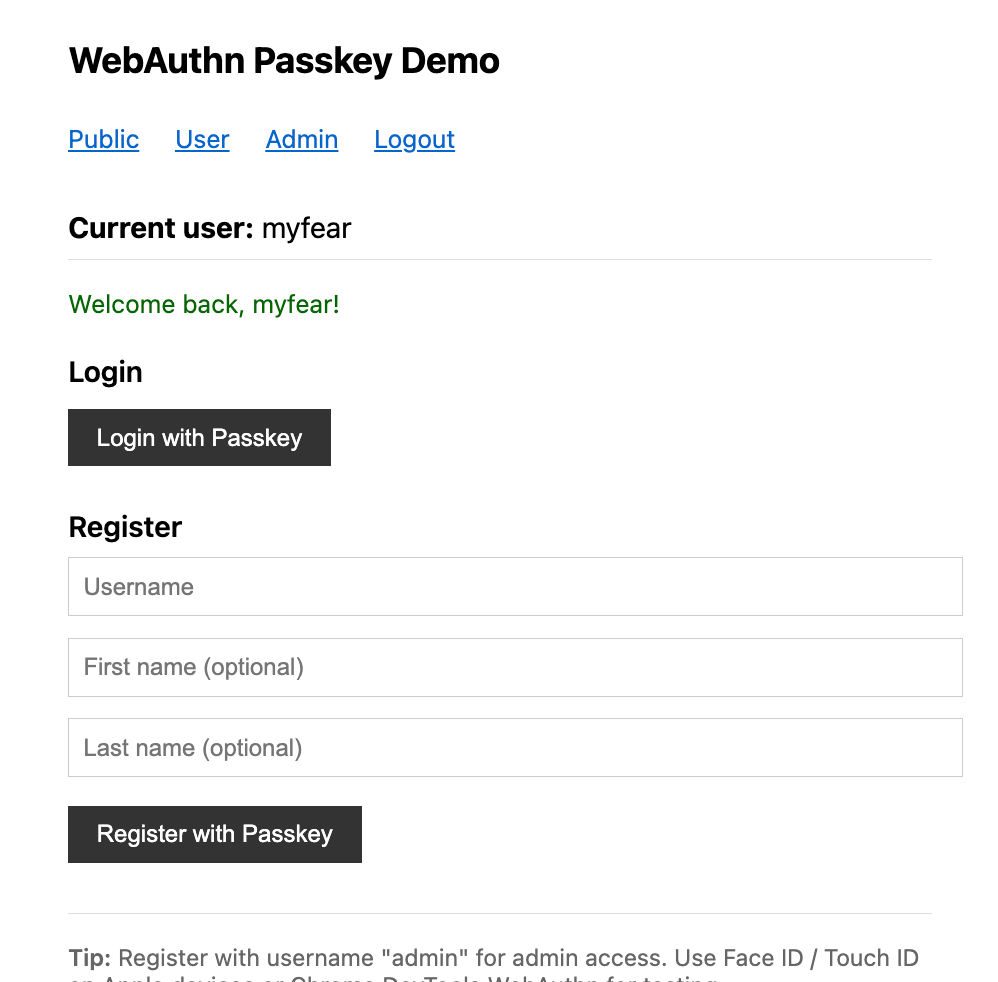
    <h1>WebAuthn Passkey Demo</h1>

    <nav>
        <a href="/api/public">Public</a>
        <a href="/api/users/me">User</a>
        <a href="/api/admin">Admin</a>
        <a href="/q/webauthn/logout">Logout</a>
    </nav>

    <div class="status" id="status">
        <strong>Current user:</strong> <span id="current-user">Loading...</span>
    </div>
    <div id="message-area"></div>

    <h2>Login</h2>
    <button id="login-btn">Login with Passkey</button>

    <h2>Register</h2>
    <input id="username" type="text" placeholder="Username" />
    <input id="firstName" type="text" placeholder="First name (optional)" />
    <input id="lastName" type="text" placeholder="Last name (optional)" />
    <button id="register-btn">Register with Passkey</button>

    <div class="info-box">
        <strong>Tip:</strong> Register with username "admin" for admin access. Use Face ID / Touch ID on Apple devices or Chrome DevTools WebAuthn for testing.
    </div>

    <script type="text/javascript">
        // Initialize WebAuthn library
        const webAuthn = new WebAuthn();

        // DOM elements
        const currentUserSpan = document.getElementById('current-user');
        const messageArea = document.getElementById('message-area');
        const loginBtn = document.getElementById('login-btn');
        const registerBtn = document.getElementById('register-btn');
        const usernameInput = document.getElementById('username');
        const firstNameInput = document.getElementById('firstName');
        const lastNameInput = document.getElementById('lastName');

        // Helper functions
        function showMessage(message, type = 'info') {
            const div = document.createElement('div');
            div.className = type === 'error' ? 'error' : 'success';
            div.textContent = message;
            messageArea.innerHTML = '';
            messageArea.appendChild(div);

            // Auto-remove after 5 seconds
            setTimeout(() => {
                div.remove();
            }, 5000);
        }

        function updateCurrentUser() {
            fetch('/api/public/me')
                .then(response => response.text())
                .then(username => {
                    currentUserSpan.textContent = username;
                    if (username !== '<not logged in>') {
                        showMessage(`Welcome back, ${username}!`, 'success');
                    }
                })
                .catch(err => {
                    currentUserSpan.textContent = 'Error loading user';
                    console.error('Error fetching current user:', err);
                });
        }

        // Login handler
        loginBtn.addEventListener('click', async () => {
            messageArea.innerHTML = '';
            loginBtn.disabled = true;
            loginBtn.textContent = 'Authenticating...';

            try {
                // This will:
                // 1. Get a challenge from /q/webauthn/login-options-challenge
                // 2. Prompt for biometric/PIN
                // 3. Send response to /q/webauthn/login
                await webAuthn.login();

                updateCurrentUser();
                showMessage('Login successful!', 'success');
            } catch (err) {
                console.error('Login error:', err);
                showMessage('Login failed: ' + err.message, 'error');
            } finally {
                loginBtn.disabled = false;
                loginBtn.textContent = 'Login with Passkey';
            }
        });

        // Registration handler
        registerBtn.addEventListener('click', async () => {
            const username = usernameInput.value.trim();
            const firstName = firstNameInput.value.trim();
            const lastName = lastNameInput.value.trim();

            if (!username) {
                showMessage('Please enter a username', 'error');
                return;
            }

            messageArea.innerHTML = '';
            registerBtn.disabled = true;
            registerBtn.textContent = 'Creating Passkey...';

            try {
                const displayName = firstName && lastName
                    ? `${firstName} ${lastName}`
                    : username;

                // This will:
                // 1. Get a challenge from /q/webauthn/register-options-challenge
                // 2. Create new credentials with biometric/PIN
                // 3. Send response to /q/webauthn/register
                await webAuthn.register({
                    username: username,
                    displayName: displayName
                });

                updateCurrentUser();
                showMessage(`Registration successful! Welcome, ${username}!`, 'success');

                // Clear form
                usernameInput.value = '';
                firstNameInput.value = '';
                lastNameInput.value = '';
            } catch (err) {
                console.error('Registration error:', err);
                showMessage('Registration failed: ' + err.message, 'error');
            } finally {
                registerBtn.disabled = false;
                registerBtn.textContent = 'Register with Passkey';
            }
        });

        // Load current user on page load
        updateCurrentUser();

        // Enter key support
        [usernameInput, firstNameInput, lastNameInput].forEach(input => {
            input.addEventListener('keypress', (e) => {
                if (e.key === 'Enter') {
                    registerBtn.click();
                }
            });
        });
    </script>
</body>
</html>
This is intentionally boring. If your frontend logic looks complex, something is wrong.
Configuration
Configure WebAuthn in application.properties:
quarkus.webauthn.enable-login-endpoint=true
quarkus.webauthn.enable-registration-endpoint=true

quarkus.webauthn.user-verification=required
quarkus.webauthn.resident-key=required
quarkus.webauthn.authenticator-attachment=platform
quarkus.webauthn.attestation=none

quarkus.webauthn.session-timeout=30m
quarkus.webauthn.cookie-same-site=strict

quarkus.datasource.db-kind=postgresql
quarkus.hibernate-orm.schema-management.strategy=drop-and-create

quarkus.http.auth.session.encryption-key=whrCQOhdqYB6GDJ2ZAJy2VbFLmPCI1WK13pCOdiv2RQ=
These settings enforce biometric verification and platform authenticators. This blocks weaker security keys by default. That is intentional.
Production Hardening
HTTPS Is Mandatory
WebAuthn does not work without HTTPS outside localhost. Terminate TLS before the application and configure allowed origins explicitly.
Credential Takeover Protection
Do not allow credential registration for existing users without authentication. This tutorial blocks it by design.
Session Lifetime
Thirty minutes is a good default. Longer sessions increase the blast radius of stolen cookies. Shorter sessions frustrate users.
Logging and Monitoring
Log registration and login attempts. Not payloads. Events. You need this data when something goes wrong.
Verification
Start the application:
./mvnw quarkus:devOpen http://localhost:8080
On Apple ecosystem:
Click “Register with Passkey”
Enter a username (e.g., “john”)
Click “Register with Passkey”
Your browser will prompt: “Save a passkey for localhost?”
Authenticate with Face ID/Touch ID
You’re registered and logged in!
To Login:
Click “Logout” in the navigation
Click “Login with Passkey”
Authenticate with Face ID/Touch ID
You’re logged back in!

The registration flow is as follows:
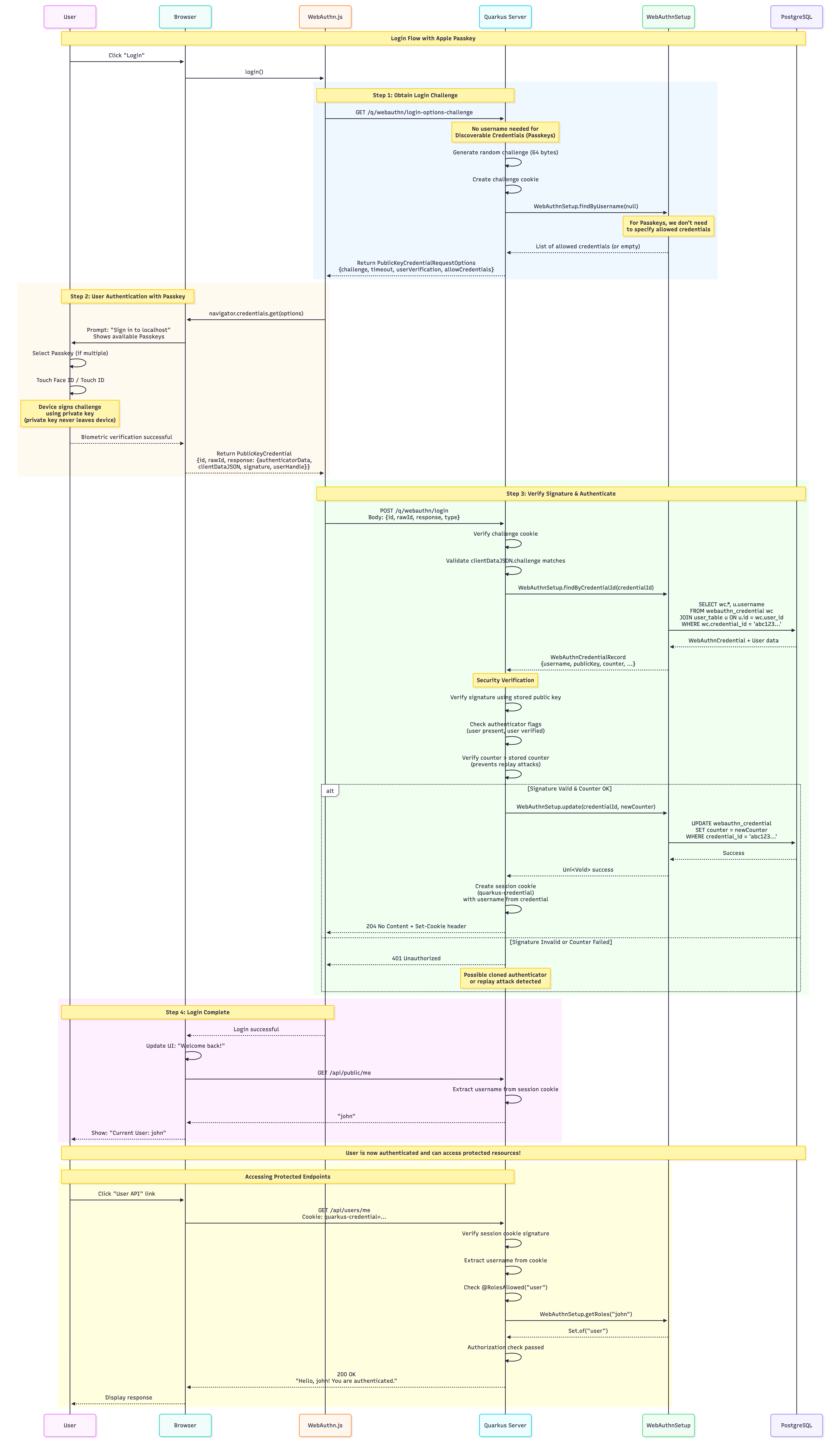
And the log-in flow:
Conclusion
We replaced passwords with cryptographic credentials backed by platform authenticators. The backend stayed simple. The security model became stronger. The user experience improved.
The important part is not WebAuthn itself. The important part is treating authentication as a first-class backend concern, not a frontend trick.