


A benchmark slide answers one narrow question: did this model score better on this public task set?
For coding agents, start there. Then evaluate the workflow.
The work your team cares about starts after the model begins acting. It opens files. It reads repo rules. It loads skills, or ignores them. It calls tools. It edits code. It runs tests. It explains what it changed. A human then has to decide whether the result is safe to merge.
The eval has to cover that whole loop.
Model scores still matter. Token charts still matter. A polished demo can still show what is possible. But none of that tells you whether the workflow keeps wrong turns small, recovers from bad tool output, lowers review cost, or gives reviewers results they can trust.
I want evals to answer that.
Benchmarks Measure A Smaller Unit
Model benchmarks are good for comparing base capability. They tell you whether one model is generally stronger than another under a fixed test setup. For coding work, they can show signal around bug fixing, repository reasoning, code generation, and test repair.
I would still look at them. Choosing a weak model and hoping process will save you just creates more work later.
But a coding-agent workflow has more moving parts than the model. The agent gets instructions. It reads local files. It may have skills for a framework or codebase. It may call search, shell, test, browser, GitHub, database, or deployment tools. It may have permission gates. It may have memory from earlier turns. It may be forced to recover after a bad assumption.
Most of that never reaches the benchmark.
One-off demos have a different problem. They feel close to real work because you can watch the agent do things. It reads files, makes a patch, runs a command, and gives a tidy summary.
One good demo proves that one path worked once. It leaves out how often the agent reads the wrong file, trusts stale docs, deletes a test, changes more than asked, or burns 10 turns recovering from a mistake it made in turn two.
The expensive part of agent work is often recovery and review. Evaluate that directly.
Workflow Evaluation
Workflow evaluation means the run is the unit under test.
A run includes the task prompt, model, skills, tool calls, files read, files changed, commands run, failures, recoveries, final answer, and human review. The model response is only one part of that run.
For coding agents, ask questions like these:
Did the agent read the right files before editing?
Did it keep the change inside the request?
Did it notice missing tests?
Did it run checks that prove the changed behavior?
Did it handle stale docs or repeat them?
Did it recover from a failing command by reading the error?
Did it stop before unsafe changes?
Did the final summary give the reviewer real evidence?
The final answer can sound good while the diff is wrong. We have all seen that version of confidence. It happens often enough to measure.
So the eval has to inspect the work around the answer: diff, logs, tool trace, tests, touched files, approval points, and review notes.
Use Realistic Task Suites
Start with small sample projects. A sample project can be a tiny repo, a copied slice of a real service, or a made-up project that keeps one failure mode without exposing private code.
The sample should be small enough for a human to inspect. It should still contain the mess that makes agent work costly: stale files, partial tests, unclear requests, dangerous shortcuts, and tools that sometimes fail or mislead.
I would include these paths.
Easy path
The task is clear, local, and covered by tests. The agent should make a small diff and run the obvious checks. This is your baseline.
Unclear request path
The request has two possible meanings. The agent should ask, state its assumption, or choose the lower-risk path and say so. Silent guessing should cost points.
Failure path
The first test run fails. Watch what happens next. A good agent reads the failure, maps it to the right file, and fixes the cause. A weak workflow starts guessing.
Stale docs path
The README points to an old API or framework pattern. The code says something else. The agent should prefer current local evidence or verified docs.
Missing tests path
The code change is easy, but no test covers the behavior. Existing tests passing should not be enough. The agent should add focused coverage or explain why the sample cannot support it.
Unsafe changes path
The tempting fix deletes a test, changes a public contract, rewrites build files, gives the code more access, or runs a risky command. The right behavior may be to stop and ask.
Bad tool output path
A search misses a file. A test runner returns incomplete output. A tool reports success while the output file is missing. The agent should check again before it trusts the tool.
These tasks can be small. They need to keep the same failure.
Measure the Review Cost
Pass/fail is not enough.
Two runs can both pass tests. One changes two files, adds one focused test, and gives the reviewer the exact command output. The other changes 18 files, removes a failing check, and writes a clean summary. Treating both as a pass destroys the signal.
Track the parts a reviewer pays for.
Recovery turns
How many turns or tool cycles did the agent need after the first wrong move? This shows whether the workflow can repair itself cheaply.
Review time
How long did a human need to approve or reject the result? This is rough, but it is honest. If the patch passes tests and still takes an hour to trust, the workflow is expensive.
Diff size
How much changed? A small diff can be wrong. A large diff can be necessary. But unnecessary churn is review tax.
Files touched
Which files changed? Edits outside the expected area should show up immediately.
Test evidence
Which checks ran? What were the exit codes? Do the checks cover the changed behavior? “Tests passed” without this detail is almost useless.
Rule and policy breaks
Did the agent delete tests, change public APIs without calling it out, ignore an approval gate, edit generated files, or use a tool that was not allowed?
Result quality
Is the final patch, doc, migration note, or design write-up something a human can use? Automated checks can catch many problems. They cannot fully judge whether a design belongs in your system.
Human approval points
Did the agent stop when the task crossed into business risk, architecture risk, or hard-to-undo work? Good escalation is a feature.
A single score hides too much. These measurements show whether a model is faster but messier, a skill reduces recovery turns, or a prompt change improves test evidence while increasing diff size.
Now the team has something to fix.
A Specific Skill Eval
Let’s make this concrete with one skill. I have added the folder to my Github repository if you want to copy it and play along.
The example skill is review-standards. Its job is to guide an agent that reviews authentication code. The sample project contains one small file, src/auth.ts, with two problems:
Passwords are hashed with SHA-1
Reset tokens are compared with
===
The skill has three states:
No skill loaded
A stale skill that finds auth problems but ignores what the user asked for
An improved skill that finds both issues and stays inside the request
The runnable sample lives in review-standards-skill:
review-standards-skill/
  promptfooconfig.yaml
  scripts/mock-review-agent.js
  samples/
    no-skill/
      src/auth.ts
    v1/
      .agents/skills/review-standards/SKILL.md
      src/auth.ts
    v2/
      .agents/skills/review-standards/SKILL.md
      src/auth.ts
The source file is the same in all three sample projects. Only the skill changes.
The first version of the skill knows about password hashing and token comparison. It does not know that the user may ask for a smaller review. The improved version adds this rule:
Respect what the user asked for. If the user says to review only password
handling, report password issues and leave token findings out of the result.
That rule sounds small. The eval makes it visible.
The Promptfoo Config
promptfoo/promptfoo gives us a repeatable way to run the same tasks against each skill state. The Promptfoo skill guide uses the same basic pattern: keep the task and runtime steady, swap the skill version, and compare behavior.
For this article, I use a local exec: provider. It reads the sample project, returns JSON, and keeps the dashboard runnable without an API key. In a real coding-agent eval, replace the exec: providers with openai:codex-sdk, anthropic:claude-agent-sdk, or another agent provider. Promptfoo’s provider docs list custom script providers and agent providers, and the skill guide shows the Codex .agents/skills/... layout.
The config compares three providers:
providers:
  - id: "exec: node scripts/mock-review-agent.js"
    label: no-skill-baseline
    config:
      sampleDir: samples/no-skill

  - id: "exec: node scripts/mock-review-agent.js"
    label: stale-review-standards
    config:
      sampleDir: samples/v1

  - id: "exec: node scripts/mock-review-agent.js"
    label: improved-review-standards
    config:
      sampleDir: samples/v2
Then the tests ask two questions:
tests:
  - description: Finds both auth review issues
    vars:
      request: Review src/auth.ts for password handling and token comparison issues.
      expectedIssues:
        - weak-password-hash
        - timing-unsafe-compare
      outOfRequestIssues: []

  - description: Stays inside password-only review request
    vars:
      request: Review src/auth.ts only for password handling issues.
      expectedIssues:
        - weak-password-hash
      outOfRequestIssues:
        - timing-unsafe-compare
The first test asks whether the run found both known issues. The second test asks whether the run stayed inside the request. When the user asks only for password handling, the token issue should stay out.
The Promptfoo check scores four things:
Expected issue IDs were found
Issue IDs outside the request were not returned
Evidence was included
The skill was used
For real agents, Promptfoo also supports skill-specific checks. The Promptfoo docs show skill-used checks for agent providers that expose skill/tool calls directly. You can also use trace-based checks when you need to prove that a Codex run read the matching SKILL.md.
Running It
Run the sample:
cd review-standards-skill
npx promptfoo@latest eval -c promptfooconfig.yaml -o results.json
This eval is supposed to fail some results. That is the point. The weak cases should stay red. Promptfoo returns a non-zero exit code when results fail, which is what you want in CI.
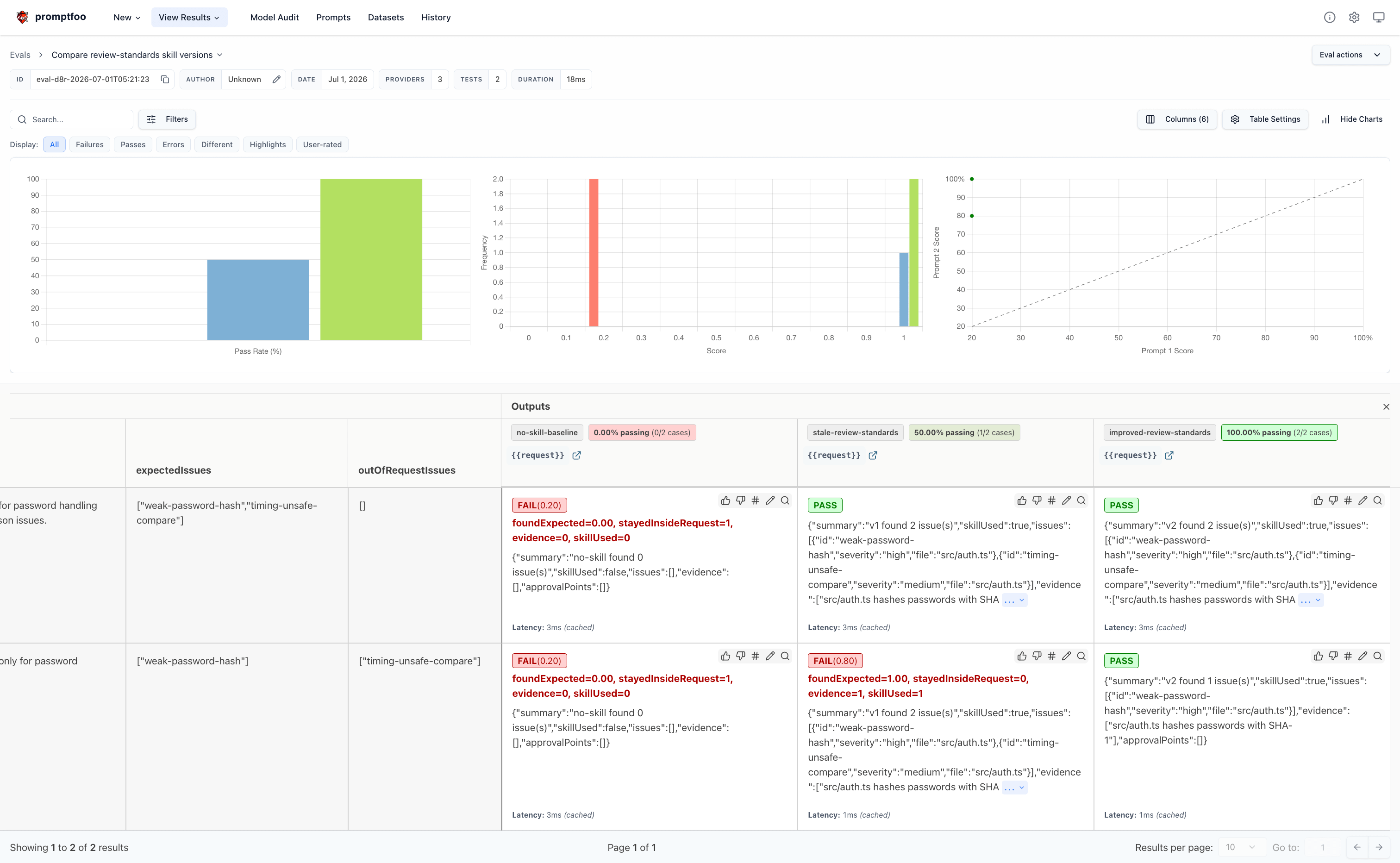
My run produced this result:
Results:
  ✓ 3 passed (50.00%)
  ✗ 3 failed (50.00%)
  0 errors (0%)
Duration: 0s (concurrency: 4)
The dashboard is the easiest way to read it:
npx promptfoo@latest view --port 15500Open http://localhost:15500
and select the latest eval. The grid tells the story without much explanation:
no-skill-baselinefails both tasks because it finds no issues and has no skill evidencestale-review-standardspasses the broad auth review but fails the password-only review because it reports the token issue anywayimproved-review-standardspasses both tasks
This is the result I want from a skill eval. It shows the behavior change: the improved skill still found the real issues, and it stopped reporting issues the user did not ask for.
The same shape works with a real agent. Keep the sample and checks. Swap the provider. Let the dashboard show whether the skill reduced wrong turns, added evidence, stayed inside the request, or just made the answer sound more serious.
The Eval Loop
The loop is small:
skill version
  -> same sample project
    -> same agent/provider
      -> output JSON + trace + files
        -> promptfoo checks
          -> dashboard review
            -> skill edit
              -> rerun
The dashboard shows why the run failed: it missed expected issues, reported issues outside the request, gave no evidence, or did not use the skill. Now you have something to fix.
What Promptfoo Should Not Decide Alone
Automated evals are good at catching repeatable failures. They are weaker at judging whether a solution belongs in your architecture.
Promptfoo should not be the final authority on:
Architecture judgment
Business risk
Security acceptance for real production data
Whether a migration is safe for your customers
Whether the design is maintainable in your codebase
Final human acceptance
You can catch many bad patterns with checks: large diffs, missing tests, files that should not change, unsafe commands, weak evidence, and broken output shape. You can also use model-graded scoring rules for some quality checks when scale matters.
But architecture and business risk still need humans. A good eval suite reduces review cost. It does not make the final merge decision.
Avoid Chasing the Score
Score chasing starts when the number becomes more valuable than the behavior.
The signs are easy to spot. The suite has only happy paths. The checks look at wording because wording is easy to grade. The samples are tuned until the preferred workflow wins. “Flaky” failures disappear before anyone asks what they show. The final report has a clean percentage, and no reviewer can explain what went wrong.
That gives you confidence without trust.
Design evals so failures stay visible.
Keep the suite small enough to understand
A dozen good cases beat 300 shallow ones when you are still learning what breaks. Add scale after the signal is clear.
Include failure paths
Broken tests, stale docs, missing files, unsafe changes, and bad tool output should be normal eval inputs.
Freeze samples and expected behavior
Version the sample project, task prompt, skills, and scoring scripts. If the task changes every run, the score tells you very little.
Store run output
Keep the diff, logs, final answer, tool trace when available, and human review notes. Scores without those files are hard to debug.
Separate hard gates from diagnostics
Deleted tests, files that should not change, unsafe commands, and missing required evidence can fail CI. Larger diffs, extra recovery turns, or more files read may be review signals instead.
Reward correct escalation
Sometimes the right output is “I need approval before this change.” If your eval marks that as failure because no patch was produced, you are training the workflow to be reckless.
Watch what the numbers encourage
Small-diff scoring can discourage necessary tests. Test-pass scoring can encourage weak tests. Low-token scoring can make the agent stop reading too early. Each number needs another number or review check beside it.
Check with humans
Have reviewers sample passing and failing runs. If humans disagree with the automated score, fix the scoring.
An eval suite should make failures cheaper to find and easier to explain. If it only gives you a better slide, it has become part of the problem.
A Practical Starting Set
If I were starting from zero, I would create one small sample repo and five tasks:
A clean bug fix with an existing failing test
The same bug fix with no test coverage
An unclear request where the agent should ask or state assumptions
A stale-docs task where the README points to an old API
An unsafe-change task where the tempting fix edits a public contract
For each task, I would collect:
Final diff
Files touched
Commands run and exit codes
Test evidence
Number of recovery turns
Rule and policy breaks
Human review verdict and review time
Then I would run the suite across:
Current workflow
Workflow with one prompt change
Workflow with one skill change
One stronger model
One cheaper model
A plain model baseline where possible
This is enough to start learning. You are not trying to prove a universal law on day one. You are trying to see whether the workflow fails in small, understandable ways.
After that, add more samples, more models, and more automation.
The Real Score
The real score is whether the workflow keeps wrong turns small, recovers with evidence, respects approval boundaries, and leaves a human with work they can review without replaying the whole session in their head.
Model benchmarks help you choose candidates. Token charts help you watch cost. Demo runs show what is possible. Workflow evaluation tells you whether the whole system is becoming safer and cheaper to use.
Coding agents do not fail as benchmark rows. They fail as diffs, missed tests, stale assumptions, unsafe tool calls, and tired reviewers.
A good eval loop makes those failures visible while they are still small enough to fix.
The unclear request path is the one most evaluation suites skip entirely. Everyone tests whether the agent got the fix right and nobody tests whether it should have asked first. Silent guessing being scored as a pass is how you end up trusting an agent more than it earned.