


Data protection is no longer optional. Every modern Java application handling personal, financial, or medical information must ensure data is secure at rest and in transit. Database-level encryption is often the first line of defense, but for sensitive applications, it’s not enough. Attackers gaining direct database access can still read unencrypted fields.
Application-level encryption gives you stronger guarantees. Even if your database is compromised, the attacker sees only ciphertext. In this tutorial, you’ll learn how to implement field-level encryption in a Quarkus application using Hibernate ORM with Panache, PostgreSQL, and HashiCorp Vault for key management.
We’ll build a small but realistic “Secure Health API” that stores patient data securely while encrypting fields like SSNs and medical histories and keeping other fields queryable and indexed. You’ll see how to integrate encryption at the ORM layer, where it belongs.
Why Encrypt at the ORM Level
Traditional database encryption — Transparent Data Encryption (TDE) — secures data at rest, but it’s coarse-grained. Once an attacker gains database credentials, they can read decrypted values.
Encrypting data in the application layer prevents that. Encryption and decryption happen before data hits the database and only within the running Quarkus service. Even a leaked database dump remains useless.
ORM-level encryption fits naturally into Quarkus applications. It allows you to:
Keep using JPA and Panache APIs.
Apply encryption transparently via attribute converters.
Combine secure and searchable fields.
Keep performance predictable with caching and key reuse.
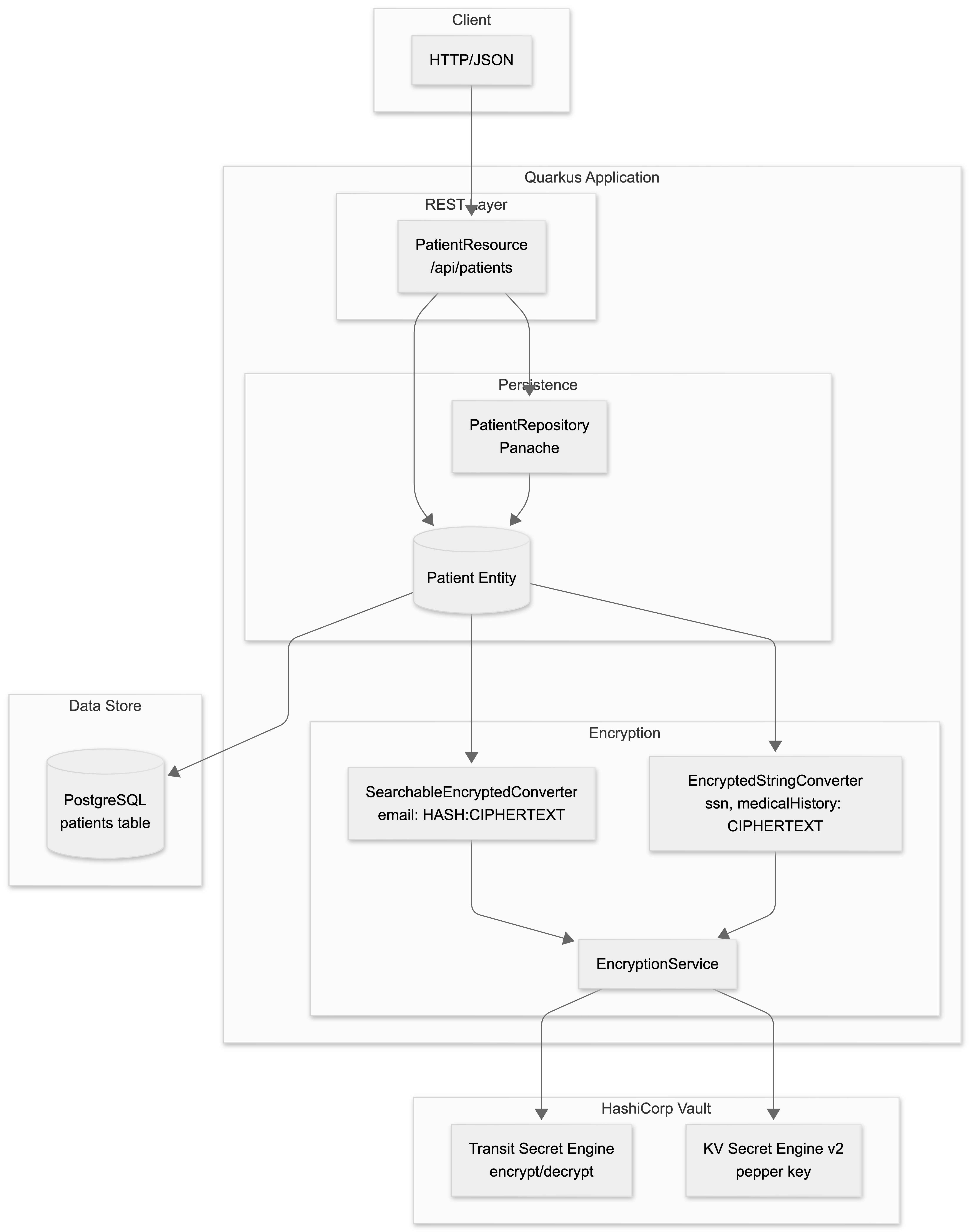
Prerequisites
Java 21 or later
Maven 3.9+
Podman or Docker (for Dev Services)
Basic knowledge of REST APIs and JPA
Project Setup
We start with a plain Quarkus REST application and add the pieces we need: Hibernate ORM, PostgreSQL, validation, and Vault integration. If you don’t feel like walking this through step by step, go grab the fully working example from my Github repository.
mvn io.quarkus.platform:quarkus-maven-plugin:create \
    -DprojectGroupId=com.example \
    -DprojectArtifactId=secure-health-api \
    -DclassName="com.example.PatientResource" \
    -Dpath="/patients" \
    -Dextensions="hibernate-orm-panache,jdbc-postgresql,rest-jackson,hibernate-validator,io.quarkiverse.vault:quarkus-vault"
cd secure-health-api
Panache gives us clean entities and repositories. Vault gives us key management without embedding secrets into the application. Dev Services will take care of PostgreSQL and Vault locally.
Configure application.properties
Before writing code, we configure the runtime. This is where most encryption tutorials are vague. We won’t be. Add below to your src/main/resources/application.properties
# Vault Dev Services Configuration
quarkus.vault.devservices.enabled=true
quarkus.vault.devservices.transit-enabled=true

# KV Secret Engine (Dev Services enables KV v2 at /secret by default)
quarkus.vault.kv-secret-engine-version=2

# Database Configuration - Let Dev Services handle PostgreSQL too!
quarkus.datasource.db-kind=postgresql

# Hibernate Configuration
quarkus.hibernate-orm.schema-management.strategy=drop-and-create
quarkus.hibernate-orm.log.sql=true
Dev Services starts Vault with both Transit and KV v2 enabled. This matters. Transit handles encryption without exposing keys. KV stores a pepper key we use for deterministic hashing.
Initialize Vault Secrets
When you start your application with mvn quarkus:dev, Vault Dev Service will start automatically. You can then access the Vault container to populate secrets.
After starting the app, in a new terminal:
# Generate a pepper key on your local machine
openssl rand -base64 32

# Get the Vault container name
podman ps | grep vault

# Access the Vault container
podman exec -it <container-name> sh

# The root token is "root" in Dev Services mode
export VAULT_TOKEN=root

# Create the pepper key for hashing
# Note: KV v2 engine is already enabled at /secret
vault kv put secret/encryption master-key="<PEPPER_KEY>"

# Verify transit engine is enabled
vault secrets list

# Create the transit key if not auto-created
vault write -f transit/keys/patient-data type=aes256-gcm96
At this point, Vault is ready. No keys are stored in your code or config files.
Create the Encryption Service
We encrypt at the JPA layer because this gives us a clean boundary. The database never sees plaintext. The REST layer never sees ciphertext. Business logic stays boring.
Hibernate’s AttributeConverter is the right tool here. It runs automatically when entities are persisted or loaded.
Create the Exception Class
File: src/main/java/com/example/encryption/EncryptionException.java
package com.example.encryption;

public class EncryptionException extends RuntimeException {
    public EncryptionException(String message, Throwable cause) {
        super(message, cause);
    }

    public EncryptionException(String message) {
        super(message);
    }
}
Create the Encryption Service
Now we create a small service that talks to Vault.
File: src/main/java/com/example/encryption/EncryptionService.java
package com.example.encryption;

import java.nio.charset.StandardCharsets;
import java.security.MessageDigest;
import java.util.Base64;
import java.util.Map;
import java.util.concurrent.ConcurrentHashMap;

import io.quarkus.vault.VaultKVSecretEngine;
import io.quarkus.vault.VaultTransitSecretEngine;
import jakarta.enterprise.context.ApplicationScoped;
import jakarta.inject.Inject;

@ApplicationScoped
public class EncryptionService {

    @Inject
    VaultKVSecretEngine kvEngine;

    @Inject
    VaultTransitSecretEngine transitEngine;

    // Transit key name (created in Vault during setup)
    private static final String TRANSIT_KEY_ID = "patient-data";

    // KV secret details
    private static final String KV_KEY_NAME = "master-key";
    private static final String KV_SECRET_PATH = "encryption";

    // Cache for the pepper key to avoid constant Vault calls
    private final Map<String, CachedKey> cache = new ConcurrentHashMap<>();
    private static final long TTL = 3600000; // 1 hour

    /**
     * Encrypts plaintext using the Vault Transit Engine.
     * The encryption key never leaves Vault.
     */
    public String encrypt(String plaintext) {
        if (plaintext == null || plaintext.isEmpty()) {
            return plaintext;
        }

        try {
            // Vault Transit expects base64-encoded input
            String base64Input = Base64.getEncoder().encodeToString(
                    plaintext.getBytes(StandardCharsets.UTF_8));

            // Send to Vault for encryption
            return transitEngine.encrypt(TRANSIT_KEY_ID, base64Input);
        } catch (Exception e) {
            throw new EncryptionException("Encryption failed via Vault Transit", e);
        }
    }

    /**
     * Decrypts ciphertext using the Vault Transit Engine.
     */
    public String decrypt(String ciphertext) {
        if (ciphertext == null || ciphertext.isEmpty()) {
            return ciphertext;
        }

        try {
            // Send to Vault for decryption (returns ClearData)
            return transitEngine.decrypt(TRANSIT_KEY_ID, ciphertext).asString();
        } catch (Exception e) {
            throw new EncryptionException("Decryption failed via Vault Transit", e);
        }
    }

    /**
     * Creates a deterministic, keyed hash for searchable fields.
     * Uses a "pepper" key from Vault KV store.
     */
    public String hashForSearch(String plaintext) {
        if (plaintext == null || plaintext.isEmpty()) {
            return plaintext;
        }

        try {
            // Get the pepper key from cache or Vault
            byte[] key = getOrFetchPepperKey();

            // Create SHA-256 hash with pepper
            MessageDigest digest = MessageDigest.getInstance("SHA-256");
            digest.update(key);
            digest.update(plaintext.getBytes(StandardCharsets.UTF_8));

            return Base64.getEncoder().encodeToString(digest.digest());
        } catch (Exception e) {
            throw new EncryptionException("Failed to hash for search", e);
        }
    }

    /**
     * Fetches the pepper key from Vault KV, with caching to reduce API calls.
     */
    private byte[] getOrFetchPepperKey() {
        CachedKey cached = cache.get(KV_KEY_NAME);
        if (cached != null && !cached.isExpired()) {
            return cached.key;
        }

        // Fetch from Vault KV v2 store
        String base64 = kvEngine.readSecret(KV_SECRET_PATH)
                .get(KV_KEY_NAME)
                .toString();

        byte[] key = Base64.getDecoder().decode(base64);
        cache.put(KV_KEY_NAME, new CachedKey(key, System.currentTimeMillis()));

        return key;
    }

    /**
     * Simple cache entry for the pepper key
     */
    private static class CachedKey {
        final byte[] key;
        final long timestamp;

        CachedKey(byte[] key, long timestamp) {
            this.key = key;
            this.timestamp = timestamp;
        }

        boolean isExpired() {
            return System.currentTimeMillis() - timestamp > TTL;
        }
    }
}
This service makes two important guarantees.
First, encryption keys never leave Vault.
Second, hashing is deterministic, so we can search on encrypted fields.
Create JPA Attribute Converters
Encrypted String Converter (Non-Searchable)
For data we never search on, we use pure encryption.
File: src/main/java/com/example/encryption/EncryptedStringConverter.java
package com.example.encryption;

import jakarta.inject.Inject;
import jakarta.persistence.AttributeConverter;
import jakarta.persistence.Converter;

/**
 * JPA Converter that automatically encrypts/decrypts String fields.
 * Use this for fields that need encryption but don't need to be searchable.
 * Example: SSN, medical history
 */
@Converter(autoApply = false)
public class EncryptedStringConverter implements AttributeConverter<String, String> {

    @Inject
    EncryptionService encryption;

    @Override
    public String convertToDatabaseColumn(String attribute) {
        // Called when saving to database
        return encryption.encrypt(attribute);
    }

    @Override
    public String convertToEntityAttribute(String dbData) {
        // Called when reading from database
        return encryption.decrypt(dbData);
    }
}
Searchable Encrypted Converter
Some fields need to be searchable. Email is the classic example.
File: src/main/java/com/example/encryption/SearchableEncryptedConverter.java
package com.example.encryption;

import jakarta.inject.Inject;
import jakarta.persistence.AttributeConverter;
import jakarta.persistence.Converter;

/**
 * JPA Converter that stores both a hash and encrypted value.
 * Format in DB: HASH:CIPHERTEXT
 * This allows searching on the hash while keeping data encrypted.
 * Example: Email addresses
 */
@Converter(autoApply = false)
public class SearchableEncryptedConverter implements AttributeConverter<String, String> {

    @Inject
    EncryptionService encryption;

    @Override
    public String convertToDatabaseColumn(String attribute) {
        if (attribute == null || attribute.isEmpty()) {
            return attribute;
        }

        // Create a searchable hash
        String hash = encryption.hashForSearch(attribute);

        // Encrypt the actual value
        String encrypted = encryption.encrypt(attribute);

        // Store as: HASH:CIPHERTEXT
        return hash + ":" + encrypted;
    }

    @Override
    public String convertToEntityAttribute(String dbData) {
        if (dbData == null || dbData.isEmpty()) {
            return dbData;
        }

        // Find the separator
        int colonIndex = dbData.indexOf(':');

        // Handle legacy data or malformed entries
        if (colonIndex == -1) {
            return encryption.decrypt(dbData);
        }

        // Extract and decrypt only the ciphertext portion
        String encrypted = dbData.substring(colonIndex + 1);
        return encryption.decrypt(encrypted);
    }
}
This is the core pattern. Hash for lookup. Ciphertext for storage.
Create the Patient Entity
Nothing here knows about Vault. That’s the point.
File: src/main/java/com/example/entity/Patient.java
package com.example.entity;

import java.time.LocalDate;

import com.example.encryption.EncryptedStringConverter;
import com.example.encryption.SearchableEncryptedConverter;

import io.quarkus.hibernate.orm.panache.PanacheEntity;
import jakarta.persistence.Column;
import jakarta.persistence.Convert;
import jakarta.persistence.Entity;
import jakarta.persistence.Index;
import jakarta.persistence.Table;

@Entity
@Table(name = "patients", indexes = {
        // Index on email for fast searching by hash prefix
        @Index(name = "idx_email_hash", columnList = "email")
})
public class Patient extends PanacheEntity {

    // Plain text fields
    @Column(nullable = false)
    public String firstName;

    @Column(nullable = false)
    public String lastName;

    @Column(nullable = false)
    public LocalDate dateOfBirth;

    @Column(nullable = false)
    public String phoneNumber;

    // Searchable encrypted field (stores HASH:CIPHERTEXT)
    @Convert(converter = SearchableEncryptedConverter.class)
    @Column(nullable = false, unique = true, length = 1000)
    public String email;

    // Fully encrypted fields (stores only CIPHERTEXT)
    @Convert(converter = EncryptedStringConverter.class)
    @Column(length = 1000)
    public String ssn;

    @Convert(converter = EncryptedStringConverter.class)
    @Column(length = 5000)
    public String medicalHistory;
}
Create the Repository
The repository hashes the email before querying.
File: src/main/java/com/example/repository/PatientRepository.java
package com.example.repository;

import java.util.List;
import java.util.Optional;

import com.example.encryption.EncryptionService;
import com.example.entity.Patient;

import io.quarkus.hibernate.orm.panache.Panache;
import io.quarkus.hibernate.orm.panache.PanacheRepository;
import jakarta.enterprise.context.ApplicationScoped;
import jakarta.inject.Inject;
import jakarta.persistence.EntityManager;

@ApplicationScoped
public class PatientRepository implements PanacheRepository<Patient> {

    @Inject
    EncryptionService encryption;

    /**
     * Find patient by email address.
     * Searches using the hash prefix stored in the database (raw column value).
     * Uses a native query so the parameter is bound as-is without going through
     * the SearchableEncryptedConverter, which would misinterpret the search
     * pattern.
     */
    @SuppressWarnings("unchecked")
    public Optional<Patient> findByEmail(String email) {
        String hash = encryption.hashForSearch(email);
        // Pattern must match stored format: HASH:CIPHERTEXT
        String pattern = hash + ":%";

        EntityManager em = Panache.getEntityManager();
        List<Patient> list = em.createNativeQuery(
                "SELECT * FROM patients WHERE email LIKE ?1", Patient.class)
                .setParameter(1, pattern)
                .getResultList();

        return list.isEmpty() ? Optional.empty() : Optional.of(list.get(0));
    }

    /**
     * Check if an email already exists in the database.
     */
    public boolean emailExists(String email) {
        return findByEmail(email).isPresent();
    }
}
We use a native query here on purpose. JPA converters should not interfere with search parameters.
Create DTOs (Data Transfer Objects)
Patient Request DTO
File: src/main/java/com/example/dto/PatientRequest.java
package com.example.dto;

import jakarta.validation.constraints.*;
import java.time.LocalDate;

/**
 * DTO for creating/updating a patient.
 * Includes validation rules for all fields.
 */
public class PatientRequest {

    @NotBlank(message = "First name is required")
    public String firstName;

    @NotBlank(message = "Last name is required")
    public String lastName;

    @NotNull(message = "Date of birth is required")
    @Past(message = "Date of birth must be in the past")
    public LocalDate dateOfBirth;

    @NotBlank(message = "Email is required")
    @Email(message = "Email must be valid")
    public String email;

    @Pattern(
        regexp = "^\\d{3}-\\d{2}-\\d{4}$",
        message = "SSN must be in XXX-XX-XXXX format"
    )
    public String ssn;

    public String medicalHistory;

    @NotBlank(message = "Phone number is required")
    @Pattern(
        regexp = "^\\d{3}-\\d{3}-\\d{4}$",
        message = "Phone must be in XXX-XXX-XXXX format"
    )
    public String phoneNumber;
}
Patient Response DTO (List View)
File: src/main/java/com/example/dto/PatientResponse.java
package com.example.dto;

import java.time.LocalDate;

import com.example.entity.Patient;

/**
 * DTO for returning patient data in list views.
 * Excludes sensitive fields like SSN and medical history.
 */
public class PatientResponse {
    public Long id;
    public String firstName;
    public String lastName;
    public LocalDate dateOfBirth;
    public String email;
    public String phoneNumber;

    public static PatientResponse from(Patient patient) {
        PatientResponse response = new PatientResponse();
        response.id = patient.id;
        response.firstName = patient.firstName;
        response.lastName = patient.lastName;
        response.dateOfBirth = patient.dateOfBirth;
        response.email = patient.email;
        response.phoneNumber = patient.phoneNumber;
        return response;
    }
}
Patient Detail Response DTO (Detail View)
File: src/main/java/com/example/dto/PatientDetailResponse.java
package com.example.dto;

import java.time.LocalDate;

import com.example.entity.Patient;

/**
 * DTO for returning complete patient data including sensitive fields.
 * Used when fetching a single patient by ID.
 */
public class PatientDetailResponse {
    public Long id;
    public String firstName;
    public String lastName;
    public LocalDate dateOfBirth;
    public String email;
    public String phoneNumber;

    // Sensitive fields (only in detail view)
    public String ssn;
    public String medicalHistory;

    public static PatientDetailResponse from(Patient patient) {
        PatientDetailResponse response = new PatientDetailResponse();
        response.id = patient.id;
        response.firstName = patient.firstName;
        response.lastName = patient.lastName;
        response.dateOfBirth = patient.dateOfBirth;
        response.email = patient.email;
        response.phoneNumber = patient.phoneNumber;
        response.ssn = patient.ssn;
        response.medicalHistory = patient.medicalHistory;
        return response;
    }
}
Create the REST Resource
File: src/main/java/com/example/PatientResource.java
package com.example;

import java.util.List;
import java.util.stream.Collectors;

import com.example.dto.PatientDetailResponse;
import com.example.dto.PatientRequest;
import com.example.dto.PatientResponse;
import com.example.entity.Patient;
import com.example.repository.PatientRepository;

import jakarta.inject.Inject;
import jakarta.transaction.Transactional;
import jakarta.validation.Valid;
import jakarta.ws.rs.Consumes;
import jakarta.ws.rs.DELETE;
import jakarta.ws.rs.GET;
import jakarta.ws.rs.POST;
import jakarta.ws.rs.PUT;
import jakarta.ws.rs.Path;
import jakarta.ws.rs.PathParam;
import jakarta.ws.rs.Produces;
import jakarta.ws.rs.QueryParam;
import jakarta.ws.rs.core.MediaType;
import jakarta.ws.rs.core.Response;

@Path("/api/patients")
@Produces(MediaType.APPLICATION_JSON)
@Consumes(MediaType.APPLICATION_JSON)
public class PatientResource {

    @Inject
    PatientRepository repository;

    /**
     * Get all patients (without sensitive data)
     */
    @GET
    public List<PatientResponse> listAll() {
        return Patient.<Patient>listAll().stream()
                .map(PatientResponse::from)
                .collect(Collectors.toList());
    }

    /**
     * Get a single patient by ID (with sensitive data)
     */
    @GET
    @Path("/{id}")
    public Response getById(@PathParam("id") Long id) {
        return Patient.<Patient>findByIdOptional(id)
                .map(patient -> Response.ok(PatientDetailResponse.from(patient)).build())
                .orElse(Response.status(Response.Status.NOT_FOUND).build());
    }

    /**
     * Search for a patient by email
     */
    @GET
    @Path("/search")
    public Response searchByEmail(@QueryParam("email") String email) {
        if (email == null || email.isEmpty()) {
            return Response.status(Response.Status.BAD_REQUEST)
                    .entity("{\"error\":\"Email parameter is required\"}")
                    .build();
        }

        return repository.findByEmail(email)
                .map(patient -> Response.ok(PatientResponse.from(patient)).build())
                .orElse(Response.status(Response.Status.NOT_FOUND).build());
    }

    /**
     * Create a new patient
     */
    @POST
    @Transactional
    public Response create(@Valid PatientRequest request) {
        // Check for duplicate email
        if (repository.emailExists(request.email)) {
            return Response.status(Response.Status.CONFLICT)
                    .entity("{\"error\":\"Email already exists\"}")
                    .build();
        }

        // Create new patient entity
        Patient patient = new Patient();
        patient.firstName = request.firstName;
        patient.lastName = request.lastName;
        patient.dateOfBirth = request.dateOfBirth;
        patient.email = request.email;
        patient.ssn = request.ssn;
        patient.medicalHistory = request.medicalHistory;
        patient.phoneNumber = request.phoneNumber;

        // Persist (encryption happens automatically via converters)
        patient.persist();

        return Response.status(Response.Status.CREATED)
                .entity(PatientResponse.from(patient))
                .build();
    }

    /**
     * Update an existing patient
     */
    @PUT
    @Path("/{id}")
    @Transactional
    public Response update(@PathParam("id") Long id, @Valid PatientRequest request) {
        return Patient.<Patient>findByIdOptional(id)
                .map(patient -> {
                    // Check if email is being changed to an existing one
                    if (!patient.email.equals(request.email) && repository.emailExists(request.email)) {
                        return Response.status(Response.Status.CONFLICT)
                                .entity("{\"error\":\"Email already exists\"}")
                                .build();
                    }

                    // Update fields
                    patient.firstName = request.firstName;
                    patient.lastName = request.lastName;
                    patient.dateOfBirth = request.dateOfBirth;
                    patient.email = request.email;
                    patient.ssn = request.ssn;
                    patient.medicalHistory = request.medicalHistory;
                    patient.phoneNumber = request.phoneNumber;

                    return Response.ok(PatientDetailResponse.from(patient)).build();
                })
                .orElse(Response.status(Response.Status.NOT_FOUND).build());
    }

    /**
     * Delete a patient
     */
    @DELETE
    @Path("/{id}")
    @Transactional
    public Response delete(@PathParam("id") Long id) {
        boolean deleted = Patient.deleteById(id);

        if (deleted) {
            return Response.noContent().build();
        } else {
            return Response.status(Response.Status.NOT_FOUND).build();
        }
    }
}
Testing
Start the Application
mvn quarkus:devMake sure that vault is initialized as in earlier step!
Test API Endpoints
Create a patient:
curl -X POST http://localhost:8080/api/patients \
  -H "Content-Type: application/json" \
  -d '{
    "firstName": "John",
    "lastName": "Doe",
    "dateOfBirth": "1980-05-15",
    "email": "john.doe@example.com",
    "ssn": "123-45-6789",
    "medicalHistory": "Hypertension, managed with medication",
    "phoneNumber": "555-123-4567"
  }'
Expected response:
{
  "id": 1,
  "firstName": "John",
  "lastName": "Doe",
  "dateOfBirth": "1980-05-15",
  "email": "john.doe@example.com",
  "phoneNumber": "555-123-4567"
}
Get all patients:
curl http://localhost:8080/api/patientsGet patient details (with sensitive data):
curl http://localhost:8080/api/patients/1Expected response:
{
  "id": 1,
  "firstName": "John",
  "lastName": "Doe",
  "dateOfBirth": "1980-05-15",
  "email": "john.doe@example.com",
  "phoneNumber": "555-123-4567",
  "ssn": "123-45-6789",
  "medicalHistory": "Hypertension, managed with medication"
}
Search by email:
curl "http://localhost:8080/api/patients/search?email=john.doe@example.com"Update a patient:
curl -X PUT http://localhost:8080/api/patients/1 \
  -H "Content-Type: application/json" \
  -d '{
    "firstName": "John",
    "lastName": "Doe",
    "dateOfBirth": "1980-05-15",
    "email": "john.doe@example.com",
    "ssn": "123-45-6789",
    "medicalHistory": "Hypertension, managed with medication. Added diabetes screening 2025.",
    "phoneNumber": "555-123-4567"
  }'
Delete a patient:
curl -X DELETE http://localhost:8080/api/patients/1Verify Encryption in Database
You will see a hash and a Vault ciphertext. No plaintext. Even with full DB access, the data is unreadable.
# Get PostgreSQL container
PGCONTAINER=$(podman ps --filter ancestor=postgres --format "{{.Names}}" | head -n 1)

# Connect to database
podman exec -it $PGCONTAINER psql -U quarkus -d quarkus

# Query the table
podman exec -it $PGCONTAINER psql -U quarkus -d quarkus -c "SELECT id, firstname, substring(email, 1, 60) as email_preview FROM patients WHERE id=1;"
What you should see:
 id | firstname |                        email_preview
----+-----------+--------------------------------------------------------------
  1 | John      | GxKKAckZxw80pvFBDLl5u1yj4RVnorVEDpu4PNolzYc=:vault:v1:KfQjkv
(1 row)
This verifies the core guarantee: the database never sees sensitive data.
Test Invalid Data
# Invalid SSN format
curl -X POST http://localhost:8080/api/patients \
  -H "Content-Type: application/json" \
  -d '{
    "firstName": "Jane",
    "lastName": "Smith",
    "dateOfBirth": "1990-03-20",
    "email": "jane@example.com",
    "ssn": "123456789",
    "phoneNumber": "555-987-6543"
  }'
Expected: Validation error for SSN format
{
  "title": "Constraint Violation",
  "status": 400,
  "violations": [
    {
      "field": "create.request.ssn",
      "message": "SSN must be in XXX-XX-XXXX format"
    }
  ]
}
Troubleshooting Dev Services
Vault container not starting?
# Check Docker is running
podman ps

# Check Quarkus logs for Dev Services startup
mvn quarkus:dev -Dquarkus.log.category."io.quarkus.vault.devservices".level=DEBUG
Need to see Vault logs?
podman logs $(podman ps -q --filter ancestor=hashicorp/vault)Want to access Vault UI?
# Find the port
podman ps | grep vault

# Access at http://localhost:<PORT>
# Login with token: root
Disable Dev Services for testing?
# In application.properties
%test.quarkus.vault.devservices.enabled=false
%test.quarkus.vault.url=http://localhost:8200
%test.quarkus.vault.authentication.client-token=root
Conclusion: Secure by Default
You’ve successfully implemented robust, field-level application encryption in Quarkus. Let’s recap what you built:
A “Secure by Default” API: Your application transparently encrypts sensitive PII (
ssn,medicalHistory) before it ever touches the database.Dual-Pattern Key Management: You used two of Vault’s core strengths:
Transit Engine: For “encryption-as-a-service,” where the key never leaves Vault.
KV Engine: To securely store a “pepper” key, which you pull into the app to create deterministic, searchable hashes.
Clean ORM Integration: By using
AttributeConverter, your encryption logic is completely isolated from your business logic. YourPatientResourceandPatientRepositorydon’t know or care that the data is encrypted; they just work with plainStrings.
Even if an attacker dumps your entire patients table, they’ll get a useless collection of ciphertexts and hashes. The only way to decrypt the data is to be the running application, which has the credentials to talk to Vault.
Next Steps
This is a powerful foundation. For a real production system, your next steps would be:
Set
%prod.quarkus.vault.urlto your production Vault URLConfigure AppRole authentication instead of static token
Enable Vault TLS with proper certificates
Set up Vault audit logging
Implement key rotation strategy for Transit keys
Configure proper database credentials provider
Set up monitoring for Vault lease renewals
Test failover scenarios
You now have the pattern and the tools to build truly secure Java applications.