



Most Java developers already know how to build web applications.
You define routes.
You validate input.
You render templates.
You return HTML.
The part that usually feels awkward is interactivity.
As soon as you want inline updates, live search, or partial page refreshes, a frontend framework enters the picture. Along with a second build system and a second mental model.
HTMX offers a different path.
Instead of moving logic to the browser, it lets the browser ask the server for small pieces of HTML at the right time. The server stays in control. The UI stays declarative.
In this tutorial, we build a complete task management application using:
Quarkus for HTTP and persistence
Qute for server-side templates
HTMX for client-side interaction
Quarkus Web Bundler to manage frontend dependencies with Maven
No custom JavaScript.
No Node.js.
No SPA framework.
If you are comfortable with REST, templates, and HTML, you already know most of what you need.
What We Are Building
We will incrementally build a task management application that supports:
Adding tasks without page reloads
Inline editing using fragment replacement
Live search with debouncing
Server-side validation with proper HTTP status codes
Every interaction follows the same rule:
The browser sends an HTTP request.
The server responds with HTML.
HTMX decides where that HTML goes.
Project Setup
Before we touch HTMX, we start with a clean and explicit Quarkus setup. The goal here is to ensure that frontend assets are handled the same way as backend dependencies.
Create the Project
Use the Quarkus CLI or grab the source code from my Github repository.
quarkus create app com.example:htmx-tasks \
  --extension=rest,web-bundler,rest-qute,hibernate-orm-panache,hibernate-validator,jdbc-h2
cd htmx-tasks
This gives us a solid baseline:
REST endpoints via JAX-RS
Qute templates for HTML rendering
Web Bundler for frontend assets
Panache ORM and validation
An in-memory H2 database for development
At this point, there is nothing HTMX-specific yet. That is intentional.
Adding HTMX via Maven
The next step is introducing HTMX in a way that fits naturally into a Java build.
Add the Dependency
Open pom.xml and add:
<dependency>
    <groupId>org.mvnpm</groupId>
    <artifactId>htmx.org</artifactId>
    <version>2.0.8</version>
    <scope>provided</scope>
</dependency>
This dependency is resolved through Maven, just like any Java library.
The provided scope matters.
HTMX is not added to your runtime classpath. Instead, Quarkus Web Bundler consumes it at build time and produces optimized static assets.
Think of it as a frontend equivalent of an annotation processor.
Base Template and Web Bundler Integration
Now we need a place where HTMX is actually loaded.
Add the htmx import to the main Java Script under resources/web/app.js
import 'htmx.org';Create the Base Template
Create src/main/resources/templates/base.html:
<!DOCTYPE html>
<html lang="en">
<head>
    <meta charset="UTF-8">
    <meta name="viewport" content="width=device-width, initial-scale=1.0">
    <title>{title ?: 'Task Manager'}</title>

    {#bundle}
        <script src="htmx.org/dist/htmx.min.js"></script>
    {/bundle}

    <style>
        body {
            font-family: system-ui, sans-serif;
            max-width: 800px;
            margin: 2rem auto;
            padding: 1rem;
        }

        .htmx-indicator {
            display: none;
        }

        .htmx-request .htmx-indicator {
            display: inline;
        }
    </style>
</head>
<body>
{#insert /}
</body>
</html>
There is no JavaScript logic here.
The {#bundle} directive tells Quarkus to resolve frontend dependencies and make them available as static resources. In dev mode, files are served directly. In production, they are bundled and optimized.
This keeps the setup predictable and inspectable.
Verifying HTMX Is Active
Before building the application, we confirm that HTMX is wired correctly.
Create a Simple Page
Create src/main/resources/templates/index.html:
{#include base}
<h1>HTMX Check</h1>

<button hx-get="/test" hx-target="#result">
    Click me
</button>

<div id="result"></div>
{/include}
This button uses hx-get. No JavaScript handler is attached. HTMX will intercept the click and issue an HTTP request.
Add the Resource
package com.example;

import io.quarkus.qute.Template;
import io.quarkus.qute.TemplateInstance;
import jakarta.inject.Inject;
import jakarta.ws.rs.GET;
import jakarta.ws.rs.Path;
import jakarta.ws.rs.Produces;
import jakarta.ws.rs.core.MediaType;

@Path("/")
public class TestResource {

    @Inject
    Template index;

    @GET
    @Produces(MediaType.TEXT_HTML)
    public TemplateInstance index() {
        return index.instance();
    }

    @GET
    @Path("/test")
    @Produces(MediaType.TEXT_HTML)
    public String test() {
        return "<p>Loaded without a page reload.</p>";
    }
}
Run and Verify
quarkus devOpen http://localhost:8080 and click the button.
If the message appears without a page reload, HTMX is active and correctly bundled.
At this point, we know the infrastructure works. Everything else builds on this.
Domain Model
Now we move from infrastructure to application logic.
Create Task.java:
package com.example.model;

import io.quarkus.hibernate.orm.panache.PanacheEntity;
import jakarta.persistence.Entity;
import jakarta.validation.constraints.NotBlank;
import jakarta.validation.constraints.Size;

@Entity
public class Task extends PanacheEntity {

    @NotBlank
    @Size(min = 3, max = 100)
    public String title;

    public boolean completed;
}
This is a standard Panache entity.
HTMX does not change your domain model.
It only changes how results are rendered.
Thinking in Fragments
Before writing the main page, it helps to adjust the mental model.
With HTMX:
Pages are composed of fragments
Endpoints return fragments
The browser decides where fragments go
This is why we start by defining reusable templates.
Template Fragments
Task Item
Create src/main/resources/templates/TaskResource/taskItem.html:
<li id="task-{task.id}">
    <span hx-get="/tasks/{task.id}/edit" hx-target="#task-{task.id}" hx-swap="outerHTML">
        {task.title}
    </span>

    <button hx-delete="/tasks/{task.id}" hx-confirm="Are you sure?" hx-target="#task-{task.id}" hx-swap="outerHTML">
        Delete
    </button>
</li>
This fragment is used in four situations:
Initial page load
After creating a task
After editing a task
After searching
Reusability is the key to keeping the system simple.
taskEditForm.html
Create src/main/resources/templates/TaskResource/taskEditForm.html:
<li id="task-{task.id}">
    <form hx-put="/tasks/{task.id}" hx-target="#task-{task.id}" hx-swap="outerHTML">
        <input type="text" name="title" value="{task.title}" required autofocus>
        <button type="submit">Save</button>
        <button type="button" hx-get="/tasks/{task.id}/view" hx-target="#task-{task.id}" hx-swap="outerHTML">
            Cancel
        </button>
    </form>
</li>
taskList.html
Create src/main/resources/templates/TaskResource/taskList.html:
{#for task in tasks}
    {#include taskItem task=task /}
{/for}
taskFormErrors.html
Create src/main/resources/templates/TaskResource/taskFormErrors.html:
<div class="errors">
    {#for error in errors}
    <p>{error}</p>
    {/for}
</div>
Main Page Flow
The main page wires everything together.
Create src/main/resources/templates/TaskResource/tasks.html:
{#include base title="Tasks"}
<h1>Task Manager</h1>

<form hx-post="/tasks" hx-target="#task-list" hx-swap="beforeend"
    hx-on::after-request="if(event.detail.successful) { this.reset(); document.getElementById('form-errors').innerHTML = ''; }"
    hx-on::response-error="if(event.detail.xhr.status === 422) { document.getElementById('form-errors').innerHTML = event.detail.xhr.responseText; }">

    <div id="form-errors"></div>

    <input type="text" name="title" placeholder="New task" required>
    <button>Add Task</button>
</form>

<input type="search" name="q" placeholder="Search tasks" hx-get="/tasks/search" hx-trigger="keyup changed delay:300ms"
    hx-target="#task-list">

<ul id="task-list">
    {#for task in tasks}
    {#include taskItem task=task /}
    {/for}
</ul>
{/include}
Notice what is missing.
There is no JavaScript state.
There is no client-side validation logic.
Everything flows through HTTP.
We just check for error responses and react accordingly.
Resource Class and Application Flow
The resource class now mirrors the UI flow.
Each endpoint answers a single question:
What fragment should be shown next?
Create src/main/java/com/example/TaskResource/TaskResource.java:
package com.example;

import java.util.List;

import com.example.model.Task;

import io.quarkus.qute.CheckedTemplate;
import io.quarkus.qute.TemplateInstance;
import jakarta.transaction.Transactional;
import jakarta.ws.rs.DELETE;
import jakarta.ws.rs.FormParam;
import jakarta.ws.rs.GET;
import jakarta.ws.rs.NotFoundException;
import jakarta.ws.rs.POST;
import jakarta.ws.rs.PUT;
import jakarta.ws.rs.Path;
import jakarta.ws.rs.PathParam;
import jakarta.ws.rs.Produces;
import jakarta.ws.rs.QueryParam;
import jakarta.ws.rs.core.MediaType;
import jakarta.ws.rs.core.Response;

@Path("/tasks")
public class TaskResource {

    @CheckedTemplate
    public static class Templates {
        public static native TemplateInstance tasks(List<Task> tasks);

        public static native TemplateInstance taskItem(Task task);

        public static native TemplateInstance taskEditForm(Task task);

        public static native TemplateInstance taskList(List<Task> tasks);

        public static native TemplateInstance taskFormErrors(List<String> errors);
    }

    @GET
    @Produces(MediaType.TEXT_HTML)
    public TemplateInstance list() {
        List<Task> tasks = Task.listAll();
        return Templates.tasks(tasks);
    }

    @POST
    @Transactional
    @Produces(MediaType.TEXT_HTML)
    public Response create(@FormParam("title") String title) {
        // Validate
        if (title == null || title.trim().length() < 3) {
            return Response.status(422)
                    .entity(Templates.taskFormErrors(
                            List.of("Title must be at least 3 characters")))
                    .build();
        }

        if (title.length() > 100) {
            return Response.status(422)
                    .entity(Templates.taskFormErrors(
                            List.of("Title must be less than 100 characters")))
                    .build();
        }

        // Create task
        Task task = new Task();
        task.title = title.trim();
        task.completed = false;
        task.persist();

        return Response.ok(Templates.taskItem(task)).build();
    }

    @GET
    @Path("/{id}/view")
    @Produces(MediaType.TEXT_HTML)
    public TemplateInstance view(@PathParam("id") Long id) {
        Task task = Task.findById(id);
        if (task == null) {
            throw new NotFoundException();
        }
        return Templates.taskItem(task);
    }

    @GET
    @Path("/{id}/edit")
    @Produces(MediaType.TEXT_HTML)
    public TemplateInstance editForm(@PathParam("id") Long id) {
        Task task = Task.findById(id);
        if (task == null) {
            throw new NotFoundException();
        }
        return Templates.taskEditForm(task);
    }

    @PUT
    @Path("/{id}")
    @Transactional
    @Produces(MediaType.TEXT_HTML)
    public Response update(@PathParam("id") Long id,
            @FormParam("title") String title) {
        Task task = Task.findById(id);
        if (task == null) {
            throw new NotFoundException();
        }

        // Validate
        if (title == null || title.trim().length() < 3) {
            return Response.status(422)
                    .entity(Templates.taskFormErrors(
                            List.of("Title must be at least 3 characters")))
                    .build();
        }

        if (title.length() > 100) {
            return Response.status(422)
                    .entity(Templates.taskFormErrors(
                            List.of("Title must be less than 100 characters")))
                    .build();
        }

        task.title = title.trim();
        task.persist();

        return Response.ok(Templates.taskItem(task)).build();
    }

    @DELETE
    @Path("/{id}")
    @Transactional
    public Response delete(@PathParam("id") Long id) {
        boolean deleted = Task.deleteById(id);
        if (!deleted) {
            throw new NotFoundException();
        }
        return Response.ok().build();
    }

    @GET
    @Path("/search")
    @Produces(MediaType.TEXT_HTML)
    public TemplateInstance search(@QueryParam("q") String query) {
        List<Task> results;

        if (query == null || query.isBlank()) {
            results = Task.listAll();
        } else {
            results = Task.list("lower(title) like lower(?1)",
                    "%" + query.trim() + "%");
        }

        return Templates.taskList(results);
    }
}
Every request returns HTML.
HTMX handles the rest.
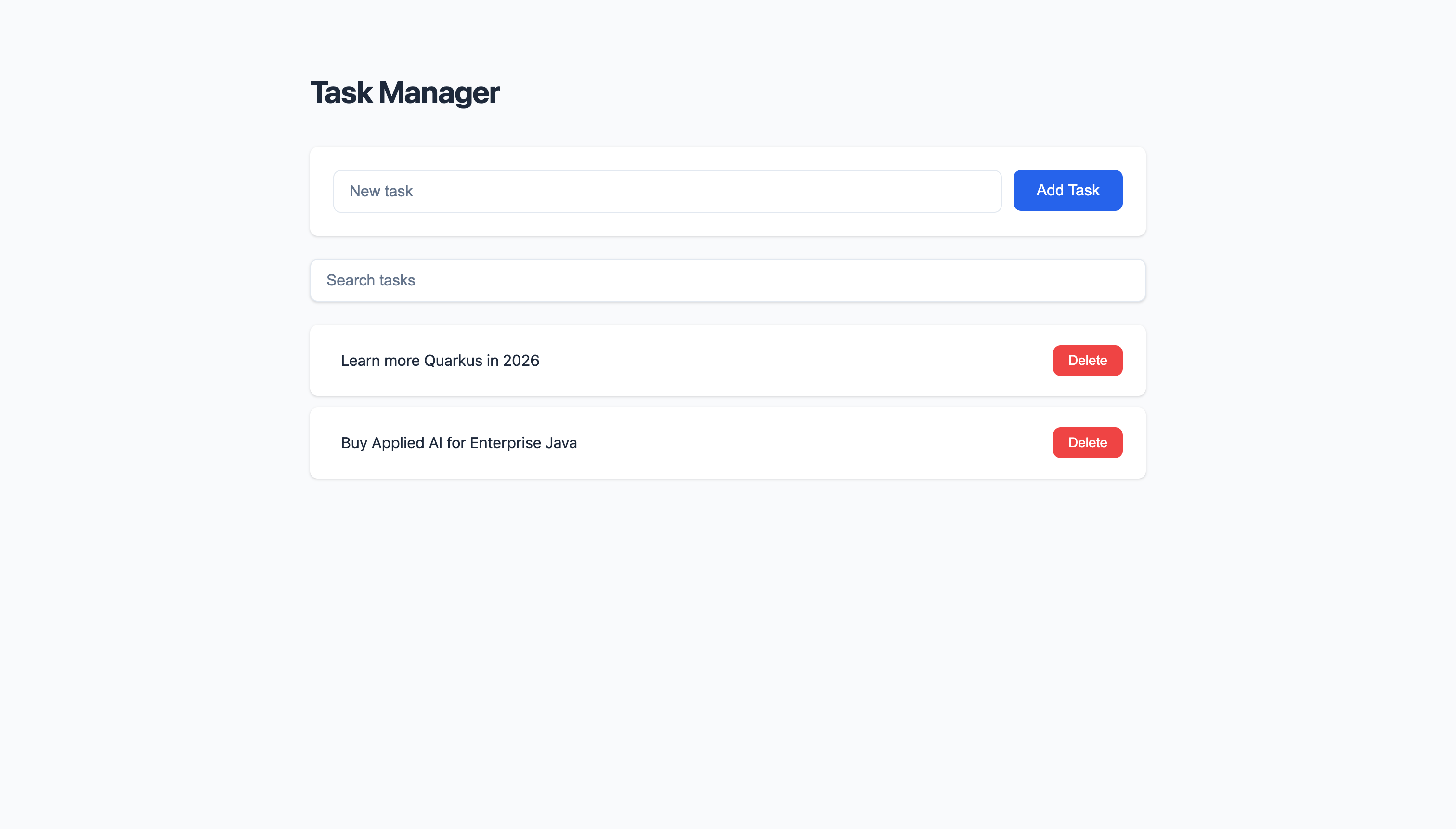
What This Architecture Buys You
One language for logic: Java
One rendering model: server-side templates
One transport: HTTP
Predictable behavior under load
Easy debugging with browser dev tools
You are not avoiding JavaScript.
You are choosing where it belongs.
Summary
HTMX lets HTML declare interactions
Quarkus Web Bundler makes frontend dependencies boring again
Qute fragments map naturally to UI components
REST endpoints and UI behavior stay aligned
You can build rich applications without frontend frameworks
If you already trust your backend, there is no reason not to let it drive the UI.
That is the real lesson here.
If you don't just grab the source code from Github repository, you run into a couple of problems when trying to run the project.
The path to the template fragments should be : src/main/resources/templates/TaskResource, e.g., src/main/resources/templates/TaskResource/taskItem.html
The taskmanager is very hard to use unless you update the styling in app.scss with the one found on GitHub.
I don't disagree that HTMX is perhaps a bit better here but isn't this just "JSP++" / Wicket / JSF / etc.? For years we've gone back and forth between server side rendering and totally separate SaaS type environments. With the complete separation I can hire a back end and a front end developer and, if I want it on the back end, I can have too many microservices or a monolith - it's up to me. Any time you pull in server side rendering you now have your rendering host and your API host as one. Either way, the rendering side certainly isn't a static website hosted on something like S3.
I do, however, appreciate the article as it gives me something to experiment with. I'm knee deep in React code and it doesn't feel right either so perhaps I'm too focused on the "separation of church and state" in my thinking. I will say that I'm not sure how HTMX is going to take care of my native mobile apps but that's a different thread.