


I already had IBM Bob working on two Java tasks in parallel. In my earlier Podman and worktree setup, I gave each task a branch and a build directory inside one container. That arrangement also left me managing the shared Git metadata, repository mounts, and port assignments. Bob carried the real API key in its process environment.
With ISX, I wanted to try giving each Bob agent a whole Linux workstation. I could put Java, Maven, Podman, and a copy of the application into a template, then create a fresh instance for each task. Bob could change that environment as it worked. I would bring the changes back through Git.
So I took the same small Quarkus application and split the work again. I ask one Bob agent to add catalog search and the other to add express shipping. Both start with the same Java tools and source code, and I choose the commits I bring back into my application.
You'll need a Bob inference API key for the unattended sessions. IBM offers a Bob free trial if you want to follow along.
A workstation for each agent
ISX manages Incus system containers. Each container has a Linux userspace, an init system, services, and a package manager. I can give Bob a shell in that environment and let it install tools, run Maven, or start containers with Podman.
On my Apple Silicon Mac, ISX starts a Linux appliance through vfkit and runs Incus inside it. The two Bob workstations have separate filesystems and process trees, and they share the appliance's Linux kernel. ISX also supports VM instances for a separate guest kernel where the host supports them. Here, I use the system containers.
I keep the source repository and the real Bob key on the Mac. The template receives a copy of the repository, and each workstation branches from that template:
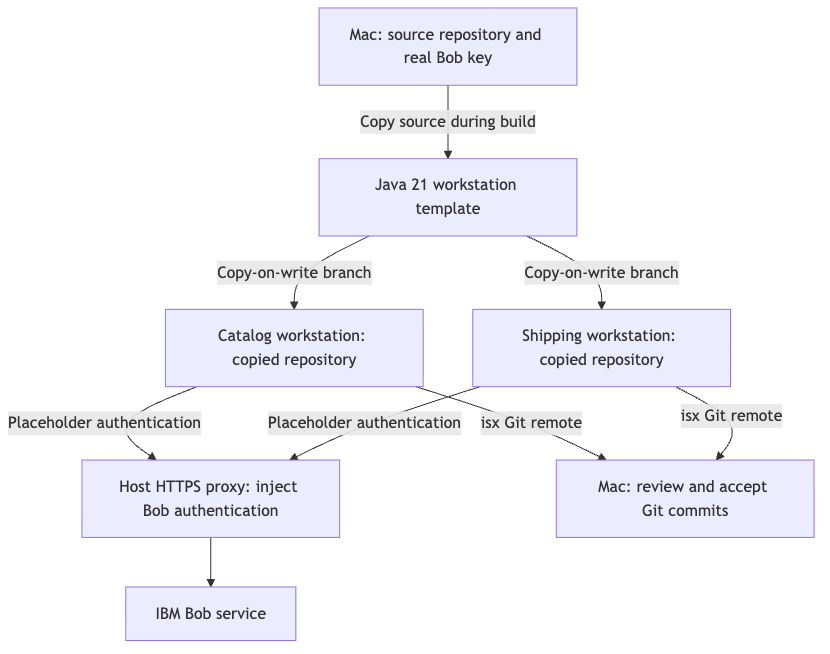
ISX runs an HTTPS proxy on the host, intercepts selected destinations, and supplies the real authentication header there. Bob uses a placeholder inside the workstation. ISX adds its certificate authority to the guest so the guest can trust the proxy connection.
I still give Bob access to the service and the ability to spend credits. The proxy keeps the actual key on my Mac; I choose the permissions that key grants. For these small tasks, I also put a cost limit on each Bob session.
Put Java and the application into a template
I use ISX 0.3.10 with Bob Shell 2.0.5. My workstation starts from Fedora 44 and includes Temurin 21, Maven, and Podman. I keep the application on Quarkus 3.39.1, the version from my earlier article, so I can concentrate on the workstation setup.
The companion project contains the application, prompts, template, and custom tool definitions. Open its isx-bob-workstations directory and run the host commands from there. On the Mac, you need Git and Homebrew; the template supplies the guest's Java tools.
First, install ISX and let it create its infrastructure:
brew install Sanne/tap/incus-spawn
isx init
During initialization, I configure the Bob credential and accept the IBM license terms. ISX stores the key in ~/.config/incus-spawn/config.yaml on the host. I also enable the optional macOS services so the Linux appliance and proxy start at login. For this application, I only need the Bob credential and the source directory I copy explicitly.
Next, prepare the application's starting point:
./scripts/prepare-source.shThis script creates a standalone Git repository at .local/parallel-bob-lab and saves its starting commit in a Git bundle. I want Bob to open a directory where the Maven project and the Git repository have the same root. That also keeps the rest of my article repository outside the workstation.
The application starts with two small resources:
GET /catalogreturns three products.GET /shipping/quotereturns a standard shipping quote with a price of 12.
Here are the core settings in my workstation template. The companion supplies the custom mainthread-prime tool and its Java configuration:
name: tpl-mainthread-bob21
description: Java 21, Bob Shell, nested Podman, and the catalog/shipping lab
parent: tpl-minimal
packages:
  - git
  - unzip
  - jq
  - ripgrep
tools:
  - bob
  - podman
  - maven-3
  - sshd
  - mainthread-prime
host-resources:
  - source: .local/parallel-bob-lab
    path: ~/parallel-bob-lab
    mode: copy
env:
  - name: BOB_API_KEY
    value: bob-placeholder
workdir: ~/parallel-bob-lab
default-action: bob
I use mode: copy deliberately. ISX copies the source during the template build, including its .git directory. Every workstation gets that starting point, and Bob edits the copy inside its own filesystem. My host checkout stays outside that filesystem.
I also warm the Maven cache while building the template. Each new workstation inherits those downloaded dependencies and then maintains its own cache. Preparing Java and Maven once saves me repeating the setup for every task.
Java 21 took a little extra configuration. Fedora 44 no longer provides java-21-openjdk-devel, so I use a custom tool that downloads a pinned Temurin archive. The first Maven run then stopped with PKIX path building failed: Temurin's bundled certificate store did not contain the ISX proxy's certificate authority.
I fixed that in the guest by pointing Temurin at Fedora's generated Java trust store. These commands belong to the custom JDK tool, after it extracts the archive under /opt:
run:
  - ln -sfn /opt/jdk-21.0.12.1+1 /opt/jdk21
  - ln -sfn /etc/pki/ca-trust/extracted/java/cacerts /opt/jdk21/lib/security/cacerts
Maven now uses the same trusted certificate authorities as the guest operating system. I make this change in the template, so every Bob workstation inherits it. The Mac's Java installation keeps its own configuration.
The Bob environment needs one adjustment too. ISX 0.3.10's built-in Bob tool exports BOBSHELL_API_KEY, while Bob's non-interactive runner expects BOB_API_KEY. I set BOB_API_KEY to bob-placeholder in the template. The host proxy supplies the real authentication when Bob calls the service.
With those settings in place, build the template:
isx build tpl-mainthread-bob21 --yesISX builds the minimal parent if necessary, installs the tools, and copies the application. When I hit the certificate problem, I could open the failed build instance and look at the Java configuration directly. After correcting the trust store, the build finished with tpl-mainthread-bob21 built successfully.
Give each task its own home
Now I create a workstation for each task, with two CPUs and 4 GB of memory apiece:
isx branch mt-catalog-agent --from tpl-mainthread-bob21 --cpu 2 --memory 4GB
isx branch mt-shipping-agent --from tpl-mainthread-bob21 --cpu 2 --memory 4GB
isx list
Incus uses copy-on-write storage to branch the stopped template. Both agents open ~/parallel-bob-lab, but each sees its own copy of the repository, Maven cache, and home directory. I can use the same paths and application ports in both workstations because each has its own network namespace.
To work in one of them yourself, open a shell:
isx shell mt-catalog-agentThat gives you a place to run Maven, look at the source, or install another tool. For the Bob tasks, I use ISX's managed SSH configuration from the host. The bash -lc invocation loads the guest's configured environment, including Java and the placeholder key.
Let Bob work on both features
I keep each prompt focused on one resource. For the catalog, I ask Bob to add a case-insensitive substring search across product names and SKUs. A missing, empty, or blank query should still return all three products.
For shipping, I ask for speed=express to return a price of 24. The standard quote should keep its price of 12, and an unsupported speed should return HTTP 400. Each agent works on its own feature branch in its own repository.
The companion's runner selects the task prompt and passes it to Bob through standard input. It uses this invocation:
bob run --trust --accept-license --disable-mcp --disable-subagents \
  --max-turns 20 --max-cost 1 --format json < "$prompt"
Here, $prompt points to the catalog or shipping prompt file. I give Bob up to 20 turns and one Bobcoin per task. These tasks are small enough to handle directly, so I disable MCP and subagents for the sessions.
bob run pre-approves tool calls, which lets Bob work unattended inside the guest. I give it that freedom in a workstation with the copied application and the tools it needs. The turn and cost limits bound the Bob session; Bob can still change its guest environment as it works.
Start both sessions from the companion directory:
ssh -F "$HOME/.config/incus-spawn/ssh/config" mt-catalog-agent \
  'bash -lc "bash ~/parallel-bob-lab/scripts/run-task.sh catalog"' \
  > .local/catalog-run.log 2>&1 &
catalog_pid=$!

ssh -F "$HOME/.config/incus-spawn/ssh/config" mt-shipping-agent \
  'bash -lc "bash ~/parallel-bob-lab/scripts/run-task.sh shipping"' \
  > .local/shipping-run.log 2>&1 &
shipping_pid=$!

wait "$catalog_pid"
wait "$shipping_pid"
I let the runner capture Bob's output under ~/run-results, outside the guest repository, and create the final commit. The host logs go into .local. That leaves me with a Git branch to bring home and a session log to read if I want to follow Bob's decisions.
I spent about 0.4 Bobcoins on the two features. Once I have the template, I can reuse the prepared Java environment for the next pair of tasks.
Bring the commits back to my Mac
At this point, each workstation owns a repository with a feature branch. I want to read the changes on my Mac, so I create a host clone from the baseline bundle and add the two workstations as remotes:
git clone .local/baseline.bundle .local/review

git -C .local/review remote add catalog \
  isx://mt-catalog-agent/~/parallel-bob-lab
git -C .local/review remote add shipping \
  isx://mt-shipping-agent/~/parallel-bob-lab
ISX installs a Git remote helper that understands the isx:// URL. Keep the workstations running while you fetch their branches:
git -C .local/review fetch catalog \
  refs/heads/feature/catalog-search:refs/review/catalog
git -C .local/review fetch shipping \
  refs/heads/feature/express-shipping:refs/review/shipping
I save the commit IDs and read each diff against the starting point:
catalog_commit=$(git -C .local/review rev-parse refs/review/catalog)
shipping_commit=$(git -C .local/review rev-parse refs/review/shipping)

git -C .local/review diff HEAD "$catalog_commit"
git -C .local/review diff HEAD "$shipping_commit"
I read how Bob handles blank catalog queries, whether the search covers both names and SKUs, and how the shipping resource responds to an unsupported speed. I have both changes in a local Git repository, so I can compare them, edit them, or leave a commit aside.
For these two features, I bring both commits into the host clone:
git -C .local/review cherry-pick "$catalog_commit" "$shipping_commit"I use the saved IDs because a workstation can keep changing after a fetch. The commits I read remain the commits I choose to accept. From here, I can continue working in the local checkout or move them onto a branch in the application repository.
Start the next task from the template
After I fetch the commits, I can delete the two workstations:
isx destroy mt-catalog-agent --skip-confirmation
isx destroy mt-shipping-agent --skip-confirmation
The host clone keeps the commits, and the stopped template keeps the original application and prepared tools. When I want another Bob session, I branch from that template again:
isx branch mt-fresh-agent --from tpl-mainthread-bob21 --cpu 2 --memory 4GB
isx shell mt-fresh-agent
The new workstation starts with the source snapshot I copied during the template build. If I want future agents to start from the updated application, I prepare that source and rebuild the template. Each branch therefore starts from a version I choose.
When you finish with the fresh workstation, remove it too:
isx destroy mt-fresh-agent --skip-confirmationThe Linux appliance, proxy services, and host credential remain configured for another session. ISX manages those separately from the disposable workstations. You'll find the template and commands in the companion project, and more options in the ISX repository.
I can now give each Bob task a prepared Linux environment and let it manage that environment while it works. I have a template for the tools and source, a separate filesystem for each agent, and Git commits I can read on my Mac. For my next parallel Java task, I can start with the same template and a fresh copy of the application.