


I wanted to find a good example of writing IBM Bob hooks in Java. We’d already looked at hooks for repository boundaries and verification in the earlier lifecycle-hooks article, and I didn’t really feel like writing another tutorial about refusing a release command. I wanted something we could have a little fun with.
So I thought about a small game. Give Bob a broken airlock, put a few JUnit cases in front of the door, and let it repair the code before it can leave. We supply the room and the rules. Bob gets to figure out the repair.
Play along. The first time Bob tries to open the door, this is what it gets:
AIRLOCK LOCKED. Repair src/Airlock.java before trying the door again.
AIRLOCK TESTS: 3/7 passed; 4 failed
The door is kept closed by a Java program running outside the model. Bob asks to run a command, our hook runs the tests, and the command is blocked because four of them fail. Once Bob has repaired the code, it can try again. I also added a hook that draws a replay with Java2D when the session ends. An airlock apparently needs a flight recorder, even when its entire actuator is printf.
You can run the game yourself as we go. If you don’t have Bob yet, you can start an IBM Bob free trial.
Where our Java code enters the loop
When you ask Bob to change a Java file, the model can request tools to read it, edit it, or run a command. The harness is the part that actually runs those tools and brings the results back into the conversation. It also supplies the context around the task. A hook gives us a place to run our own code while all of this is happening.
I connected the game to four of these places:
SessionStartgives Bob the room’s rules.PreToolUsechecks the opening command before it runs.PostToolUsechecks the code after an edit and returns test feedback.Stopverifies the final state and draws the replay.
When Bob tries the door, the exchange looks like this:
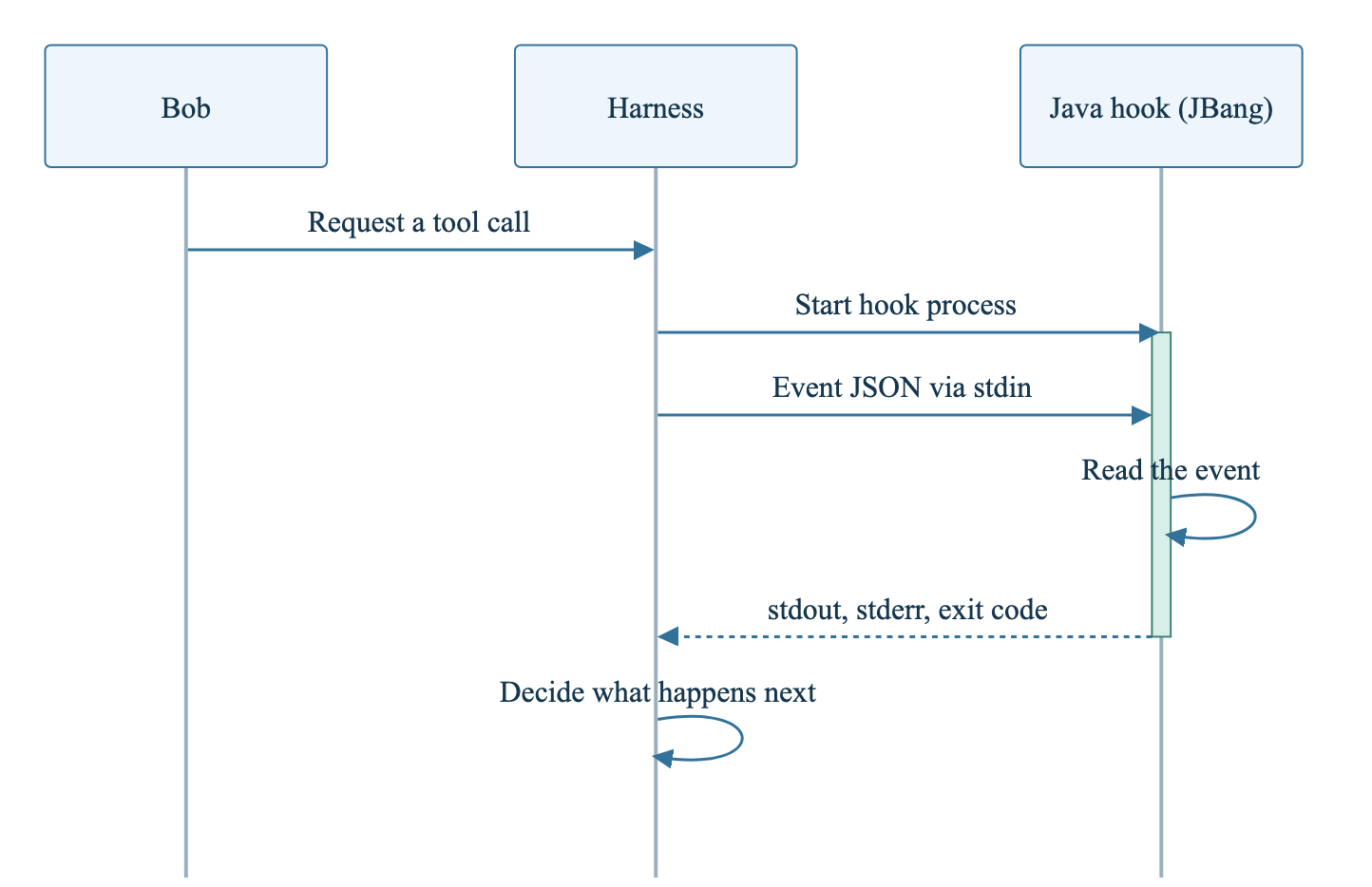
From the Java side, we can start with a main method and System.in. Our code runs in its own process, started for each hook invocation. JBang launches the Java source file and takes care of the dependencies declared at the top. There’s no server we need to start before playing.
A small room with a broken interlock
I put the starting room in the companion project’s demo/ directory. You’ll also find a reference solution and scripts for checking the hooks there. For now, this is the workspace we’re going to give Bob:
demo/
├── src/Airlock.java
├── tests/AirlockTest.java
├── verify.java
├── prompt.txt
└── .bob/
    ├── settings.json
    └── hooks/
        ├── airlock-hook.java
        └── Replay.java
The room is imaginary, of course. I kept its rules simple: the outer door may open only when the inner door is sealed and the pressure reading is between 0 and 5 kPa, including both ends. A negative reading must be rejected as well.
All of that is supposed to be checked by this method in src/Airlock.java:
class Airlock {
    static boolean canOpen(int pressureKpa, boolean innerDoorSealed) {
        return innerDoorSealed || pressureKpa <= 5;
    }
}
With that ||, a sealed inner door is enough to accept any pressure. So there’s already something for Bob to repair. I wrote the expected behavior down as seven JUnit cases:
class AirlockTest {
    @ParameterizedTest(name = "pressure={0}, sealed={1}, mayOpen={2}")
    @CsvSource({
            "0, true, true",
            "5, true, true",
            "6, true, false",
            "101, true, false",
            "0, false, false",
            "101, false, false",
            "-1, true, false"
    })
    void checksBothInterlocks(int pressureKpa, boolean innerDoorSealed, boolean expected) {
        assertEquals(expected, Airlock.canOpen(pressureKpa, innerDoorSealed));
    }
}
I’ve left the imports out of this excerpt; the complete test file is in the companion. You can probably see most of the repair already. Leave it for Bob, though. A small condition is enough to give us a failing test, a code change, and a reason to try the door again.
I ran this on macOS with Bob Shell 2.0.5 and JBang 0.138.0. The scripts request Java 21, with Jackson Databind and JUnit 5. JBang runs our Java files, JUnit checks the interlock, and Jackson handles the JSON exchanged with Bob. You’ll also need a POSIX shell for the commands below.
Let’s make a disposable copy of the room, since Bob will be editing it. Run this from the companion project’s directory:
LAB_DIR=$(mktemp -d "${TMPDIR:-/tmp}/bob-airlock.XXXXXX")
cp -R demo/. "$LAB_DIR/"
cd "$LAB_DIR"

bob --version
jbang version
jbang --quiet verify.java
That last command should fail with exit code 1. We haven’t repaired anything yet, so the verifier starts with:
AIRLOCK TESTS: 3/7 passed; 4 failedThe command runs verify.java, which uses the JUnit Platform Launcher to execute AirlockTest and return a process status. I put the dependencies and source files in its JBang header:
//JAVA 21
//DEPS org.junit.jupiter:junit-jupiter:5.11.4
//DEPS org.junit.platform:junit-platform-launcher:1.11.4
//SOURCES src/Airlock.java tests/AirlockTest.java
Those two Java files are included in compilation through the //SOURCES directive. When Bob changes Airlock.java, the next verifier run compiles the changed source. I also made the verifier require all seven cases to pass. An empty test run shouldn’t be enough to get out of the room.
Put JBang in the hook configuration
Now for the door itself. I gave Bob this harmless command to open it:
printf 'AIRLOCK_OPEN\n'Bob runs shell commands through execute_command. Before that tool runs, we want our Java program to have a look at the request. That’s configured in .bob/settings.json:
{
  "hooks": {
    "PreToolUse": [
      {
        "matcher": "^execute_command$",
        "hooks": [
          {
            "type": "command",
            "command": "jbang --quiet .bob/hooks/airlock-hook.java",
            "timeout": 30
          }
        ]
      }
    ]
  }
}
This is the part of the settings file that registers the door check. The complete file also registers the other three events, including a PostToolUse matcher for the native edit tools used in the game.
Notice that the matcher selects a tool name. It matches execute_command, and our Java code then reads the tool’s input to find out which command Bob wants to run. The jbang command in the configuration stays exactly as it is. Each new event is sent to the process through stdin.
For an opening attempt, the JSON looks like this:
{
  "session_id": "airlock-session",
  "cwd": "/workspace/airlock",
  "hook_event_name": "PreToolUse",
  "tool_name": "execute_command",
  "tool_input": {
    "command": "printf 'AIRLOCK_OPEN\\n'"
  },
  "tool_use_id": "door-attempt-1"
}
That JSON arrives at System.in, so the beginning of the hook is fairly familiar Java:
String raw = new String(System.in.readAllBytes(), StandardCharsets.UTF_8);
if (raw.isBlank()) {
    return;
}
JsonNode event = JSON.readTree(raw);
new AirlockHook(event).handle();
This is the input-handling part of AirlockHook.main; the complete method also handles failures. One small Java detail: I kept AirlockHook package-private. The filename is airlock-hook.java, and a public class can’t have a matching name with that hyphen in it.
Keep --quiet on the JBang command, because stdout is where Bob reads the hook’s response. Launcher messages mixed into that stream can spoil it. Our script does nothing with empty input, but readAllBytes() still waits for EOF. If you want to run the hook on its own without sending an event, use:
jbang --quiet .bob/hooks/airlock-hook.java < /dev/nullThis also lets JBang compile the hook and resolve its dependencies before Bob starts it with a timeout.
The door uses a fresh test result
I wanted the tests to be checked at the moment Bob asks to open the door. A passing result from an earlier edit could be out of date by then. So inside PreToolUse, the hook looks for the exact opening command and runs the verifier again. Here’s the part that keeps the door closed:
if (tool.equals("execute_command") && command.equals(OPEN)) {
    var check = verify();
    if (!check.passed()) {
        record("LOCKED", check.output());
        System.err.print("AIRLOCK LOCKED. Repair src/Airlock.java before trying the door again.\n"
                + check.output());
        System.exit(2);
    }
    // The remaining branch records the allowed call and source hash.
}
System.exit(2) is the answer that blocks this tool call. Bob is given the message from stderr and can respond to the failed tests. When the tests pass, the hook exits with code 0 and leaves stdout empty, allowing the normal tool flow to continue. And yes, the explicit System.err call belongs here: it’s how the hook sends its reason back through the process protocol.
Inside verify(), I use ProcessBuilder to launch jbang --quiet verify.java. The output is redirected to a file while the hook waits, which avoids filling an unread process pipe. The verifier gets up to 15 seconds to finish. A timeout or a nonzero exit counts as a failed check.
For an allowed attempt, the hook saves the tool-use ID and a hash of src/Airlock.java. We’ll use those when the result comes back, so a successful opening is tied to the call we allowed and the source we checked.
Before we let Bob try, let’s send an opening attempt ourselves. Stay in the copied lab directory and pipe this event into the hook:
cat <<'JSON' | jbang --quiet .bob/hooks/airlock-hook.java
{
  "session_id": "pipe-test",
  "hook_event_name": "PreToolUse",
  "tool_name": "execute_command",
  "tool_input": {"command": "printf 'AIRLOCK_OPEN\\n'"},
  "tool_use_id": "door-1"
}
JSON
echo "exit=$?"
We’re supplying the fields this hook reads, and files are resolved from the process’s working directory. You should get the locked-door message, four failing cases, and exit=2. That’s the same decision Bob will receive when it asks for this command. You can try the Java side of a hook like this without starting a model session.
Of course, you can cheat at this game. Run printf directly, spell the command differently, or edit the hook, and you’ve gone around our exact string match. I’m asking Bob to play by the rules and change only src/Airlock.java. If you use hooks around a real release, the system performing that release still needs its own controls.
Give Bob feedback while it works
Bob needs the rules of the room as well, so I supply them as context through SessionStart. Then, after a native file edit, PostToolUse runs the verifier and sends the result back. Both of these hooks use a small helper to write a structured response:
static void context(String event, String message) throws Exception {
    ObjectNode response = JSON.createObjectNode();
    response.putObject("hookSpecificOutput")
            .put("hookEventName", event)
            .put("additionalContext", message);
    System.out.print(JSON.writeValueAsString(response));
}
After an edit, event is PostToolUse and message contains the test output. Bob has just changed the file, and the result of checking that change is added to the conversation. If cases still fail, they’re there for the next model turn to read.
The door still gets its own fresh check when Bob tries to open it. The feedback after an edit helps with the next repair; the check before opening decides whether that command can run. You can use the same arrangement with a compiler result after an edit and a verification step before a later action. The Java process reads an event and returns its answer at whichever point you’ve connected it to.
I ran these hooks through bob run with the settings supplied in the companion. Keep those settings for your first try so all four events are connected.
Let Bob attempt the escape
Okay, the room is ready. Before trusting the workspace, read .bob/settings.json and the two Java hook files. These commands run with your user permissions, and Bob only loads workspace hooks from a trusted folder. That’s why I’ve included --trust below. You can find the configuration and trust details in the Bob Shell hook reference.
You’ll need Bob authentication configured before starting. For headless API-key authentication, set BOB_API_KEY outside the project. The companion’s JBang runner can also read an inference-key JSON file outside the repository and pass the key through the child process environment.
From the disposable lab directory, start Bob with:
bob run \
  --workspace "$PWD" \
  --trust \
  --accept-license \
  --disable-mcp \
  --disable-subagents \
  --max-turns 12 \
  --max-cost 1 \
  --format pretty \
  "$(cat prompt.txt)"
I made the first opening attempt part of prompt.txt, so we get to see the hook refuse it. Bob is then asked to read the implementation and tests, repair only src/Airlock.java, verify the change, and try the exact command again.
That’s how my run went. The first attempt was blocked, Bob read the Java files and changed the condition, and all seven tests passed. When it tried the door again, the command was allowed through and returned AIRLOCK_OPEN.
Once Bob has finished, check the repair yourself:
jbang --quiet verify.javaYou want to see:
AIRLOCK TESTS: 7/7 passed; 0 failedThe repaired condition requires the inner door to be sealed and the pressure to be within both bounds:
return innerDoorSealed && pressureKpa >= 0 && pressureKpa <= 5;I kept the reference solution in the companion so you can compare it with Bob’s repair. The run helper also checks that the tests, verifier, settings, and hooks stayed unchanged. Bob is supposed to fix the interlock, and those checks let us see whether it left the rules alone.
Draw the flight recorder
Bob has made it out, and we can have a look at how it got there. As the game runs, the hooks append small JSON records under .bob/state/. I use a directory name derived from the session ID to keep runs separate. Actions such as LOCKED, GREEN, CLEARED, and ESCAPED are saved there with the test output or decision that went with them.
When Stop runs, the tests are checked once more. For the final report to say that Bob escaped, an allowed door call must have returned AIRLOCK_OPEN, and the current source must still match the source that opened it. A later source change makes the report incomplete. That’s where the saved hash comes in.
Then Replay.java reads the events and draws them. I used standard Java2D for this, starting with a BufferedImage and a Graphics2D canvas:
var image = new BufferedImage(1100, height, BufferedImage.TYPE_INT_RGB);
Graphics2D canvas = image.createGraphics();
canvas.setRenderingHint(RenderingHints.KEY_ANTIALIASING,
        RenderingHints.VALUE_ANTIALIAS_ON);
The heading and event cards are drawn onto that image, and ImageIO writes the PNG:
canvas.dispose();
ImageIO.write(image, "png", state.resolve("replay.png").toFile());
The hook also writes an HTML page with the image and the full event details. Once the session ends, you can find both files with:
find .bob/state -name replay.html -o -name replay.pngOpen replay.html in your browser. You can also use the PNG on its own, perhaps in a README or when showing someone what happened. This is the image I got after Bob repaired the interlock:
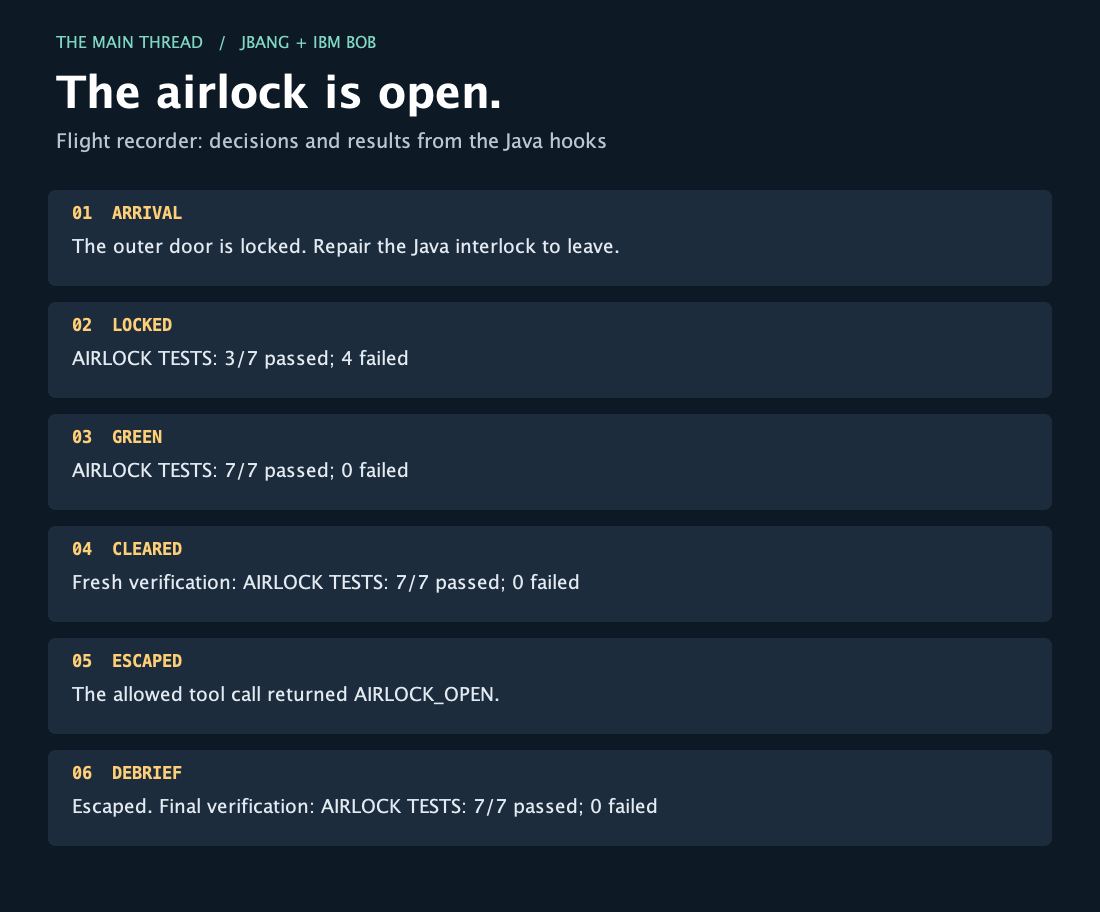
The sequence comes from the events our hooks saw and the tests they ran. One detail to keep in mind: this Stop hook writes a report after the task finishes. If the report is incomplete, it won’t reopen the task or make Bob continue.
What I would carry into a real project
You can use the same Java process to call your team’s test tooling or an internal service, then decide where the result should enter Bob’s session. A focused compiler check after an edit would be a fairly small next step from this example.
I can also see keeping the replay idea for a handover report. It could show which files changed, which checks ran, and what still failed when the agent stopped. I’d keep the picture for a workshop, anyway. It’s easier to discuss a sequence you can look at together.
If you adapt the game to your own project, keep a few practical details in mind:
Process startup adds cost. Keep frequent checks short. I used a tiny test suite here and warmed JBang before starting Bob.
Bob needs to find JBang. If its inherited
PATHdoesn’t include JBang, use the absolute path in the hook configuration. SetJBANG_CMDto the same executable for the verifier subprocess, or add JBang to Bob’sPATH.A broken hook is not automatically a denial. Our Java gate returns
2for failures it catches. A launcher failure or the outer hook timeout happens outside that code, though. Check those failure paths before relying on a gate.Concurrent edits need more coordination. I kept this to one agent with sequential edits. If you add parallel sessions or edits, you’ll need to coordinate verification and the stored state.
The companion README has the full source, commands for checking the game, and the logs from my runs. Start with a fresh copy of demo/ whenever you want to play again. The reference solution is there when you want to compare repairs.
Bob got out by repairing a Java condition, and a few small Java programs handled the rules around that repair. I like that we can follow the whole thing, from the first refused command to the picture at the end. We gave the hook a test to run and a place to return the answer. For our little game, that was enough to keep the door closed until Bob had fixed the code.