


I’ve worked at IBM long enough to learn one universal truth: the org chart you download today is already wrong tomorrow. Teams move, managers change, entire reporting lines disappear after the next reorg email lands in your inbox at 8:03 a.m. If you’re lucky, it comes with a PDF. If you’re not, it’s a screenshot.
Most developers think org charts are static reference data. You load it once, maybe redraw it once a year, and you’re done. That mental model breaks immediately in real companies. Org structures are living systems. They change often, and they change deeply. One VP move can reshuffle half the tree.
In production systems, this shows up fast. You need to answer questions like “who reports to whom now,” “what team did this person belong to last week,” or “what’s the reporting chain between these two people.” If you model this wrong, your queries explode in complexity, or worse, they return the wrong answer and nobody notices until payroll or access control breaks.
In this tutorial, we build an org chart system that expects change. We store the hierarchy correctly, query it efficiently, and visualize it in a way that makes constant reshuffling obvious and manageable. This is not about drawing boxes. This is about making organizational change survivable.
Prerequisites
You don’t need much, but you need the basics ready.
Java 17 or newer
Maven 3.8 or newer
Podman for Quarkus Dev Services
Basic understanding of REST APIs and SQL
Project Setup
We start with a clean Quarkus project.
Create the application or just grab the code from my Github repository.
mvn io.quarkus:quarkus-maven-plugin:create \
  -DprojectGroupId=com.orgchart \
  -DprojectArtifactId=quarkus-orgchart \
  -Dextensions="hibernate-orm-panache,rest-jackson,jdbc-postgresql,smallrye-openapi"
cd quarkus-orgchart
Configure the application
Edit the file: src/main/resources/application.properties
# Database configuration
quarkus.datasource.db-kind=postgresql

# Hibernate
quarkus.hibernate-orm.schema-management.strategy = drop-and-create
quarkus.hibernate-orm.log.sql=true
This setup is intentionally aggressive. We drop and recreate the schema on every start because we are iterating fast. In real systems, you migrate. Here, we want speed.
Modeling the Hierarchy
The core of the whole system is the data model. Everything else depends on this being correct.
Create the file:src/main/java/com/orgchart/entity/Employee.java
package com.orgchart.entity;

import java.util.ArrayList;
import java.util.List;

import com.fasterxml.jackson.annotation.JsonIgnore;

import io.quarkus.hibernate.orm.panache.PanacheEntity;
import jakarta.persistence.Column;
import jakarta.persistence.Entity;
import jakarta.persistence.FetchType;
import jakarta.persistence.JoinColumn;
import jakarta.persistence.ManyToOne;
import jakarta.persistence.OneToMany;
import jakarta.persistence.Table;

@Entity
@Table(name = "employees")
public class Employee extends PanacheEntity {

    @Column(nullable = false)
    public String firstName;

    @Column(nullable = false)
    public String lastName;

    @Column(nullable = false)
    public String title;

    @Column(nullable = false)
    public String email;

    public String department;

    @ManyToOne(fetch = FetchType.LAZY)
    @JoinColumn(name = "manager_id")
    @JsonIgnore
    public Employee manager;

    @OneToMany(mappedBy = "manager")
    @JsonIgnore
    public List<Employee> directReports = new ArrayList<>();

    public String getFullName() {
        return firstName + " " + lastName;
    }
}
This model does one thing well. It represents reporting structure. The hierarchy is expressed with a self-referencing foreign key. That’s it.
We deliberately do not try to walk the hierarchy in Java. That work belongs in the database.
DTO for Hierarchical Queries
Recursive queries return flat rows with level information. We don’t want to expose entities directly, so we introduce a DTO.
Create the file: src/main/java/com/orgchart/dto/EmployeeHierarchyDTO.java
package com.orgchart.dto;

import java.util.ArrayList;
import java.util.List;

public class EmployeeHierarchyDTO {

    public Long id;
    public String firstName;
    public String lastName;
    public String title;
    public String department;
    public Long managerId;
    public int level;

    public List<EmployeeHierarchyDTO> children = new ArrayList<>();

    public EmployeeHierarchyDTO(Long id,
            String firstName,
            String lastName,
            String title,
            String department,
            Long managerId,
            int level) {
        this.id = id;
        this.firstName = firstName;
        this.lastName = lastName;
        this.title = title;
        this.department = department;
        this.managerId = managerId;
        this.level = level;
    }

    public String getFullName() {
        return firstName + " " + lastName;
    }
}
This DTO carries structure, not behavior.
Repository with Recursive SQL
This is where the real work happens.
Create the file:src/main/java/com/orgchart/repository/EmployeeRepository.java
package com.orgchart.repository;

import java.util.ArrayList;
import java.util.HashMap;
import java.util.List;
import java.util.Map;
import java.util.stream.Collectors;

import com.orgchart.dto.EmployeeHierarchyDTO;
import com.orgchart.entity.Employee;

import io.quarkus.hibernate.orm.panache.PanacheRepository;
import jakarta.enterprise.context.ApplicationScoped;
import jakarta.persistence.EntityManager;
import jakarta.persistence.Query;

@ApplicationScoped
public class EmployeeRepository implements PanacheRepository<Employee> {

    private final EntityManager em;

    public EmployeeRepository(EntityManager em) {
        this.em = em;
    }

    public List<EmployeeHierarchyDTO> getOrganizationHierarchy() {
        String sql = """
                WITH RECURSIVE org_hierarchy AS (
                    SELECT
                        id,
                        firstName,
                        lastName,
                        title,
                        department,
                        manager_id,
                        0 AS level
                    FROM employees
                    WHERE manager_id IS NULL

                    UNION ALL

                    SELECT
                        e.id,
                        e.firstName,
                        e.lastName,
                        e.title,
                        e.department,
                        e.manager_id,
                        oh.level + 1
                    FROM employees e
                    JOIN org_hierarchy oh ON e.manager_id = oh.id
                )
                SELECT * FROM org_hierarchy
                ORDER BY level, lastName
                """;

        Query query = em.createNativeQuery(sql);
        List<Object[]> rows = query.getResultList();

        return rows.stream()
                .map(r -> new EmployeeHierarchyDTO(
                        ((Number) r[0]).longValue(),
                        (String) r[1],
                        (String) r[2],
                        (String) r[3],
                        (String) r[4],
                        r[5] != null ? ((Number) r[5]).longValue() : null,
                        ((Number) r[6]).intValue()))
                .collect(Collectors.toList());
    }

    public List<EmployeeHierarchyDTO> getHierarchyTree() {
        List<EmployeeHierarchyDTO> flat = getOrganizationHierarchy();
        Map<Long, EmployeeHierarchyDTO> index = new HashMap<>();
        List<EmployeeHierarchyDTO> roots = new ArrayList<>();

        for (EmployeeHierarchyDTO e : flat) {
            index.put(e.id, e);
        }

        for (EmployeeHierarchyDTO e : flat) {
            if (e.managerId == null) {
                roots.add(e);
            } else {
                EmployeeHierarchyDTO parent = index.get(e.managerId);
                if (parent != null) {
                    parent.children.add(e);
                }
            }
        }

        return roots;
    }
}
The database walks the tree. Java just assembles it into a nested structure for the frontend. This scales. Trying to do this with recursive Java queries does not.
REST API
Now we expose the data.
Create the file: src/main/java/com/orgchart/resource/EmployeeResource.java
package com.orgchart.resource;

import com.orgchart.dto.EmployeeHierarchyDTO;
import com.orgchart.entity.Employee;
import com.orgchart.repository.EmployeeRepository;
import jakarta.inject.Inject;
import jakarta.transaction.Transactional;
import jakarta.ws.rs.*;
import jakarta.ws.rs.core.MediaType;
import jakarta.ws.rs.core.Response;

import java.util.List;

@Path("/api/employees")
@Produces(MediaType.APPLICATION_JSON)
@Consumes(MediaType.APPLICATION_JSON)
public class EmployeeResource {

    @Inject
    EmployeeRepository repository;

    @GET
    public List<Employee> listAll() {
        return repository.listAll();
    }

    @GET
    @Path("/hierarchy")
    public List<EmployeeHierarchyDTO> hierarchy() {
        return repository.getHierarchyTree();
    }

    @POST
    @Transactional
    public Response create(Employee employee) {
        repository.persist(employee);
        return Response.status(201).entity(employee).build();
    }
}
All the complexity is in the data, not the HTTP layer.
Sample Data on Startup
An org chart with three people is useless. We load a realistic hierarchy at startup.
Create the file: src/main/java/com/orgchart/startup/DataInitializer.java
package com.orgchart.startup;

import com.orgchart.entity.Employee;
import com.orgchart.repository.EmployeeRepository;

import io.quarkus.runtime.Startup;
import io.quarkus.runtime.StartupEvent;
import jakarta.enterprise.context.ApplicationScoped;
import jakarta.enterprise.event.Observes;
import jakarta.inject.Inject;
import jakarta.transaction.Transactional;

@Startup
@ApplicationScoped
public class DataInitializer {

    @Inject
    EmployeeRepository repository;

    @Transactional
    void onStart(@Observes StartupEvent ev) {
        if (repository.count() > 0) {
            return;
        }

        Employee ceo = create("Sarah", "Johnson", "CEO", "Executive", null);
        Employee cto = create("Michael", "Chen", "CTO", "Technology", ceo);
        Employee vpEng = create("Emily", "Brown", "VP Engineering", "Engineering", cto);

        create("Thomas", "Moore", "Engineering Manager", "Engineering", vpEng);
        create("Sarah", "Robinson", "Backend Engineer", "Engineering", vpEng);
        create("Joshua", "Clark", "Backend Engineer", "Engineering", vpEng);
    }

    private Employee create(String first,
            String last,
            String title,
            String dept,
            Employee manager) {
        Employee e = new Employee();
        e.firstName = first;
        e.lastName = last;
        e.title = title;
        e.department = dept;
        e.email = first.toLowerCase() + "." + last.toLowerCase() + "@example.com";
        e.manager = manager;
        repository.persist(e);
        return e;
    }
}
This gives us enough depth to see the hierarchy working and changing.
Frontend with D3.js
Finally, we visualize the hierarchy.
Create the file: src/main/resources/META-INF/resources/index.html
<!DOCTYPE html>
<html>

<head>
    <meta charset="UTF-8">
    <title>Org Chart</title>
    <script src="https://d3js.org/d3.v7.min.js"></script>
    <style>
        body {
            font-family: sans-serif;
        }

        .node rect {
            fill: #e0e7ff;
            stroke: #4f46e5;
            stroke-width: 1.5px;
        }

        .node text {
            font-size: 12px;
        }

        .link {
            fill: none;
            stroke: #999;
            stroke-width: 1.5px;
        }
    </style>
</head>

<body>
    <h1>Organization Chart</h1>
    <svg width="1200" height="800"></svg>

    <script>
        fetch('/api/employees/hierarchy')
            .then(r => r.json())
            .then(data => {
                const root = d3.hierarchy(data[0]);
                const treeLayout = d3.tree().size([700, 1000]);
                treeLayout(root);

                const svg = d3.select('svg')
                    .append('g')
                    .attr('transform', 'translate(100,50)');

                svg.selectAll('.link')
                    .data(root.links())
                    .enter()
                    .append('path')
                    .attr('class', 'link')
                    .attr('d', d3.linkHorizontal()
                        .x(d => d.y)
                        .y(d => d.x)
                    );

                const node = svg.selectAll('.node')
                    .data(root.descendants())
                    .enter()
                    .append('g')
                    .attr('class', 'node')
                    .attr('transform', d => `translate(${d.y},${d.x})`);

                node.append('rect')
                    .attr('width', 180)
                    .attr('height', 40)
                    .attr('x', -90)
                    .attr('y', -20);

                node.append('text')
                    .attr('text-anchor', 'middle')
                    .attr('dy', '0.35em')
                    .text(d => d.data.firstName + ' ' + d.data.lastName);
            });
    </script>
</body>
</html>
The backend delivers structure. The UI reflects it. When the org changes, the tree changes.
Go visit localhost:8080/
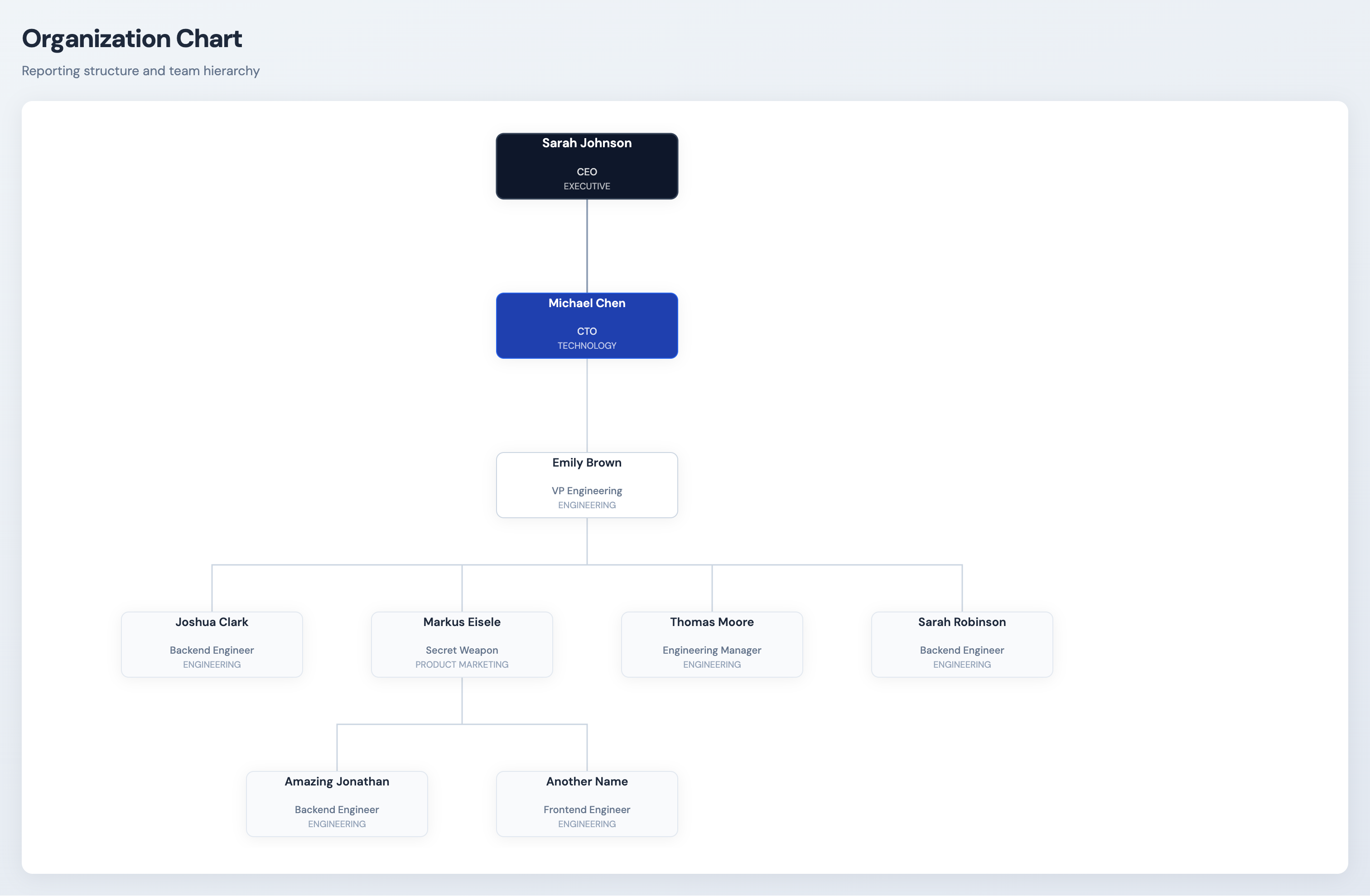
(Yep, I made it look nicer for the screenshot :))
Conclusion
We built an org chart system that assumes change is normal. The hierarchy lives in the database, recursive queries keep it efficient, and Quarkus keeps the whole stack clean and boring in the best way. When the next reorg happens, you don’t fix code. You update data, refresh the page, and move on.
That’s how systems survive real organizations.