


I have always loved the look of old video games. The chunky pixels. The imperfect shading. The handcrafted illusion of detail created by dithering techniques on limited hardware. So I wanted to build a small service that generates this retro look from any modern image. At the same time, this was a perfect opportunity to explore a clean separation of I/O and CPU workloads in Quarkus.
In this tutorial we will build a pixel-art converter that uses Java 21 Virtual Threads to efficiently handle blocking image I/O and CPU-intensive pixel processing without blocking the event loop. The goal is simple. The implementation is educational. And the final result is a fun tool that makes any picture look like it came from a 90s game console.
We will start by setting up the project, implement several pixel filters, combine them using a strategy pattern, and expose everything through a Quarkus REST endpoint.
Let’s begin.
Project Setup
To keep things predictable we will use Java 21+, Maven 3.9+, and Quarkus 3.x.
Create a new project using the Quarkus CLI:
quarkus create app com.pixel:pixel-art-converter \
    --extensions="rest-jackson" \
    --java=21

cd pixel-art-converter
This gives us a clean foundation. With the project ready we can focus on the domain layer. And if you just want to clone the code, make sure to take a look at my repository.
Designing the Filter Abstraction
We build a small strategy interface for image filters. Each filter receives a BufferedImage and returns a new one. This keeps the logic pure and testable.
Create: src/main/java/com/pixel/filter/ImageFilter.java
package com.pixel.filter;

import java.awt.image.BufferedImage;

public interface ImageFilter {
    BufferedImage apply(BufferedImage image);

    String getName();
}
We also create a DTO to describe filter configs sent by the client:
Create: src/main/java/com/pixel/service/FilterConfigDTO.java
package com.pixel.service;

import java.util.Map;

public record FilterConfigDTO(String type, Map<String, Object> params) {
}
With the structure defined we can implement real filters.
Implementing the Pixel Filters
Each filter is a simple Java class. No Quarkus annotations. No framework magic. This keeps the core logic clean and reusable.
Downsample Filter
This reduces image resolution by choosing every Nth pixel.
Create: src/main/java/com/pixel/filter/impl/DownsampleFilter.java
package com.pixel.filter.impl;

import java.awt.image.BufferedImage;

import com.pixel.filter.ImageFilter;

public class DownsampleFilter implements ImageFilter {
    private final int blockSize;

    public DownsampleFilter(int blockSize) {
        this.blockSize = blockSize;
    }

    @Override
    public BufferedImage apply(BufferedImage img) {
        int w = Math.max(1, img.getWidth() / blockSize);
        int h = Math.max(1, img.getHeight() / blockSize);

        BufferedImage result = new BufferedImage(w, h, BufferedImage.TYPE_INT_RGB);

        for (int y = 0; y < h; y++) {
            for (int x = 0; x < w; x++) {
                int rgb = img.getRGB(x * blockSize, y * blockSize);
                result.setRGB(x, y, rgb);
            }
        }
        return result;
    }

    @Override
    public String getName() {
        return “downsample”;
    }
}
How it works:
Takes a blockSize parameter (default: 8)
Divides the image into blocks of blockSize × blockSize pixels
Samples one pixel from the top-left corner of each block
Creates a smaller image with dimensions width/blockSize × height/blockSize
Uses Math.max(1, ...) to ensure at least 1×1 output
Floyd–Steinberg Dithering
This classic algorithm spreads quantization errors to neighboring pixels.
Create: src/main/java/com/pixel/filter/impl/FloydSteinbergFilter.java
package com.pixel.filter.impl;

import java.awt.image.BufferedImage;

import com.pixel.filter.ImageFilter;

public class FloydSteinbergFilter implements ImageFilter {

    private static final int RED = 0;
    private static final int GREEN = 1;
    private static final int BLUE = 2;

    @Override
    public BufferedImage apply(BufferedImage img) {
        int w = img.getWidth();
        int h = img.getHeight();

        int[][][] buffer = new int[w][h][3];

        for (int y = 0; y < h; y++) {
            for (int x = 0; x < w; x++) {
                int rgb = img.getRGB(x, y);
                buffer[x][y][RED] = (rgb >> 16) & 0xFF;
                buffer[x][y][GREEN] = (rgb >> 8) & 0xFF;
                buffer[x][y][BLUE] = rgb & 0xFF;
            }
        }

        for (int y = 0; y < h; y++) {
            for (int x = 0; x < w; x++) {
                int oldR = buffer[x][y][RED];
                int oldG = buffer[x][y][GREEN];
                int oldB = buffer[x][y][BLUE];

                int factor = 32;
                int newR = Math.round(factor * Math.round(oldR / (float) factor));
                int newG = Math.round(factor * Math.round(oldG / (float) factor));
                int newB = Math.round(factor * Math.round(oldB / (float) factor));

                newR = Math.min(255, Math.max(0, newR));
                newG = Math.min(255, Math.max(0, newG));
                newB = Math.min(255, Math.max(0, newB));

                buffer[x][y][RED] = newR;
                buffer[x][y][GREEN] = newG;
                buffer[x][y][BLUE] = newB;

                int errR = oldR - newR;
                int errG = oldG - newG;
                int errB = oldB - newB;

                distributeError(buffer, x + 1, y, errR, errG, errB, 7.0 / 16);
                distributeError(buffer, x - 1, y + 1, errR, errG, errB, 3.0 / 16);
                distributeError(buffer, x, y + 1, errR, errG, errB, 5.0 / 16);
                distributeError(buffer, x + 1, y + 1, errR, errG, errB, 1.0 / 16);
            }
        }

        BufferedImage result = new BufferedImage(w, h, BufferedImage.TYPE_INT_RGB);
        for (int y = 0; y < h; y++) {
            for (int x = 0; x < w; x++) {
                int r = buffer[x][y][RED];
                int g = buffer[x][y][GREEN];
                int b = buffer[x][y][BLUE];
                result.setRGB(x, y, (r << 16) | (g << 8) | b);
            }
        }
        return result;
    }

    private void distributeError(int[][][] buffer, int x, int y,
            int er, int eg, int eb, double weight) {
        if (x < 0 || x >= buffer.length || y < 0 || y >= buffer[0].length)
            return;
        buffer[x][y][RED] += (int) (er * weight);
        buffer[x][y][GREEN] += (int) (eg * weight);
        buffer[x][y][BLUE] += (int) (eb * weight);
    }

    @Override
    public String getName() {
        return “dither”;
    }
}
How it works:
Quantizes each RGB channel to 32 levels (factor = 32)
Distributes quantization error to neighboring pixels using Floyd-Steinberg weights:
Right: 7/16
Bottom-left: 3/16
Bottom: 5/16
Bottom-right: 1/16
Processes pixels left-to-right, top-to-bottom
Maintains image dimensions (no resizing)
Result: Creates a pixelated/dithered look while preserving perceived detail.
Upsample Filter
Nearest-neighbor scaling produces crisp pixel edges.
Create: src/main/java/com/pixel/filter/impl/UpsampleFilter.java
package com.pixel.filter.impl;

import java.awt.Graphics2D;
import java.awt.RenderingHints;
import java.awt.image.BufferedImage;

import com.pixel.filter.ImageFilter;

public class UpsampleFilter implements ImageFilter {
    private final int scale;

    public UpsampleFilter(int scale) {
        this.scale = scale;
    }

    @Override
    public BufferedImage apply(BufferedImage img) {
        int w = img.getWidth() * scale;
        int h = img.getHeight() * scale;

        BufferedImage result = new BufferedImage(w, h, BufferedImage.TYPE_INT_RGB);
        Graphics2D g = result.createGraphics();
        g.setRenderingHint(RenderingHints.KEY_INTERPOLATION,
                RenderingHints.VALUE_INTERPOLATION_NEAREST_NEIGHBOR);
        g.drawImage(img, 0, 0, w, h, null);
        g.dispose();

        return result;
    }

    @Override
    public String getName() {
        return “upsample”;
    }
}
How it works:
Takes a scale parameter (default: 8)
Multiplies dimensions by scale
Uses Graphics2D with VALUE_INTERPOLATION_NEAREST_NEIGHBOR to preserve hard edges (no smoothing)
Example: With scale=8, a 50×37 image becomes 400×296.
Now that we have several filters we build the chain.
Building the Filter Factory and Reactive Pipeline
The factory converts DTOs into filter instances.
Create: src/main/java/com/pixel/service/FilterFactory.java
package com.pixel.service;

import java.util.List;
import java.util.Map;
import java.util.stream.Collectors;

import com.pixel.filter.ImageFilter;
import com.pixel.filter.impl.DownsampleFilter;
import com.pixel.filter.impl.FloydSteinbergFilter;
import com.pixel.filter.impl.UpsampleFilter;

import jakarta.enterprise.context.ApplicationScoped;

@ApplicationScoped
public class FilterFactory {

    public ImageFilter createFilter(String type, Map<String, Object> params) {
        return switch (type.toLowerCase()) {
            case “downsample” -> new DownsampleFilter(
                    (Integer) params.getOrDefault(”blockSize”, 8));
            case “dither” -> new FloydSteinbergFilter();
            case “upsample” -> new UpsampleFilter(
                    (Integer) params.getOrDefault(”scale”, 8));
            default -> throw new IllegalArgumentException(”Unknown filter: “ + type);
        };
    }

    public List<ImageFilter> createChain(List<FilterConfigDTO> configs) {
        return configs.stream()
                .map(c -> createFilter(c.type(), c.params()))
                .collect(Collectors.toList());
    }
}
Next we run the chain.
Create: src/main/java/com/pixel/service/FilterChainService.java
package com.pixel.service;

import java.awt.image.BufferedImage;
import java.util.List;

import com.pixel.filter.ImageFilter;

import jakarta.enterprise.context.ApplicationScoped;

@ApplicationScoped
public class FilterChainService {

    public BufferedImage applyChain(BufferedImage input, List<ImageFilter> filters) {
        BufferedImage current = input;
        for (ImageFilter f : filters) {
            current = f.apply(current);
        }
        return current;
    }
}
With the service layer complete we expose it through HTTP.
Exposing the Endpoint Using Virtual Threads
Virtual Threads allow us to call blocking image I/O without hurting scalability. Create: src/main/java/com/pixel/api/ImageFilterResource.java
package com.pixel.api;

import java.awt.image.BufferedImage;
import java.io.ByteArrayOutputStream;
import java.io.IOException;
import java.io.UncheckedIOException;
import java.util.List;
import java.util.Map;

import javax.imageio.ImageIO;

import org.jboss.resteasy.reactive.RestForm;
import org.jboss.resteasy.reactive.multipart.FileUpload;

import com.pixel.service.FilterChainService;
import com.pixel.service.FilterConfigDTO;
import com.pixel.service.FilterFactory;

import io.smallrye.common.annotation.RunOnVirtualThread;
import jakarta.inject.Inject;
import jakarta.ws.rs.Consumes;
import jakarta.ws.rs.DefaultValue;
import jakarta.ws.rs.POST;
import jakarta.ws.rs.Path;
import jakarta.ws.rs.Produces;
import jakarta.ws.rs.core.MediaType;
import jakarta.ws.rs.core.Response;

@Path(”/api/filter”)
public class ImageFilterResource {

    @Inject
    FilterChainService chainService;
    @Inject
    FilterFactory factory;

    @POST
    @Path(”/pixelate”)
    @Consumes(MediaType.MULTIPART_FORM_DATA)
    @Produces(”image/png”)
    @RunOnVirtualThread
    public Response pixelate(
            @RestForm(”image”) FileUpload image,
            @RestForm @DefaultValue(”8”) int blockSize) {

        try {
            BufferedImage img = ImageIO.read(image.uploadedFile().toFile());
            BufferedImage processed = chainService.applyChain(img,
                    factory.createChain(List.of(
                            new FilterConfigDTO(”downsample”, Map.of(”blockSize”, blockSize)),
                            new FilterConfigDTO(”dither”, Map.of()),
                            new FilterConfigDTO(”upsample”, Map.of(”scale”, blockSize)))));
            return writeImage(processed);
        } catch (IOException e) {
            throw new UncheckedIOException(e);
        } catch (Exception e) {
            return Response.serverError().entity(e.getMessage()).build();
        }
    }

    private Response writeImage(BufferedImage img) {
        try (ByteArrayOutputStream baos = new ByteArrayOutputStream()) {
            ImageIO.write(img, “PNG”, baos);
            return Response.ok(baos.toByteArray()).build();
        } catch (IOException e) {
            throw new UncheckedIOException(e);
        }
    }
}
Now we configure Quarkus.
Application Configuration
Add the following to src/main/resources/application.properties
quarkus.http.limits.max-body-size=15MThis keeps uploads manageable.
Writing a Simple Verification Test
We test that dithering actually introduces variance.
// src/test/java/com/pixel/FilterComparisonTest.java
package com.pixel;

import java.awt.Color;
import java.awt.Graphics2D;
import java.awt.image.BufferedImage;
import java.util.HashSet;
import java.util.Set;

import org.junit.jupiter.api.Assertions;
import org.junit.jupiter.api.Test;

import com.pixel.filter.impl.FloydSteinbergFilter;

class FilterComparisonTest {

    @Test
    void testDithering() {
        BufferedImage src = new BufferedImage(10, 10, BufferedImage.TYPE_INT_RGB);
        Graphics2D g = src.createGraphics();
        g.setColor(new Color(140, 140, 140));
        g.fillRect(0, 0, 10, 10);
        g.dispose();

        var dither = new FloydSteinbergFilter();
        BufferedImage out = dither.apply(src);

        Set<Integer> colors = new HashSet<>();
        for (int y = 0; y < out.getHeight(); y++) {
            for (int x = 0; x < out.getWidth(); x++) {
                colors.add(out.getRGB(x, y));
            }
        }

        Assertions.assertTrue(colors.size() > 1,
                “Dithering should create variance”);
    }
}
Tests help ensure the math behaves as expected. Also delete the two scaffolded tests please.
Running and Testing the Application
Start Quarkus in dev mode:
quarkus devSend an image to the endpoint:
curl -X POST -F "image=@face.jpeg" \
     -F "blockSize=20" \
     http://localhost:8080/api/filter/pixelate \
     --output pixelated.png
Open pixelated.png and enjoy your retro masterpiece. Play with “blockSize” if you want it pixelated more or less.
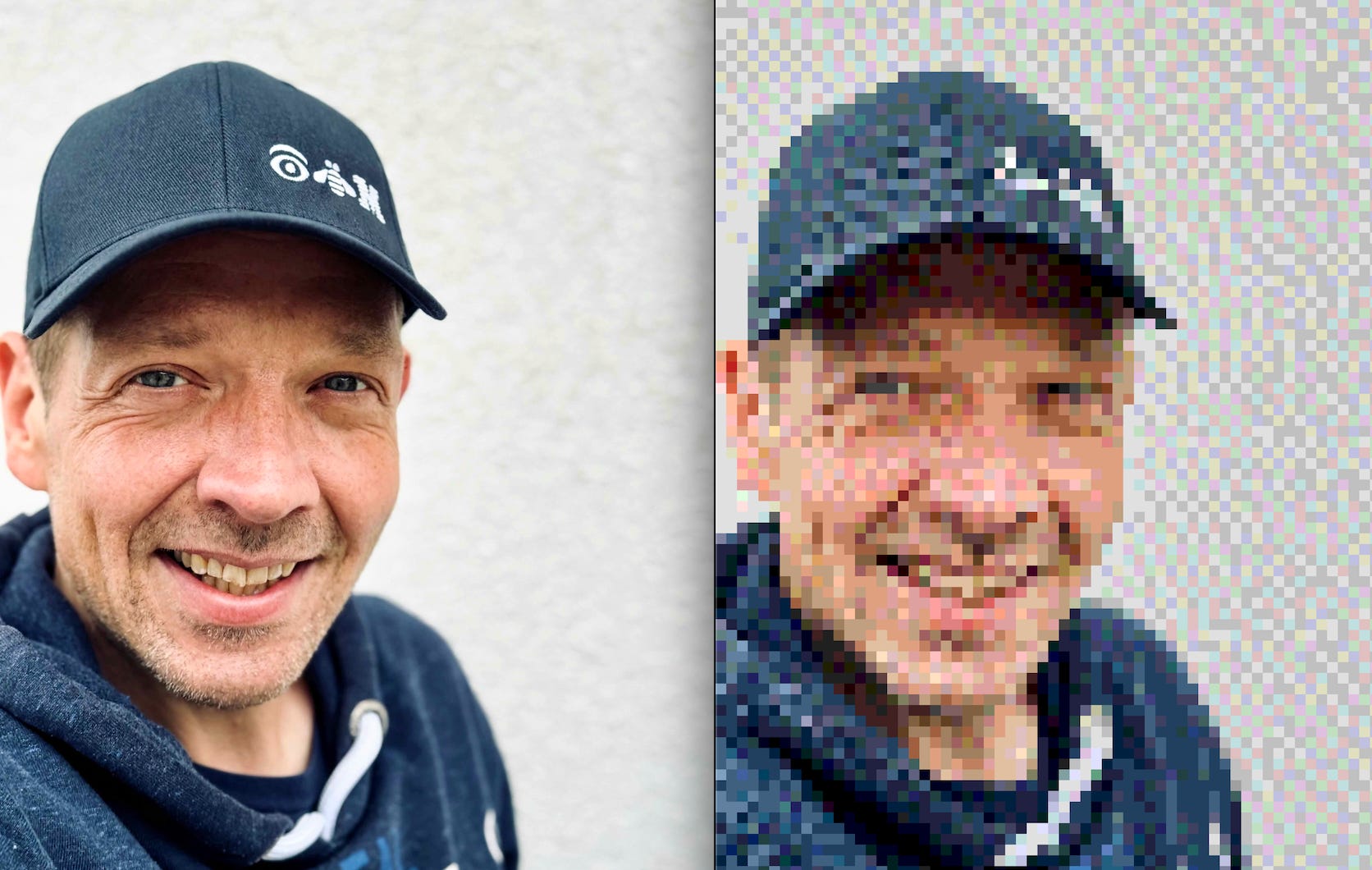
We built a full image processing pipeline using Java 21 and Quarkus. Virtual Threads handled both the blocking I/O and CPU-intensive pixel processing work without blocking the event loop. The strategy pattern allowed us to chain filters freely.
This small service shows how to structure high-performance workloads in modern Java without unnecessary complexity.
A tiny service. A clean design. A retro look that never gets old.