


Most teams think JavaDoc is a publishing problem. You write it once, the tool renders it, and that is the end of the story. In real codebases, that mental model breaks fast. The source is what developers actually read in reviews, in IDE hovers, and during production debugging. If the source form is noisy, the documentation is noisy for readers too.
Classic JavaDoc has always had this problem. The rendered HTML can look fine, but the source is full of scaffolding: {@link}, {@code}, <p>, <pre>, and little HTML fragments that mostly carry formatting. That friction has a cost. Developers write less documentation, they keep examples shorter than they should, and they avoid updating comments because touching them is annoying.
Java 23 fixes the practical part of this. JEP 467 introduced Markdown (EDIT: JEP 467 was introduced in Java 23 and not as initially stated in Java 24 )documentation comments with ///, CommonMark support, and Markdown-style links to program elements. Oracle’s JavaDoc guide documents this feature for JDK 23 and later, and Java SE 24 exposes the END_OF_LINE documentation comment kind for /// comments in the compiler model.
Second, humans are not your only readers anymore. Coding assistants, code search, and internal RAG pipelines read raw source too, not just the generated HTML site. Markdown looks like the rest of the text those systems already know: READMEs, issues, docs, examples, code fences. Cleaner comments help people and tools alike. JEP 467 also calls out the Compiler Tree API, which matters when you build or run source-analysis tooling.
In this tutorial we build a small Maven library: an in-memory book review registry with only the JDK and JUnit. We skip persistence and HTTP on purpose. We want a small API where JavaDoc matters: package overview, sealed types, records, a service class, exceptions, all written with /// in source you still want to read. Then we run javadoc, use VS Code hovers for quick feedback, and lock behavior with plain unit tests. VS Code’s Java tooling renders Markdown in JavaDoc comments.
Prerequisites
You need a recent JDK, Maven, and a Java editor that understands modern Java. I use VS Code here because the Java tooling renders Markdown JavaDoc in hovers, and because many developers already use it.
Java 23 or newer (the build uses
maven.compiler.release23; JDK 25 works)Maven 3.9 or newer
VS Code with the Extension Pack for Java
Comfort reading
pom.xmland JUnit Jupiter (this tutorial uses JUnit 6; test code still importsorg.junit.jupiter.api)
Check the setup:
java -version
mvn -version
code --version
You want a JDK that supports --release 23 (Java 23 or newer). Markdown documentation comments were introduced by JEP 467, and Oracle documents them as available in JDK 23 and later.
Project Setup
Create a project directory and work inside it. In the-main-thread Github the Maven tree lives under bookreviews/; if you are starting from scratch, create that folder and change into it before the next steps.
mkdir -p bookreviews
cd bookreviews
Create pom.xml in the project root (the directory that contains pom.xml). You can pick any groupId / artifactId; what matters is maven.compiler.release 23 and JUnit Jupiter 6 (junit-jupiter) in test scope.
Create pom.xml:
<?xml version="1.0" encoding="UTF-8"?>
<project xmlns="http://maven.apache.org/POM/4.0.0"
         xmlns:xsi="http://www.w3.org/2001/XMLSchema-instance"
         xsi:schemaLocation="http://maven.apache.org/POM/4.0.0 https://maven.apache.org/xsd/maven-4.0.0.xsd">
    <modelVersion>4.0.0</modelVersion>

    <groupId>dev.mainthread</groupId>
    <artifactId>bookreviews</artifactId>
    <version>1.0.0-SNAPSHOT</version>
    <packaging>jar</packaging>

    <properties>
        <maven.compiler.release>23</maven.compiler.release>
        <project.build.sourceEncoding>UTF-8</project.build.sourceEncoding>
        <junit.version>6.0.3</junit.version>
    </properties>

    <dependencies>
        <dependency>
            <groupId>org.junit.jupiter</groupId>
            <artifactId>junit-jupiter</artifactId>
            <version>${junit.version}</version>
            <scope>test</scope>
        </dependency>
    </dependencies>

    <build>
        <plugins>
            <plugin>
                <groupId>org.apache.maven.plugins</groupId>
                <artifactId>maven-compiler-plugin</artifactId>
                <version>3.13.0</version>
            </plugin>
            <plugin>
                <groupId>org.apache.maven.plugins</groupId>
                <artifactId>maven-surefire-plugin</artifactId>
                <version>3.5.2</version>
            </plugin>
            <plugin>
                <groupId>org.apache.maven.plugins</groupId>
                <artifactId>maven-javadoc-plugin</artifactId>
                <version>3.11.2</version>
                <configuration>
                    <!-- `javadoc:javadoc` defaults to target/reports/apidocs; match the usual site path -->
                    <outputDirectory>${project.build.directory}/site</outputDirectory>
                </configuration>
            </plugin>
        </plugins>
    </build>
</project>
Create the source tree:
mkdir -p src/main/java/dev/mainthread/bookreviews
mkdir -p src/test/java/dev/mainthread/bookreviews
Open the project in VS Code (from inside the project directory):
code .From the parent of bookreviews, you can run code bookreviews instead.
Implementation
We add six compilation units under src/main/java/dev/mainthread/bookreviews (including package-info.java) and one test class. The logic stays small on purpose so the comments stay easy to see.
Package overview
package-info.java is where you put “read me first” context: what the package is for, how the pieces fit, where to start. Markdown headings fit here. In classic HTML JavaDoc they never felt natural.
Create src/main/java/dev/mainthread/bookreviews/package-info.java:
/// In-memory book review registry for tutorials and demos.
///
/// ## Where to start
///
/// - [BookReviewService] is the entry point for callers.
/// - [BookReview] is the immutable result type returned from the service.
/// - [ReviewSubmission] carries the fields passed to [BookReviewService] when creating a review.
///
/// ## Formats
///
/// [BookFormat] is a sealed hierarchy for optional catalog metadata.
///
/// ## Thread safety
///
/// [BookReviewService] is safe for concurrent use. Individual [BookReview]
/// instances are immutable value objects.
package dev.mainthread.bookreviews;
Bracket links like [BookReviewService] resolve to types in the same package in generated docs, the same way {@link} did—without the noise in source.
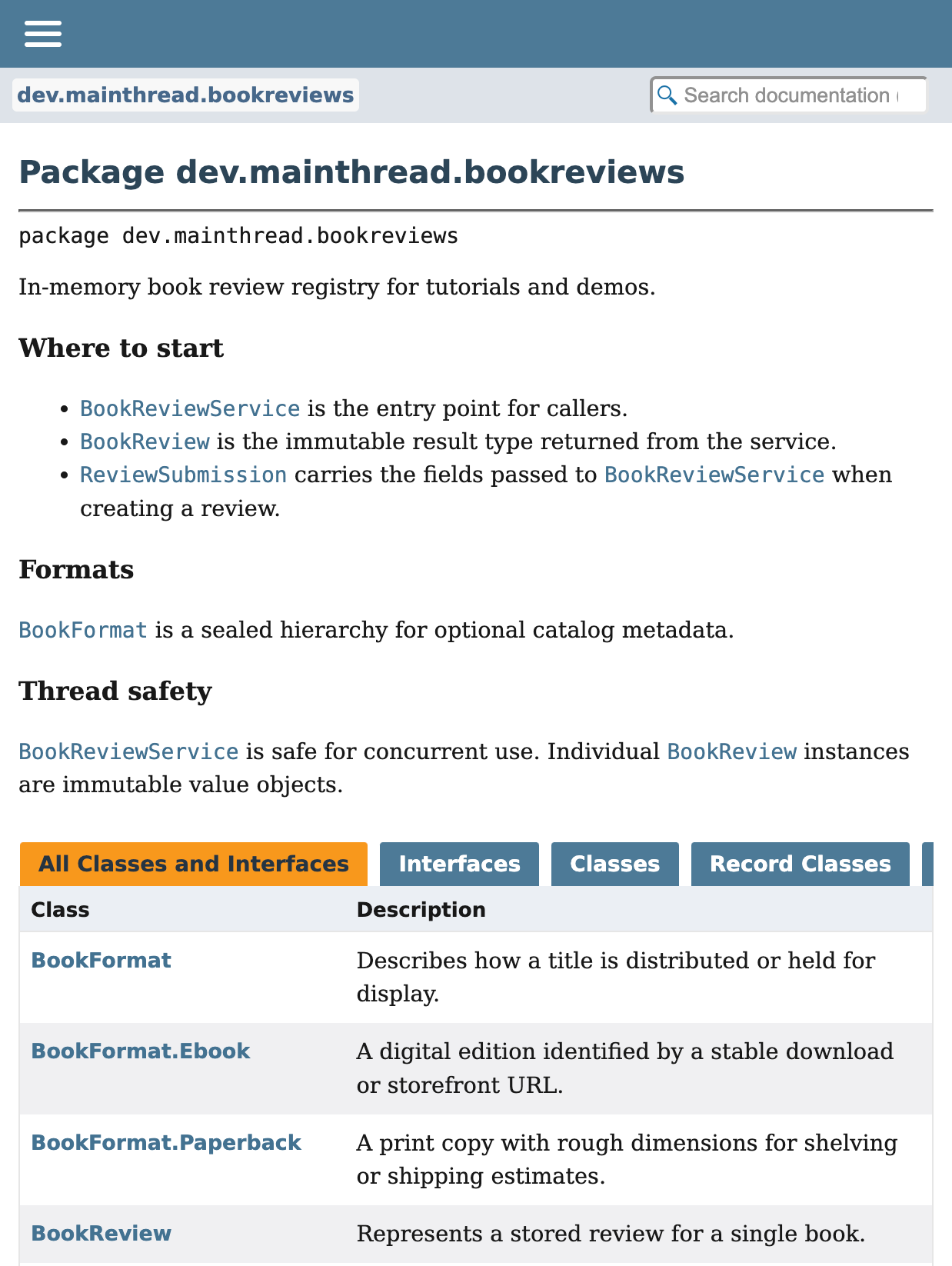
After mvn javadoc:javadoc (see Build and JavaDoc), open target/site/apidocs/dev/mainthread/bookreviews/package-summary.html, or follow the package link from the overview. You should see Markdown headings and lists in the package description, then the class summary table.
Classic JavaDoc next to Markdown
Before we add more files, compare styles on one line: a rating constraint on a method parameter.
Classic style tends toward:
/**
 * Creates a review from user-supplied fields.
 *
 * @param rating score from {@code 1} to {@code 5} (inclusive)
 */
Markdown documentation comments keep the tags the standard doclet still understands, but the body reads like normal text:
/// Creates a review from user-supplied fields.
///
/// @param rating score from `1` to `5` (inclusive)
Same information, less scaffolding. The rest of the tutorial stays in the /// form.
Sealed format types
Sealed types are a simple place for cross-links. The implementors are one closed family, so a short tour in the interface comment helps readers.
Create src/main/java/dev/mainthread/bookreviews/BookFormat.java:
package dev.mainthread.bookreviews;

/// Describes how a title is distributed or held for display.
///
/// This type is closed: only [Paperback] and [Ebook] exist. If you add a new
/// format, update this hierarchy and the package overview in
/// `package-info.java`.
public sealed interface BookFormat permits BookFormat.Paperback, BookFormat.Ebook {

    /// A print copy with rough dimensions for shelving or shipping estimates.
    ///
    /// @param dimensions human-readable size, for example `23 x 15 cm`
    record Paperback(String dimensions) implements BookFormat {
    }

    /// A digital edition identified by a stable download or storefront URL.
    ///
    /// @param uri location of the digital edition
    record Ebook(String uri) implements BookFormat {
    }
}
Stored review record
Create src/main/java/dev/mainthread/bookreviews/BookReview.java:
package dev.mainthread.bookreviews;

/// Represents a stored review for a single book.
///
/// Instances are immutable. The `id` is assigned by [BookReviewService] when a
/// review is created. Optional [BookFormat] metadata is for catalog UIs only;
/// the service does not interpret it beyond storage.
///
/// @param id system-assigned identifier
/// @param isbn ISBN-13 string in the form the caller supplied
/// @param title display title of the reviewed book
/// @param reviewer display name of the reviewer
/// @param rating score from `1` to `5`
/// @param body free-text review content
/// @param format optional [BookFormat], or `null` if unknown
public record BookReview(
        Long id,
        String isbn,
        String title,
        String reviewer,
        int rating,
        String body,
        BookFormat format
) {
}
Input record without a validation framework
Libraries often document preconditions in prose and enforce them with ordinary code. You can also leave validation to callers if you say so in the comment. Here we skip Bean Validation so the tutorial stays about documentation.
Create src/main/java/dev/mainthread/bookreviews/ReviewSubmission.java:
package dev.mainthread.bookreviews;

/// Caller-supplied data used to create a [BookReview].
///
/// ## Preconditions
///
/// The service rejects invalid input with [IllegalArgumentException]:
///
/// - `isbn`, `title`, `reviewer`, and `body` must be non-blank after trimming.
/// - `rating` must be between `1` and `5` inclusive.
/// - `body` length should stay within a reasonable bound for your product; this
///   library uses a soft maximum of `4000` characters after trim.
///
/// ## ISBN
///
/// This type does not parse or checksum ISBNs. Callers should pass normalized
/// strings if their domain requires it.
///
/// @param isbn ISBN-13 or other normalized identifier string
/// @param title non-empty book title
/// @param reviewer non-empty reviewer name
/// @param rating score from `1` to `5`
/// @param body review text
/// @param format optional [BookFormat], may be `null`
public record ReviewSubmission(
        String isbn,
        String title,
        String reviewer,
        int rating,
        String body,
        BookFormat format
) {
}
Domain exception
Create src/main/java/dev/mainthread/bookreviews/ReviewNotFoundException.java:
package dev.mainthread.bookreviews;

/// Thrown when a requested [BookReview] does not exist in the registry.
///
/// Callers that map errors to user-visible messages can rely on
/// [getMessage] for a stable English sentence in this implementation.
public class ReviewNotFoundException extends RuntimeException {

    /// @param id identifier that was not found
    public ReviewNotFoundException(Long id) {
        super("No review found with id " + id);
    }
}
Service implementation
The service class is where longer Markdown comments help. You get headings for thread safety, limits, and a short example, and you never type <h2> or <pre> in source.
Create src/main/java/dev/mainthread/bookreviews/BookReviewService.java:
package dev.mainthread.bookreviews;

import java.util.ArrayList;
import java.util.List;
import java.util.Map;
import java.util.Optional;
import java.util.concurrent.ConcurrentHashMap;
import java.util.concurrent.atomic.AtomicLong;

/// In-memory registry of [BookReview] instances.
///
/// Reviews are stored in a `ConcurrentHashMap` and identified by a monotonically
/// increasing `long` ID.
///
/// ## Thread safety
///
/// Read and write operations are safe for concurrent access. The store itself is
/// thread-safe, and the ID sequence is managed with `AtomicLong`.
///
/// ## Limits
///
/// This implementation does **not** persist data. Discarding the service instance
/// clears all reviews. It is suitable for demos, tests, and embedding in larger
/// applications that supply their own persistence.
///
/// ## Example
///
/// ```java
/// var service = new BookReviewService();
/// BookReview created = service.create(new ReviewSubmission(
///         "9780134685991",
///         "Effective Java",
///         "mjava",
///         5,
///         "Essential reading for any Java developer.",
///         new BookFormat.Paperback("23 x 15 cm")
/// ));
/// BookReview found = service.findById(created.id());
/// ```
public class BookReviewService {

    private static final int BODY_MAX_LEN = 4000;

    private final Map<Long, BookReview> store = new ConcurrentHashMap<>();
    private final AtomicLong sequence = new AtomicLong(1);

    /// Creates a new review and assigns a unique ID.
    ///
    /// @param submission validated caller input; see [ReviewSubmission]
    /// @return newly created [BookReview]
    /// @throws IllegalArgumentException if preconditions on [ReviewSubmission] fail
    public BookReview create(ReviewSubmission submission) {
        validateSubmission(submission);
        long id = sequence.getAndIncrement();
        BookReview review = new BookReview(
                id,
                submission.isbn().trim(),
                submission.title().trim(),
                submission.reviewer().trim(),
                submission.rating(),
                submission.body().trim(),
                submission.format()
        );
        store.put(id, review);
        return review;
    }

    /// @param id review identifier
    /// @return matching [BookReview]
    /// @throws ReviewNotFoundException if the ID does not exist
    public BookReview findById(Long id) {
        return Optional.ofNullable(store.get(id))
                .orElseThrow(() -> new ReviewNotFoundException(id));
    }

    /// @return snapshot list of all reviews; not backed by the live store
    public List<BookReview> findAll() {
        return new ArrayList<>(store.values());
    }

    /// @param isbn ISBN string to match exactly against stored reviews
    /// @return matching reviews, possibly empty; does not throw [ReviewNotFoundException]
    public List<BookReview> findByIsbn(String isbn) {
        return store.values().stream()
                .filter(review -> review.isbn().equals(isbn))
                .toList();
    }

    /// @param id review identifier
    /// @throws ReviewNotFoundException if the ID does not exist
    public void delete(Long id) {
        if (store.remove(id) == null) {
            throw new ReviewNotFoundException(id);
        }
    }

    private static void validateSubmission(ReviewSubmission s) {
        if (s.isbn().isBlank() || s.title().isBlank() || s.reviewer().isBlank() || s.body().isBlank()) {
            throw new IllegalArgumentException("isbn, title, reviewer, and body must be non-blank");
        }
        if (s.rating() < 1 || s.rating() > 5) {
            throw new IllegalArgumentException("rating must be between 1 and 5");
        }
        if (s.body().trim().length() > BODY_MAX_LEN) {
            throw new IllegalArgumentException("body exceeds maximum length");
        }
    }
}
Here Markdown comments start to feel like a real language feature. Oracle’s JavaDoc guide documents CommonMark together with normal JavaDoc tags and links to program elements.
The compiler model in Java 23 treats /// as an end-of-line documentation comment kind, and the standard doclet treats it as Markdown plus JavaDoc tags. (Elements.DocCommentKind)
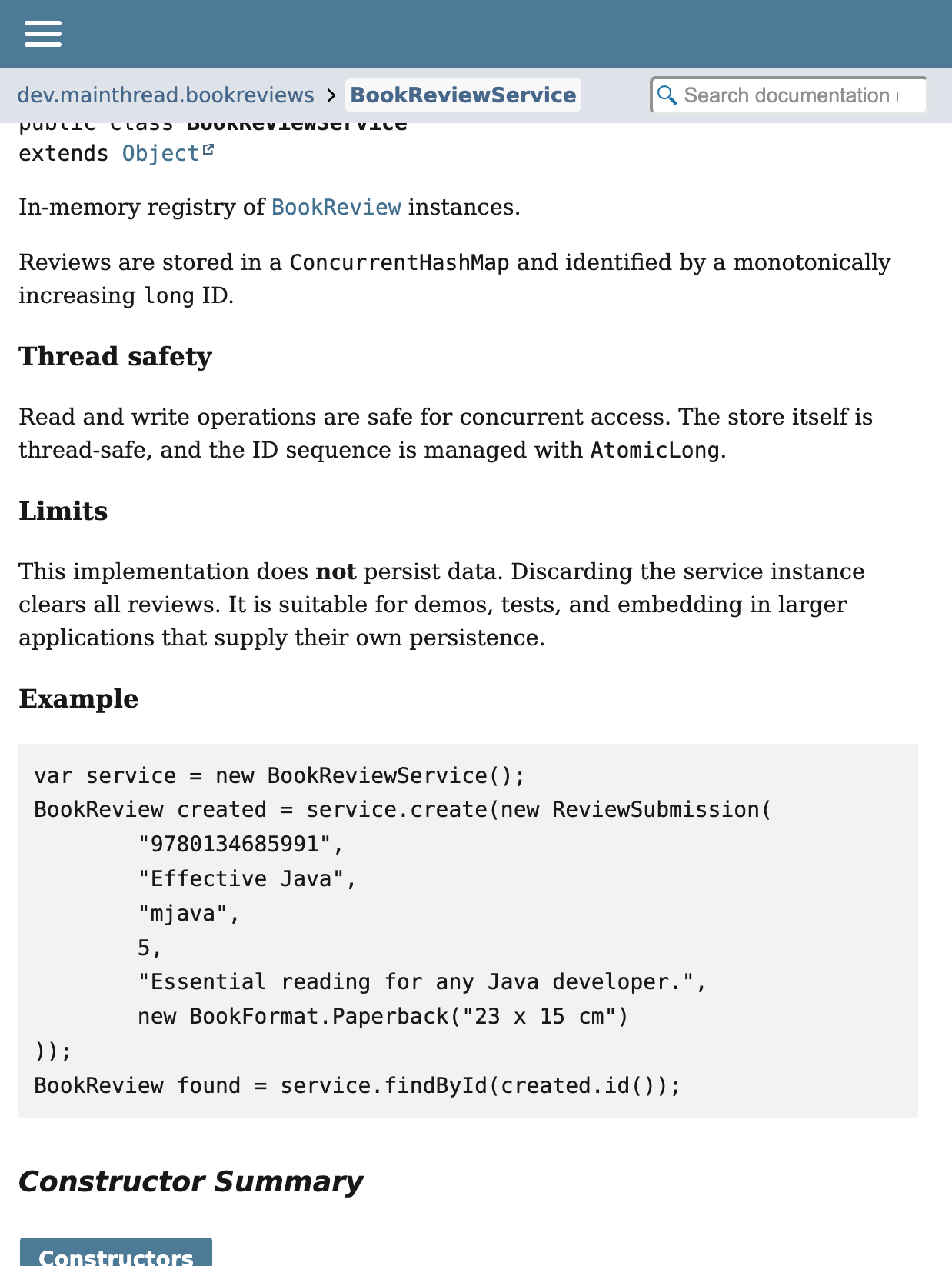
On the generated BookReviewService page, that same comment turns into subsection headings (“Thread safety”, “Limits”, “Example”) and a fenced Java sample in the HTML. You still write it in source without {@code} or <pre>.
Build and JavaDoc
The maven-javadoc-plugin configuration already pins release to 23 so the doclet matches the compiler.
Generate HTML:
mvn -q javadoc:javadocOpen the site: (on macOS):
open target/site/apidocs/index.htmlOn Windows (PowerShell):
start target/site/apidocs/index.htmlThe javadoc tool in Java 23 uses the standard doclet, and Oracle documents Markdown documentation comments as a supported feature of that toolchain. (javadoc command reference)
Now use the faster loop in VS Code. Open BookReviewService.java or package-info.java and hover a type or method. You read Markdown in hovers all day. Generated HTML is for when you publish.
To attach documentation to the JAR you publish to a repository, run mvn -q javadoc:jar and ship the -javadoc.jar next to your main artifact. Consumers of your library get the same rendered API in their IDE.
What This Means for AI-Assisted Development
This part is easy to miss when you only look at generated HTML. The change that matters is still in the source file.
Old JavaDoc carries a lot of JavaDoc-only and HTML-only noise. Models can learn that, and many already did, but normal Markdown is still easier to read. A fenced java block looks like code samples everywhere else. A bracket link looks like a normal technical link. Code assistants that scan raw files get simpler text to work with.
JEP 467 also matters for tool builders. It extended support around documentation comments. If you run internal indexing, source analysis, or agent pipelines on Java source, /// comments are easier to treat as plain documentation text.
Bad documentation stays bad. A vague Markdown comment is still vague. When the formatting tax goes down, teams often write clearer examples, limits, and method contracts anyway. That is the practical win.
Verification
Create src/test/java/dev/mainthread/bookreviews/BookReviewServiceTest.java:
package dev.mainthread.bookreviews;

import org.junit.jupiter.api.Test;

import static org.junit.jupiter.api.Assertions.assertEquals;
import static org.junit.jupiter.api.Assertions.assertThrows;

class BookReviewServiceTest {

    @Test
    void createFindAndDeleteRoundTrip() {
        var service = new BookReviewService();
        var submission = new ReviewSubmission(
                "9780134685991",
                "Effective Java",
                "mjava",
                5,
                "Essential reading for any Java developer.",
                new BookFormat.Paperback("23 x 15 cm")
        );

        BookReview created = service.create(submission);
        assertEquals("Effective Java", created.title());
        assertEquals(5, created.rating());

        BookReview found = service.findById(created.id());
        assertEquals(created, found);

        service.delete(created.id());
        assertThrows(ReviewNotFoundException.class, () -> service.findById(created.id()));
    }

    @Test
    void rejectsOutOfRangeRating() {
        var service = new BookReviewService();
        var bad = new ReviewSubmission(
                "9780134685991",
                "Effective Java",
                "mjava",
                9,
                "Essential reading for any Java developer.",
                null
        );
        assertThrows(IllegalArgumentException.class, () -> service.create(bad));
    }

    @Test
    void notFoundIsStable() {
        var service = new BookReviewService();
        var ex = assertThrows(ReviewNotFoundException.class, () -> service.findById(999L));
        assertEquals("No review found with id 999", ex.getMessage());
    }
}
Run tests:
mvn testSurefire should report three tests in BookReviewServiceTest, for example:
Tests run: 3, Failures: 0, Errors: 0, Skipped: 0If you use mvn -q test instead, Maven runs in quiet mode. When everything passes, it often prints nothing at all. That is normal. You only see output when something fails or when a plugin logs a warning.
Confirm the Javadoc JAR builds (optional but recommended before publish):
mvn -q javadoc:jarThe three tests check the behaviors the /// text promises: happy path, argument validation, and stable ReviewNotFoundException messaging.
Incremental Migration Advice
Do not plan a big-bang rewrite of every JavaDoc block. Keep migration simple. Use /// for all new code. When you touch public APIs, core services, or classes with examples for real work, migrate those comments. Leave old comments alone until you edit them anyway.
Java’s documentation model supports both forms. Oracle’s API docs in Java 23 even note that inherited documentation can cross between Markdown comments and traditional comments, so mixed codebases are normal during migration.
One practical warning: a /// comment is no longer just a normal line comment in modern JDKs. On declarations, it becomes documentation. That is usually what you want, but it is worth being deliberate when you introduce it across older code.
Conclusion
We built a small library on purpose, not a REST service, so Markdown JavaDoc stays tied to what it improves: package and type docs people read in the IDE, richer examples and structure in source, and HTML from the standard doclet without HTML scaffolding in comments. JavaDoc in the browser looks nicer too, but the main win is the text next to your public API: easier to write, easier to keep aligned with the code, easier for people and tools to read.