


I’ve been curious about how much of our Java modernization work we can hand over to a coding agent. You probably know the kind of maintenance I mean: an application still does its job, and now you need to move it to a newer Java version. Before long, you’re checking build plugins and working through compatibility problems. It’s familiar work, and it takes time.
With IBM Bob offering a Premium Package for Java, and me having access to it, I wanted to try this on an existing application. I picked a small Java 8 servlet application and asked Bob to help move it to Java 25. In this tutorial, I’ll walk you through the setup, the changes Bob made, and how I checked that the application still ran afterward.
What the Java premium package adds
The IBM Bob Premium Package for Java Modernization adds guided workflows for Java upgrades, Liberty migration, UI modernization, unit-test generation, and dependency vulnerability remediation. You choose a workflow in the IDE, and Bob takes you through the project analysis, configuration, changes, and validation. The package supports Maven and Gradle projects.
The Java upgrade combines OpenRewrite recipes with agentic work. OpenRewrite applies predefined transformations to the project. Bob can then inspect the code and build output, propose further changes, and run another build. IBM describes that combination in its package overview.
For my first try, I stayed with the Java upgrade. I kept the application’s javax.servlet API and frontend, then deployed the rebuilt WAR locally. That gave me a manageable example to follow from the original build through to the running application.
Get the tools ready
I’m using macOS, and the shell commands below also work on Linux. Before opening the project, you’ll need a few things installed:
IBM Bob IDE and access to the Java premium package. Install Bob, sign in, and enable the package with an active license. The package adds the Java workflows I’ll use below. IBM documents the installation and package prerequisites.
SDKMAN and JDKs 8 and 25. SDKMAN installs Java distributions and lets you switch between them in a terminal. Bob also uses it to manage Java installations on macOS and Linux. I need Java 8 to check the original application and Java 25 to build and run the upgraded version. Follow the SDKMAN installation instructions if you don’t have it yet.
Maven. The application already has a
pom.xml. Bob invokes Maven to resolve dependencies, compile the code, and package the WAR, so Maven needs to work from the terminal. Allow network access for dependency downloads.Git. I’ll let Bob create a branch and commit changes as it progresses. Those commits let me inspect each step and compare the result with the original project.
My setup used Bob 1.126.0+bob2.1.0, Java package 1.0.3, Maven 3.9.16, Liberica 8.0.462, and Temurin 25.0.2+10. Bob’s Java 25 dropdown selects the major version, so I’ll also check the full Java version in the terminal. Later, I’ll download Tomcat 9.0.121 to run the WAR. You don’t need a server installed before starting the upgrade.
Start with the application
I used the archived IBM appmod-resorts sample. It has four Java classes and a small weather display, which makes it easy to look through the changes. Clone this revision so you’re starting with the same code:
git clone https://github.com/IBM/appmod-resorts.git appmod-resorts-java25
cd appmod-resorts-java25
git switch -c tutorial/baseline c373ec12ed63c0114763c3b28d0140d5b4829770
git remote remove origin
git status --short
The last command should print nothing. I remove the remote here to keep the work local. Leave tutorial/java25 for Bob to create when we start the workflow.
Have a look at pom.xml. The project packages com.ibm.ta:modresorts:1.0 as a WAR, declares Java source and target 1.8, and uses WebContent for the frontend. Maven writes the WAR to data/examples/modresorts-1.0.war. The repository already contains a copy of that file, so I’ll rebuild it before trying to run it.
The application also includes saved weather data for six cities. I’ll use that data to check the weather display without calling the external weather service. There are no test sources in this project. Although the POM declares JUnit, Maven reports No tests to run.
Build it with Java 8, then Java 25
I started by checking that the original application built with Java 8. Open the project folder in Bob at the root containing pom.xml. In Bob’s terminal, initialize SDKMAN and select the Java 8 installation:
source "$HOME/.sdkman/bin/sdkman-init.sh"
sdk use java 8.0.462-librca
java -version
mvn -version
mvn -B clean verify
The source command makes SDKMAN available in this shell, and sdk use selects the JDK for the current terminal session. If you haven’t installed that version, use sdk list java to find an available JDK 8, then install it with sdk install java <identifier>. Follow the same process for JDK 25. Keep track of the identifiers you select so you can use them in the commands below.
My Java 8 build completed successfully:
[INFO] No tests to run.
[INFO] BUILD SUCCESS
Now let’s run the same build with Java 25:
sdk use java 25.0.2-tem
java -version
mvn -version
mvn -B clean verify
This is where I hit the first problem. All four classes compiled, then Maven failed while packaging the WAR. The error included:
Unable to make field private final java.util.Comparator
java.util.TreeMap.comparator accessible:
module java.base does not "opens java.util" to unnamed module
The failing goal was maven-war-plugin:2.6:war. Its old XStream dependency tries to access a field that the newer JDK prevents it from opening. So the build plugin needs an update as part of this upgrade.
At this point, the POM still targets Java 8. Selecting Java 25 in the terminal changes the JDK that runs Maven. I’ll check the compiler configuration later to confirm that Bob also changed the compilation target.
The successful Java 8 build rewrites the tracked example WAR. I restored that generated file before starting the workflow so Bob could start from a clean Git working tree:
git restore --source=HEAD -- data/examples/modresorts-1.0.war
git status --short
If Git lists any other changes, review those before continuing. This command restores only the example WAR.
Let Bob run the upgrade
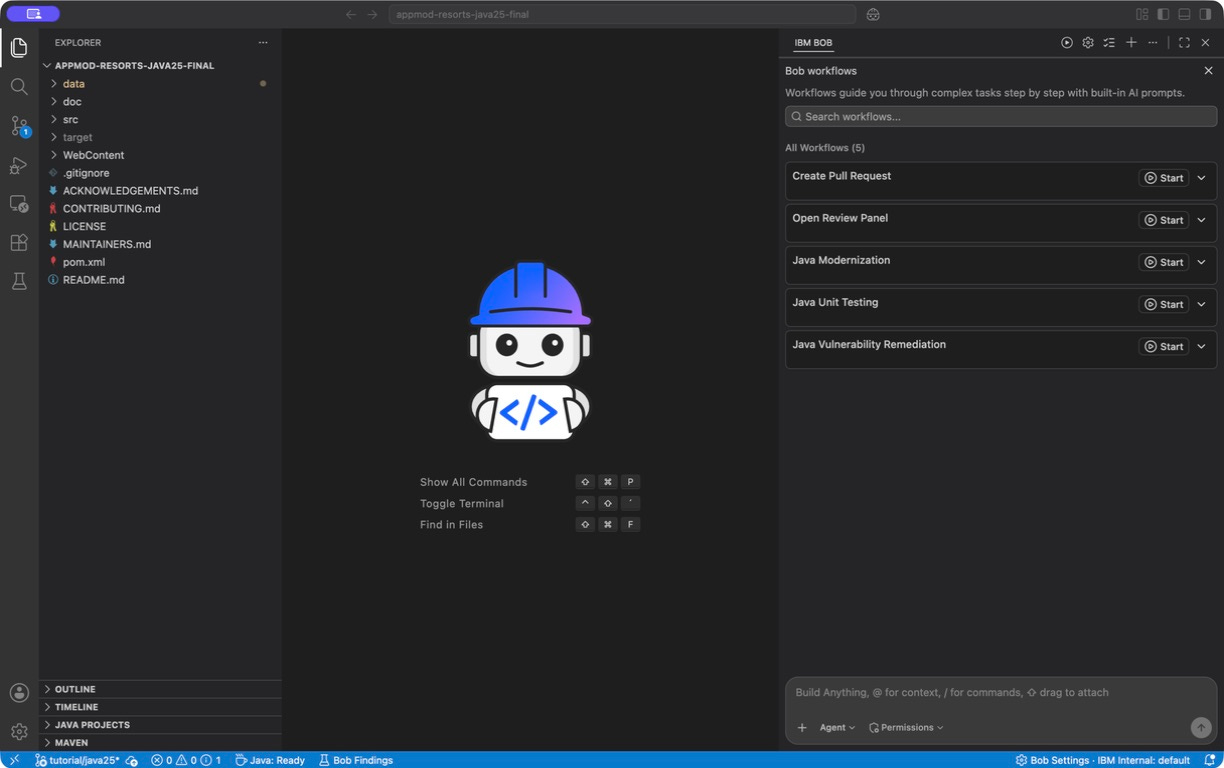
In Bob, choose Start Workflow → Java Modernization, confirm the project directory in Analyze Project, and click Continue. Bob found Maven, one module, four Java files, and 11 dependency coordinates including transitive dependencies. It also reported six dependency vulnerability findings.
Bob runs an initial build as part of the analysis. When it encountered the WAR-plugin failure, I selected No, proceed with workflow. I’d already checked that the original project built with Java 8, and I wanted the upgrade workflow to handle the plugin change. If you see a different error, take a look at that before continuing.
On Flow Selection, choose Java Upgrade, keep Enable Git Flow checked, and enter tutorial/java25 as the branch name. Bob’s Git Flow option creates a branch for the migration and records changes in local commits as the workflow progresses. That gives me checkpoints for reviewing the upgrade. If a later change breaks something, I can compare it with an earlier step and narrow down the cause.
On a team project, I would use that branch for a pull request once the upgrade passes our checks. Colleagues can review the build configuration and source changes before we merge them. For this example, I keep the branch and its commits local.
After Bob checks SDKMAN, set the three fields in Java Upgrade Configuration:
Java Distribution: Temurin (Eclipse).
Java Version: Java 25.
Jakarta EE Version: Do Not upgrade.
I chose Do Not upgrade because I wanted to keep the application’s existing servlet API. You have to select a value in that field even when you keep the current Java EE version.
Bob’s recommendation text still suggested Liberty and Jakarta migration after I made that selection. It also suggested that upgrading Java could resolve the vulnerability findings. I kept the selected scope and checked the changes afterward. In this project, Bob preserved javax.servlet, and the dependency scan continued to report the same six findings.
Click Continue to run the upgrade. Bob applied one OpenRewrite recipe, which made these changes to my POM:
-    <maven.compiler.source>1.8</maven.compiler.source>
-    <maven.compiler.target>1.8</maven.compiler.target>
+    <maven.compiler.source>25</maven.compiler.source>
+    <maven.compiler.target>25</maven.compiler.target>
...
         <artifactId>maven-war-plugin</artifactId>
-        <version>2.6</version>
+        <version>3.5.1</version>
Bob set both compiler properties to 25 and upgraded the WAR plugin to 3.5.1. It kept the source/target configuration already in the POM. I left that as generated; a switch to maven.compiler.release can be a separate change. The plugin also kept <warSourceDirectory>WebContent</warSourceDirectory> and the existing output directory.
The build passed after the recipe ran. Bob committed the POM change and the rebuilt example WAR. When it offered to fix the dependency vulnerabilities, I selected No to finish the Java upgrade first. Those dependencies still need attention, and the package provides a separate workflow for that work.
Let Bob handle the deprecated URL constructor
I noticed a deprecation message for WeatherServlet in the successful build output. Bob’s parsed summary said zero warnings, so I opened the log to see what the compiler had reported. The servlet still used the deprecated URL(String) constructor in the code that requests live weather data.
During the final compatibility step, I asked Bob to include that fix. You can accept it if Bob offers it, or give it this instruction:
Replace the deprecated URL(String) constructor in WeatherServlet with new URI(...).toURL(). Catch URISyntaxException alongside MalformedURLException through the existing ExceptionHandler. Preserve javax.servlet and the HTTP behavior. Run a Java 25 clean verify and retain local Git checkpoints on tutorial/java25. Do not remediate dependencies, push, or create a PR.
Bob added the URI and URISyntaxException imports in src/main/java/com/ibm/ta/modresorts/WeatherServlet.java. It then changed the URL construction:
obj = new URI(Objects.requireNonNull(resturl)).toURL();
con = (HttpURLConnection) obj.openConnection();
con.setRequestMethod("GET");
It also extended the catch block to handle the new exception:
} catch (URISyntaxException | MalformedURLException e1) {
    String errorMsg = "Caught URISyntaxException/MalformedURLException. Please make sure the url is correct.";
    ExceptionHandler.handleException(e1, errorMsg, logger);
}
The Java 25 URL API documentation recommends constructing a URI and converting it to a URL. URI parses the string more strictly. I wanted to check that a malformed address still went through the application’s exception handler, which wraps the cause in ServletException.
Keep the migration lesson in a test
I wanted this check to stay with the application, so I added two JUnit tests after Bob finished the upgrade. Maven will run them on future builds, including in CI. That’s a good habit during a migration: when a replacement API changes what inputs it accepts, write down the intended behavior in a test while you still have the details in front of you.
The first test sends a valid Paris request through the servlet’s live-weather method. It checks the request path, GET method, JSON content type, and response body. The second passes an API key containing a space. It checks that URI parsing rejects that input before opening a connection and that the existing exception handler preserves the URISyntaxException cause.
Both tests run entirely in process. I separated connection creation into a small method that the test overrides with a prepared HTTP response:
HttpURLConnection openWeatherConnection(URL url) throws IOException {
    return (HttpURLConnection) url.openConnection();
}
The servlet calls openWeatherConnection(obj) where it previously called obj.openConnection(). I also made getRealTimeWeatherData package-private so a test in the same package can call it. The normal servlet still opens the same HTTP connection; the test supplies its own response without an API key or access to the weather service. I’ll spare you the complete WeatherServletTest.java, you can write it yourself.
For me, this makes the next migration safer because the build can catch a return to the old input handling. The tests cover a specific regression. Security testing and dependency remediation still have their own scope.
Review the commits
Once Bob completed the workflow, I looked at the commit history and the remaining local changes:
git log --oneline --decorate -8
git diff tutorial/baseline..HEAD -- pom.xml src WebContent
git diff HEAD --stat
git status --short
Here’s the history Bob created in my copy. Your commit hashes will differ:
d9bfcf9 build: update modresorts-1.0.war binary example
a0d1bf6 build: update modresorts-1.0.war binary example
82e421d fix: replace deprecated URL(String) ctor with new URI(...).toURL() in WeatherServlet
c0a36ac build: update modresorts-1.0.war binary example
1e5e0ea build: upgrade Java compiler to 25 and maven-war-plugin to 3.5.1
The repeated WAR commits come from rebuilding the binary that this repository tracks. I also checked the POM and source diff to see the actual code changes. git diff HEAD includes staged and unstaged changes; git diff tutorial/baseline..HEAD shows what Bob has already committed.
For this upgrade, I expected the Java target, WAR-plugin version, and URL fix. If your diff includes dependency or frontend changes, review why Bob made them before moving on. Keep the regression tests in the migration branch too, so the next person gets the checks alongside the code they protect.
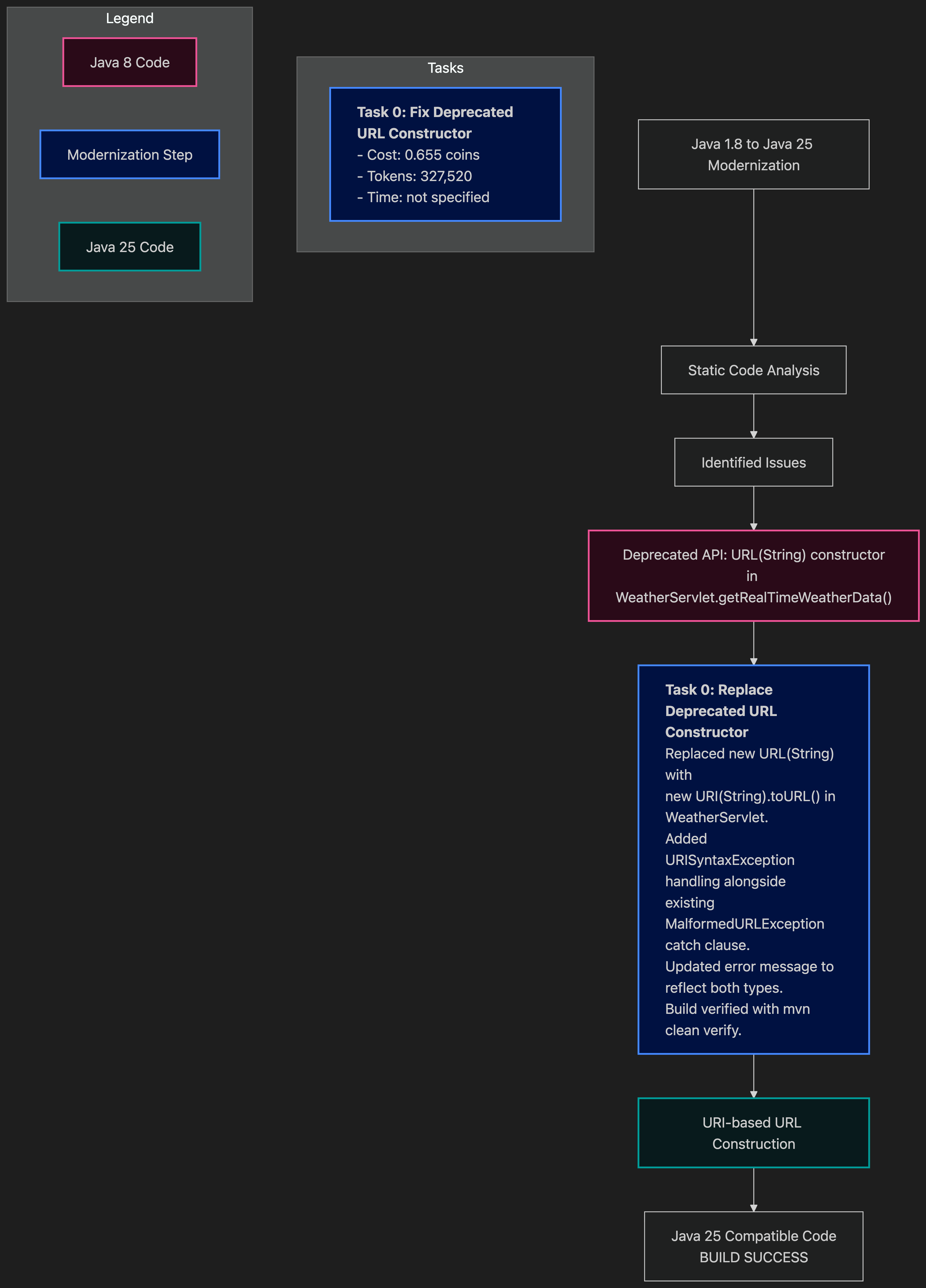
Bob also generated a Mermaid diagram at the end of the workflow:
Build and check the result
Now let’s build the upgraded application with its new tests. I check Maven’s Java version first because the JDK in a terminal can differ from the one selected in an IDE:
sdk use java 25.0.2-tem
mvn -version
mvn -B clean verify -Dmaven.compiler.showDeprecation=true
A clean build removes old compiled output, so Maven has to compile and package the current sources. The tests check the behavior we chose to preserve, and deprecation reporting helps us spot calls that still need attention. Maven should report two passing tests and BUILD SUCCESS.
For a larger application, I’d run its existing integration tests here as well, especially around code touched by the migration. A successful build tells us the project compiles, its configured tests pass, and it packages. Starting the WAR in a servlet container gives us the next check: whether the server can deploy it and the browser can still use it.
Run the application on Java 25
I used Tomcat 9 for the local deployment because it supports the Servlet 4.0 API this application uses. Once Tomcat starts, open the application in your browser and select Paris. You should see the weather panel populate.
That’s enough for a quick check that the frontend and servlet work together in the container.
Summary
This first try left me wanting to use Bob on a larger application. I could follow the upgrade, review its changes, and run the result. The combination of predefined transformations, a guided workflow, and an agent that can work through the remaining code changes looks promising for the maintenance work many Java teams already have waiting.
At a larger scale, I can see teams building a repeatable migration process around that combination. The package applies predefined recipes for changes that many applications share. The workflow puts analysis, configuration, transformation, and build checks in a consistent order. The agent can then inspect the code and failures specific to each repository, propose a repair, and check it. Engineers still decide which behavior to preserve and review the changes before accepting them.
I’d start with a small group of applications and carry what we learn into the next group. A regression test for a stricter API, for example, stays in its codebase and can inform checks in other applications with the same pattern. Over time, teams could expand their regression tests and refine their review criteria as they migrate more services with the package’s predefined workflows. I expect that could reduce repeated investigation and make modernization easier to plan across a portfolio. This small example gives me a reason to explore that further.
If you’ve got an upgrade waiting, give IBM Bob a try. With access to the Java premium package, pick an application you know, run the workflow, and keep the tests you add along the way.