


I didn’t start this project because I wanted to draw maps.
I started it because health data has been quietly piling up for years. Runs, rides, walks, the occasional ambitious New Year’s resolution. Strava has been tracking all of it for a long time, and like most people, I mostly consumed that data through whatever charts the app decided to show me that week. It was useful, but it was also a dead end. The data was there, yet it wasn’t really mine in a way a backend engineer understands.
At some point I began wondering what I could actually do with that history if I treated it like any other production dataset. What would it look like to ingest workouts into a Java backend, store routes properly instead of as blobs, compute my own metrics, and generate artifacts I could reuse elsewhere. Not dashboards, not yet another web app, but durable representations I could query, render, and evolve over time.
That curiosity led me down two parallel paths. One was learning what Strava and Apple Health actually export, how GPX files hide useful signals like heart rate in extensions, and why “just parse the file” is rarely enough. The other was rediscovering how well Quarkus fits this kind of workload. Fast startup, predictable resource usage, and just enough infrastructure glue to make PostGIS, geometry processing, and server-side rendering feel boring in the best possible way.
This tutorial is the result of that exploration. It shows how to take workout data you already have, treat it like a real backend concern, and use Quarkus to store, process, and visualize it in ways that don’t depend on a single app or UI. It’s less about fitness trends and more about owning your data, understanding its shape, and building something solid on top of it.
Getting Your Activities as GPX
Getting GPX data out of Apple Health is more fragmented than most developers expect, and that shapes the design choices in this tutorial. The built-in Health app lets you export all data in one go, but that export is a ZIP full of XML files plus GPX tracks that usually lack heart-rate information, because Apple stores most metrics separately from the route. A second option is third-party export apps, which can generate cleaner GPX files, but they still tend to drop heart rate or cadence depending on how they map Apple’s internal data model. The most practical path I found was exporting via Strava, which already merges route geometry with time-series metrics before producing GPX. That combination is what this tutorial uses, because it reflects the reality many developers face: the “best” GPX often comes from a system that already did some normalization for you.
Let’s Get Started with a new Application
Prerequisites: Java 21, Maven, and a working container runtime (Podman or Docker) so Quarkus Dev Services can start PostGIS.
Create the project with one Quarkus CLI command:
quarkus create app com.demo:health-gpx-visualizer \
  --no-code \
  --java=21 \
  --extensions="rest-jackson,hibernate-orm-panache,jdbc-postgresql,smallrye-openapi"

cd health-gpx-visualizer
Add these additional dependencies to your pom.xml. The key detail is the “special” Hibernate Spatial dependency: starting with Hibernate ORM 7, hibernate-spatial lives in org.hibernate.orm, and Quarkus won’t magically guess you need it just because you store geometry. We pin it to the Hibernate core version Quarkus 3.30.5 already brings in (7.1.11.Final) to avoid classpath roulette. (Maven Repository)
<!-- Hibernate Spatial  -->
  <dependency>
    <groupId>org.hibernate.orm</groupId>
    <artifactId>hibernate-spatial</artifactId>
    <version>7.1.11.Final</version>
  </dependency>

  <!-- GPX parsing -->
  <dependency>
    <groupId>io.jenetics</groupId>
    <artifactId>jpx</artifactId>
    <version>3.2.1</version>
  </dependency>

  <!-- GeoJSON output for the frontend -->
<dependency>
    <groupId>org.locationtech.jts.io</groupId>
    <artifactId>jts-io-common</artifactId>
    <version>1.20.0</version>
</dependency>
Hibernate Spatial bridges Java geometry types (JTS) and spatial databases (e.g., PostGIS). It maps JTS types like LineString, Point, and Polygon to database geometry columns, handles serialization/deserialization between Java objects and database formats (WKB/WKT), supports spatial queries (distance, intersection, containment) via HQL/Criteria, and manages coordinate system transformations. In this project, it lets you store a JTS LineString in a PostGIS geometry(LineString, 4326) column and read it back as a Java object without manual conversion, enabling spatial operations directly in Hibernate queries.
PostGIS Without Docker Compose: Dev Services That Boot Correctly Every Time
Dev Services will only kick in if you don’t hardcode a JDBC URL. So we won’t. Instead, we’ll tell Dev Services to start a PostGIS image and run an init script as a privileged user so the postgis extension is installed before Hibernate touches the schema.
A note on PostGIS and ARM. I could not find an official ARM image. So I fell back to a community version: imresamu/postgis:17-3.6.1-bundle0-bookworm.
Quarkus supports configuring the Dev Services database image and init scripts.
Create src/main/resources/application.properties:
# Dev Services PostgreSQL (don’t set quarkus.datasource.jdbc.url)
quarkus.datasource.db-kind=postgresql
quarkus.datasource.devservices.db-name=workout_db

# Use a PostGIS-capable image for Dev Services
quarkus.datasource.devservices.image-name=imresamu/postgis:17-3.6.1-bundle0-bookworm

# Run privileged init script (CREATE EXTENSION needs elevated rights)
quarkus.datasource.devservices.init-privileged-script-path=db/init-postgis.sql

# Hibernate
quarkus.hibernate-orm.schema-management.strategy = drop-and-create
quarkus.hibernate-orm.sql-load-script=import.sql

# Upload limits for GPX files
quarkus.http.limits.max-body-size=20M

# Server-side AWT rendering
java.awt.headless=true
Now create the privileged init script at src/main/resources/db/init-postgis.sql:
CREATE EXTENSION IF NOT EXISTS postgis;And create src/main/resources/import.sql to seed nothing but prove the pipeline is wired. Keeping it minimal avoids surprises when you switch from drop-and-create to migrations later.
-- intentionally empty: schema is handled by Hibernate in this tutorialAt this point, when you run dev mode, Quarkus will start a PostGIS container automatically and initialize PostGIS before your schema appears. That’s the difference between “works on my laptop” and “boots the same way every time”.
The Domain Model: Store The Route As Real Geometry
The trick with spatial data is that you don’t want to store “a list of points” as JSON if you ever plan to query it. If you store a LineString with SRID 4326, you can later ask PostGIS questions like “show me all workouts intersecting this bounding box” without rewriting your schema.
Create src/main/java/com/demo/workout/Workout.java:
package com.demo.workout;

import java.time.LocalDateTime;

import org.locationtech.jts.geom.LineString;

import io.quarkus.hibernate.orm.panache.PanacheEntity;
import jakarta.persistence.Column;
import jakarta.persistence.Entity;

@Entity
public class Workout extends PanacheEntity {

    public String name;

    public LocalDateTime startTime;

    public double totalDistanceMeters;

    public int avgHeartRate;

    public int maxHeartRate;

    @Column(columnDefinition = "geometry(LineString, 4326)")
    public LineString route;
}
What matters here is the column definition. We’re not letting Hibernate guess. We’re explicitly telling PostgreSQL “this is a LineString in WGS84”, which is what your GPX lat/lon really is. That single line is what unlocks spatial indexing later, even though this tutorial keeps the example narrowly scoped.
GeometryFactory As A Real Bean, Not A Static Utility
JTS objects are cheap, but wiring them as a CDI bean keeps your services clean and testable. Create src/main/java/com/demo/geo/JtsProducers.java:
package com.demo.geo;

import jakarta.enterprise.context.ApplicationScoped;
import jakarta.enterprise.inject.Produces;

import org.locationtech.jts.geom.GeometryFactory;
import org.locationtech.jts.geom.PrecisionModel;

@ApplicationScoped
public class JtsProducers {

    @Produces
    @ApplicationScoped
    public GeometryFactory geometryFactory() {
        return new GeometryFactory(new PrecisionModel(), 4326);
    }
}
We bind SRID 4326 at the factory level so every geometry we create already “knows” what coordinate system it belongs to. That prevents a whole category of subtle spatial bugs that only show up when you start calculating lengths or intersections.
The GPX Service: Parse, Extract HR, Build Geometry, Compute Distance
This is the heart of the system, and it’s where the original failure story lives. GPX “heart rate” is rarely part of the core schema. It’s usually an extension element, and Apple Health commonly uses Garmin’s gpxtpx namespace. If you treat extensions as opaque blobs, you’ll render pretty maps with silently missing data.
Create src/main/java/com/demo/gpx/GpxService.java:
package com.demo.gpx;

import java.io.InputStream;
import java.time.LocalDateTime;
import java.time.ZoneId;
import java.util.ArrayList;
import java.util.List;
import java.util.Optional;

import org.locationtech.jts.geom.Coordinate;
import org.locationtech.jts.geom.GeometryFactory;
import org.locationtech.jts.geom.LineString;
import org.locationtech.jts.simplify.DouglasPeuckerSimplifier;
import org.w3c.dom.Document;
import org.w3c.dom.NodeList;

import com.demo.workout.Workout;

import io.jenetics.jpx.GPX;
import io.jenetics.jpx.Metadata;
import io.jenetics.jpx.WayPoint;
import jakarta.enterprise.context.ApplicationScoped;
import jakarta.inject.Inject;

@ApplicationScoped
public class GpxService {

    // Common TrackPointExtension namespaces seen in the wild.
    // Apple Health exports often reference the Garmin gpxtpx schema.
    private static final String GPXTPX_V1 = "http://www.garmin.com/xmlschemas/TrackPointExtension/v1";
    private static final String GPXTPX_V2 = "http://www.garmin.com/xmlschemas/TrackPointExtension/v2";

    @Inject
    GeometryFactory geometryFactory;

    public Workout parseAndSimplify(InputStream content) throws Exception {
        GPX gpx = GPX.Reader.of(GPX.Reader.Mode.LENIENT).read(content);

        List<WayPoint> points = gpx.tracks()
                .flatMap(t -> t.segments())
                .flatMap(s -> s.points())
                .toList();

        if (points.isEmpty()) {
            throw new IllegalArgumentException("No track points found in GPX");
        }

        List<Integer> heartRates = new ArrayList<>();
        for (WayPoint p : points) {
            extractHeartRate(p).ifPresent(heartRates::add);
        }

        int avgHr = heartRates.isEmpty() ? 0
                : (int) Math.round(heartRates.stream().mapToInt(i -> i).average().orElse(0));
        int maxHr = heartRates.isEmpty() ? 0 : heartRates.stream().mapToInt(i -> i).max().orElse(0);

        Coordinate[] coords = points.stream()
                .map(p -> new Coordinate(p.getLongitude().doubleValue(), p.getLatitude().doubleValue()))
                .toArray(Coordinate[]::new);

        LineString raw = geometryFactory.createLineString(coords);

        // Roughly ~11m at the equator. Good enough for “share images” and avoids
        // overplotting.
        LineString simplified = (LineString) DouglasPeuckerSimplifier.simplify(raw, 0.0001);

        Workout w = new Workout();
        w.name = gpx.getMetadata()
                .flatMap(Metadata::getName)
                .orElse("Untitled Workout");
        w.startTime = extractStart(points).orElse(null);
        w.route = simplified;
        w.avgHeartRate = avgHr;
        w.maxHeartRate = maxHr;
        w.totalDistanceMeters = computeHaversineMeters(points);

        return w;
    }

    private Optional<LocalDateTime> extractStart(List<WayPoint> points) {
        return points.getFirst().getTime()
                .map(t -> LocalDateTime.ofInstant(t, ZoneId.systemDefault()));
    }

    private double computeHaversineMeters(List<WayPoint> points) {
        double total = 0.0;

        for (int i = 1; i < points.size(); i++) {
            WayPoint a = points.get(i - 1);
            WayPoint b = points.get(i);

            double lat1 = Math.toRadians(a.getLatitude().doubleValue());
            double lon1 = Math.toRadians(a.getLongitude().doubleValue());
            double lat2 = Math.toRadians(b.getLatitude().doubleValue());
            double lon2 = Math.toRadians(b.getLongitude().doubleValue());

            double dLat = lat2 - lat1;
            double dLon = lon2 - lon1;

            double sinLat = Math.sin(dLat / 2.0);
            double sinLon = Math.sin(dLon / 2.0);

            double h = sinLat * sinLat
                    + Math.cos(lat1) * Math.cos(lat2) * sinLon * sinLon;

            double c = 2.0 * Math.atan2(Math.sqrt(h), Math.sqrt(1.0 - h));

            // Earth radius in meters
            total += 6_371_000.0 * c;
        }

        return total;
    }

    private Optional<Integer> extractHeartRate(WayPoint p) {
        // jpx exposes extensions as Optional<Document>
        return p.getExtensions()
                .map(doc -> extractHrFromDocument(doc))
                .orElse(Optional.empty());
    }

    private Optional<Integer> extractHrFromDocument(Document doc) {
        // First try known Garmin TrackPointExtension namespaces.
        Optional<Integer> v2 = firstInt(doc.getElementsByTagNameNS(GPXTPX_V2, "hr"));
        if (v2.isPresent()) {
            return v2;
        }

        Optional<Integer> v1 = firstInt(doc.getElementsByTagNameNS(GPXTPX_V1, "hr"));
        if (v1.isPresent()) {
            return v1;
        }

        // Last-resort fallback: some exporters mess up namespaces or strip prefixes.
        // This keeps the tutorial resilient without pretending GPX is always clean.
        NodeList anyHr = doc.getElementsByTagNameNS("*", "hr");
        return firstInt(anyHr);
    }

    private Optional<Integer> firstInt(NodeList nodes) {
        if (nodes == null || nodes.getLength() == 0) {
            return Optional.empty();
        }
        String text = nodes.item(0).getTextContent();
        if (text == null) {
            return Optional.empty();
        }
        String trimmed = text.trim();
        if (trimmed.isEmpty()) {
            return Optional.empty();
        }
        try {
            return Optional.of(Integer.parseInt(trimmed));
        } catch (NumberFormatException e) {
            return Optional.empty();
        }
    }
}
This version doesn’t “hand-wave” the extension parsing. It makes the namespace problem explicit, tries the common Garmin schemas first, then falls back to a wildcard lookup for exporters that lose namespace fidelity. That’s exactly the kind of defensive parsing you need when the input format is “standard” in theory and inconsistent in practice. (forum.routeconverter.com)
The Renderer: A Server-Side PNG That Doesn’t Need A Frontend Build
Now we generate the shareable “sparkline” image on the server. In production, this is the piece that keeps your UI thin, makes social previews easy, and avoids pushing thousands of points to browsers that don’t need them.
Create src/main/java/com/demo/render/TrackImageService.java:
package com.demo.render;

import java.awt.BasicStroke;
import java.awt.Color;
import java.awt.Graphics2D;
import java.awt.RenderingHints;
import java.awt.image.BufferedImage;
import java.io.ByteArrayOutputStream;
import java.util.List;

import javax.imageio.ImageIO;

import jakarta.enterprise.context.ApplicationScoped;

@ApplicationScoped
public class TrackImageService {

    public record Point(double lat, double lon) {
    }

    public byte[] renderTrackToPng(List<Point> points) throws Exception {
        if (points == null || points.size() < 2) {
            throw new IllegalArgumentException("Need at least 2 points to render a track");
        }

        int width = 900;
        int height = 900;
        int padding = 60;

        double minLat = Double.POSITIVE_INFINITY;
        double maxLat = Double.NEGATIVE_INFINITY;
        double minLon = Double.POSITIVE_INFINITY;
        double maxLon = Double.NEGATIVE_INFINITY;

        for (Point p : points) {
            minLat = Math.min(minLat, p.lat());
            maxLat = Math.max(maxLat, p.lat());
            minLon = Math.min(minLon, p.lon());
            maxLon = Math.max(maxLon, p.lon());
        }

        double latSpan = Math.max(1e-12, maxLat - minLat);
        double lonSpan = Math.max(1e-12, maxLon - minLon);

        // Calculate scale to fit track with padding, maintaining aspect ratio
        double scaleX = (width - 2.0 * padding) / lonSpan;
        double scaleY = (height - 2.0 * padding) / latSpan;
        double scale = Math.min(scaleX, scaleY);

        // Calculate actual dimensions of scaled track
        double scaledWidth = lonSpan * scale;
        double scaledHeight = latSpan * scale;

        // Calculate offsets to center the track
        double offsetX = (width - scaledWidth) / 2.0;
        double offsetY = (height - scaledHeight) / 2.0;

        BufferedImage image = new BufferedImage(width, height, BufferedImage.TYPE_INT_RGB);
        Graphics2D g = image.createGraphics();

        g.setRenderingHint(RenderingHints.KEY_ANTIALIASING, RenderingHints.VALUE_ANTIALIAS_ON);
        g.setRenderingHint(RenderingHints.KEY_STROKE_CONTROL, RenderingHints.VALUE_STROKE_PURE);

        // Fill background with light gray
        g.setColor(new Color(245, 245, 245));
        g.fillRect(0, 0, width, height);

        // Set track color to blue
        g.setColor(new Color(59, 130, 246)); // Blue-500
        g.setStroke(new BasicStroke(6.0f, BasicStroke.CAP_ROUND, BasicStroke.JOIN_ROUND));

        // Draw track polyline
        for (int i = 1; i < points.size(); i++) {
            var a = points.get(i - 1);
            var b = points.get(i);

            int x1 = toX(a.lon(), minLon, scale, offsetX);
            int y1 = toY(a.lat(), maxLat, scale, offsetY);
            int x2 = toX(b.lon(), minLon, scale, offsetX);
            int y2 = toY(b.lat(), maxLat, scale, offsetY);

            g.drawLine(x1, y1, x2, y2);
        }

        // Start/End markers
        // Start marker in green
        g.setColor(new Color(34, 197, 94)); // Green-500
        drawDot(g, points.getFirst(), minLon, maxLat, scale, offsetX, offsetY, 16);
        // End marker in red
        g.setColor(new Color(239, 68, 68)); // Red-500
        drawDot(g, points.getLast(), minLon, maxLat, scale, offsetX, offsetY, 16);

        g.dispose();

        ByteArrayOutputStream baos = new ByteArrayOutputStream();
        ImageIO.write(image, "png", baos);
        return baos.toByteArray();
    }

    private int toX(double lon, double minLon, double scale, double offsetX) {
        return (int) Math.round(offsetX + (lon - minLon) * scale);
    }

    private int toY(double lat, double maxLat, double scale, double offsetY) {
        return (int) Math.round(offsetY + (maxLat - lat) * scale);
    }

    private void drawDot(Graphics2D g, Point p, double minLon, double maxLat, double scale, double offsetX,
            double offsetY, int size) {
        int x = toX(p.lon(), minLon, scale, offsetX);
        int y = toY(p.lat(), maxLat, scale, offsetY);
        int r = size / 2;
        g.fillOval(x - r, y - r, size, size);
    }
}
This renderer is intentionally boring in the right way. It has deterministic output, no runtime dependencies, and no “maybe it works” GPU path. When you deploy it, you can treat the PNG endpoint like any other stable API contract.
API DTOs: Don’t Serialize JTS, Serialize GeoJSON
Serializing JTS geometry directly is where a lot of projects drift into framework-specific Jackson modules and unstable JSON shapes. We avoid that by converting the stored LineString to a GeoJSON string for the browser.
Create src/main/java/com/demo/workout/WorkoutDto.java:
package com.demo.workout;

import java.time.LocalDateTime;

public record WorkoutDto(
        Long id,
        String name,
        LocalDateTime startTime,
        double totalDistanceMeters,
        int avgHeartRate,
        int maxHeartRate,
        String routeGeoJson) {
}
Create src/main/java/com/demo/workout/WorkoutMapper.java:
package com.demo.workout;

import org.locationtech.jts.io.geojson.GeoJsonWriter;

import jakarta.enterprise.context.ApplicationScoped;

@ApplicationScoped
public class WorkoutMapper {

    private final GeoJsonWriter writer = new GeoJsonWriter();

    public WorkoutDto toDto(Workout w) {
        String geoJson = (w.route == null) ? null : writer.write(w.route);
        return new WorkoutDto(
                w.id,
                w.name,
                w.startTime,
                w.totalDistanceMeters,
                w.avgHeartRate,
                w.maxHeartRate,
                geoJson);
    }
}
This is one of those small “production” decisions that saves you later. Your API becomes portable, your frontend becomes dumb in the best way, and you don’t accidentally couple your JSON format to a geometry library.
The Resource: Transaction Boundaries Where They Belong
The upload endpoint is a state change: parse, compute, persist. That’s one transaction. The image endpoint is read-only: no transaction required.
Create src/main/java/com/demo/workout/WorkoutResource.java:
package com.demo.workout;

import java.io.InputStream;
import java.util.Arrays;

import org.jboss.resteasy.reactive.RestForm;
import org.jboss.resteasy.reactive.multipart.FileUpload;

import com.demo.gpx.GpxService;
import com.demo.render.TrackImageService;
import com.demo.render.TrackImageService.Point;

import jakarta.inject.Inject;
import jakarta.transaction.Transactional;
import jakarta.ws.rs.Consumes;
import jakarta.ws.rs.GET;
import jakarta.ws.rs.NotFoundException;
import jakarta.ws.rs.POST;
import jakarta.ws.rs.Path;
import jakarta.ws.rs.PathParam;
import jakarta.ws.rs.Produces;
import jakarta.ws.rs.core.MediaType;
import jakarta.ws.rs.core.Response;

@Path("/workouts")
public class WorkoutResource {

    @Inject
    GpxService gpxService;

    @Inject
    TrackImageService trackImageService;

    @Inject
    WorkoutMapper mapper;

    @POST
    @Consumes(MediaType.MULTIPART_FORM_DATA)
    @Produces(MediaType.APPLICATION_JSON)
    @Transactional
    public WorkoutDto upload(@RestForm("file") FileUpload file) throws Exception {
        try (InputStream in = file.uploadedFile().toFile().toURI().toURL().openStream()) {
            Workout workout = gpxService.parseAndSimplify(in);
            workout.persist();
            return mapper.toDto(workout);
        }
    }

    @GET
    @Path("/{id}")
    @Produces(MediaType.APPLICATION_JSON)
    public WorkoutDto get(@PathParam("id") long id) {
        Workout workout = Workout.findById(id);
        if (workout == null) {
            throw new NotFoundException();
        }
        return mapper.toDto(workout);
    }

    @GET
    @Path("/{id}/image")
    @Produces("image/png")
    @Transactional
    public Response image(@PathParam("id") long id) throws Exception {
        Workout workout = Workout.findById(id);
        if (workout == null) {
            return Response.status(404).build();
        }

        if (workout.route == null) {
            return Response.status(404).entity("Workout route not found").build();
        }

        var coords = workout.route.getCoordinates();
        if (coords == null || coords.length < 2) {
            return Response.status(400).entity("Insufficient coordinates in route").build();
        }

        var points = Arrays.stream(coords)
                .map(c -> new Point(c.y, c.x)) // JTS: x=lon, y=lat
                .toList();

        byte[] png = trackImageService.renderTrackToPng(points);

        return Response.ok(png)
                .header("Content-Disposition", "inline; filename=\"track.png\"")
                .build();
    }
}
We’re keeping the transaction exactly where it belongs: the write path. If you later add antivirus scanning, metadata extraction, or a queue for async processing, this structure gives you clean seams to do it without “transactional soup”.
A Frontend That’s Just A File: Leaflet + Your GeoJSON
Create src/main/resources/META-INF/resources/index.html:
<!DOCTYPE html>
<html>

<head>
    <meta charset="utf-8" />
    <title>Apple Health GPX Visualizer</title>
    <script src="https://cdn.tailwindcss.com"></script>
    <link rel="stylesheet" href="https://unpkg.com/leaflet@1.9.4/dist/leaflet.css" />
    <script src="https://unpkg.com/leaflet@1.9.4/dist/leaflet.js"></script>
</head>

<body class="bg-gray-100 p-8">
    <div class="max-w-5xl mx-auto space-y-6">

        <div class="bg-white p-6 rounded-lg shadow space-y-3">
            <h2 class="text-xl font-bold">Upload GPX</h2>
            <input type="file" id="gpxInput" class="block" />
            <button onclick="upload()" class="bg-blue-600 text-white px-4 py-2 rounded">Process Workout</button>
            <p class="text-sm text-gray-600">Tip: Export your workout from Strava if you want HR data too.</p>
        </div>

        <div id="result" class="hidden grid grid-cols-2 gap-6">
            <div class="bg-white p-4 rounded-lg shadow">
                <h3 class="font-bold mb-2">Interactive Map</h3>
                <div id="map" class="h-80 w-full rounded"></div>
            </div>

            <div class="bg-white p-4 rounded-lg shadow text-center space-y-3">
                <h3 class="font-bold">Server Rendered Image</h3>
                <img id="sparkline" class="h-80 mx-auto border rounded" />
                <div id="stats" class="text-sm text-gray-600"></div>
            </div>
        </div>

    </div>

    <script>
        let map;
        let layer;

        async function upload() {
            const file = document.getElementById('gpxInput').files[0];
            if (!file) return;

            const formData = new FormData();
            formData.append('file', file);

            const res = await fetch('/workouts', { method: 'POST', body: formData });
            if (!res.ok) {
                alert('Upload failed: ' + res.status);
                return;
            }
            const workout = await res.json();
            await showResults(workout);
        }

        async function showResults(workout) {
            document.getElementById('result').classList.remove('hidden');

            document.getElementById('sparkline').src = `/workouts/${workout.id}/image`;
            document.getElementById('stats').innerText =
                `Dist: ${(workout.totalDistanceMeters / 1000).toFixed(2)} km | Avg HR: ${workout.avgHeartRate} bpm | Max HR: ${workout.maxHeartRate} bpm`;

            if (!map) {
                map = L.map('map');
                L.tileLayer('https://{s}.tile.openstreetmap.org/{z}/{x}/{y}.png').addTo(map);
            }

            if (layer) {
                layer.remove();
                layer = null;
            }

            if (workout.routeGeoJson) {
                const geo = JSON.parse(workout.routeGeoJson);
                layer = L.geoJSON(geo).addTo(map);
                map.fitBounds(layer.getBounds());
            }
        }
    </script>
</body>

</html>
This stays honest: no build step, no node toolchain, no SPA framework hiding the behavior. You can ship it, and when it breaks, you can debug it with your browser dev tools in minutes.
Production Hardening: The Stuff That Saves You Later
Once it works, the real question becomes what happens when the input isn’t polite. GPX exports vary, namespaces go missing, and extensions can be half-broken XML that still “looks fine” in a text editor. That’s why the heart-rate extraction was written as a layered strategy instead of a single XPath that explodes on the first weird file.
On the database side, storing the route as a LineString is the decision that scales. Today you’re rendering images. Next month you’ll want “show me my runs near this park” or “cluster workouts by city”. With PostGIS, those become indexed queries, not application-level loops. The tradeoff is that you must treat schema boot as part of your runtime contract, which is why we used Dev Services with a privileged init script instead of hoping the container magically has PostGIS enabled.
On the rendering side, AWT in server code is reliable, but it’s also unforgiving when you run it in stripped-down containers. Setting quarkus.native.headless=true makes the behavior explicit, and keeping the renderer deterministic keeps it testable. If you later parallelize image generation, you’ll want to keep image creation per request like we did here, because sharing mutable graphics objects across threads is where “random artifacts” are born.
Verification: Real Upload, Real Output
Start the app:
quarkus devUpload a GPX file (I have a test-file in test/resources/!):
curl -i -X POST "http://localhost:8080/workouts" \
  -H "Accept: application/json" \
  -F "file=@/path/to/your-workout.gpx;type=application/gpx+xml"
Expected shape (IDs and numbers will differ, but heart rate should not be mysteriously zero if the file contains gpxtpx:hr):
{
  "id": 1,
  "name": "Untitled Workout",
  "startTime": "2025-12-31T10:12:34",
  "totalDistanceMeters": 5243.18,
  "avgHeartRate": 142,
  "maxHeartRate": 168,
  "routeGeoJson": "{ \"type\": \"LineString\", \"coordinates\": [ ... ] }"
}
Fetch the image:
curl -I "http://localhost:8080/workouts/1/image"Expected headers include:
HTTP/1.1 200 OK
Content-Type: image/png
Content-Disposition: inline; filename="track.png"
If you want a fast manual UI check, open http://localhost:8080/
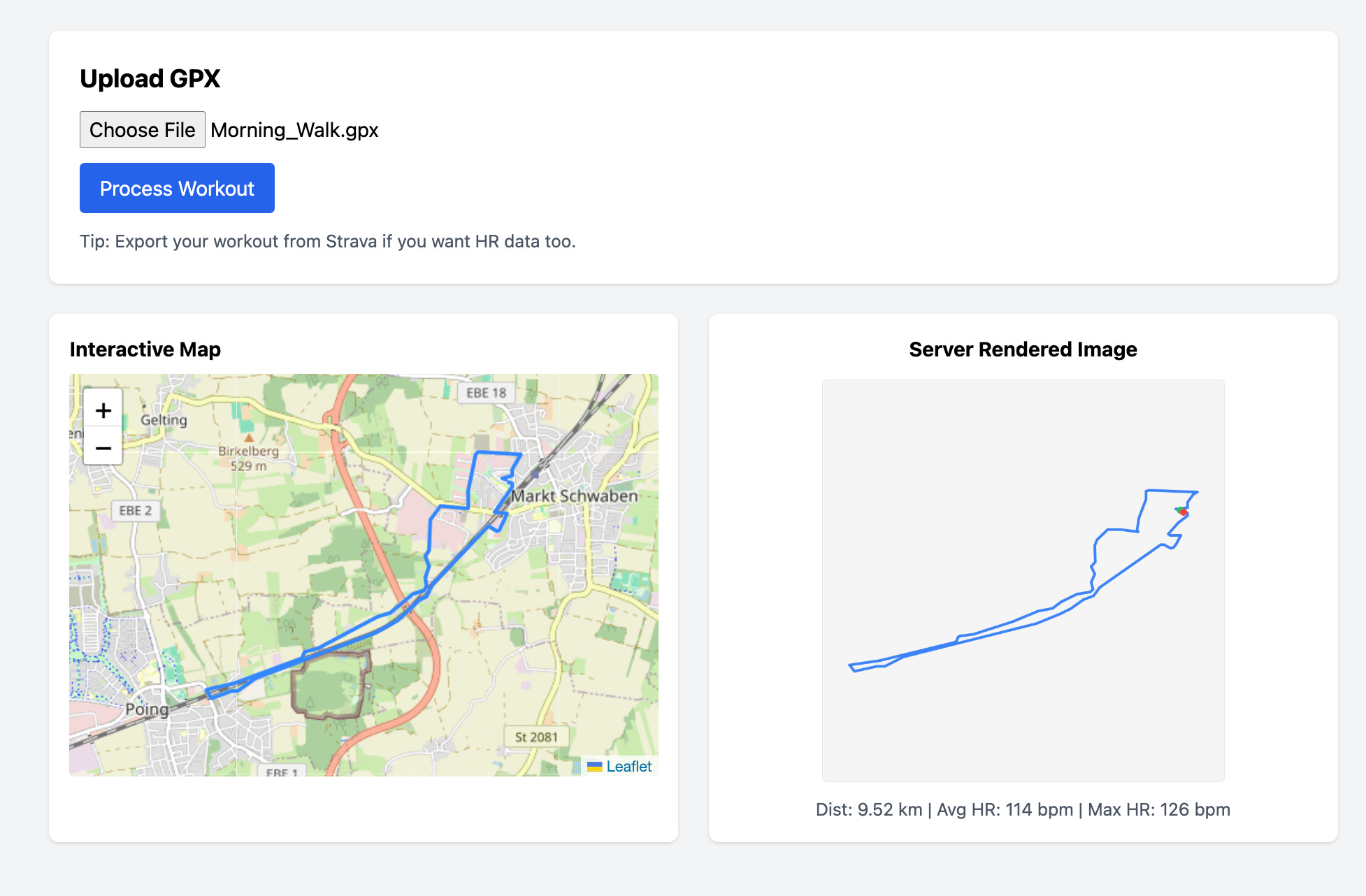
and upload the same file. You should see the Leaflet route and the server-rendered PNG side by side.
A Test That Proves Heart Rate Extraction Works
Create src/test/resources/sample-with-hr.gpx with a minimal GPX that includes gpxtpx:hr:
<?xml version="1.0" encoding="UTF-8"?>
<gpx version="1.1"
     creator="test"
     xmlns="http://www.topografix.com/GPX/1/1"
     xmlns:gpxtpx="http://www.garmin.com/xmlschemas/TrackPointExtension/v2">
  <trk>
    <name>HR Test</name>
    <trkseg>
      <trkpt lat="52.5200" lon="13.4050">
        <time>2025-12-31T10:00:00Z</time>
        <extensions>
          <gpxtpx:TrackPointExtension>
            <gpxtpx:hr>140</gpxtpx:hr>
          </gpxtpx:TrackPointExtension>
        </extensions>
      </trkpt>
      <trkpt lat="52.5201" lon="13.4051">
        <time>2025-12-31T10:00:10Z</time>
        <extensions>
          <gpxtpx:TrackPointExtension>
            <gpxtpx:hr>160</gpxtpx:hr>
          </gpxtpx:TrackPointExtension>
        </extensions>
      </trkpt>
    </trkseg>
  </trk>
</gpx>
Now create src/test/java/com/demo/workout/WorkoutResourceTest.java:
package com.demo.workout;

import io.quarkus.test.junit.QuarkusTest;
import org.junit.jupiter.api.Test;

import java.io.File;

import static io.restassured.RestAssured.given;
import static org.hamcrest.Matchers.*;

@QuarkusTest
public class WorkoutResourceTest {

    @Test
    void uploadExtractsHeartRate() {
        File gpx = new File("src/test/resources/sample-with-hr.gpx");

        given()
                .multiPart("file", gpx, "application/gpx+xml")
                .when()
                .post("/workouts")
                .then()
                .statusCode(200)
                .body("name", anyOf(equalTo("HR Test"), equalTo("Untitled Workout")))
                .body("avgHeartRate", is(150))
                .body("maxHeartRate", is(160))
                .body("routeGeoJson", notNullValue());
    }
}
Conclusion
You now have a Quarkus service that boots with PostGIS via Dev Services, stores routes as real spatial geometry, renders a deterministic PNG, and extracts heart rate from GPX extensions instead of pretending they don’t exist.
The map was never the hard part, the data fidelity was.