


Most internal business applications do not need a frontend framework.
They need to be fast.
They need to be boring.
They need to be maintainable five years from now.
In this tutorial, we build a Customer Dashboard using Quarkus and Qute.
No React. No build pipeline. No client-side state management.
Instead, we rely on server-rendered HTML and native browser features that are already stable, accessible, and well-supported.
The result is a UI that loads instantly, behaves correctly by default, and stays understandable for Java developers.
What we will build
A simple customer dashboard with:
A responsive application layout
A scrollable table with sticky headers
Expandable rows using native accordions
A modal dialog for data entry
Built-in browser validation
All rendered on the server using Qute.
Prerequisites
Java 17 or newer
Maven or Gradle
An IDE
No database is required for this tutorial. We use mock data to focus on UI structure and patterns.
Create the Quarkus project
Generate a new Quarkus project with Qute support. Or grab the code from my Github repository.
mvn io.quarkus.platform:quarkus-maven-plugin:create \
    -DprojectGroupId=com.acme \
    -DprojectArtifactId=lean-dashboard \
    -Dextensions="rest-qute"
cd lean-dashboard
This gives us:
REST for HTTP
Qute for server-side templating
A minimal dependency set
No frontend tooling. No Node.js. No npm.
Define the data model
We start with a simple immutable data structure.
package com.acme.model;

public record Customer(
        String id,
        String name,
        String email,
        String status,
        String recentNote) {
}
Why a record?
Immutable by default
Ideal for read-only views
Maps cleanly to templates
No accidental state changes
This is exactly what server-rendered UIs want.
Create the controller
This resource acts as a classic MVC controller.
package com.acme.api;

import java.util.List;

import com.acme.model.Customer;

import io.quarkus.qute.Template;
import io.quarkus.qute.TemplateInstance;
import jakarta.inject.Inject;
import jakarta.ws.rs.GET;
import jakarta.ws.rs.Path;
import jakarta.ws.rs.Produces;
import jakarta.ws.rs.core.MediaType;

@Path("/")
public class DashboardResource {

    @Inject
    Template dashboard;

    @GET
    @Produces(MediaType.TEXT_HTML)
    public TemplateInstance get() {

        List<Customer> customers = List.of(
                new Customer("C001", "Acme Corp", "contact@acme.com", "Active",
                        "Discussed Q4 contract renewal."),
                new Customer("C002", "Globex", "info@globex.com", "Pending",
                        "Waiting on procurement approval."),
                new Customer("C003", "Soylent Corp", "sales@soylent.com", "Inactive",
                        "Contract expired last month."));

        return dashboard.data("customers", customers);
    }
}
Key points:
The controller returns HTML, not JSON
Qute templates are injected by name
Data is passed explicitly to the template
No magic. No reflection tricks
Java developers immediately see the flow.
The base layout template
We define a shared layout using Qute template inheritance. Create src/main/resources/templates/base.html
<!DOCTYPE html>
<html lang="en">
<head>
    <meta charset="UTF-8">
    <meta name="viewport" content="width=device-width, initial-scale=1.0">
    <title>Lean Business App</title>

    <style>
        body {
            margin: 0;
            font-family: system-ui, sans-serif;
            display: grid;
            height: 100vh;
            grid-template-columns: 250px 1fr;
            grid-template-rows: 60px 1fr;
            grid-template-areas:
                "sidebar header"
                "sidebar content";
        }

        header {
            grid-area: header;
            background: #fff;
            border-bottom: 1px solid #ddd;
            display: flex;
            align-items: center;
            padding: 0 2rem;
            font-weight: bold;
        }

        aside {
            grid-area: sidebar;
            background: #1a1a1a;
            color: #fff;
            padding: 1rem;
        }

        main {
            grid-area: content;
            padding: 2rem;
            overflow-y: auto;
            background: #f4f4f9;
        }

        .data-table {
            width: 100%;
            border-collapse: collapse;
            background: white;
        }

        .data-table th {
            position: sticky;
            top: 0;
            background: #eee;
            padding: 1rem;
            text-align: left;
        }

        .data-table td {
            padding: 1rem;
            border-bottom: 1px solid #eee;
        }

        details {
            border: 1px solid #aaa;
            border-radius: 4px;
            padding: 0.5em;
        }

        dialog {
            border: none;
            border-radius: 8px;
            padding: 2rem;
            max-width: 500px;
        }

        dialog::backdrop {
            background: rgba(0,0,0,0.5);
        }
    </style>
</head>
<body>

<header>
    Customer Success Dashboard
</header>

<aside>
    <nav>
        <p>Dashboard</p>
        <p>Reports</p>
        <p>Settings</p>
    </nav>
</aside>

<main>
    {#insert body /}
</main>

</body>
</html>
Why CSS Grid here
CSS Grid replaces JavaScript-driven layout logic.
Fixed sidebar
Fixed header
Scrollable content area
The browser handles resizing and alignment.
No layout calculations. No listeners. No bugs.
Understanding the HTML patterns
This dashboard uses native UI primitives.
Sticky table headers
.data-table th {
    position: sticky;
    top: 0;
}
This keeps headers visible while scrolling.
No JavaScript
No scroll listeners
Works inside scroll containers
Fully accessible
Accordion with <details> and <summary>
<details>
    <summary>View Note</summary>
    <p>Some text</p>
</details>
Why this is powerful:
Built-in open/close behavior
Keyboard accessible
Screen reader friendly
State preserved automatically
JavaScript accordions often reimplement this badly.
Modal dialogs with <dialog>
<dialog id="addCustomerModal">
    <form method="dialog">
        ...
    </form>
</dialog>
The browser provides:
Focus trapping
ESC to close
Backdrop handling
Accessibility defaults
This is what frontend frameworks wrap anyway.
The dashboard page
Create src/main/resources/templates/dashboad.html
{#include base.html}

{#body}

<h1>Customer Accounts</h1>

<button onclick="document.getElementById('addCustomerModal').showModal()">
    + Add Customer
</button>

<table class="data-table">
    <thead>
        <tr>
            <th>ID</th>
            <th>Name</th>
            <th>Contact</th>
            <th>Status</th>
            <th>Notes</th>
        </tr>
    </thead>
    <tbody>
        {#for customer in customers}
        <tr>
            <td>{customer.id}</td>
            <td>{customer.name}</td>
            <td>
                <a href="mailto:{customer.email}">
                    {customer.email}
                </a>
            </td>
            <td>{customer.status}</td>
            <td>
                <details>
                    <summary>View Note</summary>
                    <p>{customer.recentNote}</p>
                </details>
            </td>
        </tr>
        {/for}
    </tbody>
</table>

<dialog id="addCustomerModal">
    <form method="dialog">
        <h2>New Customer</h2>

        <label>
            Company Name
            <input type="text" required>
        </label>

        <label>
            Email
            <input type="email" required>
        </label>

        <button value="cancel">Cancel</button>
        <button value="default">Save</button>
    </form>
</dialog>

{/body}

{/include}
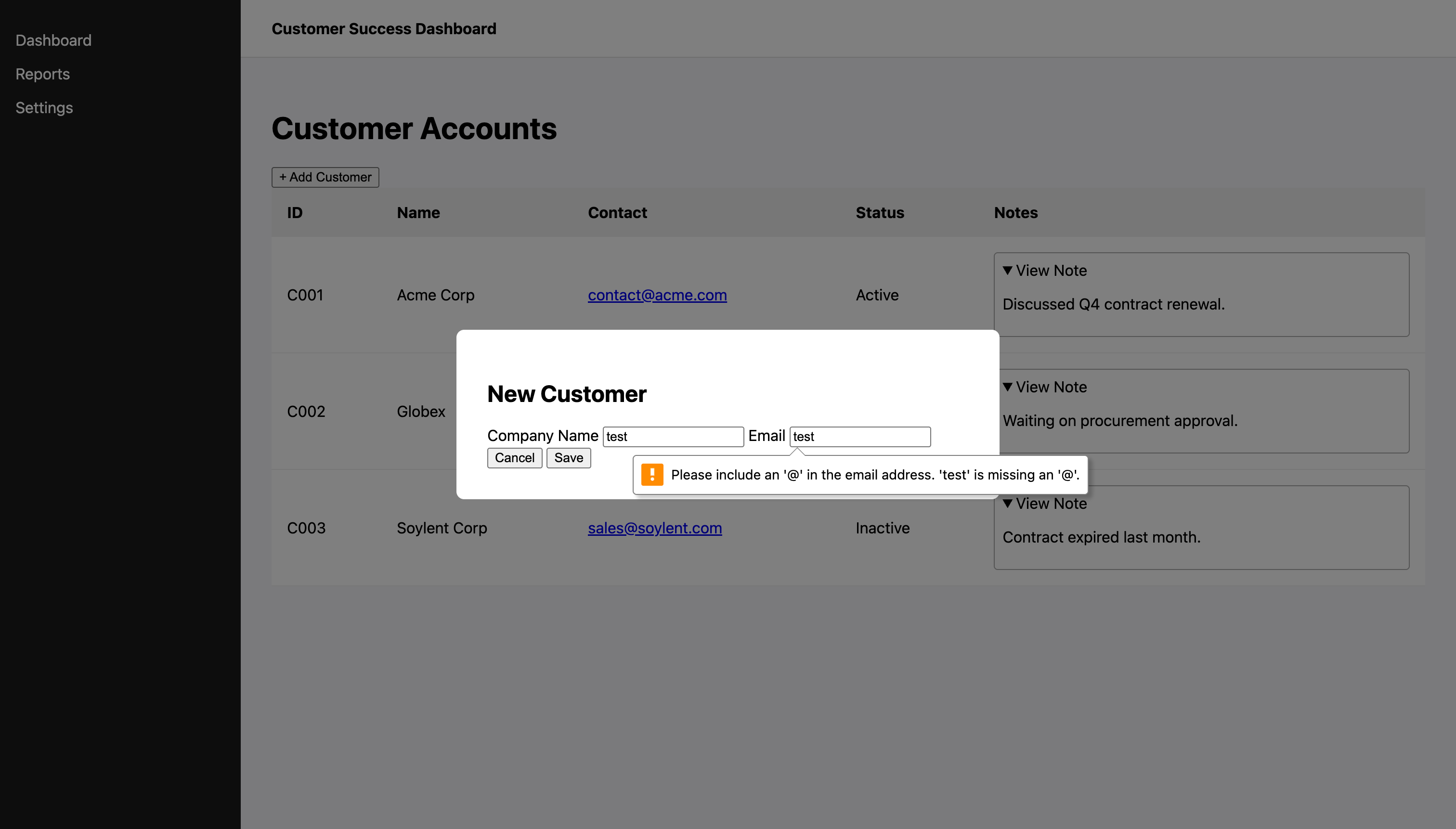
Built-in validation
required and type="email" trigger browser validation.
No JavaScript needed.
No validation library required.
Run the application
mvn quarkus:devOpen http://localhost:8080
Observe:
Instant page load
Sticky headers while scrolling
Accordion rows expanding smoothly
Modal dialog with proper focus handling
Native form validation messages
Server-rendered HTML is not old-fashioned.
It is reliable.
This approach gives you:
No frontend build failures
No hydration issues
No dependency churn
Predictable performance
Easy onboarding for Java teams
Frameworks are tools.
Browsers are platforms.
Sometimes HTML is just enough
Quarkus and Qute are enough for serious business UIs
Native HTML elements replace large JavaScript libraries
CSS Grid and modern HTML solve real layout problems
Server-side rendering improves stability and clarity
Write boring UI code.
Ship reliable business systems.
More Qute tutorials for you to look at:
Dynamic UI Composition with Quarkus Qute: The Future of Java Frontends

Dynamic user interfaces are essential in enterprise systems where every user might see something different. Admins get control panels, managers get reports, and employees get tasks. Traditionally, Qute templates handled includes statically. But starting with
Quarkus vs Spring Boot: A Modern Java Architect’s Guide to Qute and Thymeleaf

Modern Java applications live under new constraints. Container density, startup latency, and memory efficiency now matter as much as developer productivity. For teams migrating from Spring Boot to Quarkus, the transition involves more than swapping annotations. It is a shift in the architectural philosophy. One of the areas where this shift is most visi…
Server-rendered apps still make a lot of sense.
This article came just in time for someone who just failed in a quarkus - powerbi integration and is looking for alternatives. I was looking to play around with the DashBuilder extension. But will definitely try this out too.