


Most developers think running an LLM locally is about downloading a model and starting a server. If it responds on localhost, the problem looks solved. You wire your Java application to an OpenAI-compatible endpoint, and you move on.
But that mental model breaks fast. Different machines need different runtimes. GPU acceleration behaves differently on macOS and Linux. Model formats change. Dependencies drift. And suddenly your “simple local model” works only on one laptop. In a team, this becomes chaos.
The second problem shows up in integration. Your Java service expects a stable API. If your local model server changes ports, model names, or startup flags, your Quarkus application fails at boot. In production-like environments, this means your service does not even start.
The third problem is operational. Under load, LLM inference is slow compared to typical REST calls. If you block threads, you exhaust your HTTP worker pool. Your service does not degrade gracefully. It just stops responding.
So we need three things:
A reproducible way to run models in containers
A stable, OpenAI-compatible API
A Quarkus integration that behaves correctly under stress
That’s what we’ll build in this tutorial using RamaLama, Podman, Quarkus, and LangChain4j.
Prerequisites
You need a working local development setup.
Java 21 installed
Maven 3.9+
Podman 5+ (Desktop on macOS recommended)
Project Setup
First, install RamaLama:
curl -fsSL https://ramalama.ai/install.sh | bashVerify the installation:
ramalama versionYou should see something like:
ramalama version 0.17.1Now make sure Podman works:
podman versionIf Podman is not running on macOS, start the Podman machine or use Podman Desktop.
Now create the Quarkus project:
quarkus create app com.example:ramalama-quarkus-demo \
  --extension=quarkus-rest,quarkus-langchain4j-openai
cd ramalama-quarkus-demo
Extensions explained:
quarkus-rest— exposes REST endpointsquarkus-langchain4j-openai— integrates LangChain4j with OpenAI-compatible APIs
We use the OpenAI extension because RamaLama exposes an OpenAI-compatible API on port 8080.
Running a Model with RamaLama
Let’s run a small model first. We use tinyllama.
ramalama run tinyllamaThis command:
Pulls the optimized container image
Starts the
llama-serverinside a containerExposes an OpenAI-compatible API and a chat interface on port
8080
It is running, when the little seal shows up in your terminal.
🦭 >If you open another terminal and podman ps, You should see something like
48f15bd1fb9b quay.io/ramalama/ramalama:latest llama-server --ho... Less than a second ago Up 1 second 0.0.0.0:8080->8080/tcp ramalama-QU8Wk64rY0Now you have a local, containerized LLM running on:
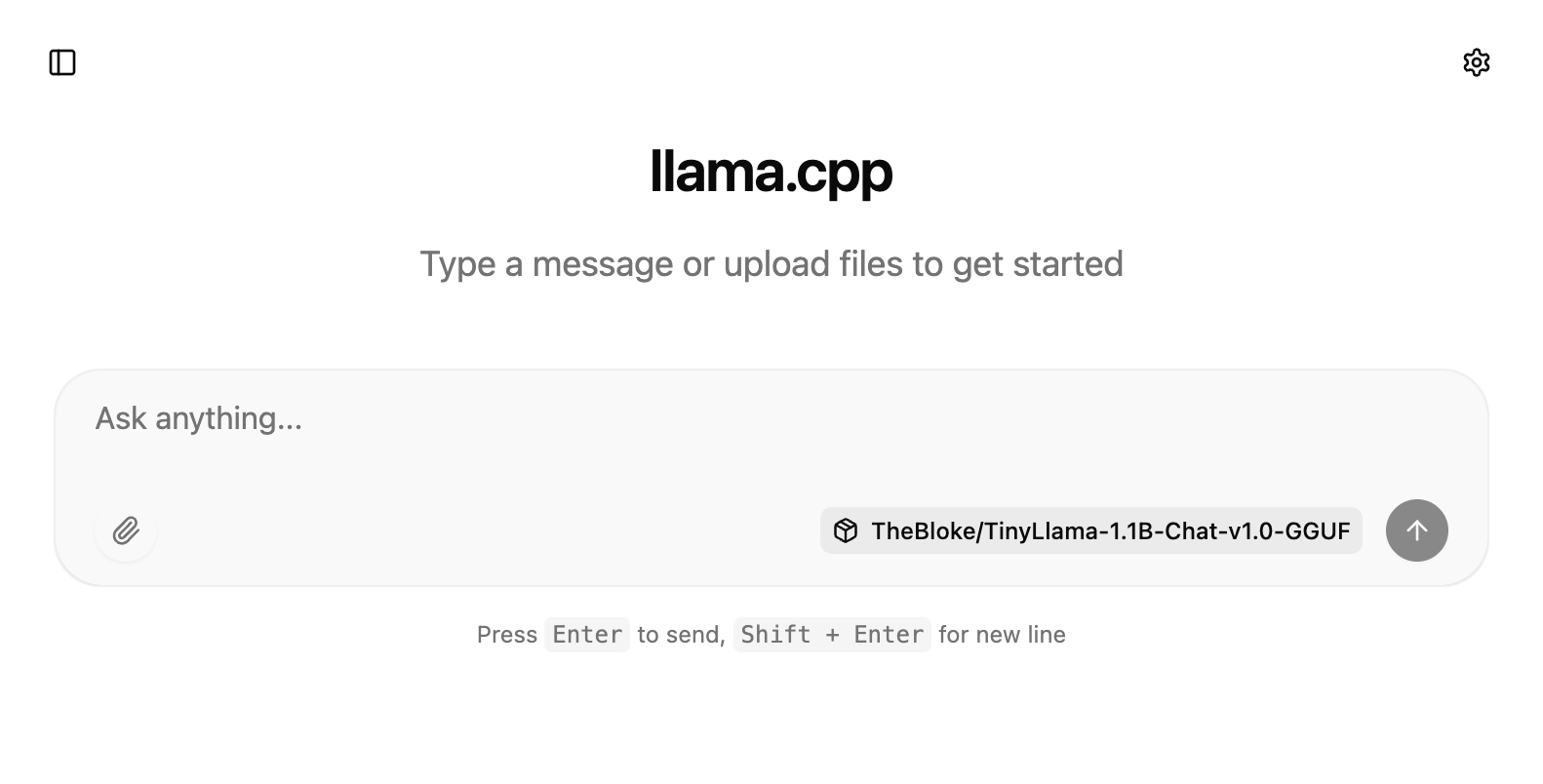
http://localhost:8080/v1This is the endpoint Quarkus will call. You can also just quickly visit the chat interface at http://localhost:8080/
Troubleshooting: Enabling GPU Support in Podman
If you are running Podman on macOS, you might run into a specific warning when trying to start your first model with RamaLama:
Plaintext
Warning! Your VM podman-machine-default is using applehv, which does not support GPU. Only the provider libkrun has GPU support. See `man ramalama-macos` for more information. Do you want to proceed without GPU? (yes/no):This happens because Podman defaults to Apple’s native hypervisor (applehv). While applehv is fantastic for standard, lightweight container workloads, it currently lacks the ability to pass your Mac’s GPU through to the virtual machine. For AI inferencing with models like tinyllama or gemma, running strictly on the CPU will be painfully slow. You absolutely want that hardware acceleration!
To fix this, we need to replace the default machine with one powered by libkrun, a lightweight virtual machine manager specifically optimized for GPU-accelerated AI workloads on macOS.
Reconfiguring via the CLI
The fastest way to resolve this is directly in your terminal. We will stop and remove the existing default machine, then initialize a new one with the correct provider and enough resources (e.g., 4 CPUs and 8GB of RAM) to let our LLMs breathe.
Stop and remove the current machine:
podman machine stop
podman machine rm podman-machine-default
Initialize a new, GPU-ready machine:
podman machine init --provider libkrun --cpus 4 --memory 8192 podman-machine-defaultStart the new machine:
podman machine startReconfiguring via Podman Desktop
If you prefer a visual approach, Podman Desktop makes this switch seamless.
Open Podman Desktop and navigate to Settings > Resources.
Under the Podman section, delete your existing machine (if you don’t need its containers) or click Create new....
Name your machine (e.g.,
gpu-machine).In the Machine Provider dropdown, change the selection from
applehvtolibkrun.Allocate at least 4 CPUs and 8192 MB of Memory.
Click Create, and then click the Start button once it finishes building.
Once your new libkrun machine is up and running, try executing ramalama run tinyllama again. The warning will be gone, and you will notice a massive improvement in inference speed thanks to your Mac’s GPU handling the heavy lifting.
Implementing the Quarkus Integration
We start with a simple REST resource that delegates to LangChain4j.
Create the REST resource
src/main/java/com/example/GreetingResource.java
package com.example;

import dev.langchain4j.model.chat.ChatModel;
import jakarta.inject.Inject;
import jakarta.ws.rs.GET;
import jakarta.ws.rs.Path;
import jakarta.ws.rs.PathParam;
import jakarta.ws.rs.Produces;
import jakarta.ws.rs.core.MediaType;

@Path("/simple")
public class SimpleResource {

    @Inject
    ChatModel chatLanguageModel;

    @GET
    @Path("/{country}")
    @Produces(MediaType.TEXT_PLAIN)
    public String ask(@PathParam("country") String country) {

        String prompt = """
                What's the capital of %s?
                Describe the history of that city briefly.
                """.formatted(country);

        return chatLanguageModel.chat(prompt);
    }
}
This is intentionally simple. We inject ChatModel and call chat() with a plain prompt.
What does this guarantee?
The request blocks until the model responds
The model call is synchronous
The response is plain text
What does it not guarantee?
Bounded latency
Structured output
Protection against long prompts
If the model takes 20 seconds, your HTTP request takes 20 seconds. That matters under load.
Configuration
Now configure application.properties.
src/main/resources/application.properties
# Use RamaLama OpenAI-compatible endpoint
quarkus.langchain4j.openai.api-key=dummy
quarkus.langchain4j.openai.base-url=http://localhost:8080/v1
quarkus.langchain4j.openai.chat-model.model-name=tinyllama

# Log requests and responses (useful during development)
quarkus.langchain4j.openai.log-requests=true
quarkus.langchain4j.openai.log-responses=true

# Avoid port conflict with RamaLama
quarkus.http.port=9080
Important detail: the API key is mandatory for initialization. RamaLama does not validate it. Any string works.
The base-url must end with /v1. Without that, the OpenAI client fails to resolve the endpoint correctly.
Running the Application
Start Quarkus:
./mvnw quarkus:devNow call the endpoint:
curl http://localhost:9080/simple/GermanyExpected output (example):
The capital of Germany is Berlin. Berlin has a long history...The exact wording changes. That is normal. LLM output is probabilistic.
What are we verifying?
Quarkus can connect to RamaLama
The OpenAI-compatible API works
LangChain4j successfully maps request and response
If this fails with connection refused, check:
Is RamaLama still running?
Is it on port 8080?
Did you change the model name?
Using the RamaLama Image Registry
Ramalama supports a lot of different registries. One is comparably new and that is their own with ready-made images containing selected AI models. At the moment, there are slightly more than 20 images with popular models such as gpt-oss, gemma3, qwen, and llama. You can view the full list of available images with models .
To run a container with a specific image from this registry, you must add the rlcr:// prefix to the model name. For example, you can pull and run the gemma3 model as shown below:
RamaLama will automatically pull the optimized image and start serving it. The best part? You don’t even have to restart our sample Quarkus application if you have already stopped the previously tested tinyllama model.
Since the new model is served on the same default port (8080), you only need to update the model name in your src/main/resources/application.properties file so LangChain4j knows which model to target:
Because Quarkus supports live coding (quarkus dev), the configuration change will be picked up instantly. Just fire off another curl request to our REST endpoint:
You should immediately get a response generated by the new gemma3 model running smoothly from its pre-packaged OCI image!
Production Hardening
Now let’s talk about real systems.
What happens under load
LLM inference is slow. Even small models can take 200–800 ms per request. Larger ones take seconds.
If 100 concurrent users hit /simple/{country}, you block 100 request threads. Eventually, your worker pool exhausts. Requests queue. Latency explodes.
The fix is not in RamaLama. It is in your service design:
Use timeouts
Limit concurrent LLM calls
Use reactive endpoints if needed
You can configure HTTP timeouts at the client level in LangChain4j if required.
Concurrency boundaries
RamaLama runs a single containerized model server. It handles requests sequentially or with limited parallelism depending on model and flags.
Your Quarkus app does not control that. If the model server is saturated, calls queue at the model layer.
So you must treat the LLM like a slow external dependency. Add resilience patterns if you expose it to real traffic.
Resource exhaustion
Prompts cost memory. Long prompts increase inference time and memory usage.
Do not expose raw prompt input from users without validation. Otherwise, a single large input can:
Increase response time dramatically
Increase memory consumption
Affect all other users
Treat prompt length as a resource boundary.
Conclusion
We built a container-native LLM setup using RamaLama and integrated it into a Quarkus application via LangChain4j. The container gives us reproducibility. The OpenAI-compatible API gives us stability. The Quarkus integration gives us a clean, testable Java interface. Most importantly, we understand the limits: LLM calls are slow, blocking, and resource-intensive, so we treat them like any other critical external dependency.