


Classic authorization code flow looks clean until you inspect the redirect URL. Then you see everything in the query string: client_id, scope, redirect_uri, state, nonce, and whatever else your client sends. That is normal OAuth behavior. Most teams stop thinking about it once login works.
These parameters are not secret in the cryptographic sense. They still travel through the browser. They end up in address bars, history, reverse proxy logs, analytics tools, screenshots, and referrer headers. On a laptop demo that feels harmless. In production, with shared logging and support tooling, they can leak further than you meant.
RFC 9126 defines pushed authorization requests (PAR). Your application sends the full authorization request to the authorization server on a back channel first. The browser only follows a redirect that carries a short request_uri instead of the full parameter list.
Quarkus OpenID Connect (OIDC) supports PAR with a dedicated configuration switch. With PAR enabled, Quarkus pushes the authorization request first, receives a short-lived request_uri, and only then redirects the browser. The browser no longer carries the full request payload. If the server advertises pushed_authorization_request_endpoint in its metadata, Quarkus can discover the PAR endpoint automatically. Details are in the Quarkus OIDC configuration reference.
There is a real security angle here too. PAR shows less on the front channel. It also makes casual tampering harder because the client must authenticate when it pushes the request. Many stricter deployments pair PAR with PKCE (Proof Key for Code Exchange, an extra check on the authorization code exchange). The Keycloak OIDC documentation recommends that combination for stronger profiles. Quarkus documents the matching client settings in the Quarkus OIDC authorization code flow guide.
What We’ll Build
Let’s build a small Quarkus app that uses OIDC to protect /account, turns on PAR for the login redirect, and talks to Keycloak locally. We will add /account/tokens as JSON so you can see that you still get normal ID, access, and refresh tokens after login. The only behavioral change we care about is how the authorization request reaches Keycloak.
You can run Keycloak in two ways: Dev Services for Keycloak (Quarkus starts a container for you in dev mode) or Podman on a fixed port. The steps below use the same Quarkus and Keycloak settings; only how you launch Keycloak changes.
Prerequisites
You do not need a big setup. You need a current Quarkus CLI and a JDK (17 or newer matches current Quarkus guides; this article uses Java 21). For Dev Services you need Docker or Podman available to Quarkus. Let’s assume you already know the usual OIDC authorization code flow in Quarkus and what a confidential client is.
Java 21 installed (or JDK 17+)
Quarkus CLI installed
Docker or Podman installed (for Dev Services, or for manual Keycloak below)
Basic familiarity with Quarkus OIDC web-app authentication
Project Setup
Let’s create the project or you can also start from my Github repository:
quarkus create app org.acme:par-demo \
  --extension='oidc,rest-jackson' \
  --no-code
cd par-demo
Extensions explained:
oidc- enables Quarkus OpenID Connect support for web-app authenticationrest-jackson- gives us REST endpoints and JSON serialization for the token inspection endpoint
We keep this small on purpose. No database, no template engine, no extra moving parts. The goal is to isolate the authorization flow.
Start Keycloak with Dev Services
Quarkus Dev Services for Keycloak is enabled by default when you run quarkus dev with the oidc extension, as long as quarkus.oidc.auth-server-url is not set for that mode. Quarkus then starts a Keycloak container (by default quay.io/keycloak/keycloak:26.5.4), creates a quarkus realm, a confidential client quarkus-app with secret secret, and users alice / bob (passwords match the usernames) with sample roles. Admin console access uses admin / admin. See Dev Services and Dev UI for OpenID Connect (OIDC).
Why this matters for PAR:
You get a confidential client out of the box, which PAR expects for the back-channel push.
Quarkus injects the correct issuer URL for the ephemeral container port, so you do not hardcode
localhost:8180in dev.
Optional parameters:
Realm file - If your flow needs a fixed realm export (for example, stricter PAR policies), set
quarkus.keycloak.devservices.realm-path=your-realm.jsonon the classpath or filesystem. Dev Services imports that realm instead of only the defaults.Fixed Keycloak port - You can use
quarkus.keycloak.devservices.port=8180to bind the Keycloak Dev Service to a specific port.Shared container - By default Quarkus may reuse a container labeled
quarkus-dev-service-keycloak; setquarkus.keycloak.devservices.shared=falseif you want an isolated container per run.
After you start the app (see Configure and Run), open the Dev UI (or /q/dev depending on your Quarkus version). Use the OpenID Connect card and the Keycloak provider link to inspect tokens or, for web-app, use Log in to your web application against a path like /account. The same guide describes authorization code, password, and client-credentials grants for service-style testing.
If you already set quarkus.oidc.auth-server-url (for example to a manually run Keycloak), Dev Services does not start; you get the generic OIDC Dev Console instead. The Keycloak authorization quickstart uses a %prod. prefix on quarkus.oidc.auth-server-url so dev keeps Dev Services while prod points at a real URL—see Using OpenID Connect (OIDC) and Keycloak to centralize authorization.
Verify PAR in discovery once Keycloak is up. For Dev Services, take the host and port from the Dev UI or like in our example here, the fixed startup port:
curl -s "http://localhost:8180/realms/quarkus/.well-known/openid-configuration" | grep pushed_authorizationSwap localhost:8180 for your real Keycloak base URL when it differs.
You should see pushed_authorization_request_endpoint. Quarkus discovers it from metadata when the server publishes it. The Quarkus OIDC authorization code flow guide describes discovery behavior.
Start Keycloak in Podman (Fixed Port)
Use this path when you want a stable URL, CI-like setup, or to match production hostnames without Dev Services.
Start Keycloak:
podman run --name keycloak \
  -e KC_BOOTSTRAP_ADMIN_USERNAME=admin \
  -e KC_BOOTSTRAP_ADMIN_PASSWORD=admin \
  -p 8180:8080 \
  quay.io/keycloak/keycloak:26.5.4 \
  start-dev
Current Quarkus Keycloak examples and Dev Services use the Keycloak 26.x line and KC_BOOTSTRAP_ADMIN_USERNAME / KC_BOOTSTRAP_ADMIN_PASSWORD (not older KEYCLOAK_* admin variables). See the Quarkus OpenID Connect client quickstart.
Wait until Keycloak prints that it is running in development mode. Then open http://localhost:8180
and log in with admin / admin.
Create a new realm named quarkus.
Create a confidential client:
Open the
quarkusrealmGo to Clients
Create a client with client ID
quarkus-appKeep the client protocol as OpenID Connect
Enable Client authentication
Enable the standard authorization code flow
Set the redirect URI to
http://localhost:8080/*Set the web origin to http://localhost:8080
You need client authentication because PAR is a back-channel client request. The authorization server must know which client pushed the request. That is part of how PAR is defined in RFC 9126.
Open the Credentials tab and copy the client secret.
Create a test user named alice with password alice.
Verify the PAR endpoint (same as for Dev Services, with your fixed port):
curl -s http://localhost:8180/realms/quarkus/.well-known/openid-configuration | grep pushed_authorizationImplement the Application
We need two resources. One public landing page gives us a safe place to land after logout. One protected resource starts the OIDC code flow, shows the signed-in user, and exposes JSON so we can inspect the tokens Quarkus got after the code exchange.
Create src/main/java/org/acme/HomeResource.java:
package org.acme;

import jakarta.ws.rs.GET;
import jakarta.ws.rs.Path;
import jakarta.ws.rs.Produces;
import jakarta.ws.rs.core.MediaType;

@Path("/")
public class HomeResource {

    @GET
    @Produces(MediaType.TEXT_HTML)
    public String home() {
        return """
            <html>
              <body>
                <h1>PAR demo</h1>
                <p>This application protects the account page with Quarkus OIDC and Pushed Authorization Requests.</p>
                <p><a href="/account">Open the protected account page</a></p>
              </body>
            </html>
            """;
    }
}
This is intentionally plain. We only need one public entry point. After logout, Quarkus can redirect back here without creating an authentication loop.
Now let’s add src/main/java/org/acme/AccountResource.java:
package org.acme;

import org.eclipse.microprofile.jwt.Claims;
import org.eclipse.microprofile.jwt.JsonWebToken;

import io.quarkus.oidc.IdToken;
import io.quarkus.oidc.RefreshToken;
import io.quarkus.security.Authenticated;
import jakarta.inject.Inject;
import jakarta.ws.rs.GET;
import jakarta.ws.rs.Path;
import jakarta.ws.rs.Produces;
import jakarta.ws.rs.core.MediaType;

@Path("/account")
public class AccountResource {

  @Inject
  @IdToken
  JsonWebToken idToken;

  @Inject
  JsonWebToken accessToken;

  @Inject
  RefreshToken refreshToken;

  @GET
  @Authenticated
  @Produces(MediaType.TEXT_HTML)
  public String account() {
    Object givenName = idToken.getClaim(Claims.given_name.name());
    String displayName = givenName != null ? givenName.toString() : idToken.getName();

    return """
        <html>
          <body>
            <h1>Hello, %s</h1>
            <p>You authenticated through Quarkus OIDC with PAR enabled.</p>
            <p><a href="/account/tokens">Inspect tokens</a></p>
            <p><a href="/logout">Logout</a></p>
          </body>
        </html>
        """.formatted(displayName);
  }

  @GET
  @Path("/tokens")
  @Authenticated
  @Produces(MediaType.APPLICATION_JSON)
  public TokenInfo tokens() {
    return new TokenInfo(
        idToken.getName(),
        idToken.getSubject(),
        accessToken.getExpirationTime(),
        refreshToken.getToken() != null);
  }

  public record TokenInfo(
      String principalName,
      String subject,
      long accessTokenExpirationTime,
      boolean hasRefreshToken) {
  }
}
This resource shows something important about the Quarkus web-app model. Redirect-based login still ends with the same token set: ID token, access token, and optionally a refresh token. The Quarkus OIDC authorization code flow guide documents how web-app uses the authorization code flow and how you can inject the access token as JsonWebToken.
PAR changes an earlier step. Your endpoint code still reads tokens the same way. Your session model stays the same. After Keycloak returns the authorization code, behavior matches a normal code flow. PAR hardens the redirect leg without forcing you to redesign everything else.
There is also a limit here. PAR does not protect you from weak session handling, bad redirect URI registration, or sloppy token use after login. If you take the access token and write it into logs, PAR does nothing for you. It narrows one attack surface. It does not replace the rest of your OIDC hygiene.
Configure Quarkus OIDC and Enable PAR
Configure src/main/resources/application.properties.
If you use Dev Services in dev mode, omit quarkus.oidc.auth-server-url for %dev (or leave it unset globally in dev) so Quarkus starts Keycloak. Use the default client secret secret. For production (or when you always point at a fixed Keycloak), set the issuer on the prod profile as in the Keycloak authorization guide:
# Dev: omit auth-server-url so Dev Services for Keycloak starts Keycloak and injects the issuer.
# Prod (or manual Keycloak on 8180): use %prod profile or set quarkus.oidc.auth-server-url globally.
%prod.quarkus.oidc.auth-server-url=http://localhost:8180/realms/quarkus

quarkus.oidc.client-id=quarkus-app
quarkus.oidc.credentials.secret=secret
quarkus.oidc.application-type=web-app

quarkus.oidc.authentication.par.enabled=true

# Default Dev Services use a random host port; pin 8180 so manual curl examples match startup.
quarkus.keycloak.devservices.port=8180

# PAR + PKCE (recommended for stricter profiles; see article.md)
quarkus.oidc.authentication.pkce-required=true
quarkus.oidc.authentication.state-secret=8f2ef0d782b24016a4a998f5d8b1a2ce

quarkus.oidc.logout.path=/logout
quarkus.oidc.logout.post-logout-path=/

quarkus.http.auth.permission.authenticated.paths=/account,/account/*,/logout
quarkus.http.auth.permission.authenticated.policy=authenticated

quarkus.log.category."io.quarkus.oidc".level=DEBUG
The critical property is quarkus.oidc.authentication.par.enabled=true. Compare the Quarkus OIDC configuration reference. If you do not set an explicit PAR path, Quarkus uses pushed_authorization_request_endpoint from the authorization server metadata.
The quarkus.oidc.application-type=web-app property selects the OIDC authorization code flow for browser login. .
The logout settings are first-class Quarkus features too. quarkus.oidc.logout.path and quarkus.oidc.logout.post-logout-path trigger RP-initiated logout and send the user back to a local page when logout finishes. Same guide covers those properties.
The debug log category is there because you want proof. When this works, you want to see the server-side behavior before the browser redirect.
Run the Application
Start the app in dev mode:
quarkus devThe first time you use Dev Services, watch the log for Dev Services for Keycloak started.
Open http://localhost:8080/account.
Because /account is protected and you have no session yet, Quarkus starts the OIDC authorization code flow. With PAR on, Quarkus posts the authorization request to the PAR endpoint on the back channel, gets a request_uri, and only then redirects your browser to the authorization endpoint. That matches the model in RFC 9126 and the PAR settings in the Quarkus OIDC configuration reference.
Look at the browser address bar on the Keycloak login page. With a classic front-channel request you often see a long URL full of scope, redirect_uri, state, and nonce. With PAR, the redirect shrinks to something that carries the client ID and a request_uri reference. That visible difference is what this tutorial is about. RFC 9126 describes the pattern.
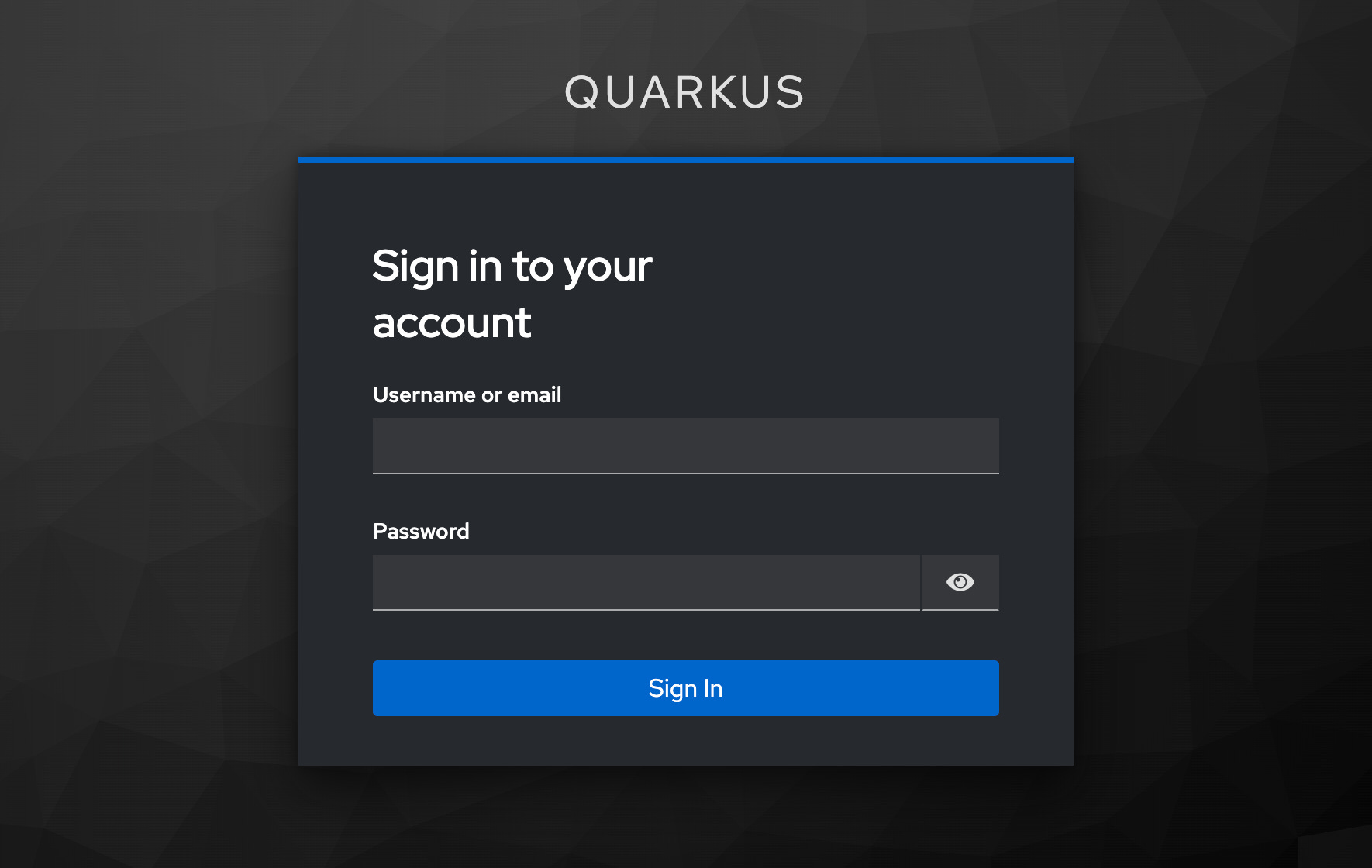
Now log in as alice with the password alice.
After the redirect back to Quarkus, open http://localhost:8080/account/tokens. You should see JSON similar to this:
{
  "principalName": "alice",
  "subject": "8e4615ab-b442-4f1d-b036-0d556ce55a2b",
  "accessTokenExpirationTime": 1774326152,
  "hasRefreshToken": true
}
The exact values will differ, but the structure should match.
What Happens in the Flow
At this point, let’s spell the flow out:
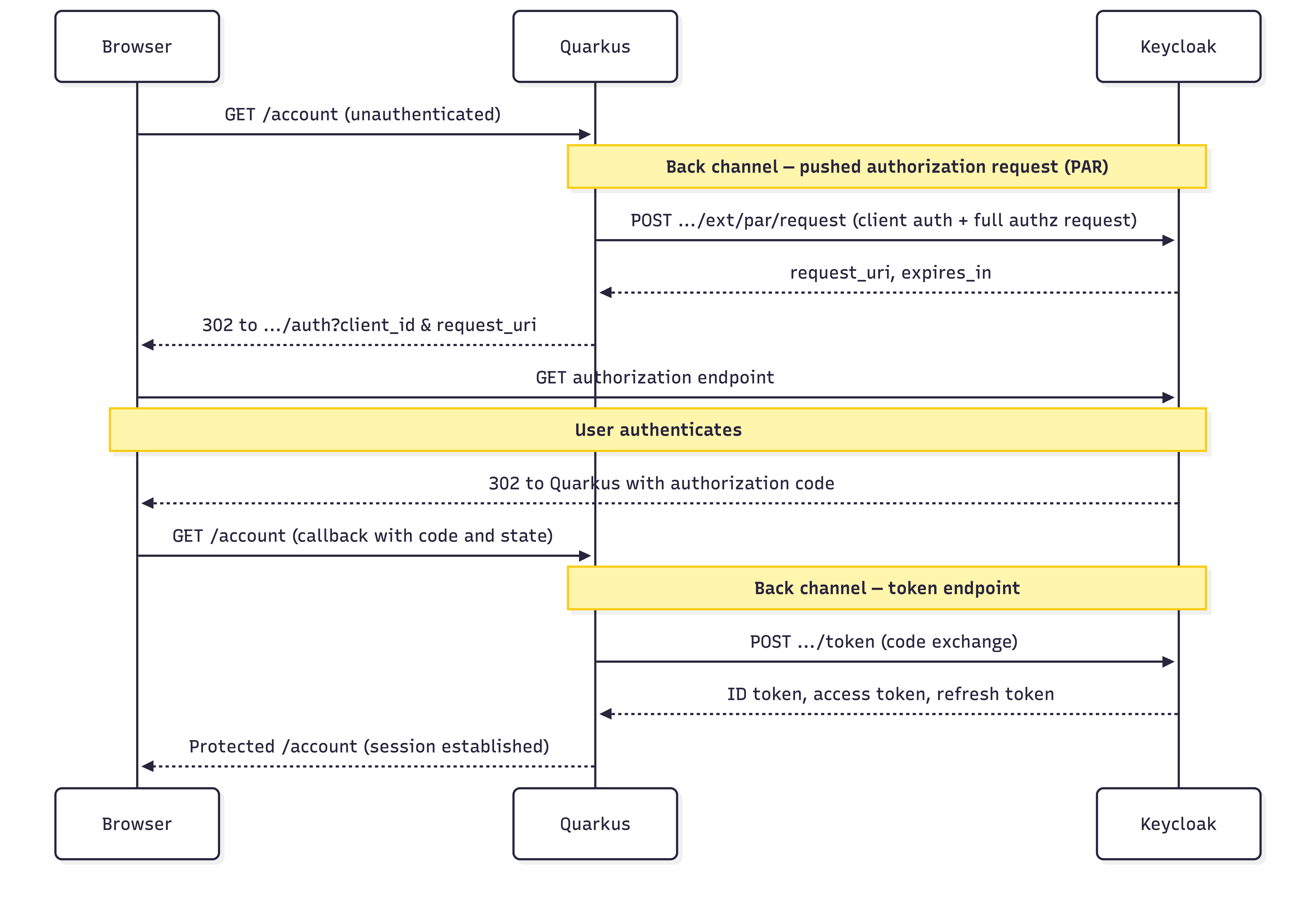
When PKCE is enabled (see the section Add PKCE on Top), the token request also includes code_verifier; PAR and PKCE address different legs of the same overall flow.
Browser →
GET /accountQuarkus →
POST /realms/quarkus/protocol/openid-connect/ext/par/requestwith the authorization request parameters and client authenticationKeycloak → returns
request_uriandexpires_inQuarkus → redirects the browser to
/protocol/openid-connect/authwithclient_idandrequest_uriUser logs in on Keycloak
Keycloak → redirects the browser back to Quarkus with the authorization code
Quarkus → exchanges the code for ID token, access token, and refresh token
Browser → sees the protected page
So here is the win in one sentence: the browser still does login, but the full authorization request does not ride through it anymore. RFC 9126 defines this push-plus-request_uri handoff, and Quarkus lines up with it through configuration.
One production detail matters. The request_uri is short-lived. If login takes too long and the reference expires before authorization finishes, the flow fails. That is expected. The short lifetime helps with replay resistance. Keep it in mind when you debug slow or interrupted logins.
Add PKCE on Top
PAR alone is useful. For sensitive apps, PAR plus PKCE is the baseline you want. We already introduced PKCE in the opening; now let’s turn it on.
Add these properties to application.properties:
quarkus.oidc.authentication.pkce-required=true
quarkus.oidc.authentication.state-secret=8f2ef0d782b24016a4a998f5d8b1a2ce
quarkus.oidc.authentication.pkce-required=true turns PKCE on. You also need quarkus.oidc.authentication.state-secret so Quarkus can encrypt the PKCE verifier in the state cookie. The Quarkus OIDC authorization code flow guide shows a 32-character example secret.
Generate one with OpenSSL if you want a fresh value:
openssl rand -hex 16The Keycloak OIDC documentation recommends PKCE together with PAR in stronger profiles. PAR keeps the heavy request off the front channel. PKCE ties the code exchange back to the original client. They solve different steps; use both.
PKCE does not replace PAR, and PAR does not replace PKCE. One protects the request leg. The other protects the code exchange leg. Use both.
Require PAR on the Keycloak Side
Right now your Quarkus client uses PAR because you told it to. That is a client-side choice. In stricter environments you also want the authorization server to reject non-PAR authorization requests.
Keycloak can publish require_pushed_authorization_requests in metadata when you enforce PAR. Quarkus can also turn PAR on automatically when discovery says pushed authorization requests are required. See the Quarkus OIDC configuration reference.
In practice, enforce it in Keycloak for the realm or client, then verify the discovery document again:
curl -s http://localhost:8180/realms/quarkus/.well-known/openid-configuration | grep require_pushed_authorization_requestsWhen that setting becomes true, clients that try to send a normal front-channel authorization request without PAR will be rejected. That is the point where PAR stops being a nice hardening option and becomes policy.
For day-to-day PAR experiments, Dev Services plus default quarkus-app / secret is enough. For a shared team baseline, I still like a checked-in realm file (quarkus.keycloak.devservices.realm-path) or the explicit Podman setup so client type and secrets stay visible in review.
Production Hardening
What Happens Under Load
PAR adds one back-channel request before the redirect. Login now depends on the PAR endpoint, the authorization endpoint, and the token endpoint all being reachable. If Keycloak is slow or the network between Quarkus and Keycloak is unhealthy, login can fail earlier in the flow. That is expected. You moved work off the browser leg onto a server-to-server leg, so monitor that path too.
Tampering and Trust Boundaries
With a classic flow, the authorization request becomes a front-channel redirect URL. With PAR, the client authenticates to the PAR endpoint and pushes the request directly. That tightens who can create the request. It does not fix bad intent. If your Quarkus client asks for too many scopes, PAR still protects exactly that request.
Session and Logout Behavior
PAR does not change how Quarkus handles sessions. After the code exchange you still have a normal web-app with Quarkus-managed tokens and cookies. You still need solid logout, tight cookie scope, HTTPS in real deployments, and consistent secrets across instances. The Quarkus OIDC authorization code flow guide covers logout paths; everything else about session hygiene is still on you.
Conclusion
We built a Quarkus OIDC app that protects a real endpoint, runs against local Keycloak, uses PAR to keep authorization request data off the browser URL, and still ends with the same code-flow tokens after login. Your resource code stays familiar. The shift is the trust boundary on the login redirect: the browser no longer carries the full authorization request, Quarkus pushes it to Keycloak, and the redirect only carries a short-lived request_uri. That is a real hardening step for sensitive apps. For stricter deployments, add PKCE and require PAR on the server too.