



Large Language Models are stateless, but real applications depend on state.
Whether you build a support bot, a domain assistant, a tool-calling agent, or a multi-step workflow, your system needs a reliable memory strategy. Without it, even the best model will forget context, repeat itself, or hallucinate missing details.
Quarkus and LangChain4j give you powerful APIs for message handling and chat memory. The defaults are simple and powerful. In multi-user or multi-pod environments, the wrong memory strategy leads to token explosions, latency spikes, and context leakage across users. On top, there’s regulations and compliance requirements.
This tutorial walks you through a complete implementation:
Custom JPA chat memory store
Sliding window contextual memory
Per-session memory isolation
Full persistence in PostgreSQL
Complete REST API + debug endpoint
Verified, real code running on Quarkus 3.29.2 and Java 21
You’ll see how the pieces fit together and how to adapt the design for your own applications.
Prerequisites
You need:
Java 21+
Quarkus CLI
Podman (or Docker for Dev Services)
Ollama (local or as Dev Service)
A model such as
llama3.1
Project Setup
You can follow along and implement yourself or grab the code from my Github repository. Create the project:
quarkus create app com.example:chat-memory-tutorial \
  --extension=quarkus-langchain4j-ollama \
  --extension=quarkus-jdbc-postgresql \
  --extension=quarkus-rest-jackson \
  --extension=hibernate-orm-panache  \
cd chat-memory-tutorial
This adds:
quarkus-langchain4j-ollama: LangChain4j integration with Ollamahibernate-orm-panache: Simplified JPA with Panachejdbc-postgresql: PostgreSQL driverrest-jackson: REST endpoints with JSON support
Configure Ollama and our chat-memory:
#Ollama Dev Service
quarkus.langchain4j.ollama.chat-model.model-name=llama3.1
quarkus.langchain4j.ollama.log-requests=true
quarkus.langchain4j.ollama.log-responses=true

# Chat memory max messages
chat-memory.max-messages=20

# Enable HQL Dev UI Console
%dev.quarkus.datasource.dev-ui.allow-sql=true
The chat-memory.max-messages property controls the sliding window size—how many recent messages to send to the LLM.
Understanding Memory in Quarkus + LangChain4j
LangChain4j automatically manages memory for each AI service.
The default is an in-memory message window that keeps 20 recent messages.
Memory Configuration in AI Services
Quarkus LangChain4j automatically manages memory for your AI services.
Every @RegisterAiService keeps track of recent messages in memory so that the model receives relevant context on each request.
@RegisterAiService
public interface MyAssistant {
    String chat(String message);
}
By default, it retains conversation state and injects it into each prompt depending on the AI service’s CDI scope (@ApplicationScoped, @RequestScoped, etc.).
It uses an internal ChatMemory instance stored in application memory, which accumulates messages and evicts old ones when the limit is reached (20 messages by default).
You can customize the default size in your application.properties file:
quarkus.langchain4j.chat-memory.memory-window.max-messages=20This is a global setting for all AI services that use the default message-window memory.
For production or multi-session scenarios, you’ll usually define explicit memory IDs and custom providers, as we will develop in the following sections.
Memory IDs: The key to multi-user isolation
While the default memory is tied to a single service instance, real-world applications need multiple, isolated memories. Usually one per user, session, or tenant.
Quarkus doesn’t make that choice for you; you must define it through the @MemoryId annotation.
The official documentation states:
“The application code is responsible for providing a unique memory ID for each user or session.”
Your memory ID determines how conversation history is routed and persisted.
It controls whether users share context or operate independently.
Common strategies include:
User-based —
memoryId = userIdSession-based —
memoryId = sessionIdUser + Session (recommended) —
memoryId = userId + “:” + sessionIdTenant + User + Session — for multi-tenant SaaS systems
Passing the Memory ID in Your API Layer
Since REST and reactive applications are stateless, you can’t rely on in-memory sessions like in older servlet applications.
Instead, you generate or extract the ID on every request and pass it to your AI service.
@Path(”/chat”)
public class ChatResource {

    @Inject
    SupportBot bot;

    @POST
    public String ask(
        @HeaderParam(”X-User-Id”) String userId,
        @QueryParam(”session”) String sessionId,
        String message
    ) {
        String memoryId = userId + “:” + sessionId;
        return bot.chat(memoryId, message);
    }
}
And the corresponding AI service:
@RegisterAiService
public interface SupportBot {
    String chat(@MemoryId String memoryId, String message);
}
Each user/session pair now maintains its own conversation thread, even when your Quarkus application scales across multiple pods or restarts.
What Strategies should I use for Generating Memory IDs
There is no single right answer. The best approach depends on how your application authenticates users and manages sessions.
Here are several common patterns you can apply in Quarkus:
HTTP Header or API Token
For APIs, pass a unique header such as X-User-Id or a bearer token subject (sub) claim:
@HeaderParam(”X-User-Id”) String userId;or, if using JWT:
@Inject
JsonWebToken jwt;

String userId = jwt.getSubject();
This works well for REST APIs, mobile clients, or frontends that already include identity tokens.
Cookie or Session Identifier
When serving browser users, store a generated session token as a cookie:
@CookieParam(”session-id”) String sessionId;Combine it with the authenticated user ID:
String memoryId = userId + “:” + sessionId;This lets each browser tab or conversation thread maintain its own memory while still being stateless on the server side.
OAuth2 or OpenID Connect Principal
If your Quarkus app integrates with Keycloak or another OIDC provider, you can inject the current user directly:
@Inject
SecurityIdentity identity;

String userId = identity.getPrincipal().getName();
You can then derive a memory key like:
String memoryId = userId + “:” + UUID.randomUUID();This ensures isolation across chat sessions for the same authenticated account.
Correlation ID or Request Context
For short-lived contexts such as workflow or tracing, use a correlation ID header:
@HeaderParam(”X-Correlation-Id”) String correlationId;This is useful when you want the model to maintain short-term continuity across a set of related requests without tying it to a user account.
Client-Side Generated Session ID
The frontend can create a UUID once and reuse it throughout the session:
const sessionId = localStorage.getItem(”sessionId”) || crypto.randomUUID();
localStorage.setItem(”sessionId”, sessionId);
Then include it in every request:
POST /chat?session=abc-123This keeps the server fully stateless while maintaining continuity for the user.
Multi-Tenant Context
In SaaS systems, prefix the memory ID with the tenant identifier:
String memoryId = tenantId + “::” + userId + “:” + sessionId;This allows safe separation of conversation data between organizations and simplifies key management in Redis or a shared database.
How Chat Memory Works in Quarkus
(Architecture Overview)
Before we implement providers or stores, you need a mental model of how the system flows.

@MemoryId determines the scope
Provider decides how memory is trimmed
Store decides where memory is persisted
ChatMemory is the runtime buffer
Storage gives durability and multi-pod support
With the architecture clear, we can start implementing.
Configuring Memory in Quarkus
Once you understand how memory is scoped and managed inside each AI service, the next step is configuring how much context to keep and how Quarkus decides what to send to the model.
Quarkus provides two layers of configuration:
Global defaults – applied to all AI services
Per-service overrides – declared via annotations or custom suppliers
Global Configuration
You can control the global memory behavior using properties in application.properties.
# Use the simple message window memory
quarkus.langchain4j.chat-memory.type=MESSAGE_WINDOW

# Maximum number of messages to keep in memory
quarkus.langchain4j.chat-memory.memory-window.max-messages=20
If your model is token-sensitive, switch to token-based trimming:
# Use token-aware window memory
quarkus.langchain4j.chat-memory.type=TOKEN_WINDOW

# Limit the number of tokens instead of messages
quarkus.langchain4j.chat-memory.token-window.max-tokens=2000
These settings apply to every @RegisterAiService in your application that doesn’t define its own provider.
Per-Service Overrides
Each AI service can customize memory independently, for example to use a smaller window for lightweight agents and a summarizing strategy for long-running ones.
You do this with the chatMemoryProviderSupplier parameter of @RegisterAiService.
@RegisterAiService(chatMemoryProviderSupplier = FixedWindowMemorySupplier.class)
public interface SupportBot {
    String chat(@MemoryId String memoryId, String message);
}
The class FixedWindowMemorySupplier is a CDI bean that returns a configured ChatMemoryProvider.
You’ll create a JPAChatMemoryProvider yourself in the next section.
How Configuration Works Internally
Here’s how Quarkus merges these settings at runtime:
Global defaults come from
application.properties.Per-service providers override those defaults when present.
The resulting
ChatMemoryProviderinstance is injected into your AI service.Each call uses the
@MemoryIdvalue to select or create aChatMemory.
Implementing A JPA Memory Provider
This implementation uses:
A JPA entity for stored messages
A Panache repository
A ChatMemoryStore that serializes all messages
A sliding-window ChatMemory wrapper
A CDI-based supplier that wires everything together
Let’s walk through each part.
Create the JPA Entity
ChatMessageEntity stores each message in PostgreSQL.
Create: src/main/java/com/example/memory/entity/ChatMessageEntity.java
package com.example.memory.entity;

import java.time.Instant;

import io.quarkus.hibernate.orm.panache.PanacheEntityBase;
import jakarta.persistence.Column;
import jakarta.persistence.Entity;
import jakarta.persistence.GeneratedValue;
import jakarta.persistence.GenerationType;
import jakarta.persistence.Id;
import jakarta.persistence.Index;
import jakarta.persistence.Lob;
import jakarta.persistence.Table;

@Entity
@Table(name = “chat_message”, indexes = @Index(name = “idx_memory_id”, columnList = “memory_id”))
public class ChatMessageEntity extends PanacheEntityBase {

    @Id
    @GeneratedValue(strategy = GenerationType.IDENTITY)
    public Long id; // Auto-generated ID

    @Column(name = “memory_id”) // Indexed for fast lookups
    public String memoryId;

    public String type; // “USER”, “AI”, “SYSTEM”

    @Lob
    public String text; // The message content

    public Instant createdAt;
}
Key points:
Indexed
memoryIdfor fast retrievalLOB storage for message JSON
Strict ordering via
createdAt
Create the Repository
The ChatMemoryRepository provides type-safe database operations for chat messages. It encapsulates all SQL queries and transaction management, offering three core operations: finding messages by conversation ID (with automatic ordering), saving new messages, and deleting entire conversations. By implementing PanacheRepository, you get Panache’s simplified query syntax while maintaining full control over transaction boundaries.
Create src/main/java/com/example/memory/entity/ChatMemoryRepository.java:
package com.example.memory.entity;

import java.util.List;

import io.quarkus.hibernate.orm.panache.PanacheRepository;
import jakarta.enterprise.context.ApplicationScoped;
import jakarta.transaction.Transactional;

@ApplicationScoped
public class ChatMemoryRepository implements PanacheRepository<ChatMessageEntity> {

    @Transactional(Transactional.TxType.MANDATORY)
    public List<ChatMessageEntity> findByMemoryId(String memoryId) {
        return find(”memoryId = ?1 ORDER BY createdAt”, memoryId).list();
    }

    @Transactional(Transactional.TxType.MANDATORY)
    public void save(ChatMessageEntity entity) {
        if (entity.createdAt == null) {
            entity.createdAt = java.time.Instant.now();
        }
        // Use merge which works for both insert and update
        getEntityManager().merge(entity);
        getEntityManager().flush();
    }

    @Transactional(Transactional.TxType.MANDATORY)
    public void deleteByMemoryId(String memoryId) {
        delete(”memoryId”, memoryId);
    }
}
Key points:
MANDATORYtransaction type: ensures all operations happen inside a caller-managed transaction.Automatic timestamp handling: The
save()method setscreatedAtif null, ensuring every message has a timestamp even if the caller forgets to set itmerge()withflush(): Uses JPA’smerge()operation (works for both insert and update) followed byflush()to immediately synchronize changes with the database, making them visible to subsequent queries in the same transactionOrdered retrieval: The
findByMemoryId()query includesORDER BY createdAtto guarantee messages are returned in chronological order, which is essential for conversation reconstruction
Implement the ChatMemoryStore
The JPAChatMemoryStore bridges LangChain4j’s memory abstraction with your JPA persistence layer. It implements the ChatMemoryStore interface, handling serialization of LangChain4j’s polymorphic message types (UserMessage, AiMessage, SystemMessage) to JSON and back. This store manages the complete lifecycle of conversation storage: updating messages (delete-then-insert pattern), retrieving them with proper deserialization, and cleaning up conversations when needed.
Create src/main/java/com/example/memory/store/jpa/JPAChatMemoryStore.java:
package com.example.memory.store.jpa;

import java.time.Instant;
import java.util.ArrayList;
import java.util.List;
import java.util.stream.Collectors;

import com.example.memory.entity.ChatMessageEntity;
import com.example.memory.entity.ChatMemoryRepository;
import com.fasterxml.jackson.databind.ObjectMapper;

import dev.langchain4j.data.message.ChatMessage;
import dev.langchain4j.store.memory.chat.ChatMemoryStore;
import io.quarkus.arc.Unremovable;
import io.quarkus.logging.Log;
import jakarta.enterprise.context.ApplicationScoped;
import jakarta.enterprise.inject.Typed;
import jakarta.inject.Inject;
import jakarta.transaction.Transactional;

@ApplicationScoped
@Typed(JPAChatMemoryStore.class)
@Unremovable
public class JPAChatMemoryStore implements ChatMemoryStore {

    /**
     * The repository used to persist and retrieve chat messages from the database.
     */
    private final ChatMemoryRepository repository;

    /**
     * The ObjectMapper used for serializing and deserializing ChatMessage objects.
     */
    private final ObjectMapper objectMapper;

    @Inject
    public JPAChatMemoryStore(ChatMemoryRepository repository, ObjectMapper objectMapper) {
        this.repository = repository;
        this.objectMapper = objectMapper;
    }

    @Override
    @Transactional
    public void updateMessages(Object memoryId, List<ChatMessage> messages) {
        if (messages == null || messages.isEmpty()) {
            Log.warnf(”No messages to update for memory ID: %s”, memoryId);
            return;
        }

        String memoryIdString = memoryId.toString();
        try {
            // Delete existing messages for this memory ID
            repository.deleteByMemoryId(memoryIdString);

            // Save each message as a separate entity
            // Use incremental timestamps to preserve message order
            Instant baseTime = Instant.now();
            for (int i = 0; i < messages.size(); i++) {
                ChatMessage message = messages.get(i);
                ChatMessageEntity entity = new ChatMessageEntity();
                entity.memoryId = memoryIdString;
                entity.type = message.type().toString();
                // Serialize the full ChatMessage to JSON for the text field
                entity.text = objectMapper.writeValueAsString(message);
                // Use incremental timestamps to maintain order (millisecond precision)
                entity.createdAt = baseTime.plusMillis(i);
                repository.save(entity);
            }

            Log.infof(”Updated messages for memory ID: %s with %d messages”, memoryIdString, messages.size());
        } catch (Exception e) {
            Log.errorf(e, “Failed to update messages for memory ID: %s”, memoryIdString);
            throw new RuntimeException(”Failed to update messages”, e);
        }
    }

    @Override
    @Transactional
    public List<ChatMessage> getMessages(Object memoryId) {
        String memoryIdString = memoryId.toString();
        try {
            List<ChatMessageEntity> entities = repository.findByMemoryId(memoryIdString);
            if (entities == null || entities.isEmpty()) {
                Log.debugf(”No messages found for memory ID: %s”, memoryIdString);
                return new ArrayList<>();
            }

            // Deserialize each entity back to ChatMessage
            List<ChatMessage> messages = entities.stream()
                    .map(entity -> {
                        try {
                            return objectMapper.readValue(entity.text, ChatMessage.class);
                        } catch (Exception e) {
                            Log.errorf(e, “Failed to deserialize message entity with ID: %d”, entity.id);
                            throw new RuntimeException(”Failed to deserialize message”, e);
                        }
                    })
                    .collect(Collectors.toList());

            Log.debugf(”Retrieved %d messages for memory ID: %s”, messages.size(), memoryIdString);
            return messages;
        } catch (Exception e) {
            Log.errorf(e, “Failed to get messages for memory ID: %s”, memoryIdString);
            throw new RuntimeException(”Failed to get messages”, e);
        }
    }

    @Override
    @Transactional
    public void deleteMessages(Object memoryId) {
        String memoryIdString = memoryId.toString();
        try {
            repository.deleteByMemoryId(memoryIdString);
            Log.infof(”Deleted messages for memory ID: %s”, memoryIdString);
        } catch (IllegalStateException e) {
            // EntityManagerFactory might be closed during shutdown - this is expected
            if (e.getMessage() != null && e.getMessage().contains(”EntityManagerFactory is closed”)) {
                Log.debugf(”Skipping delete for memory ID: %s - EntityManagerFactory is closed (shutdown in progress)”, memoryIdString);
                return;
            }
            // Re-throw if it’s a different IllegalStateException
            Log.errorf(e, “Failed to delete messages for memory ID: %s”, memoryIdString);
            throw new RuntimeException(”Failed to delete messages”, e);
        } catch (Exception e) {
            Log.errorf(e, “Failed to delete messages for memory ID: %s”, memoryIdString);
            throw new RuntimeException(”Failed to delete messages”, e);
        }
    }
}
Key implementation details:
Jackson polymorphic deserialization: The
ObjectMapperautomatically handles LangChain4j’s message type hierarchy (UserMessage, AiMessage, SystemMessage) through Jackson’s type information annotations, reconstructing the correct concrete type from JSONDelete-then-insert update strategy:
updateMessages()deletes all existing messages before inserting new ones. This simplifies the implementation and ensures consistency, though it trades some performance for reliabilityIncremental timestamp generation: Messages are saved with timestamps incremented by milliseconds (
baseTime.plusMillis(i)) to preserve exact ordering even when multiple messages are saved in the same transaction@Transactionalat method level: Each method manages its own transaction boundary, ensuring that database operations are atomic and properly rolled back on errors
Build the ChatMemory with Sliding Window
The JPAChatMemory implements LangChain4j’s ChatMemory interface with a critical feature: a sliding window that limits context size. While it stores all messages in the database, it only returns the most recent N messages to the LLM, plus the system message. This prevents context overflow as conversations grow long, keeping token usage predictable while preserving full history for debugging or analytics.
Create src/main/java/com/example/memory/memory/jpa/JPAChatMemory.java:
package com.example.memory.memory.jpa;

import java.util.ArrayList;
import java.util.List;

import org.eclipse.microprofile.config.ConfigProvider;

import dev.langchain4j.data.message.ChatMessage;
import dev.langchain4j.data.message.ChatMessageType;
import dev.langchain4j.data.message.SystemMessage;
import dev.langchain4j.memory.ChatMemory;
import dev.langchain4j.store.memory.chat.ChatMemoryStore;

/**
 * A ChatMemory implementation that stores all chat messages persistently
 * using JPAChatMemoryStore.
 *
 * This implementation stores all messages in the database but applies a
 * sliding window when retrieving messages, preserving the system message
 * and returning the most recent N messages.
 */
public class JPAChatMemory implements ChatMemory {

    private final Object id;
    private final ChatMemoryStore chatMemoryStore;
    private final int maxMessages; // Used for sliding window

    private JPAChatMemory(Builder builder) {
        this.id = builder.id;
        this.chatMemoryStore = builder.chatMemoryStore;
        this.maxMessages = builder.getMaxMessages();
    }

    /**
     * Creates a new builder for JPAChatMemory.
     *
     * @return a new builder instance
     */
    public static Builder builder() {
        return new Builder();
    }

    @Override
    public Object id() {
        return id;
    }

    @Override
    public void add(ChatMessage message) {
        if (message == null) {
            return;
        }

        // Get current messages from the store
        List<ChatMessage> currentMessages = chatMemoryStore.getMessages(id);

        // Create a new list with the new message added
        List<ChatMessage> updatedMessages = new ArrayList<>(currentMessages);
        updatedMessages.add(message);

        // Update the store with all messages (store all, windowing happens on
        // retrieval)
        chatMemoryStore.updateMessages(id, updatedMessages);
    }

    @Override
    public List<ChatMessage> messages() {
        // Fetch all messages from the store
        List<ChatMessage> allMessages = chatMemoryStore.getMessages(id);

        if (allMessages.isEmpty()) {
            return allMessages;
        }

        // Find the SystemMessage (usually the first one)
        SystemMessage systemMessage = null;
        List<ChatMessage> nonSystemMessages = new ArrayList<>();

        for (ChatMessage message : allMessages) {
            if (message.type() == ChatMessageType.SYSTEM) {
                if (systemMessage == null) {
                    systemMessage = (SystemMessage) message;
                }
            } else {
                nonSystemMessages.add(message);
            }
        }

        // Select the Recent N messages (Sliding Window)
        int messagesToTake = Math.min(maxMessages, nonSystemMessages.size());
        List<ChatMessage> recentMessages = nonSystemMessages.isEmpty()
                ? new ArrayList<>()
                : nonSystemMessages.subList(
                        Math.max(0, nonSystemMessages.size() - messagesToTake),
                        nonSystemMessages.size());

        // Combine: [System Message] + [Last N Messages]
        List<ChatMessage> result = new ArrayList<>();
        if (systemMessage != null) {
            result.add(systemMessage);
        }
        result.addAll(recentMessages);

        return result;
    }

    @Override
    public void clear() {
        chatMemoryStore.deleteMessages(id);
    }

    /**
     * Builder for creating JPAChatMemory instances.
     * Applies sliding window logic when retrieving messages.
     */
    public static class Builder {
        private Object id;
        private ChatMemoryStore chatMemoryStore;
        private Integer maxMessages; // Sliding window size, read from config if not set

        /**
         * Gets the maxMessages value, reading from configuration if not explicitly set.
         *
         * @return the maxMessages value from config or default of 20
         */
        private int getMaxMessages() {
            if (maxMessages == null) {
                return ConfigProvider.getConfig()
                        .getOptionalValue(”chat-memory.max-messages”, Integer.class)
                        .orElse(20);
            }
            return maxMessages;
        }

        /**
         * Sets the memory ID for this chat memory instance.
         *
         * @param id the memory ID (typically a session identifier)
         * @return this builder
         */
        public Builder id(Object id) {
            this.id = id;
            return this;
        }

        /**
         * Sets the ChatMemoryStore to use for persistence.
         *
         * @param chatMemoryStore the store implementation
         * @return this builder
         */
        public Builder chatMemoryStore(ChatMemoryStore chatMemoryStore) {
            this.chatMemoryStore = chatMemoryStore;
            return this;
        }

        /**
         * Sets the maximum number of recent messages to return (sliding window size).
         * The system message is always preserved and not counted in this limit.
         *
         * @param maxMessages the maximum number of recent messages to return
         * @return this builder
         */
        public Builder maxMessages(int maxMessages) {
            this.maxMessages = maxMessages;
            return this;
        }

        /**
         * Builds a new JPAChatMemory instance.
         *
         * @return a new JPAChatMemory instance
         * @throws IllegalStateException if required fields are not set
         */
        public JPAChatMemory build() {
            if (id == null) {
                throw new IllegalStateException(”id must be set”);
            }
            if (chatMemoryStore == null) {
                throw new IllegalStateException(”chatMemoryStore must be set”);
            }
            return new JPAChatMemory(this);
        }
    }
}
Key implementation details:
Sliding window on retrieval, not storage: The
messages()method applies the window when fetching messages—all messages are stored in the database, but only recent ones are returned to the LLM, preserving full history for auditingSystem message preservation: The system message (containing LLM instructions) is always included in the result and never counted against the
maxMessageslimit, ensuring consistent AI behavior regardless of conversation lengthConfiguration-driven window size: The
maxMessagesvalue comes fromapplication.propertiesvia MicroProfile Config, allowing you to tune context size without code changesBuilder pattern with validation: The builder enforces required fields (
idandchatMemoryStore) at build time, preventing runtime errors from incomplete configuration
Create the Memory Provider Supplier
The JPAChatMemoryProviderSupplier acts as a factory for creating ChatMemory instances. LangChain4j calls this supplier whenever it needs memory for a conversation, passing in a memory ID (typically a session identifier). The supplier retrieves the shared JPAChatMemoryStore from the CDI container and builds a new JPAChatMemory instance configured with that store. This design allows multiple concurrent conversations to share the same persistence layer while maintaining separate memory contexts.
Create src/main/java/com/example/memory/provider/jpa/JPAChatMemoryProviderSupplier.java:
package com.example.memory.provider.jpa;

import java.util.function.Supplier;

import org.eclipse.microprofile.config.ConfigProvider;

import com.example.memory.memory.jpa.JPAChatMemory;
import com.example.memory.store.jpa.JPAChatMemoryStore;
import dev.langchain4j.memory.ChatMemory;
import dev.langchain4j.memory.chat.ChatMemoryProvider;
import jakarta.enterprise.inject.spi.CDI;

/**
 * Supplier that provides a ChatMemoryProvider using JPAChatMemoryStore
 * for persistent storage of chat messages in the database.
 *
 * This can be used with @RegisterAiService annotation:
 *
 * @RegisterAiService(chatMemoryProviderSupplier =
 *                                               JPAChatMemoryProviderSupplier.class)
 */

public class JPAChatMemoryProviderSupplier implements Supplier<ChatMemoryProvider> {

    private final JPAChatMemoryStore chatMemoryStore;
    private final int maxMessages;

    public JPAChatMemoryProviderSupplier() {
        // Retrieve the managed JPAChatMemoryStore instance from the CDI container.
        this.chatMemoryStore = CDI.current().select(JPAChatMemoryStore.class).get();
        // Get maxMessages from config or use default
        this.maxMessages = ConfigProvider.getConfig()
                .getOptionalValue(”chat-memory.max-messages”, Integer.class)
                .orElse(20);
    }

    @Override
    public ChatMemoryProvider get() {
        return new ChatMemoryProvider() {
            @Override
            public ChatMemory get(Object memoryId) {
                return JPAChatMemory.builder()
                        .id(memoryId)
                        .maxMessages(maxMessages)
                        .chatMemoryStore(chatMemoryStore)
                        .build();
            }
        };
    }
}
Key implementation details:
CDI bean lookup: Uses
CDI.current().select()to retrieve theJPAChatMemoryStorebean from the container—this works even though the supplier itself isn’t a CDI bean, enabling dependency injection in non-managed classesShared store, isolated memories: All
ChatMemoryinstances share the sameJPAChatMemoryStore(efficient resource usage), but each has a uniquememoryIdthat isolates conversations in the databaseLambda-based provider: The
get()method returns aChatMemoryProviderimplemented as a lambda that creates a newJPAChatMemoryfor each memory ID—this is called by LangChain4j’s@RegisterAiServiceinfrastructureConfiguration read at construction: The
maxMessagesvalue is read once during supplier construction and reused for all memory instances, avoiding repeated config lookups
Define the AI Service
The JPAMemoryBot is where LangChain4j’s magic happens. This interface—just a method signature with annotations—gets automatically implemented by Quarkus at build time. The @RegisterAiService annotation connects it to your memory provider, while @SystemMessage defines the AI’s personality. The @MemoryId parameter tells LangChain4j which conversation this message belongs to, enabling per-session memory isolation.
Create src/main/java/com/example/memory/service/JPAMemoryBot.java:
package com.example.memory.service;

import com.example.memory.provider.jpa.JPAChatMemoryProviderSupplier;

import dev.langchain4j.service.MemoryId;
import dev.langchain4j.service.SystemMessage;
import dev.langchain4j.service.UserMessage;
import io.quarkiverse.langchain4j.RegisterAiService;
import jakarta.enterprise.context.ApplicationScoped;

@RegisterAiService(chatMemoryProviderSupplier = JPAChatMemoryProviderSupplier.class)
@ApplicationScoped
public interface JPAMemoryBot {
    @SystemMessage(”“”
        You are a polite and helpful assistant.
        “”“)
    String chat(@MemoryId String memoryId, @UserMessage String message);
}
Key implementation details:
Zero-implementation interface: You define only the contract—Quarkus generates the implementation at build time, handling all LLM communication, message formatting, and memory management automatically
@RegisterAiServicewith memory: ThechatMemoryProviderSupplierparameter connects this service to your JPA-backed memory system—without it, conversations would be stateless@MemoryIdfor session isolation: This parameter value becomes thememoryIdin your database, allowing multiple users or sessions to have independent conversations using the same bot@SystemMessagefor AI instructions: This message is always sent first to the LLM (and preserved by your sliding window logic), defining the AI’s behavior and personality consistently across all conversations
Create the REST API
The BotPlaygroundResource exposes your AI service over HTTP. It provides two endpoints: /chat for sending messages to the bot, and /debug for inspecting raw conversation history. The resource constructs memory IDs by combining a bot type with a session identifier, allowing you to run multiple bot personalities while keeping their conversations separate in the database.
Create src/main/java/com/example/memory/api/BotPlaygroundResource.java:
package com.example.memory.api;

import com.example.memory.service.JPAMemoryBot;
import com.example.memory.store.jpa.JPAChatMemoryStore;
import com.fasterxml.jackson.databind.ObjectMapper;

import jakarta.inject.Inject;
import jakarta.ws.rs.Consumes;
import jakarta.ws.rs.GET;
import jakarta.ws.rs.POST;
import jakarta.ws.rs.Path;
import jakarta.ws.rs.Produces;
import jakarta.ws.rs.QueryParam;
import jakarta.ws.rs.core.MediaType;

@Path(”/”)
@Consumes(MediaType.TEXT_PLAIN)
@Produces(MediaType.TEXT_PLAIN)
public class BotPlaygroundResource {

    @Inject
    JPAMemoryBot jpaMemory;

    @Inject
    JPAChatMemoryStore jpaChatMemoryStore;

    @Inject
    ObjectMapper objectMapper;

    private String id(String bot, String session) {
        return bot + “:” + session;
    }

    @POST
    @Path(”/chat”)
    public String summarizing(
            @QueryParam(”session”) String session,
            String message) {

        return jpaMemory.chat(id(”summary”, session), message);
    }

    @GET
    @Path(”/debug”)
    @Produces(MediaType.APPLICATION_JSON)
    public String debug(
            @QueryParam(”session”) String session,
            @QueryParam(”bot”) String bot) {
        try {
            // Default to “summary” if bot not specified
            String botType = (bot != null && !bot.isEmpty()) ? bot : “summary”;
            String memoryId = id(botType, session);

            var messages = jpaChatMemoryStore.getMessages(memoryId);

            // Return pretty-printed JSON
            return objectMapper.writerWithDefaultPrettyPrinter()
                    .writeValueAsString(messages);
        } catch (Exception e) {
            return “{\”error\”: \”“ + e.getMessage() + “\”}”;
        }
    }
}
Key implementation details:
Composite memory ID pattern: The
id()method combines bot type and session (“summary:test1”) to create unique memory IDs—this allows multiple bot personalities or use cases to coexist in the same databaseDirect store access for debugging: The
/debugendpoint bypasses the sliding window by callingjpaChatMemoryStore.getMessages()directly, showing the complete conversation history stored in the databasePlain text input, JSON output: The
/chatendpoint accepts plain text messages (simpler for curl testing) while/debugreturns pretty-printed JSON for easy inspectionSynchronous blocking calls: Both endpoints block until the LLM responds—for production, consider using Quarkus’s reactive endpoints with
Uni<String>return types for better scalability
Run & verify:
Start the application:
quarkus devSend a message:
curl -X POST “http://localhost:8080/chat?session=test1” \
  -H “Content-Type: text/plain” \
  -d “My name is Alice”
You see log messages:
2025-11-21 09:11:13,755 INFO  [com.exa.mem.sto.jpa.JPAChatMemoryStore] (executor-thread-1) Deleted messages for memory ID: summary:test1
2025-11-21 09:11:13,778 INFO  [com.exa.mem.sto.jpa.JPAChatMemoryStore] (executor-thread-1) Updated messages for memory ID: summary:test1 with 1 messages
2025-11-21 09:11:13,794 INFO  [com.exa.mem.sto.jpa.JPAChatMemoryStore] (executor-thread-1) Updated messages for memory ID: summary:test1 with 2 messages
2025-11-21 09:11:13,808 INFO  [com.exa.mem.sto.jpa.JPAChatMemoryStore] (executor-thread-1) Updated messages for memory ID: summary:test1 with 3 messages
Continue the conversation:
curl -X POST “http://localhost:8080/chat?session=test1” \
  -H “Content-Type: text/plain” \
  -d “What is my name?”
You see two additional log messages:
2025-11-21 09:12:25,130 INFO  [com.exa.mem.sto.jpa.JPAChatMemoryStore] (executor-thread-1) Updated messages for memory ID: summary:test1 with 4 messages
2025-11-21 09:12:25,142 INFO  [com.exa.mem.sto.jpa.JPAChatMemoryStore] (executor-thread-1) Updated messages for memory ID: summary:test1 with 5 messages
The bot now remembers the name “Alice”.
Check the database:
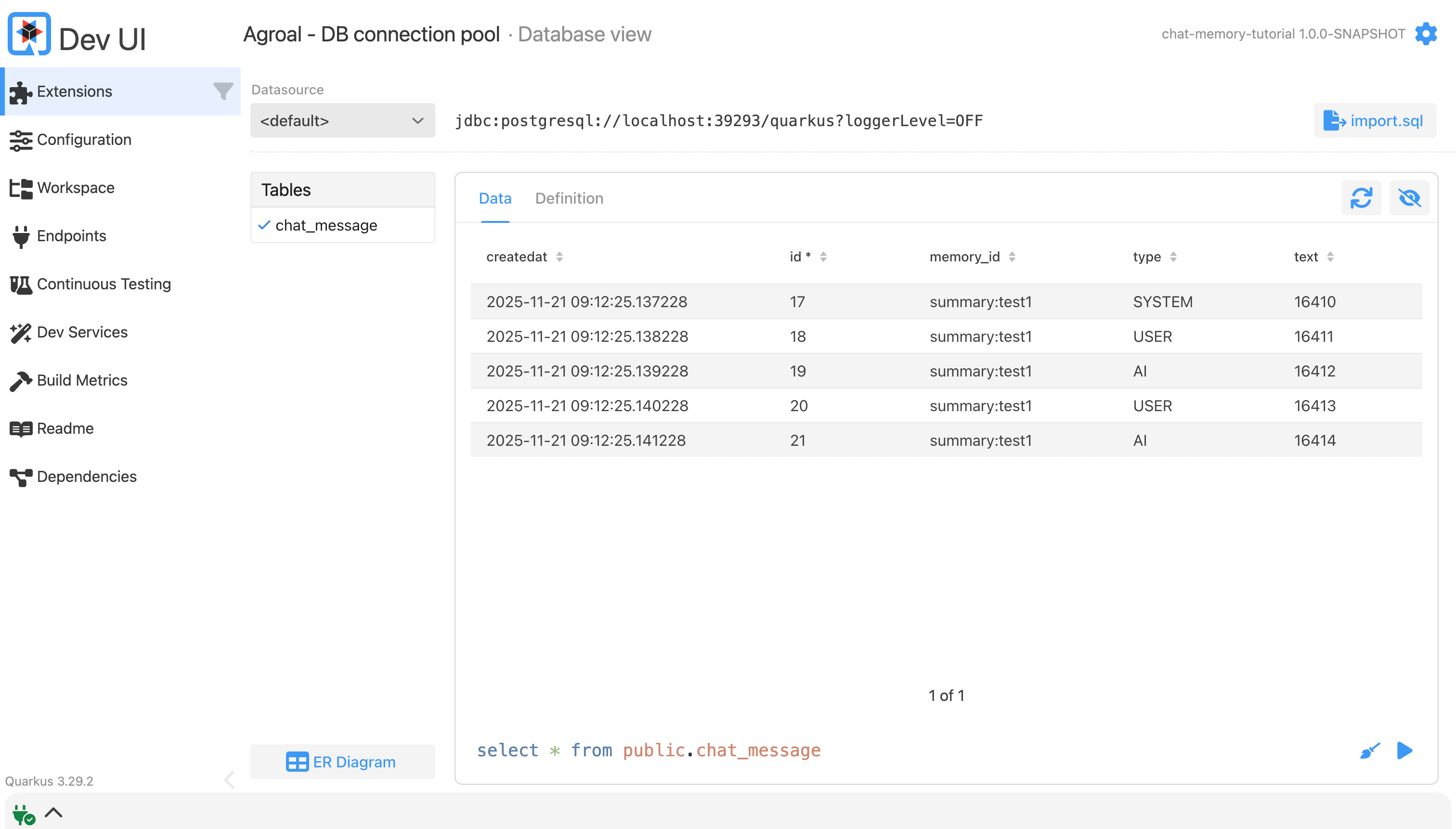
curl “http://localhost:8080/debug?session=test1”You see all the prompts and responses up to this part in the conversation:
[
  {
    “text”: “You are a polite and helpful assistant.\n”,
    “type”: “SYSTEM”
  },
  {
    “contents”: [
      {
        “text”: “My name is Alice”,
        “type”: “TEXT”
      }
    ],
    “type”: “USER”
  },
  {
    “toolExecutionRequests”: [],
    “text”: “Nice to meet you, Alice! How can I assist you today? Would you like to discuss something specific or just chat for a bit?”,
    “attributes”: {},
    “type”: “AI”
  },
  {
    “contents”: [
      {
        “text”: “What is my name?”,
        “type”: “TEXT”
      }
    ],
    “type”: “USER”
  },
  {
    “toolExecutionRequests”: [],
    “text”: “Your name is Alice. Is there anything else you’d like to know about yourself, or would you like me to tell you something new instead?”,
    “attributes”: {},
    “type”: “AI”
  }
]
Verify Database Persistence
Open the Dev UI at http://localhost:8080/q/dev/ and navigate to Extensions → Agroal - DB connection pool → Database view
Production Notes
Building persistent chat systems always means balancing two opposing goals:
Memory: Give the model context so the conversation feels natural.
Auditability: Preserve a complete, immutable record of what happened.
A good design acknowledges that these goals are not the same thing.
Memory vs Auditability
This implementation uses a simple pattern:
On every update, delete all existing messages and rewrite the full trimmed history.
This approach is intentional:
It guarantees the message sequence is always correct.
It avoids complex locking and reordering logic.
It works well for small sliding windows (10–20 messages).
The performance impact is negligible at this scale.
For most conversational use cases, this is the fastest path to a robust system.
Optimization for Scale
If you expect very large conversation histories—legal audit trails, long-running support cases, or enterprise compliance scenarios—the delete-rewrite strategy becomes an I/O bottleneck.
When persistence moves from “keep a few messages for context” to “store everything forever,” consider these patterns:
Append-Only Storage
Modify JpaChatMemoryStore to expose an addMessage(...) method and use a single INSERT per message.
This eliminates the “delete + rewrite” pattern completely and scales linearly with traffic.
Separate Concerns: Active Memory vs Audit Trail
A clean, scalable pattern is:
PostgreSQL = the Audit Trail
Append-only, full history, immutable records.Redis (or in-memory store) = Active Memory
Small sliding window of messages repeatedly fed into the LLM.
This mirrors real enterprise architectures and keeps LLM context costs under control.
Maintenance and Retention
Once you persist every interaction, the table will grow indefinitely. Avoid long-term degradation by implementing a simple retention strategy:
Archive conversations older than 30 days into inexpensive cold storage (S3 or even Glacier).
Use the Quarkus Scheduler (@Scheduled) to run an archive job nightly.Hard-delete data beyond your retention policy (e.g., older than 1 year).
Most enterprise environments require explicit deletion policies.
This keeps PostgreSQL lean and predictable.
Advanced Variations
Vector Store Integration
Instead of raw JSON, store embeddings for each message.
This allows semantic search across long histories and enables RAG over chat memory.
Summary Memory
Compress older messages periodically by:
Taking the oldest N messages
Asking an LLM to generate a summary
Replacing those messages with a single SystemMessage
This maintains context while reducing storage requirements dramatically.
Conclusion
You now have a persisted, compliant, conversational memory system that survives restarts, scales with your database, and integrates seamlessly with LangChain4j.
Memory is the backbone of real LLM applications. Build it deliberately, test it under load, and treat it as a first-class architectural concern. Quarkus and LangChain4j give you the tools, your strategy turns them into a reliable system.