


The Quarkus team has announced the first Quarkus 4 beta. When I looked through October’s list of new Quarkus extensions, I saw quarkus-http3. It was the first Quarkus 4 extension I’d come across, and I wanted to see how it works.
I started with one REST endpoint that returns the HTTP version of the request. That lets me follow the same Java method through HTTP/1.1, HTTP/2, and HTTP/3. Quarkus handles the requests through that method, while the connection underneath it changes. I followed that connection from curl to the resource, then through a Podman container, where HTTP/3 also needs a UDP port mapping.
I’m using Quarkus 4.0.0.Beta1 and Java 21 here. HTTP/3 support is experimental, and the team plans the final Quarkus 4 release for the end of November 2026. Configuration and behavior can still change before then.
What changed underneath HTTP
When I write a REST resource, I usually deal with a path, a request, and a response. HTTP, the Hypertext Transfer Protocol, gives the client and server their agreement about what those messages mean. A GET /orders/42 still asks for the same resource across HTTP/1.1, HTTP/2, and HTTP/3. Methods, headers, status codes, and bodies remain familiar, while the connection underneath them changes.
HTTP/1.1 normally runs over TCP, the Transmission Control Protocol. TCP gives the application a reliable, ordered byte stream. If some bytes arrive out of order, it waits for the missing bytes before handing the stream to HTTP. For HTTPS, TLS, Transport Layer Security, protects that stream. You can use HTTPS with different HTTP versions because HTTPS describes that protection.
With HTTP/1.1, clients commonly open several connections to send requests concurrently. Pipelining lets a client send requests ahead, but the server still has to send the responses in order. If you want several requests to make progress independently over one connection, you need the multiplexed streams that HTTP/2 introduces.
HTTP/2 uses binary frames to carry those streams. A slow response on one stream need not hold up another response, so we can share a connection between several requests. But TCP still carries all those frames in one ordered byte stream. When the network loses a TCP segment, TCP waits for the missing bytes before delivering later bytes, including data from other HTTP/2 streams. We call this transport head-of-line blocking, often shortened to HOL blocking.
HTTP/3 carries each request and its response on a bidirectional QUIC stream. QUIC handles ordering within each stream, so a lost packet affecting one stream can leave unrelated streams making progress. They still share congestion control and can have other dependencies, but they avoid the ordering wait that TCP imposes across the whole connection.
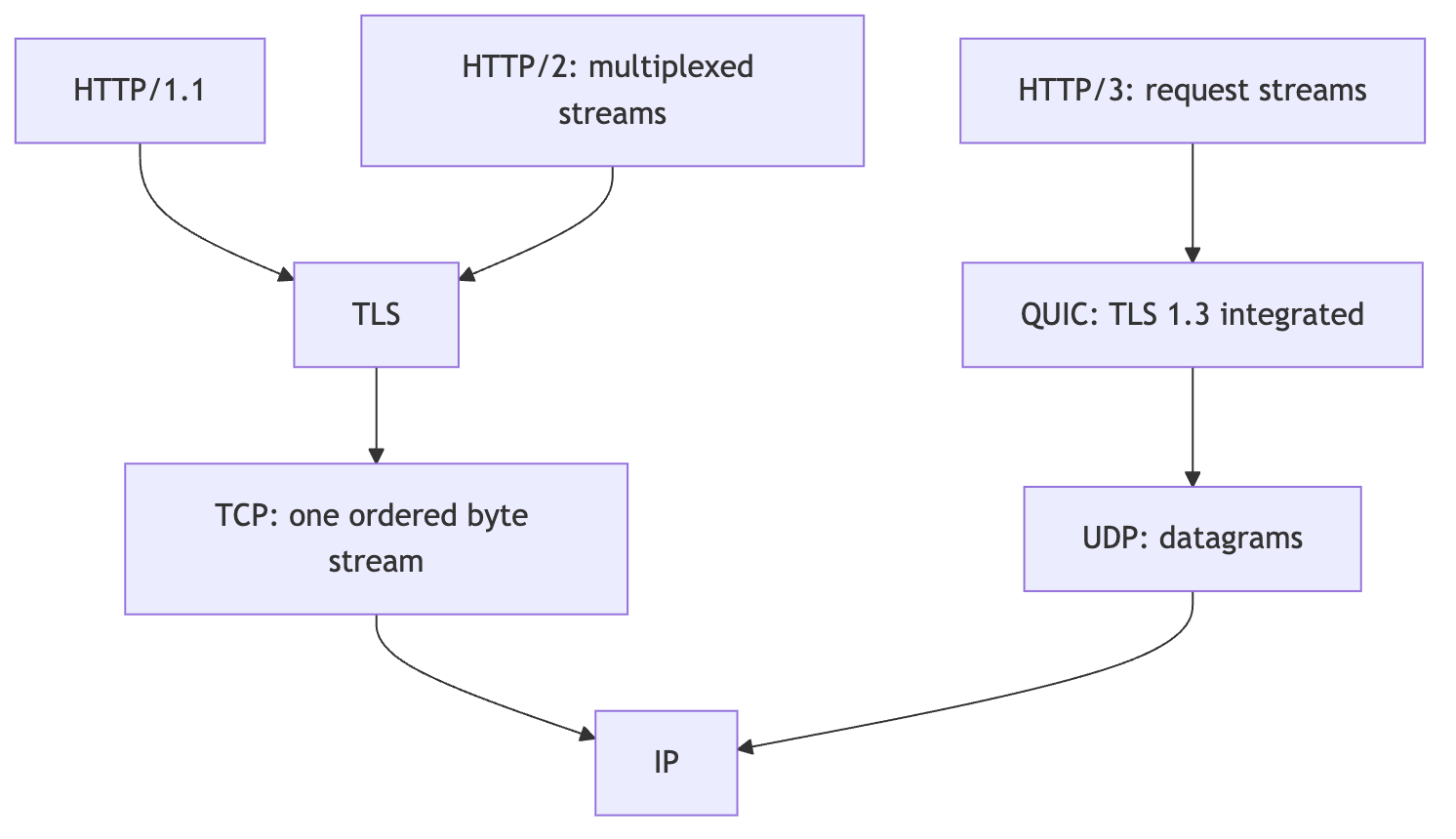
QUIC (pronounced /kwɪk/, like “quick”) is a name, not an acronym, as its specification states. It uses UDP, the User Datagram Protocol, to carry datagrams, then supplies reliable streams, flow control, congestion control, connection establishment, and loss recovery above UDP. You still get a reliable HTTP exchange. QUIC takes care of that reliability rather than asking TCP to provide it.
QUIC also integrates TLS into its handshake. QUIC version 1 uses TLS 1.3, so we need HTTPS for this application. One RTT, round-trip time, measures a trip from client to server and back. With prior connection state, QUIC can support 0-RTT early data without waiting for a new handshake to finish. The request still takes time to travel, and early data comes with replay considerations.
Header compression changes too. HTTP/2 uses HPACK, while HTTP/3 uses QPACK to accommodate QUIC’s independent streams and control compression-related blocking. Quarkus handles that below our resource, which continues to receive ordinary HTTP headers.
Create the application
I use Java 21 to build and run the application, and the Quarkus CLI to create the project. Podman runs the container later, while OpenSSL 3 creates a local certificate for HTTPS. We also need a curl build that supports both HTTP/2 and HTTP/3. The CLI adds the Maven Wrapper to the project, so you can build it without a separate Maven installation. Allow about 25 minutes once you have those tools installed.
Select Java 21 for java and JAVA_HOME, then check your tools:
java -version
quarkus --version
curl --version
podman info
My Mac’s system curl supports HTTP/2 but lacks HTTP/3, so I use Homebrew’s curl 8.21.0. Look for HTTP2 and HTTP3 in your curl’s features. If you also use Homebrew, put its curl first in your path:
export PATH="$(brew --prefix curl)/bin:$PATH"
curl --version
Curl’s HTTP/3 documentation explains the build requirements. If curl rejects --http3-only, fix the client before debugging the server. On macOS or Windows, Podman also needs its Linux VM running; see Podman’s machine documentation.
I created the project with Quarkus CLI 3.39.1 and selected Beta1 with its full platform coordinate:
quarkus create app com.themainthread:http3-demo \
  -P io.quarkus.platform:quarkus-bom:4.0.0.Beta1 \
  --maven --java=21 --no-code \
  --package-name=com.themainthread.http3 \
  --extension=rest,io.quarkus:quarkus-http3 \
  --batch-mode

cd http3-demo
I add quarkus-rest for the Jakarta REST implementation and quarkus-http3 for HTTP/3 support. The HTTP/3 extension also selects a native QUIC library for the machine building the application. Keep that machine in mind when we move to the container. The CLI includes Quarkus’s usual CDI dependencies as well.
Create src/main/java/com/themainthread/http3/ProtocolResource.java:
package com.themainthread.http3;

import io.vertx.core.http.HttpServerRequest;
import jakarta.ws.rs.GET;
import jakarta.ws.rs.Path;
import jakarta.ws.rs.Produces;
import jakarta.ws.rs.core.MediaType;

@Path("/protocol")
public class ProtocolResource {

    @GET
    @Produces(MediaType.TEXT_PLAIN)
    public String protocol(HttpServerRequest request) {
        return request.version().name();
    }
}
Quarkus REST supplies the Vert.x request context to the method. I return its version so you can see which protocol reaches the resource when you call it. Quarkus handles the request through the same method for all three HTTP versions.
A Beta1 detour: use the packaged application
The HTTP/3 extension can generate a TLS certificate for you in development mode. If you haven’t configured one, Quarkus creates one automatically, as the HTTP/3 reference describes. When you package the application, you need to supply the certificate yourself.
I started with quarkus dev. HTTP/1.1 and HTTP/2 reached my resource, but an HTTP/3 request returned HTTP 500 from the hot-reload handler:
java.lang.ClassCastException: class io.vertx.core.http.impl.http3.Http3ServerConnection cannot be cast to class io.vertx.core.net.impl.ConnectionBaseI switched to the packaged JVM application, which serves the resource over HTTP/3. We’ll use that here too. If you started dev mode, stop it with Ctrl+C before continuing.
For local HTTPS, I create a disposable localhost certificate that lasts seven days. Run this from the project root:
mkdir -p .certs
openssl req -x509 -newkey rsa:2048 -noenc -days 7 \
  -subj '/CN=localhost' \
  -addext 'subjectAltName=DNS:localhost,IP:127.0.0.1' \
  -keyout .certs/localhost-key.pem \
  -out .certs/localhost.pem
chmod 644 .certs/localhost-key.pem
The last command lets the container’s non-root user read the disposable key. I keep the files in .certs, which the generated project ignores in Git. For a real deployment, use a restricted secret mount and a managed certificate.
Put this in src/main/resources/application.properties:
%prod.quarkus.tls.key-store.pem.0.cert=${HTTP3_CERTIFICATE:/certs/localhost.pem}
%prod.quarkus.tls.key-store.pem.0.key=${HTTP3_PRIVATE_KEY:/certs/localhost-key.pem}
%prod.quarkus.http.insecure-requests=disabled
I configure the certificate through the TLS registry. The environment variables let me use paths on my Mac now and the /certs mount in the container later. The prod profile applies these settings to the packaged application, leaving development mode to generate its own certificate.
Build and start it:
./mvnw package

HTTP3_CERTIFICATE="$PWD/.certs/localhost.pem" \
HTTP3_PRIVATE_KEY="$PWD/.certs/localhost-key.pem" \
java -Dquarkus.http.host=127.0.0.1 \
  -jar target/quarkus-app/quarkus-run.jar
Leave that terminal running. I start with an HTTP/1.1 request in another terminal to see how Quarkus advertises HTTP/3:
curl -k --http1.1 -i https://localhost:8443/protocolQuarkus includes this header and returns HTTP_1_1:
HTTP/1.1 200 OK
alt-svc: h3=":8443"; ma=86400

HTTP_1_1
I use -k so curl accepts the local certificate without checking its issuer or hostname. Keep that option for local development.
Discovery and negotiation do different jobs
The Alt-Svc, Alternative Services, header tells curl that it can reach the same origin through another service. Here, h3 identifies HTTP/3 and :8443 points to port 8443 on the same host. The ma=86400 value lets a client cache that advertisement for 86,400 seconds, or 24 hours.
So a client can connect over TCP first, learn about HTTP/3 from the response, and open a QUIC connection over UDP for later requests. You keep using https://localhost:8443/protocol. Alternative Services gives the client one way to discover that connection. You can also tell curl to try HTTP/3 directly.
ALPN, Application-Layer Protocol Negotiation, comes into play when the client establishes the connection. The client offers protocol identifiers and the server selects one, following the ALPN specification. You’ll see h2 for HTTP/2 and h3 for HTTP/3. Alt-Svc tells the client about an available service, and ALPN selects the protocol they’ll speak on the connection.
I also called the resource over HTTP/2:
curl -k --http2 https://localhost:8443/protocolHTTP_2I get HTTP_2, but Quarkus omits the Alt-Svc header from this response. The Quarkus guide describes that header on both HTTP/1.1 and HTTP/2 responses, so this is another Beta1 detail to keep in mind. I use the HTTP/1.1 response to read the advertisement.
Now ask curl to connect over HTTP/3:
curl -k --fail --http3-only -v --max-time 10 \
  https://localhost:8443/protocol
The resource returns:
HTTP_3I use --http3-only here because it requires curl to establish an HTTP/3 connection. With --http3, curl can fall back to HTTP/2 or HTTP/1.1 when QUIC fails. You could still get a response while UDP remains blocked. The --fail option also makes curl reject HTTP error responses, including the HTTP 500 I encountered in dev mode. Curl documents both behaviors in its protocol options.
We now reach the same resource through two transports on port number 8443:
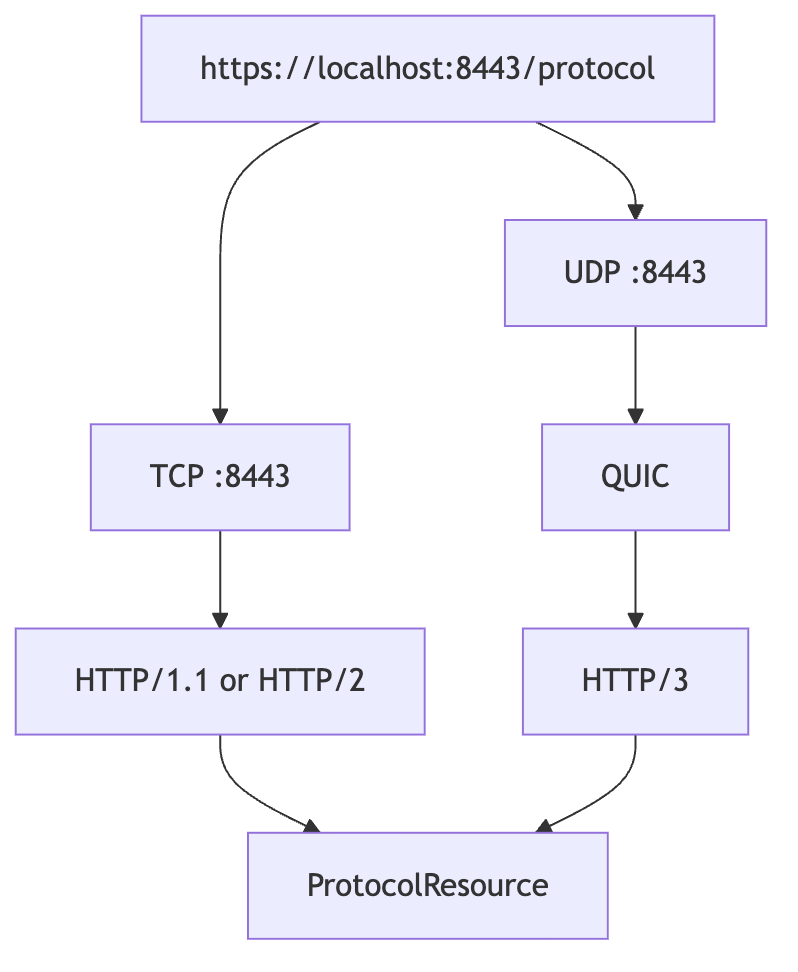
TCP and UDP have separate port spaces. Publishing TCP 8443 does not publish UDP 8443.
Prepare the native library for the container
Stop the JVM application with Ctrl+C so the container can use port 8443.
I run Podman through a Linux VM on my Mac. Check the architecture of your container runtime:
podman info --format '{{.Host.Arch}}'HTTP/3 uses Netty and the native quiche QUIC implementation. Maven selects the native library for the build machine, which means my build on Apple Silicon includes a macOS ARM library. The Podman VM needs a Linux ARM library. When I put the Mac-built application in the container, it exits during startup with this error:
java.io.FileNotFoundException: META-INF/native/libnetty_quiche42_linux_aarch_64.soThe application needs that library before it can start serving requests. Add the runtime platform to pom.xml under <dependencies>. I use this dependency for my ARM Linux VM:
<dependency>
    <groupId>io.netty</groupId>
    <artifactId>netty-codec-native-quic</artifactId>
    <classifier>linux-aarch_64</classifier>
</dependency>
For an amd64 Linux runtime, use linux-x86_64. The Quarkus platform manages the version, and Maven keeps the host library it selected automatically. I include both Linux variants in the companion project so you can package it for either architecture. My container runs on Linux ARM.
You can also select osx-x86_64, osx-aarch_64, or windows-x86_64 for those platforms. We need native QUIC while running on a normal JVM too. The Java application can move between operating systems, but this library has to match the operating system and architecture that run it.
Break HTTP/3 with Podman
Rebuild after adding the Linux dependency, then build the JVM image from the generated Dockerfile:
./mvnw package
podman build -f src/main/docker/Dockerfile.jvm -t localhost/http3-demo .
The generated image runs Java 21 as a non-root user. Its EXPOSE declaration describes the ports; podman run decides which ports the host forwards into the container. I start Podman directly here so I can change the TCP and UDP mappings independently.
First, publish only TCP:
podman run --rm -d --name http3-tcp-only \
  -p 127.0.0.1:8443:8443/tcp \
  -v "$PWD/.certs:/certs:ro,Z" \
  localhost/http3-demo
Wait for the startup message in podman logs http3-tcp-only, then make both requests:
curl -k --fail --http2 https://localhost:8443/protocol
curl -k --fail --http3-only --max-time 5 https://localhost:8443/protocol
I get HTTP_2 from the first request. The HTTP/3 request fails to connect because I’ve only published the TCP port. Quarkus listens for UDP inside the container, but Podman has no UDP mapping to carry the request from the host. Curl’s connection error can vary with its QUIC backend.
Stop that container and publish both transports:
podman stop http3-tcp-only

podman run --rm -d --name http3-both \
  -p 127.0.0.1:8443:8443/tcp \
  -p 127.0.0.1:8443:8443/udp \
  -v "$PWD/.certs:/certs:ro,Z" \
  localhost/http3-demo
After startup, call the same resource over HTTP/3 again:
curl -k --fail --http3-only --max-time 10 https://localhost:8443/protocolThis time I get HTTP_3. Adding the UDP mapping lets the request reach Quarkus over QUIC. I use the same image and the same REST method for both container starts.
What this means for a deployment
When you deploy the application, follow the UDP connection all the way to the HTTPS listener. Container publishing, firewalls, Services, and load balancers or proxies each need to support the path you choose. If a proxy accepts HTTP/3 and forwards HTTP/2 to Quarkus, our resource returns HTTP_2. It reports the connection that reaches the application.
I use a disposable certificate here to keep the local setup small. For production, manage certificates and renewal through the TLS registry and your platform’s certificate tooling or secret mounts. Also make sure Alt-Svc advertises the port your clients can reach. If you translate ports at a proxy, advertising the backend port can send a client to an unreachable service.
Keep TCP-based HTTPS available alongside HTTP/3. Clients can encounter networks that block UDP, and the HTTP/3 specification recommends falling back when QUIC connectivity fails. Let those clients reach your application over HTTP/2 or HTTP/1.1.
Does this endpoint become faster?
I haven’t benchmarked the application. Curl sends a small request over localhost and gets a short string back, so there’s very little here to tell us about a client on a slow or unreliable network. QUIC changes connection establishment and removes TCP’s ordering dependency between streams. How much that changes response time depends on your workload, latency, and packet loss.
When you’ve finished, stop the container and remove the local certificate:
podman stop http3-both
rm -rf .certs
You can find the complete example in the companion project.
I still write the resource as an ordinary Jakarta REST method. Quarkus handles the HTTP versions, and I configure the certificate, native library, and network path around it. If HTTP/2 reaches that method while HTTP/3 fails, I start with the UDP path and the runtime’s QUIC library. The application code can stay as small as the method we started with.