


Enterprise Java teams migrating from Spring Boot often ask the same question: Where is my Actuator?
Spring Boot and Quarkus share the same goal: Observable, production-ready services. But they approach the problem from opposite architectural assumptions.
Spring Boot is built around runtime introspection. The framework inspects the classpath, evaluates conditions, discovers beans, and configures the application dynamically at startup. Actuator fits naturally into this model. It exposes the internal state of the container because the container is still “alive” and reflective at runtime. This flexibility is convenient, but it comes at the cost of longer startup times, heavier memory usage, and more complex runtime behavior.
Quarkus flips the model toward build-time optimization. Classpath analysis, CDI wiring, and configuration resolution happen during the build. What ships to production is a pre-optimized, reflection-free runtime that starts fast and uses far less memory. The trade-off is intentional: Quarkus avoids exposing deep runtime introspection APIs because those internal structures no longer exist in the same way.
However, Quarkus does provide debugging and exploration tools, they are simply dev-only. For example: http://localhost:8080/q/arc/beans
This Dev UI endpoint shows the CDI container structure, bean metadata, and wiring information. It serves the same diagnostic purpose as /actuator/beans, but it is never exposed in production because the Quarkus production philosophy prioritizes predictable, minimal operational surfaces. Developers get introspection during development, and operators get tight, secure, purpose-built endpoints in production.
Spring Boot builds a dynamic runtime and exposes it. Quarkus builds a static runtime and lets you expose only what your production environment requires.
Common Actuator Endpoints and Their Quarkus Equivalents
The following list helps you understand what is different between the two systems and why those differences exist.
Health & Probes
Quarkus applications use SmallRye Health, an implementation of the MicroProfile Health specification for health-checks and probes.
/actuator/health→/q/health/actuator/health/liveness→/q/health/live/actuator/health/readiness→/q/health/ready
Metrics
For metrics, Quarkus uses Micrometer. Find details in the observability documentation.
/actuator/metrics→/q/metrics/actuator/metrics/{name}→/q/metrics(Micrometer format)/actuator/prometheus→/q/metrics(Prometheus enabled)
Beans / Container Introspection
/actuator/beans→ Dev only:/q/arc/beans
Environment & Config
/actuator/env→ custom endpoint exposing MicroProfile Config/actuator/configprops→ custom endpoint
Diagnostics
/actuator/threaddump→ JVM tools (jcmd,jstack)/actuator/heapdump→ JVM tools (jcmd GC.heap_dump)
Database Migration
/actuator/flyway→ no built-in HTTP endpoint/actuator/liquibase→ no built-in HTTP endpoint
(Use DB metadata tables or implement custom endpoints.)
Logging
/actuator/loggers→ configure viaapplication.properties(no HTTP endpoint) OR even better, use the quarkus-logging-manager.
Other Actuator endpoints with no direct Quarkus equivalent
/actuator/auditevents/actuator/httptrace/actuator/caches/actuator/scheduledtasks/actuator/mappings/actuator/sessions/actuator/shutdown/actuator/startup/actuator/quartz
Quarkus preserves what matters for production, health, metrics, configuration, security, while eliminating runtime mechanisms that slow down startup or inflate footprint. Developers still get introspection during development through Dev UI, but production surfaces remain minimal, explicit, and controlled.
Quarkus also ships with a built-in Info endpoint that exposes essential application metadata such as the application name, version, environment details, and configurable custom properties. It’s part of the broader Quarkus observability toolkit and gives teams a simple way to surface runtime diagnostics without adding external libraries. The endpoint follows Quarkus conventions: small footprint, fast execution, and build-time efficiency. You can enable it with a single extension and enrich it with your own fields, making it a lightweight alternative to Spring Boot’s Actuator info endpoint while staying fully aligned with Quarkus’s design philosophy.
But you can also add your own features to Quarkus with the extension mechanism.
In this tutorial you will build a complete Quarkus Actuator-style Info endpoint, including:
Custom runtime configuration
A
/q/actuator/infoendpointGit metadata loading
Build-time and runtime config separation
Bean registration in the deployment module
Native-image resource inclusion
You will end the guide with a working custom extension you can use across projects.
No magic. No framework hacks. Just real Quarkus extension development.
Prerequisites
You need:
Java 21+
Maven 3.9+
Quarkus CLI (optional)
No prior extension experience required
If you just want to look at the code, feel free to browse my Github repository.
And I just have to thank Holly Cummins for all her help, patience and time in pushing me over hurdles with this :)
Generate the Extension Skeleton
Instead of manually writing POMs and creating folders, run the official Quarkus extension generator:
mvn io.quarkus.platform:quarkus-maven-plugin:3.29.4:create-extension -N \
    -DgroupId=com.ibm.developer \
    -DextensionId=quarkus-actuator \
    -DwithoutTests
This produces a full extension layout:
quarkus-actuator/
 ├── pom.xml                   (parent)
 ├── deployment/
 │    └── pom.xml
 └── runtime/
      └── pom.xml
Everything from plugin configuration to metadata files is already there.
You now fill the extension with your actuator logic.
Implement Runtime Logic
All code in runtime/ is packaged into the user’s application.
Let’s add some dependencies that we will need to the runtime/pom.xml
 <dependency>
            <groupId>io.quarkus</groupId>
            <artifactId>quarkus-rest-jackson</artifactId>
        </dependency>
        <dependency>
            <groupId>org.jboss.logging</groupId>
            <artifactId>jboss-logging</artifactId>
        </dependency>
        <dependency>
            <groupId>io.quarkus</groupId>
            <artifactId>quarkus-vertx-http</artifactId>
        </dependency>
We’ll use rest-jackson to access JSON formatting and responses
jboss-logging is obvious
the vertx-http helps us registering our endpoint
Add Runtime Configuration
Create:
runtime/src/main/java/com/ibm/developer/actuator/runtime/ActuatorRuntimeConfig.java
package com.ibm.developer.quarkus.actuator.runtime;

import io.quarkus.runtime.annotations.ConfigPhase;
import io.quarkus.runtime.annotations.ConfigRoot;
import io.smallrye.config.ConfigMapping;
import io.smallrye.config.WithDefault;

@ConfigRoot(phase = ConfigPhase.RUN_TIME)
@ConfigMapping(prefix = “actuator”)
public interface ActuatorRuntimeConfig {

    /**
     * Base path for actuator endpoints.
     */
    @WithDefault(”/actuator”)
    String basePath();

    /**
     * Info configuration.
     */
    InfoConfig info();

    interface InfoConfig {
        /**
         * Enable git information.
         */
        @WithDefault(”true”)
        boolean gitEnabled();

        /**
         * Enable Java information.
         */
        @WithDefault(”true”)
        boolean javaEnabled();

        /**
         * Enable SSL information.
         */
        @WithDefault(”false”)
        boolean sslEnabled();

    }
}
Your extension now supports:
quarkus.actuator.base-path=/actuator
quarkus.actuator.info.git-enabled=true
quarkus.actuator.info.java-enabled=true
quarkus.actuator.info.ssl-enabled=true
Add Info Provider
I have implemented all the info providers in the repository. For this article, we will just focus on the GitInfoProvider.
package com.ibm.developer.quarkus.actuator.runtime.infoprovider;

import java.util.Map;

public interface GitInfoProvider {

    Map<String, Object> getGitInfo();
}
You can find the JavaInfoProvider, MachineInfoProvider and SslInfoProvider in my repository.
And yes, this is a little light. So, it basically is an interface. How is this being implemented? Before we answer that question in the “deployment” or build time module, let’s move on to create the endpoint.
Add the /q/actuator/info endpoint
ActuatorInfoEndpoint.java:
package com.ibm.developer.quarkus.actuator.runtime;

import java.util.LinkedHashMap;
import java.util.Map;

import com.fasterxml.jackson.databind.ObjectMapper;
import com.ibm.developer.quarkus.actuator.runtime.infoprovider.BuildInfoProvider;
import com.ibm.developer.quarkus.actuator.runtime.infoprovider.GitInfoProvider;
import com.ibm.developer.quarkus.actuator.runtime.infoprovider.JavaInfoProvider;
import com.ibm.developer.quarkus.actuator.runtime.infoprovider.MachineInfoProvider;
import com.ibm.developer.quarkus.actuator.runtime.infoprovider.SslInfoProvider;

import io.vertx.core.Handler;
import io.vertx.core.http.HttpServerResponse;
import io.vertx.ext.web.RoutingContext;
import jakarta.enterprise.inject.spi.CDI;

public class ActuatorInfoEndpoint implements Handler<RoutingContext> {

    private final ActuatorRuntimeConfig config;

    public ActuatorInfoEndpoint(ActuatorRuntimeConfig config) {
        this.config = config;
    }

    @Override
    public void handle(RoutingContext routingContext) {
        if (!routingContext.request().method().equals(io.vertx.core.http.HttpMethod.GET)) {
            routingContext.response().setStatusCode(405).end();
            return;
        }
        try {
            Map<String, Object> out = new LinkedHashMap<>();

            // Git section
            if (config.info().gitEnabled()) {
                GitInfoProvider git = CDI.current().select(GitInfoProvider.class).get();
                if (git != null) {
                    Map<String, Object> g = git.getGitInfo();
                    if (!g.isEmpty()) {
                        out.put(”git”, g);
                    } else {
                        org.jboss.logging.Logger.getLogger(ActuatorInfoEndpoint.class)
                                .debug(”Git info is enabled but returned empty map”);
                    }
                } else {
                    org.jboss.logging.Logger.getLogger(ActuatorInfoEndpoint.class)
                            .warn(”GitInfoProvider bean not found”);
                }
            }

            // Build section
            // As an alternate approach, most of this information is also available via
            // ConfigProvider.getConfig().getOptionalValue(”quarkus.application.name”,
            // String.class).orElse(”application”);
            BuildInfoProvider buildProvider = CDI.current().select(BuildInfoProvider.class).get();
            if (buildProvider != null) {
                out.put(”build”, buildProvider.getBuildInfo());
            }

            // Get MachineInfoProvider for OS and process information
            MachineInfoProvider machineProvider = CDI.current().select(MachineInfoProvider.class).get();

            // OS section
            if (machineProvider != null) {
                Map<String, Object> os = machineProvider.getOsInfo();
                out.put(”os”, os);

                // Process section (pid, parentPid, owner, cpus)
                Map<String, Object> process = machineProvider.getProcessInfo();
                out.put(”process”, process);
            } else {
                org.jboss.logging.Logger.getLogger(ActuatorInfoEndpoint.class)
                        .warn(”MachineInfoProvider bean not found”);
            }

            // Get JavaInfoProvider for Java info
            JavaInfoProvider javaProvider = CDI.current().select(JavaInfoProvider.class).get();

            // Java section
            if (config.info().javaEnabled()) {
                if (javaProvider != null) {
                    Map<String, Object> java = javaProvider.getJavaInfo();
                    out.put(”java”, java);
                } else {
                    org.jboss.logging.Logger.getLogger(ActuatorInfoEndpoint.class)
                            .warn(”JavaInfoProvider bean not found”);
                }
            }

            // SSL section
            if (config.info().sslEnabled()) {
                SslInfoProvider sslProvider = CDI.current().select(SslInfoProvider.class).get();
                if (sslProvider != null) {
                    Map<String, Object> ssl = sslProvider.getSslInfo();
                    if (!ssl.isEmpty()) {
                        out.put(”ssl”, ssl);
                    }
                } else {
                    org.jboss.logging.Logger.getLogger(ActuatorInfoEndpoint.class)
                            .warn(”SslInfoProvider bean not found”);
                }
            }

            ObjectMapper objectMapper = CDI.current().select(ObjectMapper.class).get();
            HttpServerResponse response = routingContext.response();
            response.putHeader(”Content-Type”, “application/vnd.quarkus.actuator.v3+json”);
            response.end(objectMapper.writeValueAsString(out));
        } catch (Exception e) {
            routingContext.fail(e);
        }
    }
}
Actuator Recorder
Quarkus separates build-time and runtime. The deployment processor runs at build time and can’t directly create runtime objects. Recorders allow build steps to “record” actions that are executed later at runtime.
The ActuatorRecorder class is such a Quarkus recorder that bridges build-time and runtime. It’s annotated with @Recorder, so Quarkus can call its methods from build steps and generate code that executes at runtime.
Create the ActuatorRecorder.java:
package com.ibm.developer.quarkus.actuator.runtime;

import java.util.Map;
import java.util.function.Supplier;

import org.jboss.logging.Logger;

import com.ibm.developer.quarkus.actuator.runtime.infoprovider.BuildInfoProvider;
import com.ibm.developer.quarkus.actuator.runtime.infoprovider.GitInfoProvider;

import io.quarkus.runtime.RuntimeValue;
import io.quarkus.runtime.annotations.Recorder;
import io.quarkus.runtime.annotations.RuntimeInit;
import io.vertx.core.Handler;
import io.vertx.ext.web.RoutingContext;

@Recorder
public class ActuatorRecorder {

    private static final Logger log = Logger.getLogger(ActuatorRecorder.class);
    private final RuntimeValue<ActuatorRuntimeConfig> config;

    public ActuatorRecorder(RuntimeValue<ActuatorRuntimeConfig> config) {
        this.config = config;
    }

    @RuntimeInit
    public void init() {
        log.debugf(”Actuator initialized at %s”, config.getValue().basePath());
    }

    public Handler<RoutingContext> createInfoHandler() {
        return new ActuatorInfoEndpoint(config.getValue());
    }

    public Supplier<GitInfoProvider> gitInfoSupplier(Map<String, Object> properties) {
        return () -> new GitInfoProvider() {
            @Override
            public Map<String, Object> getGitInfo() {
                return properties;
            }
        };
    }

    public Supplier<BuildInfoProvider> buildInfoSupplier(Map<String, Object> properties) {
        return () -> new BuildInfoProvider() {
            @Override
            public Map<String, Object> getBuildInfo() {
                return properties;
            }
        };
    }
}
What it does:
Runtime initialization (init() method, lines 27-30): Logs initialization at runtime using the base path from runtime configuration. The @RuntimeInit annotation ensures it runs during application startup.
HTTP handler creation (createInfoHandler() method, lines 32-34): Creates and returns a Vert.x Handler<RoutingContext> that handles HTTP requests to the actuator info endpoint. This handler is registered as a route during build time but executes at runtime.
Build-time data suppliers (gitInfoSupplier() and buildInfoSupplier() methods, lines 36-52): These methods capture build-time data (Git info and build metadata) and return Supplier instances that create GitInfoProvider and BuildInfoProvider beans at runtime. The suppliers capture the data at build time, so the information is baked into the application and available at runtime without re-reading files or re-computing values.
Implement Deployment Logic
Now it’s time to look at the build time aspects. Everything in the deployment/ module runs at build-time.
First we need to add the corresponding deployment dependencies in deployment/pom.xml
 <dependency>
            <groupId>io.quarkus</groupId>
            <artifactId>quarkus-core-deployment</artifactId>
        </dependency>
        <dependency>
            <groupId>io.quarkus</groupId>
            <artifactId>quarkus-rest-jackson-deployment</artifactId>
        </dependency>
        <dependency>
            <groupId>io.smallrye.config</groupId>
            <artifactId>smallrye-config-core</artifactId>
        </dependency>
        <dependency>
            <groupId>io.quarkus</groupId>
            <artifactId>quarkus-vertx-http-deployment</artifactId>
        </dependency>
Build-Time Config
The ActuatorBuildTimeConfig class defines build-time configuration for the Quarkus actuator extension. It’s a @ConfigMapping interface with the actuator prefix and @ConfigRoot(phase = ConfigPhase.BUILD_TIME), so Quarkus reads these values during build. It exposes three properties:
enabled() (defaults to true) to enable/disable the actuator,
infoEnabled() (defaults to true) to control the info endpoint, and
basePath() (defaults to /actuator) to set the base path for actuator endpoints.
The deployment processor (QuarkusActuatorProcessor) uses this config at build time to conditionally register runtime beans (like JavaInfoProvider, MachineInfoProvider, etc.) and HTTP routes for the info endpoint, allowing developers to configure the extension via application.properties before the application is built.
ActuatorBuildTimeConfig.java:
package com.ibm.developer.quarkus.actuator.deployment;

import io.quarkus.runtime.annotations.ConfigPhase;
import io.quarkus.runtime.annotations.ConfigRoot;
import io.smallrye.config.ConfigMapping;
import io.smallrye.config.WithDefault;

@ConfigRoot(phase = ConfigPhase.BUILD_TIME)
@ConfigMapping(prefix = “actuator”)
public interface ActuatorBuildTimeConfig {
    /**
     * Enable or disable the actuator.
     */
    @WithDefault(”true”)
    boolean enabled();

    /**
     * Enable or disable the info endpoint.
     */
    @WithDefault(”true”)
    boolean infoEnabled();

    /**
     * Base path for actuator endpoints.
     */
    @WithDefault(”/actuator”)
    String basePath();
}
Processor: register beans and native resources
The QuarkusActuatorProcessor is the build-time engine of the extension. It prepares everything the actuator needs before the application ever starts. Quarkus calls its @BuildStep methods during compilation, allowing the extension to shift work out of the runtime hot path.
It performs four core jobs:
Register the extension
It announces the feature asquarkus-actuatorso Quarkus can list it in build output and Dev UI.Capture build-time data
It reads build metadata (GAV coordinates, build timestamp, Quarkus version, class count) and optionalgit.propertiesinformation.
All of this is captured at build time, stored via the recorder, and exposed as injectable beans at runtime.Register beans and native resources
It conditionally registers the runtime beans (Git, Build, Java, Machine, SSL info providers) only when the extension is enabled.
It also addsgit.propertiesas a native-image resource so Git data works in native executables.Register the
/actuator/inforoute
At runtime init it builds the HTTP route (default:/actuator/info), normalizes the base path, and wires it to the handler produced by the recorder.
The processor is the glue between build-time and runtime. It computes everything that can be known ahead of time, stores it efficiently, and leaves the final application with a small, fast, and predictable runtime footprint—classic Quarkus build-time optimization.
And this is, where we finally implement the GitInfoProvider.readGitInfo() method.
Extend the scaffolded QuarkusActuatorProcessor.java:
package com.ibm.developer.quarkus.actuator.deployment;

import static java.time.format.DateTimeFormatter.ISO_OFFSET_DATE_TIME;

import java.io.IOException;
import java.io.InputStream;
import java.time.OffsetDateTime;
import java.util.HashMap;
import java.util.LinkedHashMap;
import java.util.Map;
import java.util.Properties;

import org.jboss.jandex.IndexView;
import org.jboss.logging.Logger;

import com.ibm.developer.quarkus.actuator.runtime.ActuatorRecorder;
import com.ibm.developer.quarkus.actuator.runtime.infoprovider.BuildInfoProvider;
import com.ibm.developer.quarkus.actuator.runtime.infoprovider.GitInfoProvider;
import com.ibm.developer.quarkus.actuator.runtime.infoprovider.JavaInfoProvider;
import com.ibm.developer.quarkus.actuator.runtime.infoprovider.MachineInfoProvider;
import com.ibm.developer.quarkus.actuator.runtime.infoprovider.SslInfoProvider;

import io.quarkus.arc.deployment.AdditionalBeanBuildItem;
import io.quarkus.arc.deployment.SyntheticBeanBuildItem;
import io.quarkus.bootstrap.model.ApplicationModel;
import io.quarkus.builder.Version;
import io.quarkus.deployment.annotations.BuildProducer;
import io.quarkus.deployment.annotations.BuildStep;
import io.quarkus.deployment.annotations.ExecutionTime;
import io.quarkus.deployment.annotations.Record;
import io.quarkus.deployment.builditem.CombinedIndexBuildItem;
import io.quarkus.deployment.builditem.FeatureBuildItem;
import io.quarkus.deployment.builditem.nativeimage.NativeImageResourceBuildItem;
import io.quarkus.deployment.pkg.builditem.CurateOutcomeBuildItem;
import io.quarkus.maven.dependency.ResolvedDependency;
import io.quarkus.vertx.http.deployment.NonApplicationRootPathBuildItem;
import io.quarkus.vertx.http.deployment.RouteBuildItem;
import jakarta.enterprise.context.ApplicationScoped;

class QuarkusActuatorProcessor {

    private static final Logger log = Logger.getLogger(QuarkusActuatorProcessor.class);
    private static final String FEATURE = “quarkus-actuator”;

    @BuildStep
    FeatureBuildItem feature() {
        return new FeatureBuildItem(FEATURE);
    }

    @Record(ExecutionTime.STATIC_INIT)
    @BuildStep
    void registerBuildTimeBeans(CurateOutcomeBuildItem curateOutcomeBuildItem,
                                BuildProducer<SyntheticBeanBuildItem> beanProducer, ActuatorRecorder recorder,
                                CombinedIndexBuildItem combinedIndex) {


        ApplicationModel applicationModel = curateOutcomeBuildItem.getApplicationModel();
        IndexView index = combinedIndex.getIndex();

        // Pass through information about the build to the supplier, so processing happens at build time
        // To produce an injectable bean, it needs to be recorded, but we can initialise the recorder with static information
        beanProducer.produce(SyntheticBeanBuildItem.configure(BuildInfoProvider.class)
                .supplier(recorder.buildInfoSupplier(readBuildData(applicationModel, index)))
                .scope(ApplicationScoped.class)
                .done());


        // Pass through the git information to the supplier
        beanProducer.produce(SyntheticBeanBuildItem.configure(GitInfoProvider.class)
                .supplier(recorder.gitInfoSupplier(readGitInfo()))
                .scope(ApplicationScoped.class)
                .done());
    }

    private Map<String, Object> readBuildData(ApplicationModel applicationModel, IndexView index) {
        ResolvedDependency appArtifact = applicationModel.getAppArtifact();
        Map<String, Object> buildData = new LinkedHashMap<>();

        String group = appArtifact.getGroupId();
        buildData.put(”group”, group);
        String artifact = appArtifact.getArtifactId();
        buildData.put(”artifact”, artifact);
        String version = appArtifact.getVersion();
        buildData.put(”version”, version);
        String time = ISO_OFFSET_DATE_TIME.format(OffsetDateTime.now());
        buildData.put(”time”, time);
        String quarkusVersion = Version.getVersion();
        buildData.put(”quarkusVersion”, quarkusVersion);

        // Count all known classes in the index
        int count = index.getKnownClasses().size();

        buildData.put(”classes”, count);

        return buildData;
    }

    // As an alternative approach, the Eclipse jgit library can be used to read the .git folder directly
    private Map<String, Object> readGitInfo() {
        // Read git.properties at build time
        String location = “/git.properties”;
        Properties props = new Properties();

        try (InputStream is = Thread.currentThread().getContextClassLoader()
                .getResourceAsStream(location)) {
            if (is == null) {
                // Try without leading slash
                String locationWithoutSlash = location.substring(1);
                try (InputStream is2 = Thread.currentThread().getContextClassLoader()
                        .getResourceAsStream(locationWithoutSlash)) {
                    if (is2 != null) {
                        props.load(is2);
                        log.debugf(”Loaded git.properties from: %s”, locationWithoutSlash);
                    } else {
                        log.debugf(”git.properties not found at: %s or %s”, location, locationWithoutSlash);
                    }
                }
            } else {
                props.load(is);
                log.debugf(”Loaded git.properties from: %s”, location);
            }
        } catch (IOException e) {
            log.warnf(”Failed to load git.properties: %s”, e.getMessage());
        }

        // Extract the relevant git properties
        Map<String, Object> gitProperties = new HashMap<>();
        if (!props.isEmpty()) {
            String branch = props.getProperty(”git.branch”);
            String commitId = props.getProperty(”git.commit.id.abbrev”);
            if (commitId == null || commitId.isEmpty()) {
                commitId = props.getProperty(”git.commit.id”);
            }
            String commitTime = props.getProperty(”git.commit.time”);

            if (branch != null && !branch.isEmpty()) {
                gitProperties.put(”branch”, branch);
            }
            if (commitId != null && !commitId.isEmpty()) {
                gitProperties.put(”commit-id”, commitId);
            }
            if (commitTime != null && !commitTime.isEmpty()) {
                gitProperties.put(”commit-time”, commitTime);
            }

            log.infof(”Git info loaded at build time - branch: %s, commit: %s, time: %s”,
                    branch != null ? branch : “N/A”,
                    commitId != null ? commitId : “N/A”,
                    commitTime != null ? commitTime : “N/A”);
        } else {
            log.debug(”No git properties found, git info will be empty”);
        }

        return gitProperties;
    }


    @BuildStep
    void registerRuntimeBeans(BuildProducer<AdditionalBeanBuildItem> beans, ActuatorBuildTimeConfig cfg) {

        if (!cfg.enabled()) {
            log.debug(”Actuator is disabled, skipping bean registration”);
            return;
        }


        log.infof(”Registering actuator bean: %s”, GitInfoProvider.class.getName());
        beans.produce(AdditionalBeanBuildItem.unremovableOf(GitInfoProvider.class));

        log.infof(”Registering actuator bean: %s”, BuildInfoProvider.class.getName());
        beans.produce(AdditionalBeanBuildItem.unremovableOf(BuildInfoProvider.class));

        log.infof(”Registering actuator bean: %s”, JavaInfoProvider.class.getName());
        beans.produce(AdditionalBeanBuildItem.unremovableOf(JavaInfoProvider.class));

        log.infof(”Registering actuator bean: %s”, MachineInfoProvider.class.getName());
        beans.produce(AdditionalBeanBuildItem.unremovableOf(MachineInfoProvider.class));

        log.infof(”Registering actuator bean: %s”, SslInfoProvider.class.getName());
        beans.produce(AdditionalBeanBuildItem.unremovableOf(SslInfoProvider.class));

    }

    @BuildStep
    void registerNativeResources(BuildProducer<NativeImageResourceBuildItem> resources) {
        log.debug(”Registering native resource: git.properties”);
        resources.produce(new NativeImageResourceBuildItem(”git.properties”));
    }

    @BuildStep
    @Record(ExecutionTime.RUNTIME_INIT)
    RouteBuildItem registerRoutes(
            NonApplicationRootPathBuildItem nonApplicationRootPathBuildItem,
            ActuatorRecorder recorder,
            ActuatorBuildTimeConfig buildTimeCfg) {

        if (!buildTimeCfg.enabled() || !buildTimeCfg.infoEnabled()) {
            log.debugf(”Skipping route registration - enabled: %s, infoEnabled: %s”,
                    buildTimeCfg.enabled(), buildTimeCfg.infoEnabled());
            return null;
        }

        // Normalize the base path: remove leading/trailing slashes for relative path
        // Use build-time config for route registration since routes are registered at
        // build time
        String basePath = buildTimeCfg.basePath();
        if (basePath == null || basePath.isEmpty() || basePath.equals(”/”)) {
            basePath = “”;
        } else {
            // Remove leading slash for relative path
            if (basePath.startsWith(”/”)) {
                basePath = basePath.substring(1);
            }
            // Remove trailing slash
            if (basePath.endsWith(”/”)) {
                basePath = basePath.substring(0, basePath.length() - 1);
            }
        }

        // Use nestedRoute if we have a base path, otherwise use route directly
        RouteBuildItem.Builder routeBuilder;
        String finalPath;
        if (basePath.isEmpty()) {
            finalPath = “info”;
            routeBuilder = nonApplicationRootPathBuildItem.routeBuilder()
                    .route(finalPath);
        } else {
            finalPath = basePath + “/info”;
            routeBuilder = nonApplicationRootPathBuildItem.routeBuilder()
                    .nestedRoute(basePath, “info”);
        }

        log.infof(”Registering actuator route: %s (relative to non-application root)”, finalPath);

        // Recorder has RuntimeValue injected via constructor
        return routeBuilder
                .handler(recorder.createInfoHandler())
                .displayOnNotFoundPage()
                .build();
    }

    @BuildStep
    @Record(ExecutionTime.RUNTIME_INIT)
    void initRuntime(ActuatorRecorder recorder) {
        log.debug(”Initializing actuator runtime”);
        // Recorder has RuntimeValue injected via constructor
        recorder.init();
    }
}
Build the Extension
mvn clean installYou now have:
~/.m2/repository/com/ibm/developer/quarkus-actuator/1.0.0-SNAPSHOT/Use the Extension in a Quarkus App
Create a new application:
quarkus create app demo
cd demo
Add your extension:
<dependency>
    <groupId>com.ibm.developer</groupId>
    <artifactId>quarkus-actuator</artifactId>
    <version>1.0.0-SNAPSHOT</version>
</dependency>
Add a git.properties file:
src/main/resources/git.propertiesExample:
git.branch=main
git.commit.id.abbrev=abc123
git.commit.time=2024-10-01T12:00:00Z
git.commit.message.short=Initial commit
Note: This is something you should have generated. Spring uses the git-maven plugin which can be configured like this in your demo app:
 <plugin>
                <groupId>io.github.git-commit-id</groupId>
                <artifactId>git-commit-id-maven-plugin</artifactId>
                <version>9.0.2</version>
                <executions>
                    <execution>
                        <phase>prepare-package</phase>
                        <goals>
                            <goal>revision</goal>
                        </goals>
                    </execution>
                </executions>
                <configuration>
                    <dotGitDirectory>${project.basedir}/.git</dotGitDirectory>
                    <generateGitPropertiesFile>true</generateGitPropertiesFile>
                    <generateGitPropertiesFilename>${project.build.outputDirectory}/git.properties</generateGitPropertiesFilename>
                </configuration>
            </plugin>
As alternative approach, you can also use the Eclipse jgit library.
Run the app:
mvn quarkus:devOpen:
http://localhost:8080/q/actuator/infoYou should see JSON with app, git, and java.
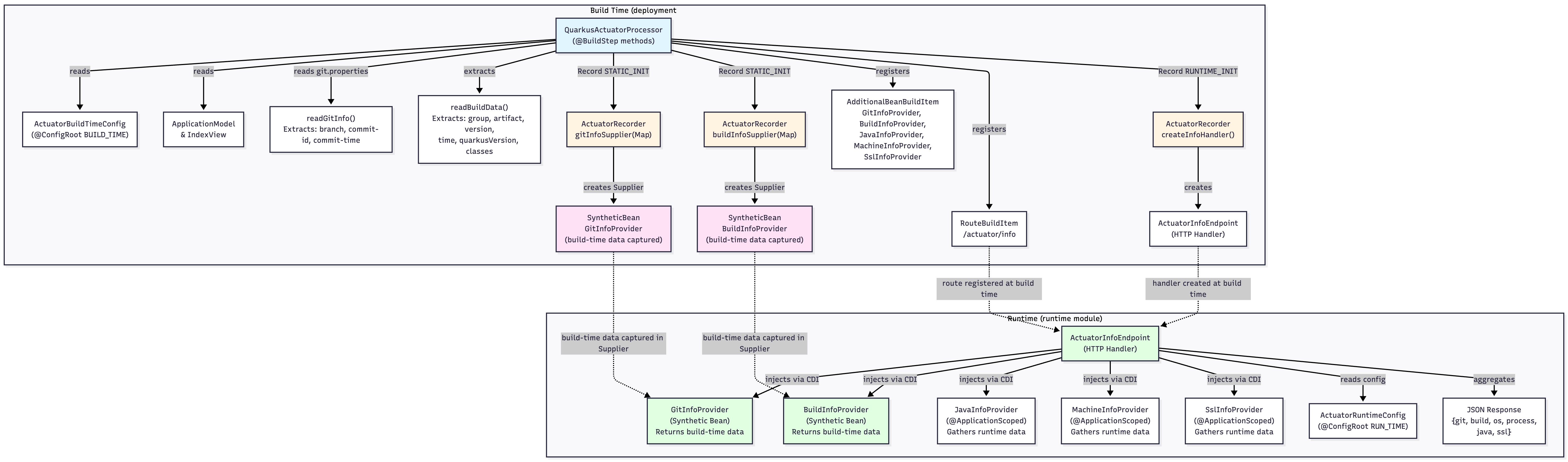
The Extension Overview
The separation between build and runtime, allows build-time data (like git commit info) to be captured once during build and exposed at runtime without re-reading files.
Congratulations! You have build your first extension!
Do You Always Need a Recorder?
While building the actuator extension, an interesting question came up in a discussion with Holly Cummins: When should an extension use a recorder, and when is plain runtime code enough?
Quarkus uses recorders heavily because they allow part of the extension’s logic to run at build time while still generating code that executes later at runtime. Recorders become essential when an extension needs to precompute something during the build, or when it wants to instantiate interfaces or runtime-initialized constructs using generated bytecode. In other words, recorders let build-time code “stage” work for runtime without violating Quarkus’s static initialization rules.
In this extension, most of the beans are simple, concrete classes with no dynamic proxies or bytecode generation requirements. That means they can safely be registered as normal runtime beans without needing a recorder to produce them. As Holly pointed out, if the extension had relied on interfaces that required implementation at runtime, or if more setup needed to be captured ahead of time, recorders would have been mandatory.
The takeaway: recorder usage depends on what you’re instantiating.
If runtime logic requires generated bytecode, interface implementations, or hybrid build/runtime behavior, use a recorder. If your beans are plain concrete classes, registering them normally is not only simpler but entirely valid within Quarkus’s build-time model.
Production Notes
Works in JVM and native mode.
Build steps ensure the endpoint is included only when enabled.
Avoid exposing environment variables or sensitive config unless intentional.
Where to Go from Here
You now have the foundation of a real Quarkus extension. From here, you can explore the parts that make Quarkus extensions so powerful: build-time augmentation, runtime initialization, native-image tuning, and deeper integration with Quarkus subsystems.
Extensions are not just a mechanism for adding endpoints. They can reshape the entire developer experience and significantly improve performance. Quarkus extensions can:
Contribute build steps that precompute data ahead of runtime
Register CDI beans only when features are enabled
Pre-configure native-image resources
Generate Dev UI cards, endpoints, and configurators
Hook into the HTTP layer, config system, health, and telemetry
Improve startup time and memory usage by moving logic to build time
If you want to see what a fully mature production-ready extension looks like, check the official Extension Maturity Matrix:
https://quarkus.io/guides/extension-maturity-matrix
It explains how extensions evolve from experimental to stable and what capabilities they unlock along the way. Studying it will give you ideas for improving your actuator extension and help you design extensions that feel native to the Quarkus ecosystem.
You can now extend this tutorial in multiple directions:
Add
/actuator/healthusing SmallRye HealthAdd
/actuator/envto surface configuration sourcesAdd
/actuator/beansusing the ArC bean registryAdd
/actuator/metricsintegrating Micrometer or OpenTelemetryAdd Dev UI integration for richer developer experience
Quarkus extensions let you design features once and use them everywhere.