


If you work in Developer Relations, you also need to report what you’ve been doing. Conference talks, workshops, articles, videos. At some point, all of that has to make its way into a structure that the organization can use for reporting.
Internally in our team we use a Microsoft SharePoint form for this. And, well, it’s semi-optimal. It’s a fairly big form because several teams report into the same structure, and it needs to capture all the different things those teams do. I can understand how we ended up there. A workshop needs different information from a video, and a customer meeting brings another set of questions. Putting all of that into one form means you spend a bit of time figuring out which parts belong to the activity you’re trying to report.
That got me wondering what it would take to let Bob help with this. I’d like to describe what I did, have Bob work out what’s still missing, and answer a few questions along the way. But I also wanted Bob to “interact” with the user in a standardized way. I didn’t particularly want to invent a weird UI framework contract just to let an agent ask someone for a number and a date.
Then I stumbled over the AG-UI architecture documentation and thought: wait, maybe we can make this work with Bob, Quarkus, and ACP.
So, let’s start. I’ve put together a small application called Field Notes to explore exactly that. I used our reporting form as the starting point, replaced the people and products with fictional ones, and added a few conditional requirements to give Bob something to work through. This example doesn’t connect to our SharePoint form. It lets us follow the interaction without involving actual reporting data.
Here’s what that looks like:
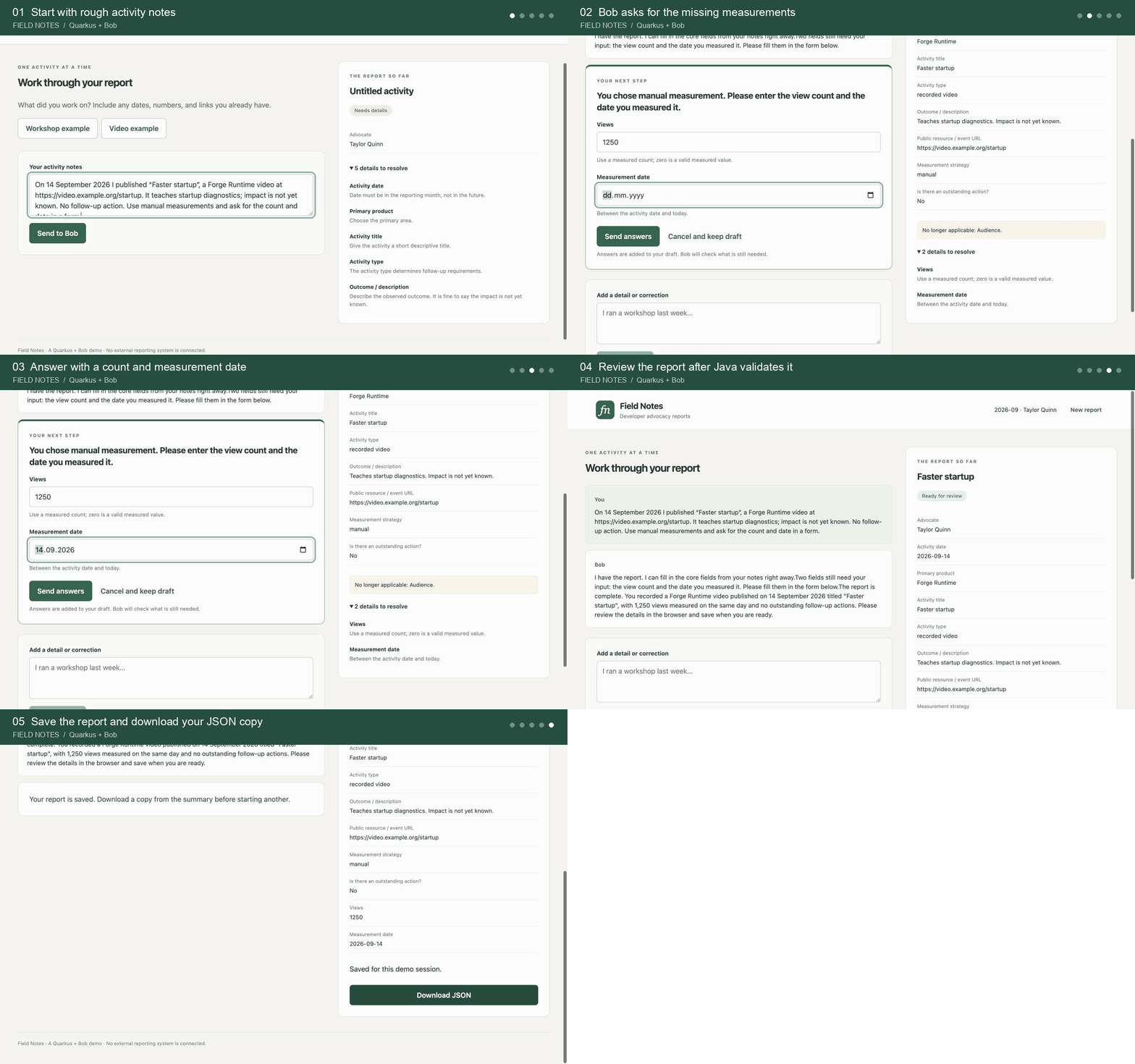
Screenshots from the running local demo, with shortened pauses between steps. The sample values are fictional. Bob’s response time and choice of questions can vary.
If you’d like to follow along, the IBM Bob site has the download and free-trial entry points. You’ll need Bob Shell access and an API key for the local application. I did put the working application into my Github repository. We are just going to walk about some elements of the implementation here and not build it out step by step.
Start with the three connections
The first thing I needed to sort out was what AG-UI actually gives me. The name stands for Agent-User Interaction Protocol. It defines messages an agent backend can send to a frontend: a run has started, here’s another piece of text, here’s the updated application state, or the run has finished. Both sides agree on the shape and meaning of those messages, so I don’t have to invent that part of the conversation. In my application, they travel between the browser and Quarkus.
Bob is still a separate process, though. I need to send it a prompt, and it needs a way to call the reporting operations in my application. So there are three connections involved:
AG-UI carries run events, text, and report snapshots from Quarkus to the browser over server-sent events, or SSE.
ACP, the Agent Client Protocol, connects Quarkus to Bob Shell over standard input and output. Quarkus starts a session, sends a prompt, and receives updates.
MCP, the Model Context Protocol, exposes the reporting tools from Quarkus to Bob over HTTP.
That sounds like quite a few acronyms for a reporting form. In practice, I have one Quarkus application serving the page, keeping the draft, checking the answers, and managing the Bob process. Each protocol covers a connection that I need anyway.
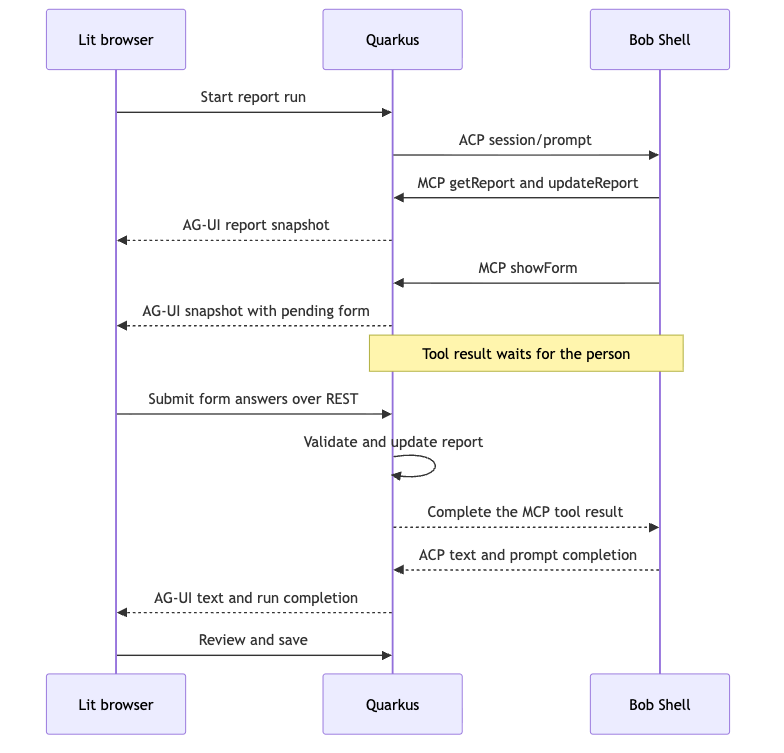
Have a look at the return path from the browser. I send form answers to an ordinary REST endpoint, which completes a pending MCP tool call. The visible form travels as state over AG-UI. The reporting fields and the answer endpoint are still part of my application; AG-UI doesn’t define those for me.
So why didn’t I add the AG-UI Java dependency?
My first thought was to integrate the AG-UI Java SDK into my application. It helps to separate the protocol from the library. AG-UI defines the messages exchanged between an agent backend and a frontend. The Java SDK gives Java developers classes and client APIs for working with those messages.
The overview starts with HttpAgent. That’s a client: it calls an existing AG-UI endpoint and reads the events coming back. In this application, my browser is the client, and Quarkus needs to provide that endpoint. Behind Quarkus, Bob speaks ACP. Something still has to translate Bob’s updates into AG-UI events and include our report state in the stream.
Adding the SDK wouldn’t write that Bob adapter for me. But its core event classes could absolutely replace the handwritten event maps in this project. I decided to implement the small set of events in the example manually so you can follow the translation, with a short fetch SSE reader on the browser side. That’s a choice I made for the walkthrough, not a technical reason to avoid the Java dependency. Using the SDK’s types would reduce the protocol structure I maintain myself; I’d still need the ACP translation and the reporting logic.
What I’d like here is a reusable server integration that handles event serialization and streaming, leaving me to connect the agent and supply the application state. I think that would be a great addition to LangChain4j or Quarkus. There’s already a LangChain4j AG-UI integration request. Anyone fancy picking that up, or contributing a Quarkus integration? I’d be happy to have less adapter code in the next example :-)
Keep the frontend familiar
I wanted to spend most of my time on the interaction with Bob, so I kept the page fairly ordinary. I picked Lit for a conversation area, a question card, and a report summary. Those components render HTML, and Quarkus Web Bundler packages the JavaScript and CSS with the backend.
For the application, I used latest Quarkus 3.39.3, Java 21, Web Bundler 2.3.4, and Lit 3.3.3. The working Bob integration is analogous to an earlier post where I exposed Bob ACP via a browser. Alongside Web Bundler, the POM includes Quarkus REST/Jackson and Quarkus MCP Server HTTP. Lit comes from a Maven dependency:
<dependency>
    <groupId>org.mvnpm</groupId>
    <artifactId>lit</artifactId>
    <version>3.3.3</version>
</dependency>
I put the page in src/main/resources/web/index.html. Web Bundler expands the bundle tag, and the custom element renders the application:
<head>
  <meta charset="utf-8">
  <meta name="viewport" content="width=device-width, initial-scale=1">
  <meta name="description" content="An advocate reporting assistant built with Quarkus, Bob, MCP, and AG-UI.">
  <title>Field Notes · Activity reports</title>
  {#bundle /}
</head>
<body><report-assistant></report-assistant></body>
The components live under src/main/resources/web/app/. I can start the whole thing in Quarkus dev mode, without another frontend server running alongside it. If you’d like more detail on that part, have a look at the Web Bundler documentation.
Give Bob a catalog it can work with
Before connecting Bob, I needed to make the reporting rules explicit. Otherwise, I’d just be asking the model to remember which fields belong to which activity, and I’d still need to validate the result somewhere.
I put those definitions in ReportRules. Each field has an identifier, a label, a control type, any available choices, and a short explanation. I use that same catalog to describe the fields to Bob and render the controls in the browser.
The fields are fairly simple. Here’s the part of ReportRules.required that handles measurements for articles and videos:
if (is(v, "type", "article", "recorded video")) {
    r.addAll(List.of("publicUrl", "metrics"));
    if (is(v, "metrics", "manual")) r.addAll(List.of("views", "measuredOn"));
    if (is(v, "metrics", "collect later")) r.add("source");
}
If I choose manual measurement, I need to provide the count and the date I measured it. If I choose to collect the views later, I need to select a supported source. The report can then be complete with the metrics explicitly marked as pending. I haven’t built a collector into this example, so that choice records the intention to collect them later.
I also kept missing values separate from zero. A video can have a measured count of zero views. If I haven’t checked the count yet, I don’t want the application quietly turning that into a zero in my report.
For workshops, I added a check that’s easy to try yourself. A hybrid session has separate on-site and remote attendance numbers. ReportRules.validate returns an issue for the completions field. Bob can use that issue to ask me another question, and I can still see the values that caused the problem in the draft.
Explain what showForm does through a tool
Now, how does Bob find out that it can show a form? Having a function somewhere in my JavaScript isn’t enough. I need to expose an operation Bob can discover, describe its arguments, and explain what comes back when it calls it.
I kept that API to three MCP tools in ReportingTools. Bob starts with getReport, which returns the draft, revision, catalog, and validation issues. It can record facts from my notes with updateReport. When it needs an answer from me, it calls showForm with a small group of fields.
Here’s the actual method:
@Tool(description = "Display 1–4 related applicable report fields in the browser and WAIT for the user. Choose catalog IDs, not arbitrary schemas. The returned report already includes submitted answers. Correct validation issues before unrelated questions. On cancellation or expiry, stop and finish the turn.")
public Uni<Map<String, Object>> showForm(long expectedRevision,
        List<String> fieldIds, String question) {
    return Uni.createFrom().completionStage(
            session().showForm(expectedRevision, fieldIds, question));
}
The description is important for Bob. It helps it to choose catalog IDs, wait for the person, and use the updated report returned by the tool. The Quarkus MCP Server extension exposes the method with that description and an input schema. getReport then supplies the details that depend on the current activity.
For a video with manual measurements, a call could look like this:
{
  "expectedRevision": 1,
  "fieldIds": ["views", "measuredOn"],
  "question": "How many views did the video have, and when did you measure them?"
}
That’s an illustrative call; Bob has to get the actual revision from the current report. It can choose how to phrase the question and which fields to ask together. My Java code checks that those fields exist and apply to the current draft, and limits a form to four different fields. Bob doesn’t send HTML for the browser to execute.
I still give Bob instructions in ReportService, of course. Read the report, extract the facts I’ve supplied, ask about missing or invalid values, and stop when the report is ready. The prompt explains how I’d like Bob to work. The tools check whether the actions it actually takes are valid.
Let a tool wait for a person
This is the part I wanted the application to center arround: Bob asks for a form, I fill it out, and Bob continues with my answers. A normal tool might return immediately after fetching some data. This one has to wait for me.
In ReportSession, I create a form with a unique ID, the current revision, and an expiry time. I also create a CompletableFuture for the answer. Publishing the updated report state makes the form appear in the browser, while the Uni returned by the MCP tool remains pending. I don’t need to keep a worker thread occupied while someone thinks about their answer.
Lit renders native inputs and selects from the field definitions. When I click Send answers, the browser posts the values to /api/report/forms/{id}/answers. The server checks the form ID, revision, and submitted field set before applying the values. Once that’s done, this part of ReportSession.answer completes the future:
Map<String, Object> snapshot = view();
result.complete(Map.of("status", "submitted", "report", snapshot));
return snapshot;
Bob gets the updated report and its validation issues as the result of its tool call. From there, it can ask another question or finish the report. All of that happens within the same ACP prompt. I don’t have to turn each answer into a new chat message and hope Bob associates it with the right question.
I also wanted to be able to change my mind about an earlier answer. Suppose I described a workshop as hybrid, then corrected it to entirely online. ReportSession.apply removes the on-site count and the travel details because they no longer apply. If I change it back to hybrid, I need to supply those answers again. I’d rather ask again than carry an old trip report into a different version of the activity.
Where MCP elicitation fits
There’s another part of MCP worth looking at here: elicitation. It lets an MCP server ask the user for additional information through the MCP client while handling a request. In form mode, the server sends elicitation/create with a message and a requestedSchema describing the answers it needs. The client handles the interaction and returns an accept, decline, or cancel response. Support has to be advertised by the client. The MCP elicitation specification describes that exchange.
For our example, that could be a request for the attendance and completion counts. A supporting client could show number inputs, collect my answers, and send them back so the tool can continue. That’s pretty close to the interaction I wanted from showForm. If all I needed was an occasional question inside an existing MCP host, I’d look at elicitation before building a separate page.
AG-UI covers more of the ongoing interaction between the agent backend and my frontend: streaming text, run progress, and shared state. In Field Notes, that includes keeping the report summary visible as Bob works through the missing details. Elicitation defines the request for input and its response; it doesn’t supply that whole reporting screen. AG-UI’s state events, in turn, don’t define our reporting fields or make our form payload an MCP elicitation request. The AG-UI architecture leaves room for application-specific UI and state like this.
So, to be precise about what I’ve built: this demo does not implement MCP elicitation. Bob calls our showForm tool, Quarkus publishes a pending form through AG-UI, and the browser sends the answers to our REST endpoint. Completing the future then returns the tool result to Bob. The form description and answer route are contracts I’ve written for this application.
We could combine the two, though. In this setup, Bob is the MCP client of the reporting server. An elicitation request would therefore go to Bob, and we’d need support that forwards it into our Quarkus/browser interaction and carries the response back. AG-UI could carry the pending question as state alongside the conversation, while that bridge completes the MCP elicitation exchange. I haven’t implemented or verified that bridge with Bob; enabling MCP tools over ACP doesn’t establish that it exists.
For me, that’s an interesting next step: make the request for those missing numbers portable across supporting MCP clients, while keeping the report screen I wanted to build. Java would still check whether the completion count makes sense and which follow-up fields apply. Neither protocol takes over those reporting rules.
Connect the reporting tools to Bob
With those operations in place, I can give them to Bob. Bob’s ACP integration allows another application to act as its client. I’m using the experimental SmallRye ACP transport to manage the process and its standard-input/output connection, with the JSON-RPC lifecycle in BobAgent.
After initialization, I check whether Bob advertises HTTP MCP support. Then I create a session and include the reporting MCP server. Here’s the configuration from BobAgent:
Map<String, Object> mcp = Map.of(
        "type", "http",
        "name", "field-notes",
        "url", config.callbackUrl() + "/mcp",
        "headers", List.of(Map.of(
                "name", "X-Report-Token", "value", token)));

JsonNode session = request("session/new", Map.of(
        "cwd", workspace.toString(),
        "mcpServers", List.of(mcp)), Duration.ofSeconds(60)).get();
The reporting token belongs to the current report. I pass it to Bob in the MCP server configuration, and each tool checks the header before accessing the draft. That token and the Bob API key stay out of the browser.
For the workspace, I give Bob a temporary directory. The adapter advertises no ACP filesystem capabilities, and its permission handler approves only the three reporting tool titles observed with Bob Shell.
Bring the state back to the browser
Let’s follow the browser side for a moment. Sending my notes starts a run with POST /api/report/agent. Quarkus returns SSE events while the ACP prompt runs. The adapter maps assistant text to TEXT_MESSAGE_START, TEXT_MESSAGE_CONTENT, and TEXT_MESSAGE_END. Changes to the report produce STATE_SNAPSHOT, and the run ends with RUN_FINISHED or RUN_ERROR.
In app.js, receiving a snapshot comes down to replacing the current report:
if (data.type === 'STATE_SNAPSHOT') this.report = data.snapshot;Lit picks up that change and updates the question card and summary. I chose full snapshots because the report is small and I wanted to be able to follow the state changes without also working through patches. This example doesn’t implement JSON Patch state deltas or expose the MCP calls as AG-UI frontend tool invocations.
There’s a little bookkeeping around that, naturally. I give every event a sequence ID. If I reload the page, the browser restores the current report snapshot and reconnects to the existing run. It doesn’t send my original prompt again. Revisions let the backend reject stale writes, and submitting an identical answer twice doesn’t apply it twice.
I set the application’s form expiry to five minutes by default. A failed or timed-out Bob tool request can end the wait sooner. If I click Cancel and keep draft, the application closes Bob and releases the pending form. My draft stays there, so I can add a correction and start another turn.
Run the companion application
I’ve put the complete application in the companion project. There is one setup detail to pay attention to: the SmallRye transport dependency is io.smallrye.ai:acp-java-core:0.1.1-SNAPSHOT, and it needs to be installed in your local Maven repository first. The one published to Maven Central is still stuck at 0.1.0.
The README includes the upstream source and installation procedure. Since this is a snapshot, check the upstream version before building it.
From the devrel-reporting-assistant directory, point the application at a credential file outside the checkout and start Quarkus:
export BOB_KEY_FILE='/absolute/path/to/your-bob-credential.json'
./mvnw quarkus:dev
The file needs an apikey property. You can use the BOB_API_KEY environment variable instead if you prefer. Open the local application, choose a reporting month, and start an activity report. The activity date needs to fall within that month and can’t be in the future.
To check the Java rules and state transitions independently of Bob, run:
./mvnw testThe Java suite has 28 tests covering the reporting rules and state transitions.
If you take this beyond the demo, JavaScript tests would be a great addition: feed the SSE reader split messages and interrupted streams to check that the browser reconstructs events and handles failures correctly.
And, yes, Bob can still get the interaction wrong. In one of my runs, the form interaction failed and Bob fell back to asking in chat. It also asked for a source even though manual measurement was selected and that field didn’t apply. The report stayed incomplete. You can ask Bob to retry with the applicable fields, but I’d add explicit recovery for rejected tool calls before taking this further. Passing the validation tests doesn’t mean every model turn will choose the intended next action. I have not played with explicit skills or additional AGENTS.md files to help Bob be more precise. Another idea I could probably try with a new iteration.
Where this leaves my reporting form
I can now give Bob a few notes, answer its follow-up questions, and look through the resulting report before saving it. That’s the interaction I wanted to try when I opened our SharePoint form and started wondering whether there was a better way to get through it.
This isn’t a production app. I built it to show how the architecture works, which is why I went with Download JSON instead of pushing the report into a database. The draft stays in memory and disappears when the application restarts; downloading it gives me a copy to keep.
The project README has the setup instructions. To follow how a form answer gets back to Bob, open ReportingTools and ReportSession together.
Our shared reporting form is still there, of course. I haven’t replaced it with this demo. But I have a working example of Bob asking for the details it needs through ordinary form controls, and I can see how that could make my next activity report a little less awkward to fill in.