


I have an odd fascination with barcodes and other machine readable formats. A few lines or a small arrangement of squares can carry data that another system reads. I have always wondered why there are so many of them. If the job is to move data from one place to another, how many ways of drawing it do we need?
In April last year, I wrote about generating QR codes with Quarkus. That example returned QR codes through HTTP and displayed them in a Qute page. For this application, I used the same framework to generate eight barcode formats and compare how they handle the same input.
Take an order identifier such as ORD-2026-104829. It can be encoded with Code 128 or Code 39. An EAN-13 request is rejected because that format expects numeric data with a check digit. So the choice of barcode format also determines which values our API can accept.
The Barcode Lab has eight editable cards. Each shows a sample payload, a generated barcode and the input rules for that format. You can change the value, download the PNG and try an input that fails validation. We’ll use these examples to explain the formats and implement their validation in Java.
Get the lab running
The complete companion application is in the repository’s barcode-lab directory. Use JDK 21 or newer to build and run it with the included Maven wrapper. From the repository root, start Quarkus in dev mode:
cd barcode-lab
./mvnw quarkus:dev
Open localhost:8080/gallery. The page displays QR Code, PDF417, Aztec, Code 128, Code 39, Codabar, EAN-13 and Interleaved 2 of 5, each with a generated image.
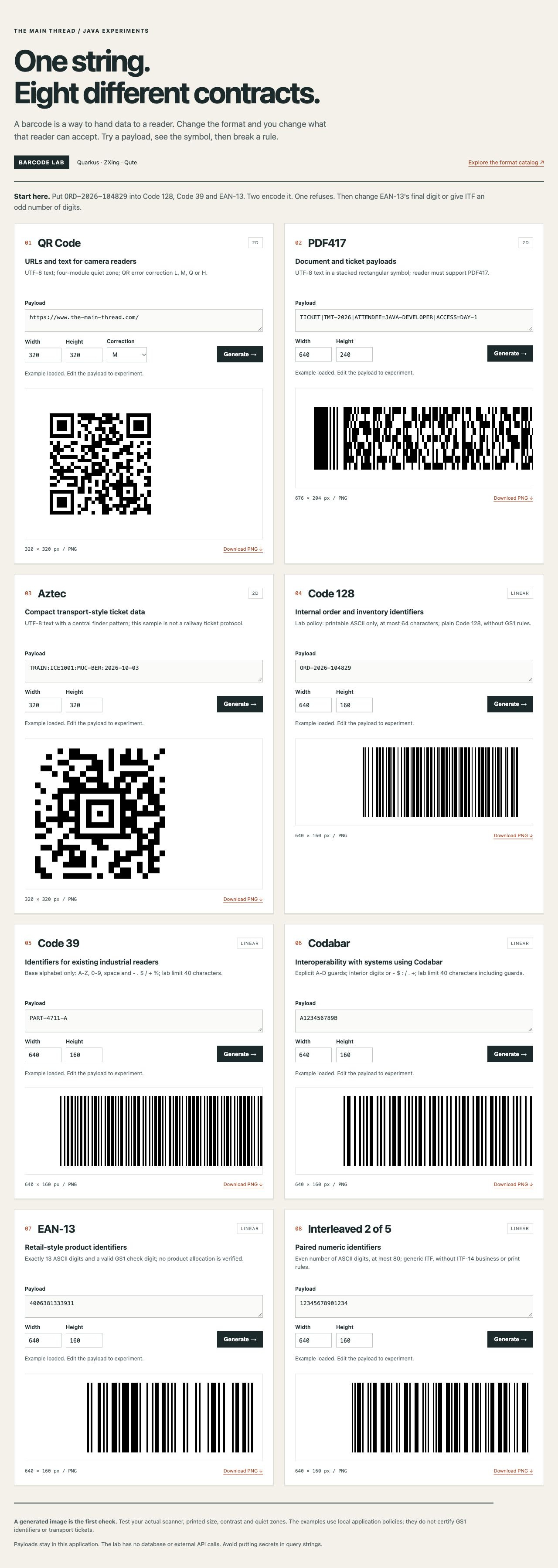
I used Quarkus 3.36.0 and Quarkiverse quarkus-zxing 1.2.0, which brings in ZXing 3.5.4. The gallery is rendered with rest-qute, while rest-jackson serializes the format catalog and validation errors. The quarkus-zxing extension provides the barcode encoder and the decoder used in the tests.
To start with an empty project, use the Quarkus CLI:
quarkus create app com.themainthread:barcode-lab:1.0.0-SNAPSHOT \
  --java=21 \
  --platform-bom=io.quarkus.platform:quarkus-bom:3.36.0 \
  --extensions=rest-jackson,rest-qute \
  --no-code --no-dockerfiles --wrapper --batch-mode
cd barcode-lab
quarkus extension add io.quarkiverse.barcode:quarkus-zxing:1.2.0 --batch-mode
Run these commands in a separate parent directory to keep the new project alongside the checked-out sample. They create the project and add its dependencies. The application classes, templates and tests are supplied by the companion project.
Quarkiverse Barcode also provides integrations for Barcode4J, Okapi and QR Code Generator. I selected ZXing because its multi-format writer supports all eight formats used here.
Give the same value to different readers
Enter ORD-2026-104829 in the Code 128 card and generate the barcode. Then copy the value to Code 39 and EAN-13. Code 128 and Code 39 produce different patterns for the same identifier. EAN-13 returns a validation error. When generation fails, the previous image is hidden so the card only displays a barcode after the current input has been accepted.
A symbology defines how data is encoded as a barcode pattern. It specifies the supported characters, the layout and how errors are detected or corrected. Your scanner must support the selected format, too. Zebra’s symbology overview describes these differences.
QR Code can encode a URL or text for a camera reader. The lab uses UTF-8 and lets you choose L, M, Q or H error correction. Higher correction can require a larger symbol for the same data. Keep the payload unchanged and try the different settings to compare the generated patterns. The QR error-correction documentation explains how the correction levels affect capacity.
PDF417 encodes data in a stack of rows, producing a rectangular barcode. The lab uses a longer document-style payload containing a ticket identifier, an attendee and an access level.
Aztec has a finder pattern in the center of the symbol. Our example encodes TRAIN:ICE1001:MUC-BER:2026-10-03 as a compact barcode containing a train number, a route and a date.
Code 128 supports mixed letter-and-number identifiers such as our order number. For this lab, I limited input to printable ASCII and 64 characters, keeping the API focused on readable identifiers. Code 128 itself also supports control and function characters.
Code 39 uses a smaller base alphabet: uppercase letters, digits, space and - . $ / + %. You can encode PART-4711-A in both the Code 39 and Code 128 cards to compare their patterns. ZXing can also convert other ASCII characters into extended mode. That mode needs support from the receiving reader, so I kept this example on the base alphabet.
Codabar gives us an example of start and stop characters. In A123456789B, A is the start character and B is the stop character. They mark the beginning and end of the barcode. In this API, both are supplied by the caller and must be A, B, C or D, with digits or the permitted punctuation between them.
EAN-13 encodes a numeric product identifier. This endpoint requires all 13 ASCII digits, including the final check digit. That digit is calculated from the preceding 12 digits and checked before encoding. GS1 allocation and the association with a particular product are separate checks.
Interleaved 2 of 5, exposed as itf, encodes digits in pairs, so the input must have an even number of digits. Our 14-digit example uses generic ITF. GS1 ITF-14 carries a GTIN in a 14-digit field and has a specific packaging use. An ITF-14 implementation also needs to apply those business rules and printing requirements.
Our order identifier is encoded with plain Code 128. GS1-128 uses FNC1 and Application Identifiers to identify fields and their meaning. A ticket protocol similarly defines the fields and verification rules for data encoded in a PDF417 or Aztec ticket. The lab uses sample strings to demonstrate the encoding. An application also needs the rules for interpreting the data it contains.
Put those choices into the application
The public API uses short identifiers such as code128 and ean13. BarcodeType maps those IDs to ZXing formats and keeps the examples, rendering defaults and card descriptions together. BarcodeValidator applies the input contract before BarcodeService calls the encoder.
I keep validation in a separate class so our API can define its input rules independently of the encoder. ZXing’s EAN-13 writer, for example, accepts 12 digits and adds the check digit. Our API requires the complete 13-digit identifier. This lets us compare the submitted value directly with the text decoded from the image.
In src/main/java/com/themainthread/barcode/BarcodeValidator.java, the EAN-13 branch checks the input length and characters before validating the check digit:
case EAN13 -> {
    require(value.length() == 13 && DIGITS.matcher(value).matches(),
            "EAN-13 requires exactly 13 ASCII digits, including the check digit.");
    int expected = ean13CheckDigit(value.substring(0, 12));
    require(value.charAt(12) - '0' == expected,
            "EAN-13 check digit must be " + expected + " for these first 12 digits.");
}
The DIGITS pattern, [0-9]+, restricts the input to ASCII digits. The helper follows the GS1 check-digit algorithm in section 7.9.1. The first 12 digits are multiplied by alternating weights of one and three. Their sum determines the final digit needed to reach a multiple of ten.
static int ean13CheckDigit(String firstTwelveDigits) {
    int sum = 0;
    for (int i = 0; i < 12; i++) {
        sum += (firstTwelveDigits.charAt(i) - '0') * (i % 2 == 0 ? 1 : 3);
    }
    return (10 - sum % 10) % 10;
}
For 400638133393, the weighted sum is 89, which requires a final digit of 1. If you submit 4006381333932, the request is rejected with a message explaining the mismatch. Accepted values are passed to the encoder unchanged, preserving the identifier supplied by the caller.
The lab also limits request size. Code 39 and Codabar accept up to 40 characters, and Code 128 accepts up to 64. For the 2D formats, both the UTF-8 byte count and the Java string length are limited to 2048. Actual barcode capacity depends on the format and encoding settings, so the encoder can reject a value before these request limits are reached.
Return a PNG, or explain the failure
You can generate a QR code with a GET request:
curl --get 'http://localhost:8080/barcodes/qr' \
  --data-urlencode 'value=https://www.the-main-thread.com/' \
  --data-urlencode 'ecc=H' \
  --output /tmp/main-thread-qr.png
The endpoint returns image/png. For each request, the service creates a MultiFormatWriter and encodes the value into a BitMatrix. The matrix is then written as a PNG to an in-memory output stream:
matrix = writer.encode(value, type.format(), width, height, hints);try (ByteArrayOutputStream output = new ByteArrayOutputStream()) {
MatrixToImageWriter.writeToStream(matrix, "PNG", output);
return new GeneratedBarcode(output.toByteArray(), matrix.getWidth(), matrix.getHeight());
}These excerpts are from src/main/java/com/themainthread/barcode/BarcodeService.java. Before encoding, the input is validated and the encoding hints are set. The three 2D formats use UTF-8. For QR, the hints specify a four-module margin and the selected error-correction level. Linear formats get horizontal margins, and the requested width is checked against the space needed for the value.
The REST resource uses @Blocking to run encoding and PNG generation on a worker thread. The PNG bytes are produced in memory and returned directly in the response. X-Barcode-Width and X-Barcode-Height report the actual image size. The Cache-Control: no-store header tells HTTP caches to leave the response uncached.
Next, submit an EAN-13 value with an incorrect check digit:
curl --get 'http://localhost:8080/barcodes/ean13' \
  --data-urlencode 'value=4006381333932'
The response is HTTP 400 with application/problem+json:
{
  "type": "urn:barcode-lab:invalid-input",
  "title": "Invalid barcode request",
  "status": 400,
  "detail": "EAN-13 check digit must be 1 for these first 12 digits.",
  "field": "value"
}
The exception mapper also returns HTTP 400 for invalid characters, odd ITF lengths and unsupported settings. If the encoder reaches its capacity, the response asks you to shorten the payload or, for QR, consider a lower error-correction level. An unexpected failure while rendering the PNG is returned as a server error.
For larger payloads, you can send the text in a POST body. A percent-encoded Unicode value can exceed the GET request-line limit before it reaches barcode validation. The POST endpoint accepts a UTF-8 text body:
curl 'http://localhost:8080/barcodes/aztec' \
  -H 'Content-Type: text/plain; charset=UTF-8' \
  --data-binary 'TRAIN:ICE1001:MUC-BER:2026-10-03' \
  --output /tmp/transport-aztec.png
The gallery uses POST when you edit a card, and both routes call the same validation and encoding code. POST bodies have a 16 KiB transport limit. The HTTP server rejects larger bodies with status 413, while an excessively long GET URL can return 414. These requests are rejected before barcode validation runs.
Check what another reader gets
To check the generated barcodes, the tests request each example through HTTP and read the response as a PNG. The image is decoded, then its format and text are compared with the request. The decoding helper is in src/test/java/com/themainthread/barcode/BarcodeResourceTest.java:
BinaryBitmap bitmap = new BinaryBitmap(
        new HybridBinarizer(new BufferedImageLuminanceSource(image)));
Map<DecodeHintType, Object> hints = new EnumMap<>(DecodeHintType.class);
hints.put(DecodeHintType.POSSIBLE_FORMATS, List.of(format));
hints.put(DecodeHintType.TRY_HARDER, Boolean.TRUE);
hints.put(DecodeHintType.RETURN_CODABAR_START_END, Boolean.TRUE);
Result decoded = new MultiFormatReader().decode(bitmap, hints);
assertEquals(format, decoded.getBarcodeFormat());
assertEquals(value, decoded.getText());
POSSIBLE_FORMATS restricts decoding to the requested format. In the EAN-13 test, this prevents the image from being interpreted as another EAN/UPC format. The Codabar reader normally removes its start and stop characters. Setting RETURN_CODABAR_START_END retains them, so the decoded text can be compared with the complete submitted value.
Run the checks from the module directory:
./mvnw verify -DskipITs=falseThe 42 test cases run under @QuarkusTest and are repeated under @QuarkusIntegrationTest against the packaged JVM application. All 84 executions passed on JDK 21 and JDK 25. The tests cover UTF-8 in the three 2D formats, all four QR correction levels, check digits and rejected inputs. There are also cases for the lab’s request limits and for payloads that fit those limits but exceed the encoder’s capacity. ZXing is used for both encoding and decoding in these tests.
The pixels still have to survive printing
You can change the width and height in the gallery to try different image sizes. Each requested dimension must be between 128 and 1600 pixels. For linear barcodes, I reserve at least two pixels per narrow module, the smallest unit in the pattern. If the requested width is too small for the value, the service returns a width error. These are rendering limits for the lab; a printed label also needs a physical size and a suitable printer resolution.
ZXing uses the requested dimensions as rendering targets. PDF417 can return a different width or height as it chooses rows and scaling. For our sample payload, the default 640-by-240 request produced a 676-by-204 PNG. The actual dimensions are returned in the response headers and displayed in the gallery. Each image is shown at its original pixel size, with scrolling available for wider barcodes.
QR requires a clear area of four modules around the symbol, according to DENSO WAVE’s margin guidance. Keep this quiet zone clear when placing the barcode on a label, because cropping it can interfere with scanning. Contrast, physical module size and the printing surface also affect the result.
For a print check, use the downloaded image at the intended physical size and on the intended material. Scan it with the reader used in that workflow. This checks the printed barcode with an independent reader, beyond the clean PNGs decoded by ZXing in our automated tests.
Keep the library’s role clear
ZXing is in maintenance mode. Its maintainers accept contributed fixes and minor improvements, with no active roadmap. Consider that maintenance policy when selecting a dependency for a longer-lived application. The Quarkiverse extension integrates the library with Quarkus, while our validation code defines the inputs accepted by the API.
When you finish experimenting, stop dev mode with Ctrl+C. You can also run the packaged app with java -jar target/quarkus-app/quarkus-run.jar. The companion README documents the endpoints, input rules and source files.
I still like turning data into lines and squares. The different formats make more sense when I consider what data they carry, how much space is available and which reader will scan them. For a Java application, that gives us a practical starting point: choose a format for the receiving system, validate its input and check the generated barcode with that reader.
Thanks for the great article. As the maintainer of Quarkus Barcode I am glad you did mention ZXing is in maintenance mode. The one that is the most advanced and up to date library is Okapi and has all the features of ZXing and more. But I understand why you picked it for this article! Thanks again.