



I joined IBM in July, and one of the first things that struck me was how seriously the company treats design. Not as an afterthought. Not as a layer of paint at the end. Real UX discipline. Real systems thinking. Real effort behind consistency, accessibility, and enterprise-grade interfaces.
That naturally led me to the Carbon Design System.
Carbon is IBM’s open-source design system. It powers IBM’s products and internal tools, but it’s also fully available to the community. As someone who mostly builds backend services and occasional admin dashboards, I’ve always appreciated a UI system that gets out of my way and still makes everything look coherent.
So I wanted to try Carbon inside a Quarkus application.
No heavy frontend framework. No Node toolchain. Just Quarkus, Web Bundler, and Carbon’s Web Components.
This tutorial walks through exactly that: how to bring Carbon’s clean UI into your Java application with minimal friction and zero JavaScript complexity. If you’ve ever wanted “enterprise UI” without “enterprise UI baggage,” this is the easiest path.
The goal is a small “Project overview” page that:
Uses Carbon UI Shell, buttons and a data table
Talks to a Quarkus REST endpoint
Bundles everything with
quarkus-web-bundlerand Carbon libraries from Maven
No React, no separate Node toolchain. Just Quarkus and web components.
What Is Carbon (and Why Should You Care)?
Carbon Design System is IBM’s open-source, enterprise-oriented design system.
Carbon has a clear structure built around a few key ideas:
Design tokens for spacing, color, typography, motion, and themes
Foundational CSS and layout utilities
A fully accessible component library implemented in several technologies
Consistent UI patterns used across IBM’s products
If you’re building internal dashboards, AI tools, admin consoles, or anything UI-heavy on top of a Java backend, Carbon gives you a proven, cohesive visual language that scales well beyond “a few buttons and a table.”
Carbon Implementations Overview
Carbon ships in multiple technology flavors:
Carbon Web Components (framework-agnostic custom elements)
Carbon React
Carbon for IBM Products (enterprise patterns)
Carbon Svelte, Carbon Angular, and others
This tutorial uses Carbon Web Components, because they work perfectly with Quarkus:
No JavaScript framework required
Simple to drop into Qute or static HTML
Full Carbon styling and UX built in
Plays well with Web Bundler and mvnpm
Ideal for lightweight dashboards, tools, and internal apps
If you want to explore deeper, start here:
Carbon gives you modern enterprise UI without React overhead.
Let’s put it into a Quarkus application.
Prerequisites
You need:
Java 21
Maven 3.8+
Quarkus CLI (optional, but convenient)
A recent Quarkus 3.30.x project
Bootstrap the Quarkus project
Create a minimal REST app.
With Quarkus CLI:
quarkus create app com.ibm.developer.example:carbon-quarkus \
  --extension="rest-jackson,io.quarkiverse.web-bundler:quarkus-web-bundler" \
  --no-code

cd carbon-quarkus
Add Web Bundler and Carbon dependencies
Open pom.xml and add Web Bundler:
<dependencies>
    <!-- existing Quarkus deps ... -->

    <!-- Carbon Web Components  -->
<dependency>
	<groupId>org.mvnpm.at.carbon</groupId>
	<artifactId>web-components</artifactId>
	<version>2.43.0</version>
	<scope>provided</scope>
</dependency>

    <!-- Carbon Styles  -->
<dependency>
	<groupId>org.mvnpm.at.carbon</groupId>
	<artifactId>styles</artifactId>
	<version>1.95.0</version>
	<scope>provided</scope>
</dependency>
        <!-- Carbon Icons  -->
        <dependency>
            <groupId>org.mvnpm.at.carbon</groupId>
            <artifactId>icons</artifactId>
            <version>11.70.0</version>
            <scope>provided</scope>
        </dependency>
        <!-- Carbon Grid  -->
<dependency>
	<groupId>org.mvnpm.at.carbon</groupId>
	<artifactId>grid</artifactId>
	<version>11.45.0</version>
	<scope>provided</scope>
</dependency>
</dependencies>

<!-- Most of the mvnpm dependencies are available from central - in case they are not, add the following profile to your pom.xml too. -->

 <profile>
            <id>mvnpm-repo</id>
            <activation>
                <activeByDefault>true</activeByDefault>
            </activation>
            <repositories>
                <repository>
                    <id>central</id>
                    <name>central</name>
                    <url>https://repo.maven.apache.org/maven2</url>
                </repository>
                <repository>
                    <snapshots>
                        <enabled>false</enabled>
                    </snapshots>
                    <id>mvnpm.org</id>
                    <name>mvnpm</name>
                    <url>https://repo.mvnpm.org/maven2</url>
                </repository>
            </repositories>
        </profile>
Notes:
<scope>provided</scope>tells Web Bundler: “only use this at build time, do not ship jars as static assets.” (docs.quarkiverse.io)Versions above are current examples at the time of writing. Check Maven Central for updates before pinning in your own project.
Build once to verify dependencies:
quarkus buildIf it builds, mvnpm and Web Bundler can see Carbon.
Create a simple REST backend for data
We will expose /api/projects returning JSON.
Create src/main/java/com/ibm/developer/example/Project.java:
package com.ibm.developer.example;

public record Project(
        long id,
        String name,
        String owner,
        String status) {
}
Create src/main/java/com/ibm/developer/example/ProjectResource.java:
package com.example;

package com.ibm.developer.example;

import java.util.List;

import jakarta.ws.rs.GET;
import jakarta.ws.rs.Path;
import jakarta.ws.rs.Produces;
import jakarta.ws.rs.core.MediaType;

@Path(”/api/projects”)
public class ProjectResource {

    @GET
    @Produces(MediaType.APPLICATION_JSON)
    public List<Project> list() {
        return List.of(
                new Project(1, “Carbon Starter”, “Frontend Team”, “Active”),
                new Project(2, “Quarkus Migration”, “Platform Team”, “Planning”),
                new Project(3, “AI Dashboard”, “Data Team”, “On hold”));
    }
}
Start Quarkus dev mode:
quarkus devOpen http://localhost:8080/api/projects and confirm you get a JSON array.
Wire Web Bundler into the HTML shell
Web Bundler looks at src/main/resources/web by default and bundles everything under web/app into a main bundle that you include with {#bundle /}. (docs.quarkiverse.io)
Create src/main/resources/web/index.html:
<!doctype html>
<html lang=”en”>
<head>
  <meta charset=”utf-8”>
  <title>Quarkus + Carbon Dashboard</title>
  <meta name=”viewport” content=”width=device-width, initial-scale=1”>

  {#bundle /}
</head>
<body class=”cds-theme-zone-g10”>
  <cds-header aria-label=”Quarkus Carbon Demo”>
    <cds-header-name href=”#” prefix=”Quarkus”>
      Carbon Demo
    </cds-header-name>
  </cds-header>

  <main class=”app-shell”>
    <section>
      <cds-heading>Projects</cds-heading>
      <p>Sample projects served from the Quarkus backend.</p>
    </section>

    <section id=”projects-section”>
      <cds-inline-loading
        id=”projects-loading”
        description=”Loading projects”
        status=”active”>
      </cds-inline-loading>

      <cds-table class=”projects-table”>
        <cds-table-header-title slot=”title”>
          Project overview
        </cds-table-header-title>
        <cds-table-header-description slot=”description”>
          Data from /api/projects
        </cds-table-header-description>

        <cds-table-head>
          <cds-table-header-row>
            <cds-table-header-cell>ID</cds-table-header-cell>
            <cds-table-header-cell>Name</cds-table-header-cell>
            <cds-table-header-cell>Owner</cds-table-header-cell>
            <cds-table-header-cell>Status</cds-table-header-cell>
          </cds-table-header-row>
        </cds-table-head>

        <cds-table-body>
          <!-- Rows injected by JavaScript -->
        </cds-table-body>
      </cds-table>
    </section>
  </main>

  <!-- Template for rows populated from /api/projects -->
  <template id=”template--project-row”>
    <cds-table-row>
      <cds-table-cell key=”id”></cds-table-cell>
      <cds-table-cell key=”name”></cds-table-cell>
      <cds-table-cell key=”owner”></cds-table-cell>
      <cds-table-cell key=”status”></cds-table-cell>
    </cds-table-row>
  </template>
</body>
</html>
The important line is {#bundle /} in <head>. Web Bundler will replace it with <script> and <link> tags that point to the bundled JS and CSS. (docs.quarkiverse.io)
Add the Carbon JS and styles entry point
Now we add our front-end entry point under web/app.
Create src/main/resources/web/app/index.js:
// Carbon Web Components imports
import ‘@carbon/web-components/es/components/ui-shell/index.js’;
import ‘@carbon/web-components/es/components/button/index.js’;
import ‘@carbon/web-components/es/components/data-table/index.js’;
import ‘@carbon/web-components/es/components/inline-loading/index.js’;
import ‘@carbon/web-components/es/components/heading/index.js’;

// Carbon styles
import ‘@carbon/styles/css/styles.css’;

// Optional small layout tweaks
import ‘./app.css’;

async function loadProjects() {
    const loading = document.querySelector(’#projects-loading’);
    const tableBody = document.querySelector(’cds-table-body’);
    const rowTemplate = document.querySelector(’#template--project-row’);

    if (!tableBody || !rowTemplate) {
        return;
    }

    try {
        if (loading) {
            loading.status = ‘active’;
            loading.description = ‘Loading projects’;
        }

        const response = await fetch(’/api/projects’);
        if (!response.ok) {
            throw new Error(`HTTP ${response.status}`);
        }

        const projects = await response.json();

        // Clear existing rows
        tableBody.innerHTML = ‘’;

        projects.forEach((project) => {
            const fragment = rowTemplate.content.cloneNode(true);

            fragment.querySelector(’[key =”id”]’).textContent = project.id;
            fragment.querySelector(’[key =”name”]’).textContent = project.name;
            fragment.querySelector(’[key =”owner”]’).textContent = project.owner;
            fragment.querySelector(’[key =”status”]’).textContent = project.status;

            tableBody.appendChild(fragment);
        });

        if (loading) {
            loading.status = ‘finished’;
            loading.description = ‘Projects loaded’;
        }
    } catch (err) {
        console.error(’Failed to load projects’, err);
        if (loading) {
            loading.status = ‘error’;
            loading.description = ‘Failed to load projects’;
        }
    }
}

window.addEventListener(’DOMContentLoaded’, () => {
    loadProjects();
});
Create src/main/resources/web/app/app.css:
.app-shell {
  padding: 2rem;
}

.projects-table {
  margin-top: 1.5rem;
}
Web Bundler will:
See
index.jsinweb/appFollow the Carbon imports from mvnpm
Bundle JS and CSS into hashed files served from
/static/bundle/...
No Node, no webpack, no Vite. (docs.quarkiverse.io)
Configuration (minimal)
Add to src/main/resources/application.properties:
quarkus.web-bundler.bundle.main=trueRun and verify
Make sure dev mode is running:
quarkus devOpen http://localhost:8080/ in the browser.
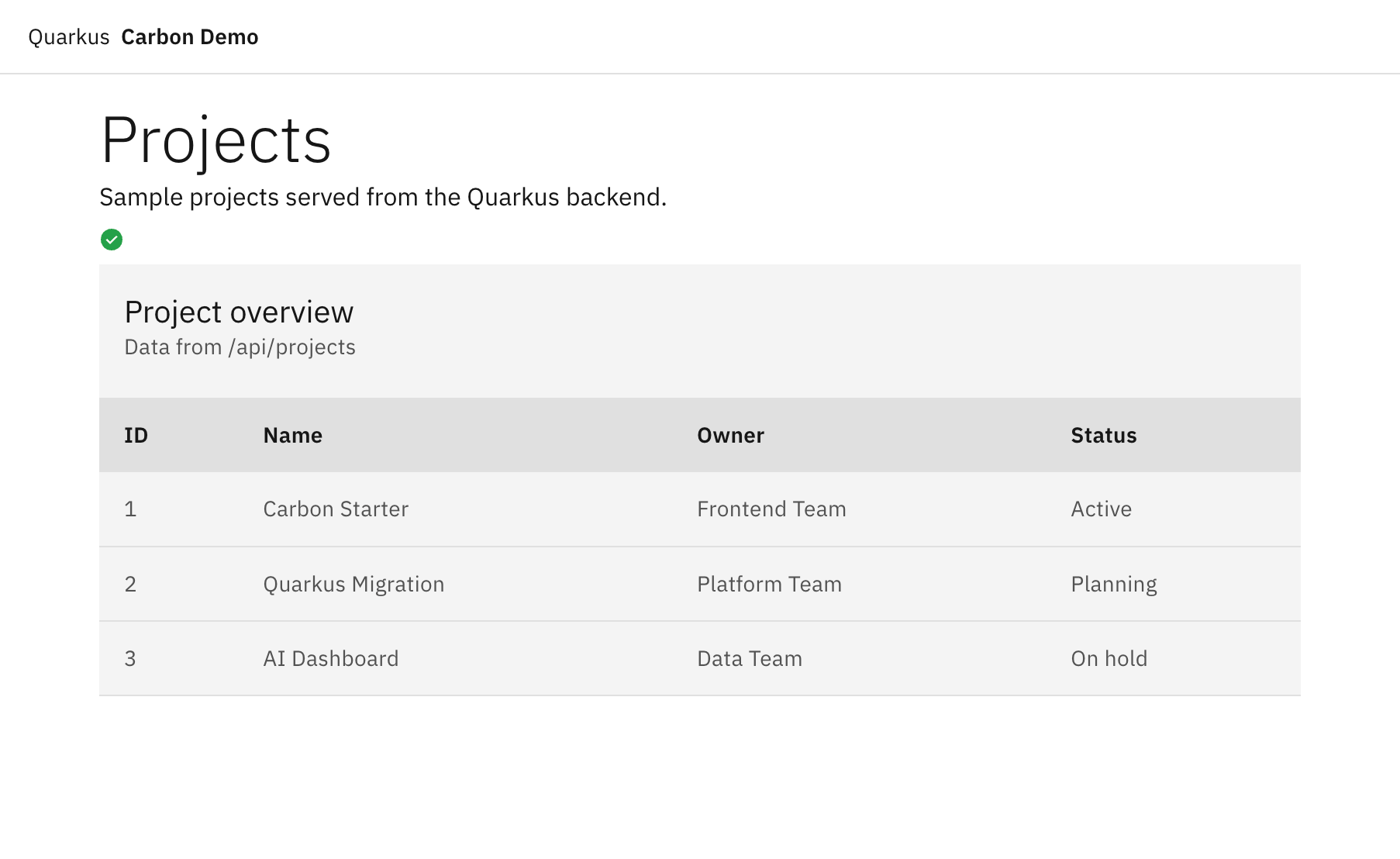
A Carbon header with “Quarkus Carbon Demo”
A “Projects” heading
A Carbon inline loading indicator that switches to “Projects loaded”
A Carbon data table with the three sample projects
If you see the header but not the styling:
Check the browser dev tools for a
<link rel=”stylesheet” ...main-*.css>generated in<head>If it is missing, confirm
{#bundle /}is present inindex.htmland thatquarkus-web-bundleris on the classpath
If the table is empty:
Confirm
/api/projectsreturns JSONCheck the console for JavaScript errors
Production notes
Some things to do before shipping this in a real app.
Pin mvnpm versions with a lock BOM
By default, mvnpm uses ranges inside its POMs. The Web Bundler docs recommend generating a version lock BOM using the mvnpm Locker Maven Plugin so your CI and devs all get the same versions.
This avoids surprise upgrades in Carbon or other NPM-backed libraries.
Static resources and caching
Web Bundler emits fingerprinted bundle files (main-XYZ.js, main-ABC.css). This is ideal for HTTP caching in front of Quarkus; you can set long Cache-Control headers on /static/bundle/** and rely on new hashes when you redeploy.
Security and CSP
Carbon Web Components are standard custom elements, so they work fine under a strict Content Security Policy if you:
Allow script execution from your domain
Avoid inline scripts and styles in templates
Keep everything inside bundled JS and CSS
If you use CSP headers with Quarkus, configure them to allow /static/bundle/**.
Variations and advanced ideas
Once this base works, you can explore and lear more:
Carbon Charts through
org.mvnpm.at.carbon:chartsto add dashboards and analytics.Multiple pages / bundles using additional entry points with
quarkus.web-bundler.bundle.<name>=truefor more complex UIs.Qute templates instead of a flat
index.htmlto inject server data at render time and still let Carbon handle interaction.
Exploring Carbon inside Quarkus sparked a new appreciation for how much thoughtful design can elevate even the most backend-centric Java work, and I’m excited to keep building on it.
Nice ! A couple of comments however:
1. The link to the GIT repository is hard to find.
2. The post states, in its introduction, that the example requires zero JavaSvript, however the index.js file has several dozens of lines.