


Quarkus is a hard repo for a coding agent to search with plain tools. This might be the only thing it has in comon with some pretty large legacy projects out there. As I can not really share examples with customer projects, I decided to use that as an opportunity rather than a limitation.
Quarkus source tree splits into core/, extensions/, and independent-projects/. The same class names show up in deployment and runtime modules. Generated config classes, synthetic beans, and build-item scheduling sit between the code you can read and the behavior you care about. If you just use rg it might work on the first jump. By the third or fourth jump you are reading whole files again and hoping you opened the right module. And the same is true for coding agents.
codebase-memory-mcp builds a local knowledge graph from a checkout and exposes it through MCP. I wanted to see whether that graph helps IBM Bob on a real Quarkus platform tree and not a toy service with twelve files and one obvious call chain.
I indexed Quarkus, wired the MCP server into Bob, and ran the same @ConfigMapping trace twice: once with shell tools only, once with graph tools. The interesting part is not whether Bob can answer the question. Both paths got there. The interesting part is what each path costs, what it misses, and what that says about agent tooling on framework-scale codebases.
The setup
codebase-memory-mcp ships as a single static binary. No Docker, no API keys, no built-in LLM. Bob still does the thinking. The MCP server answers structural questions about the indexed graph.
curl -fsSL https://raw.githubusercontent.com/DeusData/codebase-memory-mcp/main/install.sh | bashThe installer puts the binary at ~/.local/bin/codebase-memory-mcp. If your shell cannot see it:
echo 'export PATH="$HOME/.local/bin:$PATH"' >> ~/.zshrc
source ~/.zshrc
On macOS, Gatekeeper sometimes blocks a fresh download:
xattr -cr ~/.local/bin/codebase-memory-mcp
codesign --force --sign - ~/.local/bin/codebase-memory-mcp
The install script does cover all of this. Just in case you want to do this manually.
Bob reads MCP config from .bob/mcp.json in the workspace root. Open your Quarkus checkout as the Bob workspace and create the file there:
{
  "mcpServers": {
    "codebase-memory-mcp": {
      "command": "codebase-memory-mcp",
      "args": [],
      "groups": ["read", "mcp"],
      "disabled": false
    }
  }
}
If Bob says the command is missing, set "command" to the full path under ~/.local/bin. The groups entry is what mattered in my runs: Bob could call graph tools from the Quarkus workspace without extra wiring.
Reload MCP. You should see tools such as index_repository, search_graph, query_graph, trace_path, get_code_snippet, and get_architecture.
Indexing
I indexed from the shell first:
codebase-memory-mcp index ~/Projects/quarkusOn my laptop, with v0.8.1 and cache under /tmp, the full Quarkus index reported 29,206 files, 375,498 nodes, 1,587,540 edges, and about 24 seconds of wall time. Peak RSS hit roughly 12 GB during the heavy passes. That is not instant, but it is fast enough to treat as a repeatable step before a debugging session.
Graph data lives under ~/.cache/codebase-memory-mcp/ by default. Bob names the project from the checkout path. Run list_projects once and use whatever name Bob shows you in the prompts below.
You can also ask Bob to index through MCP. Paste this into a fresh chat:
The Quarkus source checkout is open in this workspace.

Index it with codebase-memory-mcp if it is not indexed already.

Rules for this run:

- Call list_projects first.
- If the Quarkus project is missing, call index_repository with the workspace path.
- If the project already exists, say so and do not re-index.
- Do not start the @ConfigMapping trace yet.
- Do not spawn subagents.

Report back with:

1. Whether the repo was already indexed or needed a fresh index
2. File, node, and edge counts if the tool returns them
3. Any error or slow step you hit
Bob called list_projects, found the existing index at 356k nodes and 1.5M edges, and stopped. Cost about nine cents. list_projects itself took over a minute on cold start. That is worth remembering if you are waiting on Bob and wondering whether the index failed. Indexing cost happen.
The question
The benchmark task:
Trace how a
@ConfigMappingclass moves from deployment scanning and generated mapping classes to synthetic bean registration and runtime creation.
“Weaker” versions of this question send you in the wrong direction. “Who calls discoverConfigMappings?” sounds precise. Quarkus does not schedule build steps through normal Java call chains. It schedules them through build-item producers and consumers, which are objects passed between @BuildStep methods. A build item is not a method call. A synthetic bean is a CDI bean registered at build time. @ConfigMapping injection often ends there before runtime code sees a constructor you can grep.
Better questions:
Which build steps produce and consume
ConfigMappingBuildItem?Which deployment code registers the synthetic bean for a mapping?
Which runtime creator calls
SmallRyeConfig#getConfigMapping(...)?
The path crosses core/deployment, extensions/arc/deployment, extensions/arc/runtime, and core/runtime. That is the point. A tool that only works on single-module apps would not tell us much.
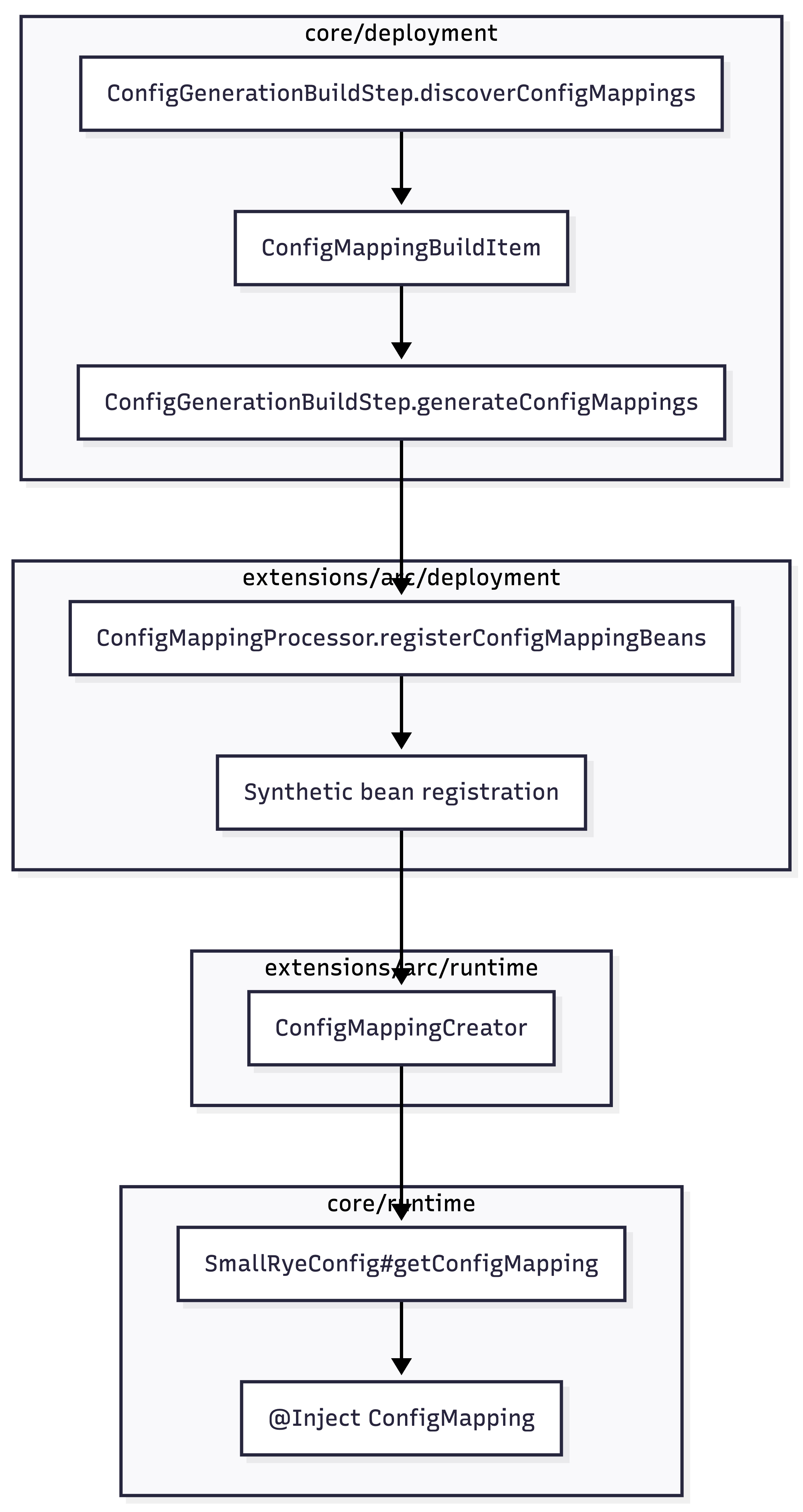
Build-time work sits on the left. Runtime materialization sits on the right. The line you have to draw in your head is the build-item boundary: ConfigMappingBuildItem is the handoff from core deployment to arc deployment. trace_path will not draw that line for you.
A map before the trace
Before the @ConfigMapping question, I asked Bob for a repo map. Fresh chat, graph indexed, MCP loaded:
The Quarkus source tree is indexed in codebase-memory-mcp.

Project name: Users-meisele-Projects-quarkus

Give me a first-pass onboarding map of the repo.

Rules for this run:

- Call get_architecture first with the project name above.
- Do not spawn subagents.
- Do not open source files.
- Do not create HTML artifacts.
- Summarize dominant languages, the largest package areas, and rough boundaries between major subsystems.

Report back with:

1. The tool output you used (name only — do not paste the full JSON)
2. The five largest package areas you would tell a new contributor about
3. One subsystem you would inspect first if the task were extension work in arc or resteasy-reactive
get_architecture returned in 1.4 seconds and named resteasy-reactive, arc, bootstrap, qute, vertx-http, and tools as dominant package areas. Bob did not open a single source file. Cost about 0.2 Bobcoins.
On the first pass I had left subagent instructions in the prompt. Bob spawned explore subagents, they could not see MCP in that run, and Bob recovered from get_architecture alone. Subagents can use MCP if you configure them. For graph-first work I still keep them out of the prompt. The default explore subagent reaches for grep and adds noise.
Conclusion: get_architecture is worth the index cost on its own. For a platform repo, five minutes of orientation without reading files is a real win. It does not replace code reading. It tells you which neighborhood to start in.
Baseline: grep and file reads
Fresh Bob chat. MCP disabled for the task. Paste:
Trace how @ConfigMapping classes move from deployment scanning and generated mapping classes to synthetic bean registration and runtime creation.

Rules for this run:

- Use only shell commands and file reads (execute_command, grep, read_file).
- Do not use codebase-memory-mcp or any MCP graph tools.
- Do not load skills, spawn subagents, or create HTML artifacts.
- Start with rg ConfigMappingBuildItem and open files from the hits.
- Stop when you can name the main deployment steps, the arc deployment step, and the runtime creator.

Report back with:

1. Files you opened, in order (count them)
2. Which steps are build-time and which are runtime
3. What you are still unsure about
The first useful rg hits look promising:
core/deployment/.../ConfigGenerationBuildStep.java:196:    void discoverConfigMappings(
core/deployment/.../ConfigGenerationBuildStep.java:225:    void generateConfigMappings(
extensions/arc/deployment/.../ConfigMappingProcessor.java:86:    void registerConfigMappingBeans(
extensions/arc/runtime/.../ConfigMappingCreator.java:13:public class ConfigMappingCreator implements BeanCreator<Object> {
Bob still opened eight files. It loaded the Quarkus writing-build-steps skill despite the prompt. The final answer traced ExtensionLoader through ConfigGenerationBuildStep, ConfigMappingProcessor, and ConfigMappingCreator with correct build-item language. It went deeper on bootstrap than the graph runs did. Cost about eighty-seven cents.
Conclusion: Plain tools can answer hard Quarkus questions if the agent already knows the platform model. The cost is context. Every file read pulls deployment code, static imports, and generated-class references into the chat. Bob got the answer. It paid for that answer in tokens and in files it had to open before it knew which methods mattered.
The writing-build-steps skill
One reason the baseline answer sounded like Quarkus and not generic Java: Bob loaded the writing-build-steps skill before its first rg pass, even though the prompt said not to load skills.
That skill does not come from codebase-memory-mcp. It comes from quarkus-agent-mcp, the Quarkus project’s MCP server, which loads skills from the quarkusio/skills repository. When you open the Quarkus checkout in Bob with quarkus-agent-mcp in .mcp.json, which many Quarkus contributors already have, Bob can pull in bundled skills through quarkus_skills. writing-build-steps is one of them. It documents how @BuildStep methods produce and consume build items, how ordering follows dependency edges rather than source order, and when to use recorders in deployment modules.
Graph path: the same question, different tools
Fresh chat. MCP loaded. Index warm. Paste (replace the project name with yours from list_projects):
The Quarkus source tree is indexed in codebase-memory-mcp.

Project name: Users-meisele-Projects-quarkus

Trace how @ConfigMapping classes move from deployment scanning and generated mapping classes to synthetic bean registration and runtime creation.

Rules for this run:

- Use codebase-memory-mcp MCP tools only for the first 15 tool calls: search_graph, query_graph, get_code_snippet, and trace_path if a plain call chain is the right question.
- Do not spawn subagents.
- Do not create HTML artifacts.
- Do not load skills.
- Use grep or read_file only after the graph narrows the target (maximum one read_file for confirmation).
- Quarkus build steps connect through build items, not normal Java call chains. Say that explicitly in your answer.

Required MCP sequence:

1. list_projects — confirm project name
2. query_graph with this Cypher:

MATCH (c:Class)-[:DEFINES_METHOD]->(m:Method)
WHERE c.name IN ['ConfigGenerationBuildStep', 'ConfigMappingProcessor']
RETURN c.name AS class_name, m.name AS method_name, m.file AS file_path
ORDER BY class_name, method_name

3. search_graph for ConfigMappingCreator and ConfigMappingBuildItem
4. get_code_snippet for the methods you need — not whole files
5. Optional: trace_path on ConfigMappingCreator only if you explain why a call chain applies

Report back in plain markdown (no HTML):

1. MCP tools you called, in order
2. Files and methods the graph surfaced
3. Which steps are build-time and which are runtime
4. Any graph edge you distrust and why (especially in_degree = 0 on build steps)

If get_code_snippet fails with "symbol not found", run search_graph again and use the qualified_name from the result, not a Java package name you guess.
I ran this twice.
First pass: loose prompt, no guardrails. Bob made about thirty graph tool calls, skipped query_graph, fell back to grep and one read_file, and generated an HTML artifact nobody asked for. The answer was strong. It explicitly distrusted in_degree = 0 on @BuildStep methods. Cost 2.45 Bobcoin and nearly a million input tokens. Most of that was Bob context, workspace rules, Quarkus AGENTS.md, and an eight-thousand-token HTML detour, not the MCP queries themselves.
Second pass: same prompt with the guardrails above. Bob called query_graph first. Cypher returned methods but empty file_path values. Bob recovered through search_graph qualified names, then get_code_snippet. No HTML. No file reads. It stated plainly that trace_path is the wrong tool for build-item wiring. Cost 0.49 Bobcoin.
That five-fold cost drop is the first lesson. On framework repos, prompt shape dominates tool choice. The graph did not get five times faster. Bob stopped doing expensive things the prompt now forbids.
The second lesson is about metadata gaps. Cypher listed 29 methods on ConfigGenerationBuildStep and 4 on ConfigMappingProcessor in under a second. get_code_snippet failed until Bob passed qualified_name values from search_graph, not guessed package paths. The graph knows structure. It does not always surface file paths in the shape your agent expects. Plan for a two-step lookup: Cypher to enumerate, search_graph to locate.
The third lesson is about what the graph cannot see. I ran a short follow-up with graph tools only:
The Quarkus graph project is Users-meisele-Projects-quarkus.

This is a short graph-only check. Do not open source files. Do not spawn subagents. Do not create HTML artifacts.

Run these MCP tools in order and summarize the results:

1. query_graph:

MATCH (c:Class)-[:DEFINES_METHOD]->(m:Method)
WHERE c.name IN ['ConfigGenerationBuildStep', 'ConfigMappingProcessor']
RETURN c.name AS class_name, m.name AS method_name, m.file AS file_path
ORDER BY class_name, method_name

2. search_graph with name pattern ConfigMappingBuildItem, label Class, limit 10
3. search_graph with name pattern ConfigMappingCreator, label Class, limit 10
4. search_graph with name pattern discoverConfigMappings, label Method, limit 5
5. search_graph with name pattern generateConfigMappings, label Method, limit 5

Report back with:

1. Methods listed for each deployment class
2. Whether discoverConfigMappings or generateConfigMappings show in_degree = 0
3. One sentence on why that matters for Quarkus build steps vs Java call graphs
Both discoverConfigMappings and generateConfigMappings showed in_degree = 0. Bob explained why that is normal: @BuildStep entry points are invoked by the build framework, not by other Java methods in the graph. Cost 0.16 Bobcoins. No file reads.
If you treat in_degree = 0 as dead code, you will misread Quarkus deployment. If you treat trace_path as proof of build-step ordering, you will misread it too. The graph is a search accelerator, not a build engine simulator.
What held up
Indexing is practical. A full Quarkus platform tree in under half a minute, on a laptop with enough RAM, changes the economics. You can afford to index before a hard debugging session instead of treating graph search as a batch job.
Java support is good enough for navigation. codebase-memory-mcp advertises Hybrid LSP support for Java as of v0.8.0. The old “Java is syntax-only” claim is stale. On this task the graph found the right classes and methods across modules quickly. The gaps are semantic, not syntactic.
Both paths reached the right answer. Baseline and graph runs named ConfigGenerationBuildStep, ConfigMappingProcessor, and ConfigMappingCreator. They separated build-time discovery and generation from synthetic bean registration and runtime materialization. Neither path invented a fake CALLS chain through ConfigMappingBuildItem.
Graph path used fewer files. Baseline: eight full file reads. Graph v2: snippets only. On a platform repo where deployment files run to hundreds of lines, that difference compounds across a session.
What still breaks
Build items are invisible to call-graph tools. Producer/consumer relationships between @BuildStep methods do not show up as CALLS edges. You still need Quarkus build-phase knowledge to interpret what the graph returns.
JVM edges have holes. Static imports, generated classes, recorders, and synthetic bean paths are hard cases. Some deployment helpers show in_degree = 0 even when the source clearly calls them. Do not trust a graph edge on Quarkus deployment code without opening the file once.
Agents ignore prompt guardrails. Bob loaded writing-build-steps on the baseline run and generated HTML on graph v1 despite explicit instructions not to. Tighter prompts helped. They did not guarantee obedience. Factor that into cost estimates.
Agent context is the real bill. The graph MCP calls were cheap. Bob’s workspace rules and Quarkus documentation loaded into every chat were not. The expensive run was not slow Cypher. It was a million tokens of context plus an unsolicited HTML report.
How I would use this in practice
For a platform or large monorepo checkout:
Index once. Keep the cache warm.
Run
get_architecturebefore you ask a trace question. Know which subsystem you are in.Use Cypher to enumerate methods on known anchor classes. Use
search_graphwhen you need qualified names or file paths.Fetch snippets, not files, until you need surrounding context.
Ask follow-ups that force the agent to classify edges: normal Java call, build-item handoff, synthetic bean path, or “I would not trust this without reading the source.”
Score your own runs on four questions:
Did it find the right files?
Did it separate build-time work from runtime work?
Did it claim a plain call chain where Quarkus uses build items?
How much full-file reading was still needed after the first structured result?
On my runs, baseline won on bootstrap depth. Graph v2 won on file count, cost, and speed to the anchor methods. Neither replaced knowing how Quarkus build phases work.
Quarkus isn’t really hard for users
But Quarkus is hard to search because the real logic spreads across build-time phases, runtime modules, generated config classes, and synthetic beans. codebase-memory-mcp shrinks that search space on a full platform tree. get_architecture gives an agent a usable map in seconds. Cypher and search_graph get you to the right methods across modules without opening every deployment file along the way.
The graph does not understand build-item scheduling. It will not tell you which step consumes ConfigMappingBuildItem. It will tell you where to look, faster than grep alone, if you ask the right questions and read the answers with platform knowledge in the loop.