


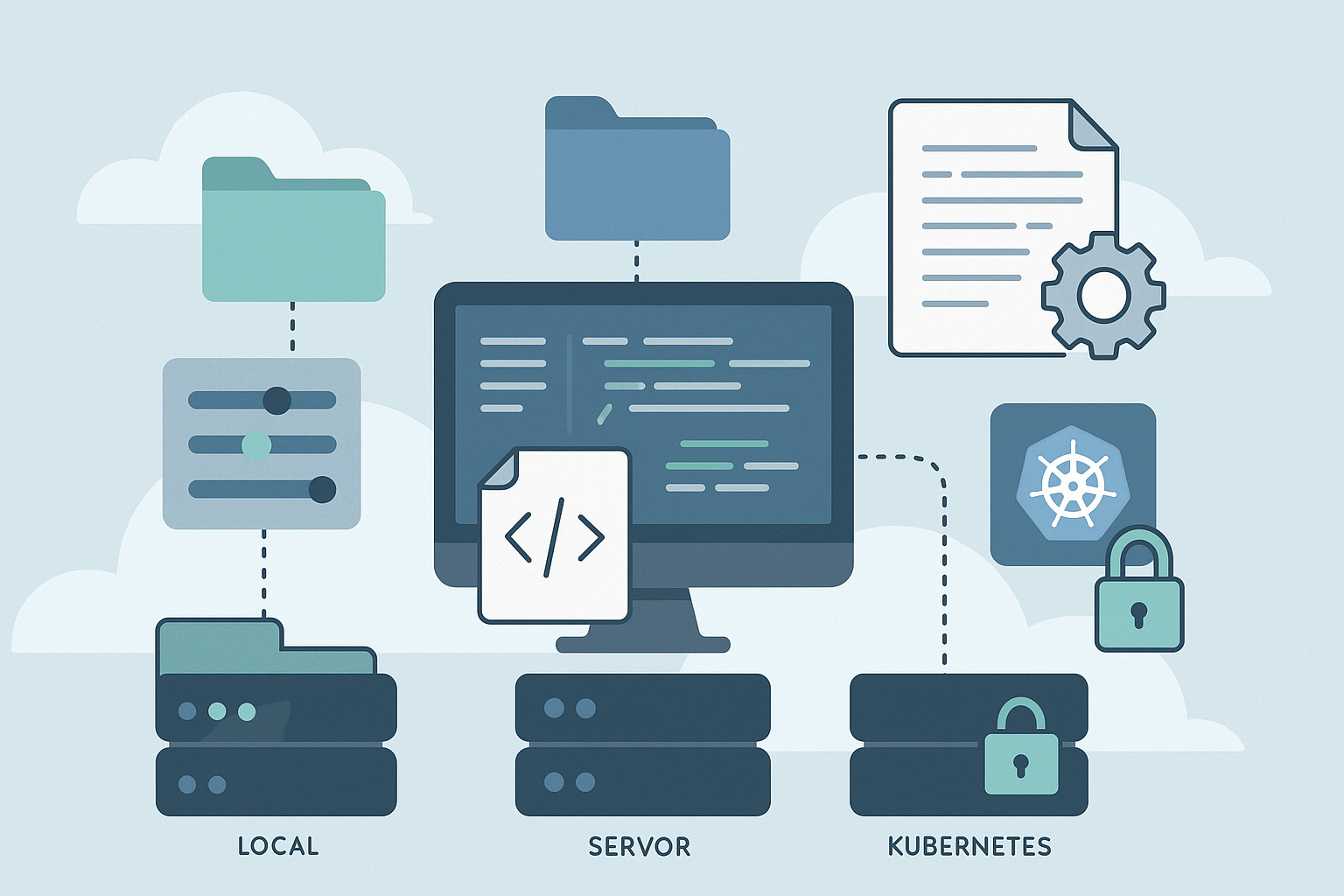
There’s a moment every Quarkus developer hits. Local development feels great. Everything works. Then you deploy to dev and something subtle breaks. Staging needs slightly different timeouts. Production injects environment variables you didn’t expect. A colleague tells you “Oh, that value actually comes from a ConfigMap now.” Six months later, you’ve accumulated enough configuration to start your own museum.
I’ve been there. Many of you told me the same story at conferences, in comments on The Main Thread, and on social. Configuration creep is real. And yet Quarkus gives us a clean, scalable model. We just rarely take the time to understand it from top to bottom.
This tutorial does that. We’ll build a small Quarkus service and walk it from local development all the way to Kubernetes, using profiles, environment variables, ConfigMaps, and secrets. You’ll see exactly what belongs where and why.
By the end, you will finally feel in control of configuration again.
What We’re Building
A realistic microservice with four environments, each needing slightly different settings:
Local
PostgreSQL in Podman, debug logging, no auth.
Dev
Shared database, info logging, basic auth.
Staging
Production-like setup, encrypted secrets, rate-limiting enabled.
Production
Kubernetes secrets, ConfigMaps, monitoring configuration, stricter defaults.
The point is not the service itself. The point is understanding how Quarkus configuration scales as the world around your application gets more complex.
Prerequisites
Java 17+
Maven (or Gradle)
Quarkus CLI recommended
Podman for PostgreSQL Dev Services
Basic Quarkus knowledge
Part 1: Start with the Simplest Possible Configuration
Configuration is easiest to reason about when you begin with one file and one environment. So we start local.
Create your project:
quarkus create app com.example:config-demo \
  --extension=rest-jackson,jdbc-postgresql,smallrye-health
cd config-demo
Create a small endpoint to expose configuration back to us:
// src/main/java/com/example/ConfigResource.java
package com.example;

import org.eclipse.microprofile.config.inject.ConfigProperty;
import jakarta.ws.rs.GET;
import jakarta.ws.rs.Path;
import jakarta.ws.rs.Produces;
import jakarta.ws.rs.core.MediaType;

@Path(”/config”)
public class ConfigResource {

    @ConfigProperty(name = “app.environment”)
    String environment;

    @ConfigProperty(name = “app.feature.rate-limiting”, defaultValue = “false”)
    boolean rateLimitingEnabled;

    @ConfigProperty(name = “db.max-connections”, defaultValue = “10”)
    int maxConnections;

    @GET
    @Produces(MediaType.APPLICATION_JSON)
    public ConfigInfo getConfig() {
        return new ConfigInfo(environment, rateLimitingEnabled, maxConnections);
    }

    public record ConfigInfo(String environment, boolean rateLimiting, int maxConnections) {}
}
Now give the app some baseline defaults:
# application.properties

app.name=config-demo
app.environment=local

# Datasource defaults
quarkus.datasource.db-kind=postgresql

# Pool config
db.max-connections=10

# Logging
quarkus.log.level=DEBUG
quarkus.log.console.format=%d{HH:mm:ss} %-5p [%c{2.}] %s%e%n

# Features
app.feature.rate-limiting=false
Start Quarkus:
quarkus devNavigate to:
http://localhost:8080/configYou now have a working baseline. Everything else will override these defaults.
Part 2: Add Profiles for Environment Classes
Profiles give you clean, environment-level defaults. They are not deployment-specific. “dev” is a class of environments. “staging” is a class. Profiles keep your configuration clean.
Quarkus supports:
dev(active in dev mode)test(active during tests)prod(active for production builds)Custom profiles like
staging
Extend your properties:
# Dev profile (active in quarkus dev)
%dev.app.environment=development
%dev.quarkus.log.level=DEBUG
%dev.db.max-connections=5

# Test profile
%test.app.environment=test
%test.quarkus.log.level=WARN

# Staging profile (custom)
%staging.app.environment=staging
%staging.db.max-connections=30
%staging.quarkus.log.level=INFO
%staging.app.feature.rate-limiting=true

# Production profile
%prod.app.environment=production
%prod.quarkus.log.level=INFO
%prod.quarkus.log.console.json=true
%prod.db.max-connections=50
%prod.app.feature.rate-limiting=true
Try dev:
quarkus dev
curl http://localhost:8080/config
Build for prod:
quarkus build
java -jar target/quarkus-app/quarkus-run.jar
Activate staging manually:
java -Dquarkus.profile=staging -jar target/quarkus-app/quarkus-run.jarProfiles are excellent for defaults, but they can’t represent deployment-level differences. For that we need the next layer.
Part 3: Understand Configuration Precedence (This Is Where People Get Lost)
Quarkus resolves configuration from multiple sources. Knowing the order saves hours of debugging.
From highest priority to lowest:
System properties
Environment variables
External config (ConfigMaps, .env files)
Profile-specific properties
Default application.properties
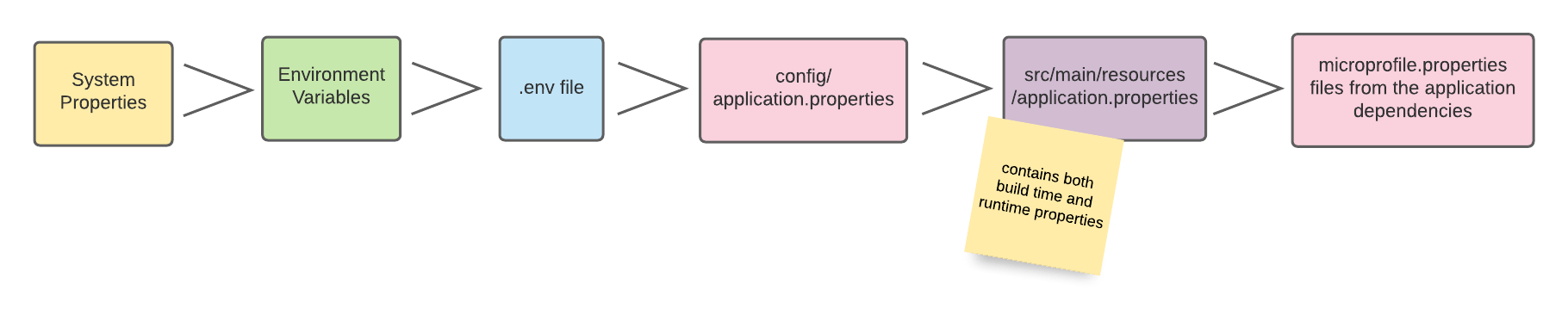
Let’s prove the hierarchy.
Add:
app.api-key=default-key
%prod.app.api-key=prod-key-from-file
Expose:
@ConfigProperty(name = “app.api-key”)
String apiKey;

@GET
@Path(”/api-key”)
public String getApiKey() {
    return apiKey;
}
Test system overrides environment:
APP_API_KEY=env-override \
  java -Dapp.api-key=system-override \
  -jar target/quarkus-app/quarkus-run.jar
Result:
system-overrideThat’s the hierarchy in action.
Part 4: Secrets the Right Way
What you don’t do
You don’t commit passwords to application.properties. Even defaults.
Local: .env files
DB_PASSWORD=local-secret
APP_API_KEY=local-key
Add to .gitignore.
Use them:
quarkus.datasource.password=${DB_PASSWORD:dev}
app.api-key=${APP_API_KEY:default-key}
Production: Use Kubernetes Secrets
In Kubernetes you have two legitimate options for injecting secrets:
Option 1: Environment variables (simple, universal)
Kubernetes injects secrets as environment variables, and Quarkus picks them up automatically.
Create a secret:
apiVersion: v1
kind: Secret
metadata:
  name: app-secrets
type: Opaque
stringData:
  DB_PASSWORD: “prod-secret-password”
  APP_API_KEY: “prod-secret-key”
Reference it in your Deployment:
envFrom:
- secretRef:
    name: app-secrets
Your properties stay exactly the same:
quarkus.datasource.password=${DB_PASSWORD}
app.api-key=${APP_API_KEY}
This approach is:
Simple
Works on any Kubernetes distribution
Easy for Ops teams
Friendly to CI/CD tooling
Option 2: Load secrets via the Kubernetes API (more flexible)
If you want your app to read secrets the same way it reads ConfigMaps—directly from the Kubernetes API—Quarkus supports that too.
Enable secret loading:
%prod.quarkus.kubernetes-config.enabled=true
%prod.quarkus.kubernetes-config.secrets.enabled=true
%prod.quarkus.kubernetes-config.secrets=app-secrets
Create the secret with property-style keys:
apiVersion: v1
kind: Secret
metadata:
  name: app-secrets
type: Opaque
stringData:
  db.password: “prod-secret-password”
  app.api-key: “prod-secret-key”
Reference them exactly as written:
quarkus.datasource.password=${db.password}
app.api-key=${app.api-key}
Why use API-based loading?
Keeps your environment variables clean
Integrates naturally with ConfigMap-driven operations
Supports multi-secret composition
Avoids leaking secret names into env vars
Important:
When using the kubernetes-config extension, Quarkus automatically generates the required ServiceAccount, Role, and RoleBinding so your pod can read ConfigMaps and Secrets from the Kubernetes API.
Part 5: External Configuration with ConfigMaps
Secrets are only half of the story. Your application also needs non-sensitive operational configuration that changes between deployments: timeouts, pool sizes, feature flags, log levels.
This is what ConfigMaps are for, and Quarkus integrates with them beautifully. You have two ways to consume ConfigMaps—and just like Secrets, you choose based on how you want Ops to work.
Let’s start with the recommended baseline.
The Modern Way: Read ConfigMaps via the Kubernetes API
This is the simplest option. You don’t mount anything. You don’t manage volumes. Quarkus pulls data directly from the Kubernetes API during startup.
Install the extension:
quarkus ext add kubernetes-configCreate the ConfigMap:
apiVersion: v1
kind: ConfigMap
metadata:
  name: app-config
data:
  db.max-connections: “100”
  app.feature.rate-limiting: “true”
  quarkus.log.level: “INFO”
Enable ConfigMap reading in prod:
%prod.quarkus.kubernetes-config.enabled=true
%prod.quarkus.kubernetes-config.config-maps=app-config
That’s all. No mounts. No volume paths. Quarkus will:
Detect it’s running in Kubernetes
Authenticate using the pod’s ServiceAccount
Fetch the ConfigMap values
Merge them into the configuration
Because we use the quarkus-kubernetes extension, the necessary RBAC permissions are generated automatically.
Option: Load Entire application.properties From a ConfigMap
If Ops prefers to manage full property files:
data:
  application.properties: |
    db.max-connections=100
    app.feature.rate-limiting=true
    quarkus.log.level=INFO
Quarkus reads it exactly as if it were a local file.
Multiple ConfigMaps with Controlled Precedence
You can compose configuration from several ConfigMaps. Priority is based on order:
%prod.quarkus.kubernetes-config.config-maps=base-config,team-config,cluster-configLater entries override earlier ones.
This pattern is great for:
Standard enterprise defaults
Team-specific overrides
Cluster-level tuning
Using a Different Namespace
If your platform team stores config centrally:
%prod.quarkus.kubernetes-config.namespace=shared-configQuarkus will look there instead of the pod’s namespace.
When to Mount ConfigMaps as Volumes
Occasionally you still need to mount a ConfigMap:
You require file-based config (e.g. XML, YAML, certificates)
You want ConfigMap updates propagated immediately to sidecars
API access is restricted
In those cases, skip kubernetes-config and mount the files manually:
volumeMounts:
- name: cfg
  mountPath: /deployments/config

volumes:
- name: cfg
  configMap:
    name: app-config
But for 90% of microservices, API loading is easier and cleaner.
Why ConfigMaps Belong in Your Strategy
ConfigMaps give you:
A place to change config without rebuilding images
A clear separation between app defaults and operational expectations
A scalable model for multi-environment deployments
A clean interface between development and platform engineering
And when combined with Quarkus profiles and precedence rules, they give you a system that scales from laptop → dev → staging → production with zero friction.
Part 6: Split Configuration into Multiple Files (Optional but Clean)
Quarkus loads all application*.properties files automatically:
src/main/resources/
  application.properties
  application-database.properties
  application-security.properties
  application-observability.properties
You can also switch to YAML if your config gets hierarchical.
Part 7: Validate Configuration at Startup
Stop your service from starting with invalid config. Add:
@ConfigMapping(prefix = “app”)
public interface AppConfig {
    @NotBlank String environment();
    Feature feature();

    interface Feature {
        boolean rateLimiting();
    }
}

@ConfigMapping(prefix = “db”)
public interface DatabaseConfig {
    @Min(1) @Max(1000)
    int maxConnections();
}
Inject them:
@Inject AppConfig app;
@Inject DatabaseConfig db;
If someone sets db.max-connections=-1, the service refuses to start. That’s a gift to future you.
Part 8: Your Complete Real-World Strategy
Here is the model that scales from laptop to Kubernetes:
1. application.properties
Project-wide defaults.
2. Profiles
Environment-class defaults (dev, test, staging, prod).
3. .env files
Local secret injection.
4. Environment variables
Per-deployment overrides.
5. ConfigMaps
Operational overrides managed by platform teams.
6. Secrets
Secure values injected at runtime.
7. System properties
Temporary debugging or emergency overrides.
Everything has a clear place. No duplication. No confusion.
Anti-Patterns to Avoid
Don’t create profiles per region or deployment.
Use environment variables.
Don’t commit secrets.
Not even “temporary” ones.
Don’t override the same property everywhere.
Defaults → environment-class → deployment override. That’s the flow.
Debugging Configuration
When things go wrong (they will):
1. Inspect configuration in dev mode
curl http://localhost:8080/q/dev/config2. Inspect configuration source
ConfigValue value = config.getConfigValue(”app.api-key”);
System.out.println(value.getSourceName());
3. Enable config logging
quarkus.log.category.”io.smallrye.config”.level=DEBUG4. Rely on validation
Fail fast is your friend.
Key Takeaways
Start with one file and clean defaults.
Use profiles for environment classes like dev, staging, prod.
Use environment variables for deployment-specific differences.
Never store secrets in properties—use .env locally and Secrets in production.
ConfigMaps handle operational values without redeploying.
Understand precedence: system > env > external > profile > default.
Validate configuration at startup to avoid broken deployments.
Keep configuration predictable and boring. That is the real goal.
Quarkus gives you a configuration model that scales from “runs on my laptop” to clusters with dozens of services. When you follow this structure, configuration becomes a tool rather than a source of friction.
You stop drowning in overrides, and you start designing configuration the same way you design code: with clarity, intent, and constraints.