


This lab is a complete, runnable application. It shows the workflow pattern most Java teams actually need in production.
You will build a review-processing pipeline that does six things reliably:
Ingest an event
Call a local LLM for classification
Route based on policy
Pause for human approval when needed
Resume from an external event
Emit domain events for downstream systems
We build a Product Review Analysis System that runs on Quarkus, uses Quarkus Flow for orchestration, and a local Ollama model for sentiment classification. Quarkus Dev Services starts Kafka for you, so the event backbone exists without manual setup.
Quarkus Flow is a workflow engine for Quarkus based on the CNCF Serverless Workflow specification. Its messaging bridge integrates with MicroProfile Reactive Messaging so workflows can listen to and emit CloudEvents over Kafka. That gives you an event-driven workflow runtime inside the same Quarkus app you already know how to operate.
Prerequisites
Before you start, make sure the basics are in place:
Java 17+
Maven 3.8+
Podman or Docker (for Dev Services Kafka)
Ollama installed locally
We use a local model because it keeps the demo repeatable and cheap. It also makes the trade-offs visible: latency, model choice, and prompt discipline become part of the architecture, not an afterthought.
Start Ollama and pull a model:
ollama serve
ollama pull llama3.2
You can swap the model later. The workflow does not care which one you use as long as the model can follow a strict classification instruction.
Create the Quarkus project
We generate a Quarkus project with the exact extensions needed:
REST + Jackson for our API boundary
Kafka Reactive Messaging to talk to topics
Quarkus Flow for the workflow runtime
LangChain4j Ollama integration for local LLM calls
Create the project or start from my Github repository!
mvn io.quarkus:quarkus-maven-plugin:create \
  -DprojectGroupId=com.example \
  -DprojectArtifactId=review-workflow \
  -Dextensions="rest-jackson,messaging-kafka,quarkus-flow,quarkus-langchain4j-ollama" \
  -DnoCode
cd review-workflow
Two details matter here.
First, Quarkus Flow discovers workflow classes as CDI beans at build time, so the “workflow runtime” becomes part of your application. There is no separate server to deploy.
Second, we intentionally pick Kafka as the transport because it is the most common enterprise choice for durable event delivery. Dev Services makes it frictionless locally.
Configure application.properties
Now we configure three things:
The Ollama model to use
Quarkus Flow’s messaging bridge
Reactive Messaging channels that map to Kafka topics
The key design choice is structured CloudEvents. That means the Kafka record value contains the entire CloudEvent JSON envelope. It matches how Quarkus and SmallRye describe CloudEvents usage for Kafka in “structured mode”, and it matches how the Flow messaging bridge expects events by default.
Create src/main/resources/application.properties:
Create src/main/resources/application.properties:
# --- Ollama (LangChain4j) ---
quarkus.langchain4j.ollama.chat-model.model=llama3.2

# --- Quarkus Flow Messaging bridge ---
# Enable default bridge bean (flow-in -> engine, engine -> flow-out)
quarkus.flow.messaging.defaults-enabled=true

# Default channels mapped to Kafka topics (structured CloudEvents JSON as byte[])
mp.messaging.incoming.flow-in.connector=smallrye-kafka
mp.messaging.incoming.flow-in.topic=flow-in
mp.messaging.incoming.flow-in.value.deserializer=org.apache.kafka.common.serialization.ByteArrayDeserializer
mp.messaging.incoming.flow-in.key.deserializer=org.apache.kafka.common.serialization.StringDeserializer

mp.messaging.outgoing.flow-out.connector=smallrye-kafka
mp.messaging.outgoing.flow-out.topic=flow-out
mp.messaging.outgoing.flow-out.value.serializer=org.apache.kafka.common.serialization.ByteArraySerializer
mp.messaging.outgoing.flow-out.key.serializer=org.apache.kafka.common.serialization.StringSerializer

# --- Our app: producer that writes *into* the flow-in topic ---
mp.messaging.outgoing.flow-in-producer.connector=smallrye-kafka
mp.messaging.outgoing.flow-in-producer.topic=flow-in
mp.messaging.outgoing.flow-in-producer.value.serializer=org.apache.kafka.common.serialization.ByteArraySerializer
mp.messaging.outgoing.flow-in-producer.key.serializer=org.apache.kafka.common.serialization.StringSerializer

# --- Our app: logger that reads the flow-out topic ---
mp.messaging.incoming.flow-out-logger.connector=smallrye-kafka
mp.messaging.incoming.flow-out-logger.topic=flow-out
mp.messaging.incoming.flow-out-logger.value.deserializer=org.apache.kafka.common.serialization.ByteArrayDeserializer
mp.messaging.incoming.flow-out-logger.key.deserializer=org.apache.kafka.common.serialization.StringDeserializer
At runtime, the data flow will look like this:
Your REST API produces a CloudEvent JSON message into topic
flow-inQuarkus Flow consumes
flow-in, runs the workflow, and emits results toflow-outYour app also consumes
flow-outfor logging and correlation
This is a useful pattern for real systems because it makes the workflow engine just another participant in your event-driven architecture.
Event and workflow overview
Before we write code, it helps to be explicit about the behavior we want.
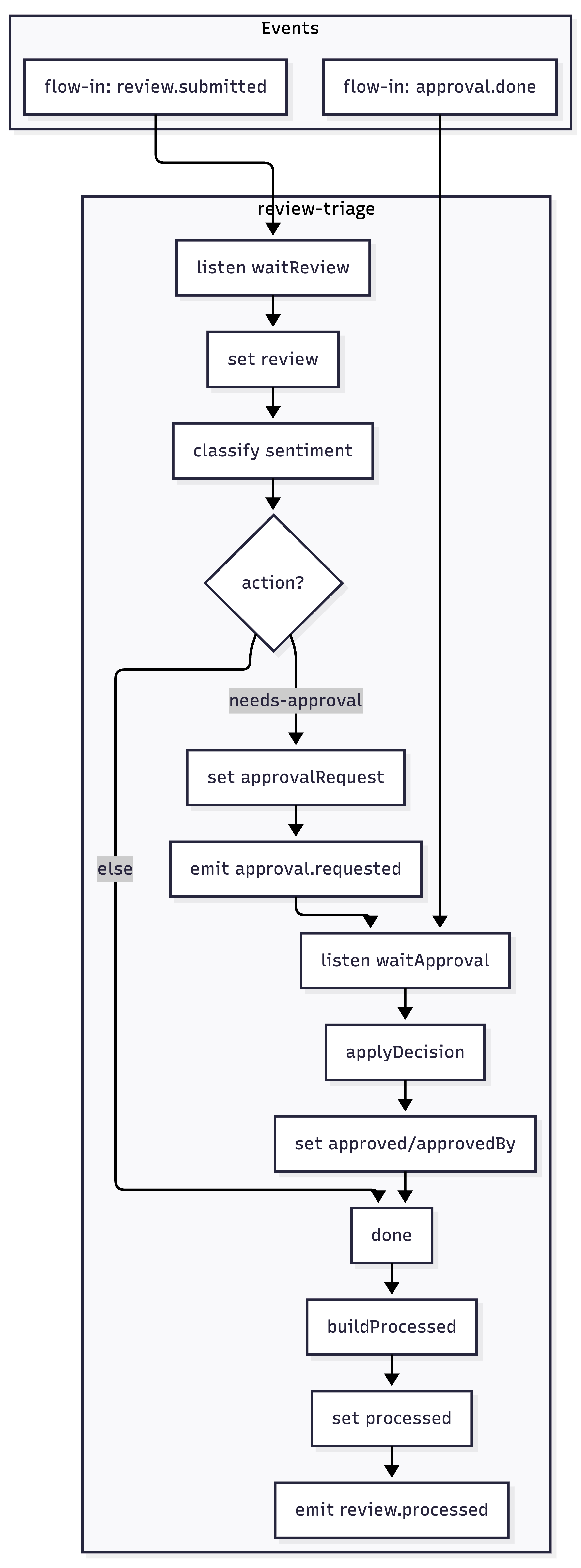
The workflow is event-driven. It starts when a com.example.review.submitted CloudEvent arrives on the flow-in topic. The Flow bridge delivers it to the engine, and the workflow processes it.
After classification and routing:
Positive / neutral cases complete immediately and emit
com.example.review.processedNegative / very-negative cases emit
com.example.review.approval.requested, then the workflow pauses on alistentask forcom.example.review.approval.done
The approval endpoint sends approval.done back to flow-in with correlation metadata so the engine can resume the correct instance. Finally, the workflow emits review.processed on flow-out so downstream systems can react.
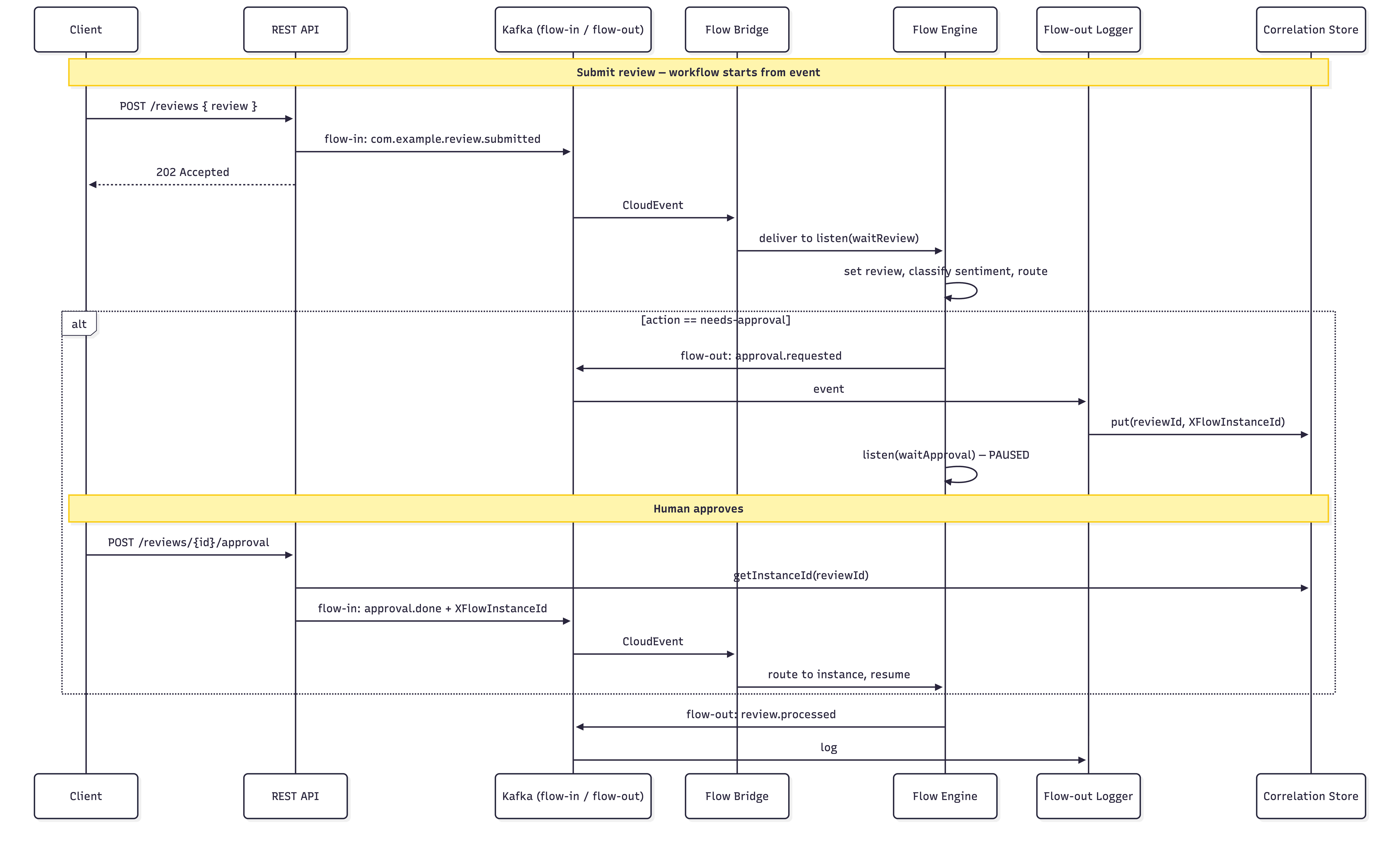
If you remember only one thing, remember this: the workflow does not “call” a human. It emits an event requesting approval and then waits for a matching approval event. That is how you keep workflows reliable at scale.
Domain model
We start with three records. They are deliberately small and boring. In workflow systems, boring domain objects are a feature. It keeps the orchestration readable and minimizes accidental coupling between tasks.
Add the following records:
Reviewdescribes the incoming reviewApprovalDecisiondescribes the human decision eventProcessedReviewis the final domain event we emit
Create src/main/java/com/example/reviews/model/Review.java:
package com.example.reviews.model;

public record Review(
        String reviewId,
        String productId,
        int rating,
        String text
) {}
Create src/main/java/com/example/reviews/model/ApprovalDecision.java:
package com.example.reviews.model;

public record ApprovalDecision(
        String reviewId,
        boolean approved,
        String approver
) {}
Create src/main/java/com/example/reviews/model/ProcessedReview.java:
package com.example.reviews.model;

public record ProcessedReview(
        String reviewId,
        String productId,
        int rating,
        String sentiment,
        String action,
        String finalAction,
        String approvedBy
) {}
Ollama sentiment agent
Next, we define the sentiment classifier.
This is where many demos fail. They let the model talk too much. For workflows, you want the opposite. You want a constrained output that your routing logic can depend on.
Your agent definition does exactly that:
It sets a system instruction
It forces one of a small set of labels
It is stable enough to put behind routing logic
Create src/main/java/com/example/reviews/ai/ReviewSentimentAgent.java:
package com.example.reviews.ai;

import dev.langchain4j.service.SystemMessage;
import dev.langchain4j.service.UserMessage;
import io.quarkiverse.langchain4j.RegisterAiService;

@RegisterAiService
public interface ReviewSentimentAgent {

    @SystemMessage("""
            You classify product reviews for a customer support workflow.
            Return ONLY one label from this list:
            very-positive, positive, neutral, negative, very-negative
            """)
    String classify(@UserMessage String reviewText);
}
After this, Quarkus LangChain4j wires the agent to the Ollama model configured in application.properties. The workflow can call it as just another task.
Build the workflow (core of the app)
Now we implement the workflow as an executable policy.
Your workflow has the right shape for enterprise use:
It keeps the review payload in workflow state
It calls the local model once to classify sentiment
It maps that sentiment into an action using deterministic Java logic
It branches cleanly between “approval required” and “no approval required”
It stashes state across the approval pause so resume is simple and safe
It emits a final
review.processeddomain event
Before pasting the workflow code, it is worth stating why this approach is robust.
A workflow instance can pause for minutes. Or hours. Your code must assume the JVM can restart, messages can redeliver, and approvals can arrive late. That is why we make correlation explicit and treat approval as a normal event.
Create src/main/java/com/example/reviews/flow/ReviewTriageWorkflow.java:
package com.example.reviews.flow;

import static io.serverlessworkflow.fluent.func.dsl.FuncDSL.emitJson;
import static io.serverlessworkflow.fluent.func.dsl.FuncDSL.function;
import static io.serverlessworkflow.fluent.func.dsl.FuncDSL.listen;
import static io.serverlessworkflow.fluent.func.dsl.FuncDSL.set;
import static io.serverlessworkflow.fluent.func.dsl.FuncDSL.switchWhenOrElse;
import static io.serverlessworkflow.fluent.func.dsl.FuncDSL.toOne;
import static io.serverlessworkflow.fluent.func.dsl.FuncDSL.withUniqueId;

import java.util.Collection;
import java.util.HashMap;
import java.util.Map;

import com.example.reviews.ai.ReviewSentimentAgent;
import com.example.reviews.model.ApprovalDecision;
import com.example.reviews.model.ProcessedReview;
import com.example.reviews.state.ApprovalCorrelationStore;

import io.quarkiverse.flow.Flow;
import io.serverlessworkflow.api.types.Workflow;
import io.serverlessworkflow.fluent.func.FuncWorkflowBuilder;
import jakarta.enterprise.context.ApplicationScoped;
import jakarta.inject.Inject;

@ApplicationScoped
public class ReviewTriageWorkflow extends Flow {

    @Inject
    ReviewSentimentAgent agent;

    @Inject
    ApprovalCorrelationStore correlationStore;

    @Override
    public Workflow descriptor() {
        return FuncWorkflowBuilder.workflow("review-triage")
                .tasks(
                        // 1) Initial state: capture review from flow.instance(review).start() input
                        set("{ review: . }"),

                        // 2) Agent call: classify sentiment and derive action, preserving review in
                        // state
                        withUniqueId("classifySentiment", this::classifySentimentWithReview, Map.class),

                        // Merge agent output into workflow doc (keep .review)
                        set("{ review: .review, sentiment: .sentiment, action: .action }"),

                        // 3) Branch: if action is needs-approval go to approvalRequest; else go to done
                        switchWhenOrElse(
                                ".action == \"needs-approval\"",
                                "approvalRequest",
                                "done"),

                        // 4) Approval path: build approval payload, stash state, emit
                        // approval.requested, then wait for approval.done
                        function("approvalRequest", ReviewTriageWorkflow::mergeApprovalRequest, Map.class),
                        function("stashState", this::stashStateForApproval, Map.class),

                        emitJson("emitApprovalRequest", "com.example.review.approval.requested", Map.class)
                                .inputFrom(".approvalRequest"),

                        listen("waitApproval", toOne("com.example.review.approval.done"))
                                .outputAs((Collection<Object> c) -> c.iterator().next()),

                        // Pass through approval decision and restore stashed state (review, sentiment,
                        // action) plus approved/approvedBy
                        function("applyDecision", (ApprovalDecision d) -> d, ApprovalDecision.class),
                        function("restoreState", this::restoreStateAfterApproval, ApprovalDecision.class),

                        set("{ review: .review, sentiment: .sentiment, action: .action, approved: .approved, approvedBy: .approvedBy }"),

                        // 5) Final path (join point): pass-through so the following set() sees full
                        // state
                        function("done", (Object ctx) -> ctx, Object.class),

                        // Pass-through so the set() below sees full state (review, sentiment, action,
                        // approved, approvedBy)
                        function("buildProcessed", (Object ctx) -> ctx, Object.class),

                        // Build processed payload (finalAction from approved/action) and emit
                        // review.processed
                        set("""
                                {
                                  processed: {
                                    reviewId: .review.reviewId,
                                    productId: .review.productId,
                                    rating: .review.rating,
                                    sentiment: .sentiment,
                                    action: .action,
                                    finalAction: (
                                      if .action == "needs-approval"
                                      then (if .approved == true then "publish-response" else "escalate-further" end)
                                      else .action
                                      end
                                    ),
                                    approvedBy: (if .action == "needs-approval" then .approvedBy else "system" end)
                                  }
                                }
                                """),

                        emitJson("emitProcessed", "com.example.review.processed", ProcessedReview.class)
                                .inputFrom(".processed"))
                .build();
    }

    private static String actionFor(String sentiment) {
        if (sentiment == null)
            return "log-only";
        return switch (sentiment) {
            case "very-positive" -> "feature-on-website";
            case "positive" -> "thank-customer";
            case "neutral" -> "log-only";
            case "negative", "very-negative" -> "needs-approval";
            default -> "log-only";
        };
    }

    private Map<String, Object> classifySentimentWithReview(String memoryId, Map<String, Object> state) {
        Object reviewObj = state.get("review");
        String text = null;
        if (reviewObj instanceof Map<?, ?> reviewMap) {
            Object t = reviewMap.get("text");
            text = t != null ? t.toString() : null;
        }
        String sentiment = agent.classify(memoryId, text != null ? text : "");
        Map<String, Object> out = new HashMap<>(state);
        out.put("sentiment", sentiment);
        out.put("action", actionFor(sentiment));
        return out;
    }

    private static Map<String, Object> mergeApprovalRequest(Map<String, Object> state) {
        Map<String, Object> out = new HashMap<>(state);
        Object reviewObj = state.get("review");
        Object reviewId = null;
        if (reviewObj instanceof Map<?, ?> reviewMap) {
            reviewId = reviewMap.get("reviewId");
        }
        Map<String, Object> approvalRequest = Map.of(
                "reviewId", reviewId != null ? reviewId : "",
                "sentiment", String.valueOf(state.getOrDefault("sentiment", "")),
                "action", String.valueOf(state.getOrDefault("action", "")));
        out.put("approvalRequest", approvalRequest);
        return out;
    }

    private Map<String, Object> stashStateForApproval(Map<String, Object> state) {
        Object reviewObj = state.get("review");
        if (reviewObj instanceof Map<?, ?> reviewMap) {
            Object reviewId = reviewMap.get("reviewId");
            if (reviewId != null) {
                correlationStore.putState(reviewId.toString(), new HashMap<>(state));
            }
        }
        return state;
    }

    private Map<String, Object> restoreStateAfterApproval(ApprovalDecision decision) {
        Map<String, Object> stashed = correlationStore.getState(decision.reviewId());
        if (stashed == null) {
            return Map.of(
                    "review", Map.of("reviewId", decision.reviewId(), "productId", "", "rating", 0, "text", ""),
                    "sentiment", "", "action", "needs-approval",
                    "approved", decision.approved(), "approvedBy", decision.approver());
        }
        Map<String, Object> out = new HashMap<>(stashed);
        out.put("approved", decision.approved());
        out.put("approvedBy", decision.approver());
        return out;
    }
}
The important part is not the LLM call. The important part is the join point. Whether we go through approval or not, the workflow always converges back to one final step: build processed and emit review.processed. This keeps downstream integrations stable because they only depend on one completion event.
REST API and events
Workflows are best triggered by events, but most teams still need an HTTP boundary. The REST API here does not run business logic. It only does two things:
Accept a review and publish a
review.submittedCloudEvent into KafkaAccept an approval decision and publish
approval.doneinto Kafka, correlated to the correct workflow instance
This keeps the API thin and keeps orchestration inside the workflow where it belongs.
CloudEvent envelope
We use a small, explicit CloudEvent envelope type. This is structured mode: the full envelope is serialized into the Kafka record value.
That matches the recommended Kafka CloudEvents approach in Quarkus for structured events. It also makes it easy to inspect messages in logs and tools.
Create src/main/java/com/example/reviews/events/CloudEventEnvelope.java:
package com.example.reviews.events;

import java.time.OffsetDateTime;
import java.util.Map;

public record CloudEventEnvelope(
        String specversion,
        String id,
        String source,
        String type,
        String datacontenttype,
        String time,
        Object data,
        Map<String, Object> extensions) {
    public static CloudEventEnvelope of(String id, String source, String type, Object data) {
        return new CloudEventEnvelope(
                "1.0",
                id,
                source,
                type,
                "application/json",
                OffsetDateTime.now().toString(),
                data,
                Map.of());
    }

    public CloudEventEnvelope withExtensions(Map<String, Object> ext) {
        return new CloudEventEnvelope(
                specversion, id, source, type, datacontenttype, time, data, ext);
    }
}
Producer to flow-in
Next we implement a small producer that writes CloudEvents into the flow-in topic.
This is intentionally byte-based. It keeps the Kafka configuration explicit and avoids surprises in serialization. The workflow engine and the blog examples both assume you can reliably produce structured CloudEvent JSON.
Create src/main/java/com/example/reviews/events/FlowInProducer.java:
package com.example.reviews.events;

import java.util.UUID;

import org.eclipse.microprofile.reactive.messaging.Channel;
import org.eclipse.microprofile.reactive.messaging.Emitter;

import com.fasterxml.jackson.databind.ObjectMapper;

import jakarta.enterprise.context.ApplicationScoped;
import jakarta.inject.Inject;

@ApplicationScoped
public class FlowInProducer {

    @Inject
    ObjectMapper mapper;

    @Inject
    @Channel("flow-in-producer")
    Emitter<byte[]> emitter;

    public void send(CloudEventEnvelope event) {
        try {
            emitter.send(mapper.writeValueAsBytes(event));
        } catch (Exception e) {
            throw new IllegalStateException("Failed to serialize CloudEvent", e);
        }
    }

    public CloudEventEnvelope newEvent(String type, Object data) {
        return CloudEventEnvelope.of(
                UUID.randomUUID().toString(),
                "/review-workflow",
                type,
                data);
    }
}
At this point you have a clean separation:
REST talks JSON to your app
Kafka carries CloudEvent JSON between components
The workflow engine reacts to CloudEvents and emits CloudEvents
That separation is what makes the demo transferable to real environments.
Correlation store (reviewId → flow instance id)
Now we need correlation.
When Quarkus Flow emits events, it attaches correlation metadata as CloudEvent extension attributes, including the workflow instance id. We capture that instance id when approval.requested is emitted. Later, when the approval endpoint is called, we attach that instance id as a CloudEvent extension so the engine can route the approval event to the correct waiting instance.
For the demo we keep the correlation store in memory. In production you would replace it with durable storage.
Create src/main/java/com/example/reviews/state/ApprovalCorrelationStore.java:
package com.example.reviews.state;

import java.util.Map;
import java.util.concurrent.ConcurrentHashMap;

import jakarta.enterprise.context.ApplicationScoped;

@ApplicationScoped
public class ApprovalCorrelationStore {

    private final Map<String, String> reviewToInstance = new ConcurrentHashMap<>();

    public void put(String reviewId, String instanceId) {
        reviewToInstance.put(reviewId, instanceId);
    }

    public String getInstanceId(String reviewId) {
        return reviewToInstance.get(reviewId);
    }
}
Flow-out logger (parses emitted events)
To make the demo easy to observe, we consume flow-out and log events.
We also use it to capture correlation metadata from approval.requested. This creates a very clear demo moment: you submit a negative review, and the logs show the approval request plus the workflow instance id.
Create src/main/java/com/example/reviews/events/FlowOutLogger.java:
package com.example.reviews.events;

import org.eclipse.microprofile.reactive.messaging.Incoming;

import com.example.reviews.state.ApprovalCorrelationStore;
import com.fasterxml.jackson.databind.JsonNode;
import com.fasterxml.jackson.databind.ObjectMapper;

import io.quarkus.logging.Log;
import jakarta.enterprise.context.ApplicationScoped;
import jakarta.inject.Inject;

@ApplicationScoped
public class FlowOutLogger {

    @Inject
    ObjectMapper mapper;

    @Inject
    ApprovalCorrelationStore store;

    @Incoming("flow-out-logger")
    public void onEvent(byte[] payload) {
        try {
            JsonNode root = mapper.readTree(payload);
            String type = root.path("type").asText();
            JsonNode data = root.path("data");

            Log.infof("[flow-out] type=%s data=%s", type, data);

            if ("com.example.review.approval.requested".equals(type)) {
                String reviewId = data.path("reviewId").asText();
                String instanceId = root.path("XFlowInstanceId").asText(null);
                if (instanceId != null && !instanceId.isBlank()) {
                    store.put(reviewId, instanceId);
                    Log.infof("[correlation] reviewId=%s -> XFlowInstanceId=%s", reviewId, instanceId);
                }
            }
        } catch (Exception e) {
            Log.errorf("Failed to parse flow-out event: " + e.getMessage());
        }
    }
}
This logger is doing two jobs: observability and correlation capture. In production you typically split those responsibilities. Correlation should be persisted. Observability should go to your telemetry pipeline.
REST resource
Now we expose the two endpoints:
POST /reviewspublishesreview.submittedPOST /reviews/{reviewId}/approvalpublishesapproval.donecorrelated to the instance
The approval endpoint is the “human-in-the-loop bridge”. It does not resume the workflow directly. It produces an event. The workflow resumes because the engine consumes that event and matches it to the waiting instance.
Create src/main/java/com/example/reviews/resource/ReviewResource.java:
package com.example.reviews.resource;

import java.util.Map;

import com.example.reviews.events.CloudEventEnvelope;
import com.example.reviews.events.FlowInProducer;
import com.example.reviews.model.ApprovalDecision;
import com.example.reviews.model.Review;
import com.example.reviews.state.ApprovalCorrelationStore;

import jakarta.enterprise.context.ApplicationScoped;
import jakarta.inject.Inject;
import jakarta.ws.rs.Consumes;
import jakarta.ws.rs.POST;
import jakarta.ws.rs.Path;
import jakarta.ws.rs.PathParam;
import jakarta.ws.rs.Produces;
import jakarta.ws.rs.core.MediaType;
import jakarta.ws.rs.core.Response;

@Path("/reviews")
@ApplicationScoped
@Consumes(MediaType.APPLICATION_JSON)
@Produces(MediaType.APPLICATION_JSON)
public class ReviewResource {

    @Inject
    FlowInProducer flowIn;

    @Inject
    ApprovalCorrelationStore store;

    @POST
    public Response submit(Review review) {
        CloudEventEnvelope evt = flowIn.newEvent("com.example.review.submitted", review);
        flowIn.send(evt);

        return Response.accepted(Map.of(
                "status", "submitted",
                "reviewId", review.reviewId())).build();
    }

    @POST
    @Path("/{reviewId}/approval")
    public Response approve(@PathParam("reviewId") String reviewId, ApprovalDecision decision) {
        String instanceId = store.getInstanceId(reviewId);
        if (instanceId == null) {
            return Response.status(409).entity(Map.of(
                    "error", "No pending approval found for reviewId",
                    "reviewId", reviewId)).build();
        }

        CloudEventEnvelope evt = flowIn
                .newEvent("com.example.review.approval.done", decision)
                .withExtensions(Map.of("XFlowInstanceId", instanceId));

        flowIn.send(evt);

        return Response.ok(Map.of(
                "status", "approval-sent",
                "reviewId", reviewId,
                "instanceId", instanceId)).build();
    }
}
Notice the operational benefit: if approval calls fail or timeout, you can retry them safely because the workflow is waiting on an event. You are not holding an HTTP thread open, and you are not relying on a fragile synchronous callback.
Run it
Now start Quarkus dev mode:
./mvnw quarkus:devWhat should happen:
Quarkus starts Kafka via Dev Services
The application connects to Ollama on http://localhost:11434
The Flow messaging bridge consumes from
flow-inand publishes toflow-out
If Kafka does not start, check that Podman or Docker is running and that Quarkus Dev Services can create containers.
Verify end-to-end
Submit a positive review
A positive review should complete without human approval. You should see the review.processed event on flow-out quickly, and the action should be something like thank-customer or feature-on-website depending on the model label.
curl -i -X POST http://localhost:8080/reviews \
  -H 'content-type: application/json' \
  -d '{
    "reviewId": "r-100",
    "productId": "p-1",
    "rating": 5,
    "text": "Great product. Fast delivery. Works perfectly."
  }'
If you see review.processed in the logs, the full pipeline works: REST → Kafka → Flow → Ollama → Flow → Kafka.
Expected:
HTTP 202 Accepted
Console shows a
com.example.review.processedevent on flow-out.
Response body: {"status":"submitted","reviewId":"r-100"}
Submit a negative review (triggers human approval)
A negative review should produce an approval request and then pause. That pause is the point. It is what makes the workflow safe. It also makes it observable, because a waiting workflow is a real state in the system.
curl -i -X POST http://localhost:8080/reviews \
  -H 'content-type: application/json' \
  -d '{
    "reviewId": "r-200",
    "productId": "p-1",
    "rating": 1,
    "text": "Terrible experience. Arrived broken."
  }'
In the console you should see com.example.review.approval.requested and the stored XFlowInstanceId. That instance id is the correlation key the approval endpoint will use.
Expected:
HTTP 202 Accepted
Console shows
com.example.review.approval.requestedand the workflow pausing atwaitApproval.
Response body: {"status":"submitted","reviewId":"r-200"}
Approve it (resume workflow)
When you approve, you are not “calling the workflow”. You are emitting the event that the workflow is waiting for. The engine will consume it and resume the correct instance using the correlation extension.
curl -i -X POST http://localhost:8080/reviews/r-200/approval \
  -H 'content-type: application/json' \
  -d '{
    "reviewId": "r-200",
    "approved": true,
    "approver": "alice"
  }'
If the workflow resumes correctly, you will see review.processed for the same review id. That is the human-in-the-loop loop closed with events, not tight coupling.
Expected:
HTTP 200 OK
Console shows a
com.example.review.processedevent forr-200.
Response body: {"reviewId":"r-200","instanceId":"...","status":"approval-sent"}
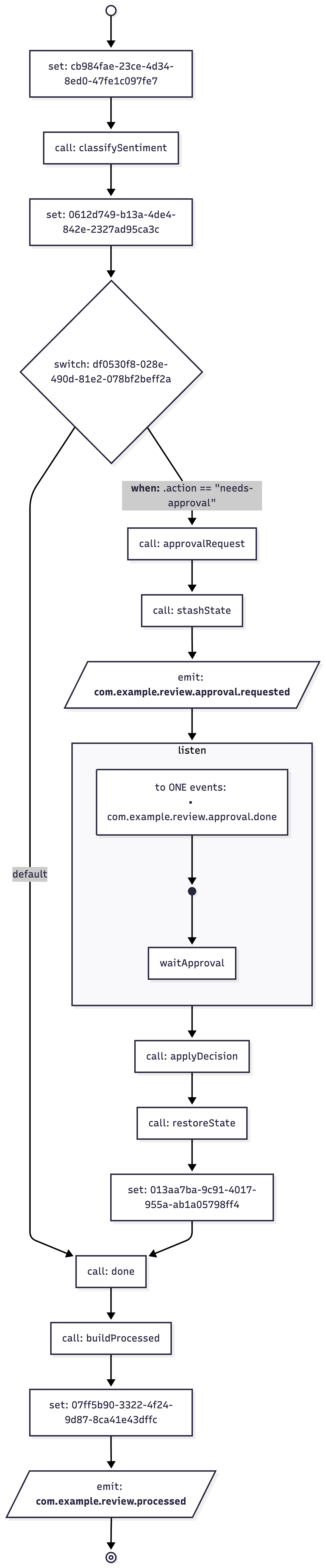
Go to the Quarkus Dev UI and check the flow diagram in the extension features:
Production notes (what to fix before shipping)
This demo is intentionally minimal, but it already suggests the production shape. Before shipping, address these items:
Persistence: this tutorial stores correlation in memory. In a real system, store correlation and workflow state durably.
Idempotency: use stable CloudEvent ids and enforce idempotency at your ingestion boundary.
Security: approvals must be authenticated and authorized. Treat the approval endpoint as control-plane API.
Observability: export workflow lifecycle events and domain events to your telemetry stack. This is where workflow systems pay off.
Model governance: pin the Ollama model version you deploy and treat prompts as code. Your routing logic depends on the model output being stable.
Workflows are not about “automation”. They are about making the unhappy paths correct.