



New Year’s Eve is one of those moments where “time zones” stop being a boring configuration detail and suddenly become very real. Midnight rolls across the globe, people celebrate in Tokyo while New York is still at breakfast, and your systems need to react in the right order.
In many enterprises you have similar requirements all year long:
Time-zone aware notifications
One-time jobs that must survive restarts
A mix of databases, REST APIs, and real-time updates
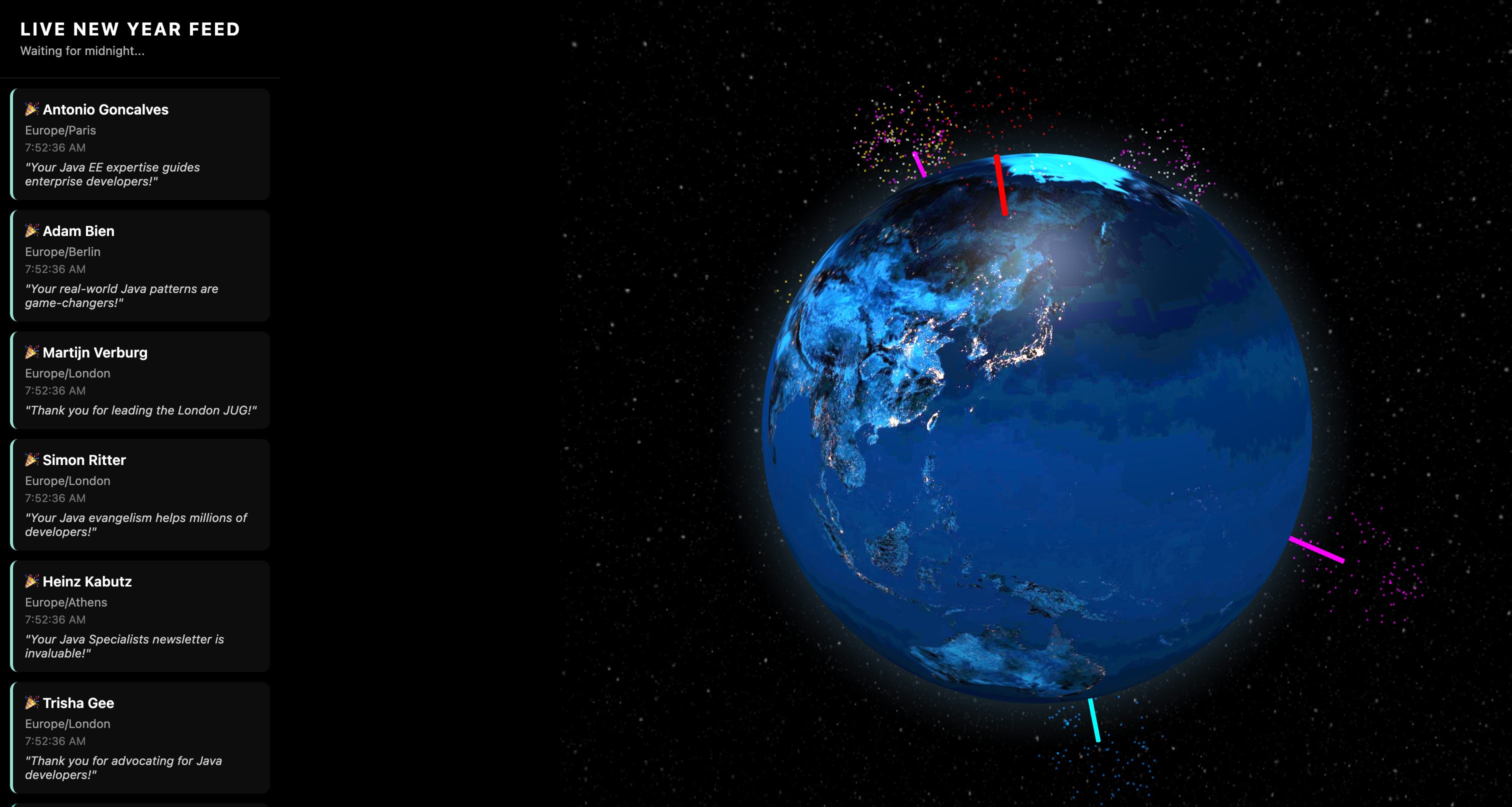
In this tutorial we build a Global New Year Orchestrator:
A REST API where you schedule New Year greetings per recipient and time zone
Quartz with a JDBC job store so jobs survive restarts
PostgreSQL provided automatically by Quarkus Dev Services
A WebSocket endpoint that pushes “Happy New Year” events
A simple 3D globe UI (using
globe.gl) that shows fireworks as greetings are delivered
Everything runs locally with:
Java 17+
Maven
Quarkus Dev Services for PostgreSQL
A container runtime (Docker or Podman) that Quarkus uses under the hood
No manual PostgreSQL setup. No docker-compose.yaml. Quarkus spins up the database for you in dev mode.
Prerequisites
You need:
Java 17+
Maven 3.8+
A terminal
A container runtime that Quarkus Dev Services can use (Docker or Podman)
A browser
curlor a REST client (HTTPie, Postman, IntelliJ HTTP files, etc.)
We will run everything in Quarkus dev mode. The PostgreSQL database will be started automatically by Dev Services.
If you don’t want to follow along and want to see the fully styled globe in action, just grab the source code from my Github repository!
Project Setup
Generate a new Quarkus project with all required extensions:
Hibernate ORM with Panache
JDBC PostgreSQL driver
Quartz
WebSockets
REST with Jackson
Mailer (we simulate email sending)
From your terminal:
mvn io.quarkus.platform:quarkus-maven-plugin:create \
    -DprojectGroupId=com.newyear \
    -DprojectArtifactId=countdown-orchestrator \
    -DnoCode \
    -Dextensions="hibernate-orm-panache,jdbc-postgresql,quartz,websockets,rest-jackson,mailer"
cd countdown-orchestrator
Configuration with Dev Services and Quartz
Change application.properties
Open src/main/resources/application.properties and replace its contents with the following:
# =========================================================
# Global New Year Orchestrator - Quarkus Configuration
# =========================================================

# --- Datasource (PostgreSQL via Dev Services) -----------
# Dev Services will automatically start a PostgreSQL container
# when running `mvn quarkus:dev` if no URL/credentials are set.
# We only specify the kind.
quarkus.datasource.db-kind=postgresql

# For the tutorial: drop and recreate schema on each start.
# In production you would use ‘validate’ or ‘update’ and
# manage schema with Flyway or Liquibase.
quarkus.hibernate-orm.schema-management.strategy=drop-and-create

# --- Quartz Scheduler -----------------------------------
# Use JDBC-backed store so jobs survive restarts.
quarkus.quartz.store-type=jdbc-cmt
quarkus.quartz.clustered=true


# Start the scheduler even if there are no @Scheduled methods.
# We use only programmatic scheduling via Quartz.
quarkus.scheduler.start-mode=forced

# --- WebSocket ------------------------------------------
quarkus.websocket.max-frame-size=102400

# --- Logging --------------------------------------------
quarkus.log.console.format=%d{HH:mm:ss} %-5p [%c{2.}] (%t) %s%e%n

# --- Dev Mode Convenience -------------------------------
# Optionally show SQL in the logs while developing.
#quarkus.hibernate-orm.log.sql=true

# --- Example Production Datasource (commented) ----------
# When you deploy, you can add a real PostgreSQL config under
# the %prod profile and still keep Dev Services locally.
#
#%prod.quarkus.datasource.jdbc.url=jdbc:postgresql://db-host:5432/newyear
#%prod.quarkus.datasource.username=newyear
#%prod.quarkus.datasource.password=change-me
#%prod.quarkus.hibernate-orm.database.generation=validate
Key points:
We do not set
quarkus.datasource.jdbc.url, username, or password.
That is the Dev Services trigger: Quarkus will start a PostgreSQL container automatically in dev and test.Quartz uses a JDBC store so scheduled jobs are persisted and survive restarts.
quarkus.scheduler.start-mode=forcedis required because we do not use the@Scheduledannotation; we only use the Quartz API programmatically.
Initializing the Quartz db tables
You’d usually use something like flyway in production to initialize the necessary database tables for Quartz. In this example, I am just using a simple import.sql script to do that. Make sure to check the official Quarkus documentation.
Domain Model and DTO
We now define the entity that represents a scheduled greeting and a simple DTO used as input to the REST API.
ScheduledGreeting entity
Create src/main/java/com/newyear/entity/ScheduledGreeting.java with this content:
package com.newyear.entity;

import io.quarkus.hibernate.orm.panache.PanacheEntity;
import jakarta.persistence.Column;
import jakarta.persistence.Entity;
import jakarta.persistence.Table;

import java.time.Instant;
import java.time.ZonedDateTime;
import java.util.List;

@Entity
@Table(name = “scheduled_greetings”)
public class ScheduledGreeting extends PanacheEntity {

    @Column(nullable = false)
    public String senderName;

    @Column(nullable = false)
    public String recipientName;

    /**
     * IANA timezone of the recipient, for example:
     * “Asia/Tokyo”, “Europe/Berlin”, “America/New_York”
     */
    @Column(nullable = false)
    public String recipientTimezone;

    @Column(length = 1000)
    public String message;

    /**
     * Target time at which the greeting should be delivered,
     * in the recipient’s timezone.
     */
    @Column(nullable = false)
    public ZonedDateTime targetDeliveryTime;

    /**
     * Quartz job id that will deliver this greeting.
     * Optional but handy for debugging and job management.
     */
    @Column
    public String quartzJobId;

    @Column(nullable = false)
    public boolean delivered = false;

    @Column
    public Instant deliveredAt;

    /**
     * For example: “email”, “in-app”, “sms”.
     * In this tutorial we simulate the channel.
     */
    @Column
    public String deliveryChannel;

    /**
     * Contact details for the chosen delivery channel.
     * Email address, phone number, user id, etc.
     */
    @Column
    public String contactInfo;

    /**
     * Helper method to find pending greetings in a given time range.
     * Not used in the basic flow but useful for catch-up logic.
     */
    public static List<ScheduledGreeting> findPendingByTimeRange(ZonedDateTime start, ZonedDateTime end) {
        return find(”delivered = false and targetDeliveryTime between ?1 and ?2”, start, end).list();
    }
}
GreetingRequest DTO
Create src/main/java/com/newyear/dto/GreetingRequest.java:
package com.newyear.dto;

/**
 * Request body for scheduling a greeting.
 * This is sent by the frontend or any client to /api/greetings.
 */
public class GreetingRequest {

    public String senderName;
    public String recipientName;

    /**
     * IANA timezone string, for example:
     * “Asia/Tokyo”, “Europe/London”, “America/New_York”
     */
    public String recipientTimezone;

    public String message;

    /**
     * e.g. “email”, “in-app”, “sms”
     */
    public String deliveryChannel;

    /**
     * e.g. email address, phone number, or username
     */
    public String contactInfo;

    /**
     * Helper flag for the tutorial.
     * If true, we schedule the greeting 5 seconds in the future
     * instead of waiting until the next New Year.
     */
    public boolean testMode;
}
Real-Time Notifications with WebSockets
We want the browser to see when a greeting is delivered. Quarkus WebSockets are a natural fit.
WebSocket endpoint
Create src/main/java/com/newyear/websocket/GlobeWebSocket.java:
package com.newyear.websocket;

import java.util.Set;
import java.util.concurrent.ConcurrentHashMap;

import com.newyear.entity.ScheduledGreeting;

import jakarta.enterprise.context.ApplicationScoped;
import jakarta.json.Json;
import jakarta.json.JsonObject;
import jakarta.websocket.OnClose;
import jakarta.websocket.OnOpen;
import jakarta.websocket.Session;
import jakarta.websocket.server.ServerEndpoint;

/**
 * WebSocket endpoint that broadcasts New Year greetings
 * to all connected browser clients.
 *
 * Frontend connects to: ws://localhost:8080/ws/globe
 */
@ServerEndpoint(”/ws/globe”)
@ApplicationScoped
public class GlobeWebSocket {

    private static final Set<Session> sessions = ConcurrentHashMap.newKeySet();

    @OnOpen
    public void onOpen(Session session) {
        sessions.add(session);
    }

    @OnClose
    public void onClose(Session session) {
        sessions.remove(session);
    }

    /**
     * Called by the delivery service when a greeting is successfully delivered.
     * Broadcasts a JSON event of type GREETING_DELIVERED.
     */
    public void broadcastGreetingDelivered(ScheduledGreeting greeting) {
        if (greeting.deliveredAt == null) {
            // Should not happen, but be defensive.
            return;
        }

        JsonObject event = Json.createObjectBuilder()
                .add(”type”, “GREETING_DELIVERED”)
                .add(”timezone”, greeting.recipientTimezone)
                .add(”timestamp”, greeting.deliveredAt.toString())
                .add(”recipientName”, greeting.recipientName)
                .add(”message”, greeting.message == null ? “” : greeting.message)
                .build();

        String payload = event.toString();

        for (Session session : sessions) {
            if (session.isOpen()) {
                session.getAsyncRemote().sendText(payload);
            }
        }
    }
}
Because we included the rest-jackson extension, jakarta.json is available out of the box.
Delivery Logic and Quartz Job
We now wire the delivery logic and the Quartz job that calls it.
Delivery service
Create src/main/java/com/newyear/service/GreetingDeliveryService.java:
package com.newyear.service;

import java.time.Instant;

import com.newyear.entity.ScheduledGreeting;
import com.newyear.websocket.GlobeWebSocket;

import jakarta.enterprise.context.ApplicationScoped;
import jakarta.inject.Inject;
import jakarta.transaction.Transactional;

/**
 * Contains the actual delivery logic for a greeting.
 * In a real system this would send an email, SMS, push notification, etc.
 */
@ApplicationScoped
public class GreetingDeliveryService {

    @Inject
    GlobeWebSocket wsNotifier;

    @Transactional
    public void deliver(Long greetingId) {
        ScheduledGreeting greeting = ScheduledGreeting.findById(greetingId);

        if (greeting == null) {
            System.out.println(”No greeting found for id “ + greetingId);
            return;
        }

        if (greeting.delivered) {
            // Idempotency: do not deliver twice.
            System.out.println(”Greeting “ + greetingId + “ already delivered, skipping.”);
            return;
        }

        System.out.println(”🎉 DELIVERING GREETING TO: “ + greeting.recipientName
                + “ in “ + greeting.recipientTimezone);

        // 1. Simulate external delivery (email/SMS/etc.)
        // In production, inject and use a real Mailer or external API client.
        if (greeting.deliveryChannel != null) {
            System.out.println(”Pretending to send via channel: “ + greeting.deliveryChannel
                    + “ to “ + greeting.contactInfo);
        }

        // 2. Mark as delivered in the database
        greeting.delivered = true;
        greeting.deliveredAt = Instant.now();
        // No need to call persist() again; entity is managed in this transaction.

        // 3. Notify all connected WebSocket clients
        wsNotifier.broadcastGreetingDelivered(greeting);
    }
}
Quartz job
Create src/main/java/com/newyear/job/GreetingDeliveryJob.java:
package com.newyear.job;

import org.quartz.Job;
import org.quartz.JobExecutionContext;
import org.quartz.JobExecutionException;

import com.newyear.service.GreetingDeliveryService;

import jakarta.enterprise.context.ApplicationScoped;
import jakarta.inject.Inject;

/**
 * Quartz job that simply delegates to GreetingDeliveryService.
 * A new instance can be created per execution by Quartz, but
 * CDI injection still works because Quarkus integrates them.
 */
@ApplicationScoped
public class GreetingDeliveryJob implements Job {

    @Inject
    GreetingDeliveryService deliveryService;

    @Override
    public void execute(JobExecutionContext context) throws JobExecutionException {
        Long greetingId = context.getJobDetail()
                .getJobDataMap()
                .getLong(”greetingId”);

        try {
            deliveryService.deliver(greetingId);
        } catch (Exception e) {
            throw new JobExecutionException(e);
        }
    }
}
Scheduling Service using Quartz
This service creates the ScheduledGreeting entity and sets up the Quartz job and trigger.
Create src/main/java/com/newyear/service/GreetingSchedulerService.java:
package com.newyear.service;

import java.time.ZoneId;
import java.time.ZonedDateTime;
import java.util.Date;

import org.quartz.JobBuilder;
import org.quartz.JobDetail;
import org.quartz.Scheduler;
import org.quartz.SchedulerException;
import org.quartz.Trigger;
import org.quartz.TriggerBuilder;

import com.newyear.dto.GreetingRequest;
import com.newyear.entity.ScheduledGreeting;
import com.newyear.job.GreetingDeliveryJob;

import jakarta.enterprise.context.ApplicationScoped;
import jakarta.inject.Inject;
import jakarta.transaction.Transactional;

/**
 * Service responsible for scheduling greetings with Quartz.
 */
@ApplicationScoped
public class GreetingSchedulerService {

    @Inject
    Scheduler quartzScheduler;

    @Transactional
    public ScheduledGreeting scheduleGreeting(GreetingRequest request) {
        ZoneId recipientZone = ZoneId.of(request.recipientTimezone);

        // If testMode is true, schedule 5 seconds from now.
        // Otherwise, schedule for next New Year’s midnight in recipient’s timezone.
        ZonedDateTime deliveryTime;

        if (request.testMode) {
            deliveryTime = ZonedDateTime.now(recipientZone).plusSeconds(5);
        } else {
            ZonedDateTime now = ZonedDateTime.now(recipientZone);
            int currentYear = now.getYear();
            int targetYear = now.getMonthValue() > 1 || (now.getMonthValue() == 1 && now.getDayOfMonth() > 1)
                    ? currentYear + 1
                    : currentYear;
            // Midnight (00:00) on January 1st of the target year
            deliveryTime = ZonedDateTime.of(targetYear, 1, 1, 0, 0, 0, 0, recipientZone);
        }

        // 1. Persist entity
        ScheduledGreeting greeting = new ScheduledGreeting();
        greeting.senderName = request.senderName;
        greeting.recipientName = request.recipientName;
        greeting.recipientTimezone = request.recipientTimezone;
        greeting.message = request.message;
        greeting.targetDeliveryTime = deliveryTime;
        greeting.deliveryChannel = request.deliveryChannel;
        greeting.contactInfo = request.contactInfo;

        greeting.persist();
        // At this point greeting.id is set.

        // 2. Schedule the Quartz job
        scheduleQuartzJob(greeting);

        return greeting;
    }

    private void scheduleQuartzJob(ScheduledGreeting greeting) {
        try {
            String jobId = “greeting-” + greeting.id;

            JobDetail job = JobBuilder.newJob(GreetingDeliveryJob.class)
                    .withIdentity(jobId, “greetings”)
                    .usingJobData(”greetingId”, greeting.id)
                    .build();

            Trigger trigger = TriggerBuilder.newTrigger()
                    .withIdentity(”trigger-” + jobId, “greetings”)
                    .startAt(Date.from(greeting.targetDeliveryTime.toInstant()))
                    .build();

            quartzScheduler.scheduleJob(job, trigger);

            // Store job id for debugging. No extra persist needed; entity is managed.
            greeting.quartzJobId = jobId;

            System.out.printf(”Scheduled greeting %d for %s at %s%n”,
                    greeting.id,
                    greeting.recipientName,
                    greeting.targetDeliveryTime);

        } catch (SchedulerException e) {
            throw new RuntimeException(”Scheduling failed”, e);
        }
    }
}
Note: we rely on Quartz’s JDBC job store and the configured datasource to persist the job and trigger. Because we enabled quarkus.quartz.jdbc-store.initialize-schema=if-not-exists, Quartz’s tables are created automatically by Quarkus when needed. (the-main-thread.com)
REST API
Now we expose the orchestration as a REST API.
Create src/main/java/com/newyear/resource/GreetingResource.java:
package com.newyear.resource;

import java.util.List;

import com.newyear.dto.GreetingRequest;
import com.newyear.entity.ScheduledGreeting;
import com.newyear.service.GreetingSchedulerService;

import jakarta.inject.Inject;
import jakarta.ws.rs.Consumes;
import jakarta.ws.rs.GET;
import jakarta.ws.rs.POST;
import jakarta.ws.rs.Path;
import jakarta.ws.rs.Produces;
import jakarta.ws.rs.core.MediaType;
import jakarta.ws.rs.core.Response;

/**
 * REST API for scheduling and listing greetings.
 */
@Path(”/api/greetings”)
@Produces(MediaType.APPLICATION_JSON)
@Consumes(MediaType.APPLICATION_JSON)
public class GreetingResource {

    @Inject
    GreetingSchedulerService scheduler;

    @POST
    public Response scheduleGreeting(GreetingRequest request) {
        if (request == null || request.recipientTimezone == null) {
            return Response.status(Response.Status.BAD_REQUEST)
                    .entity(”recipientTimezone is required”)
                    .build();
        }

        ScheduledGreeting greeting = scheduler.scheduleGreeting(request);
        return Response.status(Response.Status.CREATED)
                .entity(greeting)
                .build();
    }

    @GET
    public List<ScheduledGreeting> listGreetings() {
        return ScheduledGreeting.listAll();
    }
}
At this point we have:
A database-backed entity
A scheduler that creates Quartz jobs
A delivery service
A WebSocket endpoint
A REST API to schedule greetings and list them
Next we add a simple frontend to visualise the “Happy New Year” fireworks.
3D Globe Frontend
Quarkus serves static resources from src/main/resources/META-INF/resources. Any file there is accessible at http://localhost:8080/<filename>.
Create src/main/resources/META-INF/resources/index.html:
<!DOCTYPE html>
<html>
<head>
    <meta charset=”UTF-8”>
    <title>Global New Year Orchestrator</title>
    <style>
      <!-- omitted -->
    </style>

    <script src=”//unpkg.com/three”></script>
    <script src=”//unpkg.com/globe.gl”></script>
</head>
<body>
<div id=”info”>
    <h1>Live New Year Feed</h1>
    <div id=”status”>Waiting for midnight...</div>
</div>
<div id=”globeViz”></div>

<script>
    // --- 1. Setup Globe ---
    const world = Globe()
    (document.getElementById(’globeViz’))
        .globeImageUrl(’//unpkg.com/three-globe/example/img/earth-night.jpg’)
        .backgroundImageUrl(’//unpkg.com/three-globe/example/img/night-sky.png’)
        .pointAltitude(0.2)
        .pointColor(’color’)
        .pointRadius(0.5);

    world.controls().autoRotate = true;
    world.controls().autoRotateSpeed = 0.6;

    let activeFireworks = [];

    // --- 2. WebSocket Connection ---
    const socket = new WebSocket(”ws://” + window.location.host + “/ws/globe”);

    socket.onopen = () => console.log(”Connected to Globe Stream”);

    socket.onmessage = function (event) {
        const data = JSON.parse(event.data);

        if (data.type === “GREETING_DELIVERED”) {
            document.getElementById(”status”).innerText =
                `🎉 ${data.recipientName} just celebrated in ${data.timezone}!`;

            triggerFirework(data.timezone);
        }
    };

    socket.onclose = () => console.log(”Globe WebSocket closed”);

    // --- 3. Visualization Logic ---
    function triggerFirework(timezone) {
        // Rough mapping of timezone to lat/lng for demo purposes.
        // In production, use a proper mapping.
        let lat = (Math.random() * 160) - 80;
        let lng = (Math.random() * 360) - 180;

        if (timezone.includes(”New_York”)) { lat = 40.7; lng = -74.0; }
        if (timezone.includes(”Tokyo”)) { lat = 35.6; lng = 139.6; }
        if (timezone.includes(”London”)) { lat = 51.5; lng = -0.12; }
        if (timezone.includes(”Sydney”)) { lat = -33.8; lng = 151.2; }

        const colors = [’red’, ‘white’, ‘gold’, ‘blue’];
        const firework = {
            lat: lat,
            lng: lng,
            size: 1.0,
            color: colors[Math.floor(Math.random() * colors.length)]
        };

        activeFireworks.push(firework);
        world.pointsData(activeFireworks);

        // Remove firework after 2.5 seconds
        setTimeout(() => {
            activeFireworks.shift();
            world.pointsData(activeFireworks);
        }, 2500);
    }
</script>
</body>
</html>
This uses:
A night-time Earth texture
A background space image
Animated points on the globe when greetings arrive
For a real system you would map time zones to coordinates properly. For the tutorial we use a simple mapping with a few known cities and random coordinates for the rest.
Run Everything with Quarkus Dev Mode
Now we are ready to run the whole orchestrator.
From the project root:
./mvnw quarkus:devWhat should happen:
Quarkus starts in dev mode
Dev Services detects the PostgreSQL JDBC extension and no explicit datasource configuration, so it starts a PostgreSQL container automatically and wires the datasource.
Open the globe
In your browser, navigate to:
http://localhost:8080/You should see:
A rotating Earth
A small overlay with “Live New Year Feed” and “Waiting for midnight…”

Trigger a test greeting
Open a new terminal window and send a POST request to the REST API:
curl -X POST http://localhost:8080/api/greetings \
  -H "Content-Type: application/json" \
  -d '{
    "senderName": "Alice",
    "recipientName": "Bob",
    "recipientTimezone": "Asia/Tokyo",
    "message": "Happy New Year!",
    "deliveryChannel": "email",
    "contactInfo": "bob@example.com",
    "testMode": true
}’
Because testMode is true, the orchestrator will:
Create a
ScheduledGreetingentitySchedule a Quartz job for 5 seconds from now in the
Asia/TokyotimezonePersist both the greeting and the job to PostgreSQL
What you should see:
Terminal with Quarkus dev
A line indicating the greeting is scheduled
After about 5 seconds, a line like:
🎉 DELIVERING GREETING TO: Bob in Asia/Tokyo
Browser with globe.html
The status text updates to:
🎉 Bob just celebrated in Asia/Tokyo!A “firework” appears over Japan (Tokyo mapping)
List scheduled greetings
You can also call:
curl http://localhost:8080/api/greetingsYou should see a JSON array with at least one greeting and delivered set to true.
What Happens at Midnight (Conceptually)
In real New Year mode (testMode = false):
The scheduler calculates the next January 1st midnight in the recipient’s timezone
A Quartz job is scheduled for that instant
Jobs and triggers are stored in PostgreSQL via the JDBC job store
For a global rollout you would:
Run the same Quarkus service in multiple instances
Keep them connected to the same Quartz database with
clustered=trueLet Quartz ensure each job is executed exactly once across the cluster
Summary
You now have a working Global New Year Orchestrator:
PostgreSQL via Quarkus Dev Services
A persisted Quartz job store for reliable, restart-safe scheduling
A REST API to schedule time-zone aware New Year greetings
A WebSocket endpoint streaming real-time events
A 3D globe UI visualising celebrations as they happen
From here you can turn the orchestrator into a serious global scheduling service.
Happy New Year, wherever you are in the world. 🎉
Happy New Year!🎊