


I know Maven well. I have not used Gradle much in real project work. That is why I wanted to understand what Gradle changes in Java development and where it can help.
The generated project starts with three files: build.gradle, settings.gradle, and gradle.properties. There is no pom.xml. After years of Maven, I first need to learn where Gradle puts each part of the build. Changing XML to Groovy is only a syntax change. It does not explain the build model.
A basic Quarkus REST endpoint looks almost the same with both build tools. The Java class, test, and fast-jar do not teach us much about Gradle. We need the build to take part in the application.
We will add a custom Gradle task that generates build metadata. The task declares its inputs and output, then passes the generated file to Quarkus. Gradle skips the task when nothing changed and runs it again when an input changes.
Gradle’s task graph is where the build tool became interesting to me. Maven gives us a fixed lifecycle with plugin goals bound to phases. Gradle builds a graph of tasks and lets us add our own work to it. The team then has more build code to maintain. That trade-off makes sense when a Java project has code generation, many modules, or expensive build steps that can reuse earlier output.
What We Build
We build a small service called Quarkus Gradle Build Lab. It runs on Quarkus 3.37.2, Gradle 9.5.1, and Java 25. The /build-info endpoint returns metadata produced by the build:
{"name":"quarkus-gradle-build-lab","version":"1.0.0-SNAPSHOT"}The data follows this path:
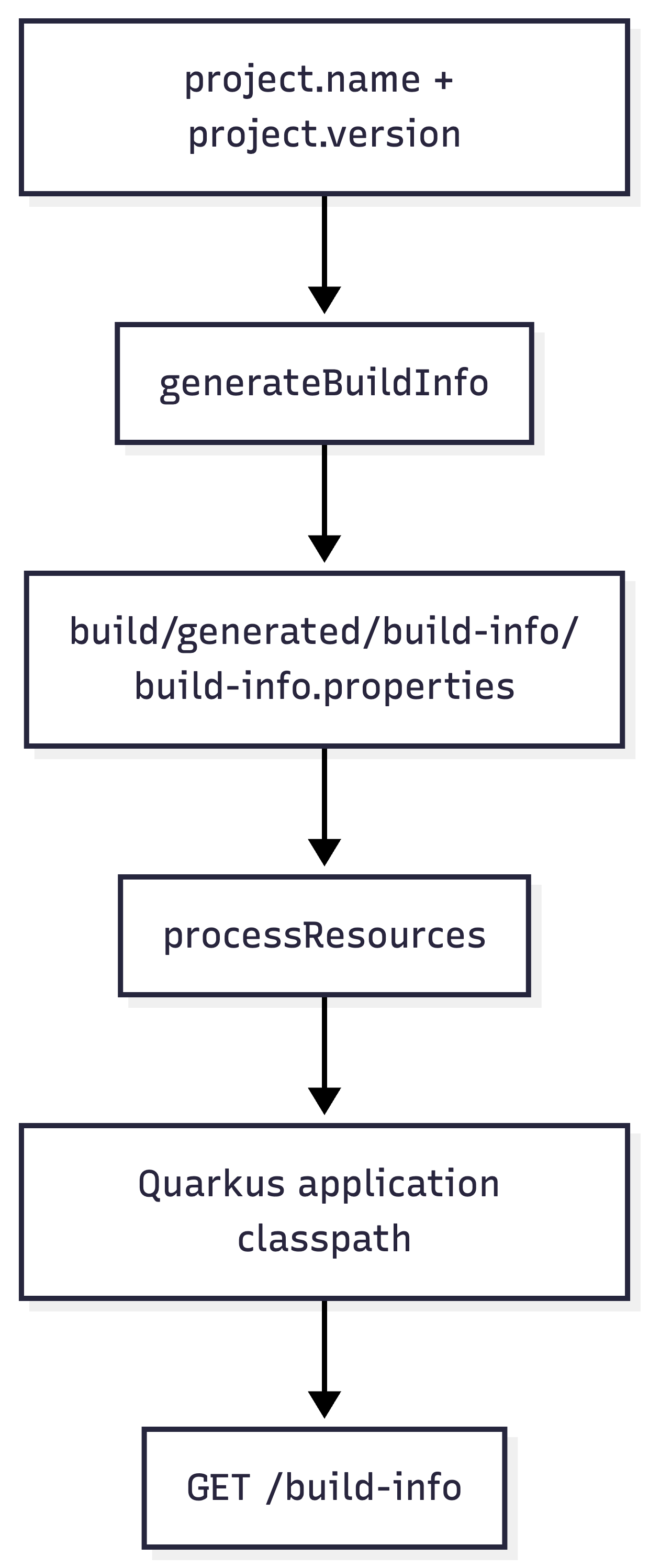
We will use the same project to inspect dependencies, filter one test, and package a Quarkus fast-jar. I will also show the matching Maven command or concept where it helps.
What You Need
This article assumes that you already know Maven. I treat dependencyManagement, plugin executions, Surefire, and the standard lifecycle as known concepts.
JDK 25
Quarkus CLI 3.37.x
Network access for the first wrapper run
curlAbout ☕️☕️☕️
The project uses the Groovy DSL because --gradle generates it. Quarkus also supports --gradle-kotlin-dsl. Kotlin DSL provides stronger IDE typing. I stay with Groovy so we can focus on Gradle itself and avoid a second syntax.
Create a Quarkus Gradle Project
Create the base project or start form my Github repository:
quarkus create app com.themainthread:quarkus-gradle-build-lab \
  --extension=rest-jackson \
  --gradle \
  --java=25 \
  --no-code \
  --no-dockerfiles
cd quarkus-gradle-build-lab
The --gradle option tells the Quarkus CLI to create a Gradle project. rest-jackson adds Quarkus REST and JSON serialization. The generated build also contains Arc, Quarkus JUnit, and RestAssured. We skip the Dockerfiles because this example does not build a container image.
The listings use Quarkus 3.37.2. A newer CLI may generate another platform and wrapper version. Keep the generated plugin, BOM, and wrapper versions together. Copying one version number into an older build can leave you with a combination that the generator never created.
Gradle splits the build across these top-level files:
settings.gradle names the build and controls plugin resolution. In a multi-project build, it also contains the include declarations. This is similar to the project list in a Maven aggregator POM, but Gradle keeps dependency and plugin configuration elsewhere.
pluginManagement {
    repositories {
        mavenCentral()
        gradlePluginPortal()
        mavenLocal()
    }
    plugins {
        id "${quarkusPluginId}" version "${quarkusPluginVersion}"
    }
}
rootProject.name = 'quarkus-gradle-build-lab'
gradle.properties contains values used by the settings and build scripts:
quarkusPluginId=io.quarkus
quarkusPluginVersion=3.37.2
quarkusPlatformGroupId=io.quarkus.platform
quarkusPlatformArtifactId=quarkus-bom
quarkusPlatformVersion=3.37.2
build.gradle applies plugins, declares dependencies, configures Java, and defines tasks. Maven keeps these concerns in one XML model. Gradle reads the settings and properties first, then evaluates the build script and creates a task graph.
This task graph is the first concept Maven users need to understand. Maven’s default lifecycle is an ordered list of phases. Calling verify also runs the earlier phases. Gradle has initialization, configuration, and execution phases. During configuration, Gradle creates a graph for the tasks you requested. Task dependencies decide the execution order.
Some names are similar, which can be confusing at first. Gradle’s build is a lifecycle task. It is not a direct rename of Maven’s package phase.
Read the Generated Dependency Model
The generated dependency block is shorter than the matching POM:
dependencies {
    implementation enforcedPlatform("${quarkusPlatformGroupId}:${quarkusPlatformArtifactId}:${quarkusPlatformVersion}")
    implementation 'io.quarkus:quarkus-rest-jackson'
    implementation 'io.quarkus:quarkus-arc'
    testImplementation 'io.quarkus:quarkus-junit'
    testImplementation 'io.rest-assured:rest-assured'
}
implementation and testImplementation are configurations. A configuration describes where Gradle needs a dependency and whether downstream modules can see it. The standard Java configurations cover familiar compile, runtime, and test needs. Plugins can add more configurations.
The Quarkus BOM appears as an enforcedPlatform. Gradle can import Maven BOMs as platforms. The enforced form makes Gradle use the platform versions during dependency resolution. This is similar to importing the Quarkus BOM under Maven dependencyManagement, with stricter conflict handling.
A dependency without a version still needs a source for that version. In this build, the imported Quarkus platform supplies it. An artifact outside that platform needs an explicit version, another platform, or a version catalog.
Add a Task That Produces Application Input
Replace build.gradle with the complete build below:
plugins {
    id 'java'
    id 'io.quarkus'
}

repositories {
    mavenCentral()
    mavenLocal()
}

dependencies {
    implementation enforcedPlatform("${quarkusPlatformGroupId}:${quarkusPlatformArtifactId}:${quarkusPlatformVersion}")
    implementation 'io.quarkus:quarkus-rest-jackson'
    implementation 'io.quarkus:quarkus-arc'
    testImplementation 'io.quarkus:quarkus-junit'
    testImplementation 'io.rest-assured:rest-assured'
}

group = 'com.themainthread'
version = providers.gradleProperty('revision').getOrElse('1.0.0-SNAPSHOT')

java {
    toolchain {
        languageVersion = JavaLanguageVersion.of(25)
    }
}

compileJava {
    options.encoding = 'UTF-8'
    options.compilerArgs << '-parameters'
}

compileTestJava {
    options.encoding = 'UTF-8'
}

@CacheableTask
abstract class GenerateBuildInfo extends DefaultTask {

    @Input
    abstract Property<String> getApplicationName()

    @Input
    abstract Property<String> getApplicationVersion()

    @OutputFile
    abstract RegularFileProperty getOutputFile()

    @TaskAction
    void generate() {
        File target = outputFile.get().asFile
        target.parentFile.mkdirs()
        target.setText("""application.name=${applicationName.get()}
application.version=${applicationVersion.get()}
""", 'UTF-8')
    }
}

def generateBuildInfo = tasks.register('generateBuildInfo', GenerateBuildInfo) {
    group = 'build setup'
    description = 'Generates build metadata consumed by the application.'
    applicationName.set(project.name)
    applicationVersion.set(project.version.toString())
    outputFile.set(layout.buildDirectory.file('generated/build-info/build-info.properties'))
}

tasks.named('processResources') {
    from(generateBuildInfo)
}
The Java toolchain makes Java 25 part of the build definition. sourceCompatibility only sets the Java language level for source code. A toolchain also tells Gradle which compiler the task needs. Gradle toolchains make this requirement explicit. This helps when developer machines and CI agents have several JDKs installed.
The revision project property supplies the application version. The build uses 1.0.0-SNAPSHOT when the property is missing. This has the same role that ${revision} often has in Maven. Gradle’s Provider API waits to read the value until the build needs it.
The command-line prefix is different from Maven. -Prevision=1.0.0 sets a Gradle project property. -Dquarkus.package.jar.type=uber-jar sets a JVM system property that Quarkus reads. Maven commonly uses -D for both types of input. Gradle uses separate prefixes.
GenerateBuildInfo is a custom task type. Its two @Input properties affect the file content. @OutputFile tells Gradle which file the task creates. Gradle records fingerprints for declared inputs and outputs. It can skip the task as UP-TO-DATE when those fingerprints have not changed.
@CacheableTask allows Gradle to reuse the output through its build cache. The output may come from another build directory or a shared cache. This task is safe to cache because the same name and version always produce the same bytes. If we added the current time to the file, every run would produce different bytes and the cache would stop helping.
We add the task with tasks.register. This keeps task configuration lazy. Gradle recommends lazy task registration because Gradle does not need to fully configure tasks that it will not run.
The final block adds the generated file to processResources:
tasks.named('processResources') {
    from(generateBuildInfo)
}
We do not need an explicit dependsOn. from(generateBuildInfo) uses the task’s declared output, so Gradle knows that generateBuildInfo must run first. The dependency comes from the data that moves between the two tasks.
With Maven, I would use a plugin goal bound to generate-resources and add the generated directory as a resource root. Gradle expresses the same work as a task with typed values and a declared output. The build engine can then track the relationship directly.
Expose the Generated File Through Quarkus
Set the application name in src/main/resources/application.properties:
quarkus.application.name=quarkus-gradle-build-labCreate src/main/java/com/themainthread/gradle/BuildInfoResource.java:
package com.themainthread.gradle;

import java.io.IOException;
import java.io.InputStream;
import java.util.Properties;

import jakarta.ws.rs.GET;
import jakarta.ws.rs.Path;
import jakarta.ws.rs.Produces;
import jakarta.ws.rs.core.MediaType;

@Path("/build-info")
@Produces(MediaType.APPLICATION_JSON)
public class BuildInfoResource {

    private final BuildInfo buildInfo = loadBuildInfo();

    @GET
    public BuildInfo getBuildInfo() {
        return buildInfo;
    }

    private static BuildInfo loadBuildInfo() {
        Properties properties = new Properties();

        try (InputStream input = BuildInfoResource.class.getResourceAsStream("/build-info.properties")) {
            if (input == null) {
                throw new IllegalStateException("Missing generated build-info.properties");
            }
            properties.load(input);
        } catch (IOException exception) {
            throw new IllegalStateException("Cannot read generated build-info.properties", exception);
        }

        return new BuildInfo(
                requiredProperty(properties, "application.name"),
                requiredProperty(properties, "application.version"));
    }

    private static String requiredProperty(Properties properties, String key) {
        String value = properties.getProperty(key);
        if (value == null || value.isBlank()) {
            throw new IllegalStateException("Missing build property: " + key);
        }
        return value;
    }

    public record BuildInfo(String name, String version) {
    }
}
The endpoint fails when the generated resource or one of its properties is missing. The exception explains what is wrong. Returning unknown would hide the broken connection between the build and the application.
Jackson serializes the nested record as JSON. processResources copies build-info.properties into the main resource output, so Quarkus includes it when it packages the application.
quarkus.application.name keeps the name in logs and management data aligned with the Gradle project name. The generated file uses project.name, so the endpoint still works when this Quarkus property is missing. However, the two names can differ if somebody changes only one of them.
Prove the Build and Application Meet
Create src/test/java/com/themainthread/gradle/BuildInfoResourceTest.java:
package com.themainthread.gradle;

import static io.restassured.RestAssured.given;
import static org.hamcrest.Matchers.equalTo;

import org.junit.jupiter.api.Test;

import io.quarkus.test.junit.QuarkusTest;

@QuarkusTest
class BuildInfoResourceTest {

    @Test
    void exposesMetadataGeneratedByGradle() {
        given()
                .when().get("/build-info")
                .then()
                .statusCode(200)
                .body("name", equalTo("quarkus-gradle-build-lab"))
                .body("version", equalTo("1.0.0-SNAPSHOT"));
    }
}
Run the test:
./gradlew testThe output shows the generated resource task before compilation and testing:
> Task :generateBuildInfo
> Task :processResources
> Task :compileJava
> Task :test

BUILD SUCCESSFUL
This test also checks the connection between the build and the application. Quarkus starts with the file produced by our Gradle task on its classpath. If you remove the from(generateBuildInfo) block, the application fails when it tries to load that file.
The matching Maven command is ./mvnw test. Selecting one test uses different syntax:
./gradlew test \
  --tests com.themainthread.gradle.BuildInfoResourceTest.exposesMetadataGeneratedByGradle
Maven would use -Dtest=BuildInfoResourceTest#exposesMetadataGeneratedByGradle. Gradle puts the filter on the test task with --tests. Quarkus continuous testing accepts the same Gradle pattern.
Watch Gradle Skip Work
Run only the generator:
./gradlew generateBuildInfoRun the same command again:
./gradlew generateBuildInfoThe second result should contain:
> Task :generateBuildInfo UP-TO-DATENow change one declared input from the command line:
./gradlew generateBuildInfo -Prevision=1.0.0Gradle runs the task again because applicationVersion changed. The generated file now contains:
application.name=quarkus-gradle-build-lab
application.version=1.0.0
What happens if the task reads a value that we forgot to mark with @Input? Gradle may reuse an old output even though that value changed. These declarations decide whether the output is correct. They also decide whether Gradle can skip the work.
Custom Gradle logic needs the same care as application code. A task that reads an undeclared environment variable, Git state, or file can produce stale output. Maven plugin authors usually own this contract inside a plugin. With a custom Gradle task, the application team owns it.
Inspect Dependencies by Configuration
Maven’s dependency:tree shows the resolved dependency graph. With Gradle, we first choose the configuration to inspect:
./gradlew dependencies --configuration runtimeClasspathUse testRuntimeClasspath for the test graph. To inspect one dependency, use dependencyInsight:
./gradlew dependencyInsight \
  --dependency jackson-databind \
  --configuration runtimeClasspath
The dependency insight report explains why Gradle selected a version and where the request came from. This helps when an enforced platform, a transitive dependency, and an explicit constraint all affect the same module.
The configuration name matters. Gradle resolves a separate graph for each configuration, and plugins may create more than the standard Java configurations. Asking for runtimeClasspath tells Gradle exactly which graph we want to debug.
Use the Quarkus Tasks
List the tasks added by the Quarkus plugin:
./gradlew tasks --group quarkusThe common commands are close to their Maven versions:
Maven
./mvnw quarkus:devbecomes Gradle./gradlew quarkusDevMaven
./mvnw testbecomes Gradle./gradlew testMaven
./mvnw packagebecomes Gradle./gradlew buildMaven
./mvnw quarkus:go-offlinebecomes Gradle./gradlew quarkusGoOffline
Start dev mode:
./gradlew quarkusDevCall the endpoint:
curl http://localhost:8080/build-infoExpected response:
{
  "name": "quarkus-gradle-build-lab",
  "version": "1.0.0-SNAPSHOT"
}
Stop dev mode, then package the application:
./gradlew build
java -jar build/quarkus-app/quarkus-run.jar
Quarkus creates the fast-jar under build/quarkus-app/. Maven uses target/quarkus-app/ for the same layout. The complete directory is the application distribution because quarkus-run.jar does not contain every dependency.
The current Quarkus plugin splits fast-jar work across tasks such as quarkusAppPartsBuild, quarkusDependenciesBuild, and quarkusBuild. The Quarkus Gradle guide explains which package outputs can use the Gradle build cache. This can reduce work in repeat builds. Cache hits still depend on stable inputs and compatible build environments.
Where Gradle Is Strong
The Quarkus REST code is the same Java we would write with Maven. Gradle becomes relevant when the build needs its own behavior.
Custom build pipelines - Code generation, schema compilation, frontend assembly, license checks, and packaging can each become a task. Declared inputs and outputs let Gradle order the tasks and skip work when nothing changed.
Large multi-project builds - Gradle can share convention plugins, configure related projects, and run independent tasks in parallel. It gives teams more control when modules need different build steps. Maven reactors remain easier to predict because they follow the same lifecycle in every module.
Dependency diagnostics - Configurations and dependencyInsight show the exact classpath and the reason for a selected version. The model takes time to learn. Once you know the configuration name, the report is precise.
Build reuse - Up-to-date checks reuse local output in the same workspace. The optional build cache can reuse cacheable task output across workspaces and CI agents. Both features depend on correct task inputs. Hidden inputs can give you stale output, which is fast but still wrong.
Where Maven Still Feels Better
Maven’s fixed lifecycle limits how we shape the build, but it also makes unfamiliar builds easier to read. I can open a POM, find the plugin executions, and understand roughly when they run. Gradle can be equally clear. It can also contain network calls during configuration, tasks that modify other tasks, and important behavior hidden in shared scripts.
For a normal Quarkus service with a few extensions and no custom generation, Maven remains a good default. The wrapper commands are familiar, many teams know how to operate it, and the POM mostly describes the build.
I would consider Gradle when a repository has many modules, several generated source sets, or expensive steps that can use fine-grained caching. Those needs could justify a build-tool change. Groovy versus XML is mostly a question of taste.
The DSL choice also matters. Groovy is concise, but some errors appear later than I would like. Kotlin DSL improves completion and type checking. Both configure the same Gradle model. A team should choose one DSL so developers do not have to translate every internal example.
Keep the Build Reproducible
The demo is small, but the build still ships the application, so its code needs the same review as production code.
Keep the wrapper - Commit gradlew, gradlew.bat, the wrapper JAR, and gradle-wrapper.properties. The generated wrapper pins Gradle 9.5.1 and includes a distribution checksum. CI should use this wrapper so every environment runs the same Gradle version.
Keep generated output under build/ - The generator writes to build/generated/, which the clean task removes. Writing into src/main/resources would change the working tree and make it easy to commit an old generated file.
Declare every input - Environment variables, Git hashes, source directories, and tool versions can all change task output. Declare each one as an input when the task reads it. Otherwise, keep it out of the generated artifact.
Move growing logic out of build.gradle - One task class is easy to read here. A larger set of shared tasks belongs in buildSrc, an included build, or a convention plugin. Add Gradle TestKit coverage as the logic grows. Build code can break a release as easily as application code.
Pin the Quarkus plugin and platform together - The generated gradle.properties uses 3.37.2 for both. The enforced platform controls dependency versions. The plugin provides the Quarkus tasks. Upgrade both in the same tested change.
Conclusion
We built a Quarkus service that gets its metadata from a typed Gradle task. The generated file moves through processResources, onto the application classpath, and into a tested REST endpoint.
My conclusion is practical. I would keep Maven for a conventional Quarkus service because it remains more familiar to me and easier to read. I would consider Gradle when the build needs generated inputs, custom task relationships, and reusable output. The task graph is the reason, not the Groovy syntax.