



Every December I start thinking about what I can send to the people who matter, a card for friends and family, a small surprise for coworkers, something that feels a bit more personal than a stock “Happy Holidays.” And every year I end up wanting to build something myself.
I open my IDE (or Photoshop), place some text, realize I mis-counted my pixel offsets, fix it, break it again, stare out the window, and wonder if my career took a wrong turn.
But it doesn’t have to be this way.
In my earlier tutorial, I showed how to generate images using QuickJS and SVG. It works great for badges and icons. But for something design-heavy, like a Christmas card with imagery, typography, shadows, rounded corners, decorative elements, and branding, SVG quickly becomes a chore.
That’s when Stephane Epardaud (FroMage) pointed me toward a smarter approach:
Why not use HTML and CSS to design your images and let Quarkus Renarde render them as PNG?
HTML/CSS already solves layout, text wrapping, gradients, shadows, and responsive sizing. Designers understand it. You can preview it in a browser. And Renarde turns that template into a PNG on the server.
So in this tutorial, we’ll build exactly that:
A Christmas Card Generator microservice powered by Quarkus Renarde, Qute, and HTML/CSS.
You provide a name and a personal message.
Renarde returns a beautifully styled Christmas card as a PNG.
No Java2D. No PDFBox. No pixel math. Just web skills.
Let’s begin.
Why HTML & CSS Are Perfect for Christmas Cards
Christmas cards need:
festive backgrounds
gradients or patterns
decorative elements
nice typography
wrapped text
centered layouts
image overlays (snowflakes, ornaments, glow effects)
All of this is trivial in HTML/CSS.
None of it is trivial in Java2D.
Renarde lets you write an HTML page that looks like a card, and it automatically renders it to an image. You can preview the design in a normal browser, tweak the CSS, reload, and when you’re happy: done.
This workflow is ideal for seasonal content and marketing-style assets.
Project Setup
Pick your learning path. Either look at the details on my Github or begin with a Renarde project and follow the tutorial step by step:
quarkus create app org.acme:christmas-card \
  --extension=renarde
cd christmas-card
Make sure to add the following additional dependency to your pom.xml
        <dependency>
            <groupId>io.quarkiverse.renarde</groupId>
            <artifactId>quarkus-renarde-pdf</artifactId>
            <version>3.1.2</version>
        </dependency>
Templates live under:
src/main/resources/templatesStatic assets (backgrounds, icons, snow overlays) go under:
src/main/resources/META-INF/resourcesThe Domain Model
A Christmas card consists of:
a recipient name
a sender name
a personalized message
the year (optional)
Create a record:
package org.acme.model;

public record CardData(
    String recipient,
    String message,
    String sender,
    String year
) {}
The service will inject this into the HTML template.
Designing the Christmas Card in HTML/CSS
This is where the fun begins.
We design a full 1200×630 Christmas card using only HTML and CSS.
Create:
src/main/resources/templates/Application/christmasCard.html
<!DOCTYPE html PUBLIC
“-//OPENHTMLTOPDF//DOC XHTML Character Entities Only 1.0//EN” “”>
<html lang=”en”>
<html>
<head>
<meta charset=”UTF-8”>
<style>
   <!-- ommited -->
</style>
</head>

<body>

<!-- there's more here. Grab it from my github! -->
    <div class=”card”>
                <!-- Main content -->
                <div class=”content”>
                    <h1><span class=”sparkle”>✨</span> Merry Christmas <span class=”sparkle”>✨</span></h1>
                    <p>{card.recipient}</p>
                    <p>{card.message}</p>
                    <p>— {card.sender}, {card.year}</p>
                </div>
    </div>

</body>
</html>
You can preview this file directly in your browser.
Adjust CSS until you’re happy.
Once the design works visually, Renarde will render it perfectly as a PNG.
The Controller: Rendering HTML and PNGs
Create:
src/main/java/org/acme/rest/Application.java
package org.acme.rest;

import org.acme.model.CardData;

import io.quarkiverse.renarde.Controller;
import io.quarkiverse.renarde.pdf.Pdf;
import io.quarkus.qute.CheckedTemplate;
import io.quarkus.qute.TemplateInstance;
import jakarta.ws.rs.GET;
import jakarta.ws.rs.Path;
import jakarta.ws.rs.Produces;
import jakarta.ws.rs.core.MediaType;

public class Application extends Controller {

    @CheckedTemplate
    public static class Templates {
        public static native TemplateInstance christmasCard(CardData card);
    }

    @GET
    @Path(”/christmasPngCard”)
    @Produces(Pdf.IMAGE_PNG)
    public TemplateInstance christmasCard() {

        CardData card = new CardData(
            “Dear Readers of The Main Thread”,
            “Thank you for being part of this journey. Your time, curiosity, and constant support mean more than you know. Wishing you peace, joy, and a warm home full of good memories this festive season.”,
            “Markus”,
            “2025”
        );

        return Templates.christmasCard(card);
    }

    @GET
    @Path(”/christmasHtmlCard”)
    @Produces(MediaType.TEXT_HTML)
    public TemplateInstance christmasCardHTML() {

        CardData card = new CardData(
            “Dear Readers of The Main Thread”,
            “Thank you for being part of this journey. Your time, curiosity, and constant support mean more than you know. Wishing you peace, joy, and a warm home full of good memories this festive season.”,
            “Markus”,
            “2025”
        );

        return Templates.christmasCard(card);
    }
}
Hit:
http://localhost:8080/christmasHtmlCardRenarde returns a HTML page:
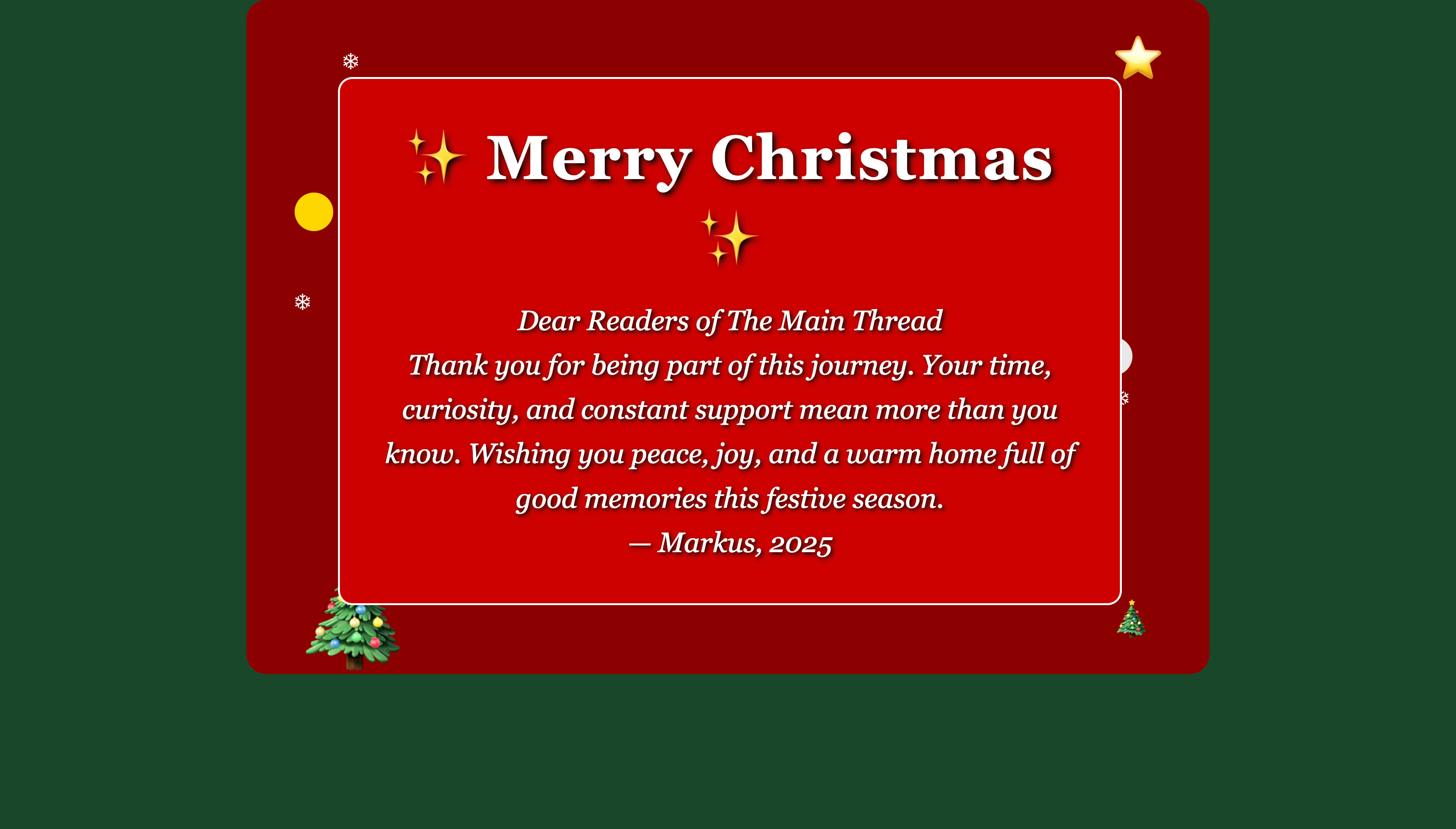
Hit:
http://localhost:8080/christmasPngCardRenarde returns a PNG render of the page:
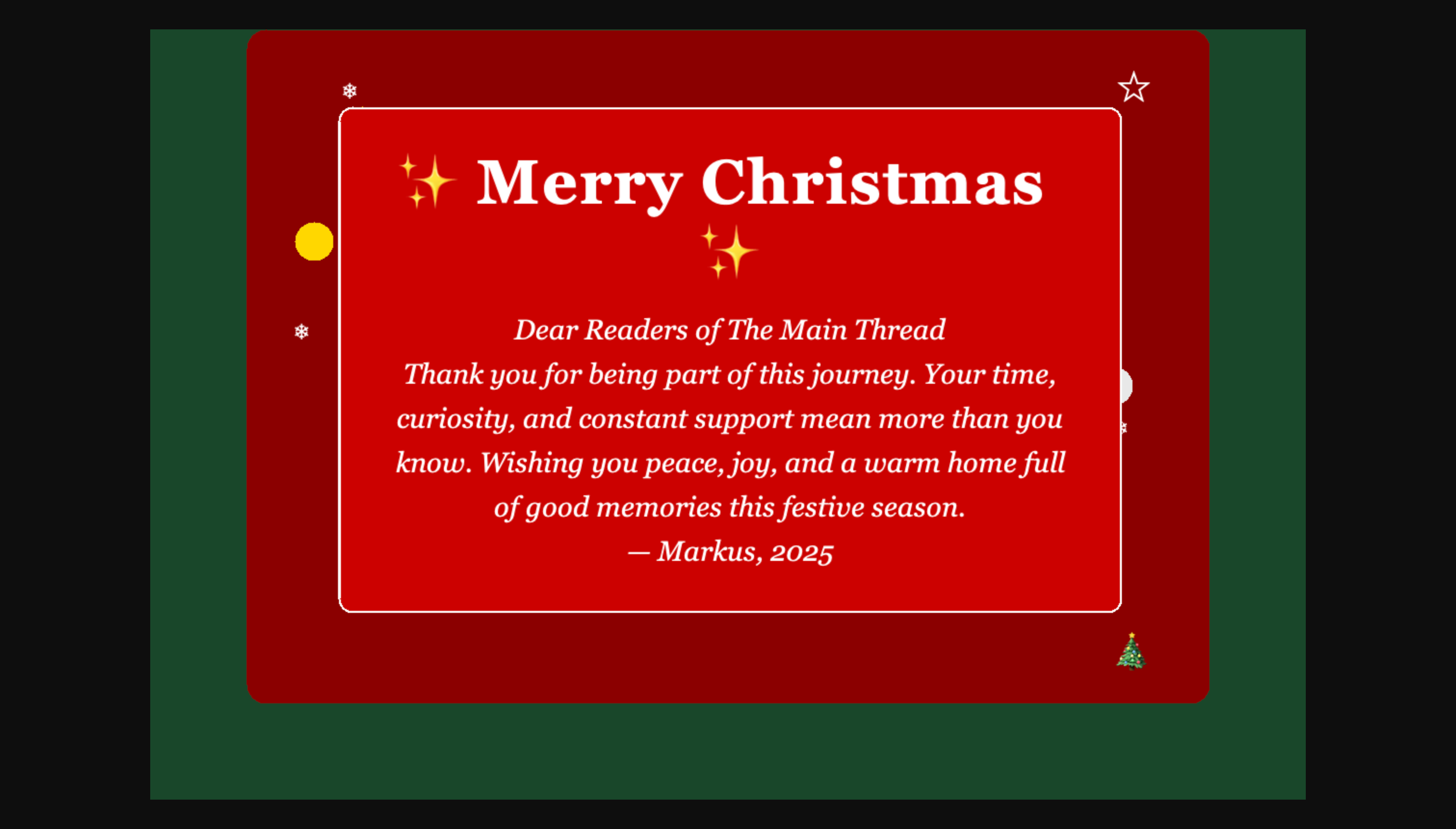
But wait! There are differences! What happened? OpenHTMLToPDF, the engine behind the magic, is based on the Flying Saucer engine. It is not a browser and never pretends to be one. That’s why some designs render beautifully in your browser but fall apart when converted to PNG.
Limited CSS Support
Only CSS 2.1 and a few CSS3 properties are supported.
The following will not work:
Flexbox
CSS Grid
Animations and transitions
CSS transforms (
rotate,scale,translate)Modern filters (
blur,drop-shadow,backdrop-filter)Advanced selectors and pseudo-classes
No JavaScript
Anything you generate or animate with JavaScript will be ignored.
Partial Transparency
Effects like:
rgba()partial opacity
semi-transparent shadows
…may look wrong or not render at all.
Font Restrictions
Only .ttf fonts are supported..otf files will be ignored, and fallback fonts are limited.
Layout Techniques
Browser-era layout systems don’t work here.
Use:
tables
block-level flow
absolute positioning
Limited Effects
Complex
linear-gradient()orradial-gradient()may not appearShadows with transparency may get flattened
Decorative effects might degrade
For anything complex, gradients, filters, multi-layer decorations, a headless browser will give you pixel-perfect output.
And that’s the real story behind HTML vs PNG rendering in Renarde: both modes are powerful, but they follow very different rules.
Where To Go Next
This simple idea grows fast:
Add multiple themes (blue winter, green forest, gold luxury)
Add support for custom uploaded images (family photos)
Create a REST API that accepts user input and returns a card
Automatically generate an OG image for your holiday blog post
Send generated cards by email using Quarkus Mailer
Add QR codes (link to a memory, a video message, or a family album)
HTML/CSS are powerful design tools. Renarde lets you reuse them in a place where Java developers normally suffer.
When you treat HTML as your canvas, server-side image generation becomes pleasant again. You iterate fast, design freely, and let the rendering engine do what it was built for.