


Using a chat box in an agent enabled application doesn’t look like a big deal. You send a few prompts, the model answers, and LangChain4j keeps adding messages to chat memory. That feels simple while the conversation is short. But soon the latency grows, older messages start dropping out, or the model answers from context you forgot was still hanging around. A problem that you also might hit when working with your coding agents.
The part I wanted to make visible is not the full model context window here though. Even if it is similar. I was particularly interested in the smaller budget my app gives to TokenWindowChatMemory. Which is not to be confused with the model context window.
Retained-memory budget -
windowwatch.budget.max-tokens=1200. This is the application budget LangChain4j enforces for chat memory. Eviction happens in LangChain4j.Model context limit -
windowwatch.budget.model-context-tokens=262144forqwen3:4b. This is the model-side ceiling reported by Ollama.
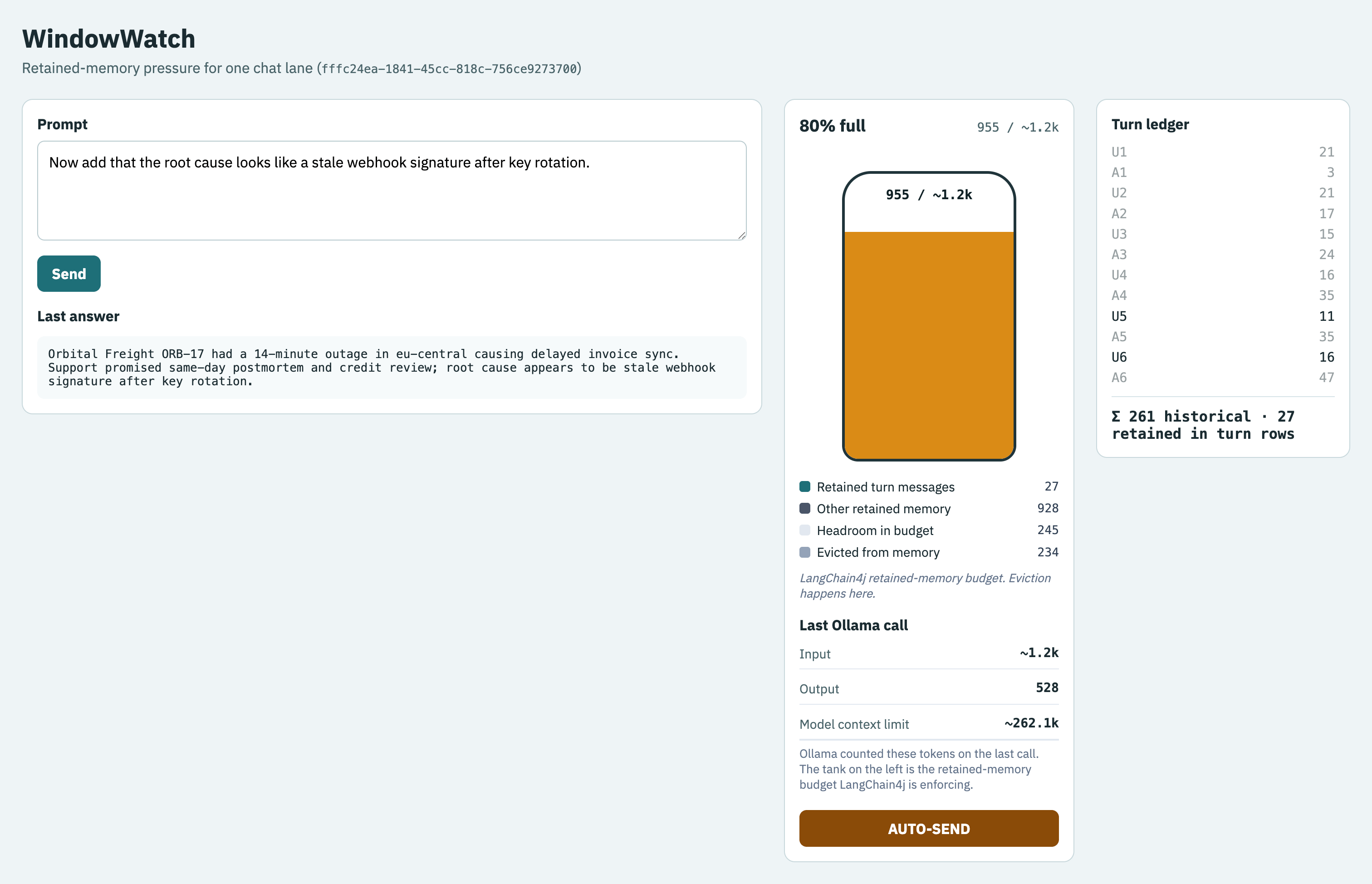
You’ll build a simple page with tank and ledger on it that visualizes how the window fills.
LangChain4j already gives us TokenWindowChatMemory. Quarkus already gives us a clean REST layer and OpenTelemetry integration. The missing piece is a thin budget layer that turns those internals into something you can see while the conversation is still local and boring.
What we build
The demo is called WindowWatch. It has one chat lane, one visible retained-memory budget, and one small request diagnostics card.
The HTTP surface stays small:
POST /api/chat/{memoryId}sends one prompt, gets one answer, and returns the updated budget snapshotGET /api/budget/{memoryId}returns the current in-process budget for that laneGET /serves a static page with the tank gauge, the turn ledger, and the AUTO-SEND stress button
One turn through the system looks like this:
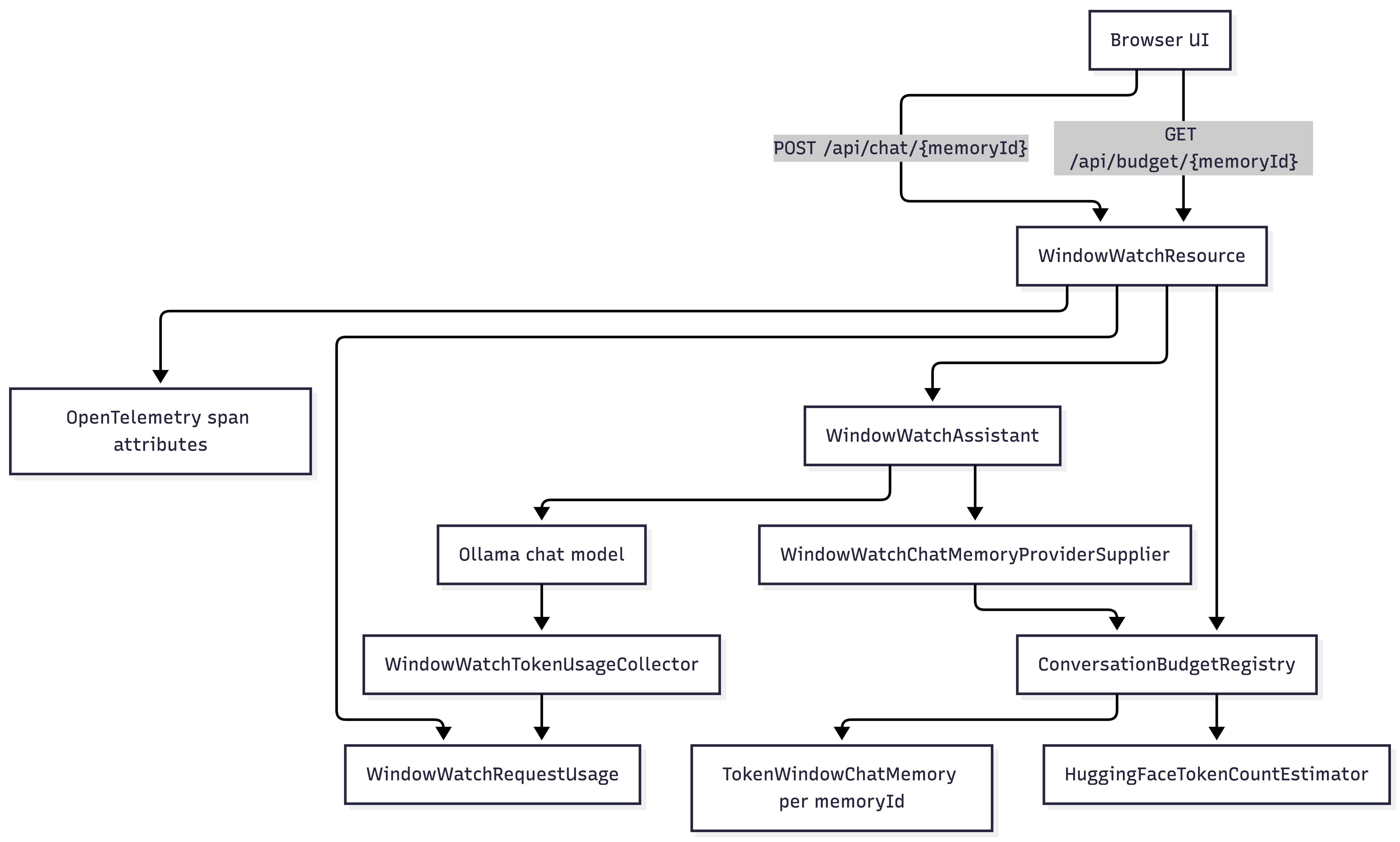
The browser tank fills from the bottom and shifts from green to amber to red as the retained-memory budget gets tight. The right-side ledger keeps the historical U1 / A1 / U2 / A2 ... story alive even after LangChain4j has already evicted older messages.
What you need
You should already be comfortable running Quarkus in dev mode and calling a JSON endpoint. You do not need to be a LangChain4j expert, but you should be fine reading a few CDI beans.
JDK 25
Quarkus 3.36.2 or Maven 3.9+
Ollama running locally on http://localhost:11434
One pulled chat model such as
qwen3:4bA matching
tokenizer.jsonfor the model family you pickAbout three ☕️
Pull the model and confirm Ollama is alive:
ollama pull qwen3:4b
ollama list
You can inspect the model-side limit with:
ollama show qwen3:4bThat is where the 262144 value comes from in this sample.
Project setup
Create the app with the Quarkus CLI and follow along or grab the source from my Github repository:
quarkus create app dev.windowwatch:windowwatch \
  --package-name=dev.windowwatch \
  --extensions='rest-jackson,quarkus-langchain4j-ollama,quarkus-opentelemetry' \
  --java=25 \
  --no-code \
  -o windowwatch
cd windowwatch
Add these dependencies to pom.xml:
<dependency>
    <groupId>dev.langchain4j</groupId>
    <artifactId>langchain4j-embeddings</artifactId>
</dependency>
<dependency>
    <groupId>io.opentelemetry</groupId>
    <artifactId>opentelemetry-exporter-logging</artifactId>
</dependency>
langchain4j-embeddings gives us HuggingFaceTokenCountEstimator. The logging exporter makes %dev.quarkus.otel.traces.exporter=logging usable in dev mode.
Put the runtime settings in src/main/resources/application.properties:
quarkus.application.name=windowwatch

quarkus.langchain4j.ollama.base-url=http://localhost:11434
quarkus.langchain4j.ollama.chat-model.model-id=${OLLAMA_MODEL:qwen3:4b}
quarkus.langchain4j.ollama.timeout=120s
quarkus.langchain4j.ollama.devservices.enabled=false
quarkus.langchain4j.devservices.enabled=false
quarkus.langchain4j.ollama.chat-model.model-options.think=false
quarkus.langchain4j.ollama.chat-model.model-options.return-thinking=false
quarkus.langchain4j.response-schema=false

quarkus.langchain4j.tracing.include-prompt=true
quarkus.langchain4j.tracing.include-completion=true
quarkus.langchain4j.tracing.include-tool-arguments=false
quarkus.langchain4j.tracing.include-tool-result=false

%dev.quarkus.otel.traces.exporter=logging

windowwatch.budget.max-tokens=1200
windowwatch.budget.model-context-tokens=262144
windowwatch.tokenizer.path=tokenizers/qwen3-tokenizer.json
This demo talks to your local Ollama instance on purpose, so Dev Services stay off.
Download the tokenizer once:
chmod +x scripts/download-tokenizer.sh
./scripts/download-tokenizer.sh
That script writes tokenizers/qwen3-tokenizer.json. The repo keeps the directory, not the downloaded file.
Checkpoint: ./mvnw quarkus:dev should start. The first run may take a minute while ONNX or DJL native bits download.
One lane, one memory id
The thing we want to watch in LangChain4j is @MemoryId.
Create the AI service first:
package dev.windowwatch.ai;

import dev.langchain4j.service.MemoryId;
import dev.langchain4j.service.SystemMessage;
import dev.langchain4j.service.UserMessage;
import io.quarkiverse.langchain4j.RegisterAiService;
import jakarta.enterprise.context.ApplicationScoped;

@RegisterAiService(chatMemoryProviderSupplier = WindowWatchChatMemoryProviderSupplier.class)
@ApplicationScoped
public interface WindowWatchAssistant {

    @SystemMessage(WindowWatchSystemPrompt.TEXT)
    @UserMessage("{{prompt}}")
    String chat(@MemoryId String memoryId, String prompt);
}
Keep the system prompt in one constant:
package dev.windowwatch.ai;

public final class WindowWatchSystemPrompt {

    public static final String TEXT = """
            You are WindowWatch, a short-answer assistant for local Quarkus demos.
            Keep replies compact.
            Reuse earlier context when it is still relevant.
            Do not explain token budgeting unless the user asks.
            """;

    private WindowWatchSystemPrompt() {
    }
}
Then supply chat memory from our own registry:
package dev.windowwatch.ai;

import java.util.function.Supplier;

import dev.langchain4j.memory.chat.ChatMemoryProvider;
import jakarta.enterprise.inject.spi.CDI;

public class WindowWatchChatMemoryProviderSupplier implements Supplier<ChatMemoryProvider> {

    @Override
    public ChatMemoryProvider get() {
        return memoryId -> CDI.current()
                .select(ConversationBudgetRegistry.class)
                .get()
                .memory(memoryId.toString());
    }
}
@MemoryId gives us one stable key we can use in three places:
the LangChain4j chat memory
the REST API
the browser state in
sessionStorage
That makes it explicit instead of hiding it inside the HTTP session.
Capture Ollama token usage without turning it into the main budget
I still want the real per-call counts from Ollama. The simplest split is a request-scoped holder plus a ChatModelListener.
First the holder:
package dev.windowwatch.ai;

import dev.langchain4j.model.output.TokenUsage;
import jakarta.enterprise.context.RequestScoped;

@RequestScoped
public class WindowWatchRequestUsage {

    private TokenUsage tokenUsage;

    public void capture(TokenUsage tokenUsage) {
        this.tokenUsage = tokenUsage;
    }

    public TokenUsage tokenUsage() {
        return tokenUsage;
    }
}
Then the listener:
package dev.windowwatch.ai;

import dev.langchain4j.model.chat.listener.ChatModelListener;
import dev.langchain4j.model.chat.listener.ChatModelResponseContext;
import dev.langchain4j.model.output.TokenUsage;
import jakarta.enterprise.context.ApplicationScoped;
import jakarta.enterprise.inject.Instance;
import jakarta.inject.Inject;

@ApplicationScoped
public class WindowWatchTokenUsageCollector implements ChatModelListener {

    @Inject
    Instance<WindowWatchRequestUsage> requestUsage;

    @Override
    public void onResponse(ChatModelResponseContext responseContext) {
        TokenUsage tokenUsage = responseContext.chatResponse().metadata().tokenUsage();
        if (tokenUsage != null && requestUsage.isResolvable()) {
            requestUsage.get().capture(tokenUsage);
        }
    }
}
This gives the REST layer three clean sources of truth:
LangChain4j memory state from
memory.messages()historical turn rows from our own registry
last-call
TokenUsagefrom Ollama
The first two drive eviction visuals. The third one becomes a small diagnostic card and a few trace attributes.
Use a real token estimator and name the limits honestly
TokenWindowChatMemory needs a TokenCountEstimator. Character counts are fine for hand-waving and terrible for a demo about token pressure.
Add typed config:
package dev.windowwatch.config;

import io.smallrye.config.ConfigMapping;
import io.smallrye.config.WithDefault;

@ConfigMapping(prefix = "windowwatch")
public interface WindowWatchConfig {

    Budget budget();

    Tokenizer tokenizer();

    interface Budget {

        @WithDefault("1200")
        int maxTokens();

        @WithDefault("262144")
        int modelContextTokens();
    }

    interface Tokenizer {

        @WithDefault("tokenizers/qwen3-tokenizer.json")
        String path();
    }
}
Then produce the estimator:
package dev.windowwatch.ai;

import java.nio.file.Path;

import dev.langchain4j.model.TokenCountEstimator;
import dev.langchain4j.model.embedding.onnx.HuggingFaceTokenCountEstimator;
import dev.windowwatch.config.WindowWatchConfig;
import jakarta.enterprise.context.ApplicationScoped;
import jakarta.enterprise.inject.Produces;
import jakarta.inject.Inject;

@ApplicationScoped
public class TokenCountEstimatorProducer {

    private final WindowWatchConfig config;

    @Inject
    TokenCountEstimatorProducer(WindowWatchConfig config) {
        this.config = config;
    }

    @Produces
    TokenCountEstimator tokenCountEstimator() {
        return new HuggingFaceTokenCountEstimator(Path.of(config.tokenizer().path()));
    }
}
If you switch model families, switch both of these:
the tokenizer file
windowwatch.budget.model-context-tokens
The 1200 value usually stays much smaller. That is the point. A full 262k model limit would make the tank barely move in a short demo.
Build the budget model around retained memory
The browser needs a small JSON shape, not a giant domain model.
Start with two records:
package dev.windowwatch.budget;

public record BudgetTurn(
        int turn,
        String userText,
        int userTokens,
        boolean userActiveInWindow,
        String assistantText,
        int assistantTokens,
        boolean assistantActiveInWindow) {
}
package dev.windowwatch.budget;
import java.util.List;
public record ConversationBudget(
String memoryId,
int usedTokens,
int maxTokens,
double fillRatio,
String state,
List<BudgetTurn> turns,
int retainedTurnTokens,
int evictedMessageTokens,
int otherRetainedTokens,
int availableTokens,
Integer lastRequestInputTokens,
Integer lastRequestOutputTokens,
int configuredModelMaxTokens) {
}The important modeling choice is that BudgetTurn tracks user and assistant activity separately.
TokenWindowChatMemory evicts messages, not whole turns. If the boundary lands in the middle of a turn, U1 can fall out while A1 is still retained. The ledger should tell the truth about that. This is what we need the registry for:
package dev.windowwatch.ai;

import java.util.ArrayList;
import java.util.HashMap;
import java.util.List;
import java.util.Map;
import java.util.concurrent.ConcurrentHashMap;
import java.util.concurrent.ConcurrentMap;
import java.util.stream.Collectors;

import dev.langchain4j.data.message.AiMessage;
import dev.langchain4j.data.message.ChatMessage;
import dev.langchain4j.data.message.UserMessage;
import dev.langchain4j.memory.ChatMemory;
import dev.langchain4j.memory.chat.TokenWindowChatMemory;
import dev.langchain4j.model.TokenCountEstimator;
import dev.langchain4j.model.output.TokenUsage;
import dev.windowwatch.budget.BudgetTurn;
import dev.windowwatch.budget.ConversationBudget;
import dev.windowwatch.config.WindowWatchConfig;
import jakarta.enterprise.context.ApplicationScoped;
import jakarta.inject.Inject;

@ApplicationScoped
public class ConversationBudgetRegistry {

    private final TokenCountEstimator estimator;
    private final int maxWindowTokens;
    private final int configuredModelMaxTokens;
    private final ConcurrentMap<String, ConversationState> states = new ConcurrentHashMap<>();

    @Inject
    ConversationBudgetRegistry(TokenCountEstimator estimator, WindowWatchConfig config) {
        this(
                estimator,
                config.budget().maxTokens(),
                config.budget().modelContextTokens());
    }

    ConversationBudgetRegistry(
            TokenCountEstimator estimator,
            int maxWindowTokens,
            int configuredModelMaxTokens) {
        this.estimator = estimator;
        this.maxWindowTokens = maxWindowTokens;
        this.configuredModelMaxTokens = configuredModelMaxTokens;
    }

    public ChatMemory memory(String memoryId) {
        return state(memoryId).memory();
    }

    public void recordTurn(String memoryId, String prompt, String assistantText, TokenUsage usage) {
        state(memoryId).recordTurn(prompt, assistantText, usage);
    }

    public ConversationBudget snapshot(String memoryId) {
        return state(memoryId).snapshot();
    }

    private ConversationState state(String memoryId) {
        return states.computeIfAbsent(memoryId, id -> new ConversationState(id, estimator, maxWindowTokens));
    }

    private final class ConversationState {

        private final String memoryId;
        private final TokenCountEstimator estimator;
        private final int maxTokens;
        private final TokenWindowChatMemory memory;
        private final List<RecordedTurn> turns = new ArrayList<>();

        private ConversationState(String memoryId, TokenCountEstimator estimator, int maxTokens) {
            this.memoryId = memoryId;
            this.estimator = estimator;
            this.maxTokens = maxTokens;
            this.memory = TokenWindowChatMemory.builder()
                    .id(memoryId)
                    .maxTokens(maxTokens, estimator)
                    .build();
        }

        private synchronized ChatMemory memory() {
            return memory;
        }

        private synchronized void recordTurn(String userText, String assistantText, TokenUsage usage) {
            turns.add(new RecordedTurn(
                    turns.size() + 1,
                    userText,
                    estimator.estimateTokenCountInMessage(UserMessage.from(userText)),
                    assistantText,
                    estimator.estimateTokenCountInMessage(AiMessage.from(assistantText)),
                    usage));
        }

        private synchronized ConversationBudget snapshot() {
            List<ChatMessage> activeMessages = memory.messages();
            int usedTokens = estimator.estimateTokenCountInMessages(activeMessages);
            Map<String, Integer> activeFingerprintCounts = activeMessages.stream()
                    .map(ConversationState::fingerprint)
                    .collect(Collectors.toMap(fingerprint -> fingerprint, fingerprint -> 1, Integer::sum, HashMap::new));

            List<BudgetTurn> budgetTurns = turns.stream()
                    .map(turn -> {
                        boolean userActive = consumeFingerprint(activeFingerprintCounts, fingerprint(UserMessage.from(turn.userText())));
                        boolean assistantActive = consumeFingerprint(activeFingerprintCounts,
                                fingerprint(AiMessage.from(turn.assistantText())));
                        return new BudgetTurn(
                                turn.turn(),
                                turn.userText(),
                                turn.userTokens(),
                                userActive,
                                turn.assistantText(),
                                turn.assistantTokens(),
                                assistantActive);
                    })
                    .toList();

            int retainedTurnTokens = budgetTurns.stream()
                    .mapToInt(turn -> (turn.userActiveInWindow() ? turn.userTokens() : 0)
                            + (turn.assistantActiveInWindow() ? turn.assistantTokens() : 0))
                    .sum();

            int evictedMessageTokens = budgetTurns.stream()
                    .mapToInt(turn -> (turn.userActiveInWindow() ? 0 : turn.userTokens())
                            + (turn.assistantActiveInWindow() ? 0 : turn.assistantTokens()))
                    .sum();

            double fillRatio = maxTokens == 0 ? 0D : ((double) usedTokens) / maxTokens;
            String state = fillRatio >= 0.85 ? "danger" : fillRatio >= 0.60 ? "warning" : "ok";
            int availableTokens = Math.max(0, maxTokens - usedTokens);
            int otherRetainedTokens = Math.max(0, usedTokens - retainedTurnTokens);

            TokenUsage lastUsage = turns.isEmpty() ? null : turns.get(turns.size() - 1).requestUsage();
            Integer lastRequestInput = lastUsage != null ? lastUsage.inputTokenCount() : null;
            Integer lastRequestOutput = lastUsage != null ? lastUsage.outputTokenCount() : null;

            return new ConversationBudget(
                    memoryId,
                    usedTokens,
                    maxTokens,
                    fillRatio,
                    state,
                    budgetTurns,
                    retainedTurnTokens,
                    evictedMessageTokens,
                    otherRetainedTokens,
                    availableTokens,
                    lastRequestInput,
                    lastRequestOutput,
                    configuredModelMaxTokens);
        }

        private static String fingerprint(ChatMessage message) {
            if (message instanceof UserMessage userMessage) {
                return "user:" + userMessage.singleText();
            }
            if (message instanceof AiMessage aiMessage) {
                return "assistant:" + aiMessage.text();
            }
            return message.type() + ":" + message.toString();
        }

        private boolean consumeFingerprint(Map<String, Integer> counts, String fingerprint) {
            Integer count = counts.get(fingerprint);
            if (count == null || count == 0) {
                return false;
            }
            if (count == 1) {
                counts.remove(fingerprint);
            } else {
                counts.put(fingerprint, count - 1);
            }
            return true;
        }
    }

    private record RecordedTurn(
            int turn,
            String userText,
            int userTokens,
            String assistantText,
            int assistantTokens,
            TokenUsage requestUsage) {
    }
}
Most important elements:
memory.messages()is the source of truth for what LangChain4j still retainsthe registry keeps a separate historical list so the browser can show evicted rows instead of pretending they never existed
otherRetainedTokenscovers retained messages that do not map back to our turn rows, which is usually the system prompt or framework-added messages
That last field is why the tank can be fuller than the sum of the still-active turn rows. That is not a bug. It is the gap between retained chat memory and the narrow slice we render as U and A rows.
Checkpoint: run the unit test that exercises eviction:
./mvnw test -Dtest=ConversationBudgetRegistryTestOne of the tests forces a partial eviction and checks that the first user row is inactive while the paired assistant row is still active.
The REST resource and the trace attributes
The remaining HTTP helper types are tiny:
package dev.windowwatch.http;

public record PromptRequest(String prompt) {
}
package dev.windowwatch.budget;
public record ChatTurnResponse(String answer, ConversationBudget budget) {
}Local Qwen-family models can still leak hidden reasoning text in some combinations which lead to weird rendering bugs, so I also keep a small sanitizer in front of the browser:
package dev.windowwatch.ai;

public final class WindowWatchAnswerSanitizer {

    private static final String REDACTED_THINKING_END = "</think>";
    private static final String THINK_END = "<" + "/think>";

    private WindowWatchAnswerSanitizer() {
    }

    public static String visibleAnswer(String raw) {
        if (raw == null || raw.isBlank()) {
            return "";
        }
        int redactedEnd = raw.lastIndexOf(REDACTED_THINKING_END);
        if (redactedEnd >= 0) {
            return raw.substring(redactedEnd + REDACTED_THINKING_END.length()).strip();
        }
        int thinkEnd = raw.lastIndexOf(THINK_END);
        if (thinkEnd >= 0) {
            return raw.substring(thinkEnd + THINK_END.length()).strip();
        }
        return raw.strip();
    }
}
The resource is intentionally small. One request in, one model call, one budget snapshot back out:
package dev.windowwatch.http;

import dev.langchain4j.model.output.TokenUsage;
import dev.windowwatch.ai.ConversationBudgetRegistry;
import dev.windowwatch.ai.WindowWatchAssistant;
import dev.windowwatch.ai.WindowWatchAnswerSanitizer;
import dev.windowwatch.ai.WindowWatchRequestUsage;
import dev.windowwatch.budget.ChatTurnResponse;
import dev.windowwatch.budget.ConversationBudget;
import io.opentelemetry.api.trace.Span;
import jakarta.inject.Inject;
import jakarta.ws.rs.Consumes;
import jakarta.ws.rs.GET;
import jakarta.ws.rs.POST;
import jakarta.ws.rs.Path;
import jakarta.ws.rs.PathParam;
import jakarta.ws.rs.Produces;
import jakarta.ws.rs.core.MediaType;

@Path("/api")
@Consumes(MediaType.APPLICATION_JSON)
@Produces(MediaType.APPLICATION_JSON)
public class WindowWatchResource {

    @Inject
    WindowWatchAssistant assistant;

    @Inject
    ConversationBudgetRegistry budgets;

    @Inject
    WindowWatchRequestUsage requestUsage;

    @POST
    @Path("/chat/{memoryId}")
    public ChatTurnResponse chat(@PathParam("memoryId") String memoryId, PromptRequest request) {
        String answer = WindowWatchAnswerSanitizer.visibleAnswer(assistant.chat(memoryId, request.prompt()));
        TokenUsage usage = requestUsage.tokenUsage();
        budgets.recordTurn(memoryId, request.prompt(), answer, usage);
        ConversationBudget budget = budgets.snapshot(memoryId);
        tagCurrentSpan(memoryId, budget, usage);
        return new ChatTurnResponse(answer, budget);
    }

    @GET
    @Path("/budget/{memoryId}")
    public ConversationBudget budget(@PathParam("memoryId") String memoryId) {
        return budgets.snapshot(memoryId);
    }

    private void tagCurrentSpan(String memoryId, ConversationBudget budget, TokenUsage usage) {
        Span span = Span.current();
        span.setAttribute("windowwatch.memory.id", memoryId);
        span.setAttribute("windowwatch.budget.used_tokens", budget.usedTokens());
        span.setAttribute("windowwatch.budget.max_tokens", budget.maxTokens());
        span.setAttribute("windowwatch.budget.fill_ratio", budget.fillRatio());
        span.setAttribute("windowwatch.budget.state", budget.state());
        span.setAttribute("windowwatch.budget.retained_turn_tokens", budget.retainedTurnTokens());
        span.setAttribute("windowwatch.budget.evicted_message_tokens", budget.evictedMessageTokens());
        span.setAttribute("windowwatch.budget.other_retained_tokens", budget.otherRetainedTokens());
        span.setAttribute("windowwatch.budget.available_tokens", budget.availableTokens());
        span.setAttribute("windowwatch.request.configured_model_max_tokens", budget.configuredModelMaxTokens());
        if (usage != null) {
            if (usage.inputTokenCount() != null) {
                span.setAttribute("windowwatch.request.input_tokens", usage.inputTokenCount());
            }
            if (usage.outputTokenCount() != null) {
                span.setAttribute("windowwatch.request.output_tokens", usage.outputTokenCount());
            }
            if (usage.totalTokenCount() != null) {
                span.setAttribute("windowwatch.request.total_tokens", usage.totalTokenCount());
            }
        }
    }
}
LangChain4j and Quarkus already create the spans, and WindowWatch adds the pressure numbers that make those spans explainable.
The retained-memory attributes are interresting for operations:
windowwatch.budget.used_tokenswindowwatch.budget.max_tokenswindowwatch.budget.fill_ratiowindowwatch.budget.statewindowwatch.budget.retained_turn_tokenswindowwatch.budget.evicted_message_tokenswindowwatch.budget.other_retained_tokens
The Ollama counters stay secondary:
windowwatch.request.input_tokenswindowwatch.request.output_tokenswindowwatch.request.total_tokenswindowwatch.request.configured_model_max_tokens
The frontend
The page is static HTML, CSS, and a little JavaScript under META-INF/resources/. No SPA framework, no SSE yet, and no drama.
The context panel has two pieces:
a tank for the retained-memory budget
a small card for the last Ollama call
The HTML looks like this:
<section class="context-panel">
  <article class="context-card">
    <header class="context-header">
      <span id="budgetPercent" class="context-percent">0% full</span>
      <span id="budgetTotals" class="context-totals">0 / 1200</span>
    </header>
    <div class="tank-shell">
      <div class="tank" aria-label="Retained-memory budget">
        <div id="budgetFill" class="tank-fill"></div>
        <div id="budgetLabel" class="tank-label">0 / 1200</div>
      </div>
    </div>
    <ul id="budgetLegend" class="context-legend"></ul>
    <p class="context-note">LangChain4j retained-memory budget. Eviction happens here.</p>
  </article>

  <article class="request-card">
    <h2>Last Ollama call</h2>
    <dl class="request-metrics">
      <div>
        <dt>Input</dt>
        <dd id="requestInput">—</dd>
      </div>
      <div>
        <dt>Output</dt>
        <dd id="requestOutput">—</dd>
      </div>
      <div>
        <dt>Model context limit</dt>
        <dd id="requestMax">—</dd>
      </div>
    </dl>
    <p id="requestNote" class="context-footer">Send a prompt to populate per-call model usage.</p>
  </article>

  <button id="autoSend" type="button">AUTO-SEND</button>
</section>
The CSS that makes the tank feel like a tank is tiny:
.tank {
  position: relative;
  inline-size: 12rem;
  block-size: 20rem;
  border: 3px solid #20343a;
  border-radius: 2rem 2rem 1.1rem 1.1rem;
  overflow: hidden;
}

.tank-fill {
  position: absolute;
  inset-inline: 0;
  inset-block-end: 0;
  block-size: 0%;
  background: #1f6f78;
  transition: block-size 220ms ease, background-color 220ms ease;
}
Then the browser logic keeps the main budget and the model-side diagnostics separate:
function fillColor(state) {
  if (state === "danger") {
    return "hsl(0 72% 52%)";
  }
  if (state === "warning") {
    return "hsl(36 82% 47%)";
  }
  return "hsl(176 58% 36%)";
}

function renderBudgetGauge(budget) {
  const used = budget.usedTokens ?? 0;
  const max = budget.maxTokens ?? 1;
  const ratio = Math.max(0, Math.min(1, budget.fillRatio ?? 0));
  const available = budget.availableTokens ?? Math.max(0, max - used);
  const retainedTurns = budget.retainedTurnTokens ?? 0;
  const otherRetained = budget.otherRetainedTokens ?? Math.max(0, used - retainedTurns);
  const evicted = budget.evictedMessageTokens ?? 0;

  budgetPercent.textContent = `${formatPercent(ratio)} full`;
  budgetTotals.textContent = `${formatTokens(used)} / ${formatTokens(max)}`;
  budgetLabel.textContent = `${formatTokens(used)} / ${formatTokens(max)}`;
  budgetFill.style.height = `${ratio * 100}%`;
  budgetFill.style.backgroundColor = fillColor(budget.state);

  budgetLegend.replaceChildren();
  addLegendRow(budgetLegend, "Retained turn messages", retainedTurns, "var(--seg-messages)");
  if (otherRetained > 0) {
    addLegendRow(budgetLegend, "Other retained memory", otherRetained, "#4a5568");
  }
  addLegendRow(budgetLegend, "Headroom in budget", available, "var(--seg-available)");
  if (evicted > 0) {
    addLegendRow(budgetLegend, "Evicted from memory", evicted, "var(--seg-evicted)");
  }
}

function renderRequestDiagnostics(budget) {
  requestInput.textContent = formatTokens(budget.lastRequestInputTokens);
  requestOutput.textContent = formatTokens(budget.lastRequestOutputTokens);
  requestMax.textContent = formatTokens(budget.configuredModelMaxTokens);

  if (budget.lastRequestInputTokens != null) {
    requestNote.textContent =
      "Ollama counted these tokens on the last call. The tank on the left is the retained-memory budget LangChain4j is enforcing.";
  } else {
    requestNote.textContent =
      "Send a prompt to populate per-call model usage. The tank on the left is still the main budget.";
  }
}
The ledger is also simple. It renders one user row and one assistant row per turn. The footer shows the historical total sum beside the currently retained turn tokens.
That is the visual story:
the tank shows the enforced retained-memory budget
the ledger shows what fell out and what survived
the Ollama card shows last-call counts
AUTO-SEND is the tutorial move
The stress button is the fastest way to make the demo do something.
It uses a fixed list of prompts that keep adding one more detail:
const stressPrompts = [
  "Remember customer Orbital Freight, incident ORB-17, and a 14 minute outage.",
  "Add that the outage was isolated to eu-central and involved delayed invoice sync.",
  "Also remember that support promised a same-day postmortem and a credit review.",
  "Summarize what happened so far in two sentences.",
  "Now add that the root cause looks like a stale webhook signature after key rotation.",
  "List the customer facts, technical facts, and promised follow-ups separately.",
  "Rewrite the whole situation as a short handoff note for the next engineer."
];
After several clicks you should see four things:
the tank moves from green to amber to red
the ledger keeps its historical rows
older
UorArows turn inactive as LangChain4j evicts messagesthe Ollama card updates each turn
Read the JSON once
Send one turn:
curl -s -X POST http://localhost:8080/api/chat/demo-1 \
  -H 'Content-Type: application/json' \
  -d '{"prompt":"Remember customer Orbital Freight and a 14 minute outage."}'
Then read the snapshot again:
curl -s http://localhost:8080/api/budget/demo-1A trimmed response looks like this:
{
  "memoryId": "demo-1",
  "usedTokens": 58,
  "maxTokens": 1200,
  "fillRatio": 0.048,
  "state": "ok",
  "retainedTurnTokens": 42,
  "evictedMessageTokens": 0,
  "otherRetainedTokens": 16,
  "availableTokens": 1142,
  "lastRequestInputTokens": 58,
  "lastRequestOutputTokens": 31,
  "configuredModelMaxTokens": 262144,
  "turns": [
    {
      "turn": 1,
      "userText": "Remember customer Orbital Freight and a 14 minute outage.",
      "userTokens": 18,
      "userActiveInWindow": true,
      "assistantText": "...",
      "assistantTokens": 24,
      "assistantActiveInWindow": true
    }
  ]
}
Exact counts depend on the tokenizer and the model family. The shape is what matters:
usedTokens / maxTokensdrives the tankretainedTurnTokensandotherRetainedTokensexplain what is inside the tankevictedMessageTokensexplains what dropped outlastRequestInputTokensandlastRequestOutputTokensstay attached to the most recent Ollama call
Make it survive
Ollama down or wrong port - chat calls fail with connection errors. Check quarkus.langchain4j.ollama.base-url. Dev Services are disabled here, so Quarkus will not start Ollama for you.
Model not pulled - Ollama returns model-not-found errors. Pull the model or set OLLAMA_MODEL to one you already have.
Tokenizer missing - startup fails when the estimator cannot read the file. Run ./scripts/download-tokenizer.sh.
Reasoning text leaks into answers - keep think=false and return-thinking=false, and strip any leftover <think> block in WindowWatchAnswerSanitizer.
Tokenizer and model family do not match - the tank becomes decorative instead of useful. Switch both the tokenizer and windowwatch.budget.model-context-tokens.
Retained-memory budget too large - the tank barely moves and eviction does not show up. Lower windowwatch.budget.max-tokens.
The Ollama card looks small compared to 262k - that is normal in short demos. The whole point is that the model limit is much larger than the budget we chose for memory eviction.
Prompt and completion capture in traces feels risky - it is risky. Keep those tracing payload flags for local inspection, not as an unquestioned production default.
Prove it
Start dev mode:
./mvnw quarkus:devOpen http://localhost:8080/, send one manual prompt, then hit AUTO-SEND until older ledger rows go inactive.
Run the tests:
./mvnw testThe test suite uses two layers:
@QuarkusTestwith a stub AI profile for the HTTP contracta plain unit test for
ConversationBudgetRegistry
The registry test is the important one. That is where we prove the message-level eviction story instead of describing it with confidence and hoping nobody checks.
If you want to see the OpenTelemetry attributes without sending traces anywhere else, keep %dev.quarkus.otel.traces.exporter=logging enabled and search the dev log for windowwatch.budget.used_tokens or windowwatch.request.input_tokens.
What you built
WindowWatch makes LangChain4j retained memory visible while the conversation is still running locally. @MemoryId turns chat state into one explicit lane. TokenWindowChatMemory enforces the retained-memory budget. The tank makes that pressure visible, the ledger shows which messages survived, and the Ollama card keeps last-call usage in its proper place.
The main mental model change is simple: the 1200 value is not the model context window. It is your app-level eviction budget. The model context limit is a different number with a different job.