


Most IDE integrations die for a boring reason: every client needs a custom plugin for every service. You want your AI IDE to access ten systems (GitHub, Jira, a DB, internal docs, scripts). Without a standard, you build ten integrations per IDE. Then you repeat it for the next IDE.
MCP (Model Context Protocol) removes this “M×N integration” problem by putting the integration logic into a small server. Your IDE becomes the generic MCP client. Your server exposes tools (actions), resources (read-only context), resource templates (parameterized resources), and prompts (reusable prompt starters). MCP messages are JSON-RPC 2.0 over stdio or Streamable HTTP. (Model Context Protocol)
The production failure mode is also very predictable: if you implement “tool calling” ad-hoc, you end up with brittle glue code, unclear schemas, and no observability. When the LLM starts making wrong calls, you have no idea what happened, because the integration boundary is invisible.
In this tutorial we make this boundary explicit. We build a real Quarkus MCP server that you can connect to IBM Bob (or any MCP client that supports Streamable HTTP). We also add tests, and we log the JSON-RPC traffic so you can debug it at 2am.
Prerequisites
We’ll run the server and test it with an MCP client.
Java 21
Maven 3.9+
One MCP client for manual testing: MCP Inspector (Node.js 18+)
curl
Project Setup
We’ll build a “Dev Toolkit” MCP server. It exposes:
Tools for small developer utilities (string ops, note writing)
Resources for “project notes” you want the IDE to inject as context
Resource templates for dynamic URIs (
dev-toolkit://notes/{key})Prompts for common tasks (code review, explain error)
Create the project
Create the project or start from my Github repository:
mvn io.quarkus:quarkus-maven-plugin:create \
  -DprojectGroupId=com.example.mcp \
  -DprojectArtifactId=dev-toolkit-mcp \
  -DprojectVersion=1.0.0-SNAPSHOT \
  -Dextensions="io.quarkiverse.mcp:quarkus-mcp-server-http:1.10.0, rest-assured" \
  -DnoCode
cd dev-toolkit-mcp
Implementation
Tools are the “actions” the LLM can ask the client to call. Tools have side effects. This is where you need to be disciplined, because a tool is effectively a remote operation the model can trigger.
Create src/main/java/com/example/mcp/StringTools.java:
package com.example.mcp;

import java.nio.charset.StandardCharsets;
import java.util.Base64;
import java.util.List;

import io.quarkiverse.mcp.server.TextContent;
import io.quarkiverse.mcp.server.Tool;
import io.quarkiverse.mcp.server.ToolArg;
import io.quarkiverse.mcp.server.ToolResponse;

public class StringTools {

    @Tool(description = "Convert a string to UPPER_SNAKE_CASE, useful for generating constant names.")
    String toUpperSnakeCase(
            @ToolArg(description = "The input string, e.g. 'my variable name'") String input) {

        if (input == null) {
            return "";
        }

        return input.trim()
                .replaceAll("\\s+", "_")
                .replaceAll("[^a-zA-Z0-9_]", "")
                .toUpperCase();
    }

    @Tool(description = "Count occurrences of a substring within a larger string.")
    String countOccurrences(
            @ToolArg(description = "The text to search in") String text,
            @ToolArg(description = "The substring to count") String substring) {

        if (text == null || text.isEmpty() || substring == null || substring.isEmpty()) {
            return "0";
        }

        int count = 0;
        int idx = 0;
        while ((idx = text.indexOf(substring, idx)) != -1) {
            count++;
            idx += substring.length();
        }
        return String.valueOf(count);
    }

    @Tool(description = "Encode or decode a string using Base64. Returns both the result and metadata.")
    ToolResponse base64Transform(
            @ToolArg(description = "The string to process") String input,
            @ToolArg(description = "Operation: 'encode' or 'decode'") String operation) {

        if (input == null) {
            input = "";
        }
        if (operation == null) {
            operation = "";
        }

        try {
            String result;
            if ("encode".equalsIgnoreCase(operation)) {
                result = Base64.getEncoder().encodeToString(input.getBytes(StandardCharsets.UTF_8));
            } else if ("decode".equalsIgnoreCase(operation)) {
                result = new String(Base64.getDecoder().decode(input), StandardCharsets.UTF_8);
            } else {
                return ToolResponse.error("Unknown operation: '" + operation + "'. Use 'encode' or 'decode'.");
            }

            return ToolResponse.success(List.of(
                    new TextContent("Result: " + result),
                    new TextContent("Operation: " + operation + " | Input length: " + input.length())));
        } catch (Exception e) {
            return ToolResponse.error("Error: " + e.getMessage());
        }
    }

    @Tool(description = "Truncate a string to a maximum length, appending an ellipsis if truncated.")
    String truncate(
            @ToolArg(description = "The string to truncate") String input,
            @ToolArg(description = "Maximum character length (default: 100)") Integer maxLength) {

        if (input == null) {
            return "";
        }

        int limit = (maxLength != null && maxLength > 0) ? maxLength : 100;
        if (input.length() <= limit) {
            return input;
        }
        if (limit < 4) {
            return input.substring(0, limit);
        }
        return input.substring(0, limit - 3) + "...";
    }
}
What this gives you: Quarkus will generate a JSON Schema per tool method, based on the Java parameters and @ToolArg metadata. This schema is what MCP clients show to the model when it decides if a tool is relevant. This is a big deal: if the schema is vague, the model will call tools in weird ways.
Implementing a resource store
Resources are read-only context. The client decides when to read them, usually to enrich the prompt context. Resources should be stable and safe to inject.
Create src/main/java/com/example/mcp/ProjectResources.java:
package com.example.mcp;

import java.time.OffsetDateTime;
import java.time.format.DateTimeFormatter;
import java.util.Base64;
import java.util.Map;
import java.util.concurrent.ConcurrentHashMap;

import io.quarkiverse.mcp.server.BlobResourceContents;
import io.quarkiverse.mcp.server.RequestUri;
import io.quarkiverse.mcp.server.Resource;
import io.quarkiverse.mcp.server.TextResourceContents;
import jakarta.inject.Singleton;

@Singleton
public class ProjectResources {

    private final Map<String, String> notes = new ConcurrentHashMap<>();

    public ProjectResources() {
        notes.put("conventions",
                """
                        # Code Conventions

                        - Use camelCase for methods
                        - Use PascalCase for classes
                        - Max line length: 120 chars
                        - Prefer records over POJOs
                        """);

        notes.put("architecture",
                """
                        # Architecture Notes

                        - Hexagonal architecture
                        - Domain layer has zero dependencies
                        - Adapters live in `infrastructure` package
                        """);
    }

    @Resource(uri = "dev-toolkit://server-info", name = "Server Info", description = "Current server status and timestamp")
    TextResourceContents serverInfo(RequestUri uri) {
        String content = """
                # Dev Toolkit MCP Server

                Status: Online
                Time: %s

                ## Available Note Keys
                %s
                """.formatted(
                OffsetDateTime.now().format(DateTimeFormatter.ISO_OFFSET_DATE_TIME),
                String.join(", ", notes.keySet()));

        return new TextResourceContents(uri.value(), content, "text/markdown");
    }

    @Resource(uri = "dev-toolkit://java-string-cheatsheet", name = "Java String Cheat Sheet", description = "Quick reference for common Java String methods")
    TextResourceContents javaStringCheatsheet(RequestUri uri) {
        String content = """
                # Java String Cheat Sheet

                ## Basic Operations
                - `s.length()`
                - `s.isEmpty()`
                - `s.isBlank()`
                - `s.trim()` and `s.strip()`

                ## Searching
                - `s.contains(sub)`
                - `s.indexOf(sub)`
                - `s.startsWith(prefix)` and `s.endsWith(suffix)`

                ## Transforming
                - `s.toUpperCase()` and `s.toLowerCase()`
                - `s.replace(old, new)` and `s.replaceAll(regex, replacement)`
                - `s.substring(start, end)`
                - `String.join(delimiter, parts...)`
                """;
        return new TextResourceContents(uri.value(), content, "text/markdown");
    }

    @Resource(uri = "dev-toolkit://sample-icon", name = "Sample Icon", description = "A tiny sample binary resource (1x1 red pixel PNG)")
    BlobResourceContents sampleIcon(RequestUri uri) {
        byte[] tinyPng = new byte[] {
                (byte) 0x89, 0x50, 0x4E, 0x47, 0x0D, 0x0A, 0x1A, 0x0A,
                0x00, 0x00, 0x00, 0x0D, 0x49, 0x48, 0x44, 0x52,
                0x00, 0x00, 0x00, 0x01, 0x00, 0x00, 0x00, 0x01,
                0x08, 0x02, 0x00, 0x00, 0x00, (byte) 0x90, 0x77, 0x53,
                (byte) 0xDE, 0x00, 0x00, 0x00, 0x0C, 0x49, 0x44, 0x41,
                0x54, 0x08, (byte) 0xD7, 0x63, (byte) 0xF8, (byte) 0xCF, (byte) 0xC0, 0x00, 0x00,
                0x00, 0x02, 0x00, 0x01, (byte) 0xE2, 0x21, (byte) 0xBC, 0x33,
                0x00, 0x00, 0x00, 0x00, 0x49, 0x45, 0x4E, 0x44,
                (byte) 0xAE, 0x42, 0x60, (byte) 0x82
        };

        return new BlobResourceContents(uri.value(), Base64.getEncoder().encodeToString(tinyPng), "image/png");
    }

    public Map<String, String> getNotes() {
        return notes;
    }

    public void putNote(String key, String content) {
        notes.put(key, content);
    }
}
The important part: a resource is a stable URI the client can fetch and paste into context. That means resources are part of your “prompt supply chain”. Don’t put secrets here.
Implementing resource templates
Templates are resources with path variables. This feels like REST path params, but it’s a URI scheme you control.
Create src/main/java/com/example/mcp/NoteTemplates.java:
package com.example.mcp;

import io.quarkiverse.mcp.server.RequestUri;
import io.quarkiverse.mcp.server.ResourceTemplate;
import io.quarkiverse.mcp.server.ResourceTemplateArg;
import io.quarkiverse.mcp.server.TextResourceContents;
import jakarta.inject.Inject;
import jakarta.inject.Singleton;

@Singleton
public class NoteTemplates {

    @Inject
    ProjectResources projectResources;

    @ResourceTemplate(uriTemplate = "dev-toolkit://notes/{key}", name = "Project Note", description = "Retrieve a project note by key")
    TextResourceContents getNote(
            @ResourceTemplateArg(name = "key") String key,
            RequestUri uri) {

        String note = projectResources.getNotes().get(key);
        if (note == null) {
            String content = """
                    # Note Not Found

                    No note exists with key: `%s`

                    Available keys: %s
                    """.formatted(key, String.join(", ", projectResources.getNotes().keySet()));

            return new TextResourceContents(uri.value(), content, "text/markdown");
        }

        return new TextResourceContents(uri.value(), note, "text/markdown");
    }
}
This is a good pattern: templates let the IDE fetch “the right note” without listing a huge static catalog.
Implementing a tool with side effects
Now we connect tools and resources: a tool writes a note, a resource template reads it. This is the smallest “real” MCP server loop.
Create src/main/java/com/example/mcp/NoteTools.java:
package com.example.mcp;

import java.util.List;

import io.quarkiverse.mcp.server.TextContent;
import io.quarkiverse.mcp.server.Tool;
import io.quarkiverse.mcp.server.ToolArg;
import io.quarkiverse.mcp.server.ToolResponse;
import jakarta.inject.Inject;

public class NoteTools {

    @Inject
    ProjectResources projectResources;

    @Tool(description = "Save or update a project note by key. This has side effects.")
    ToolResponse saveNote(
            @ToolArg(description = "Note key, e.g. 'conventions'") String key,
            @ToolArg(description = "Markdown content") String content) {

        if (key == null || key.isBlank()) {
            return ToolResponse.error("Key must not be blank.");
        }
        if (content == null) {
            content = "";
        }

        projectResources.putNote(key, content);

        return ToolResponse.success(List.of(
                new TextContent("Saved note: " + key),
                new TextContent("Read it via: dev-toolkit://notes/" + key)));
    }
}
This is where you need to think like an operator: tools can be abused. If your client lets the model call tools freely, this tool can fill memory. For this tutorial we keep it simple, but in production you usually add quotas, auth, and persistence.
Implementing prompts
Prompts are templates the user selects in the IDE (often via a prompt picker). The server returns pre-built messages. It does not “execute” anything.
Create src/main/java/com/example/mcp/DevPrompts.java:
package com.example.mcp;

import java.util.List;

import io.quarkiverse.mcp.server.Prompt;
import io.quarkiverse.mcp.server.PromptArg;
import io.quarkiverse.mcp.server.PromptMessage;
import io.quarkiverse.mcp.server.TextContent;
import jakarta.inject.Singleton;

@Singleton
public class DevPrompts {

    @Prompt(name = "explain-error", description = "Generate a prompt to explain a Java error or exception clearly")
    PromptMessage explainError(
            @PromptArg(description = "The full error message or stack trace") String error) {

        String text = """
                Please explain this Java error in simple terms:

                ```
                %s
                ```

                In your explanation:
                1. What caused this error
                2. Common root causes
                3. How to fix it
                4. How to prevent it next time
                """.formatted(error == null ? "" : error);

        return PromptMessage.withUserRole(new TextContent(text));
    }

    @Prompt(name = "code-review", description = "Generate a structured code review prompt following project conventions")
    List<PromptMessage> codeReview(
            @PromptArg(description = "The code to review") String code,
            @PromptArg(description = "Language (optional, default: Java)") String language,
            @PromptArg(description = "Focus area: security, performance, readability, or all (optional)") String focus) {

        String lang = (language != null && !language.isBlank()) ? language : "Java";
        String focusArea = (focus != null && !focus.isBlank()) ? focus : "all";

        String systemText = """
                You are a senior software engineer doing a code review.
                Apply these conventions: camelCase methods, PascalCase classes,
                max 120 char lines, prefer records over POJOs, hexagonal architecture.
                Be direct and specific.
                """;

        String userText = """
                Please review this %s code focusing on: %s

                ```%s
                %s
                ```

                Structure your review as:
                - Summary
                - Issues Found (critical, major, minor)
                - Suggestions
                - Positives
                """.formatted(lang, focusArea, lang.toLowerCase(), code == null ? "" : code);

        return List.of(
                PromptMessage.withAssistantRole(new TextContent(systemText)),
                PromptMessage.withUserRole(new TextContent(userText)));
    }
}
Configuration
Configure the MCP server in src/main/resources/application.properties:
# HTTP
quarkus.http.port=8080

# Logging
quarkus.log.level=INFO
#quarkus.log.category."io.quarkiverse.mcp".level=DEBUG
Production Hardening
Tool abuse and resource exhaustion
Your tools are remote operations. If the client gives the model freedom, it can spam tools. The simplest hardening is to keep tools small, validate input, and return clean errors (like we did in saveNote and base64Transform). Next step is auth and per-user limits.
If you expose “write” tools, plan for quotas. In this tutorial saveNote writes into a ConcurrentHashMap. This is fine for learning, but in production it turns into memory growth. You either persist to a DB with retention, or you block “unbounded writes”.
Transport choice and deployment boundary
Use HTTP transport for IDE integrations and remote clients. Use stdio when the client launches the server as a subprocess (common on desktops). The MCP spec recommends supporting stdio whenever possible, but Streamable HTTP is the main transport for networked scenarios.
Verification
Start the server
mvn quarkus:devYou should see the server start and bind to port 8080.
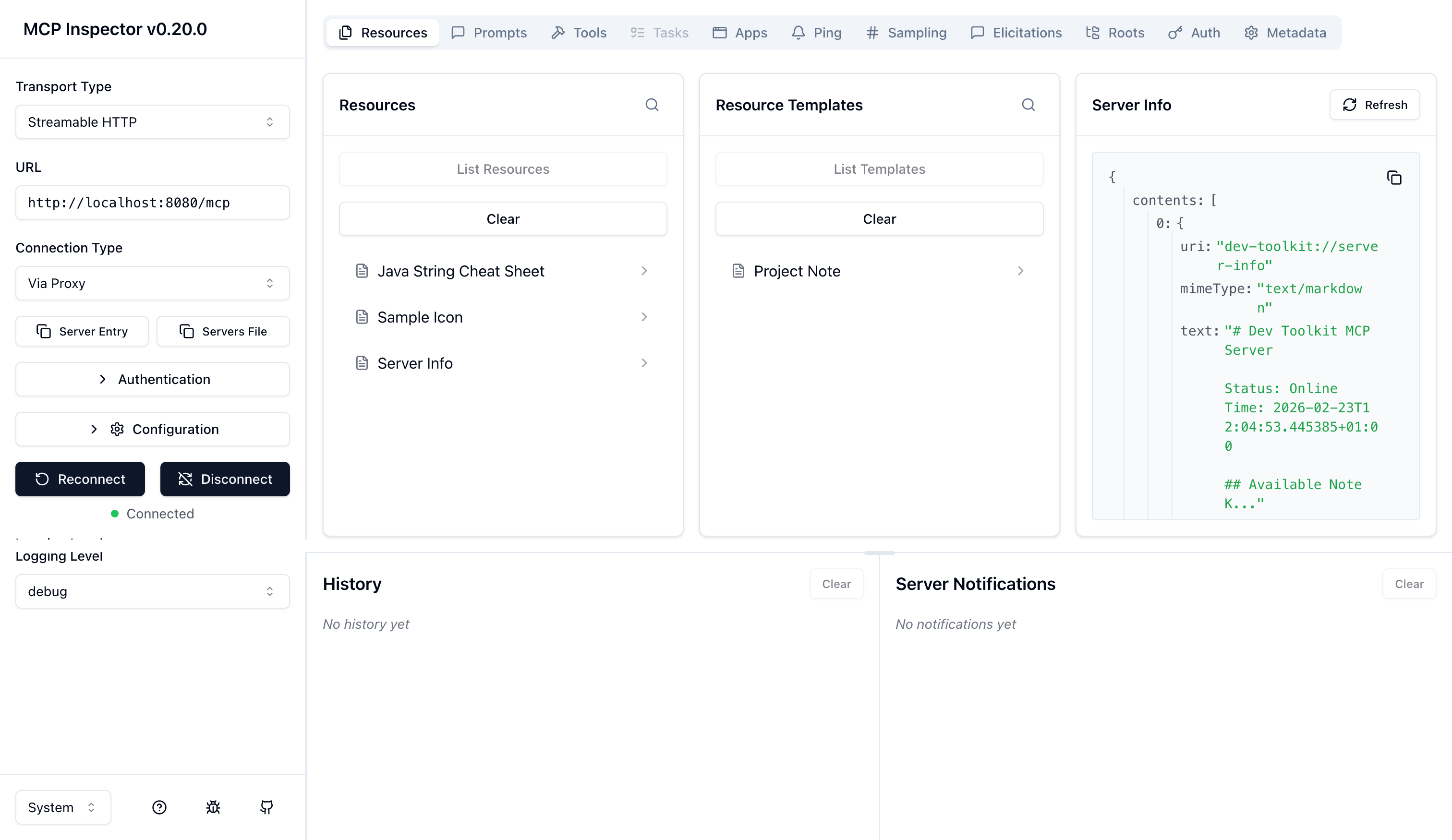
Manual test with MCP Inspector
Install and run MCP Inspector:
npx @modelcontextprotocol/inspectorThen in the UI:
Transport: Streamable HTTP
URL:
http://localhost:8080/mcp
Now verify:
Tools list includes
toUpperSnakeCase,countOccurrences,base64Transform,truncate, andsaveNoteResource list includes
dev-toolkit://server-infoanddev-toolkit://java-string-cheatsheetResource template list includes
dev-toolkit://notes/{key}Prompts list includes
explain-errorandcode-review
Automated test
Create src/test/java/com/example/mcp/McpSmokeTest.java:
package com.example.mcp;

import static io.restassured.RestAssured.given;
import static org.hamcrest.Matchers.containsString;

import org.junit.jupiter.api.Test;

import io.quarkus.test.junit.QuarkusTest;
import io.restassured.response.Response;

@QuarkusTest
class McpSmokeTest {

    /**
     * MCP Streamable HTTP requires Accept to include both application/json and
     * text/event-stream.
     */
    private static final String MCP_ACCEPT = "application/json, text/event-stream";

    @Test
    void toolsListShouldIncludeOurTools() {
        String initialize = """
                {
                  "jsonrpc": "2.0",
                  "id": 1,
                  "method": "initialize",
                  "params": {
                    "protocolVersion": "2025-03-26",
                    "capabilities": {},
                    "clientInfo": { "name": "JUnit", "version": "1.0" }
                  }
                }
                """;

        Response initResponse = given()
                .accept(MCP_ACCEPT)
                .contentType("application/json")
                .body(initialize)
                .post("/mcp");
        initResponse.then()
                .statusCode(200)
                .body(containsString("serverInfo"))
                .body(containsString("dev-toolkit-mcp"));
        String sessionId = initResponse.getHeader("Mcp-Session-Id");

        String toolsList = """
                {
                  "jsonrpc": "2.0",
                  "id": 2,
                  "method": "tools/list"
                }
                """;

        given()
                .accept(MCP_ACCEPT)
                .contentType("application/json")
                .header("Mcp-Session-Id", sessionId)
                .body(toolsList)
                .post("/mcp")
                .then()
                .statusCode(200)
                .body(containsString("toUpperSnakeCase"))
                .body(containsString("saveNote"));
    }
}
Run tests:
mvn testThis test proves two things:
The server speaks MCP over Streamable HTTP at
POST /mcpTool discovery works and includes your annotated methods
The protocolVersion value in the initialize call matches the MCP spec revision for Streamable HTTP.
Add the MCP Server to Bob
You can now simply add the mcp server to bob’s configuration. Open the project local mcp settings (.bob/mcp.json) and add the following:
{
  "mcpServers": {
    "local-quarkus-mcp": {
      "url": "http://localhost:8080/mcp/sse",
      "headers": {
        "Content-Type": "application/json"
      }
    }
  }
}
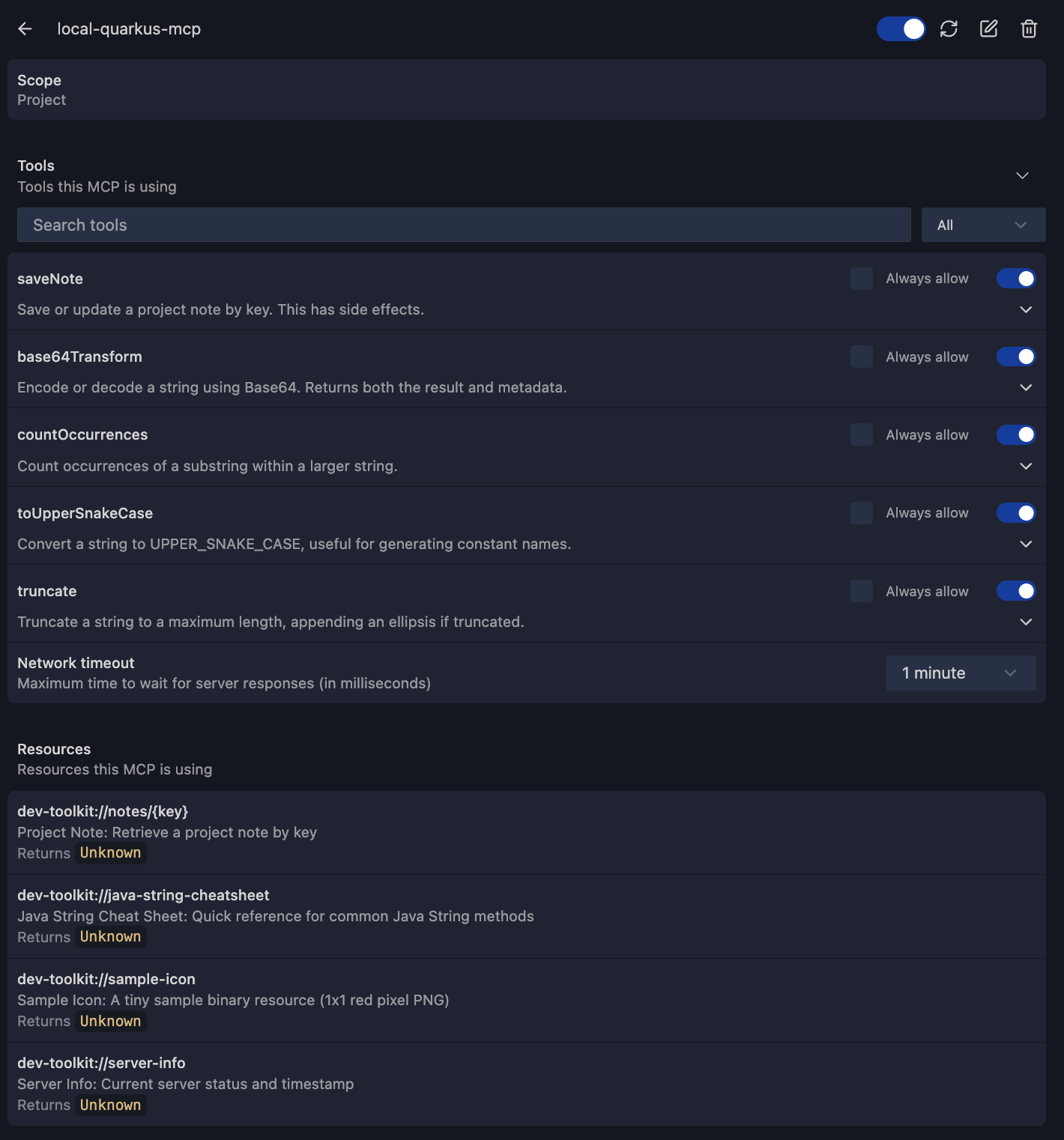
And you can see the tools and resources we just implemented:
Conclusion
You now have a real Quarkus MCP server that exposes tools, resources, resource templates, and prompts over Streamable HTTP. You can connect it to an MCP client like IBM Bob, inspect the JSON-RPC traffic, and test tool discovery automatically. The biggest win is that your integration logic is no longer IDE-specific.
Next step: add authentication and limits before you expose “write” tools in a shared environment.