



I’ve always loved the idea of multi-tenant apps. It’s one of those architectural challenges that looks simple until you try to scale it, test it, or demo it locally without wanting to scream at DNS. Every SaaS system eventually hits questions like:
“How do we separate tenant data?”
“How do we route requests cleanly?”
“How do we simulate all of this on localhost without 500 entries in etc hosts?”
That last one used to annoy me more than I’d like to admit. Every time I spun up a new “tenantX.local” I felt like I was LARPing as a network admin.
Then I discovered nip.io, and honestly… it feels like cheating.
This tutorial shows you how to build a real multi-tenant REST API in Quarkus, with each tenant living under its own subdomain. No DNS configuration. No hosts file. No magic Kubernetes Ingress. Just:
acme.127-0-0-1.nip.io
techstart.127-0-0-1.nip.io
quantum.127-0-0-1.nip.io
yourname.127-0-0-1.nip.io
And it just works.
Let’s build something fun.
What You’re Building
A Quarkus application where:
Every tenant has its own subdomain (thanks to nip.io)
A filter extracts tenant IDs from the HTTP Host header
A request-scoped
TenantContextholds the active tenantA simple service returns tenant-specific data
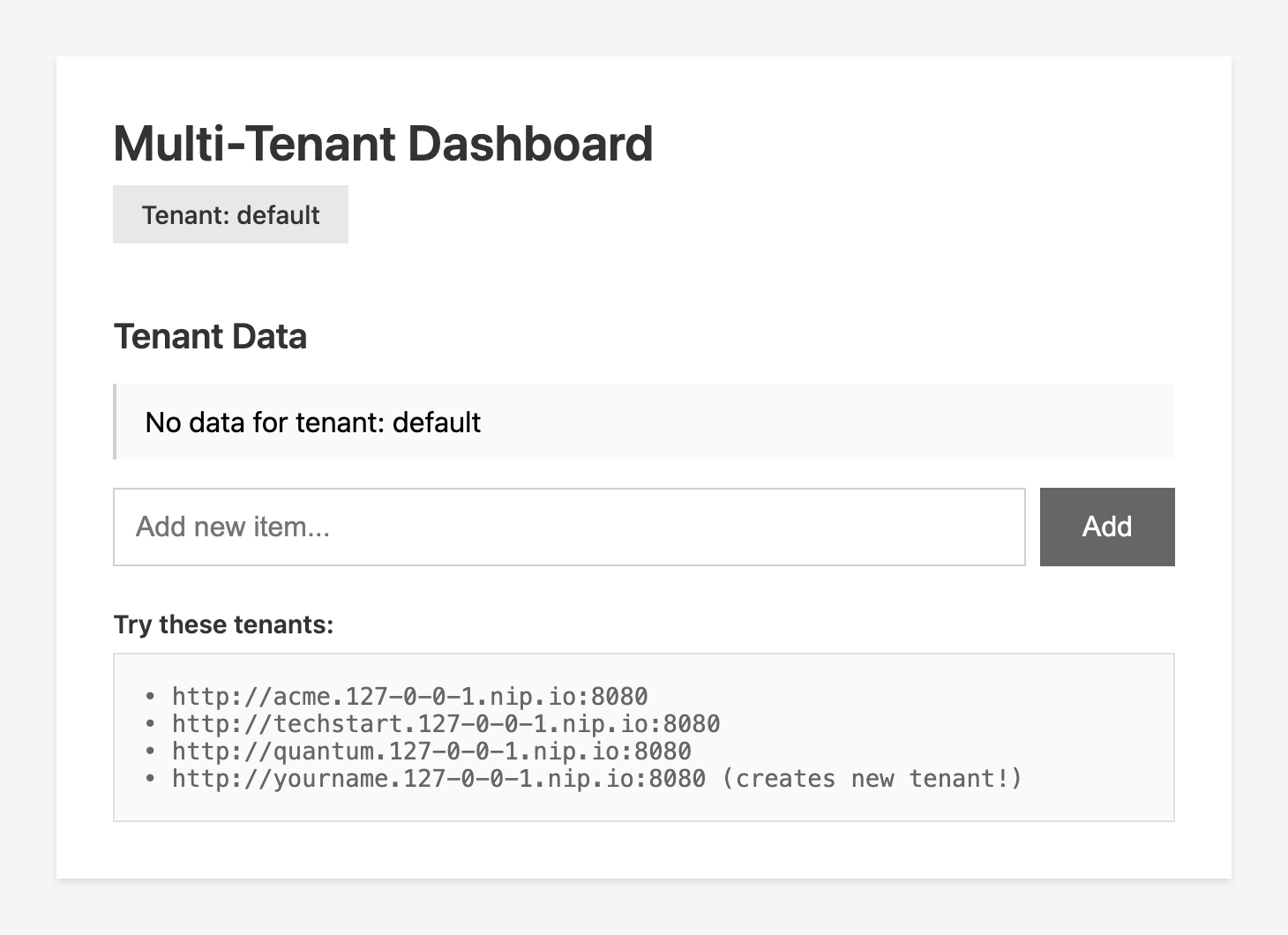
A small web dashboard visualizes it all
This is perfect for:
SaaS prototyping
Local multi-tenant testing
API design
Demos
Or simply understanding a pattern that every serious backend developer should know
Why nip.io?
nip.io is a wildcard DNS service that automatically maps domain names to IP addresses, making it perfect for local development. Instead of editing /etc hosts for each subdomain, just use the pattern subdomain.127-0-0-1.nip.io and it resolves to 127.0.0.1 automatically!
Prerequisites
Java 21+ (LTS recommended)
Maven 3.9+ or Gradle
Your favorite IDE
Internet connection (for nip.io DNS resolution)
Bootstrap the Project
Start with Maven and follow along or grab the project from my Github repository and just look at the code.
mvn io.quarkus:quarkus-maven-plugin:create \
    -DprojectGroupId=com.example \
    -DprojectArtifactId=multi-tenant-api \
    -DclassName="com.example.TenantResource" \
    -Dpath="/api/data" \
    -Dextensions="rest-jackson,smallrye-context-propagation"
cd multi-tenant-api
Create the Tenant Extractor
Create src/main/java/com/example/TenantContext.java:
package com.example;

import jakarta.enterprise.context.RequestScoped;

@RequestScoped
public class TenantContext {
    private String tenantId;

    public String getTenantId() {
        return tenantId;
    }

    public void setTenantId(String tenantId) {
        this.tenantId = tenantId;
    }
}
Create the Tenant Filter
Create src/main/java/com/example/TenantFilter.java:
package com.example;

import java.io.IOException;

import jakarta.inject.Inject;
import jakarta.ws.rs.container.ContainerRequestContext;
import jakarta.ws.rs.container.ContainerRequestFilter;
import jakarta.ws.rs.ext.Provider;

@Provider
public class TenantFilter implements ContainerRequestFilter {

    @Inject
    TenantContext tenantContext;

    @Override
    public void filter(ContainerRequestContext requestContext) throws IOException {
        String host = requestContext.getHeaderString(”Host”);
        String tenantId = extractTenantFromHost(host);
        tenantContext.setTenantId(tenantId);
        System.out.println(”🏢 Tenant detected: “ + tenantId + “ from host: “ + host);
    }

    private String extractTenantFromHost(String host) {
        if (host == null) {
            return “default”;
        }

        // Extract tenant from patterns like:
        // acme.127-0-0-1.nip.io:8080 → acme
        // techstart.192.168.1.100.nip.io → techstart
        String[] parts = host.split(”\\.”);

        if (parts.length >= 2 && host.contains(”nip.io”)) {
            return parts[0]; // First subdomain is the tenant
        }
        return “default”;
    }
}
Create Tenant-Specific Data Service
Create src/main/java/com/example/TenantDataService.java:
package com.example;

import java.util.ArrayList;
import java.util.Arrays;
import java.util.Collections;
import java.util.List;
import java.util.Map;
import java.util.concurrent.ConcurrentHashMap;

import jakarta.enterprise.context.ApplicationScoped;

@ApplicationScoped
public class TenantDataService {

    private final Map<String, List<String>> tenantData = new ConcurrentHashMap<>();

    public TenantDataService() {
        // Seed some demo data
        tenantData.put(”acme”, new ArrayList<>(Arrays.asList(
                “ACME Rocket Launcher v2.0”,
                “Instant Hole (Portable)”,
                “Earthquake Pills”)));
        tenantData.put(”techstart”, new ArrayList<>(Arrays.asList(
                “Cloud Native Platform”,
                “AI-Powered Analytics”,
                “DevOps Automation Suite”)));
        tenantData.put(”quantum”, new ArrayList<>(Arrays.asList(
                “Quantum Processor Q-100”,
                “Qubit Stabilizer”,
                “Entanglement Detector”)));
    }

    public List<String> getData(String tenantId) {
        return tenantData.getOrDefault(tenantId,
                Collections.singletonList(”No data for tenant: “ + tenantId));
    }

    public void addData(String tenantId, String item) {
        tenantData.computeIfAbsent(tenantId, k -> new ArrayList<>()).add(item);
    }
}
Create the REST Resource
Update src/main/java/com/example/TenantResource.java:
package com.example;

import java.util.HashMap;
import java.util.List;
import java.util.Map;

import jakarta.inject.Inject;
import jakarta.ws.rs.Consumes;
import jakarta.ws.rs.GET;
import jakarta.ws.rs.POST;
import jakarta.ws.rs.Path;
import jakarta.ws.rs.Produces;
import jakarta.ws.rs.core.MediaType;
import jakarta.ws.rs.core.Response;

@Path(”/api”)
@Produces(MediaType.APPLICATION_JSON)
@Consumes(MediaType.APPLICATION_JSON)
public class TenantResource {

    @Inject
    TenantContext tenantContext;

    @Inject
    TenantDataService dataService;

    @GET
    @Path(”/data”)
    public Response getData() {
        String tenant = tenantContext.getTenantId();
        List<String> data = dataService.getData(tenant);

        Map<String, Object> response = new HashMap<>();
        response.put(”tenant”, tenant);
        response.put(”data”, data);
        response.put(”timestamp”, System.currentTimeMillis());

        return Response.ok(response).build();
    }

    @POST
    @Path(”/data”)
    public Response addData(Map<String, String> payload) {
        String tenant = tenantContext.getTenantId();
        String item = payload.get(”item”);

        if (item == null || item.isBlank()) {
            return Response.status(400)
                    .entity(Map.of(”error”, “Item cannot be empty”))
                    .build();
        }

        dataService.addData(tenant, item);

        return Response.ok(Map.of(
                “tenant”, tenant,
                “message”, “Item added successfully”,
                “item”, item)).build();
    }

    @GET
    @Path(”/info”)
    public Response getTenantInfo() {
        String tenant = tenantContext.getTenantId();

        return Response.ok(Map.of(
                “tenant”, tenant,
                “message”, “Welcome to “ + tenant + “’s space!”,
                “server”, “Quarkus + nip.io Multi-Tenant API”)).build();
    }
}
Enable CORS (Important!)
Add to src/main/resources/application.properties:
# CORS configuration for local development
quarkus.http.cors=true
quarkus.http.cors.origins=/.*/
quarkus.http.cors.methods=GET,POST,PUT,DELETE,OPTIONS
quarkus.http.cors.headers=accept,authorization,content-type,x-requested-with
quarkus.http.cors.access-control-allow-credentials=true

# Dev mode settings
%dev.quarkus.log.console.format=%d{HH:mm:ss} %-5p [%c{2.}] (%t) %s%e%n
Run and Test!
Start Quarkus in dev mode:
./mvnw quarkus:devTest with curl:
# Test Acme tenant
curl -H "Host: acme.127-0-0-1.nip.io:8080" http://127.0.0.1:8080/api/data

# Result
{
  “data”: [
    “ACME Rocket Launcher v2.0”,
    “Instant Hole (Portable)”,
    “Earthquake Pills”
  ],
  “tenant”: “acme”,
  “timestamp”: 1764759659734
}

# Test TechStart tenant
curl -H "Host: techstart.127-0-0-1.nip.io:8080" http://127.0.0.1:8080/api/data

# Result
{
  “data”: [
    “Cloud Native Platform”,
    “AI-Powered Analytics”,
    “DevOps Automation Suite”
  ],
  “tenant”: “techstart”,
  “timestamp”: 1764759677338
}

# Test Quantum tenant
curl -H "Host: quantum.127-0-0-1.nip.io:8080" http://127.0.0.1:8080/api/data

# Result
{
  “data”: [
    “Quantum Processor Q-100”,
    “Qubit Stabilizer”,
    “Entanglement Detector”
  ],
  “tenant”: “quantum”,
  “timestamp”: 1764759703884
}

# Add data to a tenant
curl -X POST \
  -H "Host: acme.127-0-0-1.nip.io:8080" \
  -H "Content-Type: application/json" \
  -d '{"item":"Giant Rubber Band"}' \
  http://127.0.0.1:8080/api/data
You might be able to test this in your Browser:
Open these URLs directly in your browser:
http://acme.127-0-0-1.nip.io:8080/api/infohttp://techstart.127-0-0-1.nip.io:8080/api/infohttp://quantum.127-0-0-1.nip.io:8080/api/info
If this does not work your router will probably have DNS rebinding protection enabled, which blocks DNS responses that would return private/localhost IP addresses (like 127.0.0.1) for security reasons. This is a common security feature in modern routers.
Create a Fancy Web UI (Optional)
Create src/main/resources/META-INF/resources/index.html:
<!DOCTYPE html>
<html lang=”en”>
<head>
    <meta charset=”UTF-8”>
    <meta name=”viewport” content=”width=device-width, initial-scale=1.0”>
    <title>Multi-Tenant Dashboard</title>
    <style>
      <!-- ommitted -->
    </style>
</head>
<body>
    <div class=”container”>
        <h1>🚀 Multi-Tenant Dashboard</h1>
        <div class=”tenant-badge” id=”tenantBadge”>Loading...</div>

        <h2>📦 Tenant Data</h2>
        <ul class=”data-list” id=”dataList”></ul>

        <div class=”input-group”>
            <input type=”text” id=”newItem” placeholder=”Add new item...”>
            <button onclick=”addItem()”>Add</button>
        </div>

        <div class=”info”>
            <strong>🎯 Try these tenants:</strong>
            <div class=”urls”>
                • http://acme.127-0-0-1.nip.io:8080<br>
                • http://techstart.127-0-0-1.nip.io:8080<br>
                • http://quantum.127-0-0-1.nip.io:8080<br>
                • http://yourname.127-0-0-1.nip.io:8080 (creates new tenant!)
            </div>
        </div>
    </div>

    <script>
        let currentTenant = ‘’;

        async function loadData() {
            try {
                const res = await fetch(’/api/data’);
                const data = await res.json();
                currentTenant = data.tenant;

                document.getElementById(’tenantBadge’).textContent = `Tenant: ${currentTenant}`;

                const list = document.getElementById(’dataList’);
                list.innerHTML = data.data.map(item =>
                    `<li class=”data-item”>${item}</li>`
                ).join(’‘);
            } catch (err) {
                console.error(’Error loading data:’, err);
            }
        }

        async function addItem() {
            const input = document.getElementById(’newItem’);
            const item = input.value.trim();

            if (!item) return;

            try {
                await fetch(’/api/data’, {
                    method: ‘POST’,
                    headers: { ‘Content-Type’: ‘application/json’ },
                    body: JSON.stringify({ item })
                });

                input.value = ‘’;
                loadData();
            } catch (err) {
                console.error(’Error adding item:’, err);
            }
        }

        document.getElementById(’newItem’).addEventListener(’keypress’, (e) => {
            if (e.key === ‘Enter’) addItem();
        });

        loadData();
    </script>
</body>
</html>
Visit http://acme.127-0-0-1.nip.io:8080 in your browser for the full experience (if your router lets you!
What You Learned
Wildcard DNS Magic: How nip.io provides instant subdomain resolution for any IP
Multi-Tenancy Pattern: Extracting tenant context from subdomains
Quarkus JAX-RS Filters: Intercepting requests for cross-cutting concerns
CDI Request Scoping: Managing tenant context across the request lifecycle
Zero Configuration: No DNS setup, no /etc hosts editing, just works!
Fancy more learning? Try this:
Add database persistence with Hibernate + Panache
Implement tenant-specific database schemas
Add authentication with tenant isolation
Deploy to Kubernetes with Ingress
Use real domains in production
Very interesting. I tested it and it works as expected. That's really awsome how nip.io maps the IP addresses. I'm not sure to have understood how it does that. It's probably ... just magic. :-)
why are you using @RequestScoped for class TenantContext?