



A Hands-On Tutorial for Java Developers
PostgreSQL ships with a built-in full-text search engine.
Most teams overlook it and deploy Elasticsearch, even when they only need simple document or blog search. Anything short of multi-node distributed indexing can often stay inside the database.
In this tutorial, you build a small blog engine with:
PostgreSQL full-text search (
tsvector,tsquery)Stemming and ranking (
ts_rank)A generated column for automatic index updates
A Qute front end for interactive search
This is enough for documentation search, a basic blog engine, or internal wiki search.
Prerequisites
You need:
Java 17+
Quarkus 3.18+
Maven or Quarkus CLI
Podman (or Docker) for Dev Services
Project creation:
quarkus create app com.example:blog-search \
  --extensions='jdbc-postgresql,hibernate-orm,flyway,rest-jackson,rest-qute,qute'

cd blog-search
Database Schema: Generated tsvector Column
PostgreSQL keeps search indexes updated automatically using a generated column. We use the import.sql script to modify the table after start.
Create src/main/resources/import.sql:
-- Note: This script runs after Hibernate creates the table
ALTER TABLE articles ADD COLUMN search_vector tsvector GENERATED ALWAYS AS (
    setweight(to_tsvector(’english’, coalesce(title, ‘’)), ‘A’)
    ||
    setweight(to_tsvector(’english’, coalesce(content, ‘’)), ‘B’)
) STORED;

CREATE INDEX IF NOT EXISTS idx_articles_search_vector ON articles USING GIN (search_vector);
Why this matters:
Title gets high weight (A)
Content gets medium weight (B)
GIN index gives excellent performance
Database keeps
search_vectorin sync on insert/update
No application code needed.
Make sure to also add the following to your application.properties
quarkus.hibernate-orm.schema-management.strategy = drop-and-createAnd if you ask me, if this is the correct way to do things, I am hesitating. I would not use this path in production for various reasons. You might want to consider Flyway and a real schema migration. For this simple demo it is indeed sufficient.
The JPA Entity
src/main/java/com/example/Article.java:
package com.example;

import java.time.Instant;

import jakarta.persistence.Column;
import jakarta.persistence.Entity;
import jakarta.persistence.GeneratedValue;
import jakarta.persistence.GenerationType;
import jakarta.persistence.Id;
import jakarta.persistence.Table;

@Entity
@Table(name = “articles”)
public class Article {

    @Id
    @GeneratedValue(strategy = GenerationType.IDENTITY)
    public Long id;

    public String title;

    public String url;

    @Column(columnDefinition = “text”)
    public String content;

    @Column(name = “created_at”)
    public Instant createdAt;
}
You do not map the tsvector column. PostgreSQL handles it.
Add Ranking to the JPA Repository
We return both the article and the rank.
For that we define a projection record.
Create a DTO:
src/main/java/com/example/ArticleSearchResult.java:
package com.example;

public record ArticleSearchResult(Long id, String title, String url, String snippet, float rank, int matchPercentage) {
}
We use ts_headline to generate a small highlighted excerpt.
Now the repository:
src/main/java/com/example/ArticleRepository.java:
package com.example;

import java.util.List;
import java.util.stream.Collectors;

import jakarta.enterprise.context.ApplicationScoped;
import jakarta.inject.Inject;
import jakarta.persistence.EntityManager;
import jakarta.persistence.Tuple;

@ApplicationScoped
public class ArticleRepository {

    @Inject
    EntityManager entityManager;

    public List<ArticleSearchResult> search(String query) {
        var sql = “”“
                SELECT a.id AS id,
                       a.title AS title,
                       a.url AS url,
                       ts_headline(’english’, a.content, plainto_tsquery(:q)) AS snippet,
                       ts_rank(a.search_vector, plainto_tsquery(:q)) AS rank
                FROM articles a
                WHERE a.search_vector @@ plainto_tsquery(:q)
                ORDER BY rank DESC
                LIMIT 50
                “”“;

        @SuppressWarnings(”unchecked”)
        List<Tuple> results = entityManager.createNativeQuery(sql, Tuple.class)
                .setParameter(”q”, query)
                .getResultList();

        return results.stream().map(t -> {
            Long id = (Long) t.get(”id”);
            String title = (String) t.get(”title”);
            String url = (String) t.get(”url”);
            String snippet = (String) t.get(”snippet”);
            Number rankNum = (Number) t.get(”rank”);
            float rank = rankNum != null ? rankNum.floatValue() : 0.0f;
            // Calculate percentage match (ts_rank returns 0-1, convert to 0-100)
            int matchPercentage = Math.round(rank * 100);
            return new ArticleSearchResult(id, title, url, snippet, rank, matchPercentage);
        }).collect(Collectors.toList());
    }

    public void insert(Article article) {
        entityManager.persist(article);
    }

    public List<Article> recent(int limit) {
        return entityManager.createQuery(”SELECT a FROM Article a ORDER BY a.createdAt DESC”, Article.class)
                .setMaxResults(limit)
                .getResultList()
                .stream()
                .collect(Collectors.toList());
    }
}
Here you get:
ts_rankfor orderingts_headlinefor snippetsClean projection record
Seeder: Insert Articles
For this demo, I am using my Substack posts. You can download your post archive and it will give you a complete list of files in the format <ID.>title.of.the.post.html.
The title of the post minus ID and suffix becomes the url slug. I am adding three simple files to the demo repository. But I also ran this with >200 articles locally.
src/main/java/com/example/ArticleSeeder.java:
package com.example;
import java.io.IOException;
import java.net.URI;
import java.net.URL;
import java.nio.charset.StandardCharsets;
import java.nio.file.FileSystem;
import java.nio.file.FileSystems;
import java.nio.file.Files;
import java.nio.file.Path;
import java.nio.file.Paths;
import java.time.Instant;
import java.util.Collections;
import java.util.concurrent.atomic.AtomicInteger;
import java.util.regex.Pattern;
import java.util.stream.Stream;
import io.quarkus.runtime.StartupEvent;
import jakarta.enterprise.context.ApplicationScoped;
import jakarta.enterprise.event.Observes;
import jakarta.inject.Inject;
import jakarta.transaction.Transactional;
@ApplicationScoped
public class ArticleSeeder {
private static final Pattern HTML_TAG_PATTERN = Pattern.compile(”<[^>]*>”);
private static final Pattern MULTIPLE_SPACES = Pattern.compile(”\\s+”);
@Inject
ArticleRepository repo;
void onStart(@Observes StartupEvent ev) {
seedArticles();
}
@Transactional
void seedArticles() {
try {
URL postsUrl = getClass().getClassLoader().getResource(”posts”);
if (postsUrl == null) {
System.err.println(”Posts directory not found in resources”);
return;
}
Path postsPath = null;
FileSystem fileSystem = null;
try {
URI uri = postsUrl.toURI();
if (”file”.equals(uri.getScheme())) {
// Running from filesystem (dev mode)
postsPath = Paths.get(uri);
} else if (”jar”.equals(uri.getScheme())) {
// Running from JAR
try {
fileSystem = FileSystems.newFileSystem(uri, Collections.emptyMap());
postsPath = fileSystem.getPath(”posts”);
} catch (IOException e) {
// FileSystem might already be open, try to get existing one
fileSystem = FileSystems.getFileSystem(uri);
postsPath = fileSystem.getPath(”posts”);
}
} else {
System.err.println(”Unsupported resource URI scheme: “ + uri.getScheme());
return;
}
if (postsPath == null || !Files.exists(postsPath)) {
System.err.println(”Posts path does not exist”);
return;
}
AtomicInteger processedCount = new AtomicInteger(0);
try (Stream<Path> paths = Files.walk(postsPath)) {
paths.filter(Files::isRegularFile)
.filter(p -> p.toString().endsWith(”.html”))
.forEach(htmlPath -> {
try {
String filename = htmlPath.getFileName().toString();
String htmlContent = Files.readString(htmlPath, StandardCharsets.UTF_8);
String title = extractTitleFromFilename(filename);
String url = extractUrlFromFilename(filename);
String plainText = stripHtmlTags(htmlContent);
Article article = new Article();
article.title = title;
article.url = url;
article.content = plainText;
article.createdAt = Instant.now();
repo.insert(article);
processedCount.incrementAndGet();
} catch (IOException e) {
System.err.println(”Error processing file: “ + htmlPath + “ - “ + e.getMessage());
}
});
}
System.out.println(”Processed “ + processedCount.get() + “ articles”);
} finally {
if (fileSystem != null) {
fileSystem.close();
}
}
} catch (Exception e) {
System.err.println(”Error initializing article seeder: “ + e.getMessage());
e.printStackTrace();
}
}
private String extractTitleFromFilename(String filename) {
// Remove .html extension
String withoutExt = filename.replace(”.html”, “”);
// Remove leading number and dot (e.g., “171437814.”)
String title = withoutExt.replaceFirst(”^\\d+\\.”, “”);
// Replace hyphens with spaces and capitalize words
String[] words = title.split(”-”);
StringBuilder result = new StringBuilder();
for (int i = 0; i < words.length; i++) {
if (i > 0) {
result.append(” “);
}
if (!words[i].isEmpty()) {
result.append(Character.toUpperCase(words[i].charAt(0)));
if (words[i].length() > 1) {
result.append(words[i].substring(1));
}
}
}
return result.toString();
}
private String extractUrlFromFilename(String filename) {
// Remove .html extension
String withoutExt = filename.replace(”.html”, “”);
// Remove leading number and dot (e.g., “171437814.”)
String slug = withoutExt.replaceFirst(”^\\d+\\.”, “”);
// Construct URL: https://www.the-main-thread.com/p/{slug}
return “https://www.the-main-thread.com/p/” + slug;
}
private String stripHtmlTags(String html) {
// Remove HTML tags
String text = HTML_TAG_PATTERN.matcher(html).replaceAll(” “);
// Decode HTML entities (basic ones)
text = text.replace(” ”, “ “)
.replace(”&”, “&”)
.replace(”<”, “<”)
.replace(”>”, “>”)
.replace(”"”, “\”“)
.replace(”'”, “’”);
// Replace multiple spaces with single space
text = MULTIPLE_SPACES.matcher(text).replaceAll(” “);
// Trim and return
return text.trim();
}
}
REST Endpoint
We expose rank and snippet.
src/main/java/com/example/ArticleResource.java:
package com.example;

import java.util.List;

import jakarta.inject.Inject;
import jakarta.ws.rs.GET;
import jakarta.ws.rs.Path;
import jakarta.ws.rs.Produces;
import jakarta.ws.rs.QueryParam;
import jakarta.ws.rs.core.MediaType;

@Path(”/search”)
@Produces(MediaType.APPLICATION_JSON)
public class ArticleResource {

    @Inject
    ArticleRepository repo;

    @GET
    public List<ArticleSearchResult> search(@QueryParam(”q”) String query) {
        if (query == null || query.isBlank()) {
            return List.of();
        }
        return repo.search(query);
    }
}
Start the application:
quarkus devTry it:
curl "http://localhost:8080/search?q=running"Results ordered by rank DESC.
Build a simple Qute Front End
We create a minimal page:
src/main/resources/templates/search.html<!DOCTYPE html>
<html lang=”en”>
<head>
<meta charset=”UTF-8”>
<title>Blog Search</title>
<style>
<!-- ommitted -->
</style>
</head>
<body>
<div class=”header”>
<img src=”/logo.webp” alt=”The Main Stack Logo” class=”logo”>
<h1>The Main Stack</h1>
</div>
<form>
<input type=”text” name=”q” placeholder=”Search articles...” value=”{q ?: ‘’}”>
<button type=”submit”>Search</button>
</form>
{#if results != null}
{#if results.size > 0}
<div style=”color: #777; font-size: 0.9em; margin-bottom: 15px;”>
Found {results.size} {results.size == 1 ? ‘result’ : ‘results’}
</div>
{#for r in results}
<div class=”item”>
<div class=”title”><a href=”{r.url}” target=”_blank”>{r.title}</a></div>
<div class=”match-percentage”>{r.matchPercentage}% match</div>
<div class=”snippet”>{r.snippet.raw}</div>
</div>
{/for}
{#else}
<div style=”text-align: center; padding: 40px; color: #777;”>
<p>No results found. Try a different search term.</p>
</div>
{/if}
{/if}
</body>
</html>
Note:
{r.snippet.raw}allows Postgres<b></b>highlights fromts_headlineSimple form with GET
/ui/search?q=...
Qute Controller
Serve the page using RESTEasy Classic or RESTEasy Reactive.
Here we use classic for simplicity.
Create src/main/java/com/example/SearchPage.java:
package com.example;

import java.util.List;

import io.quarkus.qute.Template;
import io.quarkus.qute.TemplateInstance;
import jakarta.inject.Inject;
import jakarta.ws.rs.GET;
import jakarta.ws.rs.Path;
import jakarta.ws.rs.Produces;
import jakarta.ws.rs.QueryParam;
import jakarta.ws.rs.core.MediaType;

@Path(”/ui/search”)
public class SearchPage {

    @Inject
    ArticleRepository repo;

    @Inject
    Template search; // matches search.html

    @GET
    @Produces(MediaType.TEXT_HTML)
    public TemplateInstance page(@QueryParam(”q”) String q) {

        List<ArticleSearchResult> results = (q == null || q.isBlank()) ? null : repo.search(q);

        return search
                .data(”q”, q)
                .data(”results”, results);
    }
}
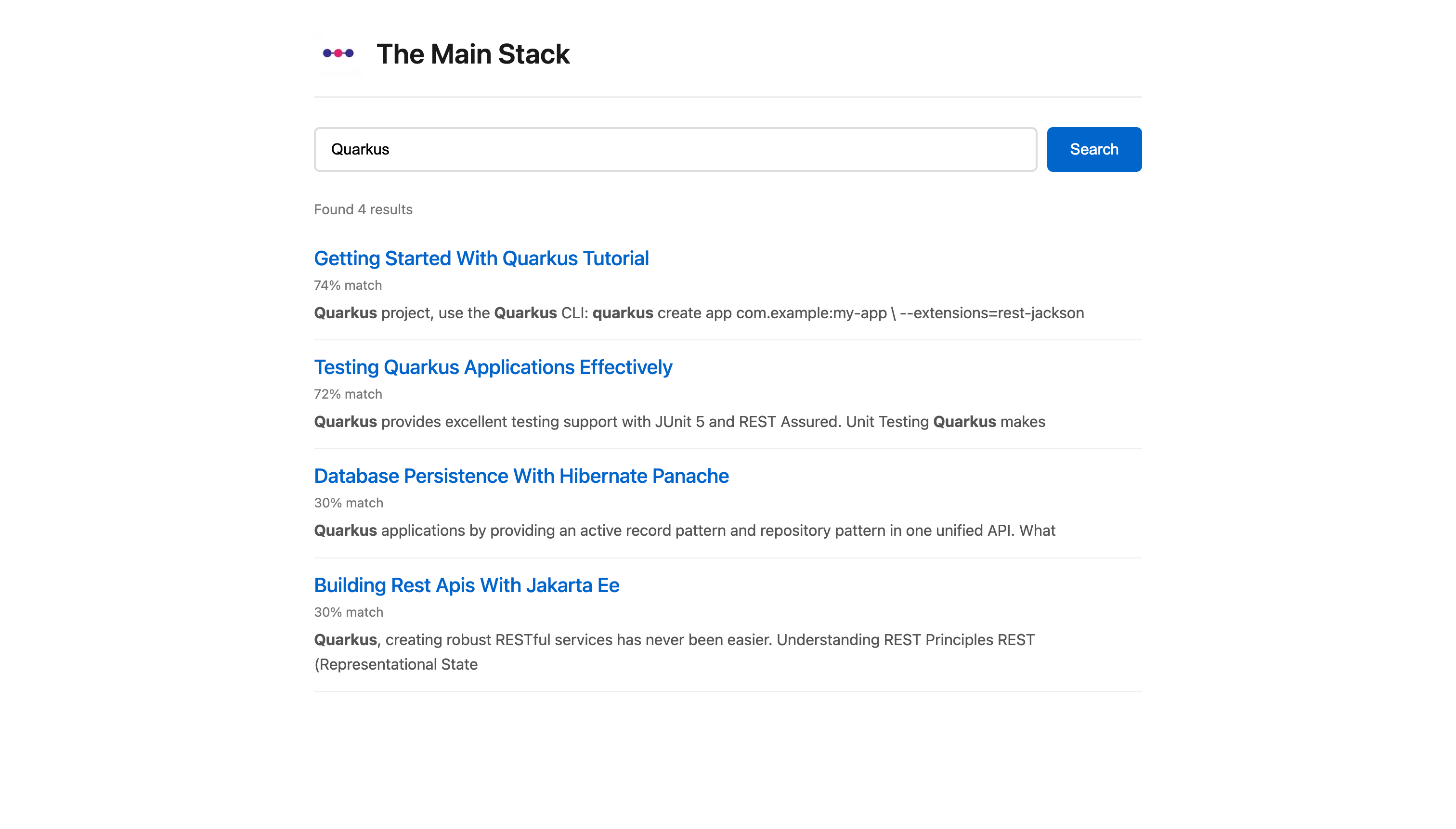
Now open:
http://localhost:8080/ui/searchTry:
“running”
“quarkus”
“search”
“developer”
Ranking will surface the most relevant posts first.
Production Notes
This pattern works well for:
Internal knowledge bases
Product documentation
Developer portals
Small to medium content systems
Advice:
Stick with GIN indexes.
Consider language-specific analyzers.
Use
ts_headlinefor nicer UI snippets.Move to Elasticsearch only when you have genuine distributed indexing needs.
PostgreSQL’s built-in search is often the simplest and fastest solution.