


I came across WebMCP and wanted to understand what it does. We already have MCP servers that expose application functions to agents, and this new thing is apparently letting me put MCP tools in a web page too.
WebMCP is a proposed browser API that lets a page expose its functionality as tools. Each tool has a name, a description, an input schema, and an implementation. An agent can discover those definitions and call the page’s code instead of working out which buttons to click. That code can reuse the application’s JavaScript, call a backend, and update what the user sees.
How this differs from server-side MCP
With Quarkus MCP Server, we expose a Java method and an MCP client calls it with arguments. The method works with server-side state. It can perform the requested operation without a web page being open, but it does not automatically know which tab the user is looking at or which unsaved changes are on that page.
A WebMCP tool runs embedded in the webpage. It has access to the page’s current state and can update the interface as part of the operation. It can still call the same Java backend for business rules. The difference is where the operation starts and which context is available when it runs.
That gave me an idea about why I might want to use both. A backend tool can calculate a result from explicit arguments. A page tool can use the user’s current selection, request that calculation, and show the result in the interface. WebMCP complements the server-side integration; it gives the agent a way to work with the application the user already has open.
Try it with a Quarkus order page
To see that difference in practice, I built a small return workbench and used IBM Bob to operate it. The task is to open an order and prepare a return for two damaged items. Java checks whether the items can be returned and calculates the refund estimate. The page updates the selected quantities and displays a draft for the user to review.
We’ll expose three WebMCP tools on that page, then call the same Java service through a backend MCP tool. That lets us check both the calculation and its effect on the browser. The workflow ends with a draft: this example has no endpoint that submits a return or issues a refund.
WebMCP runs in the order page. It prepares and displays a return draft for the current order.
Quarkus MCP Server runs in the Java application. It calculates eligibility for an explicitly supplied order and item list.
Chrome DevTools MCP is the local bridge Bob uses to discover and invoke the page’s WebMCP tools.
Bob uses ordinary MCP for that connection. We register the page’s tools separately in JavaScript.

There are two WebMCP authoring styles. The imperative API registers JavaScript functions; the declarative API annotates HTML forms. I used the imperative API because preparing this draft includes a backend request and an explicit update to the page. You can read both approaches in Chrome’s WebMCP documentation.
WebMCP is still experimental. The code below uses document.modelContext, which needs at least Chrome 152. Older examples might still use navigator.modelContext but did not work when I tested them. Keep the browser and bridge versions together when following this tutorial.
If you want to follow the Bob part, you can start an IBM Bob free trial and install Bob Shell. This tutorial should work with other agents similarly.
Start with the running application
Start in quarkus-webmcp-returns in the article Github repository if you like. We’ll run that application and look at the code you need to adapt for your own page.
I tested this combination on macOS:
JDK: Eclipse Temurin 25+36
Quarkus CLI and platform: 3.39.1
Quarkus MCP Server: 1.13.1, managed by the generated platform BOM
Google Chrome: 152.0.7977.77
Node.js: 26.7.0
IBM Bob Shell: 2.0.2
Chrome DevTools MCP: 1.8.0
Playwright: 1.58.2
As usual, you can also follow along and create the project. I started with this Quarkus CLI command from the repository root:
quarkus create app com.themainthread:quarkus-webmcp-returns:1.0.0-SNAPSHOT \
  --platform-bom=3.39.1 \
  --java=25 \
  --extensions=rest-jackson,rest-qute,io.quarkiverse.mcp:quarkus-mcp-server-http \
  --no-code \
  --no-dockerfiles \
  --batch-mode
You do not need to run the creation command over the companion directory. It generates the build structure; the supplied directory already includes the application files that follow.
From the companion directory, start dev mode:
quarkus devOpen the local workbench. I have configuration Quarkus to bind to port 8097 in the example. Leave this process running while you use the browser and Node test scripts.
The page contains one keyboard, two cables, and a digital gift card. Set the keyboard quantity to one, the cable quantity to one, and the reason to Damaged. Click Prepare return. You should see an estimate of €108.00 and the label Draft · damaged · Not submitted. Click Clear draft before continuing.
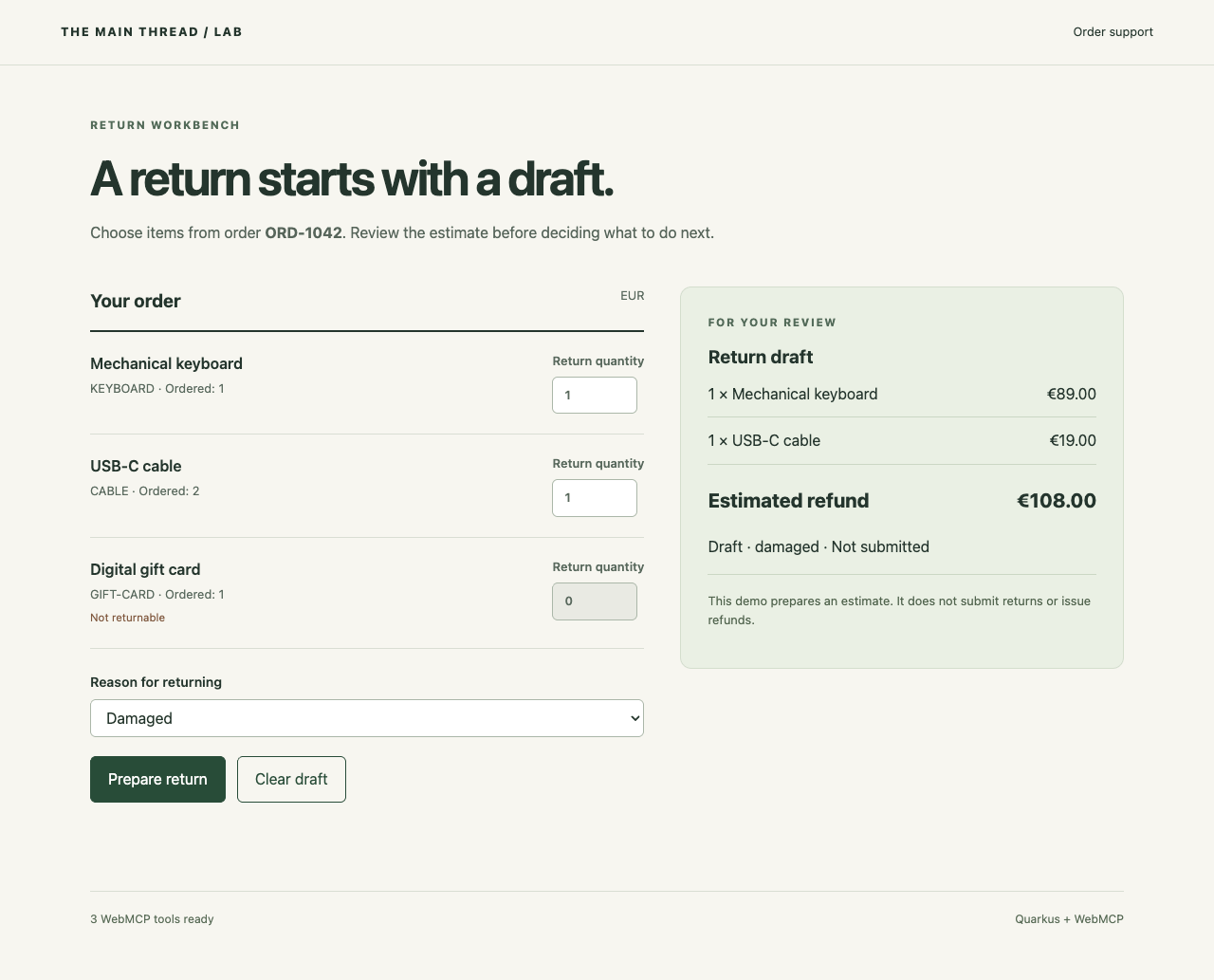
Let’s start by checking the form manually because the agent will call the same JavaScript functions. The example needs no database or container: the order is a fixed Java value, and the draft belongs to the page. Reloading simply discards that draft.
Keep the eligibility decision in Java
The application has a small set of files with distinct responsibilities:
src/main/java/com/themainthread/returns/
  ReturnService.java      Order data, eligibility, and refund calculation
  OrderResource.java     JSON endpoints
  OrderPage.java         Qute page endpoint
  ReturnTools.java       Backend MCP adapter
  JsonNumbers.java       Reject fractional integer quantities
src/main/resources/
  templates/OrderPage/order.html
  META-INF/resources/app.js
  META-INF/resources/style.css
  application.properties
ReturnService is an @ApplicationScoped CDI bean. Its input contains the requested items and a reason. Each selected item contains a SKU and an integer quantity; the order identifier is passed separately. These records live inside ReturnService:
public record Selection(String sku, Integer quantity) {
}

public record ReturnRequest(List<Selection> items, String reason) {
}

public record DraftItem(String sku, String name, int quantity, int refundCents) {
}

public record Draft(String orderId, String currency, List<DraftItem> items,
        String reason, int refundCents, String status, boolean submitted) {
}
I used integer cents to keep the calculation exact. The keyboard contributes 8,900 cents and one cable contributes 1,900 cents, so a successful preview returns 10,800 cents. The page formats that amount for display.
The service validates the entire selection before returning a draft. It rejects missing and unknown orders, empty selections, duplicate or unknown SKUs, nonreturnable items, invalid reasons, and quantities outside the purchased range. The gift card gives us an explicit ineligible item to test. Its disabled form control is only a convenience for the person using the page; the service still rejects it when called directly.
The REST adapter delegates to that service:
@POST
@Path("/{orderId}/return-preview")
@Consumes(MediaType.APPLICATION_JSON)
public ReturnService.Draft preview(@PathParam("orderId") String orderId,
        ReturnService.ReturnRequest request) {
    return returns.preview(orderId, request);
}
This method is in OrderResource, whose class-level path is /api/orders. Its constructor receives ReturnService. A @ServerExceptionMapper converts the service’s InvalidReturn exception into HTTP 400 with an error field. That gives both the form and the browser tool a useful explanation when an input fails.
We can check the Java validation directly with an HTTP request:
curl -sS http://127.0.0.1:8097/api/orders/ORD-1042/return-preview \
  -H 'Content-Type: application/json' \
  -d '{"items":[{"sku":"KEYBOARD","quantity":1},{"sku":"CABLE","quantity":1}],"reason":"damaged"}'
The response includes refundCents: 10800, status: "DRAFT", and submitted: false. Request three cables instead:
curl -sS -i http://127.0.0.1:8097/api/orders/ORD-1042/return-preview \
  -H 'Content-Type: application/json' \
  -d '{"items":[{"sku":"CABLE","quantity":3}],"reason":"damaged"}'
Expect HTTP 400 and Quantity for CABLE must be between 1 and 2. Nothing has been persisted in either case. This endpoint calculates a preview; successful calls have no server-side draft to accumulate.
I also disabled Jackson’s conversion of fractional JSON numbers to integers. JsonNumbers does this through Quarkus’s ObjectMapperCustomizer by disabling DeserializationFeature.ACCEPT_FLOAT_AS_INT. The contract test sends 1.5 and checks that the request fails.
Give the page three tools
I kept the browser’s tool set small for this test:
get_current_orderreturns the open order and current draft.prepare_returnvalidates a selection, replaces the draft, and updates the form.clear_return_draftclears the draft and resets the visible selection.
All three operations are available throughout this page’s lifetime, and are registered once. If your tools depend on a route or selected object, you will need to update their availability when that context changes.
The following definition is part of registerTools() in app.js. The other two definitions sit beside it in the same array:
{
  name: 'prepare_return',
  description: 'Replace the return draft on the current order page with a validated estimate for the selected items. Updates the visible quantities, reason, and refund total. The result is a draft for review; no return is submitted.',
  inputSchema: {
    type: 'object',
    properties: {
      items: {
        type: 'array',
        description: 'Distinct SKUs from the current order and quantities to return.',
        items: {
          type: 'object',
          properties: {
            sku: {
              type: 'string',
              description: 'SKU returned by get_current_order.'
            },
            quantity: {
              type: 'integer',
              description: 'Quantity to return, from 1 up to the purchased quantity.'
            }
          },
          required: ['sku', 'quantity']
        }
      },
      reason: {
        type: 'string',
        enum: ['damaged', 'wrong_item', 'changed_mind']
      }
    },
    required: ['items', 'reason']
  },
  execute: prepareReturn
}
I named the tool prepare_return because it creates a draft for review. The description says that it replaces an existing draft, so an agent can see what repeating the call will do.
The input needs neither an order ID nor a refund total. The page already identifies its order, and Java calculates the estimate. I kept those values out of the schema so the agent only supplies the selection and reason. Chrome’s tool-design guidance recommends clear operations and understandable inputs, with constraints enforced in code.
After loading the order successfully, registration ends with:
for (const tool of tools) {
  await document.modelContext.registerTool(tool);
}
statusElement.textContent = '3 WebMCP tools ready';
Before constructing the definitions, the function checks whether document.modelContext exists. If it does not, the page reports that WebMCP is unavailable and leaves the normal form enabled. This is progressive enhancement: JavaScript is required for this particular form, but WebMCP is optional.
For manual experimentation, enable chrome://flags/#enable-webmcp-testing and relaunch Chrome. Open the workbench again and check the status at the bottom. You can also inspect the tools from DevTools:
const tools = await document.modelContext.getTools();
tools.map(tool => tool.name);
Expect clear_return_draft, get_current_order, and prepare_return. The native API also lets you invoke a discovered tool:
const prepare = tools.find(tool => tool.name === 'prepare_return');
const result = await document.modelContext.executeTool(
  prepare,
  JSON.stringify({
    items: [{ sku: 'KEYBOARD', quantity: 1 }, { sku: 'CABLE', quantity: 1 }],
    reason: 'damaged'
  })
);
JSON.parse(result);
The second argument is a JSON string. The browser passes the parsed arguments to the registered handler. The result in this example is also a JSON string, which carries the draft back to the caller. These calls use the native imperative API.
Finish the page update before reporting success
Both the form’s submit listener and the WebMCP definition call prepareReturn in app.js. That gives us one place to request the calculation and update the page:
async function prepareReturn(input, { signal } = {}) {
  const thisRevision = ++revision;
  errorElement.textContent = '';
  try {
    const response = await fetch(
      `/api/orders/${encodeURIComponent(orderId)}/return-preview`,
      {
        method: 'POST',
        headers: { 'Content-Type': 'application/json' },
        body: JSON.stringify(input),
        signal
      }
    );
    const result = await response.json();
    if (!response.ok) {
      throw new Error(result.error ?? `Preview failed: HTTP ${response.status}`);
    }
    if (thisRevision !== revision) {
      throw new Error('Draft changed while this request was running. Read the current order again.');
    }
    signal?.throwIfAborted();
    draft = result;
    syncForm();
    renderDraft();
    return JSON.stringify({ orderId, draft });
  } catch (error) {
    if (thisRevision === revision) errorElement.textContent = error.message;
    throw error;
  }
}
The assignment to draft happens only after a successful response. If the service rejects a quantity, the previous draft stays intact and the error is displayed. syncForm() copies the validated quantities and reason into the controls. renderDraft() creates the visible line items and estimate using DOM elements and textContent.
The result is returned after those synchronous DOM updates. The browser may paint on its next rendering cycle, but the next page snapshot can already observe the new state.
I added the revision counter because a user can clear the draft while a request is still running. clearDraft() increments the same counter, resets the draft, synchronizes the controls, and renders the empty state. When the older response arrives, its revision no longer matches, so the handler rejects it. Otherwise, that response could restore a draft the user had just cleared.
Cancellation follows the same principle. The native tool’s signal is passed to fetch, and the handler checks it again before assigning the draft. Cancelling a fetch does not reverse a server-side transaction. That is another reason this example uses a calculation endpoint: there is no server-side mutation to undo.
Set up the Node tools alongside Quarkus
There are three places JavaScript runs in this example. The page’s app.js runs in Chrome and is served directly by Quarkus. Chrome DevTools MCP runs as a separate Node.js process that connects an agent to Chrome. The integration tests also run in Node.js, where they act as clients of the browser bridge and the Java application. The application has no frontend build step, and starting Quarkus does not install the Node dependencies.
For readers coming from Maven, these are the files to look at in the companion directory:
pom.xmldeclares the Java dependencies and Quarkus build.package.jsondeclares the Node dependencies and names the commands we can run. It serves part of the role you associate with a POM.package-lock.jsonrecords the exact resolved Node dependency tree, including transitive dependencies.node_modules/contains the installed Node packages for this checkout. It is generated locally and excluded from Git. Copying or cloning the project does not populate it.
The Node dependencies doe the following:
@modelcontextprotocol/sdksupplies the MCP client used by the integration test to discover and call tools.chrome-devtools-mcpsupplies the bridge to Chrome, used by both Bob and the MCP integration test.playwrightdrives Chrome for the browser tests, including form interactions, cancellation, and page reloads.
They are listed under devDependencies because they support local development and testing. They are separate from the dependencies Maven packages with the Java application.
Leave Quarkus running in the first terminal. Open a second terminal and, from the repository root, install the Node dependencies in the demo directory:
cd quarkus-webmcp-returns
node --version
npm --version
npm ci --include=dev
npm ls --depth=0
The last command should list @modelcontextprotocol/sdk@1.30.0, chrome-devtools-mcp@1.8.0, and playwright@1.58.2. If you are already in the directory containing this demo’s pom.xml, package.json, and package-lock.json, omit the cd command.
npm ci installs the dependency tree recorded in the lockfile. The explicit --include=dev also installs the test tools when your environment is configured to omit development dependencies. Run this after a fresh checkout or when the lockfile changes. Unlike running a Maven test goal, running an npm script does not resolve missing dependencies first.
If you see ERR_MODULE_NOT_FOUND for @modelcontextprotocol/sdk, Node has reached the test script but cannot load its MCP client library. Run npm ci --include=dev in this demo directory and wait for it to finish successfully before retrying. A missing package.json or lockfile means you need to check the directory or copy the complete companion project, including both files.
Let Bob discover and use the page
Continue in the second terminal, with the Node dependencies installed and Quarkus still running in the first.
After registering for the IBM Bob free trial, create an API key with the Inference scope in the Bob web portal. Set BOB_API_KEY in the terminal where you will start Bob, as described in the Bob Shell setup guide:
export BOB_API_KEY="your-inference-api-key"Then create the project MCP configuration and start an interactive session:
mkdir -p .bob
cp bob-mcp.example.json .bob/mcp.json
bob chat
If you already have .bob/mcp.json in this directory, merge the chrome-returns entry instead of replacing the file. The example uses npx to launch Chrome DevTools MCP 1.8.0. Its key arguments are:
[
  "-y", "chrome-devtools-mcp@1.8.0",
  "--isolated",
  "--categoryExperimentalWebmcp",
  "--chromeArg=--enable-features=WebMCP",
  "--allowedUrlPattern=http://127.0.0.1:8097/*"
]
--isolated creates a separate browser profile. The experimental category exposes the bridge’s WebMCP discovery and execution tools, while the Chrome argument enables the browser feature. The URL pattern limits this browser experiment to the local workbench. The complete example also disables unused emulation, performance, and network tool categories and opts out of usage statistics and CrUX requests.
I use Bob here, but the page tools also work with other agents that can connect to Chrome DevTools MCP or have their own WebMCP integration. For another MCP-capable agent, add the same bridge command and arguments to its MCP configuration and use that agent’s authentication setup. The Quarkus application and page tool definitions stay the same. The bridge tools are documented in the Chrome DevTools MCP reference.
Ask Bob:
Open http://127.0.0.1:8097/ and discover its WebMCP tools. Read the current order, then prepare a return for one mechanical keyboard and one USB-C cable because both arrived damaged. Use the page’s WebMCP tools for the operation. Inspect the visible page afterwards and report the selected items, estimate, and whether anything was submitted.
The interactive configuration leaves tool approval enabled. Approve the calls needed for this local example. Bob should discover the tools from the page rather than inventing their names or using a Java endpoint as a substitute.
Check the result in the browser
In my local run, Bob made six bridge calls:
new_page
list_webmcp_tools
take_snapshot
execute_webmcp_tool → get_current_order
execute_webmcp_tool → prepare_return
take_snapshot
The discovery call and first snapshot were issued together. Bob then read the order and supplied the following input to prepare_return:
{
  "items": [
    { "sku": "KEYBOARD", "quantity": 1 },
    { "sku": "CABLE", "quantity": 1 }
  ],
  "reason": "damaged"
}
The tool returned refundCents: 10800 and submitted: false. The final snapshot contained the two selected quantities, €108.00, and Draft · damaged · Not submitted. Check those values in your browser after the tool finishes. The selected quantities and visible draft should agree with the tool result; Bob’s final reply alone does not establish that the page changed.
This was one successful agent run. It shows that this Bob version used the native page tools through the bridge and that the recorded interface agreed with the returned draft.
The deterministic checks cover behavior that a successful demonstration can miss:
npm run test:browser
npm run test:mcp
Both commands require the local application to remain running. They use the installed Google Chrome. The browser suite checks registration, form/result agreement, repeated preparation, rejected quantities and ineligible items, a late response after clearing, cancellation, page reload, operation without WebMCP, and a narrow viewport. These are eight tests, with related assertions grouped together.
The six Java contract tests cover HTTP behavior, exact cents, unchanged order quantities, malformed inputs, nonreturnable items, and fractional quantities. I ran them through Quarkus Agent MCP’s devui-testing_runTests tool while developing the application. You can run the same test class through Quarkus continuous testing or with ./mvnw test.
If no browser tools appear, check the actual Chrome version, feature flag, and page status first. If the bridge connects but waits indefinitely, check its pageId: a newly launched browser can contain both about:blank and the workbench. In this run, the selected workbench was page 2. Page IDs are discovered values, not constants to copy into a script.
Compare the backend MCP operation
I added the backend tool to check the difference that prompted this experiment. ReturnTools injects the same ReturnService and exposes its preview calculation through Quarkus MCP Server:
@Tool(name = "check_return_eligibility",
        description = "Calculate a return preview for an explicit order and items. "
                + "Returns eligibility details and refund cents. "
                + "Does not change a browser draft or submit a return.")
public ReturnService.Draft check(
        @ToolArg(description = "Order ID, for example ORD-1042") String orderId,
        @ToolArg(description = "Distinct order items with SKU and positive quantity")
        List<ReturnService.Selection> items,
        @ToolArg(description = "damaged, wrong_item, or changed_mind") String reason) {
    try {
        return returns.preview(orderId, new ReturnService.ReturnRequest(items, reason));
    } catch (ReturnService.InvalidReturn error) {
        throw new ToolCallException(error.getMessage());
    }
}
The full class includes the constructor and imports in the companion project. @Tool and @ToolArg come from io.quarkiverse.mcp.server. The extension turns the method into an MCP tool; ToolCallException makes a rejected eligibility request a tool error. See the Quarkiverse tool guide for the adapter API. That link tracks development documentation; the companion pins the tested platform version.
The smoke test connects to http://127.0.0.1:8097/mcp using Streamable HTTP. It clears the page’s draft, calls check_return_eligibility with the order ID and valid items, then reads the page again. The backend returns the same 10,800-cent estimate. The page still returns draft: null.
The Java calculation has no reference to a browser tab, so it leaves the page alone. The WebMCP handler supplies that part of the operation: choosing the current order, synchronizing the controls, and displaying the draft. We can reuse the Java rules through both interfaces while keeping their different effects explicit.
What I would keep when adapting this
This application is a local demonstration with synthetic data and no authentication. In an authenticated application, the server must verify that the current caller may access the order and perform the requested operation. A page-owned order ID is not authorization. Submission would also need a separate operation with its own confirmation, validation, and duplicate-request handling. None of that is implied by a tool description.
To reset the example, clear the draft or reload the page. To stop it, exit Bob and press Ctrl+C in the Quarkus dev terminal. No persistent order data needs cleaning up.
I started this because I wanted to understand what WebMCP adds to the MCP tools we can already build in Java. The return example made that difference clear and simple to explain: the backend calculates an estimate, while the page tool turns that estimate into a draft the user can review. Keep the business rules in Java, and expose page operations that leave the interface in the state the agent reports.