


Most developers think technical indicators are a frontend problem. You fetch some prices, calculate a few averages, and draw lines on a chart. That mental model breaks the moment you try to do this in real time.
Live market data is infinite, bursty, and noisy. If you process every tick synchronously, your UI freezes. If you buffer too much, your signals lag behind reality. If you calculate indicators incorrectly under load, you don’t just get wrong charts, you get wrong trading signals.
Bollinger Bands make this problem obvious. They depend on sliding windows, statistical calculations, and consistent ordering. A single dropped or reordered event skews the bands. A single blocking call backpressures the entire pipeline.
In this tutorial, we build a real-time Bollinger Band monitor for Bitcoin that survives these realities. We ingest live trade data from Binance, process it using a sliding window pipeline, and stream clean, throttled signals to a browser dashboard. This is a stream-processing walkthrough in Java, not trading advice.
What you’ll build
By the end, you have a small Quarkus app that:
Connects to Binance over WebSocket and parses trade ticks
Debounces and window trades, then computes Bollinger Bands on the server
Serves a dark-themed dashboard with Chart.js and live updates over Server-Sent Events (SSE)
You can follow the steps in a fresh project, or open the companion bollinger-monitor sources next to this article.
Prerequisites
Java 21 or newer (the companion
pom.xmlsetsmaven.compiler.release; align it with the JDK you run)Apache Maven
Quarkus CLI or familiarity with
mvn quarkus:dev
Project setup
Step 1: Create the Quarkus application
Let’s start with a new Quarkus app. We use the reactive REST stack, Qute for server-side templates, and WebSockets for ingestion.
quarkus create app org.acme:bollinger-monitor \
  --extensions=quarkus-rest-jackson,quarkus-rest-qute,websockets-next \
  --java=21
cd bollinger-monitor
If you open the companion project from this repo, check maven.compiler.release in the root pom.xml and make it match the JDK you run (the generated CLI project uses whatever you passed to --java=).
Step 2: Add Gatherers4j to your build
Add Gatherers4j to pom.xml:
<dependency>
    <groupId>com.ginsberg</groupId>
    <artifactId>gatherers4j</artifactId>
    <version>0.13.0</version>
</dependency>
Gatherers4j is a small library of stream gatherers—custom intermediate operations you plug into a Java Stream with .gather(...). The classic Stream API made it straightforward to define terminal behavior with Collector, but reusable intermediate steps such as sliding windows, debouncing, and throttling were not first-class; teams often reimplemented them or jumped to a separate streaming runtime. Gatherers close that gap: you keep an ordinary in-process stream (here, fed from our queue), compose operators like debounce and window, and avoid pulling in a distributed stream-processing framework.
Implementation
Map Binance trades to a Java record
Binance trade messages are compact JSON objects. We only care about price and timestamp.
package org.acme.domain;

import com.fasterxml.jackson.annotation.JsonIgnoreProperties;
import com.fasterxml.jackson.annotation.JsonProperty;

@JsonIgnoreProperties(ignoreUnknown = true)
public record TradeData(
                @JsonProperty("p") double price,
                @JsonProperty("T") long timestamp) {
}
Ignoring unknown fields protects us from API changes. If Binance adds fields tomorrow, your pipeline keeps running.
Define the signal you stream to the UI
This record is what we send to the browser: raw band values plus a simple label the UI can show.
package org.acme.domain;

public record BollingerSignal(
        double currentPrice,
        double upperBand,
        double lowerBand,
        double middleBand,
        String signal) {
}
The UI never recalculates indicators. That logic belongs on the server, where correctness is easier to test.
Extract Bollinger math for reuse and tests
The companion project moves the band and signal logic into a small static helper so BollingerService stays focused on streaming and you can unit test the formula without the queue or Gatherers.
package org.acme.service;

import java.util.List;

import org.acme.domain.BollingerSignal;
import org.acme.domain.TradeData;

public final class BollingerCalculator {

    private BollingerCalculator() {
    }

    public static BollingerSignal calculate(List<TradeData> window, double k) {
        double currentPrice = window.getLast().price();

        double mean = window.stream()
                .mapToDouble(TradeData::price)
                .average()
                .orElse(0.0);

        double variance = window.stream()
                .mapToDouble(t -> Math.pow(t.price() - mean, 2))
                .average()
                .orElse(0.0);

        double stdDev = Math.sqrt(variance);

        double upper = mean + (k * stdDev);
        double lower = mean - (k * stdDev);

        String status = "NORMAL";
        if (currentPrice >= upper) {
            status = "BREAKOUT_UP";
        } else if (currentPrice <= lower) {
            status = "BREAKOUT_DOWN";
        } else if (stdDev < mean * 0.0001) {
            status = "SQUEEZE";
        }

        return new BollingerSignal(currentPrice, upper, lower, mean, status);
    }
}
Signal edge case: when every price in the window is identical, the bands collapse to a single level and the last price satisfies currentPrice >= upper before the squeeze check runs, so the label is BREAKOUT_UP, not SQUEEZE. The companion tests document that ordering.
Ingest trades without blocking the socket thread
WebSocket callbacks must stay fast. Any blocking work here will drop messages.
We buffer incoming trades into a queue and process them elsewhere.
package org.acme.ingest;

import java.util.concurrent.BlockingQueue;
import java.util.concurrent.LinkedBlockingQueue;

import org.acme.domain.TradeData;

import com.fasterxml.jackson.databind.ObjectMapper;

import io.vertx.core.http.WebSocketClient;
import io.vertx.core.http.WebSocketConnectOptions;
import io.vertx.mutiny.core.Vertx;
import jakarta.enterprise.context.ApplicationScoped;
import jakarta.inject.Inject;

@ApplicationScoped
public class BinanceClient {

    public static final BlockingQueue<TradeData> BUFFER = new LinkedBlockingQueue<>();

    @Inject
    Vertx vertx;

    private final ObjectMapper mapper = new ObjectMapper();
    private io.vertx.mutiny.core.http.WebSocket webSocket;

    public void connect(String uri) {
        // Check for proxy environment variables that might interfere
        String httpProxy = System.getenv("HTTP_PROXY");
        String httpsProxy = System.getenv("HTTPS_PROXY");
        if (httpProxy != null || httpsProxy != null) {
            io.quarkus.logging.Log.warn(
                    "Proxy environment variables detected - HTTP_PROXY: " + httpProxy + ", HTTPS_PROXY: " + httpsProxy);
            io.quarkus.logging.Log.warn("Using direct connection to Binance (bypassing proxy)");
        }

        WebSocketClient client = vertx.getDelegate().createWebSocketClient();

        // Parse URI to extract host, port, and path
        // Format: wss://stream.binance.com:9443/ws/btcusdt@trade
        java.net.URI parsedUri = java.net.URI.create(uri);
        String host = parsedUri.getHost();
        int port = parsedUri.getPort() != -1 ? parsedUri.getPort() : (uri.startsWith("wss://") ? 443 : 80);
        String path = parsedUri.getPath() + (parsedUri.getQuery() != null ? "?" + parsedUri.getQuery() : "");
        boolean ssl = uri.startsWith("wss://");

        // Use host/port directly to bypass proxy resolution
        WebSocketConnectOptions options = new WebSocketConnectOptions()
                .setHost(host)
                .setPort(port)
                .setURI(path)
                .setSsl(ssl);

        io.quarkus.logging.Log.info("Connecting to Binance WebSocket: " + host + ":" + port + path);

        client.connect(options)
                .onSuccess(ws -> {
                    this.webSocket = new io.vertx.mutiny.core.http.WebSocket(ws);
                    io.quarkus.logging.Log.info("Binance WebSocket connected successfully");
                    ws.textMessageHandler(message -> {
                        try {
                            TradeData data = mapper.readValue(message, TradeData.class);
                            BUFFER.offer(data);
                        } catch (Exception e) {
                            io.quarkus.logging.Log.warn("Failed to parse trade data: " + e.getMessage());
                        }
                    });
                    ws.closeHandler(v -> {
                        io.quarkus.logging.Log.warn("Binance WebSocket closed");
                    });
                })
                .onFailure(throwable -> {
                    io.quarkus.logging.Log.error("Failed to connect to Binance WebSocket", throwable);
                });
    }

    public void disconnect() {
        if (webSocket != null) {
            webSocket.close();
        }
    }
}
This queue is a pressure boundary. If downstream slows down, we drop or delay work without blocking the socket thread. Parsing the WebSocket URI into host, port, path, and SSL (instead of only setURI) helps in environments where HTTP(S) proxies would otherwise intercept wss:// connections.
Turn the queue into a windowed stream
This is the core of the system. We convert an infinite queue into a controlled, windowed stream.
package org.acme.service;

import java.time.Duration;
import java.util.List;
import java.util.Objects;
import java.util.concurrent.Executors;

import org.acme.domain.BollingerSignal;
import org.acme.domain.TradeData;
import org.acme.ingest.BinanceClient;
import org.jspecify.annotations.NonNull;

import com.ginsberg.gatherers4j.Gatherers4j;

import io.quarkus.logging.Log;
import io.quarkus.runtime.StartupEvent;
import io.smallrye.mutiny.Multi;
import io.smallrye.mutiny.subscription.MultiEmitter;
import jakarta.enterprise.context.ApplicationScoped;
import jakarta.enterprise.event.Observes;
import jakarta.inject.Inject;

@ApplicationScoped
public class BollingerService {

    @Inject
    BinanceClient binanceClient;

    private volatile MultiEmitter<? super BollingerSignal> currentEmitter;
    private volatile boolean processingStarted = false;

    private static final int WINDOW_SIZE = 20;
    private static final double K = 2.0;
    private static final @NonNull Duration DEBOUNCE_DURATION = Objects.requireNonNull(Duration.ofMillis(50));

    public Multi<BollingerSignal> stream() {
        return Multi.createFrom().emitter(emitter -> {
            this.currentEmitter = emitter;
            Log.info("New subscriber connected to stream");
            // Start processing if not already started
            if (!processingStarted) {
                synchronized (this) {
                    if (!processingStarted) {
                        processingStarted = true;
                        Executors.newSingleThreadExecutor().submit(this::processStream);
                    }
                }
            }
        });
    }

    void onStart(@Observes StartupEvent ev) {
        connectToBinance();
    }

    private void processStream() {
        Log.info("Starting stream processing - waiting for trade data...");
        try {
            java.util.stream.Stream.generate(() -> {
                try {
                    TradeData data = BinanceClient.BUFFER.take();
                    return data;
                } catch (InterruptedException e) {
                    Thread.currentThread().interrupt();
                    Log.warn("Stream processing interrupted");
                    return null;
                }
            })
                    .takeWhile(data -> data != null)
                    .gather(Gatherers4j.debounce(1, DEBOUNCE_DURATION))
                    .gather(Gatherers4j.window(WINDOW_SIZE, 1, true))
                    .map(this::calculateBollinger)
                    .forEach(signal -> {
                        MultiEmitter<? super BollingerSignal> emitter = this.currentEmitter;
                        if (emitter != null && !emitter.isCancelled()) {
                            emitter.emit(signal);
                        }
                    });
        } catch (Exception e) {
            Log.error("Error in processing stream", e);
            MultiEmitter<? super BollingerSignal> emitter = this.currentEmitter;
            if (emitter != null && !emitter.isCancelled()) {
                emitter.fail(e);
            }
        }
    }

    private BollingerSignal calculateBollinger(List<TradeData> window) {
        return BollingerCalculator.calculate(window, K);
    }

    private void connectToBinance() {
        Log.info("Attempting to connect to Binance WebSocket...");
        try {
            binanceClient.connect("wss://stream.binance.com:9443/ws/btcusdt@trade");
            // Note: connection is asynchronous, success/failure logged in BinanceClient
        } catch (Exception e) {
            Log.error("Failed to initiate Binance connection", e);
        }
    }
}
Lifecycle in the companion project: onStart only opens the Binance WebSocket. The consumer thread starts when the first client subscribes to the SSE Multi (first browser hitting /stream). Until then, trades accumulate in the buffer. That avoids a dedicated blocked thread when nobody is watching.
Multiple dashboards: the service keeps a single currentEmitter. The last subscriber wins; earlier SSE clients will not receive new signals unless you introduce a broadcast Multi or a shared processor. For a single-tab demo this is fine.
Interrupt handling: after take() is interrupted, the generator returns null; takeWhile ends the stream so null never reaches Gatherers4j.
Gatherers4j and nullness: the library uses JSpecify; some IDEs warn when passing a bare Duration.ofMillis(50) into debounce. A static final @NonNull Duration initialized with Objects.requireNonNull(Duration.ofMillis(50)) satisfies those checkers without changing runtime behavior.
Why debounce before windowing? Raw ticks arrive very fast. If we window every tick, the chart and the browser work too hard, and the bands jump on noise. A short debounce collapses bursts so the window sees a steadier stream, and the UI still feels live.
We debounce first, then window. That keeps the UI responsive and the math stable.
Serve the dashboard and an SSE stream
We serve a simple HTML page and expose an SSE stream for live updates.
package org.acme;

import org.acme.domain.BollingerSignal;
import org.acme.service.BollingerService;
import org.jboss.resteasy.reactive.RestStreamElementType;

import io.quarkus.qute.Template;
import io.quarkus.qute.TemplateInstance;
import io.smallrye.mutiny.Multi;
import jakarta.inject.Inject;
import jakarta.ws.rs.GET;
import jakarta.ws.rs.Path;
import jakarta.ws.rs.Produces;
import jakarta.ws.rs.core.MediaType;

@Path("/")
public class DashboardResource {

    @Inject
    Template index;

    @Inject
    BollingerService service;

    @GET
    @Produces(MediaType.TEXT_HTML)
    public TemplateInstance get() {
        return index.data("title", "BTC Bollinger Bands");
    }

    @GET
    @Path("/stream")
    @Produces(MediaType.SERVER_SENT_EVENTS)
    @RestStreamElementType(MediaType.APPLICATION_JSON)
    public Multi<BollingerSignal> stream() {
        return service.stream();
    }
}
SSE gives us ordered, one-way streaming from the server without extra WebSocket wiring in the page.
Build the Chart.js dashboard
We visualize the “tunnel” effect of Bollinger Bands. In Chart.js, pairing fill on the lower band with the upper band dataset gives a shaded band between them (see the fill values in the snippet below).
The companion repo keeps the same Chart.js and EventSource("/stream") pattern but expands index.html with extra layout and a metrics panel; the following snippet is the minimal version from the original walkthrough.
src/main/resources/templates/index.html:
<!DOCTYPE html>
<html>
<head>
    <title>{title}</title>
    <script src="https://cdn.jsdelivr.net/npm/chart.js"></script>
    <style>
        body { background: #121212; color: #e0e0e0; font-family: 'Segoe UI', sans-serif; padding: 20px; }
        .container { max-width: 900px; margin: 0 auto; text-align: center; }

        /* Signal Badges */
        #signal-box { padding: 10px 20px; border-radius: 5px; display: inline-block; font-weight: bold; margin-bottom: 20px;}
        .NORMAL { background: #333; color: #888; }
        .BREAKOUT_UP { background: #00c853; color: #fff; box-shadow: 0 0 15px #00c853;}
        .BREAKOUT_DOWN { background: #d50000; color: #fff; box-shadow: 0 0 15px #d50000;}
        .SQUEEZE { background: #ffd600; color: #000; }
    </style>
</head>
<body>

<div class="container">
    <h2>Bitcoin (BTC/USDT) Real-Time Bollinger Bands</h2>
    <div id="signal-box" class="NORMAL">INITIALIZING STREAM...</div>
    <canvas id="chart"></canvas>
</div>

<script>
    const ctx = document.getElementById('chart').getContext('2d');

    const chart = new Chart(ctx, {
        type: 'line',
        data: {
            labels: [],
            datasets: [
                {
                    label: 'Upper Band',
                    data: [],
                    borderColor: 'rgba(255, 255, 255, 0.2)',
                    borderWidth: 1,
                    pointRadius: 0,
                    fill: false
                },
                {
                    label: 'Lower Band',
                    data: [],
                    borderColor: 'rgba(255, 255, 255, 0.2)',
                    borderWidth: 1,
                    pointRadius: 0,
                    fill: '-1' // Fill to the dataset before this (Upper Band)
                },
                {
                    label: 'BTC Price',
                    data: [],
                    borderColor: '#00e5ff',
                    borderWidth: 2,
                    pointRadius: 0
                }
            ]
        },
        options: {
            animation: false,
            interaction: { intersect: false },
            scales: {
                y: { grid: { color: '#333' } },
                x: { display: false } // Hide time labels for cleaner look
            }
        }
    });

    const evtSource = new EventSource("/stream");

    evtSource.onmessage = function(event) {
        const data = JSON.parse(event.data);
        const time = new Date().toLocaleTimeString();

        // Update Signal Badge
        const box = document.getElementById("signal-box");
        box.className = data.signal;
        box.innerText = data.signal + " ($" + data.currentPrice.toFixed(2) + ")";

        // Update Chart
        if (chart.data.labels.length > 100) {
            chart.data.labels.shift();
            chart.data.datasets.forEach(d => d.data.shift());
        }

        chart.data.labels.push(time);
        chart.data.datasets[0].data.push(data.upperBand);
        chart.data.datasets[1].data.push(data.lowerBand);
        chart.data.datasets[2].data.push(data.currentPrice);
        chart.update();
    };
</script>
</body>
</html>
Configuration
This example runs with defaults. In production, you would externalize:
WebSocket endpoint URL
Window size and multiplier
Debounce duration
Those values directly affect signal sensitivity and system load.
Automated tests
The companion project replaces the default Quarkus greeting tests with:
BollingerCalculatorTest— pure unit tests for band math and signal labels (including the “flat window” edge case).TradeDataMappingTest— Jackson deserializes a Binance-style JSON line (pas string, unknown fields ignored).DashboardResourceTest—GET /returns HTML containing the page title and theEventSource("/stream")client.DashboardResourceIT— runs the same HTTP checks in packaged mode when you enable integration tests (for example-DskipITs=falseonverify).
Run unit tests with:
mvn testProduction hardening
Stream backpressure
The blocking queue isolates ingestion from processing. If calculations slow down, the WebSocket thread stays alive. Without this boundary, Binance would disconnect you under load.
Ordering guarantees
This pipeline assumes trade events arrive in order. Binance guarantees ordering per symbol. If you merge multiple symbols, you must reorder by timestamp before windowing.
Numerical stability
Standard deviation is recalculated per window. For large windows or high-frequency data, you would use incremental variance algorithms to reduce floating-point drift.
Common pitfalls
Unbounded buffer:
LinkedBlockingQueuewithout a cap can grow until you run out of memory if the consumer stops or cannot keep up. In production, pick a capacity and a clear policy (drop, sample, or spill to disk).Parse errors: the companion client logs parse failures; you should still add metrics or counters in production so you can alert on a unhealthy feed.
No reconnect: if the WebSocket drops, this sample does not reconnect. Production clients need backoff, resubscribe, and maybe snapshot + replay from REST.
nullfromtake(): on interrupt, the companion pipeline restores the interrupt flag, returnsnull, and ends the stream withtakeWhileso Gatherers never see a null element.One emitter: a single
currentEmitterfield means only the latest SSE subscriber receives signals; use a broadcast stream if you need multiple concurrent dashboards.
Verification
Run the application:
quarkus devIn your browser, open the dashboard at http://localhost:8080.
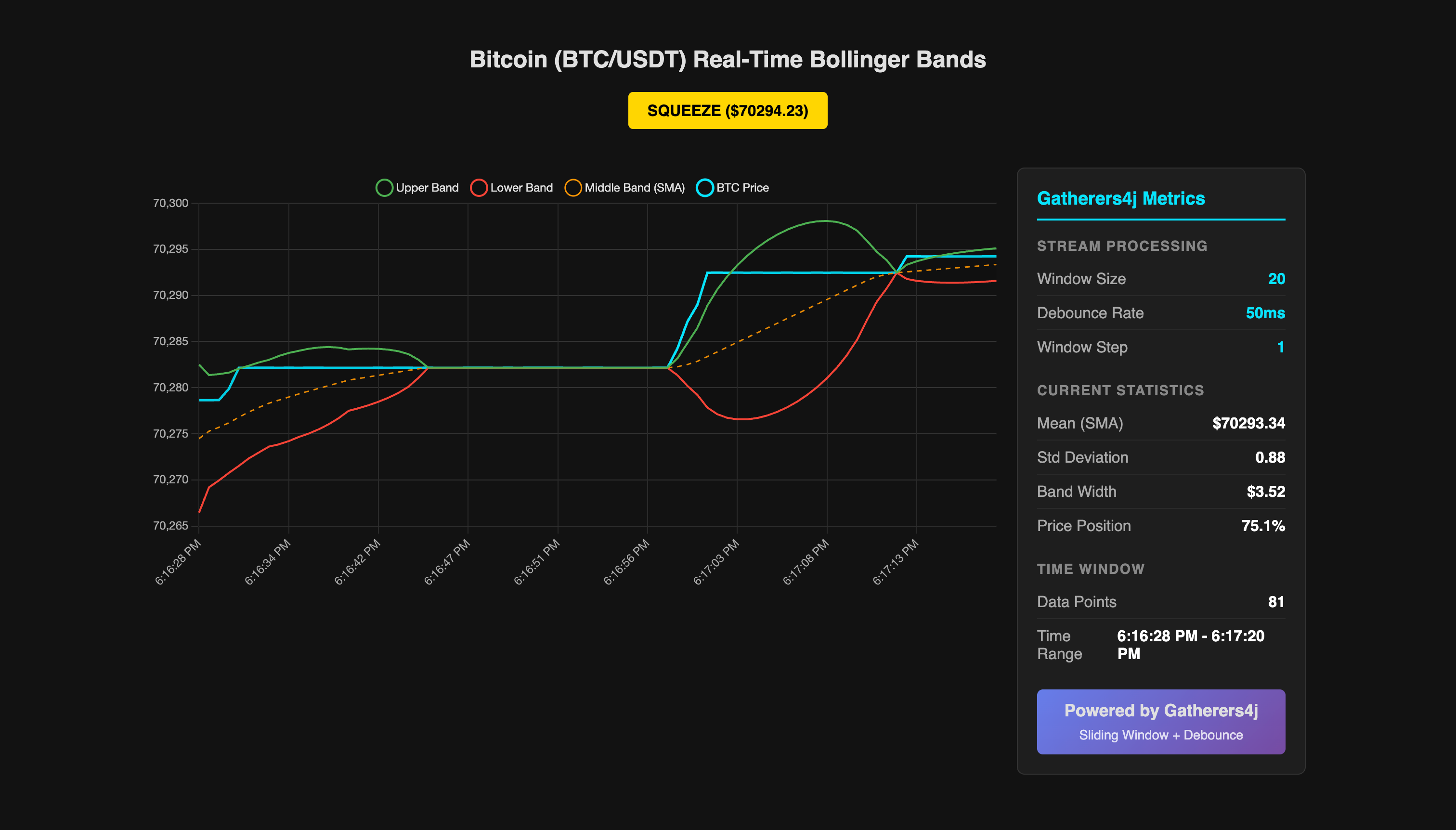
You should see:
A moving BTC price line
A shaded Bollinger Band tunnel
A signal badge that switches between NORMAL, SQUEEZE, and breakouts
When the price exits the band, the signal changes immediately. That confirms the windowing and streaming logic is working.
Conclusion
You now have a real-time Bollinger Band monitor that handles infinite streams, sliding windows, and live visualization without blocking the UI thread or letting the socket handler do heavy work. The important parts are controlled ingestion, explicit windowing, and server-side signal calculation.
From here, adding trade execution, alerts, or persistence is an architectural decision, not a rewrite.
If you want to go further, a natural next step is a guarded trade-execution endpoint that only runs on a breakout signal, with a short note on why that kind of safeguard matters in production.