


Time-series data is everywhere in modern applications: server metrics, IoT sensors, stock prices, and cryptocurrency markets. Unlike traditional databases optimized for random access, time-series databases excel at handling continuous streams of timestamped data, providing efficient storage through compression and fast querying across time ranges.
In this hands-on tutorial, we’ll build a production-ready application that captures live cryptocurrency price data from Binance, stores it efficiently using Redis TimeSeries, and visualizes it through an interactive web dashboard.
By the end of this article, you’ll have a working system that:
Connects to Binance’s WebSocket API for live market data
Stores tick data with automatic compression and aggregation
Provides REST APIs for historical queries
Displays real-time price updates on an interactive dashboard
We’re using Quarkus for its excellent developer experience and reactive capabilities, and Redis TimeSeries for its built-in time-series optimizations including Gorilla compression and automatic downsampling.
Crypto markets are used in this tutorial purely as a convenient source of continuous, real-time time-series data. No assumptions or recommendations are made about cryptocurrencies themselves. The same architecture and techniques apply to metrics, IoT telemetry, or any other high-frequency event stream.
Let’s get started!
Project Setup and Understanding the Architecture
Creating the Quarkus Project
First, let’s create our Quarkus project with the necessary extensions. Open your terminal and run:
mvn io.quarkus:quarkus-maven-plugin:create \
    -DprojectGroupId=com.example \
    -DprojectArtifactId=crypto-dashboard \
    -Dextensions="redis-client,rest-jackson,websockets-client,qute, rest-qute"
cd crypto-dashboard
This command creates a new Quarkus project with these extensions:
redis-client: For Redis connectivity and TimeSeries commands
rest and rest-jackson: For building REST APIs with JSON support
websockets-client: For connecting to Binance WebSocket API
qute: For serving our dashboard HTML
If you don’t want to follow along, feel free to grab the code from my Github repository.
Understanding Quarkus Dev Services
One of Quarkus’s best features is Dev Services - automatic provisioning of containers during development. When you run your application in dev mode, Quarkus automatically starts a Redis container with the TimeSeries module enabled. No Docker Compose files needed!
Let’s configure our application. Open src/main/resources/application.properties and add:
# Application Configuration
quarkus.application.name=crypto-dashboard

# Redis Configuration (Dev Services will auto-configure in dev mode)
quarkus.redis.devservices.image-name=redis/redis-stack:latest
quarkus.redis.devservices.port=6379
quarkus.redis.max-pool-waiting=100

# WebSocket Configuration
binance.websocket.url=wss://stream.binance.com:9443/ws
binance.symbols=btcusdt,ethusdt,solusdt,bnbusdt

# Logging
quarkus.log.level=INFO
quarkus.log.category."com.example".level=DEBUG
The redis-stack image includes the RedisTimeSeries module we need. In dev mode, Quarkus will automatically pull and start this container.
Architecture Overview
Our application follows this data flow:

Understanding the Binance API
Binance provides a free WebSocket API that broadcasts real-time market data. We’ll use the 24hr Ticker stream which provides:
Current price
24-hour price change
High/low prices
Trading volume
Number of trades
The WebSocket URL format is: wss://stream.binance.com:9443/ws/{symbol}@ticker where symbol is lowercase like btcusdt.
Let’s start building!
Ingesting Live Market Data
Creating the Data Model
First, let’s create a model for the ticker data we’ll receive from Binance. Create src/main/java/com/example/model/TickerData.java:
package com.example.model;

import com.fasterxml.jackson.annotation.JsonProperty;
import java.math.BigDecimal;

public class TickerData {

    @JsonProperty("e")
    private String eventType;

    @JsonProperty("E")
    private Long eventTime;

    @JsonProperty("s")
    private String symbol;

    @JsonProperty("c")
    private BigDecimal lastPrice;

    @JsonProperty("o")
    private BigDecimal openPrice;

    @JsonProperty("h")
    private BigDecimal highPrice;

    @JsonProperty("l")
    private BigDecimal lowPrice;

    @JsonProperty("v")
    private BigDecimal volume;

    @JsonProperty("q")
    private BigDecimal quoteVolume;

    @JsonProperty("p")
    private BigDecimal priceChange;

    @JsonProperty("P")
    private BigDecimal priceChangePercent;

    @JsonProperty("n")
    private Long numberOfTrades;

    // Getters and setters
    public String getEventType() { return eventType; }
    public void setEventType(String eventType) { this.eventType = eventType; }

    public Long getEventTime() { return eventTime; }
    public void setEventTime(Long eventTime) { this.eventTime = eventTime; }

    public String getSymbol() { return symbol; }
    public void setSymbol(String symbol) { this.symbol = symbol; }

    public BigDecimal getLastPrice() { return lastPrice; }
    public void setLastPrice(BigDecimal lastPrice) { this.lastPrice = lastPrice; }

    public BigDecimal getOpenPrice() { return openPrice; }
    public void setOpenPrice(BigDecimal openPrice) { this.openPrice = openPrice; }

    public BigDecimal getHighPrice() { return highPrice; }
    public void setHighPrice(BigDecimal highPrice) { this.highPrice = highPrice; }

    public BigDecimal getLowPrice() { return lowPrice; }
    public void setLowPrice(BigDecimal lowPrice) { this.lowPrice = lowPrice; }

    public BigDecimal getVolume() { return volume; }
    public void setVolume(BigDecimal volume) { this.volume = volume; }

    public BigDecimal getQuoteVolume() { return quoteVolume; }
    public void setQuoteVolume(BigDecimal quoteVolume) { this.quoteVolume = quoteVolume; }

    public BigDecimal getPriceChange() { return priceChange; }
    public void setPriceChange(BigDecimal priceChange) { this.priceChange = priceChange; }

    public BigDecimal getPriceChangePercent() { return priceChangePercent; }
    public void setPriceChangePercent(BigDecimal priceChangePercent) {
        this.priceChangePercent = priceChangePercent;
    }

    public Long getNumberOfTrades() { return numberOfTrades; }
    public void setNumberOfTrades(Long numberOfTrades) { this.numberOfTrades = numberOfTrades; }
}
The @JsonProperty annotations map Binance’s compact field names to our readable property names.
Building the WebSocket Client
Now let’s create a service that connects to Binance and streams data. Create src/main/java/com/example/service/BinanceWebSocketClient.java:
package com.example.service;

import java.net.URI;
import java.util.List;
import java.util.concurrent.TimeUnit;

import org.eclipse.microprofile.config.inject.ConfigProperty;

import com.example.model.TickerData;
import com.fasterxml.jackson.databind.ObjectMapper;

import io.quarkus.logging.Log;
import io.quarkus.runtime.ShutdownEvent;
import io.quarkus.runtime.StartupEvent;
import jakarta.enterprise.context.ApplicationScoped;
import jakarta.enterprise.event.Observes;
import jakarta.inject.Inject;
import jakarta.websocket.ClientEndpoint;
import jakarta.websocket.CloseReason;
import jakarta.websocket.ContainerProvider;
import jakarta.websocket.OnClose;
import jakarta.websocket.OnError;
import jakarta.websocket.OnMessage;
import jakarta.websocket.OnOpen;
import jakarta.websocket.Session;
import jakarta.websocket.WebSocketContainer;

@ApplicationScoped
@ClientEndpoint
public class BinanceWebSocketClient {

    @ConfigProperty(name = "binance.websocket.url")
    String websocketUrl;

    @ConfigProperty(name = "binance.symbols")
    List<String> symbols;

    @Inject
    TimeSeriesService timeSeriesService;

    @Inject
    ObjectMapper objectMapper;

    private Session session;
    private boolean shouldReconnect = true;

    void onStart(@Observes StartupEvent ev) {
        Log.info("Starting Binance WebSocket client...");
        connectToStreams();
    }

    void onStop(@Observes ShutdownEvent ev) {
        Log.info("Shutting down Binance WebSocket client...");
        shouldReconnect = false;
        closeConnection();
    }

    private void connectToStreams() {
        try {
            // Create combined stream URL for multiple symbols
            String streams = String.join("/",
                    symbols.stream()
                            .map(s -> s + "@ticker")
                            .toList());

            String url = websocketUrl + "/" + streams;
            Log.infof("Connecting to Binance WebSocket: %s", url);

            WebSocketContainer container = ContainerProvider.getWebSocketContainer();
            session = container.connectToServer(this, URI.create(url));

            Log.info("Successfully connected to Binance WebSocket");
        } catch (Exception e) {
            Log.error("Failed to connect to Binance WebSocket", e);
            scheduleReconnect();
        }
    }

    @OnMessage
    public void onMessage(String message) {
        try {
            TickerData ticker = objectMapper.readValue(message, TickerData.class);

            Log.debugf("Received ticker for %s: price=%s, volume=%s",
                    ticker.getSymbol(),
                    ticker.getLastPrice(),
                    ticker.getVolume());

            // ReactiveRedisDataSource is non-blocking; just subscribe.
            timeSeriesService.addTick(ticker)
                    .subscribe().with(
                            ignored -> {
                            },
                            t -> Log.error("Error storing ticker in Redis TimeSeries", t));

        } catch (Exception e) {
            Log.error("Error processing WebSocket message", e);
        }
    }

    @OnOpen
    public void onOpen(Session session) {
        Log.infof("WebSocket connection opened: %s", session.getId());
    }

    @OnClose
    public void onClose(Session session, CloseReason closeReason) {
        Log.warnf("WebSocket connection closed: %s - %s",
                closeReason.getCloseCode(),
                closeReason.getReasonPhrase());

        if (shouldReconnect) {
            scheduleReconnect();
        }
    }

    @OnError
    public void onError(Session session, Throwable throwable) {
        Log.error("WebSocket error occurred", throwable);
        if (shouldReconnect) {
            scheduleReconnect();
        }
    }

    private void scheduleReconnect() {
        Log.info("Scheduling reconnection in 5 seconds...");
        new Thread(() -> {
            try {
                TimeUnit.SECONDS.sleep(5);
                if (shouldReconnect) {
                    closeConnection();
                    connectToStreams();
                }
            } catch (InterruptedException e) {
                Thread.currentThread().interrupt();
            }
        }).start();
    }

    private void closeConnection() {
        if (session != null && session.isOpen()) {
            try {
                session.close();
            } catch (Exception e) {
                Log.error("Error closing WebSocket connection", e);
            }
        }
    }
}
This client:
Automatically connects on application startup
Handles multiple symbol streams in a single connection
Implements automatic reconnection on failures
Gracefully shuts down when the application stops
Delegates data storage to our
TimeSeriesService
Introduction to Redis TimeSeries
Before we implement the storage service, let’s understand the key Redis TimeSeries commands:
TS.CREATE - Creates a new time-series with optional parameters:
TS.CREATE key [RETENTION milliseconds] [LABELS label value...]TS.ADD - Adds a sample to a time-series:
TS.ADD key timestamp value [RETENTION milliseconds] [LABELS label value...]TS.CREATERULE - Creates a compaction rule (automatic downsampling):
TS.CREATERULE sourceKey destKey AGGREGATION aggregationType bucketDurationThe beauty of Redis TimeSeries is that once you set up compaction rules, Redis automatically maintains your aggregated views. No manual cronjobs needed!
Implementing the Time Series Service
Create src/main/java/com/example/service/TimeSeriesService.java:
package com.example.service;

import java.time.Duration;
import java.util.Map;

import com.example.model.TickerData;

import io.quarkus.logging.Log;
import io.quarkus.redis.datasource.ReactiveRedisDataSource;
import io.quarkus.redis.datasource.timeseries.CreateArgs;
import io.quarkus.runtime.StartupEvent;
import io.quarkus.redis.datasource.timeseries.ReactiveTimeSeriesCommands;
import jakarta.enterprise.context.ApplicationScoped;
import jakarta.enterprise.event.Observes;
import jakarta.inject.Inject;
import io.smallrye.mutiny.Uni;

@ApplicationScoped
public class TimeSeriesService {

    @Inject
    ReactiveRedisDataSource redisDataSource;

    private ReactiveTimeSeriesCommands<String> tsCommands;

    void onStart(@Observes StartupEvent ev) {
        tsCommands = redisDataSource.timeseries(String.class);
        Log.info("TimeSeriesService initialized");
    }

    public Uni<Void> addTick(TickerData ticker) {
        String symbol = ticker.getSymbol().toLowerCase();
        long timestamp = ticker.getEventTime();

        // Redis TimeSeries writes are non-blocking with ReactiveRedisDataSource.
        return addOrCreateTimeSeries(
                priceKey(symbol),
                timestamp,
                ticker.getLastPrice().doubleValue(),
                Map.of("symbol", symbol, "type", "price"),
                Duration.ofHours(24) // 24 hour retention for raw data
        ).chain(() -> addOrCreateTimeSeries(
                volumeKey(symbol),
                timestamp,
                ticker.getVolume().doubleValue(),
                Map.of("symbol", symbol, "type", "volume"),
                Duration.ofHours(24)))
                .chain(() -> addOrCreateTimeSeries(
                        tradesKey(symbol),
                        timestamp,
                        ticker.getNumberOfTrades().doubleValue(),
                        Map.of("symbol", symbol, "type", "trades"),
                        Duration.ofHours(24)))
                .onFailure().invoke(t -> Log.errorf("Error adding tick data for %s: %s", symbol, t.getMessage()));
    }

    private Uni<Void> addOrCreateTimeSeries(
            String key,
            long timestamp,
            double value,
            Map<String, String> labels,
            Duration retention) {
        // Try to add the sample, and if the series is missing, create it and retry.
        return tsCommands.tsAdd(key, timestamp, value)
                .onFailure().recoverWithUni(t -> {
                    String msg = t.getMessage();
                    if (msg != null && msg.contains("TSDB: the key does not exist")) {
                        return createTimeSeries(key, labels, retention)
                                .chain(() -> tsCommands.tsAdd(key, timestamp, value));
                    }
                    return Uni.createFrom().failure(t);
                });
    }

    private Uni<Void> createTimeSeries(String key, Map<String, String> labels, Duration retention) {
        Log.infof("Creating time series: %s with retention: %s", key, retention);

        CreateArgs args = new CreateArgs().setRetention(retention);
        labels.forEach(args::label);

        return tsCommands.tsCreate(key, args)
                // If another concurrent tick already created it, ignore and continue.
                .onFailure().recoverWithUni(t -> {
                    String msg = t.getMessage();
                    if (msg != null && msg.contains("TSDB: key already exists")) {
                        return Uni.createFrom().voidItem();
                    }
                    return Uni.createFrom().failure(t);
                });
    }

    // Key generation methods
    private String priceKey(String symbol) {
        return "ts:price:" + symbol;
    }

    private String volumeKey(String symbol) {
        return "ts:volume:" + symbol;
    }

    private String tradesKey(String symbol) {
        return "ts:trades:" + symbol;
    }
}
This service creates three time-series per symbol:
Price: The last traded price
Volume: Trading volume
Trades: Number of trades
Each time-series has a 24-hour retention for raw tick data. We’ll add aggregations in the next section.
Testing the Data Ingestion
Let’s verify everything works. Start your application in dev mode:
./mvnw quarkus:devYou should see output like:
INFO  [com.example.service.BinanceWebSocketClient] (Quarkus Main Thread) Connecting to Binance WebSocket: wss://stream.binance.com:9443/ws/btcusdt@ticker/ethusdt@ticker/solusdt@ticker/bnbusdt@ticker
INFO  [com.example.service.BinanceWebSocketClient] (Quarkus Main Thread) WebSocket connection opened: ziHDT5pRfiEopfn_iTfP-C51K2_hcQf0yFoQqbEh
INFO  [com.example.service.BinanceWebSocketClient] (Quarkus Main Thread) Successfully connected to Binance WebSocket
..
DEBUG [com.example.service.BinanceWebSocketClient] (vert.x-eventloop-thread-1) Received ticker for BNBUSDT: price=880.53000000, volume=54225.73700000
DEBUG [com.example.service.BinanceWebSocketClient] (vert.x-eventloop-thread-1) Received ticker for SOLUSDT: price=126.74000000, volume=850345.26600000
...
Your application is now receiving live cryptocurrency data! In the next section, we’ll set up intelligent storage with automatic downsampling.
Designing the Time-Series Storage
Understanding Retention and Downsampling
Time-series data has a unique characteristic: recent data needs high resolution, but older data can be aggregated. For example:
Last 24 hours: Every tick (second-level precision)
Last 7 days: 1-minute aggregates
Last 30 days: 5-minute aggregates
Last year: 1-hour aggregates
This strategy dramatically reduces storage while maintaining useful historical data. A year of second-level ticks would be 31.5 million data points per metric, but with aggregation, we only store about 13,000 points.
Redis TimeSeries handles this automatically through compaction rules. When you create a rule, Redis maintains a separate time-series with the aggregated data.
Setting Up Multi-Tier Storage
Let’s enhance our TimeSeriesService to create compaction rules. Update the file with these additions:
package com.example.service;

import java.time.Duration;
import java.util.List;
import java.util.Map;
import java.util.Set;
import java.util.concurrent.ConcurrentHashMap;
import java.util.concurrent.ConcurrentMap;

import org.eclipse.microprofile.config.inject.ConfigProperty;

import com.example.model.TickerData;

import io.quarkus.logging.Log;
import io.quarkus.redis.datasource.ReactiveRedisDataSource;
import io.quarkus.redis.datasource.timeseries.Aggregation;
import io.quarkus.redis.datasource.timeseries.CreateArgs;
import io.quarkus.redis.datasource.timeseries.ReactiveTimeSeriesCommands;
import io.quarkus.redis.datasource.timeseries.SeriesSample;
import io.quarkus.runtime.StartupEvent;
import io.smallrye.mutiny.Uni;
import jakarta.enterprise.context.ApplicationScoped;
import jakarta.enterprise.event.Observes;
import jakarta.inject.Inject;

@ApplicationScoped
public class TimeSeriesService {

    @Inject
    ReactiveRedisDataSource redisDataSource;

    @ConfigProperty(name = "binance.symbols")
    List<String> symbols;

    private ReactiveTimeSeriesCommands<String> tsCommands;

    private final Set<String> initializedSeries = ConcurrentHashMap.newKeySet();
    private final ConcurrentMap<String, Uni<Void>> initTasks = new ConcurrentHashMap<>();
    private final Object initQueueLock = new Object();
    private Uni<Void> initQueue = Uni.createFrom().voidItem();

    void onStart(@Observes StartupEvent ev) {
        tsCommands = redisDataSource.timeseries(String.class);
        Log.info("TimeSeriesService initialized");

        // Pre-create base + aggregated series and compaction rules for configured
        // symbols.
        if (symbols != null && !symbols.isEmpty()) {
            initializeAllSymbols()
                    .subscribe().with(
                            ignored -> Log.info("Time series initialization complete"),
                            t -> Log.warn("Time series initialization encountered errors", t));
        }
    }

    public Uni<Void> addTick(TickerData ticker) {
        String symbol = ticker.getSymbol().toLowerCase();
        long timestamp = ticker.getEventTime();

        // Ensure compaction rules exist (startup pre-creates, but we also lazily init
        // new symbols).
        String priceKey = priceKey(symbol);
        String volumeKey = volumeKey(symbol);
        String tradesKey = tradesKey(symbol);

        // Use a single TS.MADD call to reduce pressure on the Redis connection pool.
        @SuppressWarnings("unchecked")
        SeriesSample<String>[] samples = (SeriesSample<String>[]) new SeriesSample[] {
                SeriesSample.from(priceKey, timestamp, ticker.getLastPrice().doubleValue()),
                SeriesSample.from(volumeKey, timestamp, ticker.getVolume().doubleValue()),
                SeriesSample.from(tradesKey, timestamp, ticker.getNumberOfTrades().doubleValue())
        };

        return ensureInitialized(symbol)
                .chain(() -> tsCommands.tsMAdd(samples))
                .onFailure().recoverWithUni(t -> {
                    String msg = t.getMessage();
                    if (msg != null && msg.contains("TSDB: the key does not exist")) {
                        // Safety net: if keys weren't created for some reason, create and retry.
                        return chainAll(List.of(
                                createTimeSeriesIfNotExists(priceKey,
                                        Map.of("symbol", symbol, "type", "price", "aggregation", "raw"),
                                        Duration.ofHours(24)),
                                createTimeSeriesIfNotExists(volumeKey,
                                        Map.of("symbol", symbol, "type", "volume", "aggregation", "raw"),
                                        Duration.ofHours(24)),
                                createTimeSeriesIfNotExists(tradesKey,
                                        Map.of("symbol", symbol, "type", "trades", "aggregation", "raw"),
                                        Duration.ofHours(24))))
                                .chain(() -> tsCommands.tsMAdd(samples));
                    }
                    return Uni.createFrom().failure(t);
                })
                .onFailure().invoke(t -> Log.errorf("Error adding tick data for %s: %s", symbol, t.getMessage()));
    }

    private Uni<Void> initializeAllSymbols() {
        // IMPORTANT: initialize sequentially to avoid exhausting the Redis connection
        // pool.
        return chainAll(symbols.stream()
                .map(String::trim)
                .filter(s -> !s.isBlank())
                .map(this::ensureInitialized)
                .toList());
    }

    private Uni<Void> ensureInitialized(String symbol) {
        String normalized = symbol.toLowerCase();
        if (initializedSeries.contains(normalized)) {
            return Uni.createFrom().voidItem();
        }

        // Ensure concurrent callers share the same initialization work and wait for it.
        return initTasks.computeIfAbsent(normalized, s -> {
            // Serialize initialization across symbols to avoid exhausting the Redis pool.
            synchronized (initQueueLock) {
                initQueue = initQueue
                        .chain(() -> initializeTimeSeriesForSymbol(s))
                        .memoize().indefinitely();
                return initQueue
                        .onItem().invoke(() -> initializedSeries.add(s))
                        .onTermination().invoke(() -> initTasks.remove(s))
                        .memoize().indefinitely();
            }
        });
    }

    private Uni<Void> initializeTimeSeriesForSymbol(String symbol) {
        String normalizedSymbol = symbol.toLowerCase();

        if (initializedSeries.contains(normalizedSymbol)) {
            return Uni.createFrom().voidItem();
        }

        Log.infof("Initializing time series for symbol: %s", normalizedSymbol);

        return createPriceTimeSeries(normalizedSymbol)
                .chain(() -> createVolumeTimeSeries(normalizedSymbol))
                .chain(() -> createTradesTimeSeries(normalizedSymbol))
                .invoke(() -> {
                    Log.infof("Successfully initialized time series for: %s", normalizedSymbol);
                })
                .onFailure()
                .invoke(t -> Log.errorf("Error initializing time series for %s: %s", normalizedSymbol, t.getMessage()));
    }

    private Uni<Void> createPriceTimeSeries(String symbol) {
        String baseKey = priceKey(symbol);

        return createTimeSeriesIfNotExists(
                baseKey,
                Map.of("symbol", symbol, "type", "price", "aggregation", "raw"),
                Duration.ofHours(24))
                .chain(() -> chainAll(List.of(
                        // 1-minute aggregates (7 days retention) with OHLC
                        createAggregateTimeSeries(baseKey, symbol, "price", Duration.ofMinutes(1), Duration.ofDays(7),
                                Aggregation.FIRST, "open"),
                        createAggregateTimeSeries(baseKey, symbol, "price", Duration.ofMinutes(1), Duration.ofDays(7),
                                Aggregation.MAX, "high"),
                        createAggregateTimeSeries(baseKey, symbol, "price", Duration.ofMinutes(1), Duration.ofDays(7),
                                Aggregation.MIN, "low"),
                        createAggregateTimeSeries(baseKey, symbol, "price", Duration.ofMinutes(1), Duration.ofDays(7),
                                Aggregation.LAST, "close"),

                        // 5-minute aggregates (30 days retention) with OHLC
                        createAggregateTimeSeries(baseKey, symbol, "price", Duration.ofMinutes(5), Duration.ofDays(30),
                                Aggregation.FIRST, "open"),
                        createAggregateTimeSeries(baseKey, symbol, "price", Duration.ofMinutes(5), Duration.ofDays(30),
                                Aggregation.MAX, "high"),
                        createAggregateTimeSeries(baseKey, symbol, "price", Duration.ofMinutes(5), Duration.ofDays(30),
                                Aggregation.MIN, "low"),
                        createAggregateTimeSeries(baseKey, symbol, "price", Duration.ofMinutes(5), Duration.ofDays(30),
                                Aggregation.LAST, "close"),

                        // 1-hour aggregates (1 year retention) with OHLC
                        createAggregateTimeSeries(baseKey, symbol, "price", Duration.ofHours(1), Duration.ofDays(365),
                                Aggregation.FIRST, "open"),
                        createAggregateTimeSeries(baseKey, symbol, "price", Duration.ofHours(1), Duration.ofDays(365),
                                Aggregation.MAX, "high"),
                        createAggregateTimeSeries(baseKey, symbol, "price", Duration.ofHours(1), Duration.ofDays(365),
                                Aggregation.MIN, "low"),
                        createAggregateTimeSeries(baseKey, symbol, "price", Duration.ofHours(1), Duration.ofDays(365),
                                Aggregation.LAST, "close"))));
    }

    private Uni<Void> createVolumeTimeSeries(String symbol) {
        String baseKey = volumeKey(symbol);

        return createTimeSeriesIfNotExists(
                baseKey,
                Map.of("symbol", symbol, "type", "volume", "aggregation", "raw"),
                Duration.ofHours(24))
                .chain(() -> chainAll(List.of(
                        // Volume uses SUM aggregation
                        createAggregateTimeSeries(baseKey, symbol, "volume", Duration.ofMinutes(1), Duration.ofDays(7),
                                Aggregation.SUM, "sum"),
                        createAggregateTimeSeries(baseKey, symbol, "volume", Duration.ofMinutes(5), Duration.ofDays(30),
                                Aggregation.SUM, "sum"),
                        createAggregateTimeSeries(baseKey, symbol, "volume", Duration.ofHours(1), Duration.ofDays(365),
                                Aggregation.SUM, "sum"))));
    }

    private Uni<Void> createTradesTimeSeries(String symbol) {
        String baseKey = tradesKey(symbol);

        return createTimeSeriesIfNotExists(
                baseKey,
                Map.of("symbol", symbol, "type", "trades", "aggregation", "raw"),
                Duration.ofHours(24))
                .chain(() -> chainAll(List.of(
                        // Trades uses SUM aggregation
                        createAggregateTimeSeries(baseKey, symbol, "trades", Duration.ofMinutes(1), Duration.ofDays(7),
                                Aggregation.SUM, "sum"),
                        createAggregateTimeSeries(baseKey, symbol, "trades", Duration.ofMinutes(5), Duration.ofDays(30),
                                Aggregation.SUM, "sum"),
                        createAggregateTimeSeries(baseKey, symbol, "trades", Duration.ofHours(1), Duration.ofDays(365),
                                Aggregation.SUM, "sum"))));
    }

    private Uni<Void> createAggregateTimeSeries(
            String sourceKey,
            String symbol,
            String type,
            Duration bucketDuration,
            Duration retention,
            Aggregation aggregation,
            String aggregationLabel) {
        String destKey = aggregateKey(symbol, type, bucketDuration, aggregationLabel);

        // Create destination time-series, then create compaction rule.
        return createTimeSeriesIfNotExists(
                destKey,
                Map.of(
                        "symbol", symbol,
                        "type", type,
                        "aggregation", aggregationLabel,
                        "bucket", formatDuration(bucketDuration)),
                retention)
                .chain(() -> tsCommands.tsCreateRule(sourceKey, destKey, aggregation, bucketDuration)
                        .invoke(() -> Log.debugf("Created compaction rule: %s -> %s (%s, %s)",
                                sourceKey, destKey, aggregation, bucketDuration))
                        .onFailure().recoverWithUni(t -> {
                            String msg = t.getMessage();
                            // Rule might already exist, that's fine.
                            if (msg != null && msg.toLowerCase().contains("compaction rule")
                                    && msg.toLowerCase().contains("already")) {
                                return Uni.createFrom().voidItem();
                            }
                            return Uni.createFrom().failure(t);
                        }));
    }

    private Uni<Void> createTimeSeriesIfNotExists(String key, Map<String, String> labels, Duration retention) {
        CreateArgs args = new CreateArgs().setRetention(retention);
        labels.forEach(args::label);

        return tsCommands.tsCreate(key, args)
                .invoke(() -> Log.debugf("Created time series: %s (retention: %s)", key, retention))
                // If another concurrent initializer already created it, ignore and continue.
                .onFailure().recoverWithUni(t -> {
                    String msg = t.getMessage();
                    if (msg != null && msg.contains("TSDB: key already exists")) {
                        return Uni.createFrom().voidItem();
                    }
                    return Uni.createFrom().failure(t);
                });
    }

    private Uni<Void> chainAll(List<Uni<Void>> tasks) {
        Uni<Void> uni = Uni.createFrom().voidItem();
        for (Uni<Void> task : tasks) {
            uni = uni.chain(() -> task);
        }
        return uni;
    }

    // Key generation methods
    private String priceKey(String symbol) {
        return "ts:price:" + symbol;
    }

    private String volumeKey(String symbol) {
        return "ts:volume:" + symbol;
    }

    private String tradesKey(String symbol) {
        return "ts:trades:" + symbol;
    }

    private String aggregateKey(String symbol, String type, Duration bucket, String aggregation) {
        return String.format("ts:%s:%s:%s:%s", type, symbol, formatDuration(bucket), aggregation);
    }

    private String formatDuration(Duration duration) {
        if (duration.toHours() > 0) {
            return duration.toHours() + "h";
        } else if (duration.toMinutes() > 0) {
            return duration.toMinutes() + "m";
        } else {
            return duration.getSeconds() + "s";
        }
    }
}
Understanding OHLCV Aggregation
For price data, we create four separate aggregated time-series per time bucket:
Open (FIRST): The first price in the bucket
High (MAX): The highest price in the bucket
Low (MIN): The lowest price in the bucket
Close (LAST): The last price in the bucket
This is the standard OHLCV (Open, High, Low, Close, Volume) format used in financial charting. When we query for candlestick data, we’ll fetch all four series and combine them.
For volume and trade count, we use SUM aggregation to get the total volume and trades in each bucket.
Verifying the Storage Structure
Restart your application and let it run for a minute. Then, connect to the Redis instance to verify the structure. First, find the Redis port:
podman ps | grep redisConnect using redis-cli:
podman exec -it <container-id> redis-cliList all time-series keys:
127.0.0.1:6379> KEYS ts:*You should see keys like:
ts:price:btcusdt
ts:price:btcusdt:1m:open
ts:price:btcusdt:1m:high
ts:price:btcusdt:1m:low
ts:price:btcusdt:1m:close
ts:price:btcusdt:5m:open
...
Check the info for a time-series:
127.0.0.1:6379> TS.INFO ts:price:btcusdtYou’ll see details including retention, labels, and compaction rules. The compaction rules show that Redis is automatically maintaining your aggregated views!
Now we have a sophisticated storage system that automatically manages data at multiple resolutions. In the next section, we’ll build APIs to query this data.
Building the Query API
Creating Response Models
First, let’s create models for our API responses. Create src/main/java/com/example/model/OHLCVData.java:
package com.example.model;

import java.util.List;

public class OHLCVData {
    private String symbol;
    private String interval;
    private List<Candle> candles;

    public static class Candle {
        private long timestamp;
        private double open;
        private double high;
        private double low;
        private double close;
        private double volume;

        public Candle() {
        }

        public Candle(long timestamp, double open, double high, double low, double close, double volume) {
            this.timestamp = timestamp;
            this.open = open;
            this.high = high;
            this.low = low;
            this.close = close;
            this.volume = volume;
        }

        // Getters and setters
        public long getTimestamp() {
            return timestamp;
        }

        public void setTimestamp(long timestamp) {
            this.timestamp = timestamp;
        }

        public double getOpen() {
            return open;
        }

        public void setOpen(double open) {
            this.open = open;
        }

        public double getHigh() {
            return high;
        }

        public void setHigh(double high) {
            this.high = high;
        }

        public double getLow() {
            return low;
        }

        public void setLow(double low) {
            this.low = low;
        }

        public double getClose() {
            return close;
        }

        public void setClose(double close) {
            this.close = close;
        }

        public double getVolume() {
            return volume;
        }

        public void setVolume(double volume) {
            this.volume = volume;
        }
    }

    // Getters and setters
    public String getSymbol() {
        return symbol;
    }

    public void setSymbol(String symbol) {
        this.symbol = symbol;
    }

    public String getInterval() {
        return interval;
    }

    public void setInterval(String interval) {
        this.interval = interval;
    }

    public List<Candle> getCandles() {
        return candles;
    }

    public void setCandles(List<Candle> candles) {
        this.candles = candles;
    }
}
Create src/main/java/com/example/model/TickerResponse.java:
package com.example.model;

public class TickerResponse {
    private String symbol;
    private double price;
    private double priceChange;
    private double priceChangePercent;
    private double volume;
    private long timestamp;

    public TickerResponse() {
    }

    public TickerResponse(String symbol, double price, double priceChange,
            double priceChangePercent, double volume, long timestamp) {
        this.symbol = symbol;
        this.price = price;
        this.priceChange = priceChange;
        this.priceChangePercent = priceChangePercent;
        this.volume = volume;
        this.timestamp = timestamp;
    }

    // Getters and setters
    public String getSymbol() {
        return symbol;
    }

    public void setSymbol(String symbol) {
        this.symbol = symbol;
    }

    public double getPrice() {
        return price;
    }

    public void setPrice(double price) {
        this.price = price;
    }

    public double getPriceChange() {
        return priceChange;
    }

    public void setPriceChange(double priceChange) {
        this.priceChange = priceChange;
    }

    public double getPriceChangePercent() {
        return priceChangePercent;
    }

    public void setPriceChangePercent(double priceChangePercent) {
        this.priceChangePercent = priceChangePercent;
    }

    public double getVolume() {
        return volume;
    }

    public void setVolume(double volume) {
        this.volume = volume;
    }

    public long getTimestamp() {
        return timestamp;
    }

    public void setTimestamp(long timestamp) {
        this.timestamp = timestamp;
    }
}
Enhancing the Time Series Service with Query Methods
Let’s add query methods to our TimeSeriesService. Add these methods to the class:
import java.time.Instant;
import java.util.ArrayList;
import java.util.HashMap;
import com.example.model.TickerResponse;
import com.example.model.OHLCVData;
import io.quarkus.redis.datasource.timeseries.RangeArgs;
import io.quarkus.redis.datasource.timeseries.Sample;
import io.quarkus.redis.datasource.timeseries.TimeSeriesRange;


/**
     * Blocking convenience wrapper. Prefer {@link #getLatestTickerAsync(String)} in
     * reactive routes.
     */
    public TickerResponse getLatestTicker(String symbol) {
        return getLatestTickerAsync(symbol)
                .await().atMost(Duration.ofSeconds(2));
    }

    public Uni<TickerResponse> getLatestTickerAsync(String symbol) {
        String normalized = normalizeSymbol(symbol);

        long now = Instant.now().toEpochMilli();
        long start = now - Duration.ofHours(24).toMillis();

        String priceKey = priceKey(normalized);
        String volumeKey = volumeKey(normalized);

        Uni<Sample> latestPrice = tsCommands.tsGet(priceKey);
        Uni<Sample> latestVolume = tsCommands.tsGet(volumeKey);
        Uni<List<Sample>> firstPriceInWindow = tsCommands.tsRange(
                priceKey,
                TimeSeriesRange.fromTimestamps(start, now),
                new RangeArgs().count(1));

        return ensureInitialized(normalized)
                .chain(() -> Uni.combine().all().unis(latestPrice, latestVolume, firstPriceInWindow).asTuple())
                .map(tuple -> {
                    Sample lastPrice = tuple.getItem1();
                    Sample lastVol = tuple.getItem2();
                    List<Sample> firstPrices = tuple.getItem3();

                    if (lastPrice == null) {
                        return new TickerResponse(normalized, 0, 0, 0, lastVol != null ? lastVol.value() : 0, now);
                    }

                    double price = lastPrice.value();
                    double first = !firstPrices.isEmpty() ? firstPrices.get(0).value() : price;
                    double change = price - first;
                    double pct = first != 0 ? (change / first) * 100.0 : 0.0;

                    return new TickerResponse(
                            normalized,
                            price,
                            change,
                            pct,
                            lastVol != null ? lastVol.value() : 0,
                            lastPrice.timestamp());
                });
    }

    /**
     * Blocking convenience wrapper. Prefer {@link #getHistoricalDataAsync(String, String)}
     * in reactive routes.
     */
    public OHLCVData getHistoricalData(String symbol, String range) {
        return getHistoricalDataAsync(symbol, range)
                .await().atMost(Duration.ofSeconds(5));
    }

    public Uni<OHLCVData> getHistoricalDataAsync(String symbol, String range) {
        String normalized = normalizeSymbol(symbol);

        Duration window = parseWindow(range);
        Duration bucket = chooseBucket(window);

        long now = Instant.now().toEpochMilli();
        long start = now - window.toMillis();

        String openKey = aggregateKey(normalized, "price", bucket, "open");
        String highKey = aggregateKey(normalized, "price", bucket, "high");
        String lowKey = aggregateKey(normalized, "price", bucket, "low");
        String closeKey = aggregateKey(normalized, "price", bucket, "close");
        String volKey = aggregateKey(normalized, "volume", bucket, "sum");

        TimeSeriesRange tsRange = TimeSeriesRange.fromTimestamps(start, now);

        Uni<List<Sample>> opens = tsCommands.tsRange(openKey, tsRange);
        Uni<List<Sample>> highs = tsCommands.tsRange(highKey, tsRange);
        Uni<List<Sample>> lows = tsCommands.tsRange(lowKey, tsRange);
        Uni<List<Sample>> closes = tsCommands.tsRange(closeKey, tsRange);
        Uni<List<Sample>> vols = tsCommands.tsRange(volKey, tsRange);

        return ensureInitialized(normalized)
                .chain(() -> Uni.combine().all().unis(opens, highs, lows, closes, vols).asTuple())
                .map(tuple -> {
                    Map<Long, Double> openMap = toMap(tuple.getItem1());
                    Map<Long, Double> highMap = toMap(tuple.getItem2());
                    Map<Long, Double> lowMap = toMap(tuple.getItem3());
                    List<Sample> closeSamples = tuple.getItem4();
                    Map<Long, Double> volMap = toMap(tuple.getItem5());

                    List<OHLCVData.Candle> candles = new ArrayList<>(closeSamples.size());
                    for (Sample close : closeSamples) {
                        long ts = close.timestamp();
                        double c = close.value();
                        double o = openMap.getOrDefault(ts, c);
                        double h = highMap.getOrDefault(ts, c);
                        double l = lowMap.getOrDefault(ts, c);
                        double v = volMap.getOrDefault(ts, 0.0);

                        candles.add(new OHLCVData.Candle(ts, o, h, l, c, v));
                    }

                    OHLCVData resp = new OHLCVData();
                    resp.setSymbol(normalized);
                    resp.setInterval(formatDuration(bucket));
                    resp.setCandles(candles);
                    return resp;
                });
    }

    private Map<Long, Double> toMap(List<Sample> samples) {
        Map<Long, Double> map = new HashMap<>();
        if (samples == null) {
            return map;
        }
        for (Sample s : samples) {
            map.put(s.timestamp(), s.value());
        }
        return map;
    }

    private String normalizeSymbol(String symbol) {
        if (symbol == null) {
            return "";
        }
        return symbol.trim().toLowerCase();
    }

    private Duration parseWindow(String range) {
        if (range == null || range.isBlank()) {
            return Duration.ofHours(24);
        }

        String r = range.trim().toLowerCase();
        switch (r) {
            case "1h":
                return Duration.ofHours(1);
            case "6h":
                return Duration.ofHours(6);
            case "12h":
                return Duration.ofHours(12);
            case "24h":
            case "1d":
                return Duration.ofHours(24);
            case "7d":
            case "1w":
                return Duration.ofDays(7);
            case "30d":
                return Duration.ofDays(30);
            case "365d":
            case "1y":
                return Duration.ofDays(365);
            default:
                break;
        }

        // Basic duration parser: <number><unit>, units: s,m,h,d,w,y
        long n;
        String numPart = r.replaceAll("[^0-9]", "");
        if (numPart.isEmpty()) {
            return Duration.ofHours(24);
        }
        try {
            n = Long.parseLong(numPart);
        } catch (NumberFormatException e) {
            return Duration.ofHours(24);
        }

        if (r.endsWith("ms")) {
            return Duration.ofMillis(n);
        } else if (r.endsWith("s")) {
            return Duration.ofSeconds(n);
        } else if (r.endsWith("m")) {
            return Duration.ofMinutes(n);
        } else if (r.endsWith("h")) {
            return Duration.ofHours(n);
        } else if (r.endsWith("d")) {
            return Duration.ofDays(n);
        } else if (r.endsWith("w")) {
            return Duration.ofDays(n * 7);
        } else if (r.endsWith("y")) {
            return Duration.ofDays(n * 365);
        }

        return Duration.ofHours(24);
    }

    private Duration chooseBucket(Duration window) {
        // We currently create 1m / 5m / 1h compactions. Pick the closest supported one.
        if (window.compareTo(Duration.ofDays(7)) <= 0) {
            return Duration.ofMinutes(1);
        }
        if (window.compareTo(Duration.ofDays(30)) <= 0) {
            return Duration.ofMinutes(5);
        }
        return Duration.ofHours(1);
    }
Creating the REST Endpoints
Now let’s create the REST API. Create src/main/java/com/example/resource/CryptoResource.java:
package com.example.resource;

import com.example.model.OHLCVData;
import com.example.model.TickerResponse;
import com.example.service.TimeSeriesService;
import jakarta.inject.Inject;
import jakarta.ws.rs.*;
import jakarta.ws.rs.core.MediaType;
import org.eclipse.microprofile.config.inject.ConfigProperty;

import java.util.List;
import java.util.stream.Collectors;

@Path("/api")
@Produces(MediaType.APPLICATION_JSON)
@Consumes(MediaType.APPLICATION_JSON)
public class CryptoResource {

    @Inject
    TimeSeriesService timeSeriesService;

    @ConfigProperty(name = "binance.symbols")
    List<String> symbols;

    @GET
    @Path("/symbols")
    public List<String> getSymbols() {
        return symbols.stream()
            .map(String::toLowerCase)
            .collect(Collectors.toList());
    }

    @GET
    @Path("/ticker/{symbol}")
    public TickerResponse getTicker(@PathParam("symbol") String symbol) {
        return timeSeriesService.getLatestTicker(symbol);
    }

    @GET
    @Path("/tickers")
    public List<TickerResponse> getAllTickers() {
        return symbols.stream()
            .map(symbol -> timeSeriesService.getLatestTicker(symbol.toLowerCase()))
            .collect(Collectors.toList());
    }

    @GET
    @Path("/history/{symbol}")
    public OHLCVData getHistory(
            @PathParam("symbol") String symbol,
            @QueryParam("range") @DefaultValue("24h") String range
    ) {
        return timeSeriesService.getHistoricalData(symbol, range);
    }
}
Testing the API
Restart your application and let it collect data for a few minutes. Then test the endpoints:
Get available symbols:
curl http://localhost:8080/api/symbolsGet latest ticker for BTC:
curl http://localhost:8080/api/ticker/btcusdt | jqResponse:
{
  "symbol": "btcusdt",
  "price": 88783.89,
  "priceChange": 13.569999999992433,
  "priceChangePercent": 0.015286640850221599,
  "volume": 4797.97803,
  "timestamp": 1769321256016
}
Get historical data:
curl "http://localhost:8080/api/history/btcusdt?range=1h" | jqResponse:
{
  "symbol": "btcusdt",
  "interval": "1m",
  "candles": [
    {
      "timestamp": 1769321220000,
      "open": 88770.32,
      "high": 88819.28,
      "low": 88770.32,
      "close": 88809.29,
      "volume": 244764.73012
    }
  ]
}
Perfect! Our API is serving real-time and historical data. Now let’s build the dashboard to visualize it.
Creating the Interactive Dashboard
Setting Up Server-Sent Events for Live Updates
First, let’s create an SSE endpoint for real-time price updates. Add this to CryptoResource.java:
import io.smallrye.mutiny.Multi;
import org.jboss.resteasy.reactive.RestStreamElementType;

import java.time.Duration;

       @GET
    @Path("/stream/tickers")
    @Produces(MediaType.SERVER_SENT_EVENTS)
    @RestStreamElementType(MediaType.APPLICATION_JSON)
    public Multi<List<TickerResponse>> streamTickers() {
        return Multi.createFrom().ticks().every(Duration.ofSeconds(1))
                .map(tick -> symbols.stream()
                        .map(symbol -> {
                            try {
                                return timeSeriesService.getLatestTicker(symbol.toLowerCase());
                            } catch (Exception e) {
                                return null;
                            }
                        })
                        .filter(java.util.Objects::nonNull)
                        .collect(Collectors.toList()));
    }
This endpoint streams ticker updates every second to connected clients.
Creating the Dashboard Template
Create src/main/resources/templates/index.html:
<!DOCTYPE html>
<html lang="en">

<head>
    <meta charset="UTF-8">
    <meta name="viewport" content="width=device-width, initial-scale=1.0">
    <title>Crypto Dashboard</title>
    <script src="https://cdn.jsdelivr.net/npm/chart.js@4.4.0/dist/chart.umd.min.js"></script>
    <script
        src="https://cdn.jsdelivr.net/npm/chartjs-adapter-date-fns@3.0.0/dist/chartjs-adapter-date-fns.bundle.min.js"></script>
    <style>
     <!-- omitted check repo -->
    </style>
</head>

<body>
    <div class="container">
        <header>
            <h1>Crypto Dashboard</h1>
            <div class="subtitle">
                <span class="connection-status">
                    <span class="status-indicator" id="statusIndicator"></span>
                    <span id="statusText">Connecting...</span>
                </span>
            </div>
        </header>

        <div class="ticker-grid" id="tickerGrid">
            <div class="loading">Loading tickers...</div>
        </div>

        <div class="chart-section">
            <div class="chart-header">
                <h2 class="chart-title" id="chartTitle">Select a symbol</h2>
                <div class="timeframe-buttons">
                    <button class="timeframe-btn" data-range="1h">1H</button>
                    <button class="timeframe-btn active" data-range="24h">24H</button>
                    <button class="timeframe-btn" data-range="7d">7D</button>
                    <button class="timeframe-btn" data-range="30d">30D</button>
                </div>
            </div>
            <div class="chart-container">
                <canvas id="priceChart"></canvas>
            </div>
        </div>
    </div>

    <script>
        let chart = null;
        let selectedSymbol = 'btcusdt';
        let selectedRange = '24h';
        let eventSource = null;

        // Initialize
        document.addEventListener('DOMContentLoaded', () => {
            initializeChart();
            connectToStream();
            setupTimeframeButtons();
        });

        function initializeChart() {
            const ctx = document.getElementById('priceChart').getContext('2d');
            chart = new Chart(ctx, {
                type: 'line',
                data: {
                    datasets: [{
                        label: 'Price',
                        data: [],
                        borderColor: '#1d9bf0',
                        backgroundColor: 'rgba(29, 155, 240, 0.1)',
                        borderWidth: 2,
                        fill: true,
                        tension: 0.4,
                        pointRadius: 0,
                        pointHoverRadius: 6
                    }]
                },
                options: {
                    responsive: true,
                    maintainAspectRatio: false,
                    interaction: {
                        intersect: false,
                        mode: 'index'
                    },
                    plugins: {
                        legend: {
                            display: false
                        },
                        tooltip: {
                            backgroundColor: '#16181c',
                            titleColor: '#e7e9ea',
                            bodyColor: '#e7e9ea',
                            borderColor: '#2f3336',
                            borderWidth: 1,
                            padding: 12,
                            displayColors: false,
                            callbacks: {
                                label: (context) => {
                                    return 'Price: $' + context.parsed.y.toLocaleString('en-US', {
                                        minimumFractionDigits: 2,
                                        maximumFractionDigits: 2
                                    });
                                }
                            }
                        }
                    },
                    scales: {
                        x: {
                            type: 'time',
                            grid: {
                                color: '#2f3336',
                                drawBorder: false
                            },
                            ticks: {
                                color: '#71767b'
                            }
                        },
                        y: {
                            grid: {
                                color: '#2f3336',
                                drawBorder: false
                            },
                            ticks: {
                                color: '#71767b',
                                callback: (value) => '$' + value.toLocaleString('en-US')
                            }
                        }
                    }
                }
            });
        }

        function connectToStream() {
            if (eventSource) {
                eventSource.close();
            }

            eventSource = new EventSource('/api/stream/tickers');

            eventSource.onopen = () => {
                updateConnectionStatus(true);
            };

            eventSource.onmessage = (event) => {
                const tickers = JSON.parse(event.data);
                updateTickerGrid(tickers);
                updateConnectionStatus(true);
            };

            eventSource.onerror = () => {
                updateConnectionStatus(false);
                setTimeout(connectToStream, 5000);
            };
        }

        function updateConnectionStatus(connected) {
            const indicator = document.getElementById('statusIndicator');
            const text = document.getElementById('statusText');

            if (connected) {
                indicator.classList.add('connected');
                indicator.classList.remove('disconnected');
                text.textContent = 'Live';
            } else {
                indicator.classList.remove('connected');
                indicator.classList.add('disconnected');
                text.textContent = 'Reconnecting...';
            }
        }

        function updateTickerGrid(tickers) {
            const grid = document.getElementById('tickerGrid');

            if (grid.querySelector('.loading')) {
                grid.innerHTML = '';
            }

            tickers.forEach(ticker => {
                let card = document.getElementById('ticker-' + ticker.symbol);

                if (!card) {
                    card = createTickerCard(ticker);
                    grid.appendChild(card);
                } else {
                    updateTickerCard(card, ticker);
                }
            });
        }

        function createTickerCard(ticker) {
            const card = document.createElement('div');
            card.id = 'ticker-' + ticker.symbol;
            card.className = 'ticker-card ' + (ticker.symbol === selectedSymbol ? 'active' : '');
            card.onclick = () => selectSymbol(ticker.symbol);

            updateTickerCard(card, ticker);
            return card;
        }

        function updateTickerCard(card, ticker) {
            const isPositive = ticker.priceChange >= 0;
            const changeClass = isPositive ? 'positive' : 'negative';
            const changeSymbol = isPositive ? '+' : '';

            card.innerHTML =
                '<div class="ticker-symbol">' +
                ticker.symbol.replace('usdt', '/USDT') +
                '</div>' +
                '<div class="ticker-price">$' +
                ticker.price.toLocaleString('en-US', {
                    minimumFractionDigits: 2,
                    maximumFractionDigits: 2
                }) +
                '</div>' +
                '<div class="ticker-change ' +
                changeClass +
                '">' +
                changeSymbol +
                ticker.priceChangePercent.toFixed(2) +
                '%' +
                '</div>';
        }

        function selectSymbol(symbol) {
            selectedSymbol = symbol;

            document.querySelectorAll('.ticker-card').forEach(card => {
                card.classList.remove('active');
            });
            document.getElementById('ticker-' + symbol).classList.add('active');

            document.getElementById('chartTitle').textContent =
                symbol.replace('usdt', '/USDT').toUpperCase();

            loadHistoricalData(symbol, selectedRange);
        }

        function setupTimeframeButtons() {
            document.querySelectorAll('.timeframe-btn').forEach(btn => {
                btn.addEventListener('click', () => {
                    selectedRange = btn.dataset.range;

                    document.querySelectorAll('.timeframe-btn').forEach(b => {
                        b.classList.remove('active');
                    });
                    btn.classList.add('active');

                    if (selectedSymbol) {
                        loadHistoricalData(selectedSymbol, selectedRange);
                    }
                });
            });
        }

        async function loadHistoricalData(symbol, range) {
            try {
                const response = await fetch('/api/history/' + symbol + '?range=' + range);
                const data = await response.json();

                const chartData = data.candles.map(candle => ({
                    x: candle.timestamp,
                    y: candle.close
                }));

                chart.data.datasets[0].data = chartData;
                chart.update('none');

            } catch (error) {
                console.error('Error loading historical data:', error);
            }
        }

        // Cleanup on page unload
        window.addEventListener('beforeunload', () => {
            if (eventSource) {
                eventSource.close();
            }
        });
    </script>
</body>

</html>
Creating the Dashboard Controller
Create src/main/java/com/example/resource/DashboardResource.java:
package com.example.resource;

import io.quarkus.qute.Template;
import io.quarkus.qute.TemplateInstance;
import jakarta.inject.Inject;
import jakarta.ws.rs.GET;
import jakarta.ws.rs.Path;
import jakarta.ws.rs.Produces;
import jakarta.ws.rs.core.MediaType;

@Path("/")
public class DashboardResource {

    @Inject
    Template index;

    @GET
    @Produces(MediaType.TEXT_HTML)
    public TemplateInstance get() {
        return index.instance();
    }
}
Viewing the Dashboard
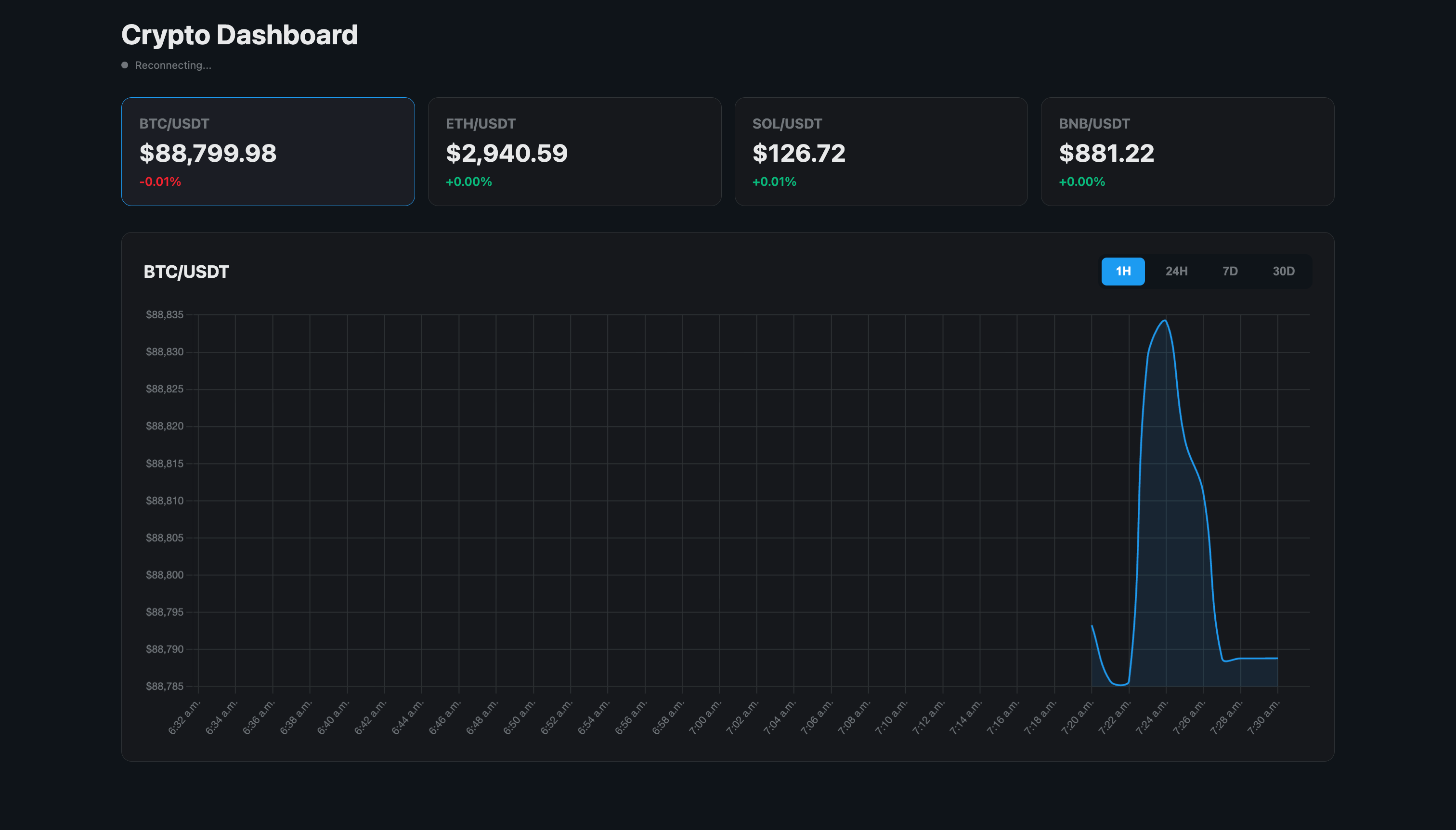
Restart your application and navigate to http://localhost:8080
in your browser. You should see:
Live ticker cards showing real-time prices for BTC, ETH, SOL, and BNB
Price change percentages updating every second
A connection status indicator showing “Live” when connected
An interactive chart that updates when you click different symbols
Timeframe buttons to switch between 1H, 24H, 7D, and 30D views
The dashboard automatically:
Reconnects if the connection drops
Updates prices in real-time without page refresh
Switches between different data resolutions based on the selected timeframe
Shows smooth animations when switching symbols
Let the application run for several minutes to accumulate data, then try switching between different timeframes to see how the aggregation levels provide appropriate detail for each time range.
Production Considerations
Adding Health Checks
Quarkus provides built-in health check support. Let’s add a custom health check for our WebSocket stream. First, add the health extension to your pom.xml:
<dependency>
    <groupId>io.quarkus</groupId>
    <artifactId>quarkus-smallrye-health</artifactId>
</dependency>
Create src/main/java/com/example/health/BinanceStreamHealthCheck.java:
package com.example.health;

import org.eclipse.microprofile.health.HealthCheck;
import org.eclipse.microprofile.health.HealthCheckResponse;
import org.eclipse.microprofile.health.Liveness;

import com.example.service.BinanceWebSocketClient;

import jakarta.enterprise.context.ApplicationScoped;
import jakarta.inject.Inject;

@Liveness
@ApplicationScoped
public class BinanceStreamHealthCheck implements HealthCheck {

    @Inject
    BinanceWebSocketClient webSocketClient;

    @Override
    public HealthCheckResponse call() {

        boolean isConnected = webSocketClient != null && webSocketClient.isConnected();

        return isConnected
                ? HealthCheckResponse.up("Binance stream connection")
                : HealthCheckResponse.down("Binance stream connection");
    }
}
If you check http://localhost:8080/q/dev-ui/quarkus-smallrye-health/health you can see the health status of both Redis and the Websocket connection.
Conclusion
We built a real-time crypto dashboard that does not just show live data but stores it correctly. Redis TimeSeries handles retention and aggregation. Quarkus handles ingestion, querying, and streaming. The result is a system that keeps working when the data does not stop.