



Every December, the same drama unfolds in families, teams, and friend groups: someone volunteers to “organize” Secret Santa, realizes it means spreadsheets and chaos, and quietly regrets everything. Picking names without duplicates, keeping the assignments secret, sending reminders, tracking wish lists… it’s all fun until the logistics hit.
This is exactly the kind of small, real-world problem developers love to automate. And Quarkus is a perfect fit when you want something lightweight, fast, and easy to run anywhere during the holiday rush.
So in today’s tutorial, we’ll build a complete Secret Santa API with Quarkus: group creation, participant management, wishlist handling, random pair generation, and automated email notifications. No spreadsheets. No awkward “Oops, I got myself.” Just clean code and festive automation.
You’ll end up with:
A REST API to manage Secret Santa groups and participants
Random pair generation that never assigns a person to themselves
Email notifications via Quarkus Mailer
Simple wish list management
Username/password authentication backed by PostgreSQL using
quarkus-security-jpa
Everything runs locally with Dev Services, so you don’t have to install PostgreSQL manually.
Prerequisites & Stack
You need:
Java 17 or 21 (Quarkus 3 recommends 21)
Maven 3.8+
Quarkus CLI (optional but convenient)
Podman for Dev Services (PostgreSQL + optional Mailpit)
We’ll use:
quarkus-rest-jacksonfor REST endpointsquarkus-hibernate-orm-panache+quarkus-jdbc-postgresqlfor persistencequarkus-security-jpa+ bcrypt for username/password authquarkus-mailerfor email notificationsquarkus-mailpitfor SMTP Dev Service
Bootstrap the Quarkus Project
Using the Quarkus CLI and follow along or grab the full tutorial (including tests!) from my Github repository!
quarkus create app com.example:secret-santa \
  -x rest-jackson,hibernate-orm-panache,jdbc-postgresql,security-jpa,mailer \
  --java=21
cd secret-santa
Add mailpit dependency to your pom.xml
<dependency>
    <groupId>io.quarkiverse.mailpit</groupId>
    <artifactId>quarkus-mailpit</artifactId>
    <version>2.0.0</version>
</dependency>
Start dev mode:
quarkus devQuarkus Dev Services will spin up a PostgreSQL container automatically because we added the JDBC extension and won’t configure a URL initially.
Domain Model: Users, Groups, Memberships, Pairings
We keep the model minimal but realistic:
AppUserAuth entity (email, bcrypt password, roles)
Backed by
quarkus-security-jpa
SecretSantaGroupA named group created by an organizer (who is an
AppUser)Has a join code for fun, but only the organizer actually uses the API
GroupMembershipParticipant in a specific group
Contains participant name, email, wishlist text
SecretSantaPairingPairing of giver and receiver for a group
Security Entity: AppUser
quarkus-security-jpa lets you map your JPA entity to security fields using annotations like @UserDefinition, @Username, @Password, and @Roles.
Create src/main/java/com/example/security/AppUser.java:
package com.example.security;

import io.quarkus.elytron.security.common.BcryptUtil;
import io.quarkus.hibernate.orm.panache.PanacheEntity;
import io.quarkus.security.jpa.Password;
import io.quarkus.security.jpa.Roles;
import io.quarkus.security.jpa.UserDefinition;
import io.quarkus.security.jpa.Username;
import jakarta.persistence.Column;
import jakarta.persistence.Entity;

@Entity
@UserDefinition
public class AppUser extends PanacheEntity {

    @Username
    @Column(unique = true, nullable = false)
    public String email;

    @Password
    @Column(nullable = false)
    public String password; // bcrypt hash

    @Roles
    @Column(nullable = false)
    public String roles; // comma-separated, e.g. “user”

    public static AppUser create(String email, String rawPassword) {
        AppUser user = new AppUser();
        user.email = email;
        user.password = BcryptUtil.bcryptHash(rawPassword);
        user.roles = “user”;
        return user;
    }
}
Note: BcryptUtil comes from quarkus-elytron-security-common and produces bcrypt hashes compatible with quarkus-security-jpa.
SecretSantaGroup
src/main/java/com/example/domain/SecretSantaGroup.java:
package com.example.domain;

import java.util.List;

import com.example.security.AppUser;

import io.quarkus.hibernate.orm.panache.PanacheEntity;
import jakarta.persistence.Column;
import jakarta.persistence.Entity;
import jakarta.persistence.ManyToOne;
import jakarta.persistence.OneToMany;

@Entity
public class SecretSantaGroup extends PanacheEntity {

    @Column(nullable = false)
    public String name;

    @Column(nullable = false, unique = true)
    public String inviteCode;

    @ManyToOne(optional = false)
    public AppUser owner;

    @OneToMany(mappedBy = “group”)
    public List<GroupMembership> members;
}
GroupMembership
src/main/java/com/example/domain/GroupMembership.java:
package com.example.domain;

import io.quarkus.hibernate.orm.panache.PanacheEntity;
import jakarta.persistence.Column;
import jakarta.persistence.Entity;
import jakarta.persistence.ManyToOne;

@Entity
public class GroupMembership extends PanacheEntity {

    @ManyToOne(optional = false)
    public SecretSantaGroup group;

    @Column(nullable = false)
    public String participantName;

    @Column(nullable = false)
    public String participantEmail;

    @Column(length = 2000)
    public String wishlist;
}
SecretSantaPairing
src/main/java/com/example/domain/SecretSantaPairing.java:
package com.example.domain;

import io.quarkus.hibernate.orm.panache.PanacheEntity;
import jakarta.persistence.Entity;
import jakarta.persistence.ManyToOne;

@Entity
public class SecretSantaPairing extends PanacheEntity {

    @ManyToOne(optional = false)
    public SecretSantaGroup group;

    @ManyToOne(optional = false)
    public GroupMembership giver;

    @ManyToOne(optional = false)
    public GroupMembership receiver;
}
Configuration: Dev Services, Security, Mailer
Open src/main/resources/application.properties and add:
quarkus.datasource.db-kind=postgresql
quarkus.hibernate-orm.schema-management.strategy=drop-and-create
quarkus.hibernate-orm.log.sql=true

# Security: use Basic auth over HTTPS in production
quarkus.http.auth.basic=true

# This realm name will show up in browsers when doing Basic auth prompt
quarkus.security.jaxrs.deny-unannotated-endpoints=true

# Mailer configuration (for dev, use a local SMTP like Mailpit)
quarkus.mailer.from=secretsanta@example.com
quarkus.mailer.host=localhost
quarkus.mailer.port=1025
quarkus.mailer.start-tls=OPTIONAL
quarkus.mailer.username=
quarkus.mailer.password=
With just db-kind set and no explicit URL, Dev Services will provision a PostgreSQL container in dev/test mode for you.
For local email testing, run Mailpit or a similar dev SMTP container, or add the quarkus-mailpit extension to use it as a Dev Service.
Authentication: Registration & Protected Endpoints
We’ll keep auth simple:
Users register with email + password
We store the bcrypt-hashed password in
AppUserAPI endpoints are protected with Basic auth and
@RolesAllowed(”user”)
In production you would probably switch to OIDC or JWT, but this is a solid starting point.
Registration Resource
src/main/java/com/example/api/AuthResource.java:
package com.example.api;

import com.example.security.AppUser;

import jakarta.annotation.security.PermitAll;
import jakarta.transaction.Transactional;
import jakarta.ws.rs.Consumes;
import jakarta.ws.rs.POST;
import jakarta.ws.rs.Path;
import jakarta.ws.rs.core.MediaType;
import jakarta.ws.rs.core.Response;

@Path(”/api/auth”)
@Consumes(MediaType.APPLICATION_JSON)
public class AuthResource {

    public static class RegisterRequest {
        public String email;
        public String password;
    }

    @POST
    @Path(”/register”)
    @PermitAll
    @Transactional
    public Response register(RegisterRequest request) {
        if (request.email == null || request.password == null) {
            return Response.status(Response.Status.BAD_REQUEST).build();
        }

        if (AppUser.find(”email”, request.email).firstResult() != null) {
            return Response.status(Response.Status.CONFLICT)
                    .entity(”User already exists”).build();
        }

        AppUser user = AppUser.create(request.email, request.password);
        user.persist();

        return Response.status(Response.Status.CREATED).build();
    }
}
For Basic auth, credentials are sent as an Authorization header. Quarkus Security + JPA will automatically fetch the user by @Username field and verify the bcrypt password.
There is no /login endpoint in this design. The client simply sends Basic auth headers with each request.
Group Management & Wish Lists
Now the core Secret Santa part.
Group DTO
Create a simple DTO for group creation:
package com.example.api;

public class CreateGroupRequest {
    public String name;
}
Group Membership Response
Create a simple DTO for group membership response:
package com.example.api;

public class GroupMembershipResponse {
    public Long id;
    public Long groupId;
    public String groupName;
    public String participantName;
    public String participantEmail;
    public String wishlist;

    public GroupMembershipResponse() {
    }

    public GroupMembershipResponse(Long id, Long groupId, String groupName,
                                   String participantName, String participantEmail,
                                   String wishlist) {
        this.id = id;
        this.groupId = groupId;
        this.groupName = groupName;
        this.participantName = participantName;
        this.participantEmail = participantEmail;
        this.wishlist = wishlist;
    }
}
Pairing Response
Create a simple DTO for pairing response:
package com.example.api;

public class PairingResponse {
    public Long id;
    public Long groupId;
    public String groupName;
    public Long giverId;
    public String giverName;
    public String giverEmail;
    public Long receiverId;
    public String receiverName;
    public String receiverEmail;
    public String receiverWishlist;

    public PairingResponse(Long id, Long groupId, String groupName,
                          Long giverId, String giverName, String giverEmail,
                          Long receiverId, String receiverName, String receiverEmail,
                          String receiverWishlist) {
        this.id = id;
        this.groupId = groupId;
        this.groupName = groupName;
        this.giverId = giverId;
        this.giverName = giverName;
        this.giverEmail = giverEmail;
        this.receiverId = receiverId;
        this.receiverName = receiverName;
        this.receiverEmail = receiverEmail;
        this.receiverWishlist = receiverWishlist;
    }
}
Security Helper
We need the currently authenticated user to assign them as group owner.
src/main/java/com/example/security/SecurityUtils.java:
package com.example.security;

import java.security.Principal;

import jakarta.enterprise.context.RequestScoped;
import jakarta.inject.Inject;
import jakarta.inject.Named;
import jakarta.ws.rs.core.SecurityContext;

@RequestScoped
@Named
public class SecurityUtils {

    @Inject
    SecurityContext securityContext;

    public String currentUsername() {
        Principal principal = securityContext.getUserPrincipal();
        return principal != null ? principal.getName() : null;
    }
}
Group Resource
src/main/java/com/example/api/GroupResource.java:
package com.example.api;

import java.security.SecureRandom;
import java.util.ArrayList;
import java.util.Collections;
import java.util.List;
import java.util.Locale;
import java.util.Objects;
import java.util.Optional;

import com.example.domain.GroupMembership;
import com.example.domain.SecretSantaGroup;
import com.example.domain.SecretSantaPairing;
import com.example.security.AppUser;
import com.example.security.SecurityUtils;

import io.quarkus.mailer.Mail;
import io.quarkus.mailer.Mailer;
import jakarta.annotation.security.RolesAllowed;
import jakarta.inject.Inject;
import jakarta.transaction.Transactional;
import jakarta.ws.rs.Consumes;
import jakarta.ws.rs.POST;
import jakarta.ws.rs.Path;
import jakarta.ws.rs.PathParam;
import jakarta.ws.rs.Produces;
import jakarta.ws.rs.core.MediaType;
import jakarta.ws.rs.core.Response;

@Path(”/api/groups”)
@Consumes(MediaType.APPLICATION_JSON)
@Produces(MediaType.APPLICATION_JSON)
public class GroupResource {

    @Inject
    SecurityUtils securityUtils;

    @Inject
    Mailer mailer;

    private static final SecureRandom RANDOM = new SecureRandom();

    public static class CreateMembershipRequest {
        public String participantName;
        public String participantEmail;
        public String wishlist;
    }

    @POST
    @RolesAllowed(”user”)
    @Transactional
    public Response createGroup(CreateGroupRequest request) {
        String currentEmail = securityUtils.currentUsername();
        AppUser owner = AppUser.find(”email”, currentEmail).firstResult();
        if (owner == null) {
            return Response.status(Response.Status.UNAUTHORIZED).build();
        }

        SecretSantaGroup group = new SecretSantaGroup();
        group.name = request.name;
        group.inviteCode = generateInviteCode();
        group.owner = owner;
        group.persist();

        return Response.status(Response.Status.CREATED).entity(group).build();
    }

    @POST
    @Path(”{groupId}/members”)
    @RolesAllowed(”user”)
    @Transactional
    public Response addMember(@PathParam(”groupId”) Long groupId,
            CreateMembershipRequest request) {
        SecretSantaGroup group = SecretSantaGroup.findById(groupId);
        if (group == null) {
            return Response.status(Response.Status.NOT_FOUND).build();
        }

        GroupMembership member = new GroupMembership();
        member.group = group;
        member.participantName = request.participantName;
        member.participantEmail = request.participantEmail;
        member.wishlist = request.wishlist;
        member.persist();

        GroupMembershipResponse response = new GroupMembershipResponse(
            member.id,
            group.id,
            group.name,
            member.participantName,
            member.participantEmail,
            member.wishlist
        );

        return Response.status(Response.Status.CREATED).entity(response).build();
    }

    @POST
    @Path(”{groupId}/pairings”)
    @RolesAllowed(”user”)
    @Transactional
    public Response generatePairings(@PathParam(”groupId”) Long groupId) {
        SecretSantaGroup group = SecretSantaGroup.findById(groupId);
        if (group == null) {
            return Response.status(Response.Status.NOT_FOUND).build();
        }

        List<GroupMembership> members = GroupMembership.list(”group”, group);
        if (members.size() < 2) {
            return Response.status(Response.Status.BAD_REQUEST)
                    .entity(”Need at least 2 members to generate pairings”).build();
        }

        // Clear existing pairings for this group
        SecretSantaPairing.delete(”group”, group);

        List<GroupMembership> givers = new ArrayList<>(members);
        List<GroupMembership> receivers = new ArrayList<>(members);

        List<SecretSantaPairing> pairings = createDerangement(group, givers, receivers);

        // send emails (in a real app, move to async)
        for (SecretSantaPairing p : pairings) {
            String subject = “Your Secret Santa assignment for group “ + group.name;
            String body = “”“

                    Ho ho ho %s!

                    You are the Secret Santa for: %s

                    Wishlist:
                    %s

                    Please keep it secret and have fun!
                    “”“.formatted(
                    p.giver.participantName,
                    p.receiver.participantName,
                    Optional.ofNullable(p.receiver.wishlist).orElse(”(no wishlist provided)”));

            mailer.send(
                    Mail.withText(p.giver.participantEmail, subject, body));
        }

        // Convert to DTOs to avoid lazy initialization issues
        List<PairingResponse> response = pairings.stream()
                .map(p -> new PairingResponse(
                        p.id,
                        p.group.id,
                        p.group.name,
                        p.giver.id,
                        p.giver.participantName,
                        p.giver.participantEmail,
                        p.receiver.id,
                        p.receiver.participantName,
                        p.receiver.participantEmail,
                        p.receiver.wishlist
                ))
                .toList();

        return Response.ok(response).build();
    }

    private static List<SecretSantaPairing> createDerangement(SecretSantaGroup group,
            List<GroupMembership> givers,
            List<GroupMembership> receivers) {
        List<SecretSantaPairing> result = new ArrayList<>();
        boolean valid;
        int attempts = 0;

        do {
            Collections.shuffle(receivers, RANDOM);
            valid = true;
            for (int i = 0; i < givers.size(); i++) {
                if (Objects.equals(givers.get(i).id, receivers.get(i).id)) {
                    valid = false;
                    break;
                }
            }
            attempts++;
        } while (!valid && attempts < 1000);

        if (!valid) {
            throw new IllegalStateException(”Could not generate valid pairings”);
        }

        for (int i = 0; i < givers.size(); i++) {
            SecretSantaPairing pairing = new SecretSantaPairing();
            pairing.group = group;
            pairing.giver = givers.get(i);
            pairing.receiver = receivers.get(i);
            pairing.persist();
            result.add(pairing);
        }

        return result;
    }

    private String generateInviteCode() {
        return Integer.toHexString(RANDOM.nextInt()).substring(0, 6)
                .toUpperCase(Locale.ROOT);
    }
}
This is the core business logic:
createGroupcreates a group owned by the logged-in user.addMemberadds participants including their wishlist.generatePairingsshuffles until no one gets themselves and sends emails with recipient details.
For a small Secret Santa group this simple derangement algorithm is more than enough. For hundreds of participants you’d use a more robust algorithm, but for family / team Secret Santa you’re fine.
Verify the API in Dev Mode
With ./mvnw quarkus:dev running:
Register a user
curl -i -X POST http://localhost:8080/api/auth/register \
  -H 'Content-Type: application/json' \
  -d '{"email":"organizer@example.com","password":"santa123"}'
Expected:
HTTP 201 Created
Create a group (with Basic auth)
curl -i -X POST http://localhost:8080/api/groups \
  -u organizer@example.com:santa123 \
  -H 'Content-Type: application/json' \
  -d '{"name":"Team Secret Santa 2025"}'
Expected:
HTTP 201 Created
JSON with group
idandinviteCode
Note the id in the response. Use it in the next calls.
Add members
GROUP_ID=1

curl -i -X POST http://localhost:8080/api/groups/$GROUP_ID/members \
  -u organizer@example.com:santa123 \
  -H 'Content-Type: application/json' \
  -d '{
        "participantName":"Alice",
        "participantEmail":"alice@example.com",
        "wishlist":"Lego, coffee, surprise"
      }'

curl -i -X POST http://localhost:8080/api/groups/$GROUP_ID/members \
  -u organizer@example.com:santa123 \
  -H 'Content-Type: application/json' \
  -d '{
        "participantName":"Bob",
        "participantEmail":"bob@example.com",
        "wishlist":"Books, tea"
      }'
You should see two HTTP 201 responses.
Generate pairings and send emails
curl -i -X POST http://localhost:8080/api/groups/$GROUP_ID/pairings \
  -u organizer@example.com:santa123
Expected:
HTTP 200
JSON list of pairings with giver/receiver IDs
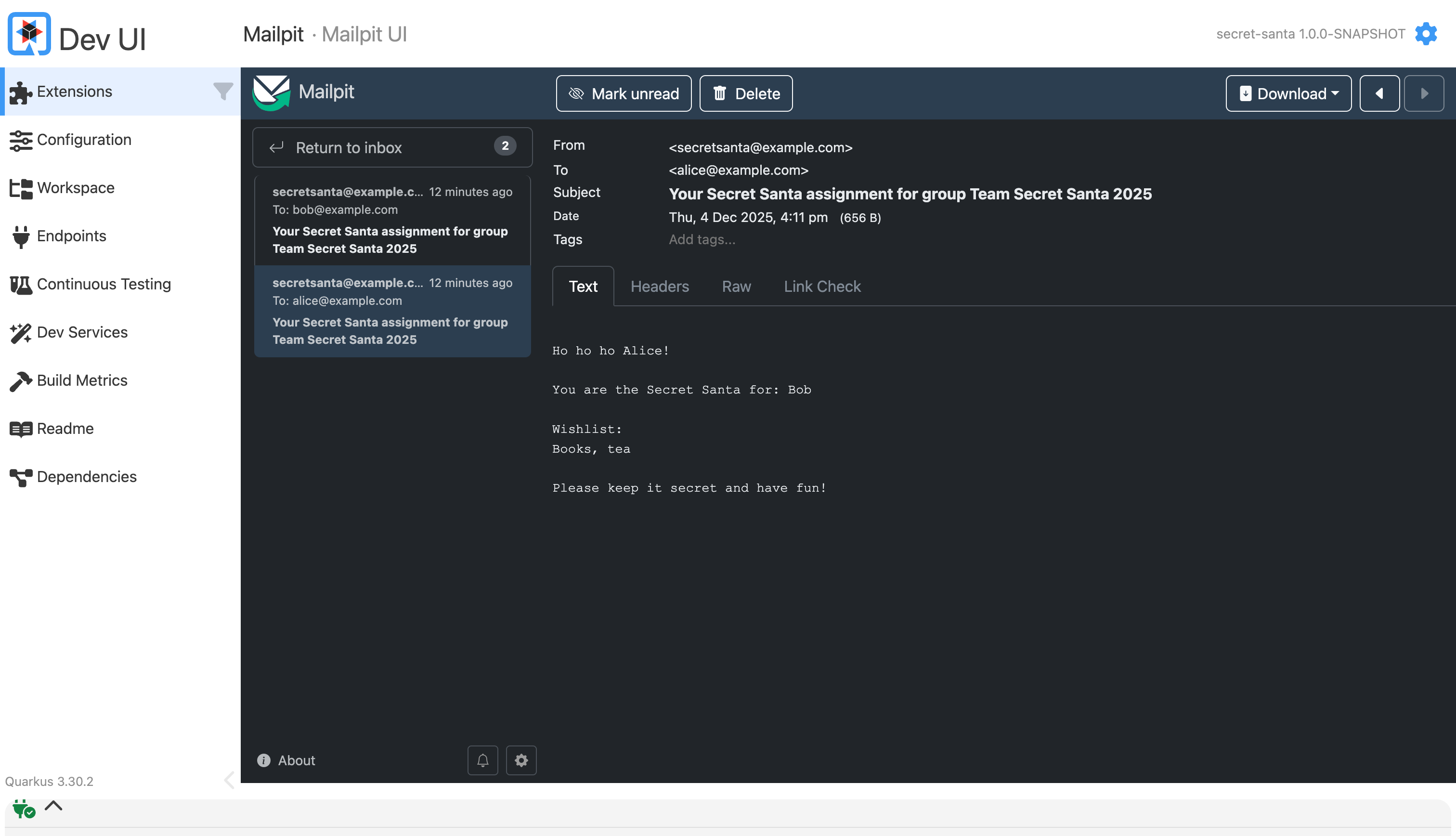
And in Mailpit / SMTP dev UI you should see something like:
Email to
alice@example.comSubject:
Your Secret Santa assignment for group Team Secret Santa 2025Body telling Alice who she is shopping for and their wishlist
At this point, your Quarkus Secret Santa API is doing what it is supposed to do. In a lean, Quarkus-native way.
Production Notes
Some things you want to tighten up for a real deployment:
Security
Basic auth is fine for demos. In production, switch to OIDC or JWT tokens. Quarkus has first-class OIDC support and integrates nicely with Keycloak and other identity providers.
Enforce HTTPS and strong password rules.
Email
Replace dev SMTP with a real provider. Configure TLS (
start-tls=REQUIRED) and credentials.Move email sending into an async or messaging-based pipeline if your groups grow large.
Database
Turn off
database.generation=updateand use migrations (Flyway or Liquibase).Point to a managed PostgreSQL instance when deploying to Kubernetes/OpenShift.
Randomization & fairness
For larger groups or stricter rules (e.g. couples not gifting each other), extend the pairing algorithm to consider constraints and perhaps include retries with backtracking.
Extensions & Variations
Once the basics work, there are plenty of ways to make the service more “enterprise”:
Add a scheduled job that reminds people about their assignments shortly before the gift date.
Store historical pairings per year to avoid repeat pairings.
Add a small Qute-based admin page to let the organizer manage everything in the browser.
Integrate with your company SSO via OIDC instead of local users.
And if you really want to go wild: use Quarkus + LangChain4j to generate gift suggestions from the wish list and send them as extra hints in the emails.
For now, you have a solid, Quarkus-native Secret Santa API that does what many Excel lists and spreadsheets do, but with Dev Services, Panache, and Quarkus Mailer making the whole experience lighter.
Time to ship it and let your Secret Santa groups go supersonic.
It's interesting to see quarkus-security-jpa in action. I wasn't aware of this extension, so thank you for allowing me to learn something new.
While addressing security categories, like users, groups, password and roles, at the application level, isn't an anti-pattern for didactic cases, I strongly beleive that it isn't the application respondibility to manage security, but the infrastructure's one.
Hence, the classical scenario consists in delegating the users management to an identity service like Keycloak, storing related data in its embedded datastore and accessing it, when required, via its API or Java client.