


Most developers think of file servers as a solved problem. You expose a directory, map a URL to it, and you are done. If you need something more advanced, you reach for SFTP, object storage, or a proprietary sync solution.
WebDAV sits in an awkward middle ground. It looks like HTTP, but behaves like a remote file system. Clients expect correct semantics for folders, metadata, partial reads, locks, and multi-status responses. Finder, Windows Explorer, and many IDEs are very unforgiving here. If one header is missing or one status code is wrong, the client silently fails or behaves strangely.
The common mistake is to treat WebDAV like “REST with XML.” That mental model breaks quickly. WebDAV is stateful in subtle ways. Clients probe capabilities using OPTIONS, inspect metadata using PROPFIND, and rely on atomic behavior for MOVE, COPY, and PUT. If your implementation blocks threads during file I/O, it works in testing and collapses under real usage.
This is where Quarkus and Vert.x fit naturally. WebDAV is I/O heavy, concurrency-heavy, and request-oriented. Vert.x gives us a non-blocking HTTP stack and an async file system API. Quarkus gives us fast startup, dev mode, dependency injection, and production-grade configuration.
This project is a WebDAV (Web Distributed Authoring and Versioning) server implementation built on Quarkus and Vert.x. The server exposes a local file system over HTTP using the WebDAV protocol and can be mounted directly by standard clients such as macOS Finder, Windows Explorer, and various WebDAV-capable file managers.
The goal of this implementation is not to provide a full enterprise-grade WebDAV stack, but a clean, understandable, and extendable baseline. The focus is correctness, client compatibility, and clear separation of responsibilities. Every protocol method is handled explicitly, and all file system access is done in a way that works under real client behavior, not just synthetic tests.
Prerequisites
You need a working Java development setup and some basic HTTP knowledge. This tutorial assumes you are comfortable reading Java code and XML.
Java 21 installed
Quarkus CLI available
Basic understanding of HTTP methods and headers
macOS for Finder testing (other clients work, but examples use Finder)
Architecture Overview
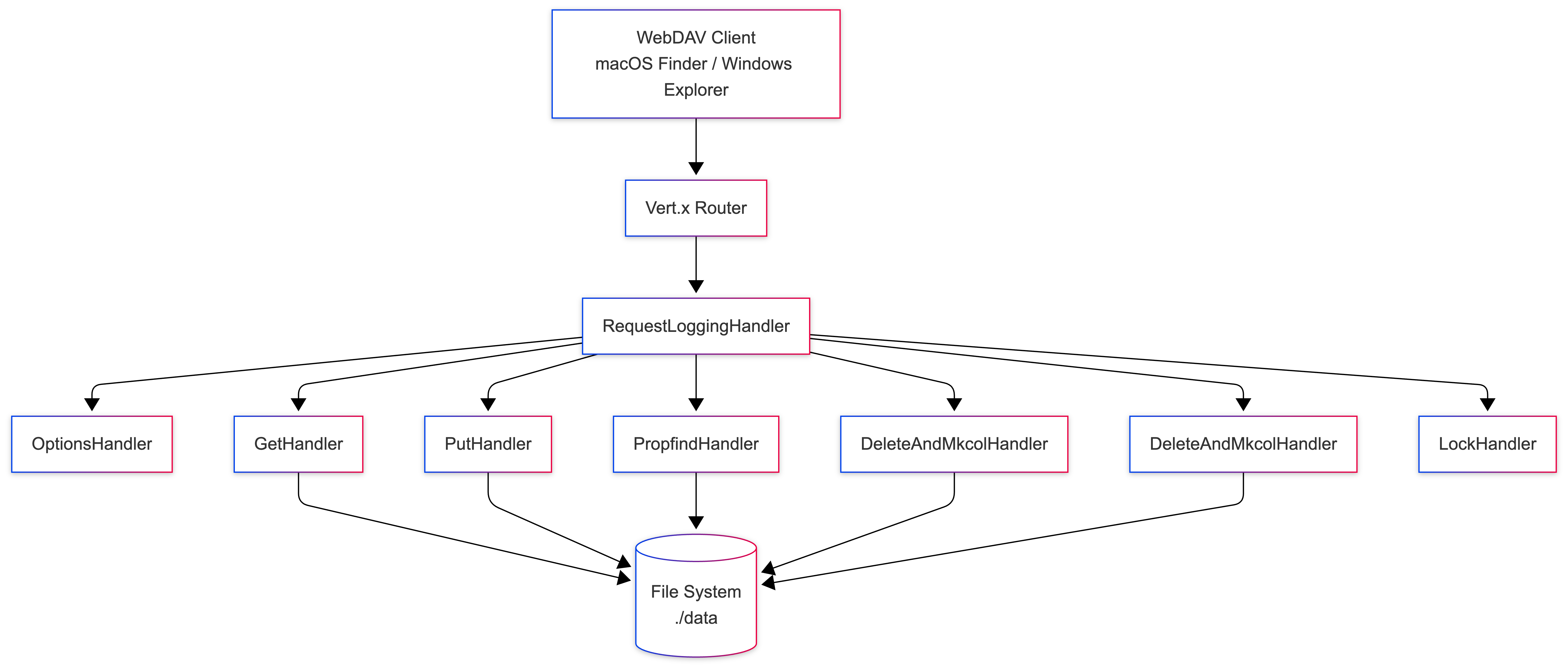
The application follows a handler-based architecture. Each WebDAV HTTP method is implemented by a dedicated handler class. There is no generic “controller” and no shared super-handler that hides behavior. This makes protocol behavior explicit and easier to reason about when clients behave unexpectedly.
All handlers are CDI beans and are registered with the Vert.x router either declaratively using @Route or programmatically by observing router initialization.
Project Setup
We start with a clean Quarkus project using Vert.x. We do not use JAX-RS here. WebDAV is not REST, and Vert.x gives us better control over low-level HTTP behavior.
Create the project or start from the complete example in my Github repository:
quarkus create app com.example:webdav-server \
  --extension=quarkus-vertx, quarkus-reactive-routes
cd webdav-server
This creates a minimal Quarkus application with Vert.x already wired in.
Implementation
Request Flow
Every request follows the same high-level flow, regardless of the HTTP method. This consistency is important when debugging client behavior.
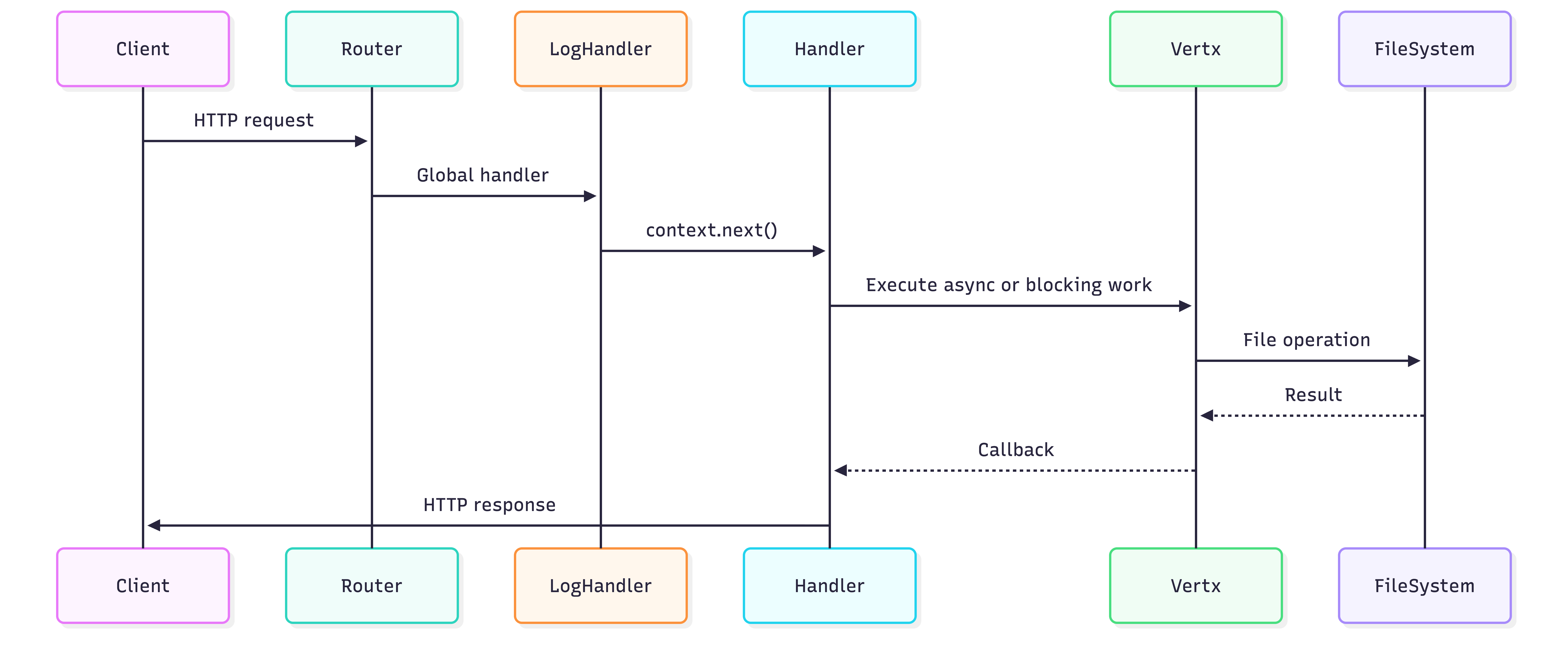
The important detail here is that blocking file system work is always isolated. The event loop never performs direct disk access.
Insights into Client Requests - RequestLoggingHandler
Logs all incoming HTTP requests. This is mainly for understanding real client behavior, especially macOS Finder, which issues many small and sometimes surprising requests.
package com.example.webdav;

import java.util.logging.Logger;

import io.vertx.ext.web.Router;
import io.vertx.ext.web.RoutingContext;
import jakarta.enterprise.context.ApplicationScoped;
import jakarta.enterprise.event.Observes;

@ApplicationScoped
public class RequestLoggingHandler {

    private static final Logger LOG = Logger.getLogger(RequestLoggingHandler.class.getName());

    void init(@Observes Router router) {

        // Add logging handler for all routes
        router.route().handler(this::logRequest);
        LOG.info("Request logging handler registered");
    }

    void logRequest(RoutingContext context) {
        LOG.info(() -> String.format("Incoming request: %s %s from %s",
                context.request().method(),
                context.request().uri(),
                context.request().remoteAddress()));
        LOG.fine(() -> "Request headers: " + context.request().headers().entries());
        LOG.fine(() -> "Request path: " + context.normalizedPath());

        // Continue to next handler
        context.next();
    }
}
Registered as a global handler
Logs HTTP method, URI, remote address, and headers
Runs before any protocol-specific handler
This handler observes router initialization using the CDI observer pattern. That guarantees it runs for every request without relying on annotation ordering.
Basic HTTP Router and OPTIONS Support
Before we handle files, we need a proper HTTP router and correct OPTIONS behavior. WebDAV clients use OPTIONS to discover server capabilities. If this is wrong, nothing else matters.
Create a router configuration class:
package com.example.webdav;

import java.util.logging.Logger;

import io.quarkus.vertx.web.Route;
import io.vertx.ext.web.RoutingContext;
import jakarta.enterprise.context.ApplicationScoped;

@ApplicationScoped
public class OptionsHandler {

    private static final Logger LOG = Logger.getLogger(OptionsHandler.class.getName());

    @Route(methods = Route.HttpMethod.OPTIONS, path = "/*")
    void options(RoutingContext context) {
        LOG.info(() -> String.format("OPTIONS request: %s %s from %s",
                context.request().method(),
                context.request().uri(),
                context.request().remoteAddress()));
        LOG.fine(() -> "Request headers: " + context.request().headers().entries());

        context.response()
                .putHeader("DAV", "1,2")
                .putHeader("Allow", "OPTIONS, GET, HEAD, PUT, DELETE, MKCOL, PROPFIND, COPY, MOVE, LOCK, UNLOCK")
                .putHeader("MS-Author-Via", "DAV")
                .setStatusCode(200)
                .end();

        LOG.info("OPTIONS response sent with status 200");
    }
}
Advertises WebDAV compliance level (
DAV: 1,2)Returns supported methods via the
AllowheaderImplemented using declarative routing
What this guarantees is that clients know which methods are available. What it does not guarantee is correct behavior for those methods. If OPTIONS is missing or incomplete, Finder simply refuses to mount the server.
You can already test this. Start your application (quarkus dev) and:
curl -i -X OPTIONS http://localhost:8080/GET and HEAD: Serving Files
Now we implement read access. This is where Vert.x shines. We use the async file system API. No blocking I/O.
Create a base directory configuration first.
In application.properties:
webdav.root=./dataNow the handler:
package com.example.webdav;

import java.nio.file.Path;
import java.util.logging.Logger;

import io.quarkus.vertx.web.Route;
import io.vertx.core.Vertx;
import io.vertx.ext.web.RoutingContext;
import jakarta.enterprise.context.ApplicationScoped;
import jakarta.inject.Inject;

@ApplicationScoped
public class GetHandler {

    private static final Logger LOG = Logger.getLogger(GetHandler.class.getName());

    @Inject
    Vertx vertx;

    @Route(methods = { Route.HttpMethod.GET, Route.HttpMethod.HEAD }, path = "/*")
    void get(RoutingContext context) {
        String root = context.vertx().getOrCreateContext().config().getString("webdav.root", "./data");
        String path = context.normalizedPath();

        LOG.info(() -> String.format("%s request: %s (normalized: %s) from %s",
                context.request().method(),
                context.request().uri(),
                path,
                context.request().remoteAddress()));

        Path filePath = Path.of(root, path);

        vertx.fileSystem().exists(filePath.toString(), exists -> {
            if (exists.failed() || !exists.result()) {
                context.response().setStatusCode(404).end();
                return;
            }

            vertx.fileSystem().props(filePath.toString(), props -> {
                if (props.failed()) {
                    context.response().setStatusCode(500).end();
                    return;
                }

                context.response()
                        .putHeader("Content-Length", String.valueOf(props.result().size()))
                        .putHeader("Last-Modified", String.valueOf(props.result().lastModifiedTime()));

                if (context.request().method().name().equals("HEAD")) {
                    context.response().end();
                } else {
                    context.response().sendFile(filePath.toString());
                }
            });
        });
    }
}
Supports both
GETandHEADUses Vert.x
FileSystemfor async accessSets correct
Content-LengthandLast-ModifiedheadersReturns
404when resources are missing
This handler avoids reading file content eagerly. Files are streamed directly to the response.
PUT: Uploading Files
Uploading files is trickier. WebDAV clients often send chunked requests and expect directories to be created automatically.
package com.example.webdav;

import java.nio.file.Files;
import java.nio.file.Path;
import java.util.logging.Logger;

import io.vertx.core.Vertx;
import io.vertx.core.http.HttpMethod;
import io.vertx.ext.web.Router;
import io.vertx.ext.web.RoutingContext;
import io.vertx.ext.web.handler.BodyHandler;
import jakarta.enterprise.context.ApplicationScoped;
import jakarta.enterprise.event.Observes;
import jakarta.inject.Inject;

@ApplicationScoped
public class PutHandler {

    private static final Logger LOG = Logger.getLogger(PutHandler.class.getName());

    @Inject
    Vertx vertx;

    void init(@Observes Router router) {
        // Configure BodyHandler specifically for PUT routes, then our handler
        router.route(HttpMethod.PUT, "/*")
                .handler(BodyHandler.create().setBodyLimit(-1))
                .handler(this::put);
        LOG.info("PUT route registered with BodyHandler");
    }

    void put(RoutingContext context) {
        String root = context.vertx().getOrCreateContext().config().getString("webdav.root", "./data");
        String normalizedPath = context.normalizedPath();
        Path rootDir = Path.of(root).toAbsolutePath().normalize();
        Path target = normalizedPath.equals("/") ? rootDir : rootDir.resolve(normalizedPath.substring(1));

        // Check if this is a macOS metadata file we should ignore
        String fileName = target.getFileName() != null ? target.getFileName().toString() : "";
        if (fileName.startsWith("._") || fileName.equals(".DS_Store") ||
                fileName.startsWith(".metadata_") || fileName.equals(".Spotlight-V100") ||
                fileName.equals(".hidden") || fileName.equals(".metadata_never_index") ||
                fileName.equals(".metadata_never_index_unless_rootfs") ||
                fileName.equals(".metadata_direct_scope_only")) {
            LOG.fine(() -> String.format("Ignoring macOS metadata file: %s", target));
            context.response().setStatusCode(204).end();
            return;
        }

        LOG.info(() -> String.format("PUT request: %s (target: %s) from %s",
                context.request().uri(),
                target,
                context.request().remoteAddress()));

        // BodyHandler should have read the body - get it from context
        // Note: macOS Finder sends PUT with Content-Length: 0 to create empty files
        // first, then follows up with actual content. We must allow empty bodies.
        var body = context.body();
        final io.vertx.core.buffer.Buffer bodyBuffer;

        if (body == null || body.buffer() == null) {
            // Empty body is valid - create an empty file
            LOG.fine(() -> String.format("PUT request with empty body for %s (creating empty file)", target));
            bodyBuffer = io.vertx.core.buffer.Buffer.buffer();
        } else {
            bodyBuffer = body.buffer();
            LOG.fine(() -> String.format("Body from context.body(): %d bytes", bodyBuffer.length()));
        }

        processPutRequest(context, target, bodyBuffer);
    }

    private void processPutRequest(RoutingContext context, Path target, io.vertx.core.buffer.Buffer bodyBuffer) {
        LOG.info(() -> String.format("Processing PUT: %s (%d bytes%s)",
                target, bodyBuffer.length(), bodyBuffer.length() == 0 ? " - creating empty file" : ""));

        // Create parent directories and write file
        vertx.executeBlocking(() -> {
            Files.createDirectories(target.getParent());
            return bodyBuffer;
        }).onFailure(e -> {
            LOG.warning(() -> String.format("PUT failed for %s: %s", target, e.getMessage()));
            context.response().setStatusCode(500).end();
        }).onSuccess(buffer -> {
            vertx.fileSystem().writeFile(
                    target.toString(),
                    buffer,
                    res -> {
                        if (res.succeeded()) {
                            LOG.info(() -> String.format("PUT success for %s", target));
                            context.response().setStatusCode(201).end();
                        } else {
                            LOG.warning(() -> String.format("PUT write failed for %s: %s", target,
                                    res.cause().getMessage()));
                            context.response().setStatusCode(500).end();
                        }
                    });
        });
    }
}
Uses Vert.x body handling to receive request content
Creates parent directories automatically
Filters macOS metadata files such as
.DS_Storeand._*Supports empty request bodies (a Finder-specific pattern)
Uses blocking execution for file writes
macOS Finder frequently uploads metadata files that should not be persisted. These requests are ignored silently and return 204 No Content. This behavior is required for a smooth Finder experience.
PROPFIND: Metadata and Directory Listings
This is the heart of WebDAV. Clients use PROPFIND to list directories and inspect metadata.
package com.example.webdav;

import java.nio.file.Files;
import java.nio.file.Path;
import java.nio.file.attribute.FileTime;
import java.time.Instant;
import java.time.ZoneId;
import java.time.format.DateTimeFormatter;
import java.util.logging.Logger;
import java.util.stream.Collectors;

import io.vertx.core.Vertx;
import io.vertx.core.http.HttpMethod;
import io.vertx.ext.web.Router;
import io.vertx.ext.web.RoutingContext;
import jakarta.enterprise.context.ApplicationScoped;
import jakarta.enterprise.event.Observes;
import jakarta.inject.Inject;

@ApplicationScoped
public class PropfindHandler {

    private static final Logger LOG = Logger.getLogger(PropfindHandler.class.getName());

    @Inject
    Vertx vertx;

    void init(@Observes Router router) {
        router.route(HttpMethod.PROPFIND, "/*").handler(this::propfind);
        LOG.info("PROPFIND route registered");
    }

    void propfind(RoutingContext context) {
        String root = context.vertx().getOrCreateContext().config().getString("webdav.root", "./data");
        String normalizedPath = context.normalizedPath();
        Path rootDir = Path.of(root).toAbsolutePath().normalize();

        // Handle root path - if path is "/", target is rootDir, otherwise build path
        Path target = normalizedPath.equals("/") ? rootDir : rootDir.resolve(normalizedPath.substring(1));

        LOG.info(() -> String.format("PROPFIND request: %s (root: %s, target: %s, absolute: %s) from %s",
                context.request().uri(),
                root,
                target,
                target.toAbsolutePath(),
                context.request().remoteAddress()));
        LOG.fine(() -> "Request headers: " + context.request().headers().entries());

        String depth = context.request().getHeader("Depth");

        vertx.executeBlocking(() -> {
            // Ensure root directory exists
            if (!Files.exists(rootDir)) {
                Files.createDirectories(rootDir);
                LOG.info(() -> String.format("Created root directory: %s (absolute: %s)", rootDir,
                        rootDir.toAbsolutePath()));
            } else {
                LOG.fine(() -> String.format("Root directory exists: %s (absolute: %s)", rootDir,
                        rootDir.toAbsolutePath()));
            }

            if (!Files.exists(target)) {
                LOG.warning(() -> String.format("Target does not exist: %s (absolute: %s)", target,
                        target.toAbsolutePath()));
                throw new RuntimeException("Not found");
            }

            // Build response for the requested resource itself
            final String href;
            if (normalizedPath.equals("/")) {
                href = "/";
            } else {
                href = normalizedPath.endsWith("/") ? normalizedPath : normalizedPath + "/";
            }

            boolean isDirectory = Files.isDirectory(target);
            String resourceType = isDirectory ? "<d:collection/>" : "";
            long contentLength = isDirectory ? 0 : Files.size(target);
            FileTime lastModifiedTime = Files.getLastModifiedTime(target);
            // Format date in RFC 822 format (required by WebDAV)
            String lastModified = DateTimeFormatter.RFC_1123_DATE_TIME
                    .withZone(ZoneId.of("GMT"))
                    .format(Instant.ofEpochMilli(lastModifiedTime.toMillis()));

            // Generate ETag (simple implementation)
            String etag = "\"" + lastModifiedTime.toMillis() + "-" + contentLength + "\"";

            String selfResponse = String.format(
                    "<d:response>" +
                            "<d:href>%s</d:href>" +
                            "<d:propstat>" +
                            "<d:prop>" +
                            "<d:displayname>%s</d:displayname>" +
                            "<d:resourcetype>%s</d:resourcetype>" +
                            "<d:getcontentlength>%d</d:getcontentlength>" +
                            "<d:getlastmodified>%s</d:getlastmodified>" +
                            "<d:getetag>%s</d:getetag>" +
                            "<d:creationdate>%s</d:creationdate>" +
                            "</d:prop>" +
                            "<d:status>HTTP/1.1 200 OK</d:status>" +
                            "</d:propstat>" +
                            "</d:response>",
                    href,
                    target.getFileName().toString().isEmpty() ? "/" : target.getFileName().toString(),
                    resourceType,
                    contentLength,
                    lastModified,
                    etag,
                    lastModified // Use lastModified as creationdate for simplicity
            );

            // If Depth=1 or Infinity, also include children
            final String childrenResponse;
            if (!"0".equals(depth) && isDirectory) {
                LOG.fine(() -> String.format("Depth=%s, listing children of %s", depth, target));
                try {
                    String children = Files.list(target)
                            .map(p -> {
                                try {
                                    boolean childIsDir = Files.isDirectory(p);
                                    String childHref = href + p.getFileName().toString() + (childIsDir ? "/" : "");
                                    String childResourceType = childIsDir ? "<d:collection/>" : "";
                                    long childContentLength = childIsDir ? 0 : Files.size(p);
                                    FileTime childLastModifiedTime = Files.getLastModifiedTime(p);
                                    String childLastModified = DateTimeFormatter.RFC_1123_DATE_TIME
                                            .withZone(ZoneId.of("GMT"))
                                            .format(Instant.ofEpochMilli(childLastModifiedTime.toMillis()));
                                    String childEtag = "\"" + childLastModifiedTime.toMillis() + "-"
                                            + childContentLength + "\"";

                                    return String.format(
                                            "<d:response>" +
                                                    "<d:href>%s</d:href>" +
                                                    "<d:propstat>" +
                                                    "<d:prop>" +
                                                    "<d:displayname>%s</d:displayname>" +
                                                    "<d:resourcetype>%s</d:resourcetype>" +
                                                    "<d:getcontentlength>%d</d:getcontentlength>" +
                                                    "<d:getlastmodified>%s</d:getlastmodified>" +
                                                    "<d:getetag>%s</d:getetag>" +
                                                    "<d:creationdate>%s</d:creationdate>" +
                                                    "</d:prop>" +
                                                    "<d:status>HTTP/1.1 200 OK</d:status>" +
                                                    "</d:propstat>" +
                                                    "</d:response>",
                                            childHref,
                                            p.getFileName().toString(),
                                            childResourceType,
                                            childContentLength,
                                            childLastModified,
                                            childEtag,
                                            childLastModified);
                                } catch (java.io.IOException e) {
                                    throw new RuntimeException("Failed to process file: " + p, e);
                                }
                            })
                            .collect(Collectors.joining());
                    childrenResponse = children;
                    LOG.fine(() -> String.format("Found children, response length: %d", childrenResponse.length()));
                } catch (java.io.IOException e) {
                    throw new RuntimeException("Failed to list directory: " + e.getMessage(), e);
                }
            } else {
                LOG.fine(() -> String.format("Depth=%s, isDirectory=%s, skipping children", depth, isDirectory));
                childrenResponse = "";
            }

            return "<?xml version=\"1.0\" encoding=\"utf-8\"?>" +
                    "<d:multistatus xmlns:d=\"DAV:\">" +
                    selfResponse +
                    childrenResponse +
                    "</d:multistatus>";
        }).onFailure(e -> {
            LOG.warning(() -> String.format("PROPFIND failed for %s: %s", target, e.getMessage()));
            context.response().setStatusCode(404).end();
        }).onSuccess(xml -> {
            LOG.info(() -> String.format("PROPFIND success for %s, returning %d bytes", target,
                    xml.toString().length()));
            context.response()
                    .putHeader("Content-Type", "application/xml; charset=utf-8")
                    .setStatusCode(207)
                    .end(xml.toString());
        });
    }
}
Returns XML
multistatusresponsesSupports
Depthheader values0,1, andinfinityGenerates standard WebDAV properties such as
displayname,resourcetype, andgetcontentlengthAutomatically creates the root directory if missing
Works for both files and directories
All responses use XML with the DAV: namespace, as required by the protocol.
DELETE and MKCOL
Delete and folder creation are straightforward.
package com.example.webdav;

import java.nio.file.Files;
import java.nio.file.Path;

import io.quarkus.vertx.web.Route;
import io.vertx.core.Vertx;
import io.vertx.core.http.HttpMethod;
import io.vertx.ext.web.Router;
import io.vertx.ext.web.RoutingContext;
import jakarta.enterprise.context.ApplicationScoped;
import jakarta.enterprise.event.Observes;
import jakarta.inject.Inject;

@ApplicationScoped
public class DeleteAndMkcolHandler {

    @Inject
    Vertx vertx;

    @Route(methods = Route.HttpMethod.DELETE, path = "/*")
    void delete(RoutingContext context) {
        String root = context.vertx().getOrCreateContext().config().getString("webdav.root", "./data");
        Path target = Path.of(root, context.normalizedPath());

        vertx.executeBlocking(() -> {
            if (Files.exists(target)) {
                if (Files.isDirectory(target)) {
                    Files.walk(target)
                            .sorted((a, b) -> b.compareTo(a))
                            .forEach(path -> {
                                try {
                                    Files.delete(path);
                                } catch (Exception e) {
                                    throw new RuntimeException(e);
                                }
                            });
                } else {
                    Files.delete(target);
                }
            }
            return null;
        }).onSuccess(v -> {
            context.response().setStatusCode(204).end();
        }).onFailure(e -> {
            context.response().setStatusCode(404).end();
        });
    }

    void init(@Observes Router router) {
        router.route(HttpMethod.MKCOL, "/*").handler(this::mkcol);
    }

    void mkcol(RoutingContext context) {
        String root = context.vertx().getOrCreateContext().config().getString("webdav.root", "./data");
        Path target = Path.of(root, context.normalizedPath());

        vertx.executeBlocking(() -> {
            Files.createDirectories(target);
            return null;
        }).onSuccess(v -> {
            context.response().setStatusCode(201).end();
        }).onFailure(e -> {
            context.response().setStatusCode(405).end();
        });
    }
}DELETE: Recursively deletes files and directoriesMKCOL: Creates directories (collections)Uses blocking execution for file tree traversal
Deletes directories in reverse order to avoid failures
Both operations use executeBlocking to run file system work off the event loop: DELETE recursively removes files and directories using Java NIO’s Files.walk(), while MKCOL creates directory structures with Files.createDirectories().
LOCK and UNLOCK
Handles LOCK and UNLOCK requests. These are required for macOS Finder compatibility, even in single-user scenarios.
package com.example.webdav;

import java.util.UUID;
import java.util.logging.Logger;

import io.vertx.core.http.HttpMethod;
import io.vertx.ext.web.Router;
import io.vertx.ext.web.RoutingContext;
import jakarta.enterprise.context.ApplicationScoped;
import jakarta.enterprise.event.Observes;

@ApplicationScoped
public class LockHandler {

        private static final Logger LOG = Logger.getLogger(LockHandler.class.getName());

        void init(@Observes Router router) {
                router.route(HttpMethod.valueOf("LOCK"), "/*").handler(this::lock);
                router.route(HttpMethod.valueOf("UNLOCK"), "/*").handler(this::unlock);
                LOG.info("LOCK/UNLOCK routes registered");
        }

        void lock(RoutingContext context) {
                String normalizedPath = context.normalizedPath();
                String lockToken = "opaquelocktoken:" + UUID.randomUUID().toString();

                LOG.info(() -> String.format("LOCK request: %s from %s, returning token: %s",
                                normalizedPath,
                                context.request().remoteAddress(),
                                lockToken));

                // Return a WebDAV lock response
                String xml = "<?xml version=\"1.0\" encoding=\"utf-8\"?>\n" +
                                "<d:prop xmlns:d=\"DAV:\">\n" +
                                "  <d:lockdiscovery>\n" +
                                "    <d:activelock>\n" +
                                "      <d:locktype><d:write/></d:locktype>\n" +
                                "      <d:lockscope><d:exclusive/></d:lockscope>\n" +
                                "      <d:depth>infinity</d:depth>\n" +
                                "      <d:owner>\n" +
                                "        <d:href>anonymous</d:href>\n" +
                                "      </d:owner>\n" +
                                "      <d:timeout>Second-3600</d:timeout>\n" +
                                "      <d:locktoken>\n" +
                                "        <d:href>" + lockToken + "</d:href>\n" +
                                "      </d:locktoken>\n" +
                                "      <d:lockroot>\n" +
                                "        <d:href>" + normalizedPath + "</d:href>\n" +
                                "      </d:lockroot>\n" +
                                "    </d:activelock>\n" +
                                "  </d:lockdiscovery>\n" +
                                "</d:prop>";

                context.response()
                                .putHeader("Content-Type", "application/xml; charset=utf-8")
                                .putHeader("Lock-Token", "<" + lockToken + ">")
                                .setStatusCode(200)
                                .end(xml);
        }

        void unlock(RoutingContext context) {
                String normalizedPath = context.normalizedPath();
                String lockToken = context.request().getHeader("Lock-Token");

                LOG.info(() -> String.format("UNLOCK request: %s (token: %s) from %s",
                                normalizedPath,
                                lockToken,
                                context.request().remoteAddress()));

                // Always succeed - we don't actually track locks
                context.response()
                                .setStatusCode(204)
                                .end();
        }
}
Generates UUID-based fake lock tokens
Returns valid WebDAV lock XML responses
Always succeeds on
UNLOCKDoes not track lock state
This implementation is intentionally simplified. It provides protocol compliance, not real concurrency control. For multi-user environments, persistent lock tracking is required!
Component Interaction
The following class diagram illustrates the relationships and dependencies between the handler classes and their external dependencies. Each handler receives a RoutingContext from Vert.x, which provides access to the HTTP request and response objects. Handlers that perform file system operations also depend on the Vertx instance, which is injected via CDI. This diagram helps visualize the uniform interface pattern used across all handlers and their shared dependencies on the Vert.x framework.

Configuration
We already introduced webdav.root. Add logging so you can see what Finder is doing.
# Enable detailed logging for debugging
quarkus.log.level=INFO
quarkus.log.category."io.vertx".level=DEBUG
quarkus.log.category."io.vertx.ext.web".level=DEBUG
quarkus.log.category."io.vertx.core.http".level=DEBUG
quarkus.log.category."com.example.webdav".level=DEBUG

# Enable HTTP access logging
quarkus.http.access-log.enabled=true
quarkus.http.access-log.pattern=%h %l %u %t \"%r\" %s %b \"%{i,Referer}\" \"%{i,User-Agent}\" %D
This helps during debugging. Finder issues many requests in short bursts. Seeing them helps understand behavior.
Routing Registration
Two routing styles are used intentionally.
Observer-based registration (used by most handlers):
void init(@Observes Router router) {
    router.route(HttpMethod.PUT, "/*").handler(this::put);
}
Declarative routing (used for simple cases):
@Route(methods = Route.HttpMethod.OPTIONS, path = "/*")
void options(RoutingContext context) { }
Both approaches integrate cleanly with Quarkus and Vert.x.
What Happens Under Load
Finder opens multiple connections and preloads metadata. With blocking I/O, threads pile up. With Vert.x, file reads are async and scale naturally.
The weak spot is XML processing and directory traversal. We already isolated it using executeBlocking. That is the correct boundary.
Security Considerations
This server is open by default. Anyone can read and write files.
In production, you must add authentication. Quarkus Security integrates cleanly here. You can add Basic Auth or Bearer tokens and check them in handlers.
Do not expose this server publicly without auth. WebDAV is very easy to abuse. This is a learning example and not a production blueprint!
Verification
Mounting in macOS Finder
Create the data directory inside your project rool:
mkdir dataIn Finder:
Press Cmd+K
Enter http://localhost:8080/
Connect
You can now drag files, create folders, and delete content. If Finder refuses to connect, check OPTIONS first.
Command Line Checks
curl -X PROPFIND http://localhost:8080/Expected behavior is a 207 response with XML content.
Conclusion
We built a working WebDAV server using Quarkus and Vert.x that you can mount in Finder and extend safely. The async file system API keeps I/O scalable, the handler structure keeps responsibilities clear, and dev mode makes iteration fast.
The complete code is ready to evolve into authentication, locking, or alternative storage backends.
Possible extensions for your to continue playing:
Real lock storage and expiration
Authentication and authorization
COPY and MOVE support
PROPPATCH handling
Configuration validation
Rate limiting and security headers