


Most developers think magic links are just a nicer login screen. You collect an email address, send a link, and skip the password form. That is the simple view, and it is the one that breaks first in production.
The real problem is not sending an email. The real problem is issuing a credential that lives in inboxes, browser history, reverse proxy logs, and support screenshots. If you store that credential in plain form, reuse it, or let it live too long, your passwordless login becomes a password reset vulnerability with better branding.
This gets worse when teams mix several flows without clear boundaries. A login link, an email verification link, and a password reset link all look similar on the surface. In code, they are not the same thing. If one token can be reused for another purpose, or if a token is not consumed atomically, you create the kind of security bug that only shows up when traffic is high and people are tired.
There is also a second production problem: identity grows. A custom token flow is fine for one application. The moment you need SSO, central policies, MFA, LDAP, or delegated login, the homegrown system becomes an integration surface. Quarkus is a good place to build the application-side mechanics, but you need to know where your code should stop and where Keycloak should take over. Quarkus supports both JWT-based application security and OIDC code flow with Keycloak, so you do not need to fake your own identity platform.
In this tutorial, we build the local application side first. We create one-time opaque tokens, store only their hashes, send links through Mailpit, consume them exactly once, and issue a session JWT after successful login. Then we connect the app to Keycloak, not by pretending Keycloak is just another mail sender, but by using it for what it is good at: centralized login, browser-based OIDC flows, and built-in account flows such as email verification and reset credentials. Keycloak’s extension catalog also points to Magic Link Login as an extension, which matters because it means you should not assume passwordless magic-link login is a built-in realm feature in current Keycloak releases.
Prerequisites
You need a recent Java and Quarkus setup, plus a local container runtime for PostgreSQL and Mailpit. I assume you know basic REST, JPA, and JSON, but not that you have built a passwordless flow before.
Java 21 installed
Maven 3.9+
Quarkus CLI installed
Podman and Podman Compose available
Basic understanding of REST endpoints and JPA entities
Project Setup
Create the project or start from my Github repository.
quarkus create app com.example:magic-link-demo \
  --extension='quarkus-rest-jackson,quarkus-hibernate-orm-panache,quarkus-jdbc-postgresql,quarkus-mailer,io.quarkiverse.mailpit:quarkus-mailpit,quarkus-scheduler,quarkus-smallrye-jwt,quarkus-elytron-security-common,quarkus-qute,quarkus-oidc' \
  --java=21 \
  --no-code
cd magic-link-demo
What we need for what:
quarkus-rest-jackson- JSON REST endpointsquarkus-hibernate-orm-panache- entity persistence with simple query helpersquarkus-jdbc-postgresql- PostgreSQL driver and Dev Services supportquarkus-mailer- SMTP integration for Mailpit and production mail relaysquarkus-mailpit- is an email testing tool that acts as both an SMTP server, and provides a web interface to view all captured emails.quarkus-scheduler- token cleanup jobquarkus-smallrye-jwt- signing the session JWT after loginquarkus-elytron-security-common- bcrypt hashing for local password resetquarkus-qute- HTML email templatesquarkus-oidc- Keycloak integration through OIDC code flow
Quarkus handles all the dependencies via its Dev Services automatically. So you don’t need a Docker or Podman Compose file.
When you start your application, Mailpit runs at http://localhost:8080/q/mailpit/, Keycloak runs at http://localhost:8180.
Generate a local JWT signing key pair:
openssl genrsa -out privateKey.pem 2048
openssl rsa -in privateKey.pem -pubout -out publicKey.pem
Put both files in the project root for now. Later you would move them to proper secret management.
Implementation
Modeling users and token purposes
We need two entities. One stores the user. The other stores a hashed one-time token with strict purpose and expiry. The purpose field is not decoration. It is the boundary that stops a password reset token from acting like a login token.
Create src/main/java/com/example/auth/User.java:
package com.example.auth;

import java.util.Optional;

import io.quarkus.hibernate.orm.panache.PanacheEntity;
import jakarta.persistence.Column;
import jakarta.persistence.Entity;
import jakarta.persistence.Table;

@Entity
@Table(name = "app_user")
public class User extends PanacheEntity {

    @Column(nullable = false, unique = true, length = 320)
    public String email;

    @Column(nullable = false, length = 120)
    public String displayName;

    @Column(nullable = false, length = 100)
    public String passwordHash;

    @Column(nullable = false)
    public boolean emailVerified = false;

    public static Optional<User> findByEmail(String email) {
        if (email == null) {
            return Optional.empty();
        }
        return find("email", email.trim().toLowerCase()).firstResultOptional();
    }
}
Create src/main/java/com/example/auth/TokenPurpose.java:
package com.example.auth;

public enum TokenPurpose {
    MAGIC_LOGIN,
    EMAIL_VERIFY,
    PASSWORD_RESET
}
Create src/main/java/com/example/auth/AuthToken.java:
package com.example.auth;

import java.time.Instant;
import java.util.Optional;

import io.quarkus.hibernate.orm.panache.PanacheEntity;
import jakarta.persistence.Column;
import jakarta.persistence.Entity;
import jakarta.persistence.EnumType;
import jakarta.persistence.Enumerated;
import jakarta.persistence.Index;
import jakarta.persistence.ManyToOne;
import jakarta.persistence.Table;

@Entity
@Table(name = "auth_token", indexes = {
        @Index(name = "idx_auth_token_hash", columnList = "tokenHash"),
        @Index(name = "idx_auth_token_expires", columnList = "expiresAt")
})
public class AuthToken extends PanacheEntity {

    @ManyToOne(optional = false)
    public User user;

    @Column(nullable = false, unique = true, length = 64)
    public String tokenHash;

    @Enumerated(EnumType.STRING)
    @Column(nullable = false, length = 40)
    public TokenPurpose purpose;

    @Column(nullable = false)
    public Instant expiresAt;

    @Column(nullable = false)
    public boolean used = false;

    @Column(nullable = false)
    public Instant createdAt = Instant.now();

    @Column
    public Instant usedAt;

    public static Optional<AuthToken> findValid(String tokenHash, TokenPurpose purpose) {
        return find(
                "tokenHash = ?1 and purpose = ?2 and used = false and expiresAt > ?3",
                tokenHash,
                purpose,
                Instant.now()).firstResultOptional();
    }

    public static long invalidateExisting(User user, TokenPurpose purpose) {
        return update(
                "used = true, usedAt = ?1 where user = ?2 and purpose = ?3 and used = false",
                Instant.now(),
                user,
                purpose);
    }

    public static long deleteExpiredOrUsed() {
        return delete("expiresAt < ?1 or used = true", Instant.now());
    }
}
This gives us a clean separation. User is long-lived identity state. AuthToken is short-lived action state. That sounds obvious, but it matters under stress. When you keep these concerns together, cleanup gets harder, indexes get worse, and you start writing queries that do login logic inside your user table.
The other guarantee here is purpose isolation. A token row only works for one action. The limit is just as important: this does not protect you from email compromise. If someone controls the inbox, they control the link. The job of this design is to make the link short-lived, single-use, and scoped.
Generating and consuming tokens safely
We need one class that owns raw token handling. No controller, no template, and no test helper should invent its own hashing or token generation.
Create src/main/java/com/example/auth/TokenService.java:
package com.example.auth;

import java.nio.charset.StandardCharsets;
import java.security.MessageDigest;
import java.security.NoSuchAlgorithmException;
import java.security.SecureRandom;
import java.time.Instant;
import java.util.HexFormat;
import java.util.Optional;

import org.eclipse.microprofile.config.inject.ConfigProperty;

import jakarta.enterprise.context.ApplicationScoped;
import jakarta.transaction.Transactional;

@ApplicationScoped
public class TokenService {

    private final SecureRandom secureRandom = new SecureRandom();

    @ConfigProperty(name = "app.magic-link.expiry-minutes", defaultValue = "15")
    int magicLinkExpiryMinutes;

    @ConfigProperty(name = "app.email-verify.expiry-hours", defaultValue = "48")
    int emailVerifyExpiryHours;

    @ConfigProperty(name = "app.password-reset.expiry-minutes", defaultValue = "20")
    int passwordResetExpiryMinutes;

    @Transactional
    public String createToken(User user, TokenPurpose purpose) {
        AuthToken.invalidateExisting(user, purpose);

        byte[] bytes = new byte[32];
        secureRandom.nextBytes(bytes);
        String rawToken = HexFormat.of().formatHex(bytes);

        AuthToken authToken = new AuthToken();
        authToken.user = user;
        authToken.tokenHash = sha256Hex(rawToken);
        authToken.purpose = purpose;
        authToken.expiresAt = Instant.now().plusSeconds(resolveLifetimeSeconds(purpose));
        authToken.persist();

        return rawToken;
    }

    @Transactional
    public Optional<User> validateAndConsume(String rawToken, TokenPurpose purpose) {
        if (rawToken == null || rawToken.isBlank()) {
            return Optional.empty();
        }

        String hash = sha256Hex(rawToken.trim());

        return AuthToken.findValid(hash, purpose).map(token -> {
            token.used = true;
            token.usedAt = Instant.now();
            return token.user;
        });
    }

    private long resolveLifetimeSeconds(TokenPurpose purpose) {
        return switch (purpose) {
            case MAGIC_LOGIN -> magicLinkExpiryMinutes * 60L;
            case EMAIL_VERIFY -> emailVerifyExpiryHours * 3600L;
            case PASSWORD_RESET -> passwordResetExpiryMinutes * 60L;
        };
    }

    String sha256Hex(String value) {
        try {
            MessageDigest md = MessageDigest.getInstance("SHA-256");
            byte[] digest = md.digest(value.getBytes(StandardCharsets.UTF_8));
            return HexFormat.of().formatHex(digest);
        } catch (NoSuchAlgorithmException e) {
            throw new IllegalStateException("SHA-256 is not available", e);
        }
    }
}
The critical thing here is not the random number generator. SecureRandom is the easy part. The critical thing is that the raw token only exists long enough to be emailed. After that, the server works with the SHA-256 hash.
This protects you from a very boring but very common failure mode: database exposure. If your auth_token table leaks and you stored raw values, every unexpired row is a working credential. With hashes, an attacker still sees metadata, but not the token itself. The limit is also clear: unlike password hashes, we are not using a slow password KDF here because the token is already high entropy and random. We want exact match speed on a short-lived secret, not human-password hardening.
Cleaning up old tokens
One-time token tables grow fast. You do not notice this in development. You do notice it after a few weeks when indexes bloat and every support-triggered resend leaves more expired rows behind.
Create src/main/java/com/example/auth/TokenCleanupJob.java:
package com.example.auth;

import org.jboss.logging.Logger;

import io.quarkus.scheduler.Scheduled;
import jakarta.enterprise.context.ApplicationScoped;
import jakarta.transaction.Transactional;

@ApplicationScoped
public class TokenCleanupJob {

    private static final Logger LOG = Logger.getLogger(TokenCleanupJob.class);

    @Scheduled(every = "1h")
    @Transactional
    void purge() {
        long deleted = AuthToken.deleteExpiredOrUsed();
        LOG.infof("Deleted %d used or expired auth tokens", deleted);
    }
}
This does not change correctness, but it changes operational behavior. Without cleanup, your hot path query still works because tokenHash is indexed. The problem shows up in maintenance cost, table growth, and accidental reporting queries that scan old data.
Sending emails with Qute and Mailer
We need one service for all outbound token mails and separate templates for each flow. Qute fits well here because Quarkus validates checked templates at build time. That removes one class of runtime errors before you send broken links to real users. Quarkus documents Mailer and Qute integration patterns, and Mailpit gives us a safe SMTP target plus a REST API for tests.
Create src/main/resources/templates/EmailService/magicLink.html:
<!DOCTYPE html>
<html>

<head>
    <meta charset="UTF-8">
    <title>Sign in</title>
</head>

<body style="font-family: Arial, sans-serif; max-width: 560px; margin: 0 auto;">
    <h2>Sign in to {appName}</h2>
    <p>This link expires in {lifetimeText} and works only once.</p>
    <p>
        <a href="{url}"
            style="display:inline-block;padding:12px 24px;background:#0f62fe;color:#ffffff;text-decoration:none;border-radius:4px;">
            Sign in
        </a>
    </p>
    <p>If you did not request this email, you can ignore it.</p>
    <p>Fallback URL: {url}</p>
</body>

</html>
Create src/main/resources/templates/EmailService/emailVerify.html:
<!DOCTYPE html>
<html>

<head>
    <meta charset="UTF-8">
    <title>Verify your email</title>
</head>

<body style="font-family: Arial, sans-serif; max-width: 560px; margin: 0 auto;">
    <h2>Verify your email address</h2>
    <p>Click the link below to confirm that you own this email address.</p>
    <p>
        <a href="{url}"
            style="display:inline-block;padding:12px 24px;background:#198038;color:#ffffff;text-decoration:none;border-radius:4px;">
            Verify email
        </a>
    </p>
    <p>If you did not create this account, you can ignore it.</p>
    <p>Fallback URL: {url}</p>
</body>

</html>
Create src/main/resources/templates/EmailService/passwordReset.html:
<!DOCTYPE html>
<html>

<head>
    <meta charset="UTF-8">
    <title>Reset your password</title>
</head>

<body style="font-family: Arial, sans-serif; max-width: 560px; margin: 0 auto;">
    <h2>Reset your password</h2>
    <p>This link expires in {lifetimeText} and works only once.</p>
    <p>
        <a href="{url}"
            style="display:inline-block;padding:12px 24px;background:#8a3ffc;color:#ffffff;text-decoration:none;border-radius:4px;">
            Reset password
        </a>
    </p>
    <p>If you did not request a password reset, you can ignore it.</p>
    <p>Fallback URL: {url}</p>
</body>

</html>
Create src/main/java/com/example/auth/EmailService.java:
package com.example.auth;

import org.eclipse.microprofile.config.inject.ConfigProperty;

import io.quarkus.mailer.Mail;
import io.quarkus.mailer.Mailer;
import io.quarkus.qute.CheckedTemplate;
import io.quarkus.qute.TemplateInstance;
import jakarta.enterprise.context.ApplicationScoped;
import jakarta.inject.Inject;

@ApplicationScoped
public class EmailService {

    @Inject
    Mailer mailer;

    @Inject
    TokenService tokenService;

    @ConfigProperty(name = "app.base-url")
    String baseUrl;

    @ConfigProperty(name = "app.mail.from")
    String fromAddress;

    @CheckedTemplate
    public static class AuthTemplates {
        public static native TemplateInstance magicLink(String appName, String url, String lifetimeText);

        public static native TemplateInstance emailVerify(String url);

        public static native TemplateInstance passwordReset(String url, String lifetimeText);
    }

    public void sendMagicLink(User user) {
        String rawToken = tokenService.createToken(user, TokenPurpose.MAGIC_LOGIN);
        String url = baseUrl + "/auth/magic?token=" + rawToken;
        String html = AuthTemplates.magicLink("Magic Link Demo", url, "15 minutes").render();

        mailer.send(
                Mail.withHtml(user.email, "Your sign-in link", html)
                        .setFrom(fromAddress));
    }

    public void sendEmailVerification(User user) {
        String rawToken = tokenService.createToken(user, TokenPurpose.EMAIL_VERIFY);
        String url = baseUrl + "/auth/verify-email?token=" + rawToken;
        String html = AuthTemplates.emailVerify(url).render();

        mailer.send(
                Mail.withHtml(user.email, "Verify your email address", html)
                        .setFrom(fromAddress));
    }

    public void sendPasswordReset(User user) {
        String rawToken = tokenService.createToken(user, TokenPurpose.PASSWORD_RESET);
        String url = baseUrl + "/auth/reset-password?token=" + rawToken;
        String html = AuthTemplates.passwordReset(url, "20 minutes").render();

        mailer.send(
                Mail.withHtml(user.email, "Reset your password", html)
                        .setFrom(fromAddress));
    }
}
The main guarantee here is consistency. Every token email uses the same service, the same base URL source, and the same token boundary. That reduces the chance that one endpoint quietly ships a different token lifetime or raw URL shape.
The limit is that email delivery is still external I/O. If SMTP is slow, this method is slow. For a production system you usually move mail sending onto a queue or an outbox table. For a hands-on tutorial, synchronous sending keeps the flow visible.
Managing local users and passwords
We still need a small service for registration and password changes. This is where we use bcrypt. Quarkus provides bcrypt support through Elytron security utilities, which is enough for local password fallback and reset flows. (quarkus.io)
Create src/main/java/com/example/auth/UserService.java:
package com.example.auth;

import java.util.Optional;

import io.quarkus.elytron.security.common.BcryptUtil;
import jakarta.enterprise.context.ApplicationScoped;
import jakarta.transaction.Transactional;

@ApplicationScoped
public class UserService {

    @Transactional
    public User register(String email, String displayName, String password) {
        Optional<User> existing = User.findByEmail(email);
        if (existing.isPresent()) {
            return existing.get();
        }

        User user = new User();
        user.email = email.trim().toLowerCase();
        user.displayName = displayName;
        user.passwordHash = BcryptUtil.bcryptHash(password);
        user.emailVerified = false;
        user.persist();
        return user;
    }

    @Transactional
    public void markEmailVerified(long userId) {
        User user = User.findById(userId);
        if (user != null) {
            user.emailVerified = true;
        }
    }

    @Transactional
    public void changePassword(User user, String newPassword) {
        if (newPassword == null || newPassword.length() < 12) {
            throw new IllegalArgumentException("Password must be at least 12 characters long");
        }
        user.passwordHash = BcryptUtil.bcryptHash(newPassword);
    }
}
This service does two things and only two things. It creates local users and rotates password hashes. It does not know about tokens, and it does not know about OIDC claims. That separation matters later when we add Keycloak. Otherwise your code ends up with a single “identity service” that does everything and becomes impossible to change.
Issuing a session JWT after magic-link login
After a magic link is consumed, we need to establish a session. For this tutorial, we return a signed JWT in the response body. In a browser app, you would usually move this to an HttpOnly secure cookie. Quarkus SmallRye JWT supports local signing and MicroProfile JWT-compatible claims. (quarkus.io)
Create src/main/java/com/example/auth/JwtService.java:
package com.example.auth;

import java.time.Duration;
import java.util.Set;

import io.smallrye.jwt.build.Jwt;
import jakarta.enterprise.context.ApplicationScoped;

@ApplicationScoped
public class JwtService {

    public String generateSessionToken(User user) {
        return Jwt.issuer("https://example.local")
                .upn(user.email)
                .subject(String.valueOf(user.id))
                .groups(Set.of("user"))
                .claim("displayName", user.displayName)
                .claim("emailVerified", user.emailVerified)
                .expiresIn(Duration.ofHours(8))
                .sign();
    }
}
This gives you an application-local session token. The limit is obvious and important: this is not a replacement for centralized identity. It is just a session token for one application. When you need shared login across services, you stop issuing your own top-level identity and let Keycloak drive the browser login.
Adding request payloads
We need a few small DTOs so the REST resource stays readable.
Create src/main/java/com/example/auth/api/MagicLinkRequest.java:
package com.example.auth.api;

public class MagicLinkRequest {
    public String email;
}
Create src/main/java/com/example/auth/api/RegisterRequest.java:
package com.example.auth.api;

public class RegisterRequest {
    public String email;
    public String displayName;
    public String password;
}
Create src/main/java/com/example/auth/api/PasswordResetConfirmRequest.java:
package com.example.auth.api;

public class PasswordResetConfirmRequest {
    public String token;
    public String newPassword;
}
Create src/main/java/com/example/auth/api/LoginResponse.java:
package com.example.auth.api;

public class LoginResponse {

    public String token;
    public String email;
    public String displayName;

    public LoginResponse() {
    }

    public LoginResponse(String token, String email, String displayName) {
        this.token = token;
        this.email = email;
        this.displayName = displayName;
    }
}
Building the authentication resource
Now we connect the flows. This resource does five different jobs: registration, magic-link request, magic-link consumption, password reset, and email verification. That is okay for a tutorial because all flows are tightly related and small enough to inspect together.
Create src/main/java/com/example/auth/AuthResource.java:
package com.example.auth;

import java.util.Optional;

import com.example.auth.api.LoginResponse;
import com.example.auth.api.MagicLinkRequest;
import com.example.auth.api.PasswordResetConfirmRequest;
import com.example.auth.api.RegisterRequest;

import jakarta.enterprise.context.RequestScoped;
import jakarta.inject.Inject;
import io.quarkus.qute.Location;
import io.quarkus.qute.Template;
import io.quarkus.qute.TemplateInstance;

import jakarta.ws.rs.Consumes;
import jakarta.ws.rs.GET;
import jakarta.ws.rs.POST;
import jakarta.ws.rs.Path;
import jakarta.ws.rs.Produces;
import jakarta.ws.rs.QueryParam;
import jakarta.ws.rs.core.MediaType;
import jakarta.ws.rs.core.Response;

@Path("/auth")
@RequestScoped
@Consumes(MediaType.APPLICATION_JSON)
public class AuthResource {

    @Inject
    EmailService emailService;

    @Inject
    JwtService jwtService;

    @Inject
    TokenService tokenService;

    @Inject
    UserService userService;

    @Inject
    @Location("auth/reset-password.html")
    Template resetPassword;

    @POST
    @Path("/register")
    public Response register(RegisterRequest request) {
        if (request == null || request.email == null || request.password == null || request.displayName == null) {
            return Response.status(Response.Status.BAD_REQUEST).entity("Missing registration data").build();
        }

        User user = userService.register(request.email, request.displayName, request.password);

        if (!user.emailVerified) {
            emailService.sendEmailVerification(user);
        }

        return Response.status(Response.Status.CREATED)
                .entity("Check your inbox to verify your email address")
                .build();
    }

    @POST
    @Path("/magic/request")
    public Response requestMagicLink(MagicLinkRequest request) {
        if (request != null && request.email != null) {
            User.findByEmail(request.email).ifPresent(emailService::sendMagicLink);
        }

        return Response.noContent().build();
    }

    @GET
    @Path("/magic")
    public Response consumeMagicLink(@QueryParam("token") String token) {
        Optional<User> maybeUser = tokenService.validateAndConsume(token, TokenPurpose.MAGIC_LOGIN);

        if (maybeUser.isEmpty()) {
            return Response.status(Response.Status.UNAUTHORIZED)
                    .entity("Link is invalid, already used, or expired")
                    .build();
        }

        User user = maybeUser.get();

        if (!user.emailVerified) {
            return Response.status(Response.Status.FORBIDDEN)
                    .entity("Email address is not verified")
                    .build();
        }

        String jwt = jwtService.generateSessionToken(user);
        return Response.ok(new LoginResponse(jwt, user.email, user.displayName)).build();
    }

    @GET
    @Path("/reset-password")
    @Produces(MediaType.TEXT_HTML)
    public Response resetPasswordForm(@QueryParam("token") String token) {
        if (token == null || token.isBlank()) {
            return Response.status(Response.Status.BAD_REQUEST).entity("Missing token").build();
        }
        TemplateInstance instance = resetPassword.data("token", token);
        return Response.ok(instance.render()).build();
    }

    @POST
    @Path("/password-reset/request")
    public Response requestPasswordReset(MagicLinkRequest request) {
        if (request != null && request.email != null) {
            User.findByEmail(request.email).ifPresent(emailService::sendPasswordReset);
        }
        return Response.noContent().build();
    }

    @POST
    @Path("/password-reset/confirm")
    public Response confirmPasswordReset(PasswordResetConfirmRequest request) {
        if (request == null || request.token == null || request.newPassword == null) {
            return Response.status(Response.Status.BAD_REQUEST).entity("Missing reset data").build();
        }

        Optional<User> maybeUser = tokenService.validateAndConsume(request.token, TokenPurpose.PASSWORD_RESET);

        if (maybeUser.isEmpty()) {
            return Response.status(Response.Status.UNAUTHORIZED)
                    .entity("Reset link is invalid, already used, or expired")
                    .build();
        }

        userService.changePassword(maybeUser.get(), request.newPassword);
        return Response.noContent().build();
    }

    @GET
    @Path("/verify-email")
    public Response verifyEmail(@QueryParam("token") String token) {
        Optional<User> maybeUser = tokenService.validateAndConsume(token, TokenPurpose.EMAIL_VERIFY);

        if (maybeUser.isEmpty()) {
            return Response.status(Response.Status.UNAUTHORIZED)
                    .entity("Verification link is invalid, already used, or expired")
                    .build();
        }

        User user = maybeUser.get();
        userService.markEmailVerified(user.id);

        return Response.ok("Email verified").build();
    }
}
The important behavior is that request endpoints return 204 No Content even when the email is unknown. That prevents user enumeration. If one response says “user not found” and the other says “email sent,” you just built an account discovery API.
There is another subtle boundary here. consumeMagicLink() checks emailVerified even though the email address was obviously reachable. That is still useful because login and verification are different trust signals. In a stricter application, you may decide that only explicit verification unlocks login. In a looser app, you may decide that consuming a magic link itself proves ownership. Pick one rule. Do not mix both.
The link in the password-reset email targets GET /auth/reset-password?token=.... That endpoint serves an HTML page (a Qute template under templates/auth/) where the user enters their new password and submits; the form then POSTs to POST /auth/password-reset/confirm, so the same API is used whether the user follows the link in the browser or you drive the flow with curl.
Bridging to Keycloak through OIDC
Now we add the enterprise path. Quarkus supports browser authentication with OIDC authorization code flow, and Keycloak is the natural provider for centralized login.
Create src/main/java/com/example/auth/OidcUserSyncService.java:
package com.example.auth;

import org.eclipse.microprofile.jwt.JsonWebToken;

import jakarta.enterprise.context.ApplicationScoped;
import jakarta.inject.Inject;
import jakarta.transaction.Transactional;

@ApplicationScoped
public class OidcUserSyncService {

    @Inject
    JsonWebToken idToken;

    @Transactional
    public User syncFromOidc() {
        String email = idToken.getClaim("email");
        String name = idToken.getClaim("name");

        return User.findByEmail(email).orElseGet(() -> {
            User user = new User();
            user.email = email.toLowerCase();
            user.displayName = name != null ? name : email;
            user.passwordHash = "";
            user.emailVerified = true;
            user.persist();
            return user;
        });
    }
}
Create src/main/java/com/example/auth/OidcCallbackResource.java:
package com.example.auth;

import java.net.URI;

import io.quarkus.security.Authenticated;
import jakarta.enterprise.context.RequestScoped;
import jakarta.inject.Inject;
import jakarta.ws.rs.GET;
import jakarta.ws.rs.Path;
import jakarta.ws.rs.core.Response;

@Path("/oidc/callback")
@RequestScoped
public class OidcCallbackResource {

    @Inject
    OidcUserSyncService oidcUserSyncService;

    @GET
    @Authenticated
    public Response callback() {
        User user = oidcUserSyncService.syncFromOidc();
        return Response.seeOther(URI.create("/welcome?email=" + user.email)).build();
    }
}
This is the pragmatic bridge. Keycloak handles browser login, central policies, and external identity providers. Your Quarkus app keeps local domain data such as profile state, audit relationships, or app-specific preferences.
The limit is that you should not keep two sources of truth for credentials. If Keycloak owns login, let Keycloak own login. Your local password-reset flow is for the standalone app path in this tutorial. In a real rollout, you usually pick one authority for primary authentication and keep the other only for migration or edge cases.
Configuration
Configure src/main/resources/application.properties:
quarkus.datasource.db-kind=postgresql
quarkus.hibernate-orm.database.generation=update

quarkus.mailer.host=localhost
quarkus.mailer.port=1025
quarkus.mailer.start-tls=DISABLED
quarkus.mailer.auth-methods=DISABLED
quarkus.mailer.mock=false

mp.jwt.verify.issuer=https://example.local
smallrye.jwt.new-token.issuer=https://example.local
smallrye.jwt.sign.key.location=privateKey.pem
mp.jwt.verify.publickey.location=publicKey.pem

app.base-url=http://localhost:8080
app.mail.from=noreply@example.local
app.magic-link.expiry-minutes=15
app.email-verify.expiry-hours=48
app.password-reset.expiry-minutes=20

quarkus.keycloak.devservices.enabled=true
quarkus.keycloak.devservices.realm-path=magic-demo-realm.json
%prod.quarkus.oidc.auth-server-url=http://localhost:8180/realms/magic-demo

quarkus.oidc.client-id=magic-link-demo
quarkus.oidc.credentials.secret=secret-from-keycloak
quarkus.oidc.application-type=web-app
quarkus.oidc.authentication.redirect-path=/oidc/callback
What the settings do:
quarkus.mailer.mock=falseforces real SMTP delivery to Mailpit instead of Quarkus’s internal mock behaviorsmallrye.jwt.sign.key.locationandmp.jwt.verify.publickey.locationkeep local JWT signing explicitapp.magic-link.expiry-minutes=15keeps login links short-livedapp.email-verify.expiry-hours=48gives users more time for registration completionapp.password-reset.expiry-minutes=20keeps reset windows tight without being annoying
Now create the Keycloak realm setup src/main/resources/magic-demo-realm.json
{
  "id": "magic-demo",
  "realm": "magic-demo",
  "enabled": true,
  "sslRequired": "external",
  "registrationAllowed": false,
  "roles": {
    "realm": [
      { "name": "user", "composite": false, "clientRole": false },
      { "name": "offline_access", "composite": false, "clientRole": false },
      { "name": "uma_authorization", "composite": false, "clientRole": false },
      { "name": "default-roles-magic-demo", "composite": true, "clientRole": false, "composites": { "realm": ["offline_access", "uma_authorization"] } }
    ]
  },
  "clients": [
    {
      "clientId": "magic-link-demo",
      "name": "Magic Link Demo",
      "enabled": true,
      "publicClient": false,
      "secret": "secret-from-keycloak",
      "directAccessGrantsEnabled": true,
      "standardFlowEnabled": true,
      "protocol": "openid-connect",
      "fullScopeAllowed": true,
      "redirectUris": ["http://localhost:8080/*"],
      "webOrigins": ["http://localhost:8080"],
      "defaultClientScopes": ["web-origins", "acr", "roles", "profile", "basic", "email"],
      "optionalClientScopes": ["address", "phone", "offline_access", "microprofile-jwt"]
    }
  ],
  "users": [
    {
      "username": "alice",
      "email": "alice@example.com",
      "enabled": true,
      "emailVerified": true,
      "realmRoles": ["user"],
      "credentials": [
        {
          "type": "password",
          "value": "alice",
          "temporary": false
        }
      ]
    }
  ]
}
Production Hardening
What happens under load
The risky part of a magic-link system is not token creation. It is repeated token creation. People double-click buttons, mobile clients retry requests, and support teams trigger resend flows during incidents. Our createToken() method invalidates earlier unused tokens for the same user and purpose before storing a new one. That keeps the newest token as the only working token.
This does not solve concurrency by itself. If two requests hit the same user at the exact same time, you still depend on transaction ordering and database constraints. The unique index on tokenHash protects token identity, but not business ordering. If you need stronger guarantees, add a separate unique constraint per active user-purpose pair or wrap the user lookup in a locking strategy.
Security abuse cases
The easiest abuse case is email flooding. An attacker does not need to break crypto. They just need to post the same address 1,000 times. Your inbox becomes the DoS target. Add rate limiting by email and by source IP before you expose these endpoints outside local development.
The second abuse case is token leakage through logs. Query parameters are easy to debug and easy to leak. Reverse proxies, analytics tools, browser history, and support screenshots all capture them. The fix is simple: keep the token lifetime short, consume it once, and exchange it immediately for a safer session mechanism. For a browser app, that safer mechanism is usually an HttpOnly, Secure, SameSite cookie rather than returning the JWT in JSON.
Failure boundaries
SMTP is an external dependency. If Mailpit or your real SMTP relay is down, token generation still works, but user login does not complete because the user never receives the link. That is a different failure mode from password login, and you need to treat it like one. Monitor send failures, alert on queue growth, and make resend behavior visible to support teams.
Keycloak introduces another dependency boundary. When OIDC login is enabled, browser authentication depends on Keycloak availability, redirect correctness, and client secret validity. The good part is centralized policy. The bad part is one more network hop and one more thing to misconfigure. Quarkus’s OIDC support is solid, but it cannot save you from a wrong redirect URI or realm setup.
Correctness boundaries
Hashing the token protects stored secrets. It does not protect against inbox compromise. Single-use protects against replay after the first successful click. It does not protect you if the attacker clicks first. Email verification proves inbox access. It does not prove the person is the person you think they are. This is why serious enterprise systems still layer MFA, device checks, or stronger identity proof where needed.
That is also where Keycloak becomes useful. Built-in flows like verify email and reset credentials reduce the amount of sensitive identity logic you own. If you need passwordless login in Keycloak itself, plan around a supported extension or custom authenticator path, not around a built-in switch that is not present by default in current documentation.
Verification
Start the application:
quarkus devRegister a user
curl -i -X POST http://localhost:8080/auth/register \
  -H 'Content-Type: application/json' \
  -d '{
    "email":"markus@example.com",
    "displayName":"Markus",
    "password":"very-long-password-123"
  }'
Expected result:
HTTP/1.1 201 Created
Check your inbox to verify your email address
Open Mailpit at http://localhost:8080/q/mailpit/ and inspect the verification email.
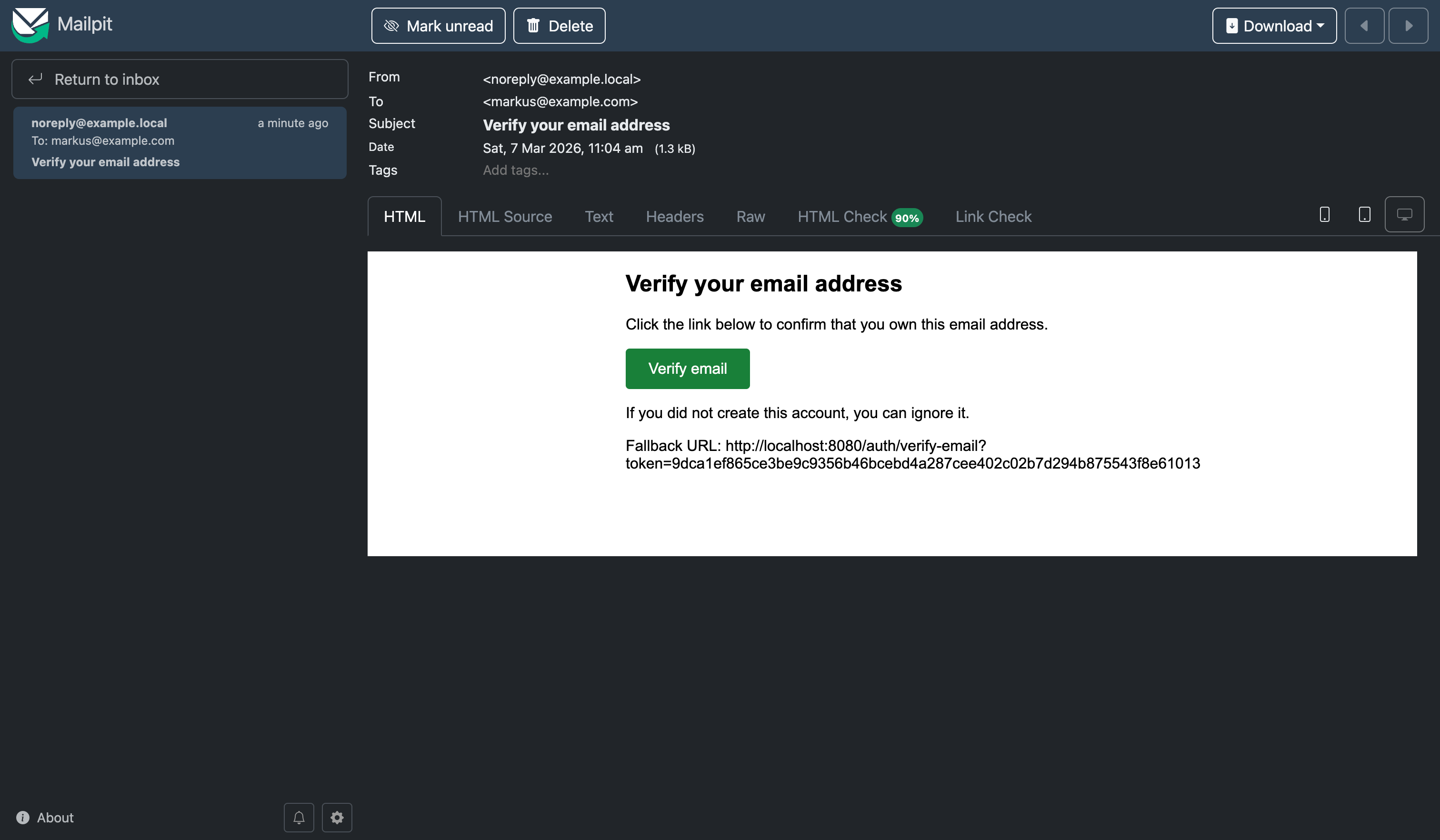
Verify the email
Copy the verification URL and curl, or just click the button in the email or copy and paste it to the browser:
curl -i 'http://localhost:8080/auth/verify-email?token=<TOKEN_FROM_EMAIL>'Expected result:
HTTP/1.1 200 OK
Email verified
Call the same URL again:
curl -i 'http://localhost:8080/auth/verify-email?token=<TOKEN_FROM_EMAIL>'Expected result:
HTTP/1.1 401 Unauthorized
Verification link is invalid, already used, or expired
This proves the one-time use rule.
Request and consume a magic link
curl -i -X POST http://localhost:8080/auth/magic/request \
  -H 'Content-Type: application/json' \
  -d '{"email":"markus@example.com"}'
Expected result:
HTTP/1.1 204 No ContentFetch the newest Mailpit message again, extract the magic-link URL, and call it:
curl -i 'http://localhost:8080/auth/magic?token=<TOKEN_FROM_EMAIL>'Expected result:
{
  "token":"<signed-jwt>",
  "email":"markus@example.com",
  "displayName":"Markus"
}
Call the same URL a second time:
curl -i 'http://localhost:8080/auth/magic?token=<TOKEN_FROM_EMAIL>'Expected result:
HTTP/1.1 401 Unauthorized
Link is invalid, already used, or expired
This verifies the consume-once behavior.
Test the password reset flow
Request a reset email:
curl -i -X POST http://localhost:8080/auth/password-reset/request \
  -H 'Content-Type: application/json' \
  -d '{"email":"markus@example.com"}'
Expected result:
HTTP/1.1 204 No ContentExtract the reset token from Mailpit and confirm the change:
curl -i -X POST http://localhost:8080/auth/password-reset/confirm \
  -H 'Content-Type: application/json' \
  -d '{
    "token":"<TOKEN_FROM_EMAIL>",
    "newPassword":"another-very-long-password-456"
  }'
Expected result:
HTTP/1.1 204 No ContentRepeat the same request with the same token and expect 401 Unauthorized.
Integration tests
Add the RestAssured and Mailpit testing dependencies in test scope to your pom.xml:
<dependency>
    <groupId>io.rest-assured</groupId>
    <artifactId>rest-assured</artifactId>
    <scope>test</scope>
</dependency>
<dependency>
    <groupId>io.quarkiverse.mailpit</groupId>
    <artifactId>quarkus-mailpit-testing</artifactId>
    <version>2.0.0</version>
    <scope>test</scope>
</dependency>
Magic link request returns 204 (no user enumeration)
Create src/test/java/com/example/auth/MagicLinkFlowTest.java:
package com.example.auth;

import static io.restassured.RestAssured.given;

import org.junit.jupiter.api.Test;

import io.quarkus.test.junit.QuarkusTest;
import io.restassured.http.ContentType;

@QuarkusTest
class MagicLinkFlowTest {

    @Test
    void unknownUserStillReturnsNoContent() {
        given()
                .contentType(ContentType.JSON)
                .body("{\"email\":\"does-not-exist@example.com\"}")
                .when()
                .post("/auth/magic/request")
                .then()
                .statusCode(204);
    }
}
This verifies a real security property: unknown emails and known emails do not get different status codes.
Mailpit: magic link email is sent and can be asserted
This test shows that the app sends real emails and Mailpit captures them so we can assert on subject and link. Add @WithMailbox and @InjectMailbox Mailbox, then create a user (e.g. via /auth/register), request a magic link, and assert the message in the mailbox.
Create src/test/java/com/example/auth/MailpitIntegrationTest.java:
package com.example.auth;

import static io.restassured.RestAssured.given;
import static org.hamcrest.MatcherAssert.assertThat;
import static org.hamcrest.Matchers.containsString;
import static org.hamcrest.Matchers.notNullValue;

import org.eclipse.microprofile.config.inject.ConfigProperty;
import org.junit.jupiter.api.Test;

import io.quarkiverse.mailpit.test.InjectMailbox;
import io.quarkiverse.mailpit.test.Mailbox;
import io.quarkiverse.mailpit.test.WithMailbox;
import io.quarkus.test.junit.QuarkusTest;
import io.restassured.http.ContentType;

@QuarkusTest
@WithMailbox
class MailpitIntegrationTest {

    @InjectMailbox
    Mailbox mailbox;

    @ConfigProperty(name = "app.mail.from")
    String fromAddress;

    @Test
    void requestMagicLinkSendsEmailWithLink() {
        given()
                .contentType(ContentType.JSON)
                .body("{\"email\":\"tutorial@example.com\",\"displayName\":\"Tutorial\",\"password\":\"very-long-password-123\"}")
                .when()
                .post("/auth/register");

        given()
                .contentType(ContentType.JSON)
                .body("{\"email\":\"tutorial@example.com\"}")
                .when()
                .post("/auth/magic/request")
                .then()
                .statusCode(204);

        var message = mailbox.findFirst(fromAddress);
        assertThat(message, notNullValue());
        assertThat(message.getSubject(), notNullValue());
        assertThat(message.getSubject(), containsString("sign-in"));
        assertThat(message.getText(), containsString("/auth/magic?token="));
    }
}
Keycloak: realm from JSON issues a token
This test shows that Keycloak Dev Services start with the realm from magic-demo-realm.json and we can obtain an access token (e.g. password grant for alice). No app endpoint is called; we only prove the realm and client are set up correctly.
Create src/test/java/com/example/auth/KeycloakIntegrationTest.java:
package com.example.auth;

import static io.restassured.RestAssured.given;
import static org.hamcrest.Matchers.notNullValue;

import org.eclipse.microprofile.config.inject.ConfigProperty;
import org.junit.jupiter.api.Test;

import io.quarkus.test.junit.QuarkusTest;
import jakarta.inject.Inject;

@QuarkusTest
class KeycloakIntegrationTest {

    @Inject
    @ConfigProperty(name = "quarkus.oidc.auth-server-url")
    String authServerUrl;

    @Test
    void keycloakRealmIssuesTokenForRealmUser() {
        String tokenUrl = authServerUrl + "/protocol/openid-connect/token";
        given()
                .formParam("grant_type", "password")
                .formParam("client_id", "magic-link-demo")
                .formParam("client_secret", "secret-from-keycloak")
                .formParam("username", "alice")
                .formParam("password", "alice")
                .when()
                .post(tokenUrl)
                .then()
                .statusCode(200)
                .body("access_token", notNullValue())
                .body("token_type", notNullValue());
    }
}
Conclusion
We built a Quarkus application that issues one-time opaque tokens, stores only their hashes, sends login and account-action links through Mailpit, consumes those links exactly once, and upgrades successful login into a signed session JWT. We also drew a clean line between application-owned flows and identity-platform concerns by integrating Quarkus with Keycloak through OIDC, while keeping in mind that current Keycloak documentation clearly supports browser login, verify-email, and reset-credentials flows, but points passwordless magic-link login to extension-based paths rather than a built-in default feature.
The important part is not that the demo works. The important part is that the token model fails in controlled ways instead of turning email into an unbounded credential store.
I think you are missing in the https://www.the-main-thread.com/i/190205368/project-setup why you need the MailPit extension. You mention Mailer but not Mailpit