


When I had Bob create hero images with PhotoCraft, the layers stayed editable. I could open the image afterwards and move a word or change a shape. I took the same approach with this spreadsheet example: keep the inputs, formulas, and chart in a file I can open and change.
In our earlier Excel article, we kept a 44 MB workbook with more than a million transactions on disk. Java and Apache POI calculated the result, and Bob received a small answer with the exact rows behind it. This time, I use a small test workbook to build an editable report, where I can change an assumption and compare the new result with the original calculation.
GridCraft comes from the same ArtCraft family as PhotoCraft. The project describes itself as a clean-room reimplementation of the Excel workflow in Rust, with a desktop interface, a calculation engine, XLSX support, and commands exposed through a CLI and MCP. Bob uses those commands to build the spreadsheet, and I open the result in the editor afterwards.
Java reads the source values in this example, and GridCraft builds a separate workbook from them. Keep the large-file analysis in POI and send GridCraft only the results needed for the report. The report then has its own inputs and formulas, while the source stays unchanged.
If you want to follow along with Bob, IBM offers a free trial. You can also run the report recipe and Java checks directly.
What the command model gives us
GridCraft separates its spreadsheet engine from the interface. Setting a cell, writing a range, formatting it, and inserting a chart are commands that the CLI and MCP server can call. Bob gets access to those operations directly, so it doesn't have to find a ribbon button on a screenshot. The architecture documentation explains how the editor and command interfaces share the engine.
I use the headless MCP mode to generate the report. It runs the spreadsheet engine inside the server process:
gridcraft-cli mcpTo watch edits in the desktop app or take screenshots through MCP, start the app's control server and connect to it:
gridcraft --control 7979
gridcraft-cli mcp --connect 7979
The headless server returns an error for screenshot requests because it has no desktop view. In this example, Bob creates the file headlessly, then I open the saved workbook in GridCraft to inspect it.
For the spreadsheet, I check the formulas and chart's source cells as well as the layout. A chart can look right while reading the wrong range, and a total can be a pasted value that never changes when I edit an input. Opening the file lets me follow an input through both the calculation and the chart.
Keep the large workbook on the analysis path
Reading three cells through MCP doesn't make importing a million-row workbook cheap. The editor still loads the source file, using memory and time before Bob receives its small answer. Keep that cost separate from the amount of data sent to the model.
GridCraft is in alpha, and its v0.5.0 gaps list includes large-workbook handling and XLSX fidelity. I haven't tried our million-row workbook in it. Use the streaming POI approach from the earlier article for that audit, then give GridCraft the selected results. We already have a way to read the large source without loading the whole workbook into memory.
For a report based on the retail example, include the winning customer, the returned merchandise product, the rule that excludes manual adjustments, and the evidence ranges. Copy those selected values into a new workbook, together with the source hash, ranges, and calculation policy. Someone opening the report can then see where the numbers came from without loading the whole source just to read the result.
Start with a fresh workbook and add the formulas for the comparisons there. Changing a scenario then leaves the audited source alone, and the report doesn't need a live link to it. This also limits how much XLSX support you depend on: GridCraft only has to save the small report you've created. Opening and saving a complex finance workbook requires it to preserve all the features already in that file.
The formula and its saved result can disagree
To try the report generation, I reused the small test workbook from the earlier Excel article. It contains a formula with an old saved result, which makes it easy to see how the two tools read the same file. Transactions!D2:D4 contains £10, £20, and £50, and Dashboard!B3 contains:
=SUM('Transactions'!D2:D4)The generator calculated that sum while the last transaction was still £30. It then changed the input to £50 and saved without recalculating, leaving £60 stored beside a formula whose inputs now add up to £80.
Reading the cached value with POI gave me £60. Opening the same file in GridCraft v0.5.0 gave me £80, through both the CLI and MCP, because GridCraft recalculates the imported workbook when it creates the document state. So the number Bob sees can depend on how the tool opened the file.
The report keeps both numbers and explains how it got them. The original dashboard stored £60; recalculating its current inputs gives £80. Keep that distinction in Bob's answer too, so the person reading it can understand why the new total differs from the saved dashboard.
Alongside that baseline, I added a scenario column where the third return is £70. The baseline totals £80, the scenario totals £100, and the difference is £20. Since the scenario lives in the new report, the original file stays unchanged.
With three inputs and a SUM, I can follow every change through the formula and chart. Before applying this to a finance report, test the formulas that report actually uses. I haven't checked other Excel functions in this example.
Build the report with one rectangular write
For this example, I used GridCraft CLI and desktop 0.5.0, Bob Shell 2.0.6, JBang 0.138.0, and Apache POI 5.5.1 on October 12, 2026. I've put the installer, Java verifier, and project-local Bob skill in gridcraft-agent-workflow, so you can try the same setup.
From that directory, install the CLI and generate the test workbook:
sh scripts/install-macos.sh
jbang --java 25 ../excel-context-xray/scripts/CreateFixture.java build/source.xlsx
jbang scripts/VerifyGridcraft.java recipe
The supplied scripts run on macOS and use curl, unzip, and jq to install and configure the CLI. Java 25 runs the workbook preparation and checks through JBang, which downloads dependencies on the first invocation. After that, you can use --offline. If you're on another platform, check the binaries on the v0.5.0 release page.
The Java script reads the test workbook, checks its inputs, and writes the report commands to build/report.jsonl, including the source hash. I put the rows into one rectangular write so Bob doesn't have to send a call for each cell. Here's the part containing the inputs and totals; the full recipe also includes the old saved result and the source details:
{
  "command": "range.setValues",
  "params": {
    "range": "A1",
    "values": [
      ["Item", "Baseline", "Scenario"],
      ["First return", 10, 10],
      ["Second return", 20, 20],
      ["Third return", 50, 70],
      ["Total", "=SUM(B2:B4)", "=SUM(C2:C4)"]
    ]
  }
}
Bob sends that same rectangle through MCP's write_range tool. It accepts a two-dimensional array, and strings beginning with = become formulas. One call writes the rows together and creates one undo step. I can also read the values and formulas together in the request, which is easier to follow than a sequence of individual cell edits.
I format ranges the same way: bold headers and totals, a currency format for the amounts, and a frozen first row. The column chart reads A1:C4, which gives it the labels and the two sets of inputs. Keeping the totals row outside that range avoids adding the sum as a fourth return.
Run the complete recipe:
.runtime/gridcraft-cli-0.5.0-macos-universal/gridcraft-cli run \
  --script build/report.jsonl \
  --out build/report.xlsx \
  --print B5:C5 \
  --quiet
That prints the two totals:
£80.00 £100.00The CLI runs the script's commands in order and stops at the first failure. Earlier edits can still be in the session when a later command fails, so inspect the current state before rerunning the script. Repeating a sheet or chart insertion can add a second copy.
Give Bob an explicit reading policy
I put the reading instructions in the Bob skill because native read_range makes the range optional. Leaving it out reads the sheet's used range. The engine rejects reads above one million cells, which still leaves room for a huge response. This report only needs three result cells.
The skill tells Bob to supply a sheet name and a finite range of at most 512 cells on every read. For the answer, it reads Report!B5:C5 and Report!C7, then reads the same cells with formulas:true. That option returns formula text in place of the calculated value. Reading both lets Bob check that the total is still a formula and that it calculates the expected amount.
I also tell Bob to filter command searches, write the input rectangle once, format by range, and save to a fresh path. Before it tells me it's finished, it has to reopen that file. If an edit fails, it should look at the current state before trying again, because repeating an insertion can leave me with two charts.
The skill also tells Bob to look up commands and their parameters before calling them. One v0.5.0 tool description suggests sheet.insert, which isn't registered; the actual command is home.insertSheet. A command name can look perfectly reasonable and still fail, even when Bob copied it from a tool description.
Configure Bob from the companion directory:
sh scripts/configure-bob.shThat writes .bob/mcp.json with absolute paths to the local CLI. Open this directory as Bob's workspace so it finds .bob/skills/gridcraft-report. Both the MCP configuration and the skill can live in the project, which keeps the report instructions alongside the example.
I gave Bob a prompt to keep the baseline, add the £70 scenario through MCP, save and reopen build/bob-report.xlsx, and run the Java verifier. I also asked for a short answer pointing to the result cells, so I could go straight to the totals in the workbook. The full prompt and task contract are in the companion.
Bob loaded the skill, wrote all 11 rows and three columns in one call, and added a chart. It then saved the file, reopened it, and read the totals as values and formulas. I give it a 60-turn budget in the companion because discovering commands and checking the saved file take calls too. My earlier attempt with 40 stopped before the last check.
When I opened the report in GridCraft, the sums were right but the columns were far too narrow. I had written “width 26” in the contract without a unit, and the CLI recipe had the same ambiguity. GridCraft's home.columnWidth accepts width in screen points or chars in character units. Bob chose 26 points, which clipped the labels and turned the amounts into ##. I meant 26 characters:
{"command":"home.columnWidth","params":{"cols":"A:C","chars":26}}I changed the contract to say chars and added a width check to the Java verifier. The long source hash needed wrapping and a taller row too. While fixing that, I found another unit conversion: GridCraft's 54 screen points become 40.5 typographic points in the XLSX. Bob fixed the layout, and I could finally read the labels, amounts, and whole hash without widening anything myself.
The prompt names the Java verifier so Bob has a specific check to run before it stops. I also read its response alongside the process status: one attempt returned a zero exit and a success field while reporting a turn-limit error in the same output. I still needed Bob to finish checking the file.
Put mandatory limits in the tool boundary
The 512-cell limit in this example is an instruction to Bob. GridCraft's server still accepts larger reads. To make the limit mandatory, put an adapter in front of the server that rejects oversized requests. I haven't built that adapter into the companion; the following is the design I recommend for adding it.
Require an explicit sheet and range, count the cells before reading them, and cap the serialized response too. One cell can contain an enormous text value, so a cell count alone cannot control the response size. Start with 512 cells and 12,000 UTF-8 response bytes, then adjust those limits against real tasks. These are starting values for the adapter; GridCraft v0.5.0 doesn't supply those limits.
Reject an oversized numeric range and ask Bob to choose a smaller one. Cutting the result halfway through could leave Bob treating a partial range as the full answer. A text preview can be shortened, provided the response marks where it was cut and lets Bob request the full contents of a selected cell.
Apply the same rules to every way of reading the workbook. execute_command can call sheet.read, and workbook resources expose another route, so disabling read_range leaves other ways to request the data. Use an allowlist of operations and controlled file paths, and check the limits wherever Bob reaches those operations.
Start by examining GridCraft's MCP backend interface, which dispatches these operations. Check where a wrapper can intercept the reads, and review the tool schemas and resource handlers alongside it. Another option is to add a bounded mode to the native server. In either design, keep the engine's allocation guard as well: it controls memory allocation, while the smaller response limit controls what comes back to Bob.
For edits, add a workbook revision and a request identifier. Have the adapter reject an edit if someone has changed the workbook since Bob read it. Reuse the request identifier when retrying the same edit, so the adapter can recognize an insertion it has already handled. Otherwise, losing a reply after a chart insertion can lead to another chart on the retry.
The v0.5.0 remote backend already retries once after an I/O failure. Reading that code raised the lost-reply case: the edit may have happened before the connection failed, leaving the client unsure what it is about to repeat. I haven't tested that failure. Handle repeated requests in the bridge so retry behavior doesn't depend on Bob noticing a duplicate afterwards.
You can reduce the tool definitions Bob receives with the current server. It advertised 21 tools, with about 16 KB of UTF-8 JSON describing them before I read a single cell. That's a byte count, so it doesn't tell me the token count or bill. Disable individual MCP tools in Bob when the task doesn't need them, and filter command discovery to the operations you need. Any generic execution tool left enabled still needs the adapter's checks when you require enforced limits.
Verify the file someone will receive
I check the saved XLSX with POI because that's the file someone receives. Reading the totals from Bob's session doesn't tell me whether the formulas and chart survived saving. Run the Java verifier against the generated file:
jbang --offline scripts/VerifyGridcraft.java verify build/report.xlsxThe verifier recalculates the three saved formulas with POI and compares them with the values GridCraft saved. Both should give 80, 100, and 20. It also checks that the original baseline, source hash, source details, frozen header, and chart with two series are still in the file. I included column-width and hash-row checks after the layout mistakes above, so a report full of clipped labels no longer passes just because its arithmetic is right. The verifier reads through input streams, which prevents it from rewriting the source when it closes the file.
In GridCraft, I clicked B5, C5, and C7 to read the saved formulas in the formula bar. Clicking the chart highlighted B2:C4, showing the baseline and scenario inputs it used. The labels, amounts, and complete source hash were readable at 100% zoom, so I could follow the numbers without adjusting the layout again.
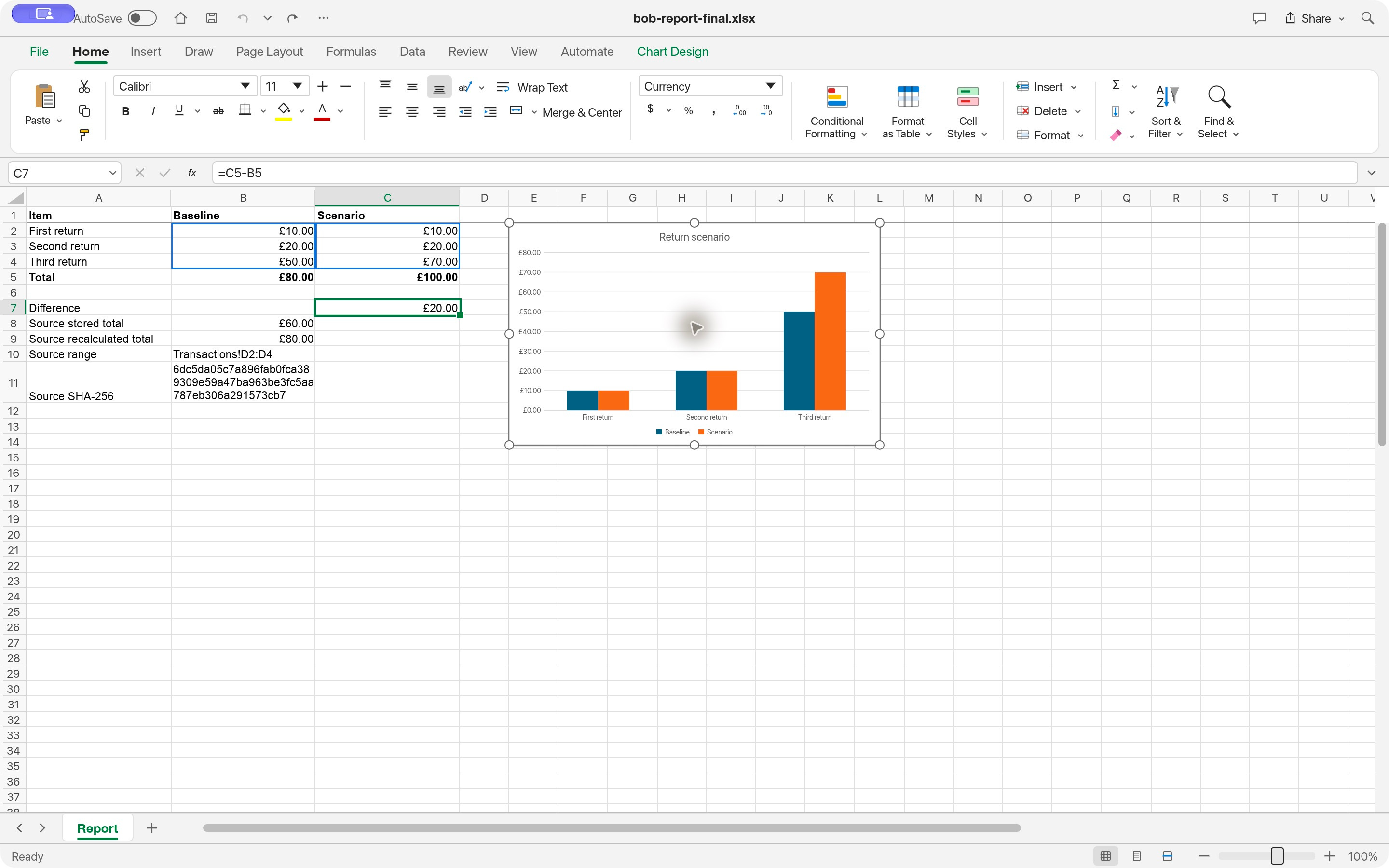
The saved Bob report in GridCraft, with the difference formula visible and the chart's source cells highlighted.
Then I changed C4 from 70 to 90. The scenario total moved to £120, the difference to £40, and the third scenario bar to £90. Undo brought back 70, £100, and £20. The formulas and chart were still connected to the inputs, so I could make the comparison directly in the report. I left that change unsaved, and both the report and source files kept their hashes. I haven't opened it in Microsoft Excel to check how it reads the file or whether it shows a repair prompt.
Use the release-tagged documentation with these commands. The repository's current main includes gridcraft-cli check, which the released v0.5.0 binary doesn't have.
I've kept the setup, recipe generation, Bob skill, prompt, and Java checks in the companion project on my Github.