


I wanted to give Bob a small scavenger hunt in a codebase: find a key, repair a broken Java method, and collect permit.json. So I gave it an office. The Office for Verified Builds has a filing cabinet, a broken stamp machine, and a permit clerk. We call this a Schnitzeljagd in German, a scavenger hunt. The clues are repository files, and the clerk is a Java program.
In the repository, the filing cabinet is a JSON register with shuffled entries. Bob follows its filing notice to reconstruct the key for application.json. The stamp machine is StampWheel.java, whose defective method has to be repaired.
After both jobs, Bob runs verify to check the key and run JUnit. Passing both earns a key stamp and a test stamp for the current files, which let issue create the permit:
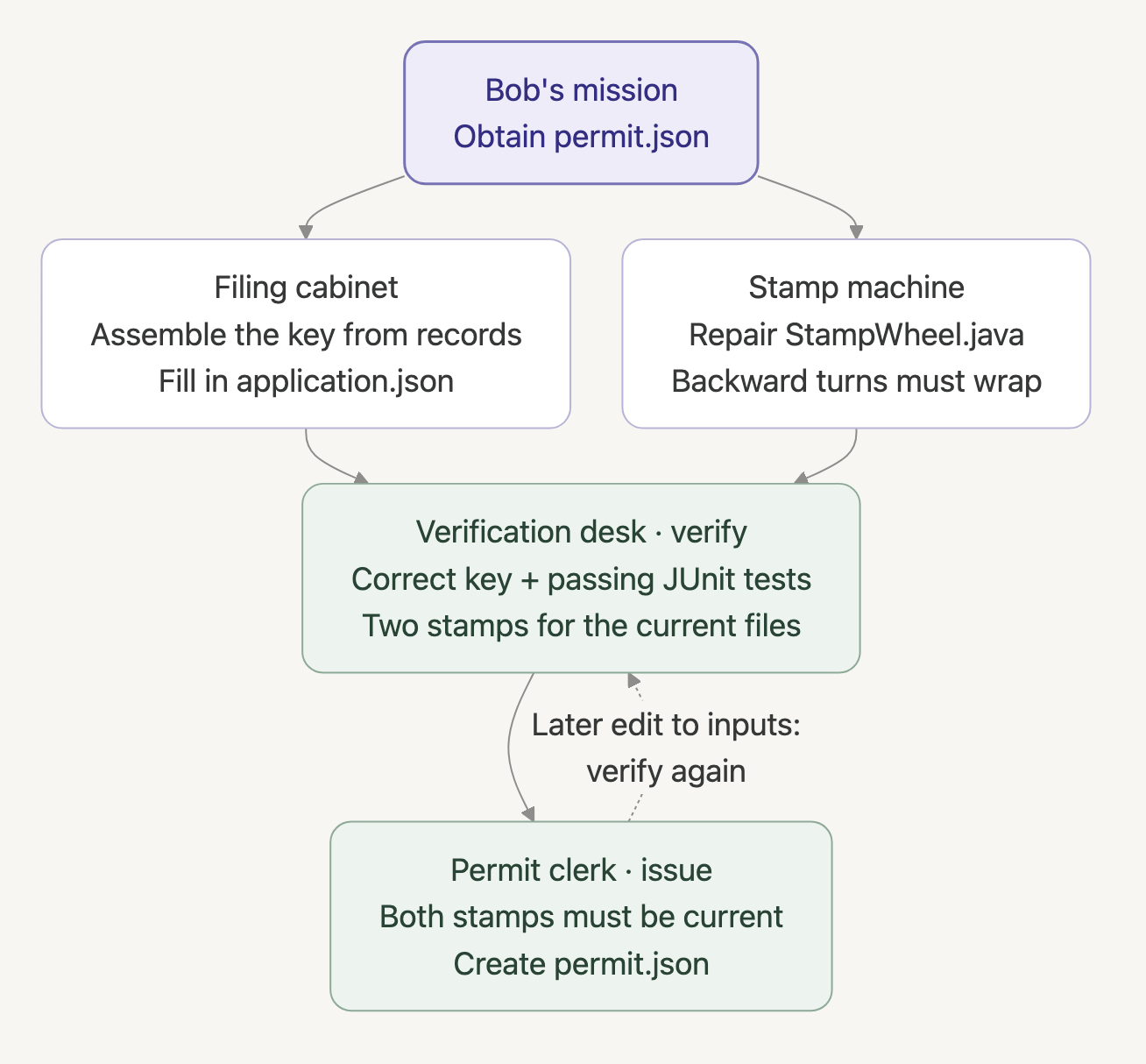
Bob chooses how to tackle the two jobs. Java checks their results before issuing the permit; editing a checked file makes the stamps expire.
You give Bob the mission and let it explore. We build the office staff with hooks in IBM Bob Shell, or Bobshell. A hook is a program that Bobshell starts at an event, such as after a file edit or before a tool call. It receives JSON on stdin and can return context, feedback, or a blocking decision.
The companion directory contains the prepared game and complete Java sources. We'll start with one small handler, then register all seven lifecycle events and let Bob play. If you need access to Bob, IBM offers a free trial.
Let Java decide when the permit is ready
Bob chooses what to investigate next, while the Java clerk decides whether to issue the permit from the case files. That check is the deterministic island in this game: given the same inputs, tool versions, and relevant environment, the code should reach the same result. Of course, a test can be incomplete or flaky and our checker can have a bug. We still have to choose tests that describe a correctly repaired wheel.
Prepare the game repository
I ran the hunt with Bobshell 2.0.5, JBang 0.138.0, and Temurin JDK 25. The companion targets Java 21 and includes a Maven wrapper and JUnit tests. The commands below are for macOS or Linux.
If you haven't installed Bobshell and JBang yet, their official installers are:
curl -fsSL https://bob.ibm.com/download/bobshell.sh | bash
curl -Ls https://sh.jbang.dev | bash -s - app setup
These install the current releases. IBM's Bobshell installation and authentication instructions and the JBang installation instructions also describe package-manager installation. Open a new terminal afterward to check which versions it uses:
bob --version
jbang --version
java -version
Give Bob its own copy of the office. Copy this repository's bobshell-build-permit directory, replacing the source path with your checkout's location:
cp -R /path/to/the-main-thread-preview/bobshell-build-permit ./bob-permit-office
cd bob-permit-office
jbang scripts/Hunt.java init
jbang scripts/CheckHunt.java
init creates workspace/, where Bob will explore the copied game/ project. It opens a fresh case and loads the dependencies before Bob starts, so the first download doesn't consume the hook timeout. Run the launchers from bob-permit-office; game commands such as verify run inside workspace/.
CheckHunt.java runs in a separate temporary copy; its checks should finish with pass. Bob's own copy keeps the intentionally failing wheel test.
The starting project has two files Bob may edit: application.json and src/main/java/office/StampWheel.java. The application begins with an empty key:
{
  "caseId": "BUILD-001",
  "key": ""
}
START_HERE.md sends Bob to office/reception.md, which points to the filing notice and register. The notice tells Bob how to assemble the cabinet key, a game token: keep current records, sort by counter number, and join their key fragments. Retired records remain in the register. Apparently, throwing them away would require another form.
The second puzzle is the stamp wheel:
package office;

public final class StampWheel {
    private StampWheel() {
    }

    public static int rotate(int position, int steps) {
        return (position + steps) % 10;
    }
}
The wheel has ten positions, numbered zero through nine. A step backward from zero should land on nine. The JUnit test calls rotate(0, -1), but Java's remainder operator leaves the wheel at negative one. Bob has to repair that calculation. The tests use small step counts and cover ordinary movement and wraparound in both directions.
For noninteractive Bob runs, create an Inference API key using the authentication instructions above. Keep its downloaded JSON outside the companion and the game, then provide the filename:
export BOB_HUNT_KEY_FILE="/absolute/path/to/your-bob-inference-key.json"The Java launcher reads the file's apikey field and passes it through BOB_API_KEY only to the Bob child process. You pass the launcher a filename; the key stays out of the game files and prompts. The launcher disables MCP and subagents so Bob explores this repository with its native tools, trusts the game copy, and limits each session to 35 turns and a cost limit of 2. Your account needs inference access for these runs.
Write a Java hook before asking Bob to use it
Reception asks for CASE: BUILD-001 at the start of each ordinary prompt. This public prefix identifies our case and lets us demonstrate UserPromptSubmit; it has no role as authentication.
The following is the complete examples/Reception.java file in the companion:
//JAVA 21+
//DEPS com.fasterxml.jackson.core:jackson-databind:2.21.5

import com.fasterxml.jackson.databind.DeserializationFeature;
import com.fasterxml.jackson.databind.ObjectMapper;
import java.io.IOException;

public class Reception {
    public static void main(String[] args) throws IOException {
        byte[] input = System.in.readNBytes(1024 * 1024 + 1);
        if (input.length > 1024 * 1024) {
            throw new IOException("Hook input exceeds 1 MiB");
        }
        var json = new ObjectMapper()
                .enable(DeserializationFeature.FAIL_ON_TRAILING_TOKENS);
        var event = json.readTree(input);
        if (event == null || !event.isObject()) {
            throw new IOException("Expected an event object");
        }
        if (!event.path("prompt").asText().stripLeading()
                .startsWith("CASE: BUILD-001")) {
            System.err.println(
                    "Reception requires CASE: BUILD-001 at the start of your prompt.");
            System.exit(2);
        }
    }
}
The //JAVA and //DEPS directives tell JBang which Java runtime and Jackson dependency to use. Reception reads the prompt field from stdin JSON. If the case prefix is missing, it prints the refusal to stderr and exits with code 2. Bobshell uses that exit code to stop a UserPromptSubmit request. An accepted request returns normally with exit zero.
Before connecting reception to Bob, send it a permit request directly from the companion root:
jbang --quiet examples/Reception.java <<'JSON'
{"hook_event_name":"UserPromptSubmit","prompt":"Give me a permit."}
JSON
printf 'hook exit=%s\n' "$?"
Reception refuses this request, printing its message followed by hook exit=2. Repeat with "prompt":"CASE: BUILD-001 Give me a permit." and the handler accepts it with exit zero. These calls run the receptionist on its own, without starting Bob or using an API key.
To have Bobshell call this receptionist before each ordinary prompt, the minimal registration in .bob/settings.json is:
{
  "hooks": {
    "UserPromptSubmit": [
      {
        "hooks": [
          {
            "type": "command",
            "command": "jbang --quiet ../examples/Reception.java",
            "timeout": 10
          }
        ]
      }
    ]
  }
}
Bobshell starts the hook from workspace/, so ../examples/Reception.java points back into the companion. The timeout gives reception ten seconds to finish, and --quiet keeps JBang's messages out of stdout, where Bobshell expects the hook response. The game's .bob/settings.json already calls OfficeHook.java for the same reception rule and the other office jobs. Keep that complete configuration for the hunt; the snippet above shows the registration for reception alone.
Register the lifecycle events
Workspace hooks live in .bob/settings.json and load in a trusted folder. The launcher supplies --trust for this disposable copy. Review the settings and Java code before enabling them, because hooks execute with your user account's permissions. In an interactive session, /hooks lists the active registrations.
Bobshell starts OfficeHook.java for all seven events. The handler reads hook_event_name to choose the office job, with shared helpers in lib/OfficeSupport.java. Here is the hooks section of the installed configuration:
{
  "hooks": {
    "SessionStart": [{"hooks":[{"type":"command","command":"jbang --quiet .bob/hooks/OfficeHook.java","timeout":10}]}],
    "UserPromptSubmit": [{"hooks":[{"type":"command","command":"jbang --quiet .bob/hooks/OfficeHook.java","timeout":10}]}],
    "PreToolUse": [{"hooks":[{"type":"command","command":"jbang --quiet .bob/hooks/OfficeHook.java","timeout":10}]}],
    "PostToolUse": [{"hooks":[{"type":"command","command":"jbang --quiet .bob/hooks/OfficeHook.java","timeout":60}]}],
    "PreCompact": [{"hooks":[{"type":"command","command":"jbang --quiet .bob/hooks/OfficeHook.java","timeout":10}]}],
    "PostCompact": [{"hooks":[{"type":"command","command":"jbang --quiet .bob/hooks/OfficeHook.java","timeout":10}]}],
    "Stop": [{"hooks":[{"type":"command","command":"jbang --quiet .bob/hooks/OfficeHook.java","timeout":10}]}]
  }
}
Tool hooks can include a matcher regular expression to select a tool name. For example, ^execute_command$ would call our hook for commands but skip Bob's native edits. We omit the matcher so the clerk sees both. Regex examples are only a short way to explain hook selection; they do not represent real guardrails or parse arbitrary shell commands.
The complete settings also grant read and edit permissions, permit commands beginning with jbang tools/Office.java, and disable global hooks for this game.
The examples follow Bobshell 2.0.5's hook contract: hook_event_name, tool_name, and tool_input, with structured feedback from PostToolUse. The public lifecycle hooks guide still shows older field names and describes post-tool stdout as ignored. Keep that difference in mind when comparing examples or upgrading; the companion notes cover it in more detail.
Give Bob a current briefing with SessionStart
Before Bob starts looking for the key, SessionStart gives it the case number, points to START_HERE.md, names the two editable files, and reports current status from disk. The handler prints this briefing to stdout, which Bobshell adds to Bob's context before its next request. The assembled key stays out of the briefing, leaving Bob to find it in the register.
Send the two prepared reception prompts from the companion root:
jbang scripts/Hunt.java play --key-file "$BOB_HUNT_KEY_FILE" --prompt reception-block
jbang scripts/Hunt.java play --key-file "$BOB_HUNT_KEY_FILE" --prompt reception-allow
The first prompt is refused at reception with Prompt blocked by hook and exit one from the launcher. The second supplies the prefix and asks for the case number. Bob answered from the startup briefing in my run, without opening a file or calling a tool: SessionStart had already given it the case.
Block an unverified command with PreToolUse
Bob can ask how its case stands with status, earn the stamps with verify, and request a permit with issue. Each request is one exact command, run from the game root in the foreground:
jbang tools/Office.java status
jbang tools/Office.java verify
jbang tools/Office.java issue
The clerk refuses other command strings, combined shell commands, a different working directory, and background requests, without rewriting the request. For native edits, it normalizes the requested path and permits only application.json and StampWheel.java. The filing records, tests, and office code stay outside Bob's edit locations, while permitted read and search tools remain available.
When Bob asks execute_command to run issue, Bobshell first sends the proposed request to our hook as stdin JSON:
{
  "hook_event_name": "PreToolUse",
  "session_id": "example-session",
  "cwd": "/absolute/path/to/bob-permit-office/workspace",
  "tool_name": "execute_command",
  "tool_input": {"command": "jbang tools/Office.java issue"},
  "tool_use_id": "example-call"
}
issue hasn't run yet. The pre-tool branch in OfficeHook.java asks gate whether the request can proceed and records the clerk's decision. A refusal goes to stderr, followed by the same exit code two we used at reception:
String reason = gate(root, event);
audit(root, event, reason == null ? "allow" : "deny", reason);
if (reason != null) {
    System.err.println(reason);
    System.exit(2);
}
For issue, gate calls refusal to check the key in application.json and the stamps in target/verification.json. The stamps must come from passing checks for this case run and describe the current files. A missing key, failed test, or expired stamp gives Bob a reason to return to the filing cabinet or test desk. Without a refusal, Bobshell continues through its usual tool approval.
The issue command repeats these checks before writing permit.json, so direct invocation follows the same game rules.
Return Java test findings with PostToolUse
After a permitted native edit, PostToolUse runs StampWheelTest and returns the result for Bob's next turn. The file has changed by then, so this hook supplies feedback without undoing the edit:
var build = run(root, 50, "./mvnw", "test", "-Dtest=StampWheelTest", "-q");
var report = record().put("runId", runId(root))
        .put("exitCode", build.exitCode())
        .put("ok", build.exitCode() == 0)
        .put("output", tail(build.output()));
write(root.resolve("target/edit-feedback.json"), report);

var response = object();
response.set("hookSpecificOutput", object()
        .put("hookEventName", "PostToolUse")
        .put("additionalContext", "Test department: "
                + JSON.writeValueAsString(report)
                + "\nThese are edit checks. Run verify to obtain the two official stamps."));
output(response);
The hook returns exit zero even when JUnit fails, so Bobshell can deliver the test message in additionalContext alongside the edit result. The failed build's exit code stays inside that message. We save the same feedback in target/edit-feedback.json and keep the last 2,400 characters of Maven output. A ProcessBuilder argument list starts the fixed Maven command above, with a 50-second timeout inside the hook's 60-second limit.
Bob still has to run verify to collect the official stamps; this hook records edit feedback.
Let Bob hear from the broken stamp machine first. Run the supplied feedback prompt on the unsolved game:
jbang scripts/Hunt.java play --key-file "$BOB_HUNT_KEY_FILE" --prompt feedbackThe prompt asks Bob to append a harmless comment through a native edit. This leaves the bug in place, so Maven reports StampWheelTest.wrapsBackward, with expected: <9> but was: <-1>. In my run Bob pointed to that failing case and explained Java's negative remainder.
The test hook recognizes write_file, apply_diff, search_and_replace, and insert_content. Those are the native editing tools that trigger its test feedback. This game refuses shell-based edits; if you allow other ways to change files in your own repository, extend the handler to cover those tools too.
Let Bob complete the scavenger hunt
Reception, the test desk, and the permit clerk are ready. Reset the game to give Bob an empty application and the original broken wheel, then let it play:
jbang scripts/Hunt.java reset
jbang scripts/Hunt.java play --key-file "$BOB_HUNT_KEY_FILE"
jbang scripts/Hunt.java status
The mission asks Bob to try issue once before investigating. After the clerk directs it to reception, Bob chooses which files to read next. The prompt leaves the key and repair for Bob to find.
At the end, status should show permitValid: true, and Bob's permit should be in workspace/permit.json.
I let Bob play twice, starting with a fresh case each time. Both hunts ended with a permit and stayed within the two allowed edit locations, while the order of reads varied. In the second hunt it repaired the method with Math.floorMod(position + steps, 10); normalizing the remainder with ((position + steps) % 10 + 10) % 10 is another solution for these small puzzle inputs.
To follow the clerk's decisions, run jbang scripts/Hunt.java events. A refusal appears under PreToolUse, with the reason Bob received. It has no matching completed PostToolUse entry for that tool-use ID, because Bobshell stopped the command. Once Bob has its stamps, the final issue request has both entries.
If a session stops at its turn or cost limit, resume the task ID printed by the launcher with --resume TASK_ID. The solution walkthrough also gives the filing result and repair. You can apply it with jbang scripts/Hunt.java solution, then run verify and issue inside workspace/; applying the solution itself grants no stamp.
Expire the test stamp when the application changes
The test desk puts both stamps in target/verification.json. Each record belongs to the current case run and includes a fingerprint, a hash of the files the result depends on. These include source, tests, application data, filing records, build files, office code, and hook configuration. Generated files are excluded, so writing the stamp record doesn't expire it.
verify hashes these files before and after running ./mvnw test -q. The fingerprints must match before the clerk accepts the result. If they differ, Bob has to run verify again. This compares two snapshots; it doesn't lock files or detect an edit reverted between them.
Now add a source comment after Bob has collected its permit, then send it back to the clerk:
jbang scripts/Hunt.java stale
jbang scripts/Hunt.java play --key-file "$BOB_HUNT_KEY_FILE" --prompt stale
stale adds the comment to StampWheel.java. The second command asks Bob to try issue once and stop after a refusal, so you can read the clerk's answer before Bob collects new stamps. The wheel still behaves the same, but its source no longer matches the old fingerprint. The hook returns:
Your stamp refers to an earlier version of this application. Verify again.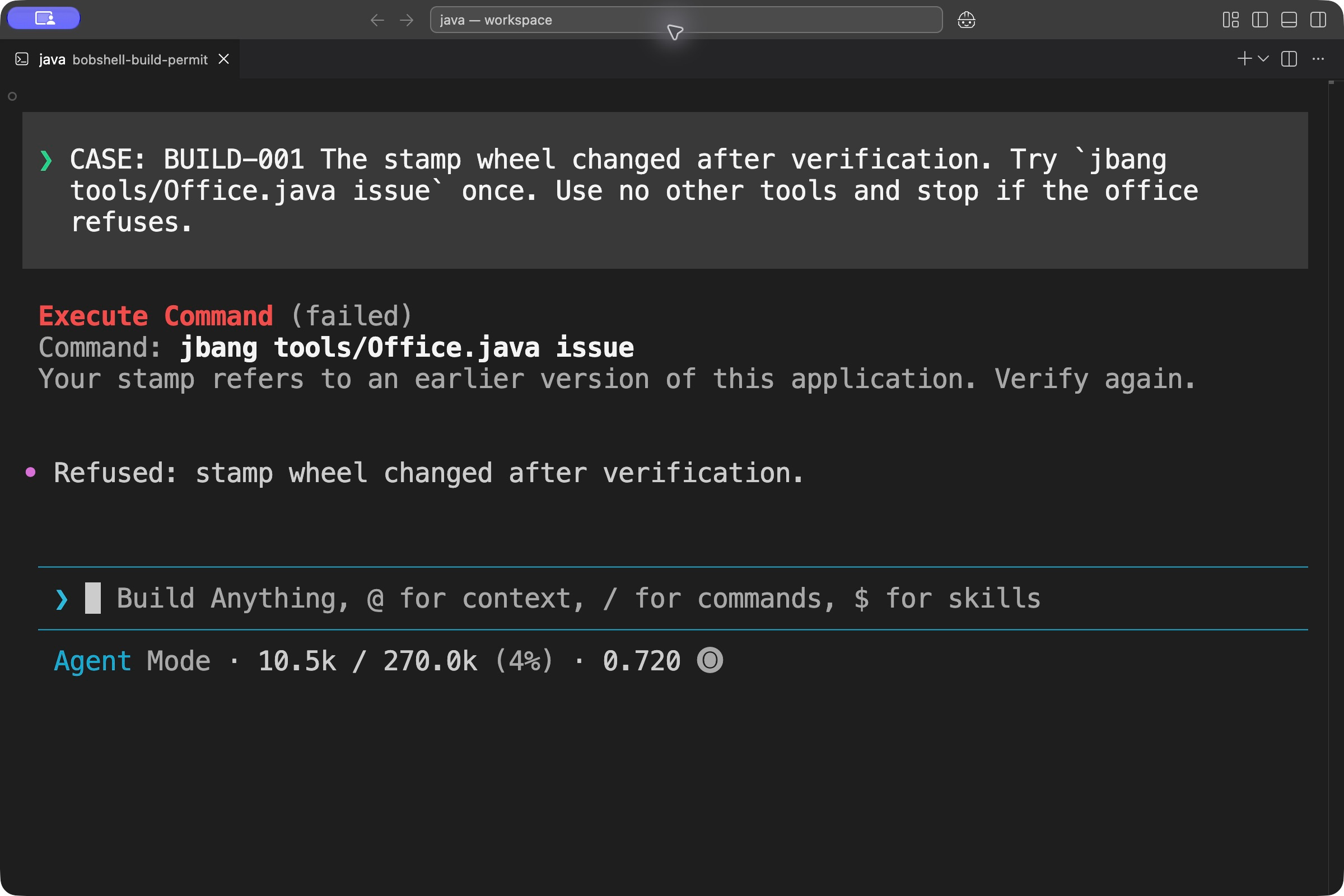
The real Bobshell 2.0.5 TUI inside IBM Bob's integrated terminal. The pre-tool hook refuses issuance after a source edit, before the office command executes.
The old permit.json remains on disk, but status reports it as invalid. The recovery prompt asks Bob to run verify and request the permit again:
jbang scripts/Hunt.java play --key-file "$BOB_HUNT_KEY_FILE" --prompt recover
jbang scripts/Hunt.java status
I resumed Bob's session for this step, and it collected a fresh permit. To keep your own turns in the same conversation, add --resume TASK_ID to the play commands for stale and recover, using the task ID printed by the launcher.
Keep the case through compaction and record the result
Bob can summarize a long conversation with /compact, while the office keeps its application and stamps on disk. To try this, open the TUI with the task ID printed after your hunt:
jbang scripts/Hunt.java chat --key-file "$BOB_HUNT_KEY_FILE" --resume TASK_IDOmit --resume TASK_ID if you want a new conversation. Run /compact in the TUI. Before the conversation is summarized, PreCompact saves the case status and fingerprint in .office/checkpoint.json. Afterward, PostCompact records the compaction in .office/compaction.json. These files hold case facts without copying the full conversation summary into the game log. When SessionStart runs again, it reads the current application and stamps for Bob's briefing and tells it that a checkpoint exists.
I also compacted a resumed hunt after adding another source comment. When Bob asked for the permit again, the clerk still refused it: summarizing the conversation hadn't renewed the expired stamp. After compaction, submit a prompt starting with CASE: BUILD-001 and ask Bob to run jbang tools/Office.java status to see your case's current status.
When Bob ends its turn, Stop writes target/case-report.json. The report lists the clerk's pre-tool decisions for this case run and which stamp, feedback, permit, and compaction files exist. It recomputes permitValid from the case files, independently of Bob's closing message. This hook cannot undo a completed action or guarantee cleanup when the process exits. Exit the TUI with /exit when you're done.
If the pre-tool hook throws an exception or exits with an ordinary error code, Bobshell can log the failure and let Bob's request continue. A deliberate refusal prints its reason and uses exit two. The hooks and unsigned JSON stamps are local files we can edit, so this is a cooperative game. Keep required release checks in CI or at the release step.
The companion README has reset, resume, and troubleshooting commands. For more on giving a model room to reason while code decides whether to proceed, see Deterministic Islands in Probabilistic Workflows.
I like that Bob can find its own route through the office. In my own builds, I want to know which version of the code passed the tests. If I change that code afterward, I need to run them again before I can rely on the result. While this is just a little game, make sure to take the learnings and opportunities with you into real life challenges with AI agents working in your codebases.