


I have built many integrations over the years where Java had to “talk” to native code.
Most of the time, this involved JNI wrappers, generated bindings, or running a Python process next to the JVM and pretending that was fine.
It never felt great.
With Java 21 and the Foreign Function & Memory API, that changes. We can now call native libraries directly. Safely. Explicitly. Without magic.
In this tutorial, we build a local, offline voice transcriber in Java.
No Python. No shell calls. No JNI frameworks.
Just Java, Quarkus, and whisper.cpp.
I have written about Java 21 and the new Foreign Function & Memory API before on this blog a couple of times. Make sure to check out the other posts too!


What We Are Building
By the end of this guide, you will have:
A browser UI that records audio from your microphone
Client-side audio processing at 16 kHz, exactly what Whisper expects
A Quarkus backend that receives raw PCM audio
A direct FFM bridge into
whisper.cppNative inference running on your CPU
You press a button. You speak. Java returns text.
Architecture Overview
Before touching code, let’s align on the architecture.
This is intentionally simple and explicit.
Frontend
Qute template
Small JavaScript layer
Captures microphone audio
Resamples to 16 kHz
Sends raw float samples to the backend
Backend
Quarkus REST endpoint
Receives a JSON array of floats
Allocates native memory using FFM
Calls
whisper.cppdirectly
Native
whisper.cppcompiled as a shared libraryLocal model file loaded once at startup
No streaming yet. No batching. No async magic.
We start with correctness and clarity.
Preparing the Native Foundation
Whisper needs two things:
The engine:
whisper.cppThe brain: a trained model
We build and control both ourselves.
Prerequisites
Ensure you have the following installed:
Xcode Command Line Tools:
xcode-select --installCMake:
brew install cmakeJava 22+ (Recommended for stable FFM API)
Clone and Build the Shared Library
Open a terminal and choose a workspace directory.
git clone https://github.com/ggerganov/whisper.cpp.git
cd whisper.cpp
The default make command usually builds a static binary. Use cmake to generate the .dylib file.
# 1. Clone the repository
git clone https://github.com/ggml-org/whisper.cpp.git
cd whisper.cpp

# 2. Configure the build for Shared Libraries
# -DBUILD_SHARED_LIBS=ON: Tells CMake to build .dylib instead of static archives
# -DGGML_METAL=ON: Ensures Apple Silicon GPU acceleration is enabled (usually default on ARM)
cmake -B build \
    -DBUILD_SHARED_LIBS=ON \
    -DGGML_METAL=ON \
    -DCMAKE_BUILD_TYPE=Release

# 3. Compile
cmake --build build --config Release
Locate the Artifacts
After the build completes, your dynamic libraries will be in the build/src/ You are looking for:
libwhisper.1.8.2.dylib(The main library)
Download a Whisper Model
For this tutorial, we use the base English model. It is small enough to load quickly and fast enough for local inference.
bash ./models/download-ggml-model.sh base.enTake note of the absolute path to:
models/ggml-base.en.binlibwhisper.dylibor.so
We will reference these explicitly from Java. No guessing.
Creating the Quarkus Project
Now we move into the Java side. We start with a minimal Quarkus setup.
quarkus create app com.acme:voice-transcriber \
  --extension='rest-jackson,qute' \
  --java=21 \
  --no-code
cd voice-transcriber
We use:
Quarkus REST for low-overhead REST
Jackson for JSON binding
Qute for server-side templates
Nothing else.
Generating Native Bindings with jextract
This is where the FFM story becomes real. Instead of writing JNI code, we generate Java bindings directly from the C header.
Prerequisites
You need jextract, matching your JDK version.
Verify it works:
jextract --versionNow point it at whisper.h.
export WHISPER_HOME="$HOME/path/to/whisper.cpp"

jextract \
  --output src/main/java \
  -t whisper.ffi \
  -l whisper \
  -I “$WHISPER_HOME/include” \
  -I “$WHISPER_HOME/ggml/include” \
  --include-function whisper_init_from_file \
  --include-function whisper_full_default_params \
  --include-function whisper_full \
  --include-function whisper_full_n_segments \
  --include-function whisper_full_get_segment_text \
  --include-function whisper_free \
  --include-struct whisper_context \
  --include-struct whisper_full_params \
  --include-struct whisper_vad_params \
  --include-struct whisper_token_data \
  “$WHISPER_HOME/include/whisper.h”
I ran into an issue with running jextract on the complete whisper.h. It heavily depends on ggml.h, a low-level tensor library containing complex C structs that jextract struggled to parse.
Specifically, jextract encountered incomplete or forward-declared structs in ggml (like ggml_backend_graph_copy) and failed to calculate their memory layouts, resulting in generated Java classes that were missing the critical layout() method. This caused compilation errors, as the generated code tried to reference methods that didn’t exist.
By strictly “whitelisting” only the high-level Whisper functions and structs (like whisper_context), I forced jextract to ignore the broken ggml internals entirely. This allowed me to treat the complex internal state as an “opaque pointer” in Java, successfully bypassing the parsing errors while keeping the functionality we actually needed. Still:
No hand-written glue code.
No unsafe casts.
You now have a typed Java API for whisper.cpp.
The Only 100% Reliable Fix: Edit the Generated File
While jextract generates excellent boilerplate, its default library loading mechanism assumes a standard, flat ClassLoader environment. Something Quarkus Dev Mode intentionally breaks to enable hot reloading. The generated code relies on SymbolLookup.loaderLookup(), which expects the native library to be visible to the current class’s specific ClassLoader. In a modular framework like Quarkus, the Service class (where we manually called System.load) and the generated FFM class often end up in different ClassLoader contexts, causing the lookup to fail silently. Furthermore, macOS compilers introduce a platform-specific quirk by prefixing C functions with an underscore (e.g., _whisper_init), causing Java’s standard name resolution to miss the symbols entirely. To fix this, we replaced the default lookup logic with a robust, absolute-path SymbolLookup that bypasses ClassLoader delegation entirely and added a smart fallback strategy that automatically checks for both standard and underscored symbol names. This ensures the bindings work reliably regardless of the runtime environment or compiler quirks.
Open
src/main/java/whisper/ffi/whisper_h.java.Replace the
SYMBOL_LOOKUPdefinition (approx line 23) with this robust version:
 static {
        // 1. HARDCODE your library path here.
        // This creates a direct handle to the file, bypassing ClassLoader issues.
        String libPath = “/Users/meisele/Projects/whisper.cpp/build/src/libwhisper.dylib”;

        System.out.println(”DEBUG: Loading library from “ + libPath);

        try {
            // Load the library directly into this lookup
            SymbolLookup libLookup = SymbolLookup.libraryLookup(java.nio.file.Path.of(libPath), LIBRARY_ARENA);

            // 2. Define a lookup strategy that handles the macOS underscore automatically
            SYMBOL_LOOKUP = name -> {
                // Try exact name
                var result = libLookup.find(name);
                if (result.isPresent()) return result;

                // Try macOS underscore prefix
                result = libLookup.find(”_” + name);
                if (result.isPresent()) return result;

                return java.util.Optional.empty();
            };

        } catch (Throwable t) {
            t.printStackTrace();
            throw new RuntimeException(”Failed to load whisper library: “ + t.getMessage(), t);
        }
    }
This lambda intercepts every symbol request. If it can’t find whisper_init..., it transparently retries with _whisper_init.... This fixes the error instantly and keeps your code compatible with Linux (which won’t have the underscores) if you deploy there later.
Implementing the Whisper Service
This is the heart of the system. And finally the part you can grab from my Github repository.
The service is responsible for:
Loading the native library
Initializing the Whisper context
Managing native memory
Running inference
WhisperService.java
Create src/main/java/com/acme/WhisperService.java.
package com.acme;

// Static import for the generated functions
import static whisper.ffi.whisper_h.whisper_free;
import static whisper.ffi.whisper_h.whisper_full;
import static whisper.ffi.whisper_h.whisper_full_default_params;
import static whisper.ffi.whisper_h.whisper_full_get_segment_text;
import static whisper.ffi.whisper_h.whisper_full_n_segments;
import static whisper.ffi.whisper_h.whisper_init_from_file;

import java.lang.foreign.Arena;
import java.lang.foreign.MemorySegment;
import java.lang.foreign.ValueLayout;

import jakarta.annotation.PostConstruct;
import jakarta.annotation.PreDestroy;
import jakarta.enterprise.context.ApplicationScoped;

@ApplicationScoped
public class WhisperService {

    // UPDATE THESE PATHS
    private static final String LIB_PATH = “/Users/meisele/Projects/whisper.cpp/build/src/libwhisper.dylib”;
    private static final String MODEL_PATH = “/Users/meisele/Projects/whisper.cpp/models/ggml-base.en.bin”;

    // “Greedy” sampling strategy is enum value 0 in whisper.h
    private static final int STRATEGY_GREEDY = 0;

    private MemorySegment ctx;

    @PostConstruct
    void init() {
        System.load(LIB_PATH);

        try (Arena arena = Arena.ofConfined()) {
            MemorySegment modelPath = arena.allocateFrom(MODEL_PATH);

            ctx = whisper_init_from_file(modelPath);

            if (ctx.equals(MemorySegment.NULL)) {
                throw new IllegalStateException(”Failed to initialize Whisper context”);
            }
            System.out.println(”Whisper initialized”);
        }
    }

    public synchronized String transcribe(float[] audioData) {
        try (Arena arena = Arena.ofConfined()) {

            // FIX 1: Pass ‘arena’ as the first argument.
            // Because the C function returns a struct by value, Java needs
            // an allocator to know where to store that struct memory.
            MemorySegment params = whisper_full_default_params(arena, STRATEGY_GREEDY);

            // FIX 2: Use allocateFrom (Java 22+) for cleaner array copy
            MemorySegment audioBuffer = arena.allocateFrom(ValueLayout.JAVA_FLOAT, audioData);

            int result = whisper_full(
                    ctx,
                    params,
                    audioBuffer,
                    audioData.length);

            if (result != 0) {
                return “Inference failed with code: “ + result;
            }

            StringBuilder text = new StringBuilder();

            // These functions require the new jextract command above
            int segments = whisper_full_n_segments(ctx);

            for (int i = 0; i < segments; i++) {
                MemorySegment segment = whisper_full_get_segment_text(ctx, i);

                // Read the C String from the pointer
                text.append(segment.getString(0));
            }

            return text.toString().trim();
        }
    }

    @PreDestroy
    void shutdown() {
        if (ctx != null && !ctx.equals(MemorySegment.NULL)) {
            whisper_free(ctx);
            System.out.println(”Whisper context freed”);
        }
    }
}
Native memory is scoped explicitly with
ArenaThe Whisper context is reused
Inference is synchronized to keep the example safe
There is no hidden lifecycle magic
You can see every boundary.
Exposing a REST Endpoint
Now we connect the frontend to the service.
TranscribeResource.java
Create src/main/java/com/acme/TranscribeResource.java.
package com.acme;

import java.util.List;

import io.quarkus.logging.Log;
import jakarta.inject.Inject;
import jakarta.ws.rs.Consumes;
import jakarta.ws.rs.POST;
import jakarta.ws.rs.Path;
import jakarta.ws.rs.Produces;
import jakarta.ws.rs.core.MediaType;

@Path(”/transcribe”)
public class TranscribeResource {

    @Inject
    WhisperService whisper;

    @POST
    @Consumes(MediaType.APPLICATION_JSON)
    @Produces(MediaType.TEXT_PLAIN)
    public String transcribe(List<Float> audioData) {
        float[] pcm = new float[audioData.size()];
        for (int i = 0; i < audioData.size(); i++) {
            pcm[i] = audioData.get(i);
        }

        Log.infof(”Received “ + pcm.length + “ samples”);
        return whisper.transcribe(pcm);
    }
}
This endpoint is intentionally simple.
JSON array of floats in
Plain text out
No streaming yet. We keep control.
Building the Frontend with Qute
Whisper expects 16 kHz mono PCM floats.
Browsers do not guarantee that by default.
So we handle audio processing on the client.
index.html
Create src/main/resources/templates/index.html.
<!DOCTYPE html>
<html lang=”en”>

<head>
    <meta charset=”UTF-8”>
    <title>Java Voice Transcriber</title>
    <script src=”https://cdn.tailwindcss.com”></script>
    <link rel=”stylesheet” href=”https://cdnjs.cloudflare.com/ajax/libs/font-awesome/6.0.0/css/all.min.css”>
</head>

<body class=”bg-slate-900 text-white min-h-screen flex flex-col items-center justify-center font-sans”>
    <div class=”max-w-md w-full p-6 bg-slate-800 rounded-xl shadow-2xl border border-slate-700”>
        <h1
            class=”text-2xl font-bold mb-6 text-center bg-gradient-to-r from-blue-400 to-emerald-400 text-transparent bg-clip-text”>
            <i class=”fa-solid fa-wave-square mr-2”></i>Whisper Java
        </h1> <textarea id=”transcription” rows=”6”
            class=”w-full bg-slate-900 text-slate-300 p-4 rounded-lg border border-slate-600 focus:border-blue-500 focus:ring-1 focus:ring-blue-500 outline-none transition resize-none mb-6”
            placeholder=”Transcription will appear here...”></textarea>
        <div class=”flex justify-center gap-4”> <button id=”recordBtn”
                class=”group relative flex items-center justify-center w-16 h-16 rounded-full bg-slate-700 hover:bg-red-500 transition-all duration-300 shadow-lg border border-slate-600”>
                <i class=”fa-solid fa-microphone text-xl text-white group-hover:scale-110 transition-transform”></i>
                <span id=”pulse” class=”absolute w-full h-full rounded-full bg-red-500 opacity-0”></span> </button>
        </div>
        <p id=”status” class=”text-center text-slate-500 text-sm mt-4”>Hold to speak</p>
    </div>
    <script> let audioContext;
        let mediaStream;
        let processor;
        let isRecording = false;
        let inputBuffer = [];
        const recordBtn = document.getElementById(’recordBtn’);
        const status = document.getElementById(’status’);
        const transcription = document.getElementById(’transcription’);
        const pulse = document.getElementById(’pulse’);

        // Initialize Audio Context on user interaction (required by browsers)
        async function initAudio() {
            if (!audioContext) {
                // Force 16kHz sample rate for Whisper
                audioContext = new (window.AudioContext || window.webkitAudioContext)({ sampleRate: 16000 });
            }
        } recordBtn.addEventListener(’mousedown’, async () => {
            await initAudio();
            isRecording = true; inputBuffer = [];
            // Visuals
            recordBtn.classList.add(’bg-red-500’, ‘scale-110’); pulse.classList.add(’animate-ping’, ‘opacity-75’); status.textContent = “Listening...”; transcription.value = “”;
            // Get Mic Stream
            mediaStream = await navigator.mediaDevices.getUserMedia({ audio: true }); const source = audioContext.createMediaStreamSource(mediaStream);
            // Create a ScriptProcessor (deprecated but simplest for raw PCM access without Worklets) // Buffer size 4096, 1 input channel, 1 output channel
            processor = audioContext.createScriptProcessor(4096, 1, 1); processor.onaudioprocess = (e) => {
                if (!isRecording) return; const inputData = e.inputBuffer.getChannelData(0);
                // Push raw floats to our buffer
                inputBuffer.push(...inputData);
            }; source.connect(processor); processor.connect(audioContext.destination);
        }); const stopRecording = async () => {
            if (!isRecording) return; isRecording = false;
            // Visuals
            recordBtn.classList.remove(’bg-red-500’, ‘scale-110’); pulse.classList.remove(’animate-ping’, ‘opacity-75’); status.textContent = “Processing...”;
            // Cleanup
            mediaStream.getTracks().forEach(track => track.stop()); processor.disconnect();
            // Send to Backend
            try {
                const response = await fetch(’/transcribe’, {
                    method: ‘POST’, headers: { ‘Content-Type’: ‘application/json’ }, body: JSON.stringify(inputBuffer)
                    // Send raw float array

                }); const text = await response.text(); transcription.value = text; status.textContent = “Done”;
            } catch (err) { console.error(err); status.textContent = “Error processing audio”; }
        };
recordBtn.addEventListener(’mouseup’, stopRecording); recordBtn.addEventListener(’mouseleave’, stopRecording); </script>
</body>

</html>
Use the full HTML you provided.
It already:
Forces a 16 kHz AudioContext
Collects raw float samples
Sends them as JSON
Provides immediate feedback
This design choice matters.
It keeps the backend clean and focused on inference.
PageResource.java
Finally, expose the page.
package com.acme;

import io.quarkus.qute.Template;
import io.quarkus.qute.TemplateInstance;
import jakarta.inject.Inject;
import jakarta.ws.rs.GET;
import jakarta.ws.rs.Path;
import jakarta.ws.rs.Produces;
import jakarta.ws.rs.core.MediaType;

@Path(”/”)
public class PageResource {

    @Inject
    Template index;

    @GET
    @Produces(MediaType.TEXT_HTML)
    public TemplateInstance get() {
        return index.instance();
    }
}
Running the Application
This is the final check. Start your application:
mvn quarkus:dev Open your browser: http://localhost:8080
Watch the logs:
DEBUG: Loading library from /path/to/whisper.cpp/build/src/libwhisper.dylib

whisper_init_from_file_with_params_no_state: loading model from ‘/Users/meisele/Projects/whisper.cpp/models/ggml-base.en.bin’
whisper_init_with_params_no_state: use gpu    = 1
whisper_init_with_params_no_state: flash attn = 1
whisper_init_with_params_no_state: gpu_device = 0
whisper_init_with_params_no_state: dtw        = 0
ggml_metal_device_init: tensor API disabled for pre-M5 and pre-A19 devices
ggml_metal_library_init: using embedded metal library
ggml_metal_library_init: loaded in 4.891 sec
ggml_metal_rsets_init: creating a residency set collection (keep_alive = 180 s)
ggml_metal_device_init: GPU name:   Apple M4 Max
ggml_metal_device_init: GPU family: MTLGPUFamilyApple9  (1009)
ggml_metal_device_init: GPU family: MTLGPUFamilyCommon3 (3003)
ggml_metal_device_init: GPU family: MTLGPUFamilyMetal4  (5002)
ggml_metal_device_init: simdgroup reduction   = true
ggml_metal_device_init: simdgroup matrix mul. = true
ggml_metal_device_init: has unified memory    = true
ggml_metal_device_init: has bfloat            = true
ggml_metal_device_init: has tensor            = false
ggml_metal_device_init: use residency sets    = true
ggml_metal_device_init: use shared buffers    = true
ggml_metal_device_init: recommendedMaxWorkingSetSize  = 55662.79 MB
whisper_init_with_params_no_state: devices    = 3
whisper_init_with_params_no_state: backends   = 3
whisper_model_load: loading model
whisper_model_load: n_vocab       = 51864
whisper_model_load: n_audio_ctx   = 1500
whisper_model_load: n_audio_state = 512
whisper_model_load: n_audio_head  = 8
whisper_model_load: n_audio_layer = 6
whisper_model_load: n_text_ctx    = 448
whisper_model_load: n_text_state  = 512
whisper_model_load: n_text_head   = 8
whisper_model_load: n_text_layer  = 6
whisper_model_load: n_mels        = 80
whisper_model_load: ftype         = 1
whisper_model_load: qntvr         = 0
whisper_model_load: type          = 2 (base)
whisper_model_load: adding 1607 extra tokens
whisper_model_load: n_langs       = 99
whisper_model_load:        Metal total size =   147.37 MB
whisper_model_load: model size    =  147.37 MB
whisper_backend_init_gpu: device 0: Metal (type: 1)
whisper_backend_init_gpu: found GPU device 0: Metal (type: 1, cnt: 0)
whisper_backend_init_gpu: using Metal backend
ggml_metal_init: allocating
ggml_metal_init: found device: Apple M4 Max
ggml_metal_init: picking default device: Apple M4 Max
ggml_metal_init: use fusion         = true
ggml_metal_init: use concurrency    = true
ggml_metal_init: use graph optimize = true
whisper_backend_init: using BLAS backend
whisper_init_state: kv self size  =    6.29 MB
whisper_init_state: kv cross size =   18.87 MB
whisper_init_state: kv pad  size  =    3.15 MB
Whisper initialized compute buffer (conv)   =   17.24 MB
That log output is beautiful. Here is why:
ggml_metal_device_init: GPU name: Apple M4 Max: It successfully detected your specific hardware.ggml_metal_library_init: using embedded metal library: This is huge. It means the Metal shader bundle was correctly found (or embedded), avoiding the common “shader not found” crash.whisper_backend_init_gpu: using Metal backend: It is officially using the GPU, not the CPU fallback.
You have successfully bridged the gap between a modern Java application and low-level, high-performance C++ AI hardware acceleration.
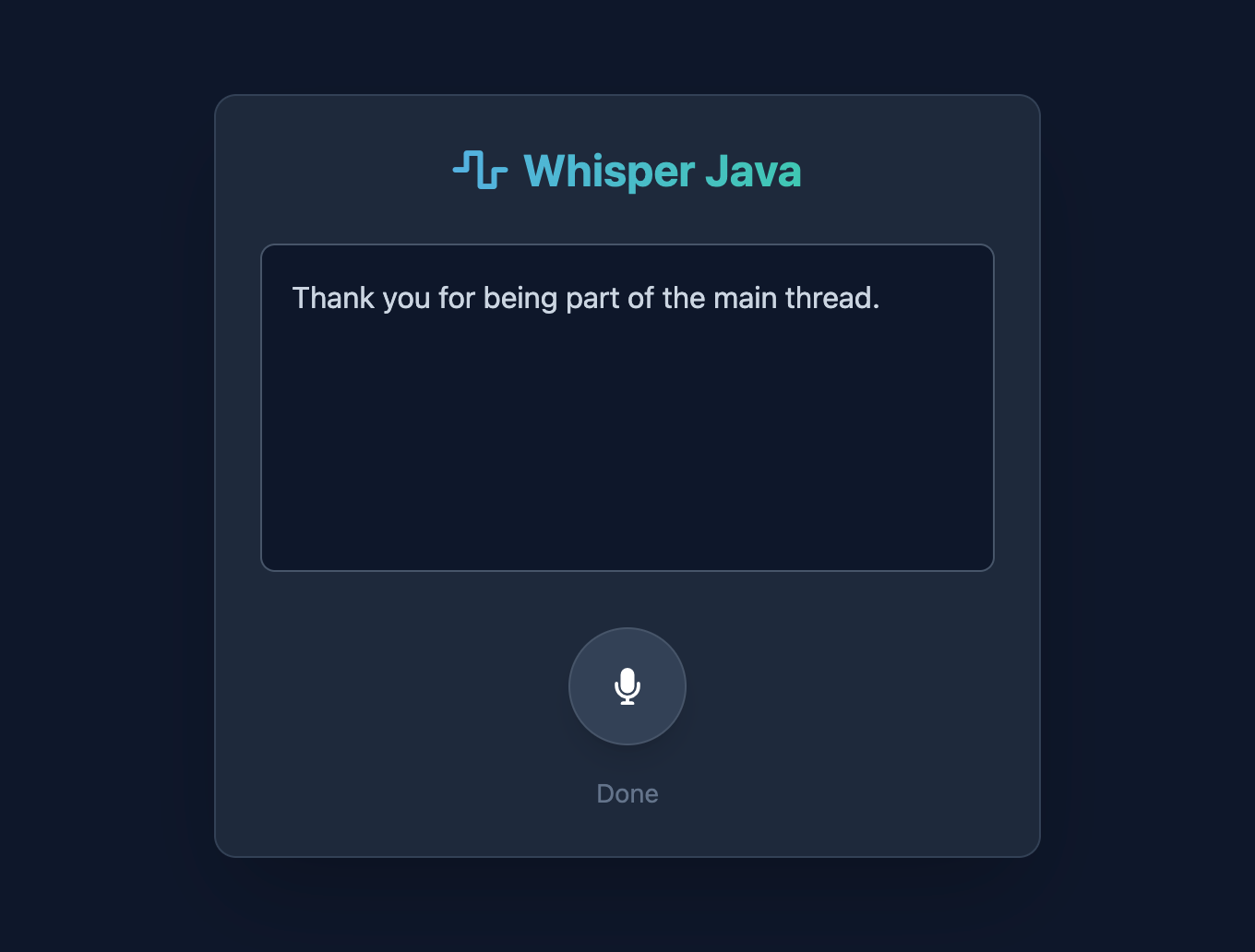
Try It
Click and hold the microphone button
Speak clearly
Release
You should see text appear almost immediately.
What Just Happened
Let’s be explicit.
The browser captured audio
Audio was resampled to 16 kHz
Raw floats were sent to Quarkus
Java allocated native memory
Whisper ran inference directly
Text came back synchronously
No Python.
No shell calls.
No JNI frameworks.
Just Java.
This is not a toy example
It shows that:
Java can call modern native ML libraries cleanly
FFM is practical, not academic
Quarkus is a solid host for AI workloads
You keep full control over memory and lifecycle
This is how Java belongs in local AI systems.
Java is no longer on the sidelines of AI systems.
It is right in the main thread.
Thanks for posting this!
I had been wanting to try Panama/FFM features for a while, especially since I saw your FFMPEG example.
This was pretty straight forward to get working locally on Ubuntu Linux.
The only changes I made were:
remove the '-DGGML_METAL=ON' option for the cmake command
in whisper_h.java, add this above the custom static block for SYMBOL_LOOKUP
static final SymbolLookup SYMBOL_LOOKUP;
update the paths to ggml-base.en.bin and libwhisper.so
Thanks again!