



Over the last week on The Main Thread, I ended up going down a bit of a rabbit hole. First I wrote about using JavaCV for webcam capture and emotion detection. Then I explored Java 25’s Foreign Function & Memory API, showing how to call ImageMagick natively without JNI.
Both posts were fun to write, and both sparked a lot of questions. But they also left me with a feeling I know well from working on larger systems:
these pieces are powerful on their own, but the real value comes when you put them together.
This tutorial is that missing piece.
If you followed along last week, you now understand:
how to pull frames from a webcam with JavaCV
how to run OpenCV DNN models for detection
how to connect to ImageMagick directly using the FFM API
how to work safely with off-heap memory in Java
Today we assemble everything into one coherent Quarkus application.
A real pipeline. End to end.
You will build a production-ready service that:
decodes video via FFmpeg’s native APIs
applies filters and overlays
performs object detection in real time
streams processed video over MJPEG and WebSockets
handles memory safely without spawning subprocesses
The kind of thing you normally see in C++ or Python ecosystems, but now done fully in Java with Quarkus.
This tutorial is the natural next step to round up the journey from last week. It connects all the dots and shows how Java can handle serious video workloads with clarity, speed, and safety.
Let’s start!
Why This Matters in Enterprise Java
Video workloads suffer from:
Performance bottlenecks.
Spawning ffmpeg processes adds latency. Copying pixels between processes doubles memory.
Memory pressure.
When 1080p frames move between processes, each additional copy is expensive. Direct access to native buffers solves this.
Operational complexity.
You must manage process lifecycles, handle crashes, and implement cleanup logic. Running FFmpeg as a library avoids this entire class of failures.
Python solved performance by relying on C-backed libraries like NumPy and OpenCV. Java now reaches the same performance envelope without writing JNI.
What You Build
You will build a Quarkus service that runs:
native FFmpeg decoding through jextract bindings
real-time frame processing
a filter graph with hqdn3d
logo overlays
object detection via OpenCV DNN
MJPEG streaming
WebSocket bidirectional streaming
Prerequisites
Install the required tooling.
Software:
Java 25
Quarkus
Maven 3.9
FFmpeg 7.x
jextract
MobileNet SSD model files
Mac (Homebrew):
brew install ffmpeg
brew install openjdk@25
Verify:
ffmpeg -version
ls /opt/homebrew/lib/libav*.dylib
Install jextract: https://jdk.java.net/jextract/ (and also make sure you have xcode installed for this!)
jextract --versionModels:
These are available from the OpenCV model zoo.
src/main/resources/models/MobileNetSSD_deploy.caffemodelfile-mobilenetssd_deploy.prototxt
Quarkus Project Bootstrap
Create the project or clone from my Github repository.
mvn io.quarkus:quarkus-maven-plugin:create \
  -DprojectGroupId=com.example \
  -DprojectArtifactId=video-pipeline \
  -Dextensions="rest-jackson,websockets-next"
cd video-pipeline
Add/change the following in the pom.xml:
<properties>
  <maven.compiler.release>25</maven.compiler.release>
</properties>

<dependencies>
  <dependency>
            <groupId>org.bytedeco</groupId>
            <artifactId>javacv-platform</artifactId>
            <version>1.5.12</version>
            <exclusions>
                <!-- Exclude JavaFX as it’s not needed for server-side OpenCV processing -->
                <exclusion>
                    <groupId>org.openjfx</groupId>
                    <artifactId>javafx-graphics</artifactId>
                </exclusion>
                <exclusion>
                    <groupId>org.openjfx</groupId>
                    <artifactId>javafx-base</artifactId>
                </exclusion>
            </exclusions>
</dependencies>

 <plugin>
                <artifactId>maven-surefire-plugin</artifactId>
                <version>${surefire-plugin.version}</version>
                <configuration>
                    <argLine>--add-opens java.base/java.lang=ALL-UNNAMED --enable-native-access=ALL-UNNAMED -Djava.library.path=/opt/homebrew/lib</argLine>
                    <systemPropertyVariables>
                        <java.util.logging.manager>org.jboss.logmanager.LogManager</java.util.logging.manager>
                        <maven.home>${maven.home}</maven.home>
                    </systemPropertyVariables>
                </configuration>
            </plugin>
Test flag in application.properties:
quarkus.test.arg-line=--enable-native-access=ALL-UNNAMEDGenerate FFmpeg Bindings
I’ve added a little generate_bindings.sh script to the Github repsoitory that helps you generate the FFmpeg bindings with jextract. Make sure to adjust the paths if necessary.
#!/bin/bash

rm -rf src/main/java/com/example/ffmpeg/generated

INCLUDE_PATH=”/opt/homebrew/include”
OUTPUT_DIR=”src/main/java”
PACKAGE=”com.example.ffmpeg.generated”

jextract \
  --output $OUTPUT_DIR \
  --target-package $PACKAGE \
  -I $INCLUDE_PATH \
  --header-class-name FFmpeg \
  $INCLUDE_PATH/libavformat/avformat.h \
  $INCLUDE_PATH/libavcodec/avcodec.h \
  $INCLUDE_PATH/libavutil/avutil.h \
  $INCLUDE_PATH/libavutil/imgutils.h \
  $INCLUDE_PATH/libswscale/swscale.h \
  $INCLUDE_PATH/libavfilter/avfilter.h \
  $INCLUDE_PATH/libavfilter/buffersrc.h \
  $INCLUDE_PATH/libavfilter/buffersink.h
Run:
chmod +x generate_bindings.sh
./generate_bindings.sh
You now have 100+ generated classes representing FFmpeg.
Implement Frame Extraction (Core FFmpeg Logic)
The VideoExtractorService extracts frames from video files and processes them using FFmpeg via Java FFI (Foreign Function Interface).
Short preview snippet: (Link to VideoExtractorService.java)
package com.example.service;

import static com.example.ffmpeg.generated.FFmpeg.*;
import com.example.ffmpeg.generated.AVCodecContext;
import com.example.ffmpeg.generated.AVCodecParameters;
import com.example.ffmpeg.generated.AVFormatContext;
import com.example.ffmpeg.generated.AVStream;
import com.example.ffmpeg.generated.AVPacket;
import com.example.ffmpeg.generated.AVFrame;

import io.quarkus.logging.Log;
import jakarta.enterprise.context.ApplicationScoped;
import jakarta.inject.Inject;
import java.lang.foreign.*;
import java.nio.file.Path;
import java.util.function.BiConsumer;

@ApplicationScoped
public class VideoExtractorService {

    private static final int VIDEO_STREAM_INDEX = 0;
    private static final int BGR_BYTES_PER_PIXEL = 3;
    private static final int MAX_PLANES = 4;

    static {
        try {
            String basePath = “/opt/homebrew/lib/”;
            System.load(basePath + “libavutil.dylib”);
            System.load(basePath + “libswscale.dylib”);
            System.load(basePath + “libavcodec.dylib”);
            System.load(basePath + “libavformat.dylib”);
            Log.info(”FFmpeg libraries loaded successfully”);
        } catch (UnsatisfiedLinkError e) {
            Log.warn(”Failed to load FFmpeg libraries: “ + e.getMessage());
        }
    }

    @Inject
    ImageProcessorService imageProcessor;

public void extractAndProcess(Path video, BiConsumer<byte[], Integer> consumer) {
    try (Arena arena = Arena.ofConfined()) {
        // open input
        // setup codec context
        // allocate packet and frame

        while (av_read_frame(formatCtx, packet) >= 0) {
            if (AVPacket.stream_index(packet) == VIDEO_STREAM_INDEX) {
                avcodec_send_packet(codecCtx, packet);

                while (avcodec_receive_frame(codecCtx, frame) == 0) {
                    sws_scale(...);

                    byte[] jpeg = imageProcessor.overlayLogo(bgrBuffer, width, height);
                    consumer.accept(jpeg, idx++);
                }
            }
            av_packet_unref(packet);
        }
    }
}
VideoExtractorService Overview
Main method: extractAndProcess() — reads a video file and processes each frame
FFmpeg integration: Loads native libraries (libavutil, libswscale, libavcodec, libavformat) at startup
Frame processing pipeline:
Opens video file and initializes codec context
Converts frames to BGR24 (3 bytes per pixel) for Java compatibility
Overlays logo on each frame using ImageProcessorService
Passes processed frames to a consumer callback
Memory management: Uses Arena for native memory and cleans up FFmpeg resources
Internal helpers:
VideoContext record: holds format context, codec context, dimensions, pixel format
FrameConverter record: manages frame conversion buffers and SwsContext
Error handling: Logs errors and ensures cleanup in finally blocks
Architecture: @ApplicationScoped CDI bean, injects ImageProcessorService
Image Processing with Logo Overlay
The ImageProcessorService:
turns BGR native memory into a BufferedImage
draws a semi-transparent logo
encodes JPEG output
Short preview:
package com.example.service;

import java.awt.Graphics2D;
import java.awt.RenderingHints;
import java.awt.image.BufferedImage;
import java.awt.image.DataBufferByte;
import java.io.ByteArrayOutputStream;
import java.io.File;
import java.io.IOException;
import java.lang.foreign.MemorySegment;

import javax.imageio.ImageIO;

import jakarta.annotation.PostConstruct;
import jakarta.enterprise.context.ApplicationScoped;
import jakarta.inject.Inject;

@ApplicationScoped
public class ImageProcessorService {

    @Inject
    FFmpegFilterService filterService;

    private BufferedImage logoImage;

    @PostConstruct
    void init() {
        try {
            // Load Logo using standard Java
            File logoFile = new File(”src/main/resources/logo.png”);
            if (logoFile.exists()) {
                this.logoImage = ImageIO.read(logoFile);
                System.out.println(”Logo loaded: “ + logoImage.getWidth() + “x” + logoImage.getHeight());
            } else {
                System.err.println(”Logo not found!”);
            }
        } catch (IOException e) {
            throw new RuntimeException(e);
        }
    }


    public byte[] overlayLogo(MemorySegment rawBgrData, int width, int height) {
        try {
// ...
 }
    }
Main methods: Two overlayLogo() overloads:
One accepts raw BGR bytes from FFmpeg (MemorySegment)
One accepts a BufferedImage (for webcam frames)
Logo handling: Loads logo.png at startup; scales to 50% and positions in the upper-right corner
Processing pipeline:
Converts native memory (BGR bytes) to Java BufferedImage
Applies denoising filter (hqdn3d) for webcam frames via FFmpegFilterService
Overlays logo with high-quality rendering hints
Exports to JPEG byte array
Architecture: @ApplicationScoped CDI bean; injects FFmpegFilterService for denoising
Image format: Uses TYPE_3BYTE_BGR to match FFmpeg’s BGR24 output format
FFmpeg Filter Graph (HQDN3D Denoise)
This service builds a full FFmpeg filter graph:
buffer → hqdn3d → format → buffersink
The graph removes noise and stabilizes camera frames.
Short preview:
package com.example.service;

import static com.example.ffmpeg.generated.FFmpeg.*;
import com.example.ffmpeg.generated.AVFrame;

import jakarta.annotation.PreDestroy;
import jakarta.enterprise.context.ApplicationScoped;
import java.awt.image.BufferedImage;
import java.lang.foreign.Arena;
import java.lang.foreign.MemorySegment;
import java.lang.foreign.ValueLayout;

@ApplicationScoped
public class FFmpegFilterService {

    private static final double LUMA_SPATIAL = 4.0;
    private static final double CHROMA_SPATIAL = 3.0;
    private static final double LUMA_TEMPORAL = 6.0;
    private static final double CHROMA_TEMPORAL = 4.5;


    static {
        try {
            String basePath = “/opt/homebrew/lib/”;
            System.load(basePath + “libavutil.dylib”);
            System.load(basePath + “libavcodec.dylib”);
            System.load(basePath + “libavfilter.dylib”);
            System.load(basePath + “libswscale.dylib”);
        } catch (UnsatisfiedLinkError e) {
            System.err.println(”Failed to load libavfilter: “ + e.getMessage());
        }
    }

    /**
     * Apply hqdn3d (high quality 3D denoise) filter to a BufferedImage using native FFmpeg filter graph
     *
     * @param inputImage The input image to denoise
     * @return The denoised image
     */
    public BufferedImage applyHqdn3d(BufferedImage inputImage) {
// ..
 }

    @PreDestroy
    void cleanup() {
        // Cleanup if needed
    }
}
Main method: applyHqdn3d() — accepts a BufferedImage, returns a denoised BufferedImage
FFmpeg integration: Uses FFmpeg filter graph API via Java FFI (libavfilter, libavcodec, libswscale)
Processing pipeline:
Converts BufferedImage → AVFrame (RGB24)
Builds filter graph: buffer source → hqdn3d → format → buffer sink
Applies denoising with configurable parameters (luma/chroma spatial/temporal)
Converts filtered AVFrame → BufferedImage
Memory management: Uses Arena for native memory; intentionally does not free filter graphs to avoid crashes (known FFmpeg lifecycle issue)
Format handling: Handles stride/padding when converting between Java images and FFmpeg frames
Error handling: Returns original image on failure; includes validation and error logging
Architecture: @ApplicationScoped CDI bean; loads native libraries at startup
Object Detection with OpenCV DNN
The ObjectDetector uses the MobileNet SSD model for:
people
cars
dogs
chairs
coffee cups
etc.
Short preview:
package com.example.vision;

import static org.bytedeco.opencv.global.opencv_core.CV_32F;
import static org.bytedeco.opencv.global.opencv_dnn.DNN_BACKEND_DEFAULT;
import static org.bytedeco.opencv.global.opencv_dnn.DNN_TARGET_CPU;
import static org.bytedeco.opencv.global.opencv_dnn.blobFromImage;
import static org.bytedeco.opencv.global.opencv_dnn.readNetFromCaffe;

import java.io.File;
import java.net.URL;
import java.util.ArrayList;
import java.util.List;

import org.bytedeco.javacpp.indexer.FloatIndexer;
import org.bytedeco.opencv.opencv_core.Mat;
import org.bytedeco.opencv.opencv_core.Scalar;
import org.bytedeco.opencv.opencv_core.Size;
import org.bytedeco.opencv.opencv_dnn.Net;

import jakarta.annotation.PostConstruct;
import jakarta.enterprise.context.ApplicationScoped;

@ApplicationScoped
public class ObjectDetector {
// ..

    // Simple POJO for results
    public record Detection(String label, float confidence, int x, int y, int x2, int y2) {
    }
}Model: Loads MobileNet-SSD Caffe model at startup (prototxt + caffemodel from resources)
Main method: detect() — accepts OpenCV Mat, returns list of Detection objects
Detection pipeline:
Preprocesses frame to 300x300 blob with normalization
Runs neural network inference (CPU backend)
Parses output to extract bounding boxes and class labels
Filters detections by confidence threshold (>0.5)
Supported classes: 20 COCO classes (person, car, dog, cat, bicycle, etc.) plus background
Output format: Detection record with label, confidence, and bounding box coordinates (x, y, x2, y2)
Technology: Uses JavaCV (OpenCV Java bindings) for DNN inference
Architecture: @ApplicationScoped CDI bean; model loaded once at startup via @PostConstruct
Memory management: Cleans up native OpenCV Mat objects after each detection
Webcam Streaming Using Mutiny Multi
The WebcamService captures webcam frames, runs object detection, and streams annotated JPEG frames:
Short preview:
package com.example.vision;

import static org.bytedeco.opencv.global.opencv_imgproc.FONT_HERSHEY_SIMPLEX;
import static org.bytedeco.opencv.global.opencv_imgproc.putText;
import static org.bytedeco.opencv.global.opencv_imgproc.rectangle;

import java.awt.image.BufferedImage;
import java.io.ByteArrayOutputStream;
import java.util.Collections;
import java.util.List;
import java.util.concurrent.Executor;
import java.util.concurrent.Executors;
import java.util.concurrent.atomic.AtomicReference;

import javax.imageio.ImageIO;

import org.bytedeco.javacv.Frame;
import org.bytedeco.javacv.FrameGrabber;
import org.bytedeco.javacv.Java2DFrameConverter;
import org.bytedeco.javacv.OpenCVFrameConverter;
import org.bytedeco.javacv.OpenCVFrameGrabber;
import org.bytedeco.opencv.opencv_core.Mat;
import org.bytedeco.opencv.opencv_core.Point;
import org.bytedeco.opencv.opencv_core.Scalar;

import io.smallrye.mutiny.Multi;
import jakarta.annotation.PreDestroy;
import jakarta.enterprise.context.ApplicationScoped;
import jakarta.inject.Inject;

@ApplicationScoped
public class WebcamService {

    @Inject
    ObjectDetector detector;

    private FrameGrabber grabber;
    private boolean running = false;
// ..
 }

    @PreDestroy
    void cleanup() {
        running = false;
        try {
            if (grabber != null)
                grabber.release();
        } catch (Exception e) {
            e.printStackTrace();
        }
    }
}
Main method: stream() — returns a Mutiny Multi<byte[]> reactive stream of JPEG frames
Processing pipeline:
Captures frames from default webcam (OpenCVFrameGrabber)
Runs object detection every 5th frame (async on virtual thread) to maintain FPS
Draws bounding boxes and labels on frames using latest detections
Converts annotated frames to JPEG byte arrays
Performance optimizations:
Detection runs asynchronously to avoid blocking frame capture
Uses AtomicReference to share latest detections between threads
Clones Mat for detection to avoid conflicts with frame grabber
Dependencies: Injects ObjectDetector for object detection
Technology: Uses JavaCV (OpenCV Java bindings) for webcam access and image processing
Architecture: @ApplicationScoped CDI bean; manages webcam lifecycle (start/stop/release)
Frame rate: Targets ~30 FPS with detection updates every 5 frames (~6 detections/second)
MJPEG Streaming Endpoint
Simple REST endpoint that serves webcam video stream as MJPEG (Motion JPEG):
package com.example.vision;

import io.smallrye.mutiny.Multi;
import jakarta.inject.Inject;
import jakarta.ws.rs.GET;
import jakarta.ws.rs.Path;
import jakarta.ws.rs.Produces;

import java.nio.charset.StandardCharsets;
import java.util.concurrent.atomic.AtomicLong;

@Path(”/stream”)
public class StreamResource {

    @Inject
    WebcamService webcamService;

    @GET
    @Produces(”multipart/x-mixed-replace;boundary=frame”)
    public Multi<byte[]> stream() {
        final byte[] initialBoundary = “--frame\r\n”.getBytes(StandardCharsets.UTF_8);
        final byte[] frameBoundary = “\r\n--frame\r\n”.getBytes(StandardCharsets.UTF_8);
        final AtomicLong frameIndex = new AtomicLong(0);

        return webcamService.stream()
                .map(bytes -> {
                    long index = frameIndex.getAndIncrement();

                    // Use initial boundary for first frame, frame boundary for subsequent frames
                    byte[] boundaryToUse = (index == 0) ? initialBoundary : frameBoundary;

                    // Format each MJPEG frame with boundary and headers
                    String headers = String.format(
                        “Content-Type: image/jpeg\r\nContent-Length: %d\r\n\r\n”,
                        bytes.length
                    );

                    byte[] headerBytes = headers.getBytes(StandardCharsets.UTF_8);
                    byte[] frame = new byte[boundaryToUse.length + headerBytes.length + bytes.length];

                    int offset = 0;
                    System.arraycopy(boundaryToUse, 0, frame, offset, boundaryToUse.length);
                    offset += boundaryToUse.length;
                    System.arraycopy(headerBytes, 0, frame, offset, headerBytes.length);
                    offset += headerBytes.length;
                    System.arraycopy(bytes, 0, frame, offset, bytes.length);

                    return frame;
                });
    }
}
Main functionality:
Injects WebcamService to get the frame stream
Wraps each JPEG frame with MJPEG multipart boundaries and headers
Formats frames with Content-Type: image/jpeg and Content-Length headers
MJPEG format: Uses multipart/x-mixed-replace with --frame boundaries between frames
Reactive: Uses Mutiny Multi<byte[]> for streaming; transforms raw JPEG bytes into MJPEG format
Frame tracking: Uses AtomicLong to track frame index for proper boundary formatting (initial vs. subsequent frames)
Architecture: JAX-RS resource class; delegates actual webcam capture to WebcamService
WebSocket Bidirectional Streaming
VideoStreamSocket is a WebSocket endpoint for bidirectional video streaming; receives frames from clients, processes them, and sends them back.
package com.example.streaming;

import com.example.service.ImageProcessorService;
import io.quarkus.websockets.next.OnBinaryMessage;
import io.quarkus.websockets.next.OnClose;
import io.quarkus.websockets.next.OnOpen;
import io.quarkus.websockets.next.OnTextMessage;
import io.quarkus.websockets.next.WebSocket;
import io.quarkus.websockets.next.WebSocketConnection;
import jakarta.inject.Inject;
import java.awt.image.BufferedImage;
import java.io.ByteArrayInputStream;
import java.util.concurrent.atomic.AtomicBoolean;
import javax.imageio.ImageIO;

@WebSocket(path = “/stream/video”)
public class VideoStreamSocket {

    @Inject
    ImageProcessorService imageProcessor;

    private final AtomicBoolean streaming = new AtomicBoolean(false);

    @OnOpen
    public void onOpen(WebSocketConnection connection) {
        System.out.println(”Client connected! Ready for bidirectional streaming...”);
        streaming.set(true);
    }

    @OnBinaryMessage
    public void onBinaryMessage(WebSocketConnection connection, byte[] frameData) {
        if (!streaming.get()) {
            return;
        }

        try {
            // Decode incoming JPEG frame from webcam
            ByteArrayInputStream bais = new ByteArrayInputStream(frameData);
            BufferedImage inputImage = ImageIO.read(bais);

            if (inputImage == null) {
                System.err.println(”Failed to decode incoming frame”);
                return;
            }

            // Check if still streaming before processing (client might have disconnected)
            if (!streaming.get()) {
                return;
            }

            // Process the frame (overlay logo)
            byte[] processedJpeg = imageProcessor.overlayLogo(inputImage);

            // Check again if still streaming after processing (processing takes time)
            if (!streaming.get()) {
                return;
            }

            // Send processed frame back to client
            // Catch WebSocket closed exception - this is normal when client disconnects
            try {
                connection.sendBinaryAndAwait(processedJpeg);
            } catch (Exception sendException) {
                // If WebSocket is closed, this is expected when client disconnects
                // Don’t log as error - it’s a normal race condition
                String msg = sendException.getMessage();
                if (msg != null && msg.contains(”closed”)) {
                    // Client disconnected while processing - this is fine
                    streaming.set(false);
                    return;
                }
                // Re-throw if it’s a different error
                throw sendException;
            }

        } catch (Exception e) {
            // Only log if it’s not a WebSocket closed exception
            String msg = e.getMessage();
            if (msg == null || !msg.contains(”closed”)) {
                System.err.println(”Error processing frame: “ + e.getMessage());
                e.printStackTrace();
            }
        }
    }

    @OnTextMessage
    public void onTextMessage(WebSocketConnection connection, String message) {
        if (”START”.equals(message)) {
            streaming.set(true);
            System.out.println(”Stream started by client”);
            connection.sendText(”STREAM_STARTED”);
        } else if (”STOP”.equals(message)) {
            streaming.set(false);
            System.out.println(”Stream stopped by client”);
            connection.sendText(”STREAM_STOPPED”);
        }
    }

    @OnClose
    public void onClose(WebSocketConnection connection) {
        streaming.set(false);
        System.out.println(”Client disconnected”);
    }
}
Main functionality:
Receives JPEG frames as binary messages from client
Processes frames using ImageProcessorService (overlays logo, applies denoising)
Sends processed JPEG frames back to client
Control messages: Text messages for START/STOP to control streaming state
State management: Uses AtomicBoolean to track streaming state; checks state before/after processing to handle disconnections
Error handling: Gracefully handles WebSocket closed exceptions (normal when client disconnects)
Lifecycle: Handles connection open/close events; resets streaming state on disconnect
Architecture: Injects ImageProcessorService for frame processing; uses Quarkus WebSockets Next annotations (@OnOpen, @OnBinaryMessage, @OnTextMessage, @OnClose)
Testing the Endpoints
Start the app:
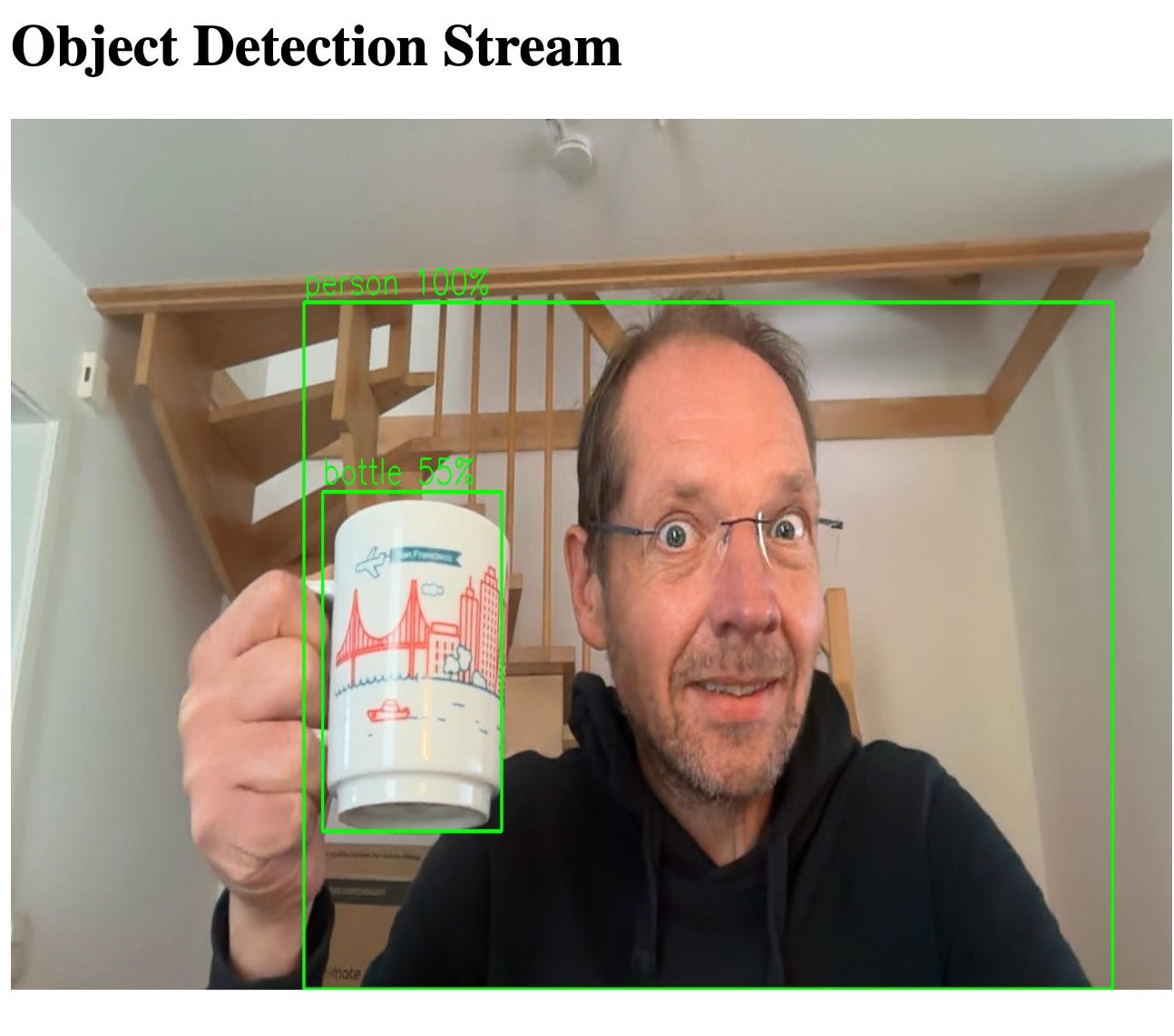
./mvnw quarkus:devObject detection MJPEG stream:
http://localhost:8080/stream.html
You should see bounding boxes on detected objects.
Bidirectional WebSocket client with Quarkus Logo overlay:
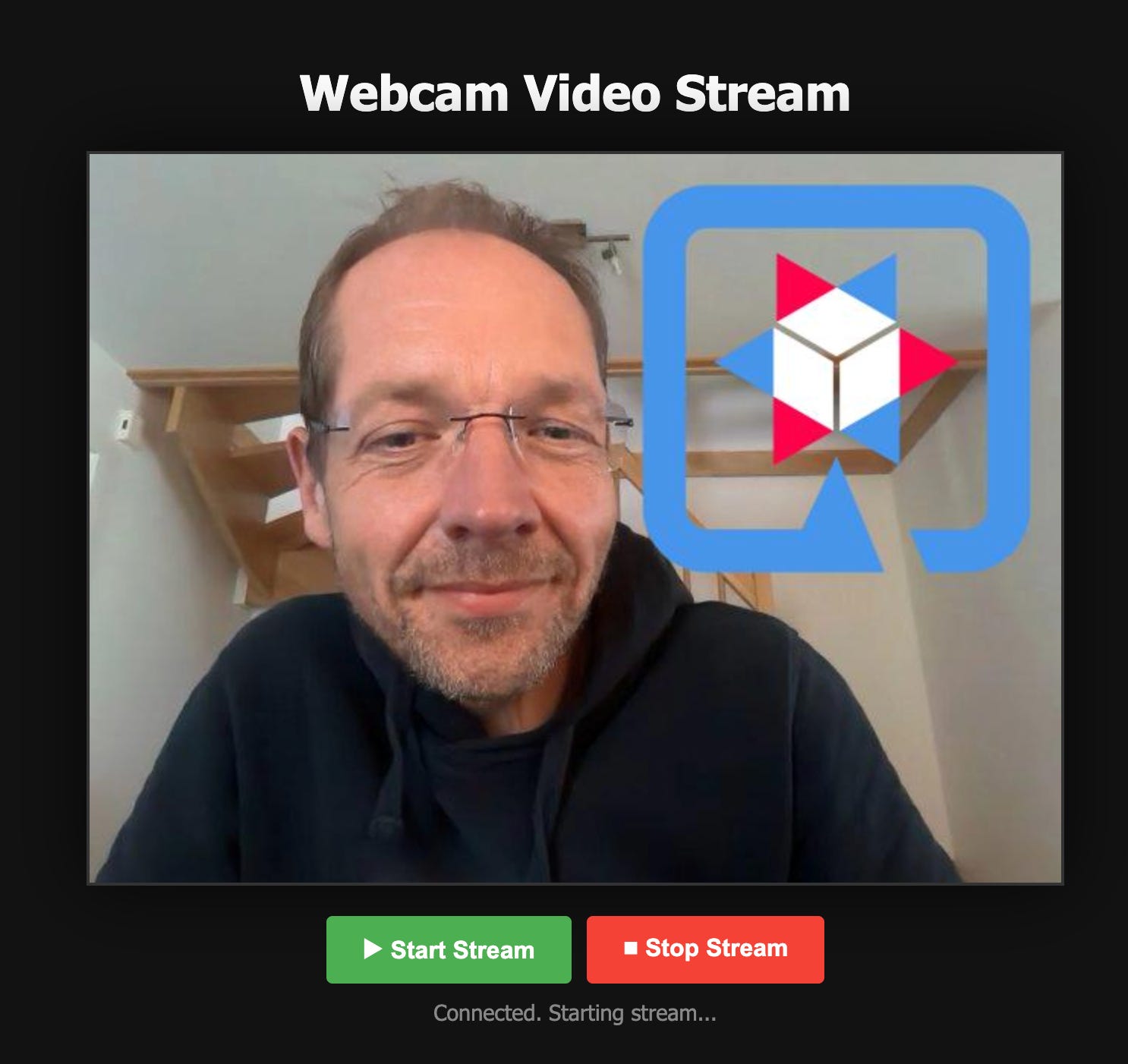
Load in your browser. Live processed video appears.
Production Notes
Memory
The FFM API uses off-heap memory. Always:
use
Arena.ofConfined()avoid leaking MemorySegments
monitor native memory
jcmd <pid> VM.native_memory summaryPerformance
use virtual threads for parallel filtering
skip detection frames to improve FPS
enable hardware acceleration (VideoToolbox, NVENC, VAAPI)
consider buffering strategies under load
Security
limit WebSocket frame sizes
validate video file headers
run FFmpeg in restricted containers
never expose raw native access flags publicly
Where to Go Next
FFmpeg has hundreds of filters. Combine Java 25’s FFM API with Quarkus and you get a powerful platform for:
transcoding microservices
live camera analysis
security monitoring
content moderation
AR overlays
video annotation pipelines