



Legacy systems are everywhere in enterprise environments. They run critical business processes, hold decades of data, and often cannot be rewritten easily. When teams start experimenting with AI agents, the first instinct is usually to expose new APIs or refactor the existing system so an LLM can interact with it.
That approach breaks down quickly.
Large enterprise applications have complex dependency trees, fragile integration points, and release processes that move slowly. A small change to expose a new endpoint can ripple through dozens of modules. What starts as “just one API for an agent” turns into a multi-month modernization project.
The reality is simple. Most organizations do not need to rewrite their legacy systems to integrate them with AI.
They just need a safe way to translate existing APIs into something AI agents understand.
That is exactly what the Model Context Protocol (MCP) enables.
In a recent demo, my friend and co-author Alex Soto showed how to expose a legacy application to AI agents without modifying the original code. The trick is simple but powerful: run a lightweight Quarkus MCP server as a Kubernetes sidecar next to the legacy application.
This pattern creates an AI-friendly interface while leaving the existing system completely untouched. I have written about other approaches to MCP integration in this article:
Exposing MCP from Legacy Java: Architecture Patterns That Actually Scale

Large Language Models are no longer just consumers of public APIs. With the Model Context Protocol (MCP), they become first-class clients of enterprise systems. This creates a new architectural question that many organizations now face:
The Real Problem with AI Integration in Enterprise Systems
Most teams assume the problem is exposing data to an LLM.
The real problem is how to do it safely without destabilizing production systems.
Enterprise applications typically have several characteristics that make direct integration risky:
Legacy systems evolve slowly because they support critical business processes. Changing them introduces risk. AI integrations, on the other hand, evolve quickly because teams experiment with prompts, tools, and workflows.
These two speeds do not match.
There is also a security issue. Many internal APIs were never designed to be consumed by external systems. They assume trusted callers, internal networks, and stable traffic patterns. Exposing them directly to AI systems increases the attack surface.
Finally, there is an operational concern. AI workloads often behave differently from traditional applications. Agents may call APIs repeatedly while reasoning through a problem. They may retry requests aggressively. They may explore endpoints in unexpected ways.
Connecting these workloads directly to a legacy system is not a good idea.
So the goal becomes clear: create an adapter layer that speaks MCP while isolating the legacy system.
Why the Sidecar Pattern Works So Well
The sidecar pattern is widely used in Kubernetes to extend applications without modifying them. Service meshes, logging agents, and security proxies often run as sidecars.
The same pattern works extremely well for AI integration.
In Alex’s demo, the legacy application and the MCP server run inside the same Kubernetes Pod.
Because containers in the same pod share a network namespace, they can communicate through localhost. The MCP server simply calls the legacy REST API internally.
This architecture gives several important advantages.
First, the legacy application does not change. The sidecar translates requests between the MCP protocol and the existing REST API.
Second, the legacy API does not need to be exposed externally. Only the MCP server is visible to AI clients.
Third, the MCP layer can evolve independently. You can add new tools, change prompts, or improve output formatting without touching the legacy codebase.
This is exactly the kind of separation enterprise teams need.
The Demo Architecture
Alex’s example uses the classic Spring Boot PetClinic REST application. This project is widely known in the Java community and exposes an OpenAPI specification.
The architecture looks like this:
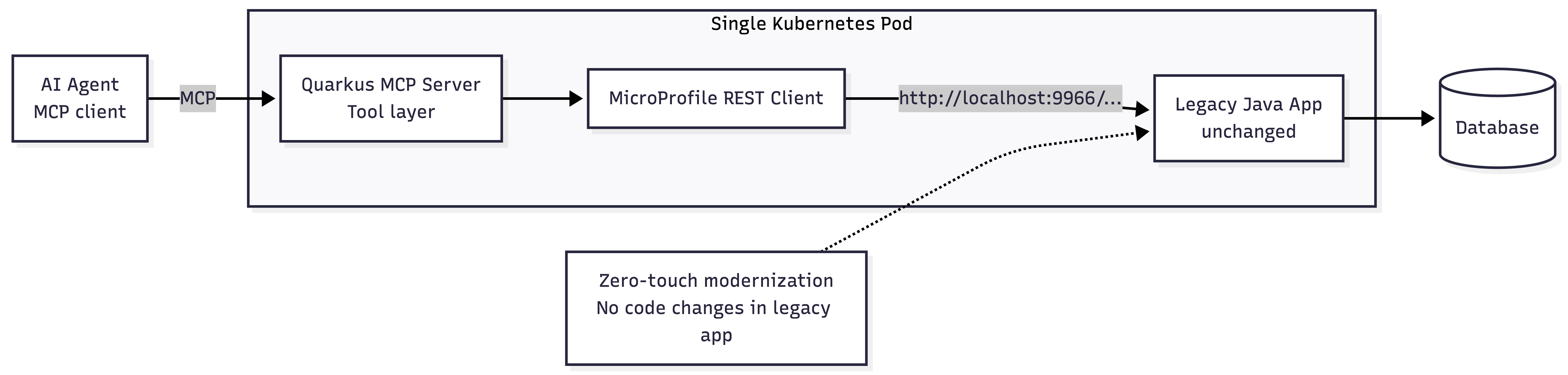
The MCP server acts as a translation layer.
When an AI agent asks for pets owned by a specific user, the MCP tool invokes the legacy REST endpoint. The response is converted into MCP tool output and returned to the agent.
From the agent’s perspective, it is simply calling a tool.
From the legacy system’s perspective, nothing changed.
Step 1: Create the Quarkus MCP Server
The first step is creating a lightweight Quarkus application that will run as the sidecar.
Quarkus is a good choice here because it starts quickly, uses little memory, and works well in container environments.
Create the project:
quarkus create app org.example:petclinic-mcp-sidecar \
  --extension=quarkus-rest-jackson,quarkus-rest-client-jackson,quarkus-mcp-server
Extensions explained:
quarkus-rest-jackson– provides REST support and JSON serializationquarkus-rest-client-jackson– allows the sidecar to call the legacy REST APIquarkus-mcp-server– exposes Java methods as MCP tools
The application itself is intentionally simple. Its job is only to translate between MCP and the legacy API.
Step 2: Generate the REST Client from the OpenAPI Specification
The PetClinic application already exposes an OpenAPI specification. Instead of writing REST client code manually, Alex used IBM Bob to generate the client interfaces.
The prompt simply referenced the OpenAPI URL and requested client interfaces for the required endpoints.
The generated client looked like this:
package org.example.petclinic.client;

import jakarta.ws.rs.GET;
import jakarta.ws.rs.Path;
import jakarta.ws.rs.PathParam;
import jakarta.ws.rs.QueryParam;

import org.eclipse.microprofile.rest.client.inject.RegisterRestClient;

import java.util.List;

@Path("/pets")
@RegisterRestClient(configKey = "petclinic-api")
public interface PetService {

    @GET
    List<Pet> listPets();

    @GET
    @Path("/{petId}")
    Pet getPetById(@PathParam("petId") Long petId);

    @GET
    @Path("/owner")
    List<Pet> getPetsByOwner(@QueryParam("ownerId") Long ownerId);
}
Because the sidecar runs inside the same pod, the base URL simply points to the legacy container:
http://localhost:9966/petclinic/apiThere is no service discovery or ingress configuration required.
Step 3: Expose MCP Tools
Next we wrap the REST client inside MCP tools.
The Quarkus MCP extension makes this very straightforward. You annotate Java methods with @Tool, and they become available to MCP clients automatically.
Example:
package org.example.petclinic.tools;

import jakarta.enterprise.context.ApplicationScoped;
import jakarta.inject.Inject;

import org.eclipse.microprofile.rest.client.inject.RestClient;

import io.quarkiverse.mcp.server.Tool;

import java.util.List;

@ApplicationScoped
public class PetClinicTools {

    @Inject
    @RestClient
    PetService petService;

    @Tool(description = "List all pets in the clinic")
    public List<Pet> listPets() {
        return petService.listPets();
    }

    @Tool(description = "Get pet by ID")
    public Pet getPetById(Long id) {
        return petService.getPetById(id);
    }

}
This code does not contain any AI logic.
It simply exposes the legacy API as structured tools that an agent can discover and call.
The MCP framework handles the protocol layer automatically.
Step 4: Deploy the Sidecar in Kubernetes
The final step is deploying both containers in the same pod.
The existing PetClinic deployment does not change significantly. We just add another container.
apiVersion: apps/v1
kind: Deployment
metadata:
  name: petclinic
spec:
  template:
    spec:
      containers:

      - name: petclinic
        image: springcommunity/spring-petclinic-rest
        ports:
          - containerPort: 9966

      - name: petclinic-mcp
        image: example/petclinic-mcp-sidecar
        ports:
          - containerPort: 8888
        env:
          - name: QUARKUS_REST_CLIENT_PETCLINIC_API_URL
            value: http://localhost:9966/petclinic/api
Both containers share the same network namespace.
The sidecar talks to the legacy app through localhost. External clients talk only to the MCP endpoint.
Step 5: Verify the Integration
Once deployed, you can verify the MCP server using the MCP Inspector tool.
The inspector will list the available tools:
listPets
getPetById
getPetsByOwner
Calling a tool should return the same data as the original REST endpoint.
The difference is that the output now follows the MCP protocol. This makes it usable by any MCP-compatible AI client.
Why This Pattern Matters
The sidecar approach solves a problem many enterprises face right now.
Companies want to experiment with AI agents, but they cannot risk destabilizing the systems that run their business.
By isolating the MCP integration in a separate container, teams can move quickly without touching the legacy codebase.
They can:
add new AI tools
improve prompts
integrate with new agent frameworks
iterate on output formats
All while the underlying system stays unchanged.
This is a powerful modernization strategy.
Instead of rewriting legacy systems, we wrap them with intelligent interfaces.
Conclusion
Legacy applications are not going away. They contain critical business logic and valuable data. The challenge is connecting them to modern AI systems safely.
The combination of Quarkus, MCP, and the Kubernetes sidecar pattern provides a practical solution. You expose legacy APIs as AI-friendly tools without modifying the original application.
Alex Soto’s demo shows how quickly this can be implemented. With the help of tools like IBM Bob, the boilerplate between OpenAPI specifications and MCP tools can be generated in minutes.
This approach allows teams to modernize incrementally while keeping their production systems stable.


