


I’m returning to the little Java UIs I’ve been building here, this time using just the keyboard. I enter something wrong, the page asks me to fix it, and I have to find my place again. Getting from that error to a completed request takes me through several HTML replacements, each with a decision about where focus belongs.
I’ve already covered the pieces in HTMX with Quarkus and Qute, the Playwright tutorial, and the durable progress article. Java renders the HTML, browser tests follow the interaction, and a live region announces changes as processing continues. I’m combining those pieces in a form that preserves entered values, directs focus after validation, and announces request status.
When I submit the form, HTMX replaces the HTML. I need to know where I am and what I can do next. If I’m using a screen reader, I need that feedback through speech too. Agents navigating web interfaces also rely on the controls and state we expose. I’m checking those same controls by following a person’s keyboard input through the form.
So I’ve picked a small equipment form. I need laptops for a workshop, I enter the reason and quantity, and I review the details before submitting. I’ll deliberately get the first attempt wrong. Then I’ll follow the correction through to confirmation using the keyboard, with Playwright checking the sequence and a separate screen-reader pass to assess the spoken feedback.
Keep the example focused
I’ve kept the request data in the rendered form, and submission creates an illustrative reference for this local accessibility lab. Equipment reservations and persistent storage belong to the service you would connect behind this UI. The page makes that scope explicit. Once you connect an actual equipment service, its receipt must represent a committed business operation.
I selected Java 25, Quarkus 3.39.4, HTMX 2.0.10, Playwright for Java 1.63.0, and the axe Playwright integration 4.13.0. Quarkus 3.39.4 was the latest stable release when checked on September 20, 2026, following its September 17 release. I’ve pinned those versions so you can follow the same setup.
You’ll need JDK 25 selected through JAVA_HOME to compile and run the application. The Quarkus CLI creates the project and its Maven wrapper, which handles the build. Check java -version before starting, and allow network access for the initial dependency and browser downloads. Everything in this example runs through the Java application and its browser tests.
Create the application from the directory where you want to keep it or start from my Github repository:
quarkus create app com.themainthread:keyboard-workflow \
  --extension=rest-qute \
  --java=25 \
  --platform-bom=io.quarkus.platform:quarkus-bom:3.39.4 \
  --no-code --no-dockerfiles --wrapper --batch-mode
cd keyboard-workflow
I chose rest-qute for the REST integration with Qute templates.
For the browser side, I’ll serve a pinned HTMX file with the application. I used Web Bundler in the earlier article, and you can keep that approach for a larger collection of frontend assets. This form needs one library, so a local copy keeps the setup fairly small:
mkdir -p src/main/resources/META-INF/resources/vendor
curl -fsSL https://cdn.jsdelivr.net/npm/htmx.org@2.0.10/dist/htmx.min.js \
  -o src/main/resources/META-INF/resources/vendor/htmx.min.js
The browser loads HTMX from the application, which also lets you run the form with local assets after the initial download.
Decide where focus belongs
The event handlers follow these focus rules:
Initial load: leave focus at the browser’s normal starting point. The first Tab reveals a skip link.
Rejected details: focus an error summary with links to the invalid fields, and retain both entered values.
Review or edit: focus the new step heading. The next Tab reaches the first control in that step.
Submission: focus the confirmation heading, giving the reader a starting point for the result.
HTTP or network failure: retain the current form and focus, and announce that the user can retry.
A slow response after the user leaves the form: preserve their new focus location and announce that the result is available.
I’m applying these rules to deliberate transitions between steps. For a background update, such as a changing progress value, I would keep focus where the user placed it. If you’re extending the durable progress application, you can use its live region for those updates and reserve focus changes for navigation.
Render the same workflow as a page or a fragment
Create src/main/java/com/themainthread/keyboard/WorkflowResource.java:
package com.themainthread.keyboard;

import java.util.LinkedHashMap;
import java.util.Map;
import java.util.UUID;

import io.quarkus.qute.CheckedTemplate;
import io.quarkus.qute.TemplateInstance;
import jakarta.ws.rs.Consumes;
import jakarta.ws.rs.GET;
import jakarta.ws.rs.HeaderParam;
import jakarta.ws.rs.POST;
import jakarta.ws.rs.Path;
import jakarta.ws.rs.Produces;
import jakarta.ws.rs.core.MediaType;
import jakarta.ws.rs.core.Response;
import org.jboss.resteasy.reactive.RestForm;

@Path("/")
@Produces(MediaType.TEXT_HTML)
public class WorkflowResource {

    public record View(String step, String purpose, String quantity,
            Map<String, String> errors, String receipt) {
        public String title() {
            if (!errors.isEmpty()) {
                return "Correct " + errors.size() + " errors";
            }
            return switch (step) {
                case "review" -> "Step 2 of 2: Review your request";
                case "done" -> "Demo request submitted";
                default -> "Step 1 of 2: Request details";
            };
        }
    }

    @CheckedTemplate(basePath = "")
    public static class Templates {
        public static native TemplateInstance page(View view);
        public static native TemplateInstance workflow(View view);
    }

    @GET
    public Response start() {
        return render(new View("details", "", "1", Map.of(), ""), false);
    }

    @POST
    @Path("review")
    @Consumes(MediaType.APPLICATION_FORM_URLENCODED)
    public Response review(@RestForm String purpose, @RestForm String quantity,
            @HeaderParam("HX-Request") boolean htmx) {
        return render(validate(purpose, quantity, "review"), htmx);
    }

    @POST
    @Path("confirm")
    @Consumes(MediaType.APPLICATION_FORM_URLENCODED)
    public Response confirm(@RestForm String purpose, @RestForm String quantity,
            @RestForm String intent, @HeaderParam("HX-Request") boolean htmx) {
        if ("edit".equals(intent)) {
            return render(new View("details", clean(purpose), clean(quantity), Map.of(), ""), htmx);
        }
        // Hidden fields are still untrusted input. Validate the final POST too.
        View checked = validate(purpose, quantity, "done");
        if (checked.errors().isEmpty()) {
            checked = new View("done", checked.purpose(), checked.quantity(), Map.of(),
                    UUID.randomUUID().toString());
        }
        return render(checked, htmx);
    }

    private View validate(String purpose, String quantity, String next) {
        String reason = clean(purpose);
        String count = clean(quantity);
        Map<String, String> errors = new LinkedHashMap<>();
        if (reason.length() < 10 || reason.length() > 200) {
            errors.put("purpose", "Purpose: enter between 10 and 200 characters.");
        }
        if (!count.matches("[1-5]")) {
            errors.put("quantity", "Quantity: enter a whole number from 1 to 5.");
        }
        return new View(errors.isEmpty() ? next : "details", reason, count, errors, "");
    }

    private static String clean(String value) {
        return value == null ? "" : value.strip();
    }

    private Response render(View view, boolean htmx) {
        return Response.status(view.errors().isEmpty() ? 200 : 422)
                .entity(htmx ? Templates.workflow(view) : Templates.page(view))
                .header("X-Workflow-Fragment", "true")
                .header("Vary", "HX-Request")
                .header("Cache-Control", "no-store")
                .build();
    }
}
The server accepts form data and returns HTML. I use HX-Request to select a fragment for HTMX or a complete document for an ordinary form submission. The header controls rendering; authorization belongs to the service’s security layer. Vary describes the two representations, while no-store tells caches to leave these responses uncached.
The view model holds the current step, entered values, and errors. I chose a LinkedHashMap to keep the summary in field order. Quantity stays a string through validation, so entering many, for example, reaches the resource method and produces the field error we’ve defined.
I’ve kept the rules straightforward: a purpose between 10 and 200 characters and a quantity from 1 to 5. The final POST validates the values again. Hidden inputs are still editable by the sender, of course, so this is also where an actual service must enforce its business rules.
The checked Qute templates declare the data they receive. With basePath = "", the methods resolve to templates/page.html and templates/workflow.html. Qute escapes the values rendered into these HTML templates. Keep that escaping enabled for user input.
Next, create src/main/resources/templates/page.html:
<!doctype html>
<html lang="en">
<head>
    <meta charset="utf-8">
    <meta name="viewport" content="width=device-width, initial-scale=1">
    <title>{view.title} — Equipment requests</title>
    <link rel="stylesheet" href="/workflow.css">
    <script src="/vendor/htmx.min.js" defer></script>
    <script src="/workflow.js" defer></script>
</head>
<body>
<a class="skip" href="#main">Skip to request</a>
<header><p>The Main Thread / Keyboard lab</p></header>
<main id="main" tabindex="-1">
    <h1>Equipment request</h1>
    <p>Request loan laptops for a workshop. This demo does not reserve equipment or store requests.</p>
    <p id="status" role="status" aria-live="polite" aria-atomic="true"></p>
    <div id="workflow" aria-busy="false">
        {#include workflow /}
    </div>
</main>
<footer><a href="/">Start a new request</a></footer>
</body>
</html>
I’ve made #workflow the stable replacement target. HTMX changes its children while the container stays in place. The #status element also exists from the initial page load, just outside that replacement boundary.
That gives me a persistent live region for request feedback. Assistive technology can announce its updates while focus stays on the current control. I use a polite, atomic region here: feedback can wait for a pause in speech, and the message is treated as a whole. Its position outside the busy region lets the status remain available while the form’s subtree is updating. This follows the intent of WCAG’s status-message guidance.
The surrounding page supplies a language, title, main landmark, and heading. The skip link takes you to main. With tabindex="-1", that destination can receive focus programmatically while the ordinary Tab sequence continues through interactive controls.
Make validation usable
Create src/main/resources/templates/workflow.html:
<section aria-labelledby="step-title" data-title="{view.title}">
    <h2 id="step-title" tabindex="-1" {#if view.errors.isEmpty}data-focus{/if}>{view.title}</h2>
    {#if !view.errors.isEmpty}
    <div class="errors" tabindex="-1" data-focus aria-labelledby="error-title">
        <h3 id="error-title">There are {view.errors.size} errors to correct</h3>
        <ul>
        {#for error in view.errors.entrySet}
            <li><a href="#{error.key}">{error.value}</a></li>
        {/for}
        </ul>
    </div>
    {/if}
    {#if view.step == 'details'}
    <form action="/review" method="post" novalidate
          hx-post="/review" hx-target="#workflow" hx-swap="innerHTML"
          hx-sync="this:drop" data-pending="Checking request details…">
        <label for="purpose">Purpose (required)</label>
        <p id="purpose-hint">Use 10–200 characters to explain the workshop.</p>
        <input id="purpose" name="purpose" type="text" required maxlength="200"
               value="{view.purpose}" aria-invalid="{view.errors.containsKey('purpose')}"
               aria-describedby="purpose-hint{#if view.errors.containsKey('purpose')} purpose-error{/if}">
        {#if view.errors.containsKey('purpose')}
        <p id="purpose-error" class="error">{view.errors.get('purpose')}</p>
        {/if}
        <label for="quantity">Quantity (required)</label>
        <p id="quantity-hint">Enter a whole number from 1 to 5.</p>
        <input id="quantity" name="quantity" type="text" inputmode="numeric" required
               value="{view.quantity}" aria-invalid="{view.errors.containsKey('quantity')}"
               aria-describedby="quantity-hint{#if view.errors.containsKey('quantity')} quantity-error{/if}">
        {#if view.errors.containsKey('quantity')}
        <p id="quantity-error" class="error">{view.errors.get('quantity')}</p>
        {/if}
        <button type="submit">Review request</button>
    </form>
    {#else if view.step == 'review'}
    <dl><dt>Purpose</dt><dd>{view.purpose}</dd><dt>Quantity</dt><dd>{view.quantity}</dd></dl>
    <form action="/confirm" method="post"
          hx-post="/confirm" hx-target="#workflow" hx-swap="innerHTML"
          hx-sync="this:drop" data-pending="Processing your choice…">
        <input type="hidden" name="purpose" value="{view.purpose}">
        <input type="hidden" name="quantity" value="{view.quantity}">
        <button type="submit" name="intent" value="edit">Edit details</button>
        <button type="submit" name="intent" value="submit">Submit demo request</button>
    </form>
    {#else}
    <p>Your demo request for {view.quantity} laptops is complete.</p>
    <p>Demo reference: <strong>{view.receipt}</strong></p>
    <p>No equipment has been reserved. Save this page if you want to keep the reference.</p>
    {/if}
</section>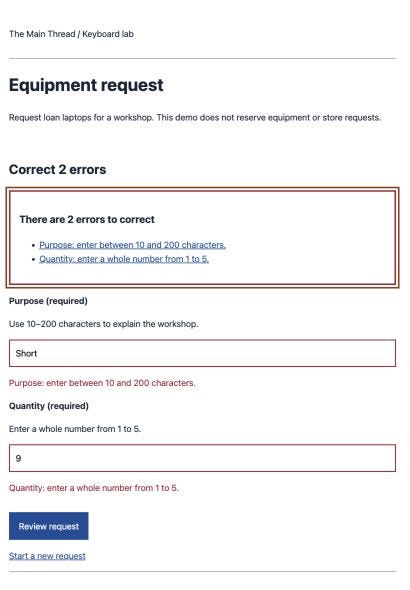
Each field keeps its label visible while you type, with a hint explaining the constraint before submission. If validation fails, aria-invalid becomes true and aria-describedby connects the field to both its hint and error. The summary links then give you a direct route back to the field that needs attention. The WAI form-notification tutorial explains these associations in more detail.
I added novalidate so invalid entries reach the Java resource. The required state remains exposed on the controls, while the server handles validation feedback for this walkthrough. With browser validation enabled, an empty required field could stop at a native popup. With novalidate, the test reaches the HTTP 422 response and the replacement that follows it.
The summary carries tabindex="-1" and data-focus. For an accepted submission or a return to editing, the step heading becomes the destination. I’ll use JavaScript to focus that marker and then let document order determine the next Tab stop. This keeps the navigation sequence tied to the HTML as the form grows.
For the error summary, I’ve chosen focus as the way to introduce the result. Adding a live alert to the same element could repeat the announcement, so the persistent status region handles request feedback separately. The manual screen-reader pass will tell us whether the summary provides enough context when focus arrives.
The review step uses ordinary submit buttons with different intent values. Enter or Space activates them, and the selected button sends its value with the form. I get that keyboard behavior from the native control. The form’s action and method also provide a full-page submission path when JavaScript is disabled.
Handle replacement as a state transition
Create src/main/resources/META-INF/resources/workflow.js:
(() => {
    const workflow = document.getElementById('workflow');
    const status = document.getElementById('status');
    let busy = false;
    let focusAfterSwap = true;
    const ours = event => event.detail.target === workflow;

    document.body.addEventListener('htmx:beforeRequest', event => {
        if (!ours(event)) return;
        if (busy) {
            event.preventDefault();
            return;
        }
        busy = true;
        workflow.setAttribute('aria-busy', 'true');
        workflow.querySelectorAll('button').forEach(button =>
            button.setAttribute('aria-disabled', 'true'));
        status.textContent = event.detail.elt.dataset.pending || 'Working…';
    });

    document.body.addEventListener('htmx:beforeSwap', event => {
        if (!ours(event)) return;
        focusAfterSwap = workflow.contains(document.activeElement)
            || document.activeElement === document.body;
        if (event.detail.xhr.status === 422
                && event.detail.xhr.getResponseHeader('X-Workflow-Fragment') === 'true') {
            event.detail.shouldSwap = true;
            event.detail.isError = false;
        }
    });

    document.body.addEventListener('htmx:afterRequest', event => {
        if (!ours(event)) return;
        busy = false;
        workflow.setAttribute('aria-busy', 'false');
        workflow.querySelectorAll('button').forEach(button =>
            button.removeAttribute('aria-disabled'));
        status.textContent = event.detail.successful ? ''
            : 'The request could not be completed. Your entries are still here. Try again.';
    });

    document.body.addEventListener('htmx:afterSettle', event => {
        if (!ours(event)) return;
        const section = workflow.querySelector('[data-title]');
        document.title = section.dataset.title + ' — Equipment requests';
        // A slow response must not pull someone back after they leave the form.
        if (focusAfterSwap && (workflow.contains(document.activeElement)
                || document.activeElement === document.body)) {
            workflow.querySelector('[data-focus]')?.focus();
        } else {
            status.textContent = section.dataset.title + '. Return to the request to continue.';
        }
    });

    workflow.addEventListener('click', event => {
        const link = event.target.closest('.errors a');
        if (!link) return;
        const field = document.getElementById(link.hash.slice(1));
        if (field) {
            event.preventDefault();
            field.focus();
        }
    });
})();
I attach the handlers to stable elements so they remain available as HTMX replaces the form. Each handler checks that the request targets our #workflow container before changing its state.
At request start, I mark that container busy and update the persistent status message. The buttons stay in the tab order, with aria-disabled communicating their temporary state. Preventing another submission takes a little more than that attribute: the busy guard and hx-sync="this:drop" handle requests while one is already in flight. A real submission endpoint still needs server-side idempotency to cover repeated commands beyond this interaction.
HTMX normally leaves the current content in place for a 422 response. I change that behavior in beforeSwap, specifically for this target and a response carrying our fragment marker. Clearing HTMX’s error classification lets the validation response follow the expected rendering path. Transport failures keep their separate message, and the HTTP status remains 422.
Once the replacement has settled, I can move focus. HTMX already supports preserving focus for inputs with stable IDs; the choice between an error summary and a new step heading comes from our data-focus marker. The HTMX event reference describes the request, swap, and settle hooks used here.
Someone may Tab to the footer while waiting for a response. I check focus before replacement and again after settling, preserving that location and announcing the new step through the live region. During an ordinary in-form transition, I clear the temporary message and let the focused destination introduce the result. I update the page title as well, alongside those focus and announcement mechanisms.
The error-summary link remains an ordinary link. Keyboard activation fires its click event too, which lets the delegated handler focus the associated input. Tab navigation continues through the browser’s normal sequence.
Create src/main/resources/META-INF/resources/workflow.css:
html { color: #182333; background: #fff; font: 1.1rem/1.6 system-ui, sans-serif; }
body { max-width: 44rem; margin: auto; padding: 1rem; }
header, footer { border-block-end: 1px solid #64748b; padding-block: 1rem; }
a { color: #174d99; }
label { display: block; font-weight: 650; margin-top: 1rem; }
input { box-sizing: border-box; width: 100%; padding: .65rem; font: inherit; border: 2px solid #64748b; }
button { font: inherit; color: white; background: #174d99; border: 2px solid #174d99; padding: .65rem 1rem; margin: 1rem .5rem 0 0; }
button[aria-disabled="true"] { cursor: wait; }
:focus { outline: 3px solid #8b3500; outline-offset: 4px; }
.errors { border: 3px solid #9f1834; padding: 1rem; }
.error { color: #9f1834; }
[aria-invalid="true"] { border-color: #9f1834; }
#status { min-height: 1.6em; }
.skip:not(:focus) { position: absolute; width: 1px; height: 1px; overflow: hidden; clip-path: inset(50%); }
dt { font-weight: 650; }
dd { margin-inline-start: 0; overflow-wrap: anywhere; }
I apply the focus outline to both controls and programmatically focused headings. Errors get a text message as well as a border. A maximum width keeps the form readable on a large screen, while wrapping text and flexible height let the content expand when you zoom.
Walk through it before writing assertions
Start dev mode from the module directory:
./mvnw quarkus:devOpen http://localhost:8080/ and follow the same keyboard sequence I’ll use in the browser test:
Press Tab. Skip to request should become visible with a focus outline. Activate it with Enter, then press Tab to reach Purpose.
Enter
Short. Tab to Quantity, select the existing value, and enter9. Tab to Review request and press Enter.Focus should move to the summary with two errors. Both entered values should remain. Tab to the first error link and press Enter; focus should return to Purpose.
Replace the purpose with
Java training workshop, change quantity to3, and review again. Focus should move to Step 2 of 2: Review your request.Tab to Edit details, activate it, and check that both values remain. The details heading receives focus, followed by Purpose on the next Tab.
Review again. Tab through Edit to Submit demo request and activate it. Focus should move to Demo request submitted, with a reference below it.
I’d also check the reverse direction with Shift+Tab. You should be able to enter and leave the form from either end. Repeat at 200% zoom and with a narrow window, checking that the focused element and its text remain visible.
If Tab skips links or buttons, start with your operating system and browser keyboard-navigation settings. Safari has a setting for using Tab to highlight every item on a webpage; Apple documents Tab and Option-Tab behavior. Keep the application’s tab order based on its document structure while you check those preferences.
These requests usually finish quickly. You can use network throttling to inspect the pending state manually. For the automated check, I’ll hold a request in Playwright until the assertions have examined the busy state, making the timing explicit.
Make the browser prove the keyboard path
Playwright and its axe integration are test-scoped dependencies with versions outside the Quarkus platform BOM. Add both entries inside the generated POM’s existing <dependencies> element:
<dependency>
    <groupId>com.microsoft.playwright</groupId>
    <artifactId>playwright</artifactId>
    <version>1.63.0</version>
    <scope>test</scope>
</dependency>
<dependency>
    <groupId>com.deque.html.axe-core</groupId>
    <artifactId>playwright</artifactId>
    <version>4.13.0</version>
    <scope>test</scope>
</dependency>
The generated quarkus-junit dependency supplies @QuarkusTest. I manage Playwright directly here, creating the browser context and starting tracing in the test setup. The earlier article used the Quarkiverse extension. For this test, keep the lifecycle entirely in the code below.
Install the Chromium binary that matches the Java dependency:
./mvnw org.codehaus.mojo:exec-maven-plugin:3.6.3:java \
  -Dexec.classpathScope=test \
  -Dexec.mainClass=com.microsoft.playwright.CLI \
  -Dexec.args="install chromium"
On a fresh supported Linux CI worker, use install --with-deps chromium to install the required operating-system packages as well. That command needs package-install privileges. The Playwright Java browser instructions cover the platform requirements. Keep the browser binaries aligned with the Java library version, including when you choose a browser image for CI.
Now create src/test/java/com/themainthread/keyboard/WorkflowTest.java:
package com.themainthread.keyboard;

import static com.microsoft.playwright.assertions.PlaywrightAssertions.assertThat;
import static org.junit.jupiter.api.Assertions.assertEquals;
import static org.junit.jupiter.api.Assertions.assertTrue;

import java.net.URI;
import java.net.URL;
import java.net.http.HttpClient;
import java.net.http.HttpRequest;
import java.net.http.HttpResponse;
import java.nio.file.Files;
import java.nio.file.Path;
import java.util.concurrent.atomic.AtomicReference;

import com.deque.html.axecore.playwright.AxeBuilder;
import com.microsoft.playwright.Browser;
import com.microsoft.playwright.BrowserContext;
import com.microsoft.playwright.BrowserType;
import com.microsoft.playwright.Page;
import com.microsoft.playwright.Playwright;
import com.microsoft.playwright.Route;
import com.microsoft.playwright.Tracing;
import com.microsoft.playwright.options.AriaRole;
import io.quarkus.test.common.http.TestHTTPResource;
import io.quarkus.test.junit.QuarkusTest;
import org.junit.jupiter.api.AfterEach;
import org.junit.jupiter.api.BeforeEach;
import org.junit.jupiter.api.Test;
import org.junit.jupiter.api.TestInfo;

@QuarkusTest
class WorkflowTest {
    @TestHTTPResource("/")
    URL base;

    Playwright playwright;
    Browser browser;
    BrowserContext context;
    Page page;

    @BeforeEach
    void open() {
        playwright = Playwright.create();
        String engine = System.getProperty("browser", "chromium");
        BrowserType type = switch (engine) {
            case "firefox" -> playwright.firefox();
            case "webkit" -> playwright.webkit();
            default -> playwright.chromium();
        };
        browser = type.launch();
        context = browser.newContext();
        context.tracing().start(new Tracing.StartOptions().setScreenshots(true).setSnapshots(true));
        page = context.newPage();
    }

    @AfterEach
    void close(TestInfo info) throws Exception {
        try {
            if (context != null) {
                Path directory = Path.of("target", "browser-traces");
                Files.createDirectories(directory);
                context.tracing().stop(new Tracing.StopOptions().setPath(
                        directory.resolve(info.getTestMethod().orElseThrow().getName() + ".zip")));
                context.close();
            }
        } finally {
            if (browser != null) browser.close();
            if (playwright != null) playwright.close();
        }
    }

    private void start() {
        page.navigate(base.toString());
        page.keyboard().press("Tab");
        assertThat(page.getByRole(AriaRole.LINK,
                new Page.GetByRoleOptions().setName("Skip to request"))).isFocused();
        page.keyboard().press("Enter");
        page.keyboard().press("Tab");
        assertThat(page.getByLabel("Purpose (required)")).isFocused();
    }

    private void details(String purpose, String quantity) {
        page.keyboard().type(purpose);
        page.keyboard().press("Tab");
        assertThat(page.getByLabel("Quantity (required)")).isFocused();
        page.keyboard().press("ControlOrMeta+A");
        page.keyboard().type(quantity);
        page.keyboard().press("Tab");
        assertThat(page.getByRole(AriaRole.BUTTON,
                new Page.GetByRoleOptions().setName("Review request").setExact(true))).isFocused();
        page.keyboard().press("Enter");
    }

    private void scan() {
        var result = new AxeBuilder(page).analyze();
        assertTrue(result.getViolations().isEmpty(), result.getViolations().toString());
    }

    @Test
    void completeWorkflowUsingOnlyKeyboard() {
        start();
        scan();
        details("Short", "9");
        assertThat(page.locator(".errors")).isFocused();
        assertThat(page.locator(".errors li")).hasCount(2);
        assertThat(page.getByLabel("Purpose (required)")).hasAttribute("aria-invalid", "true");
        assertThat(page.getByLabel("Purpose (required)")).hasAttribute("aria-describedby", "purpose-hint purpose-error");
        assertThat(page.getByLabel("Quantity (required)")).hasValue("9");
        scan();
        page.keyboard().press("Tab");
        page.keyboard().press("Enter");
        assertThat(page.getByLabel("Purpose (required)")).isFocused();
        page.keyboard().press("ControlOrMeta+A");
        details("Java training workshop", "3");
        assertThat(page.locator("#step-title")).isFocused();
        assertThat(page.locator("#step-title")).hasText("Step 2 of 2: Review your request");
        scan();
        page.keyboard().press("Tab");
        assertThat(page.getByRole(AriaRole.BUTTON,
                new Page.GetByRoleOptions().setName("Edit details"))).isFocused();
        page.keyboard().press("Enter");
        assertThat(page.locator("#step-title")).hasText("Step 1 of 2: Request details");
        assertThat(page.locator("#step-title")).isFocused();
        assertThat(page.getByLabel("Purpose (required)")).hasValue("Java training workshop");
        assertThat(page.getByLabel("Quantity (required)")).hasValue("3");
        assertThat(page.getByLabel("Purpose (required)")).hasAttribute("aria-invalid", "false");
        scan();
        page.keyboard().press("Tab");
        page.keyboard().press("ControlOrMeta+A");
        details("Java training workshop", "3");
        assertThat(page.locator("#step-title")).isFocused();
        page.keyboard().press("Tab");
        page.keyboard().press("Tab");
        assertThat(page.getByRole(AriaRole.BUTTON,
                new Page.GetByRoleOptions().setName("Submit demo request"))).isFocused();
        page.keyboard().press("Enter");
        assertThat(page.locator("#step-title")).hasText("Demo request submitted");
        assertThat(page.locator("#step-title")).isFocused();
        assertThat(page.locator("#workflow")).containsText("for 3 laptops");
        assertThat(page).hasTitle("Demo request submitted — Equipment requests");
        scan();
    }

    @Test
    void slowResponseAnnouncesBusyAndDoesNotStealFocus() {
        AtomicReference<Route> pending = new AtomicReference<>();
        page.route("**/review", pending::set);
        start();
        details("Java training workshop", "2");
        assertThat(page.getByRole(AriaRole.STATUS)).hasText("Checking request details…");
        assertThat(page.locator("#workflow")).hasAttribute("aria-busy", "true");
        assertThat(page.getByRole(AriaRole.BUTTON)).hasAttribute("aria-disabled", "true");
        page.keyboard().press("Tab");
        assertThat(page.getByRole(AriaRole.LINK,
                new Page.GetByRoleOptions().setName("Start a new request"))).isFocused();
        pending.get().resume();
        assertThat(page.locator("#step-title")).hasText("Step 2 of 2: Review your request");
        assertThat(page.getByRole(AriaRole.STATUS)).containsText("Return to the request");
        assertThat(page.getByRole(AriaRole.LINK,
                new Page.GetByRoleOptions().setName("Start a new request"))).isFocused();
        assertThat(page.locator("#workflow")).hasAttribute("aria-busy", "false");
    }

    @Test
    void failedRequestRetainsDataAndCanBeRetried() {
        page.route("**/review", route -> route.fulfill(new Route.FulfillOptions().setStatus(503)));
        start();
        details("Java training workshop", "2");
        assertThat(page.getByRole(AriaRole.STATUS)).containsText("Try again");
        assertThat(page.getByLabel("Purpose (required)")).hasValue("Java training workshop");
        assertThat(page.getByRole(AriaRole.BUTTON)).isFocused();
        assertThat(page.locator("#workflow")).hasAttribute("aria-busy", "false");
        page.unroute("**/review");
        page.keyboard().press("Enter");
        assertThat(page.locator("#step-title")).hasText("Step 2 of 2: Review your request");
    }

    @Test
    void disconnectedRequestRetainsFocus() {
        page.route("**/review", Route::abort);
        start();
        details("Java training workshop", "2");
        assertThat(page.getByRole(AriaRole.STATUS)).containsText("Try again");
        assertThat(page.getByRole(AriaRole.BUTTON)).isFocused();
        assertThat(page.locator("#workflow")).hasAttribute("aria-busy", "false");
    }

    @Test
    void finalPostRevalidatesHiddenFields() throws Exception {
        try (HttpClient client = HttpClient.newHttpClient()) {
            var request = HttpRequest.newBuilder(URI.create(base + "confirm"))
                    .header("Content-Type", "application/x-www-form-urlencoded")
                    .header("HX-Request", "true")
                    .POST(HttpRequest.BodyPublishers.ofString("purpose=x&quantity=99&intent=submit"))
                    .build();
            var response = client.send(request, HttpResponse.BodyHandlers.ofString());
            assertEquals(422, response.statusCode());
            assertTrue(response.body().contains("There are 2 errors"));
        }
    }

    @Test
    void worksWithoutJavaScript() {
        try (BrowserContext plain = browser.newContext(new Browser.NewContextOptions().setJavaScriptEnabled(false))) {
            Page original = page;
            page = plain.newPage();
            try {
                start();
                details("Java training workshop", "2");
                assertThat(page.locator("#step-title")).hasText("Step 2 of 2: Review your request");
                page.keyboard().press("Tab"); // Skip link after full navigation.
                page.keyboard().press("Enter");
                page.keyboard().press("Tab"); // Edit details.
                page.keyboard().press("Tab"); // Submit.
                assertThat(page.getByRole(AriaRole.BUTTON,
                        new Page.GetByRoleOptions().setName("Submit demo request"))).isFocused();
                page.keyboard().press("Enter");
                assertThat(page.locator("#step-title")).hasText("Demo request submitted");
            } finally {
                page = original;
            }
        }
    }
}
Run the suite from the module directory:
./mvnw testThe first test follows the entire form sequence, including error recovery and a return to editing. I’ve used keyboard events for every interaction and kept locators for assertions about the current control. That distinction lets the test check whether Tab actually reaches each destination. Methods such as fill() and click() would bypass part of that navigation.
For the slow response, I hold the review request in Playwright’s routing layer. The test examines the busy message and aria-busy, tabs to the footer, and then releases the request to the server. Focus should remain on the footer link as the response arrives.
The next tests cover HTTP 503 and a connection failure. They check that the form retains its values and focus, and the HTTP-error test retries from the same button. I also send a direct HTTP request with altered hidden values to check final validation. The last browser test disables JavaScript and completes the full-page sequence.
Each assertion waits for an observable result, such as the expected heading or focused control. Playwright handles that waiting through its assertions. The test saves traces under target/browser-traces/, so you can open one to investigate a failure:
./mvnw org.codehaus.mojo:exec-maven-plugin:3.6.3:java \
  -Dexec.classpathScope=test \
  -Dexec.mainClass=com.microsoft.playwright.CLI \
  -Dexec.args="show-trace target/browser-traces/completeWorkflowUsingOnlyKeyboard.zip"
You can also select another browser engine through the test’s browser system property. Install its binary first:
./mvnw org.codehaus.mojo:exec-maven-plugin:3.6.3:java \
  -Dexec.classpathScope=test \
  -Dexec.mainClass=com.microsoft.playwright.CLI \
  -Dexec.args="install firefox webkit"
./mvnw test -Dbrowser=firefox
./mvnw test -Dbrowser=webkit
The Chromium run passed all six tests, including five axe scans. Firefox exited while trying to launch its temporary profile, and WebKit failed the initial Tab assertion. That leaves Chromium as the verified browser for this example, with Firefox and WebKit coverage still pending.
On macOS, Playwright’s WebKit browser can depend on the system Keyboard navigation preference, as reported in Playwright issue 41808. I would check that environment while keeping the keyboard assertions intact. They need to exercise the same navigation a person would use.
A WebKit run adds engine coverage. The separate manual pass pairs Safari with VoiceOver to check spoken feedback.
What the scan contributes
The scan() helper runs axe against the whole page in its current state. I call it for the initial form, validation errors, review, restored details, and confirmation. That gives the scan access to the markup introduced by each replacement, including the error associations that appear after validation.
I keep the enabled rules active across the whole page. A detected violation fails the test and includes the result details. A passing scan means those rules accepted the rendered state. Understanding the spoken sequence takes a separate assessment, and Playwright’s accessibility-testing guide recommends combining automation with manual assessment and testing with users.
Keyboard assertions cover navigation and transitions, axe examines structural and presentation rules, and a person using a screen reader evaluates the feedback they hear.
Finish with a screen-reader pass
For the manual pass, I would start with a combination your users regularly use. Safari with VoiceOver on macOS or Firefox with NVDA on Windows gives you a concrete starting point. Record the OS, browser, and screen-reader versions, along with relevant verbosity and keyboard settings. Apple documents starting VoiceOver with Command-F5, and the NVDA user guide explains its browse and focus modes.
Start with the invalid values from the earlier sequence. The exact speech will vary between products, so I’d listen for these outcomes:
Find and understand the form. Navigate by headings or landmarks, then enter the controls. You should hear the labels, required state, and constraint hints. Check that the reading cursor and keyboard focus make your location clear.
Receive the errors. Submit
Shortand9. The summary must become apparent as focus arrives. Follow each error link and confirm that the associated field receives focus and exposes its error description. The typed values must remain available.Advance and return. Correct the fields, review, and edit. Each transition should identify the new step, with the next Tab taking you to its first control.
Keep your place while waiting. Enable network throttling and submit again. Check that the pending message is available while you remain on the form. Repeat while tabbing to the footer before the response. Focus must stay there, and the status announcement should make the result available. Fast requests may finish before a polite pending message is spoken.
Recover from a failed request. With the form loaded, use the browser’s offline setting and submit. Check that the failure is announced, the current control retains focus, and the values remain. Restore networking and retry. Flag repeated failure announcements or a stalled interaction for correction.
Confirm the result. Submit the valid review and listen to the confirmation heading. Navigate through the quantity and demo reference. You should be able to recognize completion and understand that the reservation is simulated.
You can use the speech viewer or caption panel to follow along, and I would listen to the actual output as well. Record the action, expected outcome, spoken feedback, focus destination, and pass or fail. Those details give you a sequence to reproduce after changing the markup or handler.
The VoiceOver and NVDA passes remain pending for this example. For a real product, I would also bring in people who regularly use those tools. Their experience adds another perspective on whether the sequence is clear and comfortable to follow.
Carry the behavior into a real application
I’ve kept the request data in the form and made the receipt illustrative. Refreshing the POST can submit it again, and persistence belongs to the next stage of the application. An equipment service needs authenticated ownership, CSRF protection for its cookie-based form flow, a durable request, and an idempotent confirmation command. A stable receipt URL with Post/Redirect/Get handling would give refresh and browser history a predictable destination too.
As you add those pieces, keep the same focus and feedback rules. If submission starts a long-running job, I’d bring in the durable progress design: announce meaningful phase changes through the persistent live region while focus stays where the user placed it. Reserve spoken updates for those phase changes so the person can continue navigating between them.
When you’re finished, stop dev mode with Ctrl+C. The tests close their browser contexts and processes, and the generated Maven output and browser traces stay under target/. Cleanup for this local example is limited to those build artifacts.
You’ll find the companion source in the keyboard-workflow directory of this preview repository, alongside its README and validation record. The complete implementation appears above, so you can also build it file by file.
I still render the HTML in Qute and let HTMX replace the form. Each response now also gives the person a place to continue, whether that’s an error summary, the review step, or confirmation. The keyboard tests now follow that sequence through correction, review, and submission. The next step is to listen to it with a screen reader and check that the spoken feedback carries the same clear progression.