


You have developed a working terminal Substack reader in yesterday’s tutorial. It runs with mvn compile exec:java. It works on your machine. That feels done.
But it is not done.
The moment someone else wants to use it, the friction starts. They need Git. They need Maven. They need the right Java version. They need to understand how to build and run it. For a CLI tool, this is a lot. For a quick try, it should be easier.
In production terms, your problem is not code. Your problem is distribution. If a tool cannot be installed with one command, it will not spread. And if you manually create releases, manually upload JARs, and manually write changelogs, you will eventually skip releases. I have seen many small tools die this way. The build works. The release process breaks.
In this part, we fix that. We turn the existing Maven project into a versioned GitHub release with a fat JAR, automated changelog, and a JBang install command. After this, users can run:
jbang app install substack-reader@myfear substack-readerNo cloning. No Maven. No build steps.
We use JReleaser to automate everything.
Prerequisites
You need the Maven-based Substack reader from Part 1. It must already run with mvn compile exec:java. Go check out the Github repository if you haven’t build it yesterday.
Java 21 installed
Maven 3.9+
A GitHub account
Basic Git knowledge
What We Are Building
We start from this existing Maven project:
substack-reader-cli/
├── pom.xml
├── LICENSE
├── README.md
└── src/
    └── main/
        └── java/
            └── substack/
                └── reader/
                    └── SubstackReader.java
We will:
Add a fat JAR build using the Maven Shade plugin
Add a
jreleaser.ymlconfigurationCreate a GitHub Actions workflow
Publish a JBang catalog
No refactoring. No conversion to JBang source mode. We keep Maven. We add release tooling.
How JReleaser Fits In
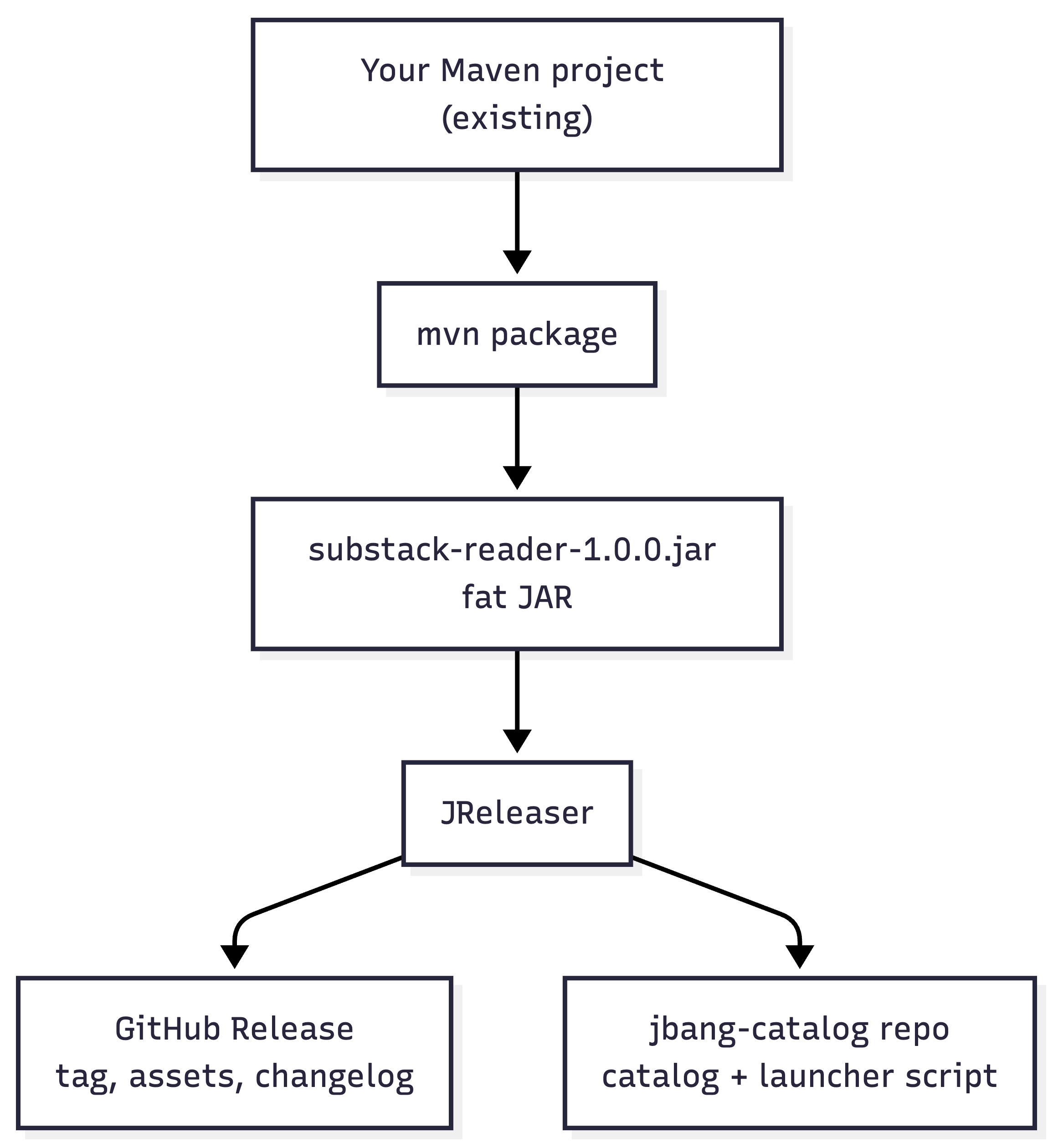
JReleaser is a release automation tool for Java (and other) projects. You give it your built artifacts and a single config file, jreleaser.yml. It then:
Creates a GitHub Release with a generated changelog and your JAR (or other assets).
Pushes a JBang catalog to a separate
jbang-catalogrepository so users can runjbang app install substack-reader@myfear.
It can also publish to Homebrew, Scoop, SDKMAN, Maven Central, and more; we’ll stick to GitHub + JBang so the tutorial stays focused.
You run JReleaser from the command line (for example via JBang). It reads version and metadata from your pom.xml and the paths you specify in jreleaser.yml. No Maven or Gradle plugin is required.
A high-level flow looks like this:
Add a Fat JAR Build to Your Maven Project
Right now you can run the app with mvn compile exec:java or by running SubstackReader from your IDE. To distribute a single file, we need a fat JAR: one JAR that includes your code and all dependencies (TamboUI, Gson, Jsoup, etc.). Then users can run java -jar substack-reader-1.0.0.jar without a Maven or classpath setup.
We’ll use the Maven Shade plugin to create that fat JAR during mvn package. We also add a mainClass property so the JAR has a manifest entry that points to substack.reader.SubstackReader; JReleaser will use the same value later.
Add mainClass Property
Open pom.xml and add:
<properties>
    <mainClass>substack.reader.SubstackReader</mainClass>
</properties>
This ensures the JAR manifest points to your entry point.
Add Maven Shade Plugin
Inside <build><plugins> add:
     <plugin>
                <groupId>org.apache.maven.plugins</groupId>
                <artifactId>maven-shade-plugin</artifactId>
                <version>3.6.1</version>
                <executions>
                    <execution>
                        <phase>package</phase>
                        <goals>
                            <goal>shade</goal>
                        </goals>
                        <configuration>
                            <createDependencyReducedPom>false</createDependencyReducedPom>
                            <shadedArtifactAttached>false</shadedArtifactAttached>
                            <transformers>
                                <transformer
                                    implementation="org.apache.maven.plugins.shade.resource.ManifestResourceTransformer">
                                    <mainClass>${mainClass}</mainClass>
                                </transformer>
                                <transformer
                                    implementation="org.apache.maven.plugins.shade.resource.ServicesResourceTransformer" />
                            </transformers>
                        </configuration>
                    </execution>
                </executions>
            </plugin>
Why this matters:
ManifestResourceTransformerensuresjava -jarworksServicesResourceTransformermergesMETA-INF/servicesentries. Without this, terminal libraries break under load
(Optional)Add project metadata for JReleaser
JReleaser can read groupId, artifactId, version, and main class from the POM. It also uses optional metadata such as name, description, and license for the GitHub release and catalog. If your POM doesn’t have these yet, you can add them now:
<name>Substack Reader</name>
<description>A terminal Substack reader built with TamboUI</description>
<url>https://github.com/myfear/substack-reader-cli</url>
<licenses>
    <license>
        <name>Apache License, Version 2.0</name>
        <url>https://www.apache.org/licenses/LICENSE-2.0</url>
    </license>
</licenses>
This step is optional; you can also set the same information later in jreleaser.yml.
Build it:
mvn package
java -jar target/substack-reader-1.0-SNAPSHOT.jar
Run it in a real terminal. TUI libraries need a real TTY.
If this JAR does not start correctly, stop here. Fix this before touching releases.
Install JReleaser
Simplest way with either SDKMan! or brew on MacOS:
sdk install jreleaser
jreleaser --version
You can also run it without installing:
jbang jreleaser@jreleaser --versionNow you have the release engine ready.
Create the JReleaser Config File
JReleaser is driven by a single config file: jreleaser.yml in the project root. In it we define the project metadata, the GitHub release target, the distribution (our fat JAR), and the JBang packager so that JReleaser can push the catalog to a separate repository.
Create jreleaser.yml with the following content. Replace myfear with your GitHub username if you’re using your own repo; the repository name is the actual GitHub repo name (substack-reader-cli).
project:
  name: substack-reader
  version: 1.0-SNAPSHOT
  description: A terminal Substack reader built with TamboUI
  longDescription: |
    Read articles from any Substack publication right in your terminal.
    Built with TamboUI for a two-panel UI experience.
  authors:
    - Your Name
  license: Apache-2.0
  links:
    homepage: https://github.com/myfear/substack-reader-cli
  languages:
    java:
      groupId: substack-reader
      artifactId: substack-reader
      version: 21
      mainClass: substack.reader.SubstackReader
  inceptionYear: "2026"

release:
  github:
    owner: myfear
    name: substack-reader-cli
    overwrite: true
    changelog:
      formatted: ALWAYS
      preset: conventional-commits
      contributors:
        enabled: false

distributions:
  substack-reader:
    type: SINGLE_JAR
    executable:
      name: substack-reader
      windowsExtension: bat
    artifacts:
      - path: target/{{distributionName}}-{{projectVersion}}.jar
    jbang:
      active: ALWAYS
      alias: substack-reader
      repository:
        active: ALWAYS
        owner: myfear
        name: jbang-catalog
What the key fields mean:
project: JReleaser uses this for the release title, description, and for the JBang launcher (Java version and main class). We set `version` to `1.0-SNAPSHOT` so it matches the default POM; the workflow will override it with the release version (e.g. `1.0.0`) when you run a release.
release.github:
ownerandnameare your GitHub user/org and the repository name. JReleaser will create tags and releases in this repo.distributions.substack-reader: Defines one distribution named substack-reader. The artifacts path uses JReleaser’s Mustache-style templates: {{distributionName}} and {{projectVersion}} expand to substack-reader and the project version. With the default 1.0-SNAPSHOT, the path is target/substack-reader-1.0-SNAPSHOT.jar. When you release via the workflow with version 1.0.0, the path becomes target/substack-reader-1.0.0.jar.
packagers.jbang: Tells JReleaser to update the JBang catalog in the repository
myfear/jbang-catalog. That repo must exist on GitHub; we’ll create it in the next step.
What the JBang packager does: JReleaser will commit two things to your jbang-catalog repo:
jbang-catalog.json — an index that lists the
substack-readeralias and points to a small launcher script.substack-reader.java — a tiny JBang script that delegates to your main class. When users run
jbang app install substack-reader@myfear, JBang looks up that catalog, finds the script, and can resolve the JAR (e.g. from the GitHub release or a Maven coordinate you configure). The launcher script will look conceptually like this:
//usr/bin/env jbang "$0" "$@" ; exit $?
//JAVA 21
//DEPS substack-reader:substack-reader:1.0.0

public class substack_reader {
    public static void main(String... args) throws Exception {
        substack.reader.SubstackReader.main(args);
    }
}
So the catalog and script are generated for you; you don’t write them by hand.
Create the jbang-catalog Repository on GitHub
The JBang packager needs a dedicated GitHub repository to push the catalog and launcher script.
JReleaser creates this directly automatically for you if you set the correct permissions in the PAT (Personal Access Token, see below). I am doing it manually here so you realize how this is happening and why!
JBang expects this repo to be named jbang-catalog when you use the @username form.
On GitHub, click New repository.
Set the name to jbang-catalog.
Leave it public and initialize with a README so it’s not empty.
Create the repository.
You don’t need to add any files inside it. JReleaser will create and update jbang-catalog.json and substack-reader.java (or similar) on each release.
Create a Personal Access Token for Cross-Repo Access
GitHub Actions gives you a GITHUB_TOKEN that is scoped to the single repository running the workflow. JReleaser needs to:
Create the release and upload assets in substack-reader-cli.
Push commits to jbang-catalog.
So we need a fine-grained Personal Access Token (PAT) that has access to both repositories. Per the GitHub docs on fine-grained PAT permissions, the Contents permission with write access covers creating releases, uploading release assets, and creating or updating files (e.g. in the jbang-catalog repo). No other repository permission is required for this workflow.
On GitHub go to Settings → Developer settings → Personal access tokens → Fine-grained tokens.
Click Generate new token.
Set the resource owner to your user (or org).
Under Repository access, choose Only select repositories and select substack-reader-cli and jbang-catalog.
Under Repository permissions, find Contents in the list (alongside Actions, Administration, Metadata, Workflows, etc.) and set it to Read and write. Leave all other permissions at “No access.”
Generate the token and copy it.
Important: GitHub shows the token value only once. If you leave the page before copying it, you must revoke the token and create a new one. Copy the token immediately, then add it as a repository secret (next step) before closing the token page.
Add it as a repository secret in substack-reader-cli. The name you gave the token when creating it (e.g. “JReleaser release”) is only for your reference in GitHub; the secret name here is what the workflow uses:
Open substack-reader-cli → Settings → Secrets and variables → Actions.
Click New repository secret.
Name: GH_PAT (use this exact name—the workflow references
secrets.GH_PAT).Value: the token you just copied.
Why not GITHUB_TOKEN? If you use the default GITHUB_TOKEN, JReleaser can create the release in the same repo but will get 403 Forbidden when pushing to jbang-catalog. The PAT must have write access to both repos.
Validate and Dry-Run the Release
Before automating with GitHub Actions, run JReleaser locally to validate the config and see what it would do. With the default POM and jreleaser.yml (both use 1.0-SNAPSHOT), Step 6 works as soon as the project is built.
1. Build the project so the fat JAR exists. From the project root:
mvn package -DskipTestsThis produces target/substack-reader-1.0-SNAPSHOT.jar, which matches the artifact path that JReleaser will resolve when project.version is 1.0-SNAPSHOT.
2. Export your PAT so JReleaser can authenticate. Use the same token you added as the GH_PAT secret (replace the placeholder with the actual token value; keep it only on your machine and do not commit it):
export JRELEASER_GITHUB_TOKEN=ghp_your_token_here3. Validate the configuration and resolve templates:
jreleaser config4. Run a full release in dry-run mode. JReleaser will simulate every step but won’t create tags, releases, or push to the catalog:
jreleaser full-release --dry-runThe resolved artifact path should be target/substack-reader-1.0-SNAPSHOT.jar. If something fails, open out/jreleaser/trace.log; JReleaser logs detailed steps there.
5. When the dry-run looks good, you can run a real release. For a release version like 1.0.0, use the GitHub Actions workflow in the next step: it sets the POM version, builds, and runs JReleaser with that version. To release once from your machine instead, run:
mvn versions:set -DnewVersion=1.0.0
mvn versions:commit
mvn package -DskipTests
jreleaser full-release
You should see something like:
[INFO] JReleaser 1.x.x
[INFO]  - Project version: 1.0.0
[INFO]  - Creating tag v1.0.0
[INFO]  - Uploading assets to GitHub release
[INFO]  - Publishing JBang catalog to jbang-catalog
[INFO]  Release succeeded!
Best Practices: Version Setting
JReleaser fails with “Path does not exist” when the JAR it expects isn’t there. That almost always means a version mismatch: the artifact path is built from the project version, and the file on disk must match. This section spells out how to keep versions aligned so releases work every time.
The golden rule: The path in jreleaser.yml is target/{{distributionName}}-{{projectVersion}}.jar. So for version 1.0-SNAPSHOT JReleaser looks for target/substack-reader-1.0-SNAPSHOT.jar; for 1.0.0 it looks for target/substack-reader-1.0.0.jar. Maven names the JAR from the version in pom.xml. Those two versions must be the same when you run JReleaser.
Where the version comes from:
pom.xml — Drives the build.
mvn packageproduces substack-reader-<version>.jar (e.g. substack-reader-1.0-SNAPSHOT.jar or substack-reader-1.0.0.jar).jreleaser.yml — The
project.version(we use1.0-SNAPSHOTso Step 6 works with the default POM) is the default. It is used for the tag name, release title, and the resolved artifact path. In CI you override it withJRELEASER_PROJECT_VERSION.JRELEASER_PROJECT_VERSION — If this environment variable is set, JReleaser uses it instead of
project.version. The GitHub Actions workflow sets it to the version you type when you run the release.
So: the JAR that exists on disk must have been built with the same version JReleaser is using (from the YAML or from the env var).
Recommended workflow in CI (GitHub Actions):
You enter one version when you click “Run workflow” (e.g.
1.0.0).The “Set version” step runs
mvn versions:set -DnewVersion=1.0.0, so the POM (and thus the JAR name) becomes1.0.0.The “Build” step runs
mvn package, producing target/substack-reader-1.0.0.jar.The workflow passes the same value to JReleaser via
JRELEASER_PROJECT_VERSION, so JReleaser looks for that exact file.
One version, one place (the workflow input), and everything stays in sync.
Recommended workflow for a local release:
Option A — POM already at release version: Set pom.xml to the release version (e.g.
1.0.0). Runmvn package, thenjreleaser full-release. No env var needed ifproject.versionin jreleaser.yml matches.Option B — POM on SNAPSHOT: Keep pom.xml at
1.0-SNAPSHOTfor daily work. When you want to release (e.g.1.0.0), run:
mvn versions:set -DnewVersion=1.0.0
mvn versions:commit
mvn package
jreleaser full-release
Then either commit the POM at
1.0.0or runmvn versions:set -DnewVersion=1.0.1-SNAPSHOT(or your next dev version) and commit that so the next release is from a known baseline.
After a release: If you use Option B and don’t commit the POM change, your tree stays at 1.0.0 until you bump it. Many teams bump to the next SNAPSHOT in a follow-up commit (e.g. 1.0.1-SNAPSHOT) so the next build and the next release have a clear version. The GitHub Actions workflow in this tutorial does not bump the POM after a release; you do that manually or with a separate step if you want it.
Default in jreleaser.yml: We set project.version: 1.0-SNAPSHOT in jreleaser.yml so it matches the default POM. That way Step 6 (validate and dry-run) works right after mvn package with no extra steps. For a real release, the GitHub Actions workflow overrides the version with JRELEASER_PROJECT_VERSION (e.g. 1.0.0). For a local release, set the POM to the release version, build, then run jreleaser full-release, or pass JRELEASER_PROJECT_VERSION=1.0.0 when you have built a 1.0.0 JAR.
Semantic versioning: Using versions like 1.0.0, 1.1.0, 2.0.0 (major.minor.patch) is a good practice for users and for tools that interpret them. JReleaser doesn’t require it, but it fits well with changelog presets and user expectations.
Automate Releases with GitHub Actions
We’ll add a workflow that builds the fat JAR and runs JReleaser when you trigger it manually and supply a version number. That way you don’t have to run JReleaser from your laptop for every release.
Create the file .github/workflows/release.yml (create the .github/workflows directory if it doesn’t exist):
name: Release

on:
  workflow_dispatch:
    inputs:
      version:
        description: 'Release version (e.g. 1.0.0)'
        required: true

jobs:
  release:
    name: Release
    runs-on: ubuntu-latest
    permissions:
      contents: write

    steps:
      - name: Checkout
        uses: actions/checkout@v6
        with:
          fetch-depth: 0

      - name: Set up Java 21
        uses: actions/setup-java@v5
        with:
          java-version: 21
          distribution: zulu
          cache: maven

      - name: Set version
        run: |
          mvn -B -ntp versions:set -DnewVersion=${{ github.event.inputs.version }}
          mvn -B -ntp versions:commit

      - name: Build
        run: mvn -B -ntp package -DskipTests

      - name: JReleaser full-release
        uses: jreleaser/release-action@v2
        env:
          JRELEASER_GITHUB_TOKEN: ${{ secrets.GH_PAT }}
          JRELEASER_PROJECT_VERSION: ${{ github.event.inputs.version }}

      - name: Upload JReleaser logs
        if: always()
        uses: actions/upload-artifact@v7
        with:
          name: jreleaser-logs
          path: |
            out/jreleaser/trace.log
            out/jreleaser/output.properties
What each part does:
workflow_dispatch: The workflow runs only when you click “Run workflow” in the Actions tab and enter a version. No automatic runs on push.
fetch-depth: 0: Full Git history is required so JReleaser can generate a meaningful changelog from commits. Without it, the changelog may be empty.
Set version: The
versions:setgoal updates the version in pom.xml to the value you typed (e.g.1.0.0). That way the built JAR is named substack-reader-1.0.0.jar and JReleaser’s artifact path matches.JRELEASER_PROJECT_VERSION: Passes the same version into JReleaser so it uses the right tag and asset names without editing jreleaser.yml.
Upload JReleaser logs: If the run fails, you can download the artifact and inspect trace.log to see what went wrong.
Trigger a Release
Commit and push your changes: the updated pom.xml, jreleaser.yml, and .github/workflows/release.yml.
On GitHub open substack-reader-cli → Actions → Release.
Click Run workflow, enter a version (e.g. 1.0.0), and run.
When the workflow finishes:
There will be a new tag (e.g. v1.0.0) and a GitHub Release with the fat JAR attached.
The jbang-catalog repo will have a new commit with the updated catalog and launcher script.
Install and Run as an End User
From any machine with JBang installed, users can install and run the reader without cloning or Maven:
jbang app install substack-reader@myfear
substack-reader
JBang resolves @myfear to the repository github.com/myfear/jbang-catalog, reads the substack-reader alias, and installs the command (typically under ~/.jbang/bin/). To see what’s in the catalog:
jbang catalog list @myfearSubsequent Releases
For the next release (e.g. 1.1.0), run the same workflow again and enter the new version. JReleaser will create a new tag and release and update the JBang catalog so the alias points to the new version. Users can upgrade with:
jbang app install --force substack-reader@myfearOptional: Snapshot or Preview Builds
If you want to offer a rolling “snapshot” or preview install, you can use a version like 1.1.0-SNAPSHOT. JReleaser supports snapshot releases and can add a suffix to the JBang alias (e.g. substack-reader-snapshot) and configure the catalog to pull from a snapshot source (e.g. JitPack for GitHub snapshots). See the JReleaser docs on snapshots for the exact options.
Optional: Add a Homebrew Tap
If you want users on macOS or Linux to install via Homebrew, create a separate GitHub repo (e.g. homebrew-tap) and add the Homebrew packager to your jreleaser.yml under the same distribution. Give your PAT access to that repo and set JRELEASER_HOMEBREW_GITHUB_TOKEN in the workflow to the same secret. Then users can run brew tap myfear/tap and brew install substack-reader. The JReleaser Homebrew packager docs have the exact YAML.
The Full Picture
End-to-end flow:
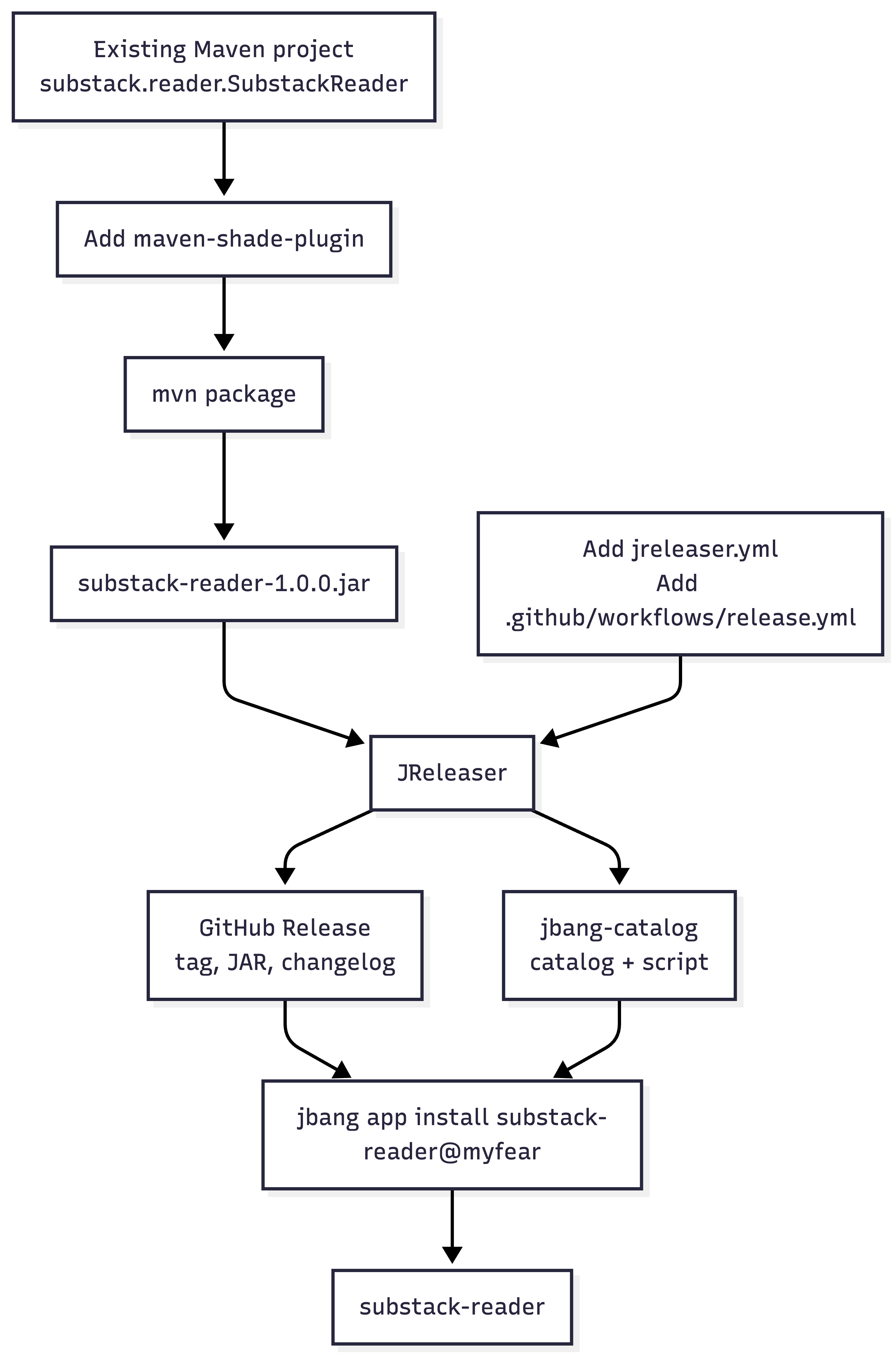
End user: run jbang app install substack-reader@myfear to get the substack-reader command (JBang uses the catalog and the release assets).
Troubleshooting
403 Forbidden when pushing to jbang-catalog — You’re using
GITHUB_TOKENinstead of a PAT. Use a fine-grained PAT with Contents read/write on both repos, stored asGH_PAT.Empty or missing changelog — The Actions checkout is a shallow clone. Set
fetch-depth: 0in the checkout step.Artifact not found (path does not exist) — The JAR on disk doesn’t match the version JReleaser is using. For Step 6 (validate/dry-run) with the default POM and jreleaser.yml (
1.0-SNAPSHOT), runmvn packagefirst so target/substack-reader-1.0-SNAPSHOT.jar exists. In CI, the version you enter must match the POM after “Set version” (e.g.1.0.0→ target/substack-reader-1.0.0.jar). Runjreleaser config --fullto see the resolved path.TUI doesn’t display or no color — No real TTY (e.g. running from an IDE or daemon). Run
java -jarfrom a normal terminal.alias must be unique — Two distributions share the same JBang alias. Use a single distribution with one
aliasfor this app.
Logs: JReleaser writes detailed output to out/jreleaser/trace.log. After a GitHub Actions run, download the jreleaser-logs artifact and open that file first.
JReleaser Commands Quick Reference
jreleaser full-release— Create changelog, tag, GitHub release, and run all packagers (e.g. JBang).jreleaser full-release --dry-run— Simulate the full release without writing anything.jreleaser release— Only create the GitHub release (no packagers).jreleaser publish— Only run packagers (e.g. push to jbang-catalog).jreleaser changelog— Generate and show the changelog without releasing.jreleaser config --full— Validate config and print resolved values (paths, versions).
Conclusion
We took a local Maven CLI and turned it into a distributable tool. The fat JAR removes build dependencies, JReleaser automates tagging and releases, GitHub Actions enforces version alignment, and JBang gives users a single install command. The result is simple for users and maintainable for you.
The release process is now automated. And automated release processes survive longer than manual ones.
Liked this a lot! What would be different if I instead of a fat jar copy dependencies to a libs folder in target and add classpath entry to the jar's manifest, so I still can run with java -jar. What changes would be required, e.g. in jreleaser.yml?