


In Part 1 of this series, we built the ingestion pipeline.
In Part 2, we added hybrid retrieval across SQL and pgvector.
That already gave you a useful Enterprise RAG system. But there is one big missing piece that every enterprise architect gets asked about sooner or later:
“Where did this answer come from?”
Compliance, legal, sales, and auditors do not care that the LLM sounds confident. They want traceability. They want to click a link back to the original policy, slide deck, or contract.
Part 3 is about solving exactly that problem.
You will:
Extract content from documents page by page using Docling.
Attach metadata like file name, page number, and source URL at ingestion time.
Inject this metadata into the RAG context so the LLM can reference it.
Return a structured JSON response that includes both the answer and deep links you can render in your UI.
We keep using Quarkus and LangChain4j, and we layer these capabilities onto the existing Enterprise RAG project.
Prerequisites and Project Setup
This part assumes you already have the project from Part 2:
Quarkus 3.30.x
Java 21 or 25
PostgreSQL with pgvector (Dev Services or an external DB)
Quarkus LangChain4j configured with an embedding model
Hybrid retrieval in place (SQL + vector store)
If you want to start fresh or validate your setup, you can recreate the project like this:
quarkus create app com.ibm:enterprise-rag-metadata \
  -x rest-jackson,hibernate-orm-panache,jdbc-postgresql \
  -x io.quarkiverse.langchain4j:quarkus-langchain4j-core \
  -x io.quarkiverse.langchain4j:quarkus-langchain4j-pgvector \
  -x io.quarkiverse.docling:quarkus-docling
cd enterprise-rag-metadata
This gives you:
REST endpoints with
rest-jacksonPostgreSQL and Panache for the relational side
pgvector-backed embedding store
Docling integration for document conversion
You also need a running Docling Serve instance. The Quarkus Docling extension can run it for you via Dev Services, or you can start the container yourself using the images from the Docling project.
From here on, we focus on the new capabilities, assuming your Part 2 code is already in place. If you want to just look at the code, grab it from my Github repsoitory.
The Plan for Part 3
Before writing any code, here is the logical flow we want:
We already have the document ingestion in place. Now we want users to be able to look at the original source of the SalesEnablementBot response.
We run Docling on our files as usual, but now we chunk it and go through it page by page.
For each page we create LangChain4j
TextSegmentswith metadata:file_namepage_number
We ingest those Segments into the embedding store . The metadata is already part of the TextSegments but we add some more, static ones, like the
source_urlthat could contain a configurable link to a sharepoint folder or something.At query time, we use the DocumentRetriever to enrich the Metadata further with vector specific information. Eg.
similarity_score,embedding_idandretrieval_timestamp.The HybridAugmentorSupplier retrieves both SQL records and vector chunks.
We use a
ContentInjectorto inject metadata into the context the LLM sees. And add a prompt for including it into the response.The ContentAggregator makes sure we combine the aggregated meta information and calculate some on top like
cross_validated(seen in more than one source),similarity_score, etc. I might use that in another installment.
Let’s implement this step by step.
Upgrade the Docling Converter to Page-Level Extraction
We start by teaching our Docling integration to work page by page instead of returning a single blob of text.
Create or update src/main/java/com/ibm/ingest/DoclingConverter.java:
package com.ibm.ingest;

import java.io.File;
import java.io.IOException;
import java.nio.file.Path;
import java.util.ArrayList;
import java.util.HashMap;
import java.util.List;
import java.util.Map;

import ai.docling.serve.api.chunk.response.Chunk;
import ai.docling.serve.api.chunk.response.ChunkDocumentResponse;
import ai.docling.serve.api.convert.request.options.OutputFormat;
import dev.langchain4j.data.document.Metadata;
import dev.langchain4j.data.segment.TextSegment;
import io.quarkiverse.docling.runtime.client.DoclingService;
import io.quarkus.logging.Log;
import jakarta.enterprise.context.ApplicationScoped;
import jakarta.inject.Inject;
import jakarta.ws.rs.ProcessingException;

@ApplicationScoped
public class DoclingConverter {

    @Inject
    DoclingService doclingService;

    public String toMarkdown(File sourceFile) throws IOException {
        Path filePath = sourceFile.toPath();

        try {
            var response = doclingService.convertFile(filePath, OutputFormat.MARKDOWN);
            var document = response.getDocument();
            return document.getMarkdownContent();
        } catch (ProcessingException e) {
            // Check and log health status when there’s a connection error
            try {
                boolean isHealthy = doclingService.isHealthy();
                Log.warnf(”Docling service health check: %s (file: %s)”,
                        isHealthy ? “HEALTHY” : “UNHEALTHY”, sourceFile.getName());
            } catch (Exception healthCheckException) {
                Log.warnf(”Failed to check Docling service health status: %s (file: %s)”,
                        healthCheckException.getMessage(), sourceFile.getName());
            }

            Throwable cause = e.getCause();
            String errorMessage = cause != null ? cause.getMessage() : e.getMessage();
            throw new IOException(”Failed to convert file: “ + sourceFile + “. Cause: “ + errorMessage, e);
        } catch (Exception e) {
            // Check and log health status for any exception
            try {
                boolean isHealthy = doclingService.isHealthy();
                Log.warnf(”Docling service health check: %s (file: %s)”,
                        isHealthy ? “HEALTHY” : “UNHEALTHY”, sourceFile.getName());
            } catch (Exception healthCheckException) {
                Log.warnf(”Failed to check Docling service health status: %s (file: %s)”,
                        healthCheckException.getMessage(), sourceFile.getName());
            }

            throw new IOException(”Failed to convert file: “ + sourceFile, e);
        }
    }

    /**
     * Extracts content page by page and returns TextSegments with Docling metadata.
     */
    public List<TextSegment> extractPages(File sourceFile) throws IOException {
        Path filePath = sourceFile.toPath();
        List<TextSegment> resultSegments = new ArrayList<>();
        String fileName = sourceFile.getName();

        try {
            // Use hybridChunkFromUri to get ChunkDocumentResponse with chunks
            ChunkDocumentResponse chunkResponse = doclingService.chunkFileHybrid(filePath, OutputFormat.MARKDOWN);

            List<Chunk> chunks = chunkResponse.getChunks();

            // Map to group chunks by page number
            Map<Integer, StringBuilder> pageTextMap = new HashMap<>();

            if (chunks != null) {
                for (Chunk chunk : chunks) {
                    // Get text content from chunk
                    String chunkText = chunk.getText();

                    // Get page numbers from chunk (returns List<Integer>)
                    List<Integer> pageNumbers = chunk.getPageNumbers();

                    if (chunkText != null && !chunkText.isBlank() && pageNumbers != null && !pageNumbers.isEmpty()) {
                        // A chunk can span multiple pages, so we add it to each page it belongs to
                        for (Integer pageNumber : pageNumbers) {
                            pageTextMap.computeIfAbsent(pageNumber, k -> new StringBuilder())
                                    .append(chunkText).append(”\n\n”);
                        }
                    }
                }
            }

            // Convert map to list of TextSegments with metadata, sorted by page number
            pageTextMap.entrySet().stream()
                    .sorted(Map.Entry.comparingByKey())
                    .forEach(entry -> {
                        String combinedText = entry.getValue().toString().trim();
                        if (!combinedText.isBlank()) {
                            int pageNumber = entry.getKey();

                            // Create TextSegment with Docling metadata
                            Map<String, String> metaMap = new HashMap<>();
                            metaMap.put(”doc_id”, fileName);
                            metaMap.put(”source”, fileName);
                            metaMap.put(”page_number”, String.valueOf(pageNumber));

                            Metadata metadata = Metadata.from(metaMap);
                            TextSegment segment = TextSegment.from(combinedText, metadata);
                            resultSegments.add(segment);
                        }
                    });

            return resultSegments;
        } catch (ProcessingException e) {
            handleError(sourceFile, e);
            throw new IOException(”Failed to convert file: “ + sourceFile, e);
        } catch (Exception e) {
            handleError(sourceFile, e);
            throw new IOException(”Failed to convert file: “ + sourceFile, e);
        }
    }

    private void handleError(File file, Exception e) {
        Log.warnf(”Docling conversion failed for file %s: %s”,
                file.getName(), e.getMessage());
        try {
            boolean isHealthy = doclingService.isHealthy();
            Log.warnf(”Docling service health check: %s (file: %s)”,
                    isHealthy ? “HEALTHY” : “UNHEALTHY”, file.getName());
        } catch (Exception healthCheckException) {
            Log.warnf(”Failed to check Docling health: %s”,
                    healthCheckException.getMessage());
        }
    }
}
If your Docling Java version uses slightly different methods than getMarkdownContent, check the extension documentation and adjust the method calls accordingly. The core idea is the same: extract text per page and wrap it in TextSegment.
With this in place, we can move on to ingestion with provenance.
Metadata-Aware Ingestion with Provenance
Now we want to ingest content while preserving provenance. Let’s adjust the Document loader accordingly so it adds the additional metadata fields and generates the embeddings from that.
File name (
file_name)Page number (
page_number)Deep link URL (
url), such as a SharePoint or S3 link
Change src/main/java/com/ibm/ingest/DocumentLoader.java:
package com.ibm.ingest;

import java.io.File;
import java.nio.file.Files;
import java.nio.file.Path;
import java.util.Arrays;
import java.util.HashMap;
import java.util.List;
import java.util.Map;

import org.eclipse.microprofile.config.inject.ConfigProperty;

import dev.langchain4j.data.document.Metadata;
import dev.langchain4j.data.embedding.Embedding;
import dev.langchain4j.data.segment.TextSegment;
import dev.langchain4j.model.embedding.EmbeddingModel;
import dev.langchain4j.store.embedding.EmbeddingStore;
import io.quarkus.logging.Log;
import io.quarkus.runtime.Startup;
import jakarta.annotation.PostConstruct;
import jakarta.inject.Inject;
import jakarta.inject.Singleton;

@Singleton
@Startup
public class DocumentLoader {

    @Inject
    EmbeddingStore<TextSegment> store;

    @Inject
    EmbeddingModel embeddingModel;

    @Inject
    DoclingConverter doclingConverter;

    @ConfigProperty(name = “document.endpoint”)
    String documentEndpoint;

    @PostConstruct
    void loadDocument() throws Exception {

        Log.infof(”Starting document loading...”);

        // Read the files from /resources/documents folder
        Path documentsPath = Path.of(”src/main/resources/documents”);

        // For each file in the folder, extract pages with metadata using docling
        // converter
        if (Files.exists(documentsPath) && Files.isDirectory(documentsPath)) {
            int successCount = 0;
            int failureCount = 0;
            int totalPages = 0;

            // Only process files with allowed extensions
            List<String> allowedExtensions = Arrays.asList(”txt”, “pdf”, “pptx”, “ppt”, “doc”, “docx”, “xlsx”, “xls”,
                    “csv”, “json”, “xml”, “html”);

            int skippedCount = 0;
            try (var stream = Files.list(documentsPath)) {
                for (Path filePath : stream.filter(Files::isRegularFile).toList()) {
                    File file = filePath.toFile();
                    String fileName = file.getName();

                    // Extract file extension
                    int lastDotIndex = fileName.lastIndexOf(’.’);
                    String extension = (lastDotIndex > 0 && lastDotIndex < fileName.length() - 1)
                            ? fileName.substring(lastDotIndex + 1).toLowerCase()
                            : “”;

                    // Skip files that don’t have an allowed extension
                    if (extension.isEmpty() || !allowedExtensions.contains(extension)) {
                        skippedCount++;
                        Log.debugf(”Skipping file ‘%s’ - extension ‘%s’ is not in allowed list: %s”,
                                fileName, extension.isEmpty() ? “(no extension)” : extension, allowedExtensions);
                        continue;
                    }

                    try {
                        Log.infof(”Processing file: %s”, file.getName());

                        // Extract TextSegments with page-level metadata
                        List<TextSegment> segments = doclingConverter.extractPages(file);

                        // Add additional metadata (file_name, format) to each segment
                        for (TextSegment segment : segments) {
                            // Build enhanced metadata map
                            Map<String, String> metaMap = new HashMap<>();

                            // Copy existing metadata (we know the keys from DoclingConverter)
                            Metadata existingMetadata = segment.metadata();
                            if (existingMetadata != null) {
                                // Extract known metadata keys
                                String docId = existingMetadata.getString(”doc_id”);
                                String source = existingMetadata.getString(”source”);
                                String pageNumber = existingMetadata.getString(”page_number”);

                                if (docId != null)
                                    metaMap.put(”doc_id”, docId);
                                if (source != null)
                                    metaMap.put(”source”, source);
                                if (pageNumber != null)
                                    metaMap.put(”page_number”, pageNumber);
                            }

                            // Add additional metadata
                            metaMap.put(”file_name”, fileName);
                            metaMap.put(”format”, extension);
                            metaMap.put(”source_url”, documentEndpoint + “/” + fileName);

                            // Create new segment with enhanced metadata
                            TextSegment enhancedSegment = TextSegment.from(segment.text(), Metadata.from(metaMap));

                            // Generate embedding
                            Embedding embedding = embeddingModel.embed(enhancedSegment).content();

                            // Store with metadata
                            store.add(embedding, enhancedSegment);
                        }

                        totalPages += segments.size();
                        successCount++;
                        Log.infof(”Successfully processed file: %s (%d pages)”, file.getName(), segments.size());
                    } catch (Exception e) {
                        failureCount++;
                        Log.errorf(e, “Failed to process file: %s. Error: %s”, filePath, e.getMessage());
                        // Continue processing other files instead of failing the entire startup
                    }
                }
            }

            Log.infof(”Document loading completed. Success: %d, Failures: %d, Skipped: %d, Total pages: %d”,
                    successCount, failureCount, skippedCount, totalPages);
        }
    }

}
A few important details here:
One Document Per Page. We create exactly one `TextSegment` per page by grouping Docling chunks by page number
Initial metadata (`doc_id`, `source`, `page_number`) is attached when creating each page segment
The Metadata Enhancement Loop iterates through segments to copy existing metadata and add `file_name`, `format`, `source_url`
Direct embedding and storage occurs are done, and I am not using an ingestor that would handle chunking
Next we have to make sure this metadata survives retrieval and is visible to the LLM in a controlled way.
Configure the Hybrid Augmentor for Metadata Injection
In Part 2, you built a HybridAugmentorSupplier that combined:
A SQL retriever
A vector retriever
A default content aggregator
Now we want to enhance it with a CustomContentInjector that exposes metadata inside the context text.
Update src/main/java/com/ibm/rag/HybridAugmentorSupplier.java:
package com.ibm.retrieval;
import java.time.Instant;
import java.util.ArrayList;
import java.util.Collection;
import java.util.Comparator;
import java.util.HashMap;
import java.util.List;
import java.util.Map;
import java.util.function.Supplier;
import java.util.stream.Collectors;
import org.eclipse.microprofile.context.ManagedExecutor;
import dev.langchain4j.data.document.Metadata;
import dev.langchain4j.data.message.ChatMessage;
import dev.langchain4j.data.message.UserMessage;
import dev.langchain4j.data.segment.TextSegment;
import dev.langchain4j.rag.DefaultRetrievalAugmentor;
import dev.langchain4j.rag.RetrievalAugmentor;
import dev.langchain4j.rag.content.Content;
import dev.langchain4j.rag.content.aggregator.ContentAggregator;
import dev.langchain4j.rag.content.injector.ContentInjector;
import dev.langchain4j.rag.query.Query;
import dev.langchain4j.rag.query.router.DefaultQueryRouter;
import io.quarkus.logging.Log;
import jakarta.enterprise.context.ApplicationScoped;
import jakarta.inject.Inject;
@ApplicationScoped
public class HybridAugmentorSupplier implements Supplier<RetrievalAugmentor> {
@Inject
DatabaseRetriever sqlRetriever;
@Inject
DocumentRetriever vectorRetriever;
@Inject
ManagedExecutor executor;
@Override
public RetrievalAugmentor get() {
// Use a custom content injector that formats content more explicitly
// This ensures the LLM sees the context clearly formatted and receives
// explicit instructions to return plain text (not JSON)
ContentInjector injector = new CustomContentInjector();
// 1. Query Router: Routes each query to both retrievers (hybrid search)
// DefaultQueryRouter broadcasts queries to all registered retrievers
// simultaneously
// This enables parallel retrieval from both SQL (structured) and vector
// (semantic) stores
DefaultQueryRouter router = new DefaultQueryRouter(sqlRetriever, vectorRetriever);
// 2. Content Aggregator: Combines results from all retrievers
// LoggingContentAggregator merges results from both SQL and vector retrievers
// into a single list, with logging for visibility into the aggregation process
ContentAggregator aggregator = new EnrichedContentAggregator();
// 3. Build the Retrieval Augmentor that orchestrates the hybrid retrieval
// pipeline:
// - Router: Sends queries to both retrievers in parallel
// - Aggregator: Combines results from all retrievers
// - Injector: Formats the aggregated content with metadata into the prompt
// - Executor: Manages async execution of retrieval operations
return DefaultRetrievalAugmentor.builder()
.queryRouter(router)
.contentAggregator(aggregator)
.contentInjector(injector)
.executor(executor)
.build();
}
/**
* Custom ContentAggregator that combines results from multiple retrievers
* and provides detailed logging for debugging and monitoring.
*
* Logs include:
* - Total number of retrievers that contributed results
* - Total number of queries processed
* - Total content items retrieved
* - Per-retriever contribution breakdown
* - Final aggregated content count
*/
private static class EnrichedContentAggregator implements ContentAggregator {
@Override
public List<Content> aggregate(Map<Query, Collection<List<Content>>> retrieverToContents) {
// Track which doc_ids appear in multiple sources
Map<String, List<Content>> contentsByDocId = new HashMap<>();
// Collect all content
List<Content> allContent = retrieverToContents.values().stream()
.flatMap(Collection::stream)
.flatMap(List::stream)
.peek(content -> {
String docId = content.textSegment().metadata().getString(”doc_id”);
contentsByDocId.computeIfAbsent(docId, k -> new ArrayList<>())
.add(content);
})
.collect(Collectors.toList());
// Enrich with cross-source metadata
return allContent.stream()
.map(content -> enrichWithAggregationMetadata(content, contentsByDocId))
.sorted(Comparator.comparing(EnrichedContentAggregator::calculatePriority)
.reversed())
.collect(Collectors.toList());
}
private static Content enrichWithAggregationMetadata(
Content content,
Map<String, List<Content>> contentsByDocId) {
TextSegment segment = content.textSegment();
Metadata enriched = segment.metadata().copy();
String docId = enriched.getString(”doc_id”);
List<Content> duplicates = contentsByDocId.get(docId);
// Add aggregation-level metadata
enriched.put(”found_in_sources_count”, String.valueOf(duplicates.size()));
if (duplicates.size() > 1) {
// Document found in multiple retrievers - higher confidence
enriched.put(”cross_validated”, “true”);
enriched.put(”confidence_boost”, “1.2”);
// Collect retrieval methods
String methods = duplicates.stream()
.map(c -> c.textSegment().metadata().getString(”retrieval_method”))
.distinct()
.collect(Collectors.joining(”, “));
enriched.put(”retrieval_methods”, methods);
Log.infof(”Document %s found in multiple sources: %s”, docId, methods);
} else {
enriched.put(”cross_validated”, “false”);
enriched.put(”confidence_boost”, “1.0”);
}
// Add aggregation timestamp
enriched.put(”aggregated_at”, Instant.now().toString());
return Content.from(TextSegment.from(segment.text(), enriched));
}
// The calculatePriority() method in the EnrichedContentAggregator class
// calculates a priority score for each retrieved content item to determine its
// ranking in the final result set.
private static double calculatePriority(Content content) {
Metadata meta = content.textSegment().metadata();
// Base score from retrieval
double score = meta.getDouble(”similarity_score”);
// Apply confidence boost for cross-validated content
double boost = Double.parseDouble(meta.getString(”confidence_boost”));
return score * boost;
}
}
/**
* Custom ContentInjector that formats retrieved content with metadata in a
* clear,
* explicit format that helps the LLM understand the context better.
*/
private static class CustomContentInjector implements ContentInjector {
@Override
public ChatMessage inject(List<Content> contents, ChatMessage userMessage) {
if (contents == null || contents.isEmpty()) {
Log.warn(”CustomContentInjector: No content to inject”);
return userMessage;
}
// Which metadata keys to include in the prompt
final List<String> metadataKeysToInclude = List.of(
“source_url”,
“file_name”,
“page_number”,
“retrieval_method”,
“similarity_score”,
“cross_validated”,
“retrieval_timestamp”);
// Build a formatted string with all content items
StringBuilder contentBuilder = new StringBuilder();
contentBuilder.append(”=== RETRIEVED DOCUMENT CONTENT ===\n\n”);
for (int i = 0; i < contents.size(); i++) {
Content content = contents.get(i);
contentBuilder.append(String.format(”--- Content Item %d ---\n”, i + 1));
// Extract text from content
TextSegment segment = content.textSegment();
String text = segment.text();
// Extract MetaData
Metadata meta = segment.metadata();
// Add selected metadata
for (String key : metadataKeysToInclude) {
if (meta.containsKey(key)) {
Object value = meta.toMap().get(key);
contentBuilder.append(key).append(”: “).append(value).append(”\n”);
}
}
// Add the actual text content
contentBuilder.append(”\nContent:\n”);
if (text != null && !text.isEmpty()) {
contentBuilder.append(text);
} else {
contentBuilder.append(”(No text content available)”);
}
contentBuilder.append(”\n\n”);
}
contentBuilder.append(”=== END RETRIEVED CONTENT ===\n\n”);
String formattedContent = contentBuilder.toString();
Log.infof(”CustomContentInjector: Formatted %d content item(s), total length: %d chars”,
contents.size(), formattedContent.length());
// Get the user message text
String userMessageText = “”;
if (userMessage instanceof UserMessage) {
userMessageText = ((UserMessage) userMessage).singleText();
} else {
userMessageText = userMessage.toString();
}
// Build the final message with clear instructions
String finalMessage = String.format(
“”“
USER QUESTION: %s
Answer using the following sources. When referencing information, cite the source using markdown links in the format [source_name](source_url).
Available sources:
%s
CRITICAL INSTRUCTIONS:
- Answer the question using ONLY the information provided above in the RETRIEVED DOCUMENT CONTENT section
CITATION REQUIREMENTS (VERY IMPORTANT):
- ONLY cite sources that are EXPLICITLY shown above in the “Source:” lines
- Format your answer with inline citations like this: “According to the [Cancellation Policy](url), you can...”
- NEVER invent, make up, or guess source filenames or page numbers
- If no source is shown for information, DO NOT add a citation - just state the information without a citation
- If the retrieved content doesn’t contain the answer, say: “I don’t have that specific information in the retrieved documents.”
- Be comprehensive and detailed (minimum 3-5 sentences)
- If information is missing, explain what is available and what might be needed
Now provide your answer as plain text:
“”“,
userMessageText, formattedContent);
Log.debugf(”CustomContentInjector: Final message length: %d chars”, finalMessage.length());
return UserMessage.from(finalMessage);
}
}
}The key idea here is separation of responsibilities:
The LLM sees a clean, human-readable citation like
[Source: Policy_v2.pdf | Page: 5].The backend still has access to the original metadata, including the URL, without forcing the model to reason about it.
We do not need to change the SystemPrompt in the AIService as this is done with the additional citation prompt here.
With the augmentor ready, we can update the AI service.
Some other changes on the way from Part 2 to here
I have deleted all the guardrails and the exception handler. I wanted to develop a little quicker. You are more than welcome to keep them and work your way around it. I have also added meta data to the DatabaseRetriever, so if you want to take a look how this is done there, feel free.
Running and Testing the System
With all the pieces wired together, let’s test it from end to end.
Start Quarkus in dev mode:
./mvnw quarkus:devQuarkus will:
Start your app
Start Dev Services for PostgreSQL and pgvector (if configured)
Start Docling Serve if you enabled the extension and Dev Services
Starts to ingest your documents and enrich them with metadata
Ask a Question
Now ask something that should be answered from the policy:
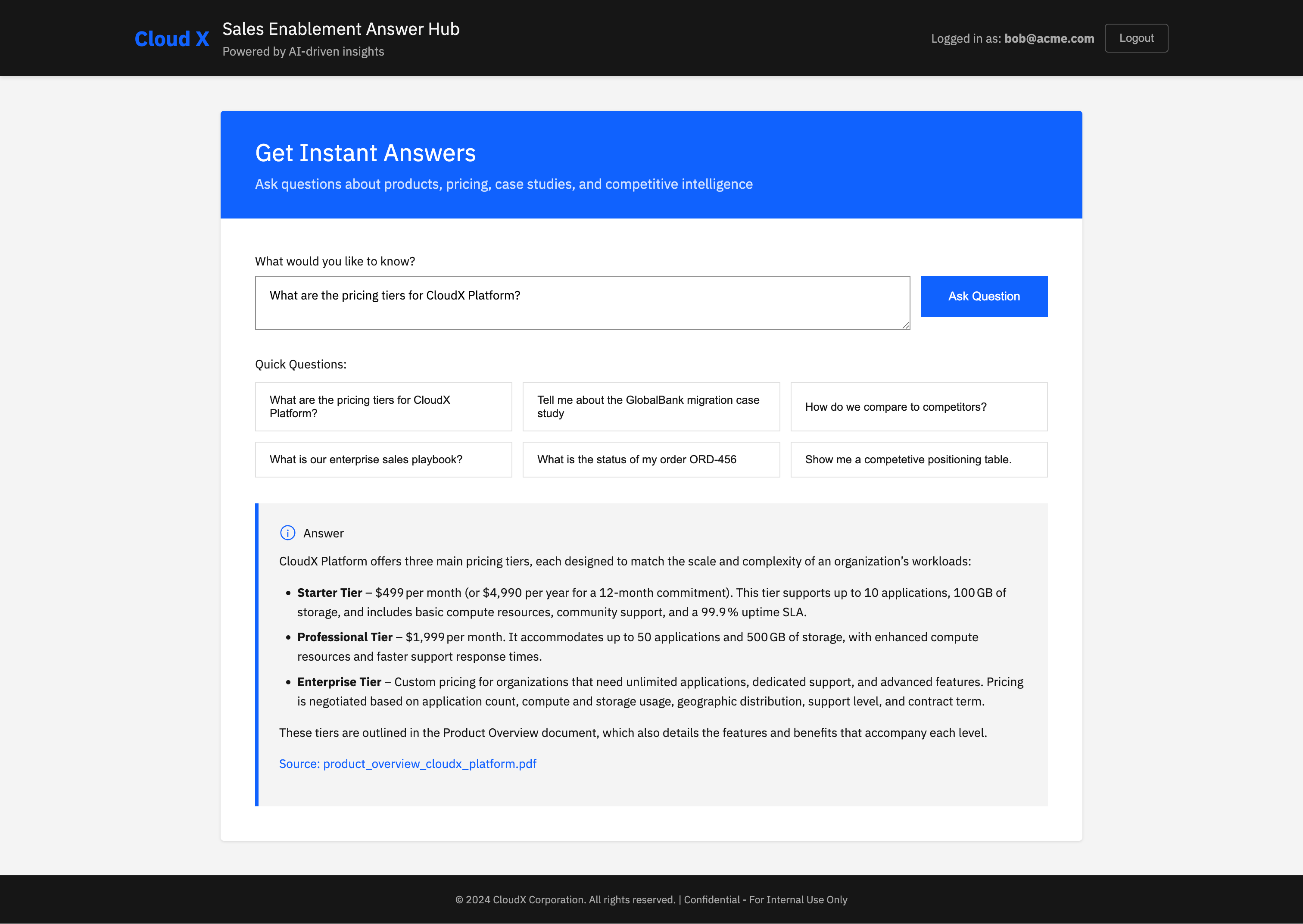
curl -H “Authorization: Bearer $(curl -s ‘http://localhost:8080/dev/token?user=bob@acme.com’)” “http://localhost:8080/bot?q=Show+me+a+super+small+and+concise+competetive+positioning+table”You should see a response similar to:
{”answer”:”**Competitive Positioning Snapshot (Q4 2024)** \n\n| Platform | Market Share | Professional‑Tier Price | Key Strengths | Key Weaknesses | CloudX Advantage |\n|----------|--------------|------------------------|--------------|----------------|-----------------|\n| **CloudX** | #1 (30 %) | $1,799 / mo | Superior multi‑cloud support, transparent pricing, fast deployment, 15‑min support response | – | *Transparent, multi‑cloud, faster support* |\n| **CompeteCloud** | #2 (28 %) | $1,799 / mo | Strong North American brand, 500+ partner ecosystem, 2,000+ integrations | Complex pricing, AWS‑only, quarterly releases, low support rating (3.2/5) | *CloudX’s clear pricing & broader cloud reach* |\n| **SkyPlatform** | #3 (18 %) | $1,499 / mo | European presence, GDPR‑native compliance, developer‑friendly docs | Limited scalability (100 apps), no AI ops, 8 data centers | *CloudX’s AI ops & global footprint* |\n| **TechGiant Cloud** | – | – | Fortune 500 relationships, deep enterprise integration, large R&D | – | *CloudX’s dedicated support & compliance stack* |\n\n*All figures and insights are drawn from the Q4 2024 competitive analysis report* [competitive_analysis_q4_2024.pdf](http://localhost:8080/document/competitive_analysis_q4_2024.pdf).”}I’ve tweaked the front-end to include markdown rendering and some example questions.
At this point, you have closed the trust loop. Every answer is backed by a concrete source.
Production Notes
A few remarks for production environments.
Metadata Schema
Decide on a stable metadata schema early:
file_namepage_numberurldoc_type(policy, contract, FAQ)tenant_idorbusiness_unit
Once you commit to these names and semantics, changing them later is painful because the embedding store already contains historical data. There’s also surprisingly many places where you have to add or check them. Make sure they stay stable from the very beginning.
Where does Metadata really belong?
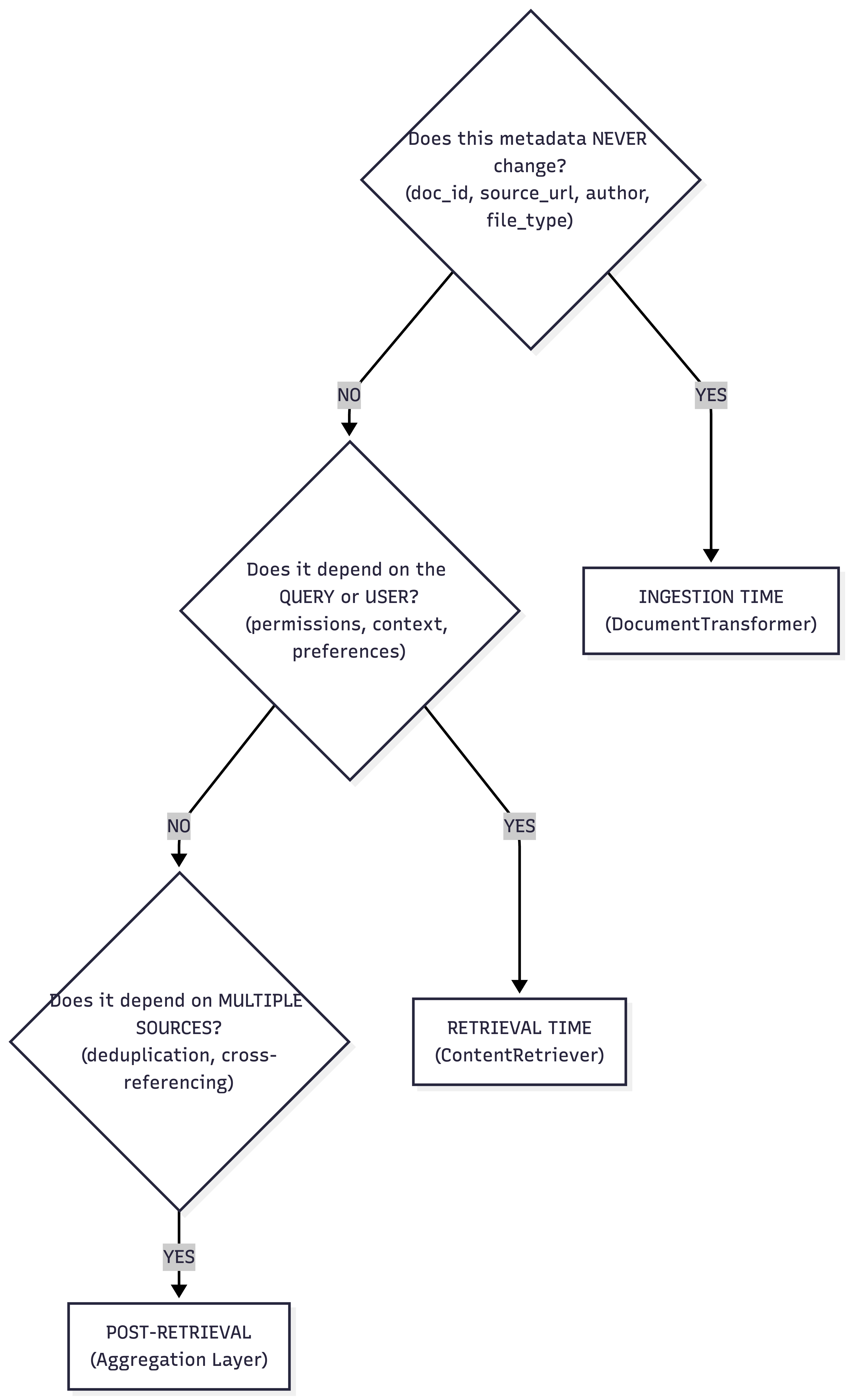
A common mistake in RAG systems is to treat metadata as a single concern with a single home. It is not.
Metadata has a lifecycle. It evolves as content moves through the pipeline. Once you see that, the architecture becomes much clearer.
At ingestion time, metadata is static and factual. This is where things like document IDs, file names, source URLs, authorship, creation dates, or business ownership belong. This metadata should be embedded directly into the vector store alongside the content. It becomes part of the document’s identity. Because it travels with the content, it enables filtered retrieval, tenant isolation, and basic provenance. In our example, file_name, page_number, and the SharePoint URL are ingestion-time metadata. They never change, and they should not be recomputed later.
At retrieval time, metadata becomes dynamic. Similarity scores, retrieval timestamps, ranking positions, or user-specific access checks are not properties of the document. They are properties of the query. This kind of metadata is computed inside each ContentRetriever. A vector retriever may attach similarity scores. A SQL retriever may attach record IDs or match types. This data is ephemeral by design. It reflects the context of a single question and should not be stored back into the vector store.
Aggregation is where metadata starts to gain meaning across sources. The ContentAggregator is the first place where you can see the full picture. Did the same document appear in both SQL and vector search? Was a chunk retrieved by multiple strategies? Do several sources agree on the same answer fragment? This is where cross-source metadata belongs. Deduplication flags, confidence signals, or indicators like “found in structured and semantic search” naturally live here, because only the aggregator has visibility across all retrieval paths.
Finally, the ContentInjector decides what actually matters to the language model. Not all metadata should reach the prompt. Some metadata is for the system, not for the model. The injector acts as a curator. It selects which metadata keys are exposed and how they are presented. In this tutorial, we inject file name and page number into the context, but we deliberately keep URLs out of the visible prompt. The model gets enough information to cite sources correctly, while the application keeps full control over links and navigation.
Seen this way, metadata is not an afterthought. It is a first-class architectural concern that flows through the system in layers. Raw facts enter at ingestion. Context is added during retrieval. Meaning emerges during aggregation. Only the relevant subset reaches the model through injection.
Once you align metadata with this flow, your RAG system becomes easier to reason about, easier to extend, and much easier to trust.
Security and Access Control
The RAG system does not magically fix access control for documents. We have implemented some high level access control with JWS for the database side, but we haven’t for documents. Make sure:
The
urlyou return only points to documents that the current user is allowed to see.Your ingestion pipeline respects per-tenant or per-user boundaries.
The frontend checks access before navigating to the link, if necessary.
A common pattern is to scope vector stores by tenant or role instead of putting all documents in a single global index.
Performance
Page-level ingestion is slightly heavier, but it pays off in explainability:
More precise citations
Easier debugging for wrong answers
Better UX when linking into PDF viewers
If ingestion volume becomes a bottleneck, you can adjust this further.
Summary and Next Steps
In this Part 3 of the Enterprise RAG series you:
Upgraded the Docling integration to extract page-level content.
Attached provenance metadata (file name, page number, deep link URL) at ingestion time.
Used a
ContentInjectorto surface metadata to the LLM in a controlled format.
You now have a hybrid RAG system that is not only smart but also auditable and clickable.
Citations are the difference between a demo and a system people trust.